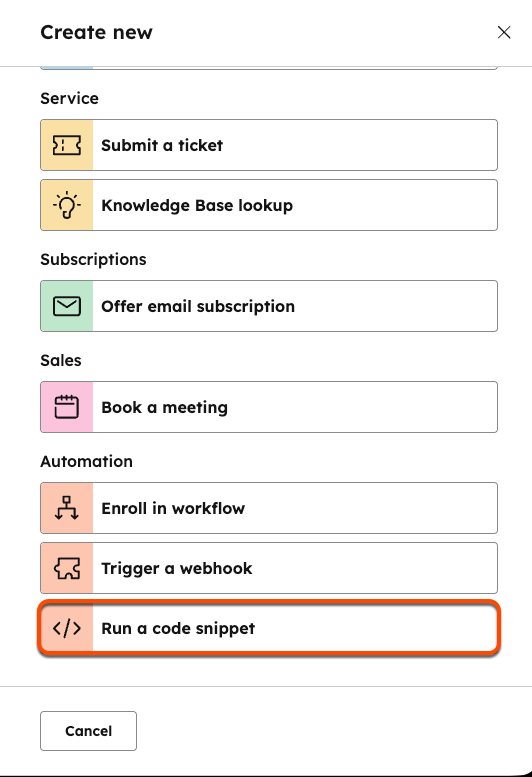
When creating or editing a bot, you can add a code snippet by clicking the ”+” to add an action as you normally would. From the action selection panel, click Run a code snippet.
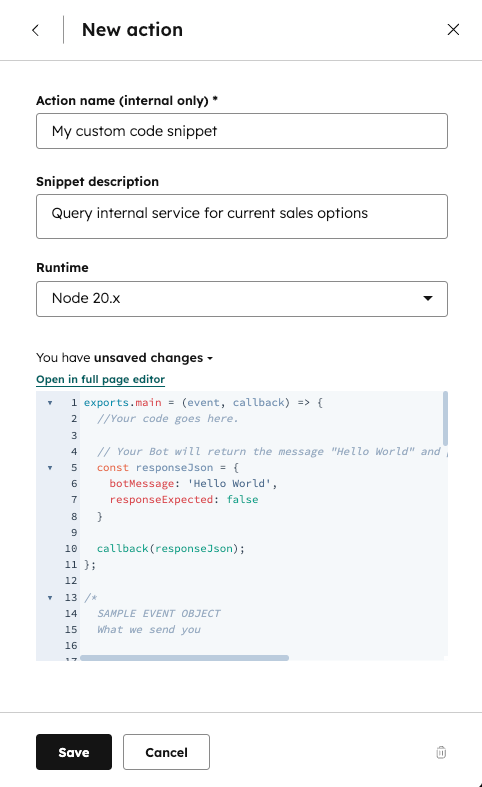
Next, give your action a nickname and description. Within the code editing pane, you’ll see the default template for Node.js 10.x. The details of the “event” object and possible response object formats are detailed below.
The code will be triggered when the saved action is reached in a conversation. There are three main things to keep in mind when working with code snippets:
  • The exports.main() function is called when the code snippet action is executed.
  • The event argument is an object containing details for the visitor and chat session.
  • The callback() function is used to pass data back to the bot and user. It should be called in the exports.main function.
The event object contains the following properties:
PropertyTypeDescription
userMessageObjectAn object that contains two fields:
  • message: A string that represents the last message sent to your bot.
  • quickReply: A nested object that contains a quickReplies array if the visitor selected any quick reply options. Each entry in the array contains an object with two fields:
    • value: The actual value of the quick reply (e.g., "yes_option")
    • label: The text that appears on the quick reply button (e.g., “Yes”).
.
sessionObjectAn object that contains the following fields:
  • vid: The contact VID of the visitor, expressed as a number, if known.
  • properties: A list of properties collected by the bot in the current session, such as the firstname and lastname of the contact.
customStateObjectOnly present if customState was passed in from a previous callback payload.
The code block provides an example event object for a contact who was chatting with a bot.
{
  "userMessage": {
    "message": "100-500",
    "quickReply": {
      "quickReplies":[
         {
            "value":"100-500",
            "label":"100-500"
         }
      ],
  },
  "session": {
    "vid": 12345,
    "properties": {
      "CONTACT": {
        "firstname": {
          "value": "John",
          "syncedAt": 1534362540592
        },
        "email": {
          "value": "testing@domain.com",
          "syncedAt": 1534362541764
        },
        "lastname": {
          "value": "Smith",
          "syncedAt": 1534362540592
        }
      }
    },
  "customState":{myCustomCounter: 1, myCustomString:"someString"}
  }
}
The callback() function is used to send data back to the bot. The argument should be an object containing the following data:
PropertyTypeDescription
botMessageStringThis is the message your bot will display to the visitor.
quickRepliesArrayA list of quick reply options passed to the bot after a click. Each option is an object with two fields:
  • value: The actual value of the quick reply (e.g., "yes_option")
  • label: The text that appears on the quick reply button (e.g., “Yes”).
.
nextModuleNicknameStringThe nickname of the next module the bot should execute. If undefined, the bot will follow the default configured behavior.
responseExpectedBooleanIf true, the bot will display the returned botMessage, wait for a response, then execute this code snippet again with that new response.
customStateObjectOptional field to pass along to the next step.
{
  "botMessage": "Thanks for checking out our website!",
 "quickReplies": [{
    "value": "option",
    "label": "Option" 
   }],
  "nextModuleNickname": "SuggestAwesomeProduct",
  "responseExpected": false,
  "customState": {
    "myCustomCounter": 1,
    "myCustomString": "someString"
  }

}

Limitations

Code snippets in bots are subject to the following limits:
  • For snippets created prior to August 1st, 2025, code snippets must finish running within 20 seconds. Any snippets created after August 1st, 2025 must finish running within 45 seconds.
  • Code snippets can only use up to 128 MB of memory.
Exceeding either of these limits above will result in an error.

Available libraries

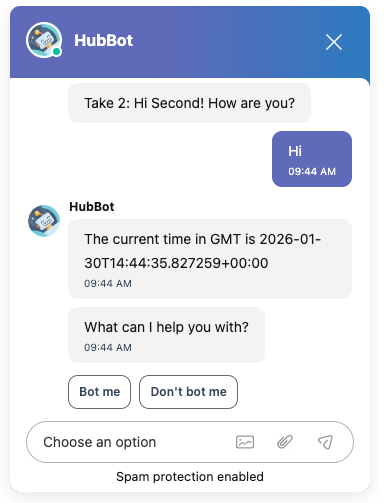
Several popular Node.js libraries are available for use within the code snippet. The libraries can be loaded using the normal require() function at the top of your code.
const request = require("request");

exports.main = (event, callback) => {
  request("http://time.jsontest.com/", function (error, response, body) {
    const responseJson = {
      botMessage: "The current time in GMT is " + JSON.parse(body).time,
      responseExpected: false,
    };

    callback(responseJson);
  });
};
Last modified on January 21, 2026