> ## Documentation Index
> Fetch the complete documentation index at: https://developers.hubspot.com/docs/llms.txt
> Use this file to discover all available pages before exploring further.

---
id: a99697ad-198e-4df8-8cb1-ee162453fe3b
---

# Running code snippets in bots

> Learn how to configure code snippets in a bot action for a chatflow.

export const SupportedProducts = ({marketing, sales, service, cms, data, commerce, crm, marketingLevel, salesLevel, serviceLevel, cmsLevel, dataLevel, commerceLevel, crmLevel}) => {
  const translations = {
    description: "Requires one of the following products or higher.",
    productNames: {
      marketing: "Marketing Hub",
      sales: "Sales Hub",
      service: "Service Hub",
      cms: "Content Hub",
      data: "Data Hub",
      commerce: "Revenue Hub",
      crm: "Smart CRM"
    },
    tiers: {
      free: "Free",
      starter: "Starter",
      professional: "Professional",
      enterprise: "Enterprise"
    }
  };
  const translateTier = tier => {
    if (!tier) return '';
    const lowerTier = tier.toLowerCase();
    return translations.tiers[lowerTier] || tier;
  };
  const products = [{
    name: marketing ? translations.productNames.marketing : '',
    level: translateTier(marketingLevel),
    icon: "https://www.hubspot.com/hubfs/Knowledge_Base_2023-24-25/developer/icons/MarketingHub.svg",
    alt: "Marketing Hub"
  }, {
    name: sales ? translations.productNames.sales : '',
    level: translateTier(salesLevel),
    icon: "https://www.hubspot.com/hubfs/Knowledge_Base_2023-24-25/developer/icons/SalesHub.svg",
    alt: "Sales Hub"
  }, {
    name: service ? translations.productNames.service : '',
    level: translateTier(serviceLevel),
    icon: "https://www.hubspot.com/hubfs/Knowledge_Base_2023-24-25/developer/icons/ServiceHub.svg",
    alt: "Service Hub"
  }, {
    name: cms ? translations.productNames.cms : '',
    level: translateTier(cmsLevel),
    icon: "https://www.hubspot.com/hubfs/Knowledge_Base_2023-24-25/developer/icons/ContentHub.svg",
    alt: "Content Hub"
  }, {
    name: data ? translations.productNames.data : '',
    level: translateTier(dataLevel),
    icon: "https://www.hubspot.com/hubfs/Knowledge_Base_2023-24-25/developer/icons/DataHub.svg",
    alt: "Data Hub"
  }, {
    name: commerce ? translations.productNames.commerce : '',
    level: translateTier(commerceLevel),
    icon: "https://www.hubspot.com/hubfs/Knowledge_Base/subscription_key_icons/commerce_icon.svg",
    alt: "Revenue Hub"
  }, {
    name: crm ? translations.productNames.crm : '',
    level: translateTier(crmLevel),
    icon: "https://www.hubspot.com/hubfs/Knowledge_Base_2023-24-25/developer/icons/SmartCRM.svg",
    alt: "Smart CRM"
  }].filter(product => product.name && product.level);
  if (products.length === 0) return null;
  return <div>
      <div className="text-sm mb-2">{translations.description}</div>
      <div className={`grid ${products.length === 1 ? 'grid-cols-1' : 'grid-cols-2'} gap-1.5`}>
        {products.map((product, index) => <div key={index} style={{
    display: 'flex',
    alignItems: 'center'
  }}>
            <img src={product.icon} alt={product.alt} className="w-3.5 h-3.5 mr-1.5 mt-2.5 mb-2.5 flex-shrink-0 align-middle" />
            <span className="font-medium mr-1 text-sm">{product.name} -</span>
            <span className="text-sm">{product.level}</span>
          </div>)}
      </div>
    </div>;
};

<SupportedProducts data={true} dataLevel="Professional" />

Use HubSpot's [chatflows tool](https://knowledge.hubspot.com/chatflows/create-a-bot) to customize how visitors to your website can ask custom questions and interact directly with support or sales agents from your organization. As you build out a chatflow, you can create a chatbot to automatically handle specific visitor questions, and add actions based on certain rules, including the ability to run custom code snippets.

## Add a code snippet action to a bot

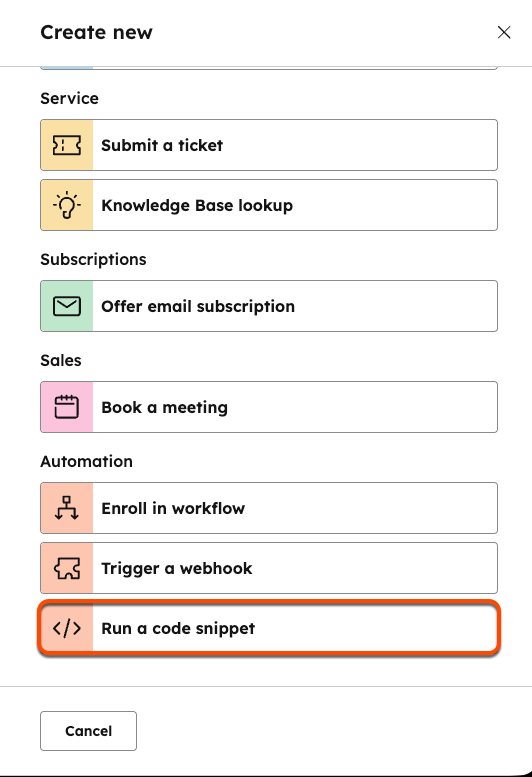
When [creating or editing a bot](https://knowledge.hubspot.com/chatflows/create-a-live-chat), you can add a code snippet by clicking the **+ icon** to [add an action](https://knowledge.hubspot.com/chatflows/a-guide-to-bot-actions) as you normally would. From the action selection panel, click **Run a code snippet**.

<Frame>
  <img src="https://developers.hubspot.com/hubfs/Knowledge_Base_2023-24-25/KB-Chatflows/Chatflows-running-code-snippets-bots.png" width="300" />
</Frame>

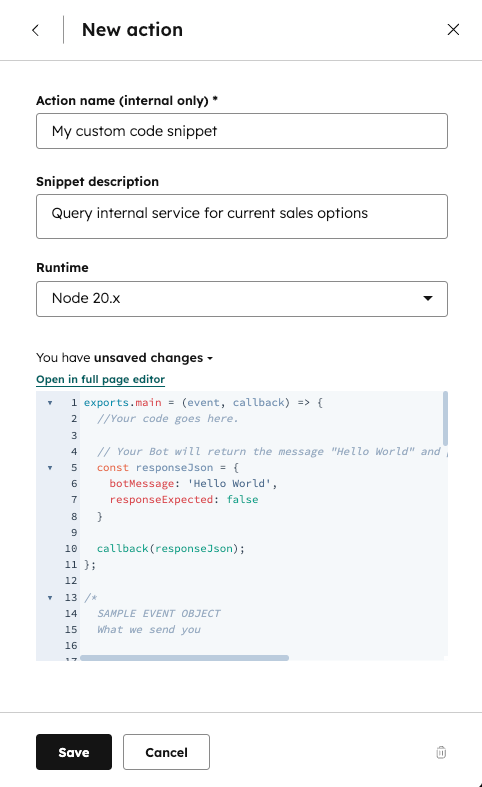
Next, give your action a **name** and **description**, then select the **Node.js runtime version** that the code snippet will use.
<Warning>
  **Please note:** it's highly recommended you use the v24 runtime of Node.js for security purposes. Both previous versions (v20 and v18) will no longer be supported starting August 31, 2026.
</Warning>

<Frame>
  <img src="https://www.hubspot.com/hubfs/Knowledge_Base_2023-24-25/KB-Chatflows/updated-code-snippet-in-bot.png" alt="Configure a code snippet action in a bot" width="300" />
</Frame>

The code will be triggered when the saved action is reached in a conversation.

There are three main things to keep in mind when working with code snippets:

* The `exports.main()` function is called when the code snippet action is executed.
* The `event` argument is an object containing details for the visitor and chat session.
* The `callback()` function is used to pass data back to the bot and user. It should be called in the `exports.main` function.

The `event` object contains the following properties:

| Property      | Type   | Description                                                                                                                                                                                                                                                                                                                                                                                                                                                                                 |
| ------------- | ------ | ------------------------------------------------------------------------------------------------------------------------------------------------------------------------------------------------------------------------------------------------------------------------------------------------------------------------------------------------------------------------------------------------------------------------------------------------------------------------------------------- |
| `userMessage` | Object | An object that contains two fields: <ul><li>`message`: A string that represents the last message sent to your bot.</li><li>`quickReply`: A nested object that contains a `quickReplies` array if the visitor selected any quick reply options. Each entry in the array contains an object with two fields: <ul><li>`value`: The actual value of the quick reply (e.g., `"yes_option"`)</li><li>`label`: The text that appears on the quick reply button (e.g., "Yes").</li></ul></li></ul>. |
| `session`     | Object | An object that contains the following fields: <ul><li>`vid`: The contact VID of the visitor, expressed as a number, if known.</li><li>`properties`: A list of properties collected by the bot in the current session, such as the `firstname` and `lastname` of the contact.</li></ul>                                                                                                                                                                                                      |
| `customState` | Object | Only present if `customState` was passed in from a previous callback payload.                                                                                                                                                                                                                                                                                                                                                                                                               |

The code block provides an example `event` object for a contact who was chatting with a bot.

```json expandable theme={null}
{
  "userMessage": {
    "message": "100-500",
    "quickReply": {
      "quickReplies":[
         {
            "value":"100-500",
            "label":"100-500"
         }
      ],
  },
  "session": {
    "vid": 12345,
    "properties": {
      "CONTACT": {
        "firstname": {
          "value": "John",
          "syncedAt": 1534362540592
        },
        "email": {
          "value": "testing@domain.com",
          "syncedAt": 1534362541764
        },
        "lastname": {
          "value": "Smith",
          "syncedAt": 1534362540592
        }
      }
    },
    "customState": {
      "myCustomCounter": 1,
      "myCustomString": "someString"
    }
  }
}
```

The `callback()` function is used to send data back to the bot. The argument should be an object containing the following data:

| Property             | Type    | Description                                                                                                                                                                                                                                                                     |
| -------------------- | ------- | ------------------------------------------------------------------------------------------------------------------------------------------------------------------------------------------------------------------------------------------------------------------------------- |
| `botMessage`         | String  | This is the message your bot will display to the visitor.                                                                                                                                                                                                                       |
| `quickReplies`       | Array   | A list of quick reply options passed to the bot after a click. Each option is an object with two fields: <ul><li>`value`: The actual value of the quick reply (e.g., `"yes_option"`)</li><li>`label`: The text that appears on the quick reply button (e.g., "Yes").</li></ul>. |
| `nextModuleNickname` | String  | The nickname of the next module the bot should execute. If undefined, the bot will follow the default configured behavior.                                                                                                                                                      |
| `responseExpected`   | Boolean | If `true`, the bot will display the returned `botMessage`, wait for a response, then execute this code snippet again with that new response.                                                                                                                                    |
| `customState`        | Object  | Optional field to pass along to the next step.                                                                                                                                                                                                                                  |

```json expandable theme={null}
{
  "botMessage": "Thanks for checking out our website!",
 "quickReplies": [{
    "value": "option",
    "label": "Option"
   }],
  "nextModuleNickname": "SuggestAwesomeProduct",
  "responseExpected": false,
  "customState": {
    "myCustomCounter": 1,
    "myCustomString": "someString"
  }

}
```

## Limitations

Code snippets in bots are subject to the following limits:

* For snippets created prior to August 1st, 2025, code snippets must finish running within 20 seconds. Any snippets created after August 1st, 2025 must finish running within 45 seconds.
* Code snippets can only use up to 128 MB of memory.

Exceeding either of these limits above will result in an error.

## Available libraries

It's highly recommended you use the Node.js v24 runtime for security purposes. Both previous versions (v18 and v20) will no longer be supported starting August 31, 2026.

The code block below provides version information for the libraries available to import into your snippet, specified using the `npm` [semver](https://docs.npmjs.com/cli/v11/configuring-npm/package-json/#dependencies) convention.

```json expandable theme={null}
{
  "@hubspot/api-client": "^13.4.0",
  "ajv": "^8.6.2",
  "asn1": "^0.2.4",
  "assert-plus": "^1.0.0",
  "async": "^3.2.1",
  "asynckit": "^0.4.0",
  "aws-sign2": "^0.7.0",
  "aws4": "^1.11.0",
  "axios": "^1.7.9",
  "bcrypt-pbkdf": "^1.0.2",
  "bignumber.js": "^9.0.1",
  "bl": "^6.0.0",
  "bluebird": "^3.7.2",
  "bson": "^6.10.0",
  "caseless": "^0.12.0",
  "combined-stream": "^1.0.8",
  "core-util-is": "^1.0.2",
  "dashdash": "^2.0.0",
  "debug": "^4.3.2",
  "delayed-stream": "^1.0.0",
  "denque": "^2.1.0",
  "dependency": "^0.0.1",
  "double-ended-queue": "^2.1.0-0",
  "ecc-jsbn": "^0.2.0",
  "extend": "^3.0.2",
  "extsprintf": "^1.4.0",
  "fast-deep-equal": "^3.1.3",
  "fast-json-stable-stringify": "^2.1.0",
  "forever-agent": "^0.6.1",
  "form-data": "^4.0.0",
  "getpass": "^0.1.7",
  "har-schema": "^2.0.0",
  "har-validator": "^5.1.5",
  "http-signature": "^1.3.5",
  "inherits": "^2.0.4",
  "is-typedarray": "^1.0.0",
  "isarray": "^2.0.5",
  "isstream": "^0.1.2",
  "jsbn": "^1.1.0",
  "json-schema": "^0.4.0",
  "json-schema-traverse": "^1.0.0",
  "json-stringify-safe": "^5.0.1",
  "jsprim": "^2.0.0",
  "kareem": "^2.3.2",
  "lodash": "^4.17.21",
  "memory-pager": "^1.5.0",
  "mime-db": "^1.49.0",
  "mime-types": "^2.1.32",
  "mongodb": "^6.13.0",
  "mongoose": "^8.10.0",
  "mongoose-legacy-pluralize": "^2.0.0",
  "mpath": "^0.9.0",
  "mquery": "^5.0.0",
  "ms": "^2.1.3",
  "mysql": "^2.18.1",
  "oauth-sign": "^0.9.0",
  "optional-require": "^1.1.6",
  "performance-now": "^2.1.0",
  "process-nextick-args": "^2.0.1",
  "psl": "^1.8.0",
  "punycode": "^2.1.1",
  "qs": "^6.10.1",
  "readable-stream": "^4.7.0",
  "redis": "^4.7.0",
  "redis-commands": "^1.7.0",
  "redis-parser": "^3.0.0",
  "regexp-clone": "^1.0.0",
  "safe-buffer": "^5.2.1",
  "safer-buffer": "^2.1.2",
  "saslprep": "^1.0.3",
  "sift": "^17.1.0",
  "sliced": "^1.0.1",
  "sparse-bitfield": "^3.0.3",
  "sqlstring": "^2.3.2",
  "sshpk": "^1.16.1",
  "string_decoder": "^1.3.0",
  "tough-cookie": "^5.1.0",
  "tunnel-agent": "^0.6.0",
  "tweetnacl": "^1.0.3",
  "uri-js": "^4.4.1",
  "util-deprecate": "^1.0.2",
  "uuid": "^11.0.5",
  "verror": "^1.10.0"
}
```

The libraries can be loaded using the `require()` function at the top of your code.

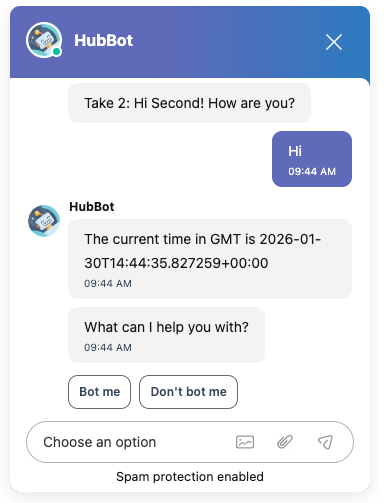
For example, the code block below imports the [axios](https://axios-http.com/) library and makes a request to the `time.now` API, then displays the current time in GMT.

```js theme={null}
const axios = require('axios');

exports.main = async (event, callback) => {
  try {
    const response = await axios.get('https://time.now/developer/api/timezone/GMT');
    const time = response.data.datetime;

    const responseJson = {
      botMessage: "The current time in GMT is " + time,
      responseExpected: false,
    };

    callback(responseJson);
  } catch (error) {
    callback({
      botMessage: "There was an error fetching the time.",
      responseExpected: false,
    });
  }
};
```

The resulting output for running the above action in a bot is shown below:

<Frame>
  <img src="https://www.hubspot.com/hubfs/Knowledge_Base_2023-24-25/KB-Chatflows/sample-output-from-running-code-snippet-in-bot.png" alt="Example code snippet in bot displaying the current time in GMT using axios and the time.now API" width="300" />
</Frame>