{scope}
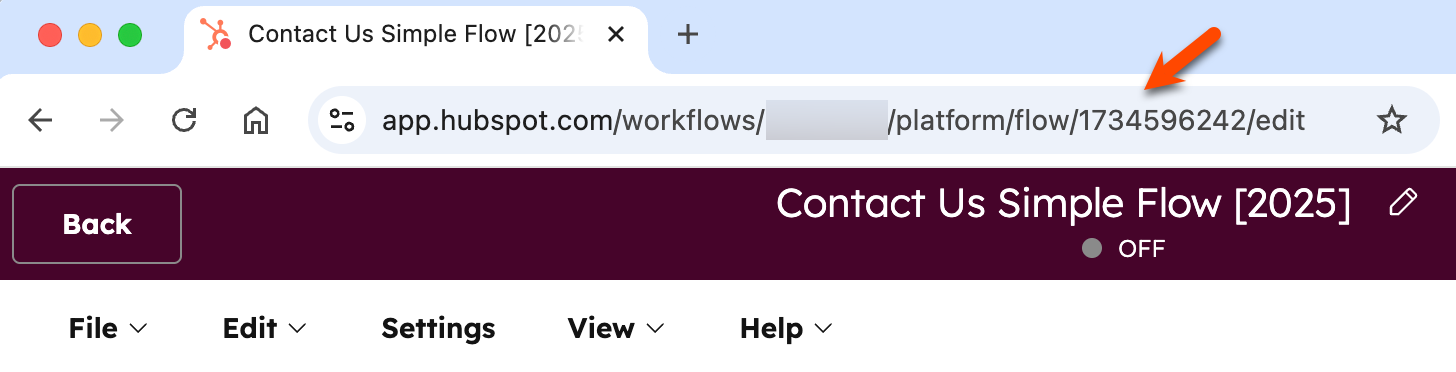 ### Retrieve a specific workflow by ID
To retrieve data from an existing workflow, make a `GET` request to `/automation/v4/2027-03-beta/flows/{flowId}`, where `flowId` is the ID of an existing workflow in your account.
For example, if you made a `GET` request to `/automation/v4/2027-03-beta/flows/12345678` to get the workflow with an ID of `12345678`, you can expect the resulting response below.
The response includes the specification for a contact-based workflow with two actions, where contacts are enrolled if they filled out a form on your website. If there are actions with incomplete but required fields in your workflow, you may encounter errors when making this request.
```json theme={null}
{
"id": "12345678",
"isEnabled": true,
"flowType": "WORKFLOW",
"revisionId": "7",
"name": "New form submission workflow",
"createdAt": "2024-06-07T17:27:08.101Z",
"updatedAt": "2024-06-07T17:31:11.263Z",
"startActionId": "1",
"nextAvailableActionId": "3",
"actions": [
{
"type": "SINGLE_CONNECTION",
"actionId": "1",
"actionTypeVersion": 0,
"actionTypeId": "0-13",
"connection": {
"edgeType": "STANDARD",
"nextActionId": "2"
},
"fields": {
"operation": "ADD",
"list_id": "178"
}
},
{
"type": "SINGLE_CONNECTION",
"actionId": "2",
"actionTypeVersion": 0,
"actionTypeId": "0-9",
"fields": {
"user_ids": ["2620022"],
"delivery_method": "APP",
"subject": "New form submission",
"body": "Check out the new form submission we received!"
}
}
],
"enrollmentCriteria": {
"shouldReEnroll": false,
"type": "EVENT_BASED",
"eventFilterBranches": [
{
"filterBranches": [],
"filters": [],
"eventTypeId": "4-1639801",
"operator": "HAS_COMPLETED",
"filterBranchType": "UNIFIED_EVENTS",
"filterBranchOperator": "AND"
}
],
"listMembershipFilterBranches": []
},
"timeWindows": [],
"blockedDates": [],
"customProperties": {},
"crmObjectCreationStatus": "COMPLETE",
"type": "CONTACT_FLOW",
"objectTypeId": "0-1",
"suppressionListIds": [],
"canEnrollFromSalesforce": false
}
```
### Retrieve workflows in bulk using their IDs
To fetch multiple workflows using their IDs, you can make a `POST` request to the `/automation/v4/2027-03-beta/flows/batch/read` endpoint. When doing so, you'll need to provide the following within an `inputs` array provided in the request body:
* The ID of each workflow as the `flowId`.
* The `type` as `FLOW_ID`
For example, the request body below would fetch the workflow details for two workflows with IDs of `12345678` and `87654321`:
```json theme={null}
{
"inputs": [
{
"flowId": "12345678",
"type": "FLOW_ID"
},
{
"flowId": "87654321",
"type": "FLOW_ID"
}
]
}
```
### Retrieve all workflows
To retrieve all workflows in an account, you can make a `GET` request to `/automation/v4/2027-03-beta/flows`. Do note that the response will only include key fields for the workflow, such as `id`, `isEnabled`, `objectTypeId`, and the latest `revisionId`.
If you want to retrieve a full list of properties for a specific workflow, make a `GET` request to `/automation/v4/2027-03-beta/flows/{flowId}` and provide the specific ID of the workflow as the `flowId`.
## Update a workflow
To update an existing workflow, make a `PUT` request to `/automation/v4/2027-03-beta/flows/{flowId}` using the ID of your workflow you want to update as the `flowId`, and providing any properties you want to change in the request body.
* You must include the `revisionId` and `type` properties in your request body.
* The `revisionId` must correspond to the most current revision of your workflow. This can be retrieved by making a `GET` request to `/automation/v4/2027-03-beta/flows/{flowId}`.
* Any existing data retrieved from the `GET` request, not included in the `PUT` request, will be omitted from the updated workflow. For example, if an existing action is not included in the new `PUT` request to update the workflow, the action will be removed from the workflow.
* If you're creating a `PUT` request with data retrieved from an earlier `GET` request, it is recommended to remove the `CreatedAt`, `UpdatedAt`, and `dataSources` fields to avoid validation errors.
For the example, if the following workflow is currently turned off, the request body below would turn on the workflow, using its most recent revisionId of `"18"`:
```json theme={null}
{
"id": "1734596242",
"isEnabled": true,
"flowType": "WORKFLOW",
"revisionId": "18",
"name": "Contact Us Simple Flow [2025]",
"startActionId": "4",
"nextAvailableActionId": "6",
"actions": [
{
"actionId": "4",
"actionTypeVersion": 0,
"actionTypeId": "0-1",
"connection": {
"edgeType": "STANDARD",
"nextActionId": "5"
},
"fields": {
"delta": "1440",
"time_unit": "MINUTES"
},
"type": "SINGLE_CONNECTION"
},
{
"actionId": "5",
"actionTypeVersion": 0,
"actionTypeId": "0-4",
"fields": {
"content_id": "35431921489"
},
"type": "SINGLE_CONNECTION"
}
],
"enrollmentCriteria": {
"shouldReEnroll": true,
"eventFilterBranches": [
{
"filterBranches": [],
"filters": [
{
"property": "hs_form_id",
"operation": {
"operator": "IS_ANY_OF",
"includeObjectsWithNoValueSet": false,
"values": [
"1c2c34c5-c98b-4241-abea-ef227575335b"
],
"operationType": "ENUMERATION"
},
"filterType": "PROPERTY"
}
],
"eventTypeId": "4-1639801",
"operator": "HAS_COMPLETED",
"filterBranchType": "UNIFIED_EVENTS",
"filterBranchOperator": "AND"
}
],
"listMembershipFilterBranches": [],
"type": "EVENT_BASED"
},
"timeWindows": [],
"blockedDates": [],
"customProperties": {},
"crmObjectCreationStatus": "COMPLETE",
"suppressionListIds": [],
"canEnrollFromSalesforce": false,
"type": "CONTACT_FLOW",
"objectTypeId": "0-1"
}
```
## Delete a workflow
To delete a workflow, make a `DELETE` request to `/automation/v4/2027-03-beta/flows/{flowId}` using the ID of the workflow you want to delete as the `flowId`.
### Retrieve a specific workflow by ID
To retrieve data from an existing workflow, make a `GET` request to `/automation/v4/2027-03-beta/flows/{flowId}`, where `flowId` is the ID of an existing workflow in your account.
For example, if you made a `GET` request to `/automation/v4/2027-03-beta/flows/12345678` to get the workflow with an ID of `12345678`, you can expect the resulting response below.
The response includes the specification for a contact-based workflow with two actions, where contacts are enrolled if they filled out a form on your website. If there are actions with incomplete but required fields in your workflow, you may encounter errors when making this request.
```json theme={null}
{
"id": "12345678",
"isEnabled": true,
"flowType": "WORKFLOW",
"revisionId": "7",
"name": "New form submission workflow",
"createdAt": "2024-06-07T17:27:08.101Z",
"updatedAt": "2024-06-07T17:31:11.263Z",
"startActionId": "1",
"nextAvailableActionId": "3",
"actions": [
{
"type": "SINGLE_CONNECTION",
"actionId": "1",
"actionTypeVersion": 0,
"actionTypeId": "0-13",
"connection": {
"edgeType": "STANDARD",
"nextActionId": "2"
},
"fields": {
"operation": "ADD",
"list_id": "178"
}
},
{
"type": "SINGLE_CONNECTION",
"actionId": "2",
"actionTypeVersion": 0,
"actionTypeId": "0-9",
"fields": {
"user_ids": ["2620022"],
"delivery_method": "APP",
"subject": "New form submission",
"body": "Check out the new form submission we received!"
}
}
],
"enrollmentCriteria": {
"shouldReEnroll": false,
"type": "EVENT_BASED",
"eventFilterBranches": [
{
"filterBranches": [],
"filters": [],
"eventTypeId": "4-1639801",
"operator": "HAS_COMPLETED",
"filterBranchType": "UNIFIED_EVENTS",
"filterBranchOperator": "AND"
}
],
"listMembershipFilterBranches": []
},
"timeWindows": [],
"blockedDates": [],
"customProperties": {},
"crmObjectCreationStatus": "COMPLETE",
"type": "CONTACT_FLOW",
"objectTypeId": "0-1",
"suppressionListIds": [],
"canEnrollFromSalesforce": false
}
```
### Retrieve workflows in bulk using their IDs
To fetch multiple workflows using their IDs, you can make a `POST` request to the `/automation/v4/2027-03-beta/flows/batch/read` endpoint. When doing so, you'll need to provide the following within an `inputs` array provided in the request body:
* The ID of each workflow as the `flowId`.
* The `type` as `FLOW_ID`
For example, the request body below would fetch the workflow details for two workflows with IDs of `12345678` and `87654321`:
```json theme={null}
{
"inputs": [
{
"flowId": "12345678",
"type": "FLOW_ID"
},
{
"flowId": "87654321",
"type": "FLOW_ID"
}
]
}
```
### Retrieve all workflows
To retrieve all workflows in an account, you can make a `GET` request to `/automation/v4/2027-03-beta/flows`. Do note that the response will only include key fields for the workflow, such as `id`, `isEnabled`, `objectTypeId`, and the latest `revisionId`.
If you want to retrieve a full list of properties for a specific workflow, make a `GET` request to `/automation/v4/2027-03-beta/flows/{flowId}` and provide the specific ID of the workflow as the `flowId`.
## Update a workflow
To update an existing workflow, make a `PUT` request to `/automation/v4/2027-03-beta/flows/{flowId}` using the ID of your workflow you want to update as the `flowId`, and providing any properties you want to change in the request body.
* You must include the `revisionId` and `type` properties in your request body.
* The `revisionId` must correspond to the most current revision of your workflow. This can be retrieved by making a `GET` request to `/automation/v4/2027-03-beta/flows/{flowId}`.
* Any existing data retrieved from the `GET` request, not included in the `PUT` request, will be omitted from the updated workflow. For example, if an existing action is not included in the new `PUT` request to update the workflow, the action will be removed from the workflow.
* If you're creating a `PUT` request with data retrieved from an earlier `GET` request, it is recommended to remove the `CreatedAt`, `UpdatedAt`, and `dataSources` fields to avoid validation errors.
For the example, if the following workflow is currently turned off, the request body below would turn on the workflow, using its most recent revisionId of `"18"`:
```json theme={null}
{
"id": "1734596242",
"isEnabled": true,
"flowType": "WORKFLOW",
"revisionId": "18",
"name": "Contact Us Simple Flow [2025]",
"startActionId": "4",
"nextAvailableActionId": "6",
"actions": [
{
"actionId": "4",
"actionTypeVersion": 0,
"actionTypeId": "0-1",
"connection": {
"edgeType": "STANDARD",
"nextActionId": "5"
},
"fields": {
"delta": "1440",
"time_unit": "MINUTES"
},
"type": "SINGLE_CONNECTION"
},
{
"actionId": "5",
"actionTypeVersion": 0,
"actionTypeId": "0-4",
"fields": {
"content_id": "35431921489"
},
"type": "SINGLE_CONNECTION"
}
],
"enrollmentCriteria": {
"shouldReEnroll": true,
"eventFilterBranches": [
{
"filterBranches": [],
"filters": [
{
"property": "hs_form_id",
"operation": {
"operator": "IS_ANY_OF",
"includeObjectsWithNoValueSet": false,
"values": [
"1c2c34c5-c98b-4241-abea-ef227575335b"
],
"operationType": "ENUMERATION"
},
"filterType": "PROPERTY"
}
],
"eventTypeId": "4-1639801",
"operator": "HAS_COMPLETED",
"filterBranchType": "UNIFIED_EVENTS",
"filterBranchOperator": "AND"
}
],
"listMembershipFilterBranches": [],
"type": "EVENT_BASED"
},
"timeWindows": [],
"blockedDates": [],
"customProperties": {},
"crmObjectCreationStatus": "COMPLETE",
"suppressionListIds": [],
"canEnrollFromSalesforce": false,
"type": "CONTACT_FLOW",
"objectTypeId": "0-1"
}
```
## Delete a workflow
To delete a workflow, make a `DELETE` request to `/automation/v4/2027-03-beta/flows/{flowId}` using the ID of the workflow you want to delete as the `flowId`.