Use the workflows v4 API to fetch data from existing workflows, create new workflows, and delete workflows that you no longer need. The sections below provide a walkthrough of how to use the v4 endpoints. When setting up your requests, learn more about action and enrollment types.
Please note:This API is currently in beta and is subject to change based on testing and feedback. By using these endpoints you agree to adhere to HubSpot’s Developer Terms & Developer Beta Terms. You also acknowledge and understand the risk associated with testing an unstable API.

Scope requirements

To use any of the v4 endpoints, your app will need to be authorized to use the automation scope. In addition, if you need to access sensitive data properties in a workflow, enroll records in a workflow that references sensitive data, or retrieve enrollment and performance data for workflows with sensitive data properties, you’ll need to authorize sensitive data scopes as detailed in the sections below. Learn more about working with sensitive data.

Retrieving workflows that reference sensitive data

To retrieve enrollment and performance data for existing workflows that reference sensitive data properties, your app will need to request and be granted one of the scopes below, based on the enrolled record type in your workflow:
  • crm.objects.contacts.sensitive.read: view enrollment and performance data for existing contact-based workflows.
  • crm.objects.companies.sensitive.read: view enrollment and performance data for existing company-based workflows.
  • crm.objects.deals.sensitive.read: view enrollment and performance data for existing deal-based workflows.
  • crm.objects.custom.sensitive.read: view enrollment and performance data for workflows based on custom objects an account.
The scopes above are not sufficient to create or delete workflows using the v4 API, or enroll records in existing workflows that access sensitive data properties. Consult the sensitive data write scopes in the section below if you need to perform these operations via the v4 API.

Creating and managing workflows that reference sensitive data

To create or delete workflows that reference sensitive data, or enroll records in an existing workflow, your app will need to request and be granted one of the scopes below, based on the enrolled record type of your workflow:
  • crm.objects.contacts.sensitive.write: create and delete contact-based workflows via the v4 API, as well as enroll contacts in existing workflows that access sensitive data.
  • crm.objects.companies.sensitive.write: create and delete company-based workflows via the v4 API, as well as enroll companies in existing workflows that access sensitive data.
  • crm.objects.deals.sensitive.write: create and delete deal-based workflows via the v4 API, as well as enroll deals in existing workflows that access sensitive data.
  • crm.objects.custom.sensitive.write: create and delete workflows based on custom objects via the v4 API, as well as enroll custom object records in existing workflows that access sensitive data.

Create a workflow

To create a workflow, make a POST request to /automation/v4/flows and provide a workflow specification in the body of your request.
  • Consult the action and enrollment types reference for information on specifying the actions in your workflow and configuring the enrollmentCriteria.
  • For contact-based workflows, set the type to CONTACT_FLOW. For all other workflow types (e.g., deal-based, goal-based, etc.), set the type to PLATFORM_FLOW.
For example, if you wanted to create a workflow that executed the following:
  • When a contact submits a specific form on your website, create a ticket in your account.
  • After a 1 day delay, send an automated marketing email to the contact.
The request body of your POST request will resemble the following:
{
  "isEnabled": true,
  "flowType": "WORKFLOW",
  "name": "New form submission from interested contact",
  "startActionId": "1",
  "nextAvailableActionId": "4",
  "actions": [
    {
      "type": "SINGLE_CONNECTION",
      "actionId": "1",
      "actionTypeVersion": 0,
      "actionTypeId": "0-14",
      "connection": {
        "edgeType": "STANDARD",
        "nextActionId": "3"
      },
      "fields": {
        "object_type_id": "0-5",
        "properties": [
          {
            "targetProperty": "subject",
            "value": {
              "type": "STATIC_VALUE",
              "staticValue": "Review new form submission"
            }
          },
          {
            "targetProperty": "hs_pipeline_stage",
            "value": {
              "type": "STATIC_VALUE",
              "staticValue": "1"
            }
          },
          {
            "targetProperty": "source_type",
            "value": {
              "type": "STATIC_VALUE",
              "staticValue": "FORM"
            }
          },
          {
            "targetProperty": "content",
            "value": {
              "type": "STATIC_VALUE",
              "staticValue": "[Triage required] new form submitted. Next available rep should review."
            }
          }
        ],
        "associations": [
          {
            "target": {
              "associationCategory": "HUBSPOT_DEFINED",
              "associationTypeId": 16
            },
            "value": {
              "type": "ENROLLED_OBJECT"
            }
          },
          {
            "target": {
              "associationCategory": "HUBSPOT_DEFINED",
              "associationTypeId": 339
            },
            "value": {
              "type": "COPY_ASSOCIATION",
              "sourceSpec": {
                "associationCategory": "HUBSPOT_DEFINED",
                "associationTypeId": 279
              }
            }
          }
        ],
        "use_explicit_associations": "true"
      }
    },
    {
      "type": "SINGLE_CONNECTION",
      "actionId": "2",
      "actionTypeVersion": 0,
      "actionTypeId": "0-4",
      "fields": {
        "content_id": "113782603056"
      }
    },
    {
      "type": "SINGLE_CONNECTION",
      "actionId": "3",
      "actionTypeVersion": 0,
      "actionTypeId": "0-1",
      "connection": {
        "edgeType": "STANDARD",
        "nextActionId": "2"
      },
      "fields": {
        "delta": "1440",
        "time_unit": "MINUTES"
      }
    }
  ],
  "enrollmentCriteria": {
    "shouldReEnroll": false,
    "type": "EVENT_BASED",
    "eventFilterBranches": [
      {
        "filterBranches": [],
        "filters": [
          {
            "property": "hs_form_id",
            "operation": {
              "operator": "IS_ANY_OF",
              "includeObjectsWithNoValueSet": false,
              "values": ["2f5cc7f8-d359-4e9c-a770-dd42ea07d217"],
              "operationType": "ENUMERATION"
            },
            "filterType": "PROPERTY"
          }
        ],
        "eventTypeId": "4-1639801",
        "operator": "HAS_COMPLETED",
        "filterBranchType": "UNIFIED_EVENTS",
        "filterBranchOperator": "AND"
      }
    ],
    "listMembershipFilterBranches": []
  },
  "timeWindows": [],
  "blockedDates": [],
  "customProperties": {},
  "crmObjectCreationStatus": "COMPLETE",
  "type": "CONTACT_FLOW",
  "objectTypeId": "0-1",
  "suppressionListIds": [],
  "canEnrollFromSalesforce": false
}

Retrieve workflows

The sections below outline how to fetch details about specific workflows, or retrieve details for multiple workflows in a single call. When retrieving a workflow When retrieving workflows, you may need the workflow’s flowId to make a request. To retrieve the workflow’s flowId:
  • In your HubSpot account, navigate to the workflow editor for the workflow that you’d like to retrieve, then check the URL for the second ID in the URL path.
  • Alternatively, make a GET request to /automation/v4/flows to get all workflows and filter the resulting response by the name of your workflow.
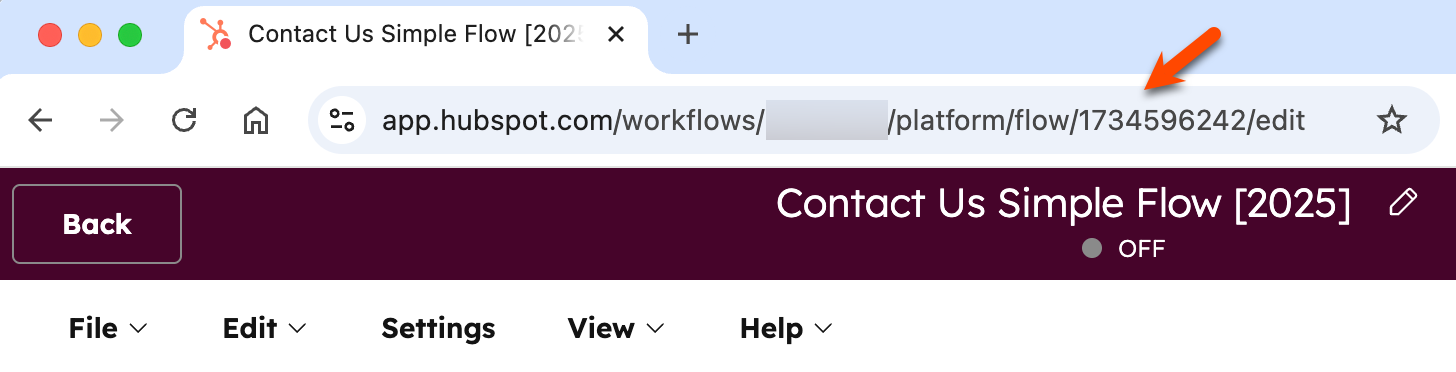
workflow-id-for-automation-v4-api-1

Retrieve a specific workflow by ID

To retrieve data from an existing workflow, make a GET request to /automation/v4/flows/{flowId}, where flowId is the ID of an existing workflow in your account. For example, if you made a GET request to /automation/v4/flows/12345678 to get the workflow with an ID of 12345678, you can expect the resulting response below. The response includes the specification for a contact-based workflow with two actions, where contacts are enrolled if they filled out a form on your website. If there are actions with incomplete but required fields in your workflow, you may encounter errors when making this request.
{
  "id": "12345678",
  "isEnabled": true,
  "flowType": "WORKFLOW",
  "revisionId": "7",
  "name": "New form submission workflow",
  "createdAt": "2024-06-07T17:27:08.101Z",
  "updatedAt": "2024-06-07T17:31:11.263Z",
  "startActionId": "1",
  "nextAvailableActionId": "3",
  "actions": [
    {
      "type": "SINGLE_CONNECTION",
      "actionId": "1",
      "actionTypeVersion": 0,
      "actionTypeId": "0-13",
      "connection": {
        "edgeType": "STANDARD",
        "nextActionId": "2"
      },
      "fields": {
        "operation": "ADD",
        "list_id": "178"
      }
    },
    {
      "type": "SINGLE_CONNECTION",
      "actionId": "2",
      "actionTypeVersion": 0,
      "actionTypeId": "0-9",
      "fields": {
        "user_ids": ["2620022"],
        "delivery_method": "APP",
        "subject": "New form submission",
        "body": "Check out the new form submission we received!"
      }
    }
  ],
  "enrollmentCriteria": {
    "shouldReEnroll": false,
    "type": "EVENT_BASED",
    "eventFilterBranches": [
      {
        "filterBranches": [],
        "filters": [],
        "eventTypeId": "4-1639801",
        "operator": "HAS_COMPLETED",
        "filterBranchType": "UNIFIED_EVENTS",
        "filterBranchOperator": "AND"
      }
    ],
    "listMembershipFilterBranches": []
  },
  "timeWindows": [],
  "blockedDates": [],
  "customProperties": {},
  "crmObjectCreationStatus": "COMPLETE",
  "type": "CONTACT_FLOW",
  "objectTypeId": "0-1",
  "suppressionListIds": [],
  "canEnrollFromSalesforce": false
}

Retrieve workflows in bulk using their IDs

To fetch multiple workflows using their IDs, you can make a POST request to the /automation/v4/flows/batch/read endpoint. When doing so, you’ll need to provide the following within an inputs array provided in the request body:
  • The ID of each workflow as the flowId.
  • The type as FLOW_ID
For example, the request body below would fetch the workflow details for two workflows with IDs of 12345678 and 87654321:
{
  "inputs": [
    {
      "flowId": "12345678",
      "type": "FLOW_ID"
    },
    {
      "flowId": "87654321",
      "type": "FLOW_ID"
    }
  ]
}

Retrieve all workflows

To retrieve all workflows in an account, you can make a GET request to /automation/v4/flows. Do note that the response will only include key fields for the workflow, such as id, isEnabled, objectTypeId, and the latest revisionId. If you want to retrieve a full list of properties for a specific workflow, make a GET request to /automation/v4/flows/{flowId} and provide the specific ID of the workflow as the flowId.

Update a workflow

To update an existing workflow, make a PUT request to /automation/v4/{flowId} using the ID of your workflow you want to update as the flowId, and providing any properties you want to change in the request body.
  • You must include the revisionId and type properties in your request body.
  • The revisionId must correspond to the most current revision of your workflow. This can be retrieved by making a GET request to /automation/v4/{flowId}.
  • Any existing data retrieved from the GET request, not included in the PUT request, will be omitted from the updated workflow. For example, if an existing action is not included in the new PUT request to update the workflow, the action will be removed from the workflow.
  • If you’re creating a PUT request with data retrieved from an earlier GET request, it is recommended to remove the CreatedAt, UpdatedAt, and dataSources fields to avoid validation errors.
For the example, if the following workflow is currently turned off, the request body below would turn on the workflow, using its most recent revisionId of "18":
{
    "id": "1734596242",
    "isEnabled": true,
    "flowType": "WORKFLOW",
    "revisionId": "18",
    "name": "Contact Us Simple Flow [2025]",
    "startActionId": "4",
    "nextAvailableActionId": "6",
    "actions": [
        {
            "actionId": "4",
            "actionTypeVersion": 0,
            "actionTypeId": "0-1",
            "connection": {
                "edgeType": "STANDARD",
                "nextActionId": "5"
            },
            "fields": {
                "delta": "1440",
                "time_unit": "MINUTES"
            },
            "type": "SINGLE_CONNECTION"
        },
        {
            "actionId": "5",
            "actionTypeVersion": 0,
            "actionTypeId": "0-4",
            "fields": {
                "content_id": "35431921489"
            },
            "type": "SINGLE_CONNECTION"
        }
    ],
    "enrollmentCriteria": {
        "shouldReEnroll": true,
        "eventFilterBranches": [
            {
                "filterBranches": [],
                "filters": [
                    {
                        "property": "hs_form_id",
                        "operation": {
                            "operator": "IS_ANY_OF",
                            "includeObjectsWithNoValueSet": false,
                            "values": [
                                "1c2c34c5-c98b-4241-abea-ef227575335b"
                            ],
                            "operationType": "ENUMERATION"
                        },
                        "filterType": "PROPERTY"
                    }
                ],
                "eventTypeId": "4-1639801",
                "operator": "HAS_COMPLETED",
                "filterBranchType": "UNIFIED_EVENTS",
                "filterBranchOperator": "AND"
            }
        ],
        "listMembershipFilterBranches": [],
        "type": "EVENT_BASED"
    },
    "timeWindows": [],
    "blockedDates": [],
    "customProperties": {},
    "crmObjectCreationStatus": "COMPLETE",
    "suppressionListIds": [],
    "canEnrollFromSalesforce": false,
    "type": "CONTACT_FLOW",
    "objectTypeId": "0-1"
}

Delete a workflow

To delete a workflow, make a DELETE request to /automation/v4/{flowId} using the ID of the workflow you want to delete as the flowId.
Please note:Once deleted, you cannot restore the workflow via the automation API. You must contact HubSpot Support to get assistance with restoring your workflow.
Last modified on February 9, 2026