> ## Documentation Index
> Fetch the complete documentation index at: https://developers.hubspot.com/docs/llms.txt
> Use this file to discover all available pages before exploring further.
---
id: c5cd5ded-40aa-48a4-a0bf-4da7e6f6069b
---
# Conversations SDK
> HubSpot's Live Chat widget allows you to chat with customers on your website. With the Chat Widget SDK, you can customize the behavior of the chat widget.
To chat with customers and leads on your website using HubSpot's conversation inbox, you can set up a [live chat widget](https://knowledge.hubspot.com/chatflows/create-a-live-chat). With the conversations SDK, you can provide a more tailored experience for visitors by customizing the behavior of the chat widget.
At a high level, the conversations SDK enables you to do the following:
* [Configure chat widget settings](#configure-conversations-settings)
* [Control the widget's behavior](#widget-behavior)
* [Clear chat cookies](#clear-chat-cookies)
* [Listen for and respond to widget events](#chat-events)[](#widget-status)
## Initializing
The API is housed in the `window.HubSpotConversations` object, which provides access to all available methods. The object is created by the [HubSpot tracking code](https://knowledge.hubspot.com/reports/install-the-hubspot-tracking-code), but may not be available immediately on page load. To defer accessing the API until it's initialized, you can use the `window.hsConversationsOnReady` helper.
`window.hsConversationsOnReady` is an optional field you can define on the `window` object which enables you to specify code to be executed as soon as the widget becomes available. This field takes an array functions to be executed once the API has been initialized.
```js theme={null}
```
## Configure conversations settings
`hsConversationsSettings`
This optional object enables you to provide some configuration options to the widget before it initializes.
```js theme={null}
window.hsConversationsSettings = {
loadImmediately: false,
inlineEmbedSelector: "#some-id",
enableWidgetCookieBanner: true,
disableAttachment: true,
};
window.hsConversationsOnReady = [
() => {
window.HubSpotConversations.widget.load();
},
];
```
| Field | Type | Default | Description |
| -------------------------- | ----------- | ------- | ----------------------------------------------------------------------------------------------------------------------------------------------------------------------------------------------------------------------------------------------------------------------------------------------------------------------------------------------------------------------------------------------------------------------------------------- |
| `loadImmediately` | Boolean | `true` | Whether the widget should implicitly load or wait until the `widget.load` method is called. |
| `inlineEmbedSelector` | String | `""` | Specify a selector (`#some-id`) to embed the chat widget in a specific location on the page. Widget will be embedded inline within that DOM node and will remain open until it is removed with `widget.remove`. Learn more about [styling embedded chat widgets](#inline-embed-styling). |
| `enableWidgetCookieBanner` | Enumeration | `false` | Control behavior of the cookie banner for all chat widgets on the page. Options include:
`false` (default): uses the [chat widget's settings](https://knowledge.hubspot.com/chatflows/create-a-live-chat#4-options).
`true`: presents cookie banners when the widget is loaded.
`ON_WIDGET_LOAD`: same as `true`.
`ON_EXIT_INTENT`: enable cookie banners when the user exhibits an exit intent.
|
| `disableAttachment` | Boolean | `false` | Whether to hide the upload attachment button in the chat widget. |
| `disableInitialInputFocus` | Boolean | `false` | Whether to automatically prevent focusing on the widget's input field after an inline embedded widget is initially loaded. |
| `avoidInlineStyles` | Boolean | `false` | When set to `true`, injects a link tag with externally hosted CSS instead of a direct dynamic insertion of a style tag. |
| `hideNewThreadLink` | Boolean | `false` | When set to `true`, prevent the *To start a new chat, click here* link from appearing below the *Your chat has ended* text when a chat has ended. |
### Inline embed styling
When the widget is embedded in a specific location using `inlineEmbedSelector`, several DOM elements are added and can be styled (e.g. height, width, border).
For example, if you embed the chat widget using the `#some-id` selector, it would be loaded with the following containers and IDs:
```html theme={null}
```
You can then customize the chat widget using those selectors, such as:
```css theme={null}
#hubspot-conversations-inline-iframe {
width: 300px;
height: 500px;
border: none;
}
```

## Widget behavior
`HubSpotConversations.widget`
The widget object contains a number of methods that allow you to manipulate the chat widget on your page, including:
* [widget.load](#widget-load)
* [widget.refresh](#widget-refresh)
* [widget.open](#widget-open)
* [widget.close](#widget-close)
* [widget.remove](#widget-remove)
* [widget.status](#widget-status)
Below, learn more about each method.
### widget.load
The `widget.load` method handles the initial load on the page. This method is only necessary if you set `loadImmediately` to `false`. Otherwise, the widget will load itself automatically.
This method is throttled to one call per second.
```js theme={null}
window.HubSpotConversations.widget.load();
/* ... */
// Force the widget to load in an open state
window.HubSpotConversations.widget.load({ widgetOpen: true });
```
| Field | Type | Default | Description |
| ------------ | ------- | ------- | ------------------------------------------------ |
| `widgetOpen` | Boolean | `false` | Whether the widget should load in an open state. |
### widget.refresh
The `widget.refresh` method handles refreshing and re-rendering the widget's information, given the current page URL. This method can be useful for chat widgets embedded in single-page applications when you need to refresh the widget on route changes. This method also enables you to [specify different chat widgets on different page routes](#example).
If you call `widget.refresh` on a route where there is no chat widget, and the user isn't engaged in a chat, the widget will be removed. It will not remove the widget when there is a currently active chat.
This method is throttled to one call per second.
```js theme={null}
window.HubSpotConversations.widget.refresh();
/* ... */
// Force the widget to open to a specific chat flow
window.HubSpotConversations.widget.refresh({ openToNewThread: true });
```
| Field | Type | Default | Description |
| ----------------- | ------- | ------- | -------------------------------------------- |
| `openToNewThread` | Boolean | `false` | Whether to force a new thread to be created. |
#### Example
Using this method, you could create buttons and links to open specific chatflows on a page by adding query parameters to the page URL.
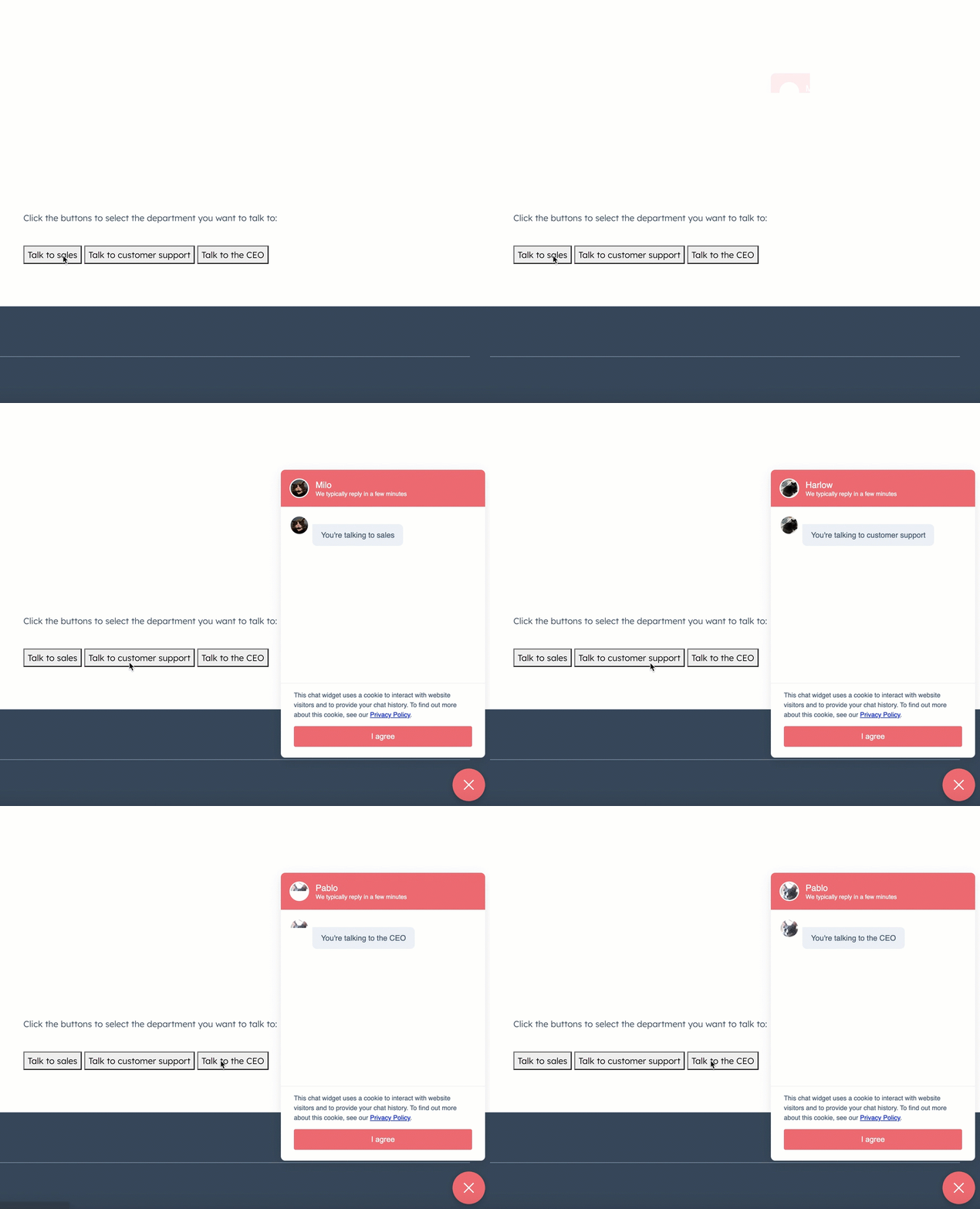For example, you could add the following code to your pages to generate the buttons:
```html theme={null}
```
Then, in each chat's [target settings](https://knowledge.hubspot.com/chatflows/create-a-live-chat#2-target---decide-where-the-live-chat-should-appear), you would set the chat to display when the query parameter matches the one you've set in your button code. 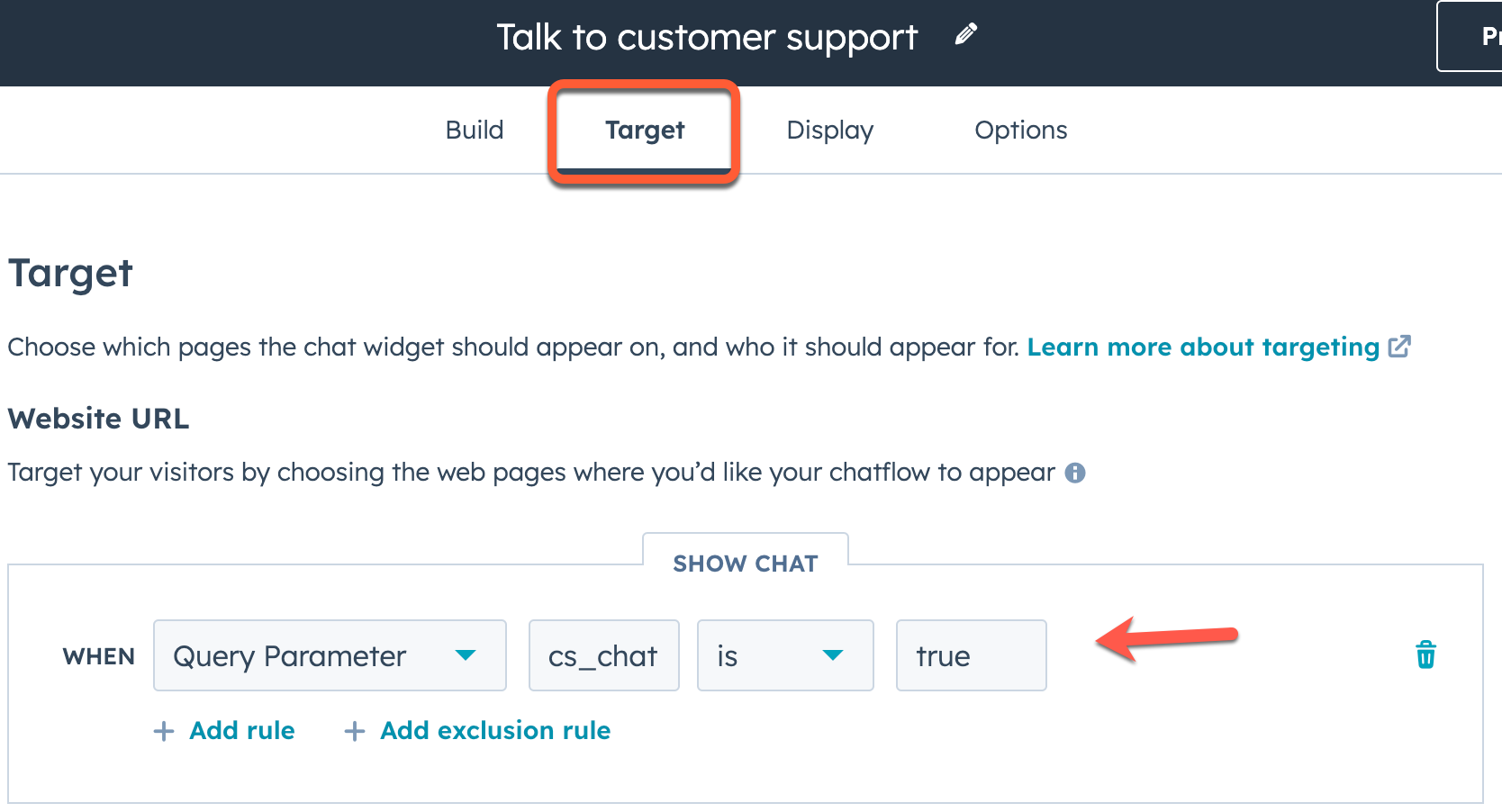
### widget.open
The `widget.open` method opens the widget if it is not already open or isn't currently loaded.
```js theme={null}
window.HubSpotConversations.widget.open();
```
### widget.close
The `widget.close` method closes the widget if it isn't already closed.
```js theme={null}
window.HubSpotConversations.widget.close();
```
### widget.remove
The `widget.remove` method removes the widget from the page. If the widget isn't present on the page, this method does nothing. The widget will display again on page refresh or if `widget.load` is invoked.
```js theme={null}
window.HubSpotConversations.widget.remove();
```
### widget.status
The `widget.status` method returns an object containing properties related to the current status of the widget.
```js theme={null}
const status = window.HubSpotConversations.widget.status();
if (status.loaded) {
window.HubSpotConversations.widget.refresh();
} else {
window.HubSpotConversations.widget.load();
}
```
| Field | Type | Default | Description |
| -------- | ------- | ------- | ------------------------------------- |
| `loaded` | Boolean | `false` | Whether the widget iframe has loaded. |
## Clear chat cookies
The `clear` method deletes cookies related to the chat widget and returns it to its default state on subsequent load.
The chat widget creates several cookies to preserve its state across site visits and page refreshes. These cookies are scoped to the domain of the page hosting the widget, and are used to support the following features:
* Referencing historical conversations.
* Persisting the open state of the chat widget across page loads.
* Persisting the open state of the welcome message across page loads.
The following cookies are cleared with this method:
* `messagesUtk`
* `hs-messages-is-open`
* `hs-messages-hide-welcome-message`
For more information about these cookies, see [check out HubSpot's Knowledge Base](https://knowledge.hubspot.com/privacy-and-consent/what-cookies-does-hubspot-set-in-a-visitor-s-browser).
```js theme={null}
window.HubSpotConversations.clear();
```
Additionally, you can pass `{resetWidget:true}` to the `clear()` function to clear all chat related cookies, remove the widget from the page, and create a new instance of the chat widget.
```js theme={null}
window.HubSpotConversations.clear({ resetWidget: true });
```
## Chat events
The chat widget emits various events you can listen and respond to throughout its lifecycle. These events include:
* [conversationStarted](#conversationstarted)
* [conversationClosed](#conversationclosed)
* [userSelectedThread](#userselectedthread)
* [unreadConversationCountChanged](#unreadconversationcountchanged)
* [contactAssociated](#contactassociated)
* [userInteractedWithWidget](#userinteractedwithwidget)
* [widgetLoaded](#widgetloaded)
* [quickReplyButtonClick](#quickreplybuttonclick)
* [widgetClosed](#widgetclosed)
To register and remove event listeners, you'll use `on` and `off`, as shown below.
```js theme={null}
const handleEvent = eventPayload => console.log(eventPayload);
window.HubSpotConversations.on("conversationStarted", handleEvent);
/* ... */
window.HubSpotConversations.off("conversationStarted", handleEvent);
```
Learn more about each event below.
### conversationStarted
The `conversationStarted` event triggers when a new conversation has been successfully started.
```js theme={null}
window.HubSpotConversations.on("conversationStarted", payload => {
console.log(`Started conversation with id ${payload.conversation.conversationId}`);
});
```
| Field | Type | Description |
| ------------------------------------- | ------ | ---------------------------------------------------------------------------------------------------------------------------------------------------------------- |
| `payload.conversation.conversationId` | Number | The thread ID of the conversation that was started. You can use this ID when making calls to the [conversations API](/api-reference/legacy/conversations/guide). |
### conversationClosed
The `conversationClosed` event triggers when a new conversation has [marked as closed](https://knowledge.hubspot.com/inbox/use-the-conversations-inbox#reply-and-comment:~:text=To%20mark%20the%20conversation%20as%20closed) from the conversations inbox.
Site visitors minimizing or closing the chat widget will not trigger this event. For that event, use [widgetClosed](#widgetclosed) instead.
```js theme={null}
window.HubSpotConversations.on("conversationClosed", payload => {
console.log(`Conversation with id ${payload.conversation.conversationId} has been closed!`);
});
```
| Field | Type | Description |
| ------------------------------------- | ------ | ---------------------------------------------------------------------------------------------------------------------------------------------------------------- |
| `payload.conversation.conversationId` | Number | The thread ID of the conversation that was started. You can use this ID when making calls to the [conversations API](/api-reference/legacy/conversations/guide). |
### userSelectedThread
The `userSelectedThread` event triggers when creating a thread or selecting an existing thread.
```js theme={null}
window.HubSpotConversations.on("userSelectedThread", payload => {
console.log(`User selected thread with ID ${payload.conversation.conversationId}!`);
});
```
| Field | Type | Description |
| ------------------------------------- | ------ | ---------------------------------------------------------------------------------------------------------------------------------------------------------------- |
| `payload.conversation.conversationId` | Number | The thread ID of the conversation that was started. You can use this ID when making calls to the [conversations API](/api-reference/legacy/conversations/guide). |
### unreadConversationCountChanged
The `unreadConversationCountChanged` event is triggered when the number of conversations with unread messages increases or decreases.
```js theme={null}
window.HubSpotConversations.on("unreadConversationCountChanged", payload => {
console.log(`New unread count is ${payload.unreadCount}!`);
});
```
| Field | Type | Description |
| ------------- | ------ | ------------------------------------------------------------------- |
| `unreadCount` | Number | The total number of conversations with at least one unread message. |
### contactAssociated
The `contactAssociated` event is triggered when the visitor is associated with a contact in the CRM.
```js theme={null}
window.HubSpotConversations.on("contactAssociated", payload => {
console.log(payload.message);
});
```
| Field | Type | Description |
| --------- | ------ | --------------------------------------------------------------------------- |
| `message` | String | A confirmation message that the visitor has been associated with a contact. |
### userInteractedWithWidget
The `userInteractedWithWidget` event is triggered when the visitor interacts with the widget, such as clicking to open the widget or closing the initial welcome message.
```js theme={null}
window.HubSpotConversations.on("userInteractedWithWidget", payload => {
console.log(payload.message);
});
```
| Field | Type | Description |
| --------- | ------ | ---------------------------------------------------------------------------- |
| `message` | String | A confirmation message that the visitor has been interacted with the widget. |
### widgetLoaded
The `widgetLoaded` event is triggered when the widget iframe is loaded.
```js theme={null}
window.HubSpotConversations.on("widgetLoaded", payload => {
console.log(payload.message);
});
```
| Field | Type | Description |
| --------- | ------ | --------------------------------------------------------- |
| `message` | String | A confirmation message that the widget iframe has loaded. |
### quickReplyButtonClick
The `quickReplyButtonClick` event is triggered when the visitor clicks a [quick reply](https://knowledge.hubspot.com/chatflows/a-guide-to-bot-actions#ask-a-question) in a bot conversation.
| Field | Type | Description |
| ------- | ----- | ------------------------------------------------------------------------ |
| `value` | Array | An array containing the text of the quick reply option that was clicked. |
```js theme={null}
window.HubSpotConversations.on("quickReplyButtonClick", event => {
console.log(`The text content of the clicked button is ${payload.value[0]}`);
});
```
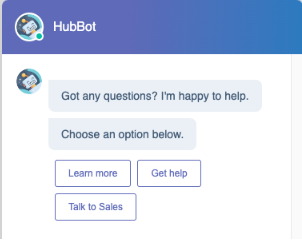
In the example screenshot above, the bot chatflow contains three quick reply options. If the user selects *Learn more*, the resulting event payload would be:
```json theme={null}
// Example event payload when a quick reply option is selected
{
"name": "QUICK_REPLIES",
"multiSelect": false,
"value": ["Learn more"]
}
```
### widgetClosed
The `widgetClosed` event is triggered when the visitor closes the chat widget.
```js theme={null}
window.HubSpotConversations.on("widgetClosed", event => {
console.log(event);
});
```
| Field | Type | Description |
| --------- | ------ | ------------------------------------------------------------------- |
| `message` | String | A confirmation message that the visitor has closed the chat widget. |