> ## Documentation Index
> Fetch the complete documentation index at: https://developers.hubspot.com/docs/llms.txt
> Use this file to discover all available pages before exploring further.

---
id: b0d99b1c-abda-4509-9aec-d2e7d3744519
---

# Custom channels API guide (2026-03)

> Learn how to use the latest custom channel API for the conversations inbox and help desk.

export const ScopesList = ({scopes = [], description = "This API requires one of the following scopes:"}) => {
  if (!scopes || scopes.length === 0) {
    return null;
  }
  const sortedScopes = scopes.sort((a, b) => a.localeCompare(b));
  return <div>
      <div className="text-sm mb-2">{description}</div>
      <div>
        {sortedScopes.map((scope, index) => <div key={index}>
            <code>
              <span className="text-xs">{scope}</span>
            </code>
          </div>)}
      </div>
    </div>;
};

<ProductTier tiers={['sales_hub-professional', 'service_hub-professional']} />

<Accordion title="Scope requirements">
  <ScopesList
    scopes={[
  'conversations.custom_channels.read',
  'conversations.custom_channels.write'
]}
  />
</Accordion>

You can create custom channels to build a bridge between an external message service and HubSpot's [inbox](https://knowledge.hubspot.com/inbox/set-up-the-conversations-inbox) or [help desk](https://knowledge.hubspot.com/help-desk/overview-of-the-help-desk-workspace) features. You can then publish your custom channel app in the HubSpot Marketplace for other HubSpot admins to install and use in their own accounts.

You'll need to [create an app](/docs/apps/developer-platform/build-apps/create-an-app) if you want to define and register custom channels. The custom channel endpoints are **not** supported when building a legacy private app.

## Create an app

To get started, you'll need to create an app that you'll use to register your custom channel with HubSpot, then handle incoming and outgoing messages to an inbox.

You can follow the instructions in [this article](/docs/apps/developer-platform/build-apps/create-an-app) to create a new app. When configuring the scopes for your app, ensure that your app requests the following scopes:

* `conversations.custom_channels.read`: this scope allows you to access to read messages and threads that your custom channel has already published to HubSpot.
* `conversations.custom_channels.write`: this scope allows you to publish messages to HubSpot.
* `conversations.read`: this scope allows you to retrieve a list of conversation inboxes in an account using the [Conversations API](/docs/api-reference/legacy/conversations/guide#inboxes), so that you can connect channel accounts to specific inboxes.
* `crm.objects.contacts.write`: allows you to create contacts automatically from the conversations inbox or help desk, once they provide their email address and you have the *Email capture* [setting](https://knowledge.hubspot.com/inbox/create-contacts-in-your-conversations-inbox#create-contacts-with-the-email-capture-setting) turned on.

Once you've created your app, take note of the following app details that you'll use to identify your app when making requests to the Custom Channels API endpoints.

* App ID
* Client ID
* Client secret

## Register your custom channel in HubSpot

After creating your app, you can create your custom channel in HubSpot, using your HubSpot [developer API key](/docs/apps/developer-platform/build-apps/manage-apps-in-hubspot#developer-api-keys), and the app ID of the app you just created.

To register your channel, make a `POST` request to `https://api.hubapi.com/conversations/2026-03/custom-channels?hapikey={YOUR_DEVELOPER_API_KEY}&appId={appId}`. In the body of your request, you'll specify the configuration and capabilities for your channel:

* Specify the user-facing channel name as the value for the `name` field.
* Provide a channel schema that includes an object that details the channel capabilities as the value for the `capabilities` field.
* Certain fields are optional and can be updated later using a `PATCH` request:
  * You can also specify a `webhookUrl` for handling webhook events (e.g., handling [updates to channel accounts](#handling-updates-to-channel-accounts)).
  * You can include a `channelDescription` and `channelLogoUrl` that will appear in the setup flow for your channel.
  * Specify a redirect URL that users will be sent to after completing your setup flow with the `channelAccountConnectionRedirectUrl` field.

For example, the following request body provides an example channel schema with a set of basic channel capabilities:

```json theme={null}
{
  "name": "My new custom channel",
  "webhookUrl": "https://example.com/handle-new-outgoing-message-notification",
  "capabilities": {
    "deliveryIdentifierTypes": [],
    "richText": ["HYPERLINK", "TEXT_ALIGNMENT", "BLOCKQUOTE"],
    "allowInlineImages": false,
    "allowOutgoingMessages": true,
    "outgoingAttachmentTypes": ["FILE"],
    "allowedFileAttachmentMimeTypes": ["image/png"],
    "maxFileAttachmentCount": 1,
    "maxFileAttachmentSizeBytes": 1500000,
    "maxTotalFileAttachmentSizeBytes": 1500000,
    "threadingModel": "INTEGRATION_THREAD_ID"
  },
  "channelAccountConnectionRedirectUrl": "https://example.com/path-back-to-your-connection-flow",
  "channelDescription": "Respond to prioritized messages via our custom channel",
  "channelLogoUrl": "https://example.com/logo.png"
}
```

### Channel schema

The table below outlines each of the available parameters for the channel schema in the request body.

| Parameter                             | Type   | Description                                                                                                                                                                                                                                                                                                                                           |
| ------------------------------------- | ------ | ----------------------------------------------------------------------------------------------------------------------------------------------------------------------------------------------------------------------------------------------------------------------------------------------------------------------------------------------------- |
| `name`                                | String | The name of your channel, which will appear to users who install your app.                                                                                                                                                                                                                                                                            |
| `webhookUrl`                          | String | A valid URL where HubSpot will send webhook notifications of outgoing messages that should be sent using your channel. This field is not required when initially registering the channel.                                                                                                                                                             |
| `capabilities`                        | Object | An object that specifies that the messaging content and recipient capabilities of your channel. Consult the table below for all supported fields for this object.                                                                                                                                                                                     |
| `channelAccountConnectionRedirectUrl` | String | If you're [creating a connection setup flow for your custom channel](#creating-a-connection-setup-flow-for-your-custom-channel), this is the URL that HubSpot will point to when users click the option to install your app in the inbox or help desk connection setup in HubSpot. This field is not required when initially registering the channel. |
| `channelDescription`                  | String | A string that will provide context under the channel when connecting it to HubSpot. This field is not required when initially registering the channel. See the [section below](#creating-a-connection-setup-flow-for-your-custom-channel) on defining a setup flow for your custom channel.                                                           |
| `channelLogoUrl`                      | String | A URL that points to a logo that appear for your channel when connecting it to HubSpot. This field is not required when initially registering the channel. See the [section below](#creating-a-connection-setup-flow-for-your-custom-channel) on defining a setup flow for your custom channel.                                                       |

### Channel capabilities

The table below outlines all available fields you can specify for the `capabilities` field of your channel.

| Parameter                         | Type    | Description                                                                                                                                                                                                                                                                                                                                                                 | Default                            |
| --------------------------------- | ------- | --------------------------------------------------------------------------------------------------------------------------------------------------------------------------------------------------------------------------------------------------------------------------------------------------------------------------------------------------------------------------- | ---------------------------------- |
| `deliveryIdentifierTypes`         | Array   | A required array that specifies the identifier types your channel supports for its senders and recipients. Consult the delivery identifier types table below for more info.                                                                                                                                                                                                 | `[]`                               |
| `richText`                        | Array   | An optional array of supported rich text elements presented as options in HubSpot's message composer. Available values are `"BLOCKQUOTE"`, `"BOLD"`, `"FONT_SIZE"`, `"FONT_STYLE"`, `"HYPERLINK"`, `"ITALIC"`, `"LISTS"`, `"TEXT_ALIGNMENT"`, `"TEXT_HIGHLIGHT_COLOR"`, `"TEXT_COLOR"`, and/or `"UNDERLINE"`. If left unspecified, no rich text elements will be supported. | `[]`                               |
| `allowInlineImages`               | Boolean | Whether your channel allows inline images to be included in the message body. If set to `true`, HubSpot's message composer will present an *Insert image* option.                                                                                                                                                                                                           | `false`                            |
| `allowOutgoingMessages`           | Boolean | Whether your channel allows outgoing messages. You can set this field to `false` if you want your channel to be an "intake-only" message source.                                                                                                                                                                                                                            | `true`                             |
| `outgoingAttachmentTypes`         | Array   | The types of attachments your channel supports (valid values are `"FILE"` and `"QUICK_REPLIES"`).                                                                                                                                                                                                                                                                           | `[]`                               |
| `allowedFileAttachmentMimeTypes`  | Array   | The file MIME types that your channel supports for file attachments, if any. This defaults to a fairly permissive list of common text, image, audio, video, and archive files.                                                                                                                                                                                              | `["image/png", "text/plain", ...]` |
| `maxFileAttachmentCount`          | Integer | The maximum number of file attachments permitted for a single message.                                                                                                                                                                                                                                                                                                      | `0`                                |
| `maxFileAttachmentSizeBytes`      | Integer | The maximum individual file size permitted for a single attachment on a message, in bytes.                                                                                                                                                                                                                                                                                  | `0`                                |
| `maxTotalFileAttachmentSizeBytes` | Integer | The maximum cumulative file size permitted for all attachments combined for a single message, in bytes.                                                                                                                                                                                                                                                                     | `0`                                |
| `threadingModel`                  | String  | An enumeration denoting which threading model to use for messages. Values are: `INTEGRATION_THREAD_ID` and `DELIVERY_IDENTIFIER`. See the section below for more information.                                                                                                                                                                                               | `INTEGRATION_THREAD_ID`            |

### Specifying a threading model

By default, the threading model of your custom channel is set to `INTEGRATION_THREAD_ID`, where you're required to include an `integrationThreadId` in every `POST` [message request](#incoming-message-schema). This ID will always be returned in the `channelIntegrationThreadIds` property of the `OUTGOING_CHANNEL_MESSAGE_CREATED` [webhook event](#handling-outgoing-messages-sent-from-hubspot).

You can optionally set your threading model to `DELIVERY_IDENTIFIER`, which is a good fit when there is only ever one open conversation between parties. If you set the `threadingModel` to this value within the `capabilities` [object](#channel-capabilities) of your channel, you should *not* include an `integrationThreadId` in any of your `POST` [message requests](#incoming-message-schema), because HubSpot will generate and manage its own `threadIds` based on the following rules:

* A set of `deliveryIdentifiers` (e.g., email address, phone numbers, or other identifiers in the sender and/or recipients array of a message) may have a maximum of one active thread between these delivery identifiers at once.
* Archived threads between that same set of participants are ignored.
* Outgoing messages can only be published on open threads, and there can only be one thread between a specific set of participants at a time.
* Incoming messages can only be published to the same `threadId` if either of the following conditions are met:
  * The thread is already open.
  * The thread was closed with the latest message activity occurring less than 24 hours ago, in which case the published incoming message will re-open the thread.
* The `channelIntegrationThreadIds` property within the payload of the `OUTGOING_CHANNEL_MESSAGE_CREATED` [webhook event](#handling-outgoing-messages-sent-from-hubspot) will contain the value of the `threadId` that HubSpot created.

### Delivery identifiers

The `deliveryIdentifierTypes` field specified within the `channelCapabilities` of your channel specifies an array of delivery identifiers.

A delivery identifier is an object that includes a `type` and `value`, that describes sender or recipient delivery details:

| Parameter | Type   | Description                                                                                                                                                                                                                                                                                                                                                                                                                                                                                                                                                                                                                                                                                                                      |
| --------- | ------ | -------------------------------------------------------------------------------------------------------------------------------------------------------------------------------------------------------------------------------------------------------------------------------------------------------------------------------------------------------------------------------------------------------------------------------------------------------------------------------------------------------------------------------------------------------------------------------------------------------------------------------------------------------------------------------------------------------------------------------- |
| `type`    | String | The format for an identifier of the sender or recipient. Much like a postal mail address, this identifier provides a well-defined format for sending or receiving messages to/from the individual contact. The following types are available:<ul><li>`HS_EMAIL_ADDRESS`: identifier value must have a valid email address.</li><li>`HS_PHONE_NUMBER`: identifier value must be a valid phone number, based on the logic in libphonenumber.</li><li>`CHANNEL_SPECIFIC_OPAQUE_ID`: identifier value does not require any format validation to be performed, except to check it isn't blank. This option is intended for use in channels with their own concept of "addresses" (e.g., usernames, UUIDs, or chat handles).</li></ul> |
| `value`   | String | The actual value of the delivery identifier (e.g., "[support@example.com](mailto:support@example.com)" for an `HS_EMAIL_ADDRESS`).                                                                                                                                                                                                                                                                                                                                                                                                                                                                                                                                                                                               |

If you need to review or update your channel's configuration, you can send a `GET` or `PATCH` request to `/conversations/2026-03/custom-channels?hapikey={YOUR_DEVELOPER_API_KEY}&appId={appId}&channelId={channelId}` using the same channel schema. `PATCH` requests also accept partial-update requests.

## Connect channel accounts to HubSpot

After you've created your custom channel, the next step is to allow specific channel accounts to be connected to a user's HubSpot account, so that messages can be sent and received.

### Channel account connection for specific accounts

If you're developing a custom channel for your own business, or building a specific integration on behalf of a client, you can connect channel accounts directly to a HubSpot account. You'll need to have direct administrative access to the account or have an app installed in an account that's authorized the `conversations.read` scope.

When a HubSpot user installs your custom channel app in their account, a request will be sent to your custom channel's *Redirect URL*, which contains an authorization code that can be used to request an OAuth token for accessing that user's HubSpot account and its associated data. For more information on how OAuth works, check out [this article](/docs/apps/legacy-apps/authentication/working-with-oauth).

Once you've obtained an OAuth access token using the authorization code, you can use this OAuth access token to send requests to HubSpot to connect specific channel accounts.

To connect a specific channel account, make a `POST` request to `/conversations/2026-03/custom-channels/{channelId}/channel-accounts`, where the `channelId` is the channel ID that you've registered.

The request body below provides an example channel account schema for an inbox ID of `123`:

```json theme={null}
{
  "inboxId": "123",
  "name": "My connected inbox",
  "deliveryIdentifier": {
    "type": "HS_EMAIL_ADDRESS",
    "email": "jdoe@example.com"
  },
  "authorized": true
}
```

The table below provides details for each of the possible fields of a channel account:

| Parameter            | Type    | Description                                                                                                                                                                                                                                                                                                        |
| -------------------- | ------- | ------------------------------------------------------------------------------------------------------------------------------------------------------------------------------------------------------------------------------------------------------------------------------------------------------------------ |
| `inboxId`            | String  | The ID of the [conversations inbox](https://knowledge.hubspot.com/inbox/use-the-conversations-inbox) that you've connected your channel account to. You can retrieve a list of conversation inboxes with their associated IDs by using the [conversations API](/docs/api-reference/latest/conversations/guide#inboxes). |
| `name`               | String  | The friendly name that will appear to HubSpot users in their account.                                                                                                                                                                                                                                              |
| `deliveryIdentifier` | String  | A required delivery identifier that should be associated with this channel account (e.g., a username or email address that uniquely identifies this channel account within your integrated messaging service).                                                                                                     |
| `authorized`         | Boolean | By default this field is set to `true`, but if the account is no longer usable or accessible, you can update this to `false` to disable this channel account for your custom channel.                                                                                                                              |

### Creating a connection setup flow for your custom channel

If you're developing a custom channel integration that you want to distribute to multiple customers via the HubSpot marketplace, you can register an account connection flow that will appear within the in-app HubSpot inbox or help desk connection flow.

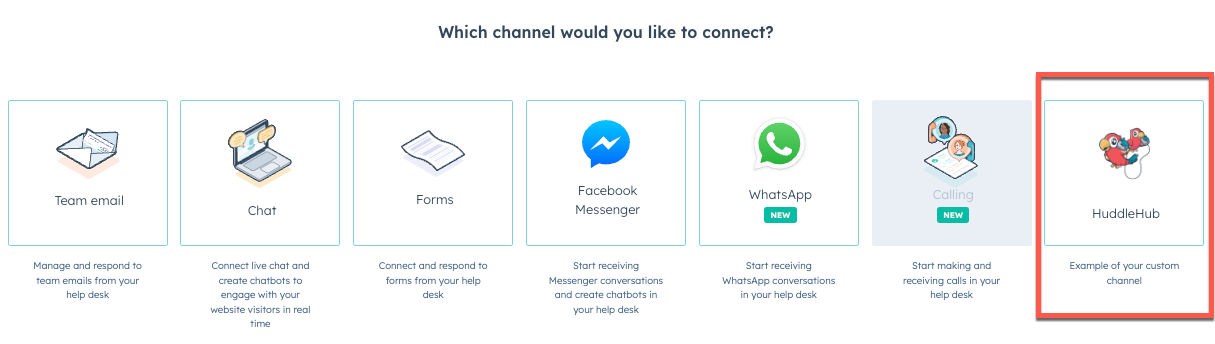
The screenshot below showcases how an example custom channel called *HuddleHub* would appear in the help desk connection flow in HubSpot. Your app's name, description, and logo from your app configuration will appear as part of the custom channel option that users can click to connect.

<Frame>
  <img src="https://www.hubspot.com/hubfs/Knowledge_Base_2023_2024/custom-channel-account-connection-api.png" alt="custom-channel-account-connection-api" />
</Frame>

Any account that installs your app can click the associated option to authorize their credentials with any third-party service you're integrating with (if applicable), then proceed to connect that account to HubSpot. When users click the associated option in HubSpot, a pop-up window will open and load a webpage that allows them to provide their credentials. You'll need to host this webpage and any associated backend services yourself.

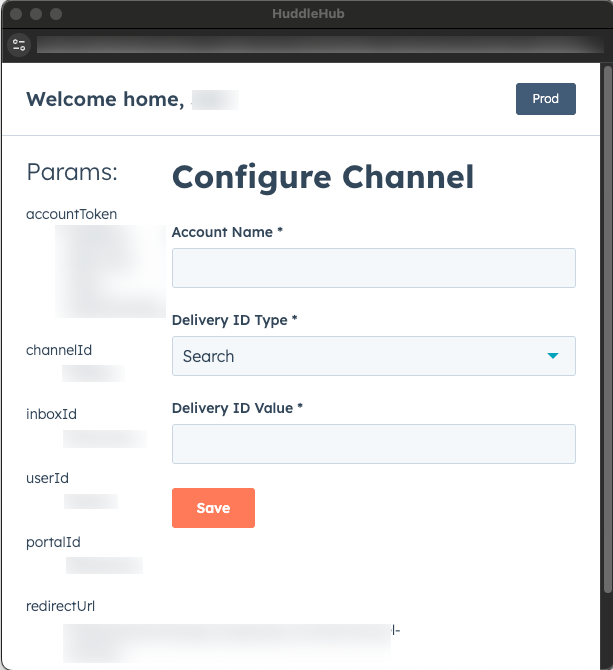
The screenshot below provides a minimal example of what this dialog box looks like and includes some debugging information based on the query parameters that HubSpot includes in the URL. When designing your own page, you should optimize it for a 600px by 600px window, and provide a user-friendly method (e.g., a form) to provide any account details and [delivery identifier information](#delivery-identifiers) you'll need to connect their account.
<Frame>
  <img src="https://www.hubspot.com/hubfs/Knowledge_Base_2023_2024/custom-channel-account-connection-flow-huddle-hub-dialog.png" alt="custom-channel-account-connection-flow-huddle-hub-dialog" />
</Frame>

If you didn't specify a redirect URL for your connection flow when you [initially registered your channel](#register-your-custom-channel-in-hubspot), you can update the behavior of your channel by making a `PATCH` request to `/conversations/2026-03/custom-channels/{channelId}`. In the body of your request, set the `channelAccountConnectionRedirectUrl` property to the URL that you want HubSpot to navigate to when users click your custom channel in the connection flow. You can also provide a `channelDescription` and `channelLogoUrl` if you didn't specify these fields previously or you want to update them.

Once clicked, HubSpot will open a new window with the URL you specified, and append the following query parameters that you can use to authenticate with a third-party service, or for any other custom behavior you might need to wire up based on the user's HubSpot account, inbox, channel, or user information:

| Parameter      | Type   | Description                                                                                                                                                                                                                                                                                                                                                                                                                          |
| -------------- | ------ | ------------------------------------------------------------------------------------------------------------------------------------------------------------------------------------------------------------------------------------------------------------------------------------------------------------------------------------------------------------------------------------------------------------------------------------ |
| `accountToken` | String | A shared object created in HubSpot's database that you'll use as an interim session token while the end user goes through the setup flow.<br /><br />Once they've provided all the parameters you'll need to connect their account, you'll use this token to make a `PATCH` request to `/conversations/2026-03/custom-channels/{channelId}/channel-account-staging-tokens/{accountToken}`, detailed in the section below this table. |
| `channelId`    | Number | The ID of your custom channel.                                                                                                                                                                                                                                                                                                                                                                                                       |
| `inboxId`      | Number | The ID of the help desk or inbox that the HubSpot admin wants to connect your channel to.                                                                                                                                                                                                                                                                                                                                            |
| `portalId`     | Number | The ID of the HubSpot account attempting to connect their account to your custom channel.                                                                                                                                                                                                                                                                                                                                            |
| `redirectUrl`  | String | The HubSpot URL that you should send the user to when your flow and/or form submission is complete.                                                                                                                                                                                                                                                                                                                                  |

Once you've collected the user's information in your page (e.g., using a form to collect each of the required parameters) and the user confirms their input by clicking a submission button, you can make a `PATCH` request to `/conversations/2026-03/custom-channels/{channelId}/channel-account-staging-tokens/{accountToken}` and provide the following parameters in your request:

| Parameter            | Type               | Description                                                                                                                                                                                                                                                                                                                         |
| -------------------- | ------------------ | ----------------------------------------------------------------------------------------------------------------------------------------------------------------------------------------------------------------------------------------------------------------------------------------------------------------------------------- |
| `accountToken`       | String             | As detailed above, this is the same `accountToken` provided as a query parameter in the URL of your webpage when the user initiated the connection in their HubSpot account. This should be provided as a path parameter in the URL of your request.                                                                                |
| `channelId`          | Number             | The ID of your custom channel, provided as a path parameter in the URL of your request.                                                                                                                                                                                                                                             |
| `accountName`        | String             | This is a request body parameter that will act as a friendly name for the channel account that will appear in the inbox or help desk settings in the user's HubSpot account.<br />![successfully-connected-huddlehub-account](https://www.hubspot.com/hubfs/Knowledge_Base_2023_2024/successfully-connected-huddlehub-account.png). |
| `deliveryIdentifier` | DeliveryIdentifier | Provided as a request body parameter, the `deliveryIdentifier` that describes the address of the connected account. See the [Delivery Identifiers section above](#delivery-identifiers) for more details on how a `deliveryIdentifier` is structured.                                                                               |

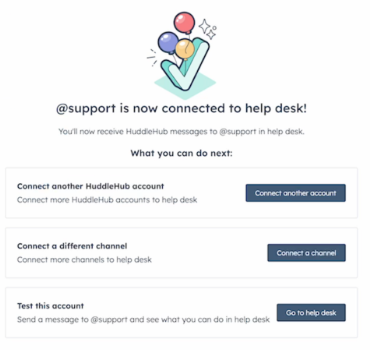
Once you've made the `PATCH` request and gotten a successful response, you can redirect the user back to the `redirectUrl` detailed above and close the pop-up window.

The user will then see a success screen in their HubSpot account:

<Frame>
  <img src="https://www.hubspot.com/hubfs/Knowledge_Base_2023_2024/custom-account-channel-connection-flow-api-doc.png" alt="custom-account-channel-connection-flow-api-doc" />
</Frame>

## Publish messages to HubSpot

When a channel account that uses your custom channel receives or sends a message in the external message service (e.g., a user gets a new direct message in their social account's inbox), you'll want to ensure that the message gets published to HubSpot, which will log it into the HubSpot CRM and the associated conversations inbox.

To publish a message to HubSpot, make a `POST` request to `/conversations/2026-03/custom-channels/{channelId}/messages`, where the `channelId` should be the channel ID that you previously registered.

### Message schema

The body of your request can include the following fields:

| Field                      | Type   | Description                                                                                                                                                                                                                                                                                                                                                                                                                                                                                             |
| -------------------------- | ------ | ------------------------------------------------------------------------------------------------------------------------------------------------------------------------------------------------------------------------------------------------------------------------------------------------------------------------------------------------------------------------------------------------------------------------------------------------------------------------------------------------------- |
| `text`                     | String | The plaintext content of your message.                                                                                                                                                                                                                                                                                                                                                                                                                                                                  |
| `richText`                 | String | An optional string that represents the HTML markup for the formatted text content of the message.                                                                                                                                                                                                                                                                                                                                                                                                       |
| `channelAccountId`         | String | The ID of the channel account receiving the message.                                                                                                                                                                                                                                                                                                                                                                                                                                                    |
| `integrationThreadId`      | String | A required string based on the `threadingModel` you [specified](#specifying-a-threading-model). If you specified the `threadingModel` for your channel to be `INTEGRATION_THREAD_ID`, then you'll need to provide the `integrationThreadId` for this field. If your `threadingModel` is set to `DELIVERY_IDENTIFIER`, this field must be set to `null`.                                                                                                                                                 |
| `integrationIdempotencyId` | String | An optional string you can use as a unique-per-message idempotency ID, to ensure that multiple requests to publish this message don't result in duplicate copies of it being published.<br /><br />The idempotency ID is only unique in the context of a channel account: the same channel account cannot have two messages with the same idempotency ID. However, two different channel accounts can have messages that have the same idempotency ID.                                                  |
| `inReplyToId`              | String | An optional string you can use to reference the message ID of an existing message that this message is a direct reply to.                                                                                                                                                                                                                                                                                                                                                                               |
| `messageDirection`         | String | A required string that indicates the message direction: should be set to `"INCOMING"` for received messages and `"OUTGOING"` for sent messages.                                                                                                                                                                                                                                                                                                                                                         |
| `senders`                  | Array  | A list of messages senders. Each sender should be provided as an object with two fields: a `deliverIdentifier`, detailed [above](#delivery-identifiers), and a `name`, which is an optional string that serves as a friendly name for the sender. <br /> <br /> For any outgoing messages, you can optionally include a `senderActorId` field to record which [actor](/docs/api-reference/latest/conversations/guide#get-actors) sent the message. For example, `A-12345` would denote a HubSpot agent user. |
| `recipients`               | Array  | A list of intended recipients. Each recipient should be provided as an object with two fields: a `deliveryIdentifier`, detailed [above](#delivery-identifiers), and a `name`, which is an optional string that serves as a friendly name for the recipient.                                                                                                                                                                                                                                             |
| `timestamp`                | String | An optional timestamp, in ISO8601 format, that specifies when the message was received. If omitted, this value will default to the time you publish the message to HubSpot.                                                                                                                                                                                                                                                                                                                             |
| `attachments`              | Array  | An optional list of message attachments.                                                                                                                                                                                                                                                                                                                                                                                                                                                                |
| `associateWithContactId`   | Number | If you're using a `CHANNEL_SPECIFIC_OPAQUE_ID` [delivery identifier type](#delivery-identifiers), you can provide this field to associate the message with the provided contact ID. The contact must already exist. Channels using email or phone identifier types continue to resolve contact associations automatically.                                                                                                                                                                              |

### Supported message attachment types

Several message attachment types are currently available: files, quick replies, as well as a catch-all type for unsupported file attachments.

#### File attachments

File attachments can be uploaded using HubSpot's [files AP](/docs/api-reference/latest/files/guide), and the resulting file ID can be used to reference the file contents when publishing incoming messages to HubSpot.

Consult the table below for details on how to structure a message attachment referencing an uploaded file:

| Parameter       | Type   | Description                                                                                                                                                             |
| --------------- | ------ | ----------------------------------------------------------------------------------------------------------------------------------------------------------------------- |
| `type`          | String | A required string that must be set to `"FILE"`.                                                                                                                         |
| `fileId`        | String | The HubSpot file ID for the uploaded file that the attachment will reference.                                                                                           |
| `fileUsageType` | String | An enumeration used to render an appropriate preview of the file attachment. Available values are `"STICKER"`, `"VOICE_RECORDING"`, `"IMAGE"`, `"AUDIO"`, or `"OTHER"`. |

#### Quick reply attachments

Some chat services, such as Facebook Messenger, present suggested options as "quick replies" to users, allowing them to select from a predefined list of response messages. HubSpot supports this functionality by providing the ability to include quick replies as an attachment to your message.

Consult the table below on how to structure a message attachment that includes a list of quick replies:

| Parameter      | Type   | Description                                                                                                                                                                                                                                                                                                                                                                                                                                                                                                                                                           |
| -------------- | ------ | --------------------------------------------------------------------------------------------------------------------------------------------------------------------------------------------------------------------------------------------------------------------------------------------------------------------------------------------------------------------------------------------------------------------------------------------------------------------------------------------------------------------------------------------------------------------- |
| `type`         | String | A required string that must be set to `"QUICK_REPLIES"`.                                                                                                                                                                                                                                                                                                                                                                                                                                                                                                              |
| `quickReplies` | Array  | A list of one or more predefined responses. Each quick reply is an object that should include the following fields:<ul><li>`value`: a string that provides the text content of the reply, or the URL to visit when the option is clicked.</li><li>`label`: an optional string that will appear instead of the raw `value` when presenting the option to the user.</li><li>`valueType`: whether to treat the option as a hyperlink (with the value as the URL and the label as text) or as plaintext (in which case the `label` is used as the option text).</li></ul> |

#### Unsupported content attachments

These attachments are used to represent attachment types included in the original message that HubSpot cannot recognize.

For example, if a channel account on the messaging platform you're connecting to HubSpot via your channel receives a message that includes an attachment not listed in this article, and you want users viewing the message in their HubSpot account to know there was an attachment they might want to view directly on the messaging platform, you could use this attachment type when publishing the message to HubSpot.

To specify an unsupported content attachment, the attachment should be specified as follows:

```json theme={null}
{
  "type": "UNSUPPORTED_CONTENT"
}
```

## Handling outgoing messages sent from HubSpot

To handle outgoing messages sent from HubSpot using your custom channel, HubSpot will send a payload as a `POST` request to the `webhookUrl` that you specified when you first registered your custom channel.

The payload of the request that HubSpot sends will include a type of `OUTGOING_CHANNEL_MESSAGE_CREATED`. The table below provides a full reference on all fields included in the body of the webhook event:

| Parameter                     | Type   | Description                                                                                                                                                                                                                                                                                                                                                                           |
| ----------------------------- | ------ | ------------------------------------------------------------------------------------------------------------------------------------------------------------------------------------------------------------------------------------------------------------------------------------------------------------------------------------------------------------------------------------- |
| `type`                        | String | A string that specifies the webhook event type, which will be `"OUTGOING_CHANNEL_MESSAGE_CREATED"`.                                                                                                                                                                                                                                                                                   |
| `portalId`                    | String | The ID of the HubSpot account from which the message was sent.                                                                                                                                                                                                                                                                                                                        |
| `channelId`                   | String | The ID of the custom channel.                                                                                                                                                                                                                                                                                                                                                         |
| `eventTimestamp`              | String | When the event occurred, represented as an ISO8601 timestamp.                                                                                                                                                                                                                                                                                                                         |
| `message`                     | String | An object that provides details about the outgoing message. Each of the fields of this message are detailed in the message table below.                                                                                                                                                                                                                                               |
| `eventId`                     | String | Unique reference to a specific message over a given channel used for debugging.                                                                                                                                                                                                                                                                                                       |
| `channelIntegrationThreadIds` | Array  | The value for this field is based on the [threading model](#specifying-a-threading-model) you specified for your channel. The array includes an `integrationThreadId` that was sent if you opted for a `threadingModel` of `INTEGRATION_THREAD_ID` for your channel. If you specified a `threadingModel` of `DELIVERY_IDENTIFIER`, this array will include a HubSpot-generated value. |

The `message` object in the webhook payload contains the following fields:

| Field                   | Type             | Description                                                                                                                                                                                                                                                                                                                       |
| ----------------------- | ---------------- | --------------------------------------------------------------------------------------------------------------------------------------------------------------------------------------------------------------------------------------------------------------------------------------------------------------------------------- |
| `id`                    | String           | A unique message ID                                                                                                                                                                                                                                                                                                               |
| `type`                  | String           | A string that's hard-coded to `"MESSAGE"`.                                                                                                                                                                                                                                                                                        |
| `channelId`             | String           | The ID of your custom channel.                                                                                                                                                                                                                                                                                                    |
| `channelAccountId`      | String           | The ID of the channel account receiving the message.                                                                                                                                                                                                                                                                              |
| `conversationsThreadId` | String           | The ID of the thread in the conversations inbox that includes this message.                                                                                                                                                                                                                                                       |
| `createdAt`             | String           | An ISO8601 timestamp representing the time when the user hit **Send** from within the HubSpot message composer.                                                                                                                                                                                                                   |
| `createdBy`             | String           | A string representing the [actorId](/docs/api-reference/latest/conversations/guide#get-actors) of the HubSpot user who sent the message.                                                                                                                                                                                               |
| `senders`               | Array            | A list of messages senders. Each sender is provided as an object with three fields: an [actorId](/docs/api-reference/latest/conversations/guide#get-actors) string, a `deliverIdentifier`, detailed [above](#delivery-identifiers), and a `name`, which is a string that serves as a friendly name for the sender.                     |
| `recipients`            | Array            | A list of intended recipients. Each recipient is provided as an object with three fields: an [actorId](/docs/api-reference/latest/conversations/guide#get-actors) string, a `deliveryIdentifier`, detailed [above](#delivery-identifiers), and a `name`, which is an optional string that serves as a friendly name for the recipient. |
| `text`                  | String           | The plaintext content of your message.                                                                                                                                                                                                                                                                                            |
| `richText`              | String           | An optional string that represents the HTML markup for the formatted text content of the message.                                                                                                                                                                                                                                 |
| `direction`             | channelAccountId | `"OUTGOING"`                                                                                                                                                                                                                                                                                                                      |
| `inReplyToId`           | String           | An optional string you can use to reference the message ID of an existing message that this message is a direct reply to.                                                                                                                                                                                                         |
| `truncationStatus`      | String           | `"NOT_TRUNCATED"`                                                                                                                                                                                                                                                                                                                 |
| `status`                | String           | `"SENT"`                                                                                                                                                                                                                                                                                                                          |
| `attachments`           | Array            | An optional list of message attachments.                                                                                                                                                                                                                                                                                          |

## Handling updates to channel accounts

Whenever a channel account is connected, updated, or deleted, HubSpot will send a payload as a `POST` request to the `webhookUrl` that you specified when you first registered your custom channel. This can be useful for cases where you want to take an action such as notifying your users that their connection to HubSpot has succeeded, or if the channel is later modified or deleted.

### Channel account webhook event payload

The payload of the request that HubSpot sends will includes the fields listed in the table below. The event's type will be provided in the `type` field:

* `CHANNEL_ACCOUNT_CREATED`: triggered when an admin successfully connected a custom channel to an inbox or help desk in their HubSpot account.
* `CHANNEL_ACCOUNT_UPDATED`: triggered when a HubSpot user updates a channel account that uses one of your connected custom channels.
* `CHANNEL_ACCOUNT_PURGED`: triggered when a HubSpot user deletes a channel account that uses one of your connected custom channels.

| Parameter                          | Type   | Description                                                                 |
| ---------------------------------- | ------ | --------------------------------------------------------------------------- |
| `type`                             | String | A string that specifies the webhook event type.                             |
| `portalId`                         | String | The HubSpot portal ID associated with the custom channel.                   |
| `channelId`                        | String | The channel ID of your custom channel.                                      |
| `eventTimestamp`                   | String | When the event occurred, represented as an ISO8601 timestamp.               |
| `channelAccountId`                 | String | The ID of the custom channel account.                                       |
| `channelAccountDeliveryIdentifier` | String | The delivery account identifier that's associated with the channel account. |

## Archive a custom channel

To archive a custom channel, make a `DELETE` call to `/conversations/2026-03/custom-channels/{channelId}` using the ID of the channel you want to archive as the `channelId`.

If successfully archived, you'll receive a response of `204 No content`.
