> ## Documentation Index
> Fetch the complete documentation index at: https://developers.hubspot.com/docs/llms.txt
> Use this file to discover all available pages before exploring further.
---
id: a14cd621-76f6-48e2-8d7e-2355e48f6c9e
---
# Calling extensions SDK
> Overview of the calling extensions SDK
export const RequiredIndicator = () => {
return
required
;
};
export const Tag = ({children, type = 'default', className = ''}) => {
return
{children}
;
};
The [Calling Extensions SDK](https://github.com/HubSpot/calling-extensions-sdk) enables apps to provide a custom calling option to HubSpot users directly from a CRM record, similar to [HubSpot's provided calling tool](https://knowledge.hubspot.com/calling/make-calls-in-the-hubspot-browser). When a user makes a call using your app, HubSpot will create an engagement on the activity timeline of the CRM record, then exchange data with your app to fill in the details.
A calling extension consists of three main components:
1. The [Calling Extensions SDK](https://github.com/HubSpot/calling-extensions-sdk), a JavaScript SDK that enables communication between your app and HubSpot.
2. The **calling settings endpoints**, which are used to set the calling settings for your app. Each HubSpot account that connects to your app will use these settings.
3. The **calling iframe**, which is where your app appears to HubSpot users and is configured using the calling settings endpoints.
If you don't have an app, you can [create a new app](/apps/developer-platform/build-apps/create-an-app).
**Please note:**
The documentation below covers outbound calling via the SDK. Learn more about using the SDK to [receive incoming calls](/api-reference/latest/crm/extensions/calling-extensions/receive-incoming-calls).
## Run the demo calling app
You have the option to test the Calling Extensions SDK on two different demo apps:
* The [demo-minimal-js](https://github.com/HubSpot/calling-extensions-sdk/tree/master/demos/demo-minimal-js) features a minimal implementation of the SDK using JavaScript, HTML, and CSS. View how the SDK is instantiated in [index.js](https://github.com/HubSpot/calling-extensions-sdk/blob/master/demos/demo-minimal-js/index.js).
* The [demo-react-ts](https://github.com/HubSpot/calling-extensions-sdk/tree/master/demos/demo-react-ts) features a real-life implementation of the SDK using React, TypeScript, and Styled Components to act as a blueprint for your app. View how the SDK is instantiated in [useCti.ts](https://github.com/HubSpot/calling-extensions-sdk/blob/master/demos/demo-react-ts/src/hooks/useCti.ts).
**Please note:**
These demo apps aren't fully functional calling apps and use mock data to provide a more realistic experience.
### Install the demo calling app
You can run the demo apps with or without installation. To install the demo on your local environment:
1. Install [Node.js](https://nodejs.org/en) on your environment.
2. Clone, fork, or [download the ZIP](https://codeload.github.com/HubSpot/calling-extensions-sdk/zip/refs/heads/master) of this repository.
3. Open your terminal, and navigate to the root directory of the project.
4. Run one of the following commands:
* For the `demo-minimal-js`:
```shell theme={null}
cd demos/demo-minimal-js && npm i && npm start
```
* For the `demo-react-ts`:
```shell theme={null}
cd demos/demo-react-ts && npm i && npm start
```
These will switch to the desired demo directory, install the [Node.js](https://nodejs.org/en/) dependencies required for the project using the [npm CLI](https://docs.npmjs.com/cli/v9/), and start the app.
**Please note:**
The `npm start` command will automatically open a new tab in your browser at [https://localhost:9025/](https://localhost:9025/), and you may need to bypass a "Your connection is not secure" warning in order to access the application.
### Launch the demo calling app from HubSpot
1. Navigate to your records:.
* **Contacts:** In your HubSpot account, navigate to **Contacts > Contacts**.
* **Company:** In your HubSpot account, navigate to **Contacts > Companies**.
2. Open your browser's developer console, and run the following command:
* If you've completed the installation steps, for the `demo-minimal-js` or the `demo-react-ts`:
```js theme={null}
localStorage.setItem("LocalSettings:Calling:installDemoWidget", "local");
```
* If you've skipped the installation steps:
* For the `demo-minimal-js`:
```js theme={null}
localStorage.setItem("LocalSettings:Calling:installDemoWidget", "app:js");
```
* For the `demo-react-ts`:
```js theme={null}
localStorage.setItem("LocalSettings:Calling:installDemoWidget", "app");
```
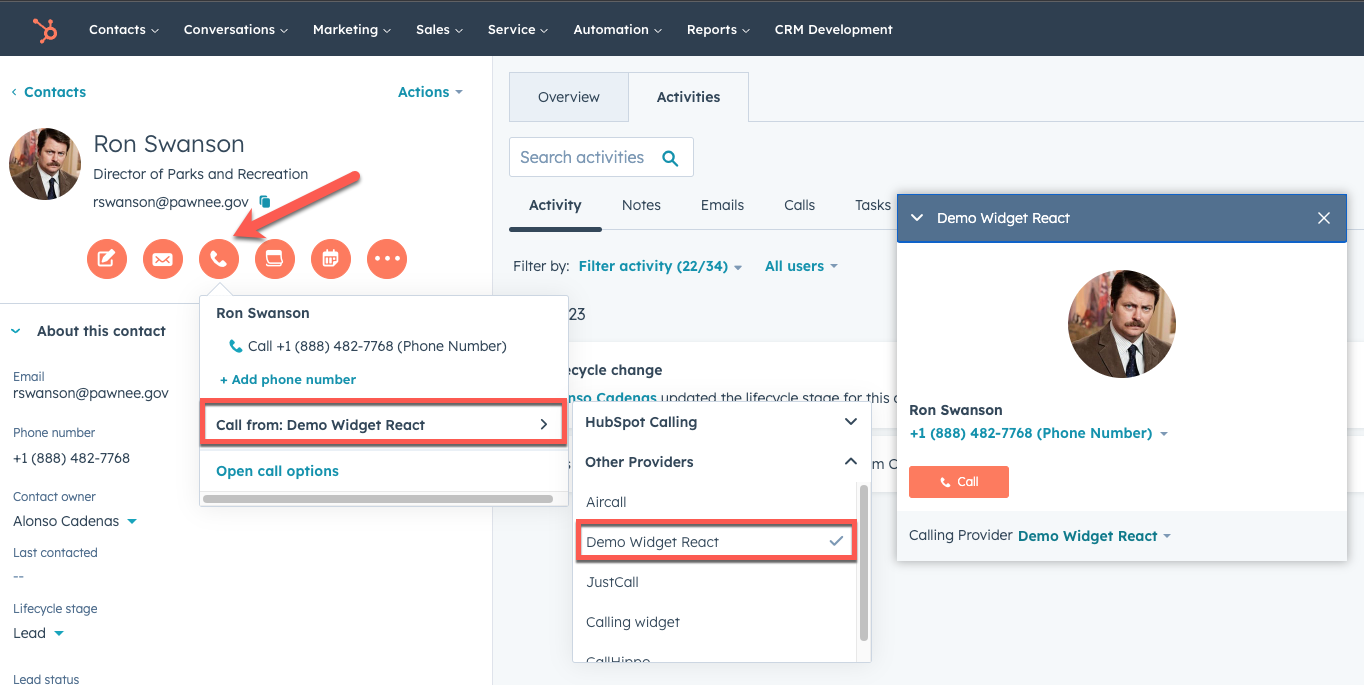
1. Refresh the page, and click the **Call** icon in the left sidebar. Click the **Call from** dropdown menu, and select the **name** of the demo app from step 2 (e.g. Demo App Local, Demo App JS, Demo App React).
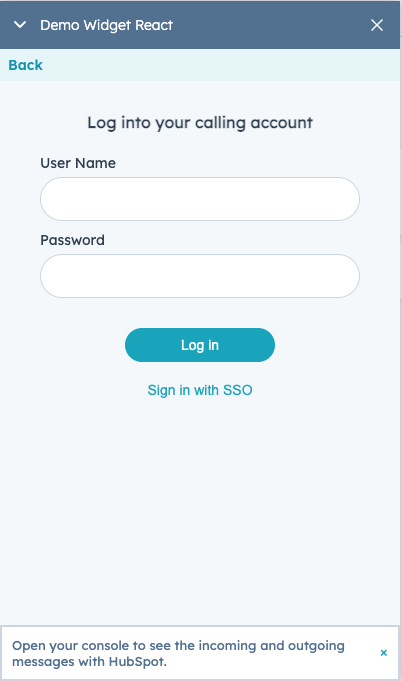
 2. Click **Call** to see how the demo app integrates with HubSpot via the Calling Extensions SDK. You can also see the events logged to your browser's developer console.
 ## Install the Calling Extensions SDK on your calling app
To add the Calling Extensions SDK as a [Node.js](https://nodejs.org/en/) dependency to your calling app:
* For npm, run:
```shell theme={null}
npm i --save @hubspot/calling-extensions-sdk
```
* For yarn, run:
```shell theme={null}
yarn add @hubspot/calling-extensions-sdk
```
## Using the Calling Extensions SDK
The Calling Extensions SDK exposes a simple API for HubSpot and a calling app to exchange messages. The messages are sent through methods exposed by the SDK and received through `eventHandlers`. You can find a full list of the available events in the [Events section](#events).
The following is a description of the events:
1. **Dial number:** HubSpot sends the dial number event.
2. **Outbound call started:** App notifies HubSpot when the call is started.
3. **Create engagement:** HubSpot creates [a call engagement](/api-reference/latest/crm/activities/calls/guide) with minimal information if requested by the app.
4. **Engagement created:** HubSpot created an engagement.
5. **EngagementId sent to App:** HubSpot sends the `engagementId` to the app.
6. **Call ended:** App notifies when the call is ended.
7. **Call completed:** App notifies when the user is done with the app user experience.
8. **Update engagement:** App fetches the engagement by the `engagementId`, then merges and updates the engagement with additional call details. Learn more about [updating a call engagement via the API](/api-reference/latest/crm/activities/calls/guide#update-calls)or [via the SDK](/api-reference/latest/crm/activities/calls/guide).
To begin, create an instance of the `CallingExtensions` object. You can define the behavior of your extension by providing an option's object when you create your extensions instance. This option's object provides an `eventHandlers` field where you can specify the behavior of your extension. The following code block illustrates the available options and event handlers you can define:
```js theme={null}
import CallingExtensions from "@hubspot/calling-extensions-sdk";
const options = {
/** @property {boolean} debugMode - Whether to log various inbound/outbound debug messages to the console. If false, console.debug will be used instead of console.log */
debugMode: boolean,
// eventHandlers handle inbound messages
eventHandlers: {
onReady: () => {
/* HubSpot is ready to receive messages. */
},
onDialNumber: event => {
/* HubSpot sends a dial number from the contact */
},
onCreateEngagementSucceeded: event => {
/* HubSpot has created an engagement for this call. */
},
onEngagementCreatedFailed: event => {
/* HubSpot has failed to create an engagement for this call. */
},
onUpdateEngagementSucceeded: event => {
/* HubSpot has updated an engagement for this call. */
},
onUpdateEngagementFailed: event => {
/* HubSpot has failed to update an engagement for this call. */
},
onVisibilityChanged: event => {
/* Call widget's visibility is changed. */
},
},
};
const extensions = new CallingExtensions(options);
```
## Test your app
In order to launch the calling extensions iFrame for end users, HubSpot requires the following iFrame parameters.
```json theme={null}
{
name: string /* The name of your calling app to display to users. */,
url: string /* The URL of your calling app, built with the Calling Extensions SDK */,
width: number /* The iFrame's width */,
height: number /* The iFrame's height */,
isReady: boolean /* Whether the widget is ready for production (defaults to true) */,
supportsCustomObjects : true /* Whether calls can be placed from a custom object */
}
```
### Using the calling settings endpoint
Using your API tool (e.g. Postman), send the following payload to HubSpot's settings API. Ensure you get the APP\_ID of your calling app and your app [DEVELOPER\_ACCOUNT\_API\_KEY](/apps/legacy-apps/public-apps/overview#authentication).
**Please note:**
The `isReady` flag indicates whether the app is ready for production. This flag should be set to `false` during testing.
```shell theme={null}
# Example payload to add the call widget app settings
curl --request POST \
--url 'https://api.hubapi.com/crm/extensions/calling/2026-03/{appId}/settings?hapikey=DEVELOPER_ACCOUNT_API_KEY' \
--header 'accept: application/json' \
--header 'content-type: application/json' \
--data '{"name":"demo widget","url":"https://mywidget.com/widget","height":600,"width":400,"isReady":false}'
# Note that this endpoint also supports PATCH, GET and DELETE
```
### Override your extension settings using localStorage
You can override any of your extension settings for testing purposes. Open your browser developer console from a HubSpot tab, edit the settings below, and run the command:
```js theme={null}
const myExtensionSettings = {
isReady: true,
name: "My app name",
url: "My local/qa/prod URL",
};
localStorage.setItem("LocalSettings:Calling:CallingExtensions", JSON.stringify(myExtensionSettings));
```
## Get your app ready for production
Once you have set your app settings using the [calling settings endpoint](/api-reference/latest/crm/extensions/calling-extensions/calling-sdk#using-the-calling-settings-endpoint), use the PATCH endpoint to change `isReady` to true.
```shell theme={null}
# Example payload to add the call widget app settings
curl --request PATCH \
--url 'https://api.hubapi.com/crm/extensions/calling/2026-03/{appId}/settings?hapikey=DEVELOPER_ACCOUNT_API_KEY' \
--header 'accept: application/json' \
--header 'content-type: application/json' \
--data '{"isReady":true}'
```
## Publish your calling app to the HubSpot marketplace
Once your app is set up, users can install it into their account using the app's install URL. If you want to list it publicly for other HubSpot users to find, you can also choose to [list it on the HubSpot Marketplace](/apps/developer-platform/list-apps/listing-your-app/listing-your-app). This is not necessary if the app is for internal use only.
## Events
Available calling events:
* Send messages to HubSpot:
* [`initialized`](#initialized)
* [`userAvailable`](#useravailable)
* [`userUnavailable`](#userunavailable)
* [`userLoggedIn`](#userloggedin)
* [`userLoggedOut`](#userloggedout)
* [`incomingCall`](#incomingcall)
* [`outgoingCall`](#outgoingcall)
* [`callAnswered`](#callanswered)
* [`callTransferred`](#calltransferred)
* [`callEnded`](#callended)
* [`callCompleted`](#callcompleted)
* [`publishToChannel`](#publishtochannel) Deprecated
* [`finalizeEngagement`](#finalizeengagement) New
* [`navigateToRecord`](#navigatetorecord)
* [`sendError`](#senderror)
* [`resizeWidget`](#resizewidget)
* Receive messages from HubSpot:
* [`onReady`](#onready)
* [`onDialNumber`](#ondialnumber)
* [`onEngagementCreated`](#onengagementcreated) Deprecated
* [`onCreateEngagementSucceeded`](#oncreateengagementsucceeded)
* [`onCreateEngagementFailed`](#oncreateengagementfailed)
* [`onNavigateToRecordFailed`](#onnavigatetorecordfailed)
* [`onPublishToChannelSucceeded`](#onpublishtochannelsucceeded) Deprecated
* [`onPublishToChannelFailed`](#onpublishtochannelfailed) Deprecated
* [`onFinalizeEngagementSucceeded`](#onfinalizeengagementsucceeded) New
* [`onFinalizeEngagementFailed`](#onfinalizeengagementfailed) New
* [`onCallerIdMatchFailed`](#oncalleridmatchfailed)
* [`onCallerIdMatchSucceeded`](#oncalleridmatchsucceeded)
* [`onVisibilityChanged`](#onvisibilitychanged)
* [`defaultEventHandler`](#defaulteventhandler)
### Sending messages to HubSpot
The `extensions` object provides the following event handlers that you can invoke to send messages to HubSpot or to specify other associated behavior. See examples below.
#### initialized: Required
Send a message indicating that the soft phone is ready for interaction.
```js theme={null}
const payload = {
isLoggedIn: boolean,
engagementId: number,
isAvailable: boolean,
};
extensions.initialized(payload);
```
| Property | Type | Description |
| -------------- | ------- | ------------------------------------- |
| `isLoggedIn` | Boolean | Checks if a user is logged in or not. |
| `engagementId` | Number | A HubSpot created engagement ID. |
| `isAvailable` | Number | Checks if a user is available or not. |
#### userAvailable
Sends a message indicating that the user is available.
```js theme={null}
extensions.userAvailable();
```
#### userUnavailable
Sends a message indicating that the user is unavailable.
```js theme={null}
extensions.userUnavailable();
```
#### userLoggedIn
Sends a message indicating that the user has logged in.
```js theme={null}
// This message is only needed when user isn't logged in when initialized
extensions.userLoggedIn();
```
Both `userLoggedIn` and `userAvailable` must be called before HubSpot will route incoming call events to the extension. If either one is not called, the extension will not receive incoming call events even if it has been correctly initialized.
#### userLoggedOut
Sends a message indicating that the user has logged out.
```js theme={null}
extensions.userLoggedOut();
```
#### incomingCall
Sends a message to notify HubSpot that an incoming call has started. A *Call Started* event will then be available in the [journey analytics](https://knowledge.hubspot.com/reports/create-a-journey-report) and [workflows](https://knowledge.hubspot.com/workflows/create-workflows) tools.
```js theme={null}
const callInfo = {
externalCallId: string,
callStartTime: number,
createEngagement: boolean,
fromNumber: string,
tonumber: string,
};
extensions.incomingCall(callInfo);
```
| Property | Type | Description |
| -------------------------------------- | ------- | ---------------------------------------------------------------------------------------------------------------------------------------------------------------------------------------------------------------------------- |
| `externalCallId` | String | A call ID created by a calling app. It's used to turn on [calling in help desk](/api-reference/latest/crm/extensions/calling-extensions/third-party-calling). |
| `callStartTime` | Number | Start time of call, in milliseconds. |
| `createEngagement` | Boolean | Whether HubSpot should create an engagement for this call or not. When true, HubSpot will respond with [onCreateEngagementSucceeded](#oncreateengagementsucceeded) or [onCreateEngagementFailed](#oncreateengagementfailed). |
| `fromNumber` | String | The caller's number in E.164 format (e.g., `+15551234567`). |
| `toNumber` | String | The recipient's phone number in E.164 format (e.g., `+15551234567`). |
Phone numbers must be in E.164 format. A misformatted number will silently prevent [`onCallerIdMatchSucceeded`](#oncalleridmatchsucceeded) from firing.
#### outgoingCall
Sends a message to notify HubSpot that an outgoing call has started.
```js theme={null}
const callInfo = {
externalCallId: string,
phoneNumber: string /** @deprecated Use toNumber instead **/,
callStartTime: number,
createEngagement: true,
toNumber: string,
fromNumber: string,
dialingContext: onDialEventPayload,
};
extensions.outgoingCall(callInfo);
```
| Property | Type | Description |
| -------------------------------------- | ------- | ---------------------------------------------------------------------------------------------------------------------------------------------------------------------------------------------------------------------------- |
| `externalCallId` | String | A call ID created by a calling app. It's used to turn on [calling in help desk](/api-reference/latest/crm/extensions/calling-extensions/third-party-calling). |
| `callStartTime` | Number | Start time of call, in milliseconds. |
| `createEngagement` | Boolean | Whether HubSpot should create an engagement for this call or not. When true, HubSpot will respond with [onCreateEngagementSucceeded](#oncreateengagementsucceeded) or [onCreateEngagementFailed](#oncreateengagementfailed). |
| `toNumber` | String | The recipients phone number. |
| `fromNumber` | String | The caller's number. |
| `dialingContext` | Object | The full event object received from [`onDialNumber`](#ondialnumber). Pass the entire object back, as HubSpot uses the complete payload for engagement and ticket creation. |
`dialingContext` is not included in the `OnOutgoingCall` TypeScript type definition. To avoid a type error, assign your call data to a variable before passing it to `outgoingCall` instead of using an inline object literal. You can also use a type assertion (`as OnOutgoingCall`).
The following example shows how to capture the `onDialNumber` payload and pass it as `dialingContext`:
```js theme={null}
let dialingContext;
const extensions = new CallingExtensions({
eventHandlers: {
onDialNumber: (data) => {
dialingContext = data;
},
},
});
// When the call starts:
extensions.outgoingCall({
externalCallId: 'your-call-id',
toNumber: '+15551234567',
callStartTime: Date.now(),
createEngagement: true,
dialingContext,
});
```
#### callAnswered
Sends a message to notify HubSpot that an outgoing call is being answered.
```js theme={null}
const payload = {
externalCallId: string,
};
extensions.callAnswered();
```
| Property | Type | Description |
| -------------------------------------- | ------ | ------------------------------------------------------------------------------------------------------------------------------------------------------------- |
| `externalCallId` | String | A call ID created by a calling app. It's used to turn on [calling in help desk](/api-reference/latest/crm/extensions/calling-extensions/third-party-calling). |
#### callTransferred
Notify HubSpot that a call has been transferred to another user or agent.
```js theme={null}
extensions.callTransferred({
externalCallId: string,
});
```
| Property | Type | Description |
| -------------------------------------- | ------ | ---------------------------------------- |
| `externalCallId` | String | The ID of the call that was transferred. |
#### callEnded
Sends a message to notify HubSpot that the call has ended, and a *Call Ended* event will then be available in the [journey analytics](https://knowledge.hubspot.com/reports/create-a-journey-report) and [workflows](https://knowledge.hubspot.com/workflows/create-workflows) tools. If omitted, HubSpot may still publish a *Call ended* event eventually, but the end time will be inaccurate.
```js theme={null}
// After receiving the call ended event, the user can navigate away, can close the call widget.
extensions.callEnded({
externalCallId: string,
engagementId: number,
callEndStatus: EndStatus,
});
```
| Property | Type | Description |
| -------------------------------------- | ----------- | ---------------------------------------------------------------------------------------------------------------------------------------------------------------------------------------------- |
| `externalCallId` | String | A call ID created by a calling app. It's used to turn on [calling in help desk](/api-reference/latest/crm/extensions/calling-extensions/third-party-calling). |
| `engagementId` | Number | A HubSpot created engagement ID. |
| `callEndStatus` | Enumeration | The status of the call when ended. Statuses available:
## Install the Calling Extensions SDK on your calling app
To add the Calling Extensions SDK as a [Node.js](https://nodejs.org/en/) dependency to your calling app:
* For npm, run:
```shell theme={null}
npm i --save @hubspot/calling-extensions-sdk
```
* For yarn, run:
```shell theme={null}
yarn add @hubspot/calling-extensions-sdk
```
## Using the Calling Extensions SDK
The Calling Extensions SDK exposes a simple API for HubSpot and a calling app to exchange messages. The messages are sent through methods exposed by the SDK and received through `eventHandlers`. You can find a full list of the available events in the [Events section](#events).
The following is a description of the events:
1. **Dial number:** HubSpot sends the dial number event.
2. **Outbound call started:** App notifies HubSpot when the call is started.
3. **Create engagement:** HubSpot creates [a call engagement](/api-reference/latest/crm/activities/calls/guide) with minimal information if requested by the app.
4. **Engagement created:** HubSpot created an engagement.
5. **EngagementId sent to App:** HubSpot sends the `engagementId` to the app.
6. **Call ended:** App notifies when the call is ended.
7. **Call completed:** App notifies when the user is done with the app user experience.
8. **Update engagement:** App fetches the engagement by the `engagementId`, then merges and updates the engagement with additional call details. Learn more about [updating a call engagement via the API](/api-reference/latest/crm/activities/calls/guide#update-calls)or [via the SDK](/api-reference/latest/crm/activities/calls/guide).
To begin, create an instance of the `CallingExtensions` object. You can define the behavior of your extension by providing an option's object when you create your extensions instance. This option's object provides an `eventHandlers` field where you can specify the behavior of your extension. The following code block illustrates the available options and event handlers you can define:
```js theme={null}
import CallingExtensions from "@hubspot/calling-extensions-sdk";
const options = {
/** @property {boolean} debugMode - Whether to log various inbound/outbound debug messages to the console. If false, console.debug will be used instead of console.log */
debugMode: boolean,
// eventHandlers handle inbound messages
eventHandlers: {
onReady: () => {
/* HubSpot is ready to receive messages. */
},
onDialNumber: event => {
/* HubSpot sends a dial number from the contact */
},
onCreateEngagementSucceeded: event => {
/* HubSpot has created an engagement for this call. */
},
onEngagementCreatedFailed: event => {
/* HubSpot has failed to create an engagement for this call. */
},
onUpdateEngagementSucceeded: event => {
/* HubSpot has updated an engagement for this call. */
},
onUpdateEngagementFailed: event => {
/* HubSpot has failed to update an engagement for this call. */
},
onVisibilityChanged: event => {
/* Call widget's visibility is changed. */
},
},
};
const extensions = new CallingExtensions(options);
```
## Test your app
In order to launch the calling extensions iFrame for end users, HubSpot requires the following iFrame parameters.
```json theme={null}
{
name: string /* The name of your calling app to display to users. */,
url: string /* The URL of your calling app, built with the Calling Extensions SDK */,
width: number /* The iFrame's width */,
height: number /* The iFrame's height */,
isReady: boolean /* Whether the widget is ready for production (defaults to true) */,
supportsCustomObjects : true /* Whether calls can be placed from a custom object */
}
```
### Using the calling settings endpoint
Using your API tool (e.g. Postman), send the following payload to HubSpot's settings API. Ensure you get the APP\_ID of your calling app and your app [DEVELOPER\_ACCOUNT\_API\_KEY](/apps/legacy-apps/public-apps/overview#authentication).
**Please note:**
The `isReady` flag indicates whether the app is ready for production. This flag should be set to `false` during testing.
```shell theme={null}
# Example payload to add the call widget app settings
curl --request POST \
--url 'https://api.hubapi.com/crm/extensions/calling/2026-03/{appId}/settings?hapikey=DEVELOPER_ACCOUNT_API_KEY' \
--header 'accept: application/json' \
--header 'content-type: application/json' \
--data '{"name":"demo widget","url":"https://mywidget.com/widget","height":600,"width":400,"isReady":false}'
# Note that this endpoint also supports PATCH, GET and DELETE
```
### Override your extension settings using localStorage
You can override any of your extension settings for testing purposes. Open your browser developer console from a HubSpot tab, edit the settings below, and run the command:
```js theme={null}
const myExtensionSettings = {
isReady: true,
name: "My app name",
url: "My local/qa/prod URL",
};
localStorage.setItem("LocalSettings:Calling:CallingExtensions", JSON.stringify(myExtensionSettings));
```
## Get your app ready for production
Once you have set your app settings using the [calling settings endpoint](/api-reference/latest/crm/extensions/calling-extensions/calling-sdk#using-the-calling-settings-endpoint), use the PATCH endpoint to change `isReady` to true.
```shell theme={null}
# Example payload to add the call widget app settings
curl --request PATCH \
--url 'https://api.hubapi.com/crm/extensions/calling/2026-03/{appId}/settings?hapikey=DEVELOPER_ACCOUNT_API_KEY' \
--header 'accept: application/json' \
--header 'content-type: application/json' \
--data '{"isReady":true}'
```
## Publish your calling app to the HubSpot marketplace
Once your app is set up, users can install it into their account using the app's install URL. If you want to list it publicly for other HubSpot users to find, you can also choose to [list it on the HubSpot Marketplace](/apps/developer-platform/list-apps/listing-your-app/listing-your-app). This is not necessary if the app is for internal use only.
## Events
Available calling events:
* Send messages to HubSpot:
* [`initialized`](#initialized)
* [`userAvailable`](#useravailable)
* [`userUnavailable`](#userunavailable)
* [`userLoggedIn`](#userloggedin)
* [`userLoggedOut`](#userloggedout)
* [`incomingCall`](#incomingcall)
* [`outgoingCall`](#outgoingcall)
* [`callAnswered`](#callanswered)
* [`callTransferred`](#calltransferred)
* [`callEnded`](#callended)
* [`callCompleted`](#callcompleted)
* [`publishToChannel`](#publishtochannel) Deprecated
* [`finalizeEngagement`](#finalizeengagement) New
* [`navigateToRecord`](#navigatetorecord)
* [`sendError`](#senderror)
* [`resizeWidget`](#resizewidget)
* Receive messages from HubSpot:
* [`onReady`](#onready)
* [`onDialNumber`](#ondialnumber)
* [`onEngagementCreated`](#onengagementcreated) Deprecated
* [`onCreateEngagementSucceeded`](#oncreateengagementsucceeded)
* [`onCreateEngagementFailed`](#oncreateengagementfailed)
* [`onNavigateToRecordFailed`](#onnavigatetorecordfailed)
* [`onPublishToChannelSucceeded`](#onpublishtochannelsucceeded) Deprecated
* [`onPublishToChannelFailed`](#onpublishtochannelfailed) Deprecated
* [`onFinalizeEngagementSucceeded`](#onfinalizeengagementsucceeded) New
* [`onFinalizeEngagementFailed`](#onfinalizeengagementfailed) New
* [`onCallerIdMatchFailed`](#oncalleridmatchfailed)
* [`onCallerIdMatchSucceeded`](#oncalleridmatchsucceeded)
* [`onVisibilityChanged`](#onvisibilitychanged)
* [`defaultEventHandler`](#defaulteventhandler)
### Sending messages to HubSpot
The `extensions` object provides the following event handlers that you can invoke to send messages to HubSpot or to specify other associated behavior. See examples below.
#### initialized: Required
Send a message indicating that the soft phone is ready for interaction.
```js theme={null}
const payload = {
isLoggedIn: boolean,
engagementId: number,
isAvailable: boolean,
};
extensions.initialized(payload);
```
| Property | Type | Description |
| -------------- | ------- | ------------------------------------- |
| `isLoggedIn` | Boolean | Checks if a user is logged in or not. |
| `engagementId` | Number | A HubSpot created engagement ID. |
| `isAvailable` | Number | Checks if a user is available or not. |
#### userAvailable
Sends a message indicating that the user is available.
```js theme={null}
extensions.userAvailable();
```
#### userUnavailable
Sends a message indicating that the user is unavailable.
```js theme={null}
extensions.userUnavailable();
```
#### userLoggedIn
Sends a message indicating that the user has logged in.
```js theme={null}
// This message is only needed when user isn't logged in when initialized
extensions.userLoggedIn();
```
Both `userLoggedIn` and `userAvailable` must be called before HubSpot will route incoming call events to the extension. If either one is not called, the extension will not receive incoming call events even if it has been correctly initialized.
#### userLoggedOut
Sends a message indicating that the user has logged out.
```js theme={null}
extensions.userLoggedOut();
```
#### incomingCall
Sends a message to notify HubSpot that an incoming call has started. A *Call Started* event will then be available in the [journey analytics](https://knowledge.hubspot.com/reports/create-a-journey-report) and [workflows](https://knowledge.hubspot.com/workflows/create-workflows) tools.
```js theme={null}
const callInfo = {
externalCallId: string,
callStartTime: number,
createEngagement: boolean,
fromNumber: string,
tonumber: string,
};
extensions.incomingCall(callInfo);
```
| Property | Type | Description |
| -------------------------------------- | ------- | ---------------------------------------------------------------------------------------------------------------------------------------------------------------------------------------------------------------------------- |
| `externalCallId` | String | A call ID created by a calling app. It's used to turn on [calling in help desk](/api-reference/latest/crm/extensions/calling-extensions/third-party-calling). |
| `callStartTime` | Number | Start time of call, in milliseconds. |
| `createEngagement` | Boolean | Whether HubSpot should create an engagement for this call or not. When true, HubSpot will respond with [onCreateEngagementSucceeded](#oncreateengagementsucceeded) or [onCreateEngagementFailed](#oncreateengagementfailed). |
| `fromNumber` | String | The caller's number in E.164 format (e.g., `+15551234567`). |
| `toNumber` | String | The recipient's phone number in E.164 format (e.g., `+15551234567`). |
Phone numbers must be in E.164 format. A misformatted number will silently prevent [`onCallerIdMatchSucceeded`](#oncalleridmatchsucceeded) from firing.
#### outgoingCall
Sends a message to notify HubSpot that an outgoing call has started.
```js theme={null}
const callInfo = {
externalCallId: string,
phoneNumber: string /** @deprecated Use toNumber instead **/,
callStartTime: number,
createEngagement: true,
toNumber: string,
fromNumber: string,
dialingContext: onDialEventPayload,
};
extensions.outgoingCall(callInfo);
```
| Property | Type | Description |
| -------------------------------------- | ------- | ---------------------------------------------------------------------------------------------------------------------------------------------------------------------------------------------------------------------------- |
| `externalCallId` | String | A call ID created by a calling app. It's used to turn on [calling in help desk](/api-reference/latest/crm/extensions/calling-extensions/third-party-calling). |
| `callStartTime` | Number | Start time of call, in milliseconds. |
| `createEngagement` | Boolean | Whether HubSpot should create an engagement for this call or not. When true, HubSpot will respond with [onCreateEngagementSucceeded](#oncreateengagementsucceeded) or [onCreateEngagementFailed](#oncreateengagementfailed). |
| `toNumber` | String | The recipients phone number. |
| `fromNumber` | String | The caller's number. |
| `dialingContext` | Object | The full event object received from [`onDialNumber`](#ondialnumber). Pass the entire object back, as HubSpot uses the complete payload for engagement and ticket creation. |
`dialingContext` is not included in the `OnOutgoingCall` TypeScript type definition. To avoid a type error, assign your call data to a variable before passing it to `outgoingCall` instead of using an inline object literal. You can also use a type assertion (`as OnOutgoingCall`).
The following example shows how to capture the `onDialNumber` payload and pass it as `dialingContext`:
```js theme={null}
let dialingContext;
const extensions = new CallingExtensions({
eventHandlers: {
onDialNumber: (data) => {
dialingContext = data;
},
},
});
// When the call starts:
extensions.outgoingCall({
externalCallId: 'your-call-id',
toNumber: '+15551234567',
callStartTime: Date.now(),
createEngagement: true,
dialingContext,
});
```
#### callAnswered
Sends a message to notify HubSpot that an outgoing call is being answered.
```js theme={null}
const payload = {
externalCallId: string,
};
extensions.callAnswered();
```
| Property | Type | Description |
| -------------------------------------- | ------ | ------------------------------------------------------------------------------------------------------------------------------------------------------------- |
| `externalCallId` | String | A call ID created by a calling app. It's used to turn on [calling in help desk](/api-reference/latest/crm/extensions/calling-extensions/third-party-calling). |
#### callTransferred
Notify HubSpot that a call has been transferred to another user or agent.
```js theme={null}
extensions.callTransferred({
externalCallId: string,
});
```
| Property | Type | Description |
| -------------------------------------- | ------ | ---------------------------------------- |
| `externalCallId` | String | The ID of the call that was transferred. |
#### callEnded
Sends a message to notify HubSpot that the call has ended, and a *Call Ended* event will then be available in the [journey analytics](https://knowledge.hubspot.com/reports/create-a-journey-report) and [workflows](https://knowledge.hubspot.com/workflows/create-workflows) tools. If omitted, HubSpot may still publish a *Call ended* event eventually, but the end time will be inaccurate.
```js theme={null}
// After receiving the call ended event, the user can navigate away, can close the call widget.
extensions.callEnded({
externalCallId: string,
engagementId: number,
callEndStatus: EndStatus,
});
```
| Property | Type | Description |
| -------------------------------------- | ----------- | ---------------------------------------------------------------------------------------------------------------------------------------------------------------------------------------------- |
| `externalCallId` | String | A call ID created by a calling app. It's used to turn on [calling in help desk](/api-reference/latest/crm/extensions/calling-extensions/third-party-calling). |
| `engagementId` | Number | A HubSpot created engagement ID. |
| `callEndStatus` | Enumeration | The status of the call when ended. Statuses available:- `COMPLETED`
- `FAILED`
- `CANCELED`
- `BUSY`
- `NO_ANSWER`
- `REJECTED`
- `MISSED`
|
#### callCompleted
Sends a message to notify HubSpot that the call has completed. Engagement properties are [owned by HubSpot](/api-reference/latest/crm/activities/calls/guide), and no longer need to be created or updated manually (see highlighted).
**Please note:**
The `hideWidget` property will be ignored when the user is in a task queue with the `Call` task type.
```js theme={null}
// After receiving the call completed event, HubSpot will
// 1) insert the engagement into the timeline
// 2) set the default associations on the engagement
// 3) closes the widget unless `hideWidget` is set to false.
// 4) update the engagement with any engagement properties
const data = {
engagementId: number,
hideWidget: boolean,
engagementProperties: { [key: string]: string },
externalCallId: string,
}
extensions.callCompleted(data);
```
| Property | Type | Description |
| -------------------------------------- | ------- | ------------------------------------------------------------------------------------------------------------------------------------------------------------------------------------------------------------------------------------------------------------------------ |
| `engagementId` | Number | A HubSpot created engagement ID. |
| `hideWidget` | Boolean | Whether the widget should be hidden when the call is ended. Optional parameter. Defaults to true. |
| `engagementProperties` | String | Opt in to hs owned engagements by [adding properties](/api-reference/latest/crm/activities/calls/guide#properties). Causes HubSpot to respond with [onUpdateEngagementSucceeded](#onUpdateEngagementSucceeded) or [onUpdateEngagementFailed](#onUpdateEngagementFailed). |
| `externalCallId` | String | A call ID created by a calling app. It's used to turn on [calling in help desk](/api-reference/latest/crm/extensions/calling-extensions/third-party-calling). |
#### publishToChannel
**Please note:** this event type is deprecated in favor of the new [`finalizeEngagement`](#finalizeengagement) event, which performs the same underlying function. The `publishToChannel` event is still supported for backward capability but should not be used going forward for new integrations.
Publishes the call to a connected channel. This isn't needed for HubSpot-owned engagements.
```js theme={null}
const payload = {
externalCallId,
engagementId,
};
extensions.publishToChannel(payload);
```
| Property | Type | Description |
| -------------------------------------- | ------ | ------------------------------------------------------------------------------------------------------------------------------------------------------------- |
| `externalCallId` | String | A call ID created by a calling app. It's used to turn on [calling in help desk](/api-reference/latest/crm/extensions/calling-extensions/third-party-calling). |
| `engagementId` | Number | A HubSpot created engagement ID. |
#### finalizeEngagement
Maps a third-party engagement (created outside of the calling SDK) to a CRM object within HubSpot. If you use the calling SDK to create the engagement, this mapping is handled automatically and this event is not required.
This event replaces the deprecated `publishToChannel` event. While both events perform the same function, `finalizeEngagement` more accurately reflects its broader purpose beyond channel publishing.
You should use this event if any of the following criteria applies:
* You are creating your own engagements manually (not using the calling SDK's engagement creation).
* You want call-related events to be published to HubSpot (e.g., for use in the journey analytics or workflows tools).
Keep the following behavior in mind when using this event:
* The `incomingCall` and `callEnded` SDK events must also be sent to generate `e_call_started` and `e_call_ended` events, respectively.
* This event is backward-compatible with the `publishToChannel` event, but any new integrations should use the `finalizeEngagement` event going forward.
```js theme={null}
const payload = {
externalCallId,
engagementId,
};
extensions.finalizeEngagement(payload);
```
| Property | Type | Description |
| -------------------------------------- | ------ | ---------------------------------------- |
| `externalCallId` | String | A call ID from your calling app. |
| `engagementId` | Number | A HubSpot-created ID for the engagement. |
#### navigateToRecord
This event is called when navigating to a record.
```js theme={null}
onNavigateToRecord {
const {
engagementId: number,
objectCoordinates: object coordinates,
openIn: enum
} = data;
...
}
```
| Property | Type | Description |
| ----------------------------------------- | ------------------ | ----------------------------------------------------------------------------------------------------------------------------------------------------------------------------------------------------------------------------------------------------------------------------------------------------------------------------------------------------------------------------------------------------------------------------------------------------------------------------------------------------------------------------------------------------------------------------------------------------------------------------------------------------------------------------------------------------------------------------------------------------------------------------------------------------------------------------------------------------------------------------------------------------------------------------------------- |
| `engagementId` | Number | A HubSpot created engagement ID. |
| `objectCoordinates` | Object coordinates | References a `portalId`, `objectId`, and `objectTypeID`. |
| `openIn` | Enumeration | Determines the browser behavior for whether to navigate to the record in the current tab or a new tab: - `"CURRENT_TAB"`: Navigate to the record in the current tab.
- Note if you're using both the [calling remote and calling window](/api-reference/latest/crm/extensions/calling-extensions/receive-incoming-calls#1-use-both-the-calling-remote-and-the-calling-window) in your calling app, you should trigger the `extensions.navigateToRecord` event when your app loads in the HubSpot remote and not the calling window.
- If you're only using the [calling remote](/api-reference/latest/crm/extensions/calling-extensions/receive-incoming-calls#2-use-the-calling-remote-only), you can navigate to a record using the current tab without any restrictions.
- `"NEW_TAB"`: Navigate to the record in a new tab. This is the default behavior if no value is passed in.
|
#### sendError
Sends a message to notify HubSpot that the calling app has encountered an error.
```js theme={null}
// After receiving the sendError event, HubSpot will display an alert popup to the user with the error message provided.
const data = {
message: string,
};
extensions.sendError(data);
```
| Property | Type | Description |
| ------------------------------- | ------ | ------------------------------------------------- |
| `message` | String | Error message to be displayed in the alert popup. |
#### resizeWidget
Sends a message to notify HubSpot that the calling app needs to be resized.
```js theme={null}
// After receiving the resizeWidget event, HubSpot will use the provided height and width to resize the call widget.
const data = {
height: number,
width: number,
};
extensions.resizeWidget(data);
```
| Property | Type | Description |
| ------------------------------ | ------ | ---------------------------------- |
| `height` | Number | Desired height of the call widget. |
| `width` | Number | Desired width of the call widget. |
### Receive messages from HubSpot
The `extensions` object provides the following event handlers that you can invoke when receiving messages in HubSpot or to specify other associated behavior. See examples below.
#### onReady
Message indicating that HubSpot is ready to receive messages.
```js theme={null}
// Example snippet for handling onReady event
onReady() {
extensions.initialized(payload);
}
```
| Property | Type | Description |
| ---------------- | ---------------- | --------------------------------------------------------------------------------------------------------------------------------------------------------------------------------------------------------------------------------------------------------------------------------------------------------------------------------------------------------------------------------------------- |
| `engagementId` | Number | A HubSpot created engagement ID. |
| `iframeLocation` | Enum | `widget`: drag and drop widget shown in record pages when calling app doesn't [support inbound inbound calling](/api-reference/latest/crm/extensions/calling-extensions/receive-incoming-calls#9.-notify-users).
`remote`: frame in the navigation bar when calling app supports inbound calling.
`window`: iframe in the calling window when calling app supports inbound calling. |
| `ownerId` | String or Number | The ID of the logged in user in HubSpot. |
| `PortalId` | Number | The ID of the HubSpot account. |
| `userId` | Number | The ID of the HubSpot user. |
#### onDialNumber
This event will trigger when a user in HubSpot triggers an outbound call. The `onDialNumber` event will provide a payload that includes all the pertinent fields associated with the call. These fields are detailed in the table below:
```js theme={null}
onDialNumber(data) {
const {
calleeInfo {
calleeId: number,
calleeObjectTypeId: string,
},
countryCode: string,
phoneNumber: string,
objectId: number,
objectType: CONTACT | COMPANY,
origin: CLICK_TO_DIAL | TASK,
ownerId: number,
portalId: number,
startTimestamp: number,
subjectId: number,
toPhoneNumberSrc: string,
} = data;
...
}
```
| Property | Type | Description |
| ------------------ | ---------------- | ----------------------------------------------------------------------------------------------------------------------------------------------------------------------------------------------------------------------------------------------------------------------------------------------------------------------------------------------------------------- |
| `calleeInfo` | Array | Information about the callee. Should include the following:- `calleeID: number`
- `calleeObjectTypeId: string`
|
| `countryCode` | String | The country code of the phone number. |
| `ownerId` | String or Number | The ID of the logged in user (in HubSpot). |
| `objectId` | Number | Object type of the phone number. |
| `objectType` | String | The object type associated with the phone number that was dialed (e.g., the phone number of the contact or company). The possible values here are `"CONTACT"` or `"COMPANY"`. |
| `origin` | String | An enumeration that identifies where the dial request originated from. Available values are: `"CLICK_TO_DIAL"` and `"TASK"`. |
| `phoneNumber` | String | The phone number of the person that the HubSpot user called. |
| `portalId` | Number | The ID of the HubSpot portal. |
| `startTimestamp` | Number | Timestamp of the start of the call. |
| `subjectId` | Number | The ID of the subject. |
| `toPhoneNumberSrc` | String | The name of the phone numbers' [property in HubSpot](https://knowledge.hubspot.com/properties/create-and-edit-properties). The property can be a standard property value or a custom property. For example, a contact may have three contact phone numbers, one may be labeled *Office*, another may be labeled *Personal* and the other may be labeled *Mobile*. |
#### onEngagementCreated
Deprecated. Use [onCreateEngagementSucceeded](#oncreateengagementsucceeded) instead.
```js theme={null}
/** @deprecated Use onCreateEngagementSucceeded instead **/
onEngagementCreated(data) {
const {
engagementId: number,
} = data;
...
}
```
| Property | Type | Description |
| -------------- | ------ | -------------------------------- |
| `engagementId` | Number | A HubSpot created engagement ID. |
#### onCreateEngagementSucceeded
HubSpot sends a message to notify the calling [technology partner](https://www.hubspot.com/partners/technology/join) that the engagement update succeeds.
```js theme={null}
onCreateEngagementSucceeded: event => {};
```
#### onCreateEngagementFailed
HubSpot sends a message to notify the calling [technology partner](https://www.hubspot.com/partners/technology/join) that the engagement creation failed.
```js theme={null}
onCreateEngagementFailed: event => {};
```
#### onNavigateToRecordFailed
This event is called when navigating to a record fails.
```js theme={null}
onNavigateToRecordFailed {
const {
engagementId: number,
objectCoordinates: object coordinates
} = data;
...
}
```
| Property | Type | Description |
| ------------------- | ------------------ | -------------------------------------------------------- |
| `engagementId` | Number | A HubSpot created engagement ID. |
| `objectCoordinates` | Object coordinates | References a `portalId`, `objectId`, and `objectTypeID`. |
#### onPublishToChannelSucceeded
**Please note:** this event type is deprecated in favor of the new [`onFinalizeEngagementSucceeded`](#onfinalizeengagementsucceeded) event.
This event is called when publishing to a channel succeeds.
```js theme={null}
onPublishToChannelSucceeded{
const {
engagementId: number,
externalCallId: string
} = data;
...
}
```
| Property | Type | Description |
| ---------------- | ------ | -------------------------------------------------------------------------------------------------------------------------------------------------- |
| `engagementId` | Number | A HubSpot created engagement ID. |
| `externalCallId` | String | A calling app created call ID. Used to enable [calling in help desk](/api-reference/latest/crm/extensions/calling-extensions/third-party-calling). |
#### onPublishToChannelFailed
**Please note:** this event type is deprecated in favor of the new [`onFinalizeEngagementFailed`](#onfinalizeengagementfailed) event.
This event is called when publishing to a channel fails.
```js theme={null}
onPublishToChannelFailed{
const {
engagementId: number,
externalCallId: string
} = data;
...
}
```
| Property | Type | Description |
| ---------------- | ------ | -------------------------------------------------------------------------------------------------------------------------------------------------- |
| `engagementId` | Number | A HubSpot created engagement ID. |
| `externalCallId` | String | A calling app created call ID. Used to enable [calling in help desk](/api-reference/latest/crm/extensions/calling-extensions/third-party-calling). |
#### onFinalizeEngagementSucceeded
This event is called when finalizing engagement successes.
```js theme={null}
onFinalizeEngagementSucceeded{
const {
engagementId: number,
externalCallId: string
} = data;
...
}
```
| Property | Type | Description |
| ---------------- | ------ | ---------------------------------------- |
| `engagementId` | Number | A HubSpot-created engagement ID. |
| `externalCallId` | String | A call ID created from your calling app. |
#### onFinalizeEngagementFailed
This event is called when finalizing engagement failures.
```js theme={null}
onFinalizeEngagementFailed{
const {
engagementId: number,
externalCallId: string
} = data;
...
}
```
#### onCallerIdMatchSucceeded
This event fires when HubSpot successfully matches the caller's phone number to a contact or company record in the CRM. The event payload includes the matched record's details, such as name and contact type.
```js theme={null}
onCallerIdMatchSucceeded: event => {};
```
This event will only fire if the phone number passed to `incomingCall` is in E.164 format. A misformatted number will silently prevent this event from firing.
#### onCallerIdMatchFailed
This event is called when the caller ID match fails.
```js theme={null}
onCallerIDMatchFailed: event => {};
```
#### onVisibilityChanged
Message indicating if the user has minimized or hidden the calling app.
```js theme={null}
onVisibilityChanged(data) {
const { isMinimized, isHidden } = data;
...
}
```
While a call is active, the HubSpot widget will reopen itself if the user attempts to close it. This is intentional behavior to prevent losing call state.
#### defaultEventHandler
Default handler for events.
```js theme={null}
defaultEventHandler(event) {
console.info("Event received. Do you need to handle it?", event);
}
```
## Calling SDK | Frequently Asked Questions
### How is user authentication handled?
The calling app should handle authentication.
### Is Calling Extensions hosted on a CDN?
Yes. You can install the Calling Extensions SDK via [jsDeliver](https://www.jsdelivr.com/). For example, to install calling-extensions-sdk\@0.2.2, you can use [https://cdn.jsdelivr.net/npm/@hubspot/calling-extensions-sdk@0.2.2/dist/main.js](https://cdn.jsdelivr.net/npm/@hubspot/calling-extensions-sdk@0.2.2/dist/main.js).
### When should an engagement be created versus updated?
A user can initiate a call from inside the HubSpot UI and outside the HubSpot UI (e.g. mobile app, redirected number, etc.) If a call is initiated from within HubSpot UI, HubSpot will create a call engagement and send the engagement to the calling app. Once the call finishes, the call app can update this engagement with additional call details. If a call is initiated outside of HubSpot UI, the app should create the call engagement.
### What scopes are required as a part of the integration?
Add contacts and timeline scopes are required. These scopes ensure your application has access to contacts and the ability to create and update call engagements in the CRM.
### Can this functionality be added to an already existing application in the marketplace or do I create a new app?
If you already have an existing app that serves the calling use case then you can directly add this functionality to your existing app. All customers who already have your app installed will get access to this new functionality without having to install the app again.
### Can I integrate my existing soft phone application in the SDK?
Yes, integrating your existing soft phone application should be very easy. Just follow the steps in the documentation above to have your application up and running.
### Can users use multiple integrations at the same time?
Yes, users can use multiple third-party calling integrations at the same time. They can use the provider switcher presented after clicking on the call button to seamlessly switch between providers.
### Can free users install app integrations?
Yes, all users can install the app.
### If a user already has my app installed, does the integration automatically show up?
Yes, if a user already has installed your app, and you are updating the same app with the calling extensions, the integration will automatically show up. Currently, there is no way for the developer to enable the calling app only to a subset of customers.
### Can any user install or uninstall an app?
No, only users who have necessary permissions can install and uninstall an app. Learn more about how to [review a user's permissions](https://knowledge.hubspot.com/user-management/manage-user-permissions).
### Can I create a custom calling property?
Yes, you can create a custom calling property using the [properties API](/api-reference/latest/crm/properties/guide).
### Can I place a call from a custom object?
Yes, calling integrations can place calls from custom objects as long as they only use the SDK to create the call. Each integration will need to verify that they only use the Calling SDK to create calls and to notify HubSpot in the `outgoingCall` event.
First, verify that the integration is using the Calling SDK to create engagements in the outgoingCall event:
```js theme={null}
outgoingCall({ createEngagement: true });
```
If `createEngagement` is true, learn how to update your app information [here](#get-your-app-ready-for-production).
Here is the example for the entire `outgoingCall` event:
```js theme={null}
const callInfo = {
phoneNumber: string, // optional unless call is initiated by the widget
createEngagement: true // whether HubSpot should create an engagement for this call
callStartTime: number // optional unless call is initiated by the widget
};
extensions.outgoingCall(callInfo);
```