> ## Documentation Index
> Fetch the complete documentation index at: https://developers.hubspot.com/docs/llms.txt
> Use this file to discover all available pages before exploring further.

---
id: e74d041f-f517-4f17-8eaf-b7da54005b48
---

# Quotes API guide

> Use the quotes API to create and manage HubSpot quotes for sharing pricing with buyers, collecting signatures, and more.

export const RequiredIndicator = () => {
  return <span className="required-indicator">
      required
    </span>;
};

export const ScopesList = ({scopes = [], description = "This API requires one of the following scopes:"}) => {
  if (!scopes || scopes.length === 0) {
    return null;
  }
  const sortedScopes = scopes.sort((a, b) => a.localeCompare(b));
  return <div>
      <div className="text-sm mb-2">{description}</div>
      <div>
        {sortedScopes.map((scope, index) => <div key={index}>
            <code>
              <span className="text-xs">{scope}</span>
            </code>
          </div>)}
      </div>
    </div>;
};

export const SupportedProducts = ({marketing, sales, service, cms, data, commerce, marketingLevel, salesLevel, serviceLevel, cmsLevel, dataLevel, commerceLevel}) => {
  const translations = {
    description: "Requires one of the following products or higher.",
    productNames: {
      marketing: "Marketing Hub",
      sales: "Sales Hub",
      service: "Service Hub",
      cms: "Content Hub",
      data: "Data Hub",
      commerce: "Revenue Hub"
    },
    tiers: {
      free: "Free",
      starter: "Starter",
      professional: "Professional",
      enterprise: "Enterprise"
    }
  };
  const translateTier = tier => {
    if (!tier) return '';
    const lowerTier = tier.toLowerCase();
    return translations.tiers[lowerTier] || tier;
  };
  const products = [{
    name: marketing ? translations.productNames.marketing : '',
    level: translateTier(marketingLevel),
    icon: "https://mintlify-assets.b-cdn.net/Icons/marketing-bolt.svg",
    alt: "Marketing Hub"
  }, {
    name: sales ? translations.productNames.sales : '',
    level: translateTier(salesLevel),
    icon: "https://mintlify-assets.b-cdn.net/Icons/sales-star.svg",
    alt: "Sales Hub"
  }, {
    name: service ? translations.productNames.service : '',
    level: translateTier(serviceLevel),
    icon: "https://mintlify-assets.b-cdn.net/Icons/service-heart.svg",
    alt: "Service Hub"
  }, {
    name: cms ? translations.productNames.cms : '',
    level: translateTier(cmsLevel),
    icon: "https://mintlify-assets.b-cdn.net/Icons/content-play.svg",
    alt: "Content Hub"
  }, {
    name: data ? translations.productNames.data : '',
    level: translateTier(dataLevel),
    icon: "https://developers.hubspot.com/hubfs/Knowledge_Base_2023-24-25/subscription_key_icons/operations_icon.svg",
    alt: "Data Hub"
  }, {
    name: commerce ? translations.productNames.commerce : '',
    level: translateTier(commerceLevel),
    icon: "https://developers.hubspot.com/hubfs/Knowledge_Base/subscription_key_icons/commerce_icon.svg",
    alt: "Revenue Hub"
  }].filter(product => product.name && product.level);
  if (products.length === 0) return null;
  return <div>
      <div className="text-sm mb-2">{translations.description}</div>
      <div className={`grid ${products.length === 1 ? 'grid-cols-1' : 'grid-cols-2'} gap-1.5`}>
        {products.map((product, index) => <div key={index} style={{
    display: 'flex',
    alignItems: 'center'
  }}>
            <img src={product.icon} alt={product.alt} className="w-3.5 h-3.5 mr-1.5 mt-2.5 mb-2.5 flex-shrink-0 align-middle" />
            <span className="font-medium mr-1 text-sm">{product.name} -</span>
            <span className="text-sm">{product.level}</span>
          </div>)}
      </div>
    </div>;
};

<AccordionGroup>
  <Accordion title="Supported products" defaultOpen="true" icon="cubes">
    <SupportedProducts commerce={true} commerceLevel="professional" />
  </Accordion>

  <Accordion title="Scope requirements">
    <ScopesList
      scopes={[
  'crm.objects.quotes.read',
  'crm.objects.quotes.write',
  'crm.objects.deals.read',
  'crm.objects.line_items.read',
  'crm.objects.line_items.write',
  'crm.objects.contacts.read',
]}
    />
  </Accordion>
</AccordionGroup>

HubSpot quotes offer enhanced functionality over [legacy quotes](/api-reference/legacy/crm/objects/quotes/guide). While you can build both types of quotes using the same API, there are important differences in how you create and manage them.

If you’ve set up either [HubSpot payments](https://knowledge.hubspot.com/payment-processing/set-up-payments) or [Stripe payment processing](https://knowledge.hubspot.com/payment-processing/connect-your-stripe-account-as-a-payment-processor-in-hubspot), you can configure a quote to be payable through this API. Learn more about [payable quotes below](/api-reference/latest/crm/objects/quotes/guide#enable-payments).

<Warning>
  Creating a quote requires a ***Revenue Hub*** *Professional* or *Enterprise* subscription. Other accounts created before September 3rd, 2025 may have access to legacy quotes:

  * **Users in a Free account:** access to legacy quotes if one or more quotes were created in the 6 months prior to Sept. 3rd, 2025.
  * **Users in a *Sales Hub* account:** continue to have access to legacy quotes after Sept. 3rd, 2025.

  If the account has access to legacy quotes and you're assigned a ***Revenue Hub*** seat, you'll no longer be able to create new legacy quotes via the UI, but you can still view and edit existing legacy quotes. To go back to the legacy experience, you'll need to change your seat to a core or view-only seat.
</Warning>

## Quotes vs. legacy quotes

Below is an overview of the differences between quotes and legacy quotes. For a full comparison, see [Differences between legacy quotes and Revenue Hub quotes](https://knowledge.hubspot.com/quotes/compare-legacy-quotes-and-quotes) on HubSpot's Knowledge Base.

Properties:

* When creating a quote, you must set `hs_template_type` to `CPQ_QUOTE` at the time of creation. This automatically sets the quote to use the correct type of template. Learn more about [quote templates below](#quote-templates).
* While many of the existing legacy quote properties are supported for configuring quotes, there's a new [set of properties](#quote-properties), which replaces some legacy properties.

Associations:

* A quote must include line item, contact, and deal associations. For quotes that require signatures, you'll also need to associate a signing contact.
* Currently, one-time discounts, taxes, fees, and payment schedules are not supported for quotes. You can still set discounts and tax rates on individual line items.
* If you want to associate a specific quote template with a quote, you can only do so at the time of creation. The quote template's, properties, content, and associations will be added to the quote as supplemental information, with properties set on the quote overriding the quote template's settings.

Learn more about [quote associations](#quote-associations).

Quote states:

* A quote created via the API will automatically be set to `DRAFT`. Other states such as `PENDING_APPROVAL`,`APPROVED`, and `REJECTED` are primarily managed via the UI and approval workflows.
* The state will automatically be updated to `ACCEPTED` when the buyer accepts the quote.

<Info>
  If you're a partner (a user that is assigned a Partner Seat) in an account that still has access to legacy quotes:

  * When creating a quote in the UI, you'll have the option of creating a quote or a legacy quote.
  * You can manage [approval workflows](https://knowledge.hubspot.com/quotes/set-up-quote-approvals) for all quote types in the accounts *Approvals* settings.
</Info>

## Create a quote

To create a quote, make a `POST` request to `/crm/objects/2026-03/quotes`. In the request body, you'll specify the quote's [properties](#quote-properties) and [associations](#quote-associations) with other CRM objects as needed.

At a minimum, a quote must include the following properties:

* `hs_title`
* `hs_expiration_date`
* `hs_template_type` (must be set to `CPQ_QUOTE`)

```json theme={null}
{
  "properties": {
    "hs_title": "My quote",
    "hs_expiration_date": "2026-09-30",
    "hs_template_type": "CPQ_QUOTE"
  }
}
```

| Parameter            | Type        | Description                                                                                            |
| -------------------- | ----------- | ------------------------------------------------------------------------------------------------------ |
| `hs_title`           | String      | The title of the quote.                                                                                |
| `hs_expiration_date` | String      | The date that the quote expires.                                                                       |
| `hs_template_type`   | Enumeration | Specifies the type of quote template to use. Must be `CPQ_QUOTE` to be compatible with the CPQ system. |

Within the `properties` object, you can include properties for configuring the [acceptance method](#enable-e-signatures) (e.g., e-signature) and [enabling payments](#enable-payments), as shown below.

### Enable e-signatures

By default, a quote will be configured for manual printing and signing. Use the `hs_acceptance_method` property to customize the quote's signature requirements.

```json theme={null}
{
  "properties": {
    "hs_title": "My custom quote",
    "hs_expiration_date": "2026-09-30",
    "hs_template_type": "CPQ_QUOTE",
    "hs_acceptance_method": "clickwrap"
  }
}
```

`hs_acceptance_method` can be set to one of the following:

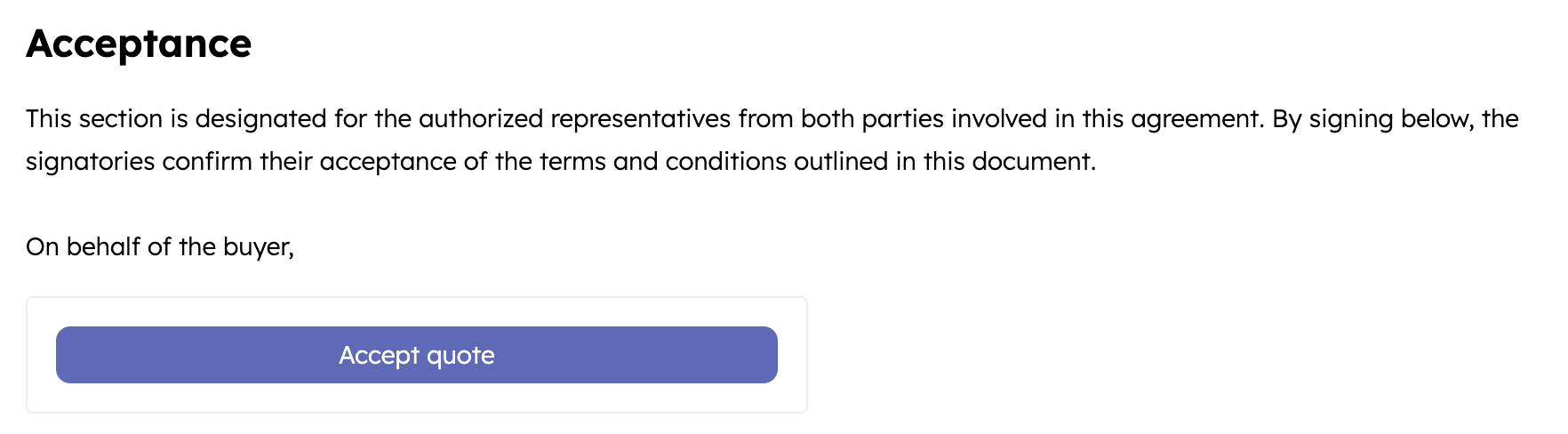
* `clickwrap`: renders a button on the quote to allow the buyer to accept by clicking (no signature).

<Frame>
  <img src="https://digitalmarketingkickoff.hubspot.es/hubfs/Knowledge_Base_2023-24-25/developer/quote-acceptance-setting-clickwrap.png" alt="Screenshot of the clickwrap option rendering on a quote template in HubSpot" />
</Frame>

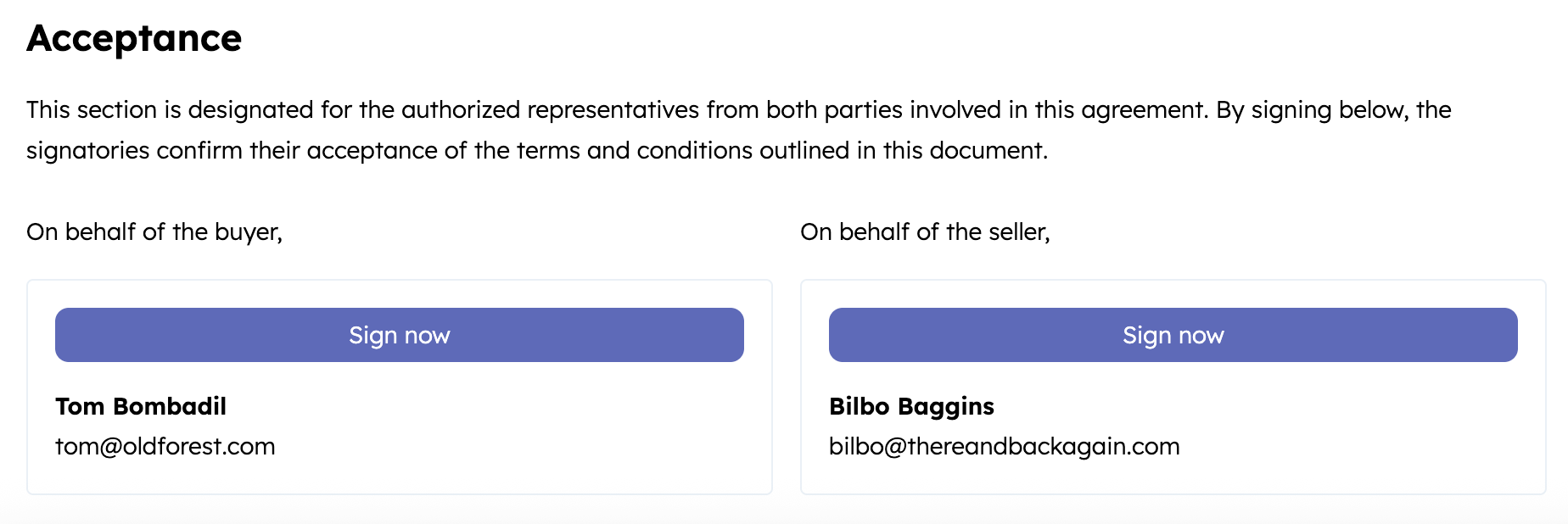
* `esignature`: renders a button on the quote that triggers an e-signature flow. This option requires at least one buyer contact to be associated with the quote as a signer. You can add one or more countersigners via the HubSpot UI to capture seller signatures.

<Frame>
  <img src="https://digitalmarketingkickoff.hubspot.es/hubfs/Knowledge_Base_2023-24-25/developer/quote-acceptance-setting-esignature.png" alt="Screenshot of the esignature option rendering on a quote template in HubSpot" />
</Frame>

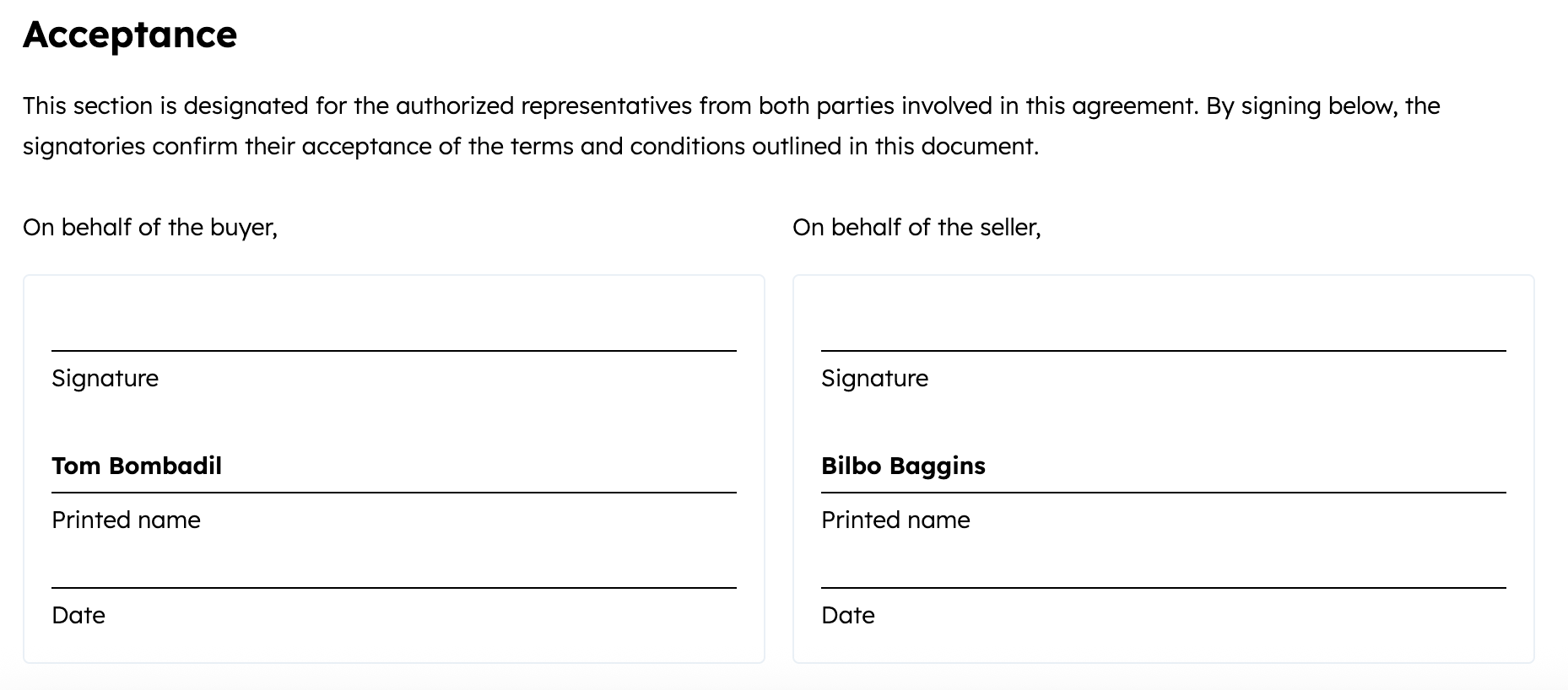
* `print_and_sign` (default): renders fields intended for printing and signing. This option requires at least one buyer contact to be associated with the quote as a signer. You can add one or more countersigners via the HubSpot UI to capture seller signatures.

<Frame>
  <img src="https://digitalmarketingkickoff.hubspot.es/hubfs/Knowledge_Base_2023-24-25/developer/quote-acceptance-setting-print-and-sign.png" alt="Screenshot of the print_and_sign option rendering on a quote template in HubSpot" />
</Frame>

<Warning>
  **Please note:**

  A quote with e-sign enabled can't be published if the account has exceeded its [monthly e-signature limit](https://knowledge.hubspot.com/quotes/use-e-signatures-with-quotes#monitor-e-signature-usage).
</Warning>

### Enable payments

If you’ve set up [HubSpot payments](https://knowledge.hubspot.com/payment-processing/set-up-payments) or [Stripe payment processing](https://knowledge.hubspot.com/payment-processing/connect-your-stripe-account-as-a-payment-processor-in-hubspot), the quote will automatically be configured to be payable through your connected payment processor. Payment details are configured by a set of default properties, which you can update as needed.

```json theme={null}
{
  "properties": {
    "hs_title": "Quote with CC payment",
    "hs_expiration_date": "2026-09-30",
    "hs_template_type": "CPQ_QUOTE",
    "hs_acceptance_method": "clickwrap",
    "hs_billing_enabled": true,
    "hs_payment_enabled": true,
    "hs_payment_type": "HUBSPOT",
    "hs_allowed_payment_methods":"CREDIT_OR_DEBIT_CARD",
    "hs_collect_billing_address": true
  }
}
```

| Parameter                     | Type        | Description                                                                                                                                                                                                                                                                                                                                            |
| ----------------------------- | ----------- | ------------------------------------------------------------------------------------------------------------------------------------------------------------------------------------------------------------------------------------------------------------------------------------------------------------------------------------------------------ |
| `hs_payment_enabled`          | Boolean     | By default, this will be set to `true` with a connected payment processor, which enables the quote to collect payment using either HubSpot payments or Stripe payment processing.                                                                                                                                                                      |
| `hs_billing_enabled`          | Boolean     | By default, this will be set to `true` with a connected payment processor, which enables HubSpot to automatically create invoices and subscriptions for the transaction. When set to `true`, `hs_payment_enabled` must also be `true`.                                                                                                                 |
| `hs_payment_type`             | Enumeration | Determines which payment processor to use. Automatically set by HubSpot based on the account's payment processor. Value can be either `HUBSPOT` or `BYO_STRIPE`.                                                                                                                                                                                       |
| `hs_payment_status`           | Enumeration | The status of payment collection, if you've enabled payments. Upon publishing with payments enabled, this property will be set to `PENDING`. Once the buyer submits payment through the quote, the status will automatically update accordingly. Learn more about [enabling payments](/api-reference/latest/crm/objects/quotes/guide#enable-payments). |
| `hs_allowed_payment_methods`  | Enumeration | The payment methods to be used. By default, this will be set to the payment methods configured for the account. Can be one of: `ACH`, `CREDIT_OR_DEBIT_CARD`, `SEPA`, `BACS`, `PADS`.                                                                                                                                                                  |
| `hs_collect_billing_address`  | Boolean     | When set to `true`, allows the buyer to enter their billing address during checkout.                                                                                                                                                                                                                                                                   |
| `hs_collect_shipping_address` | Boolean     | When set to `true`, allows the buyer to enter their shipping address during checkout.                                                                                                                                                                                                                                                                  |

## Quote associations

For a quote to be published and shared externally, it must include line item, contact, and deal associations. For quotes that require [signatures](#enable-e-signatures), you'll also need to associate a signing contact. You can set these associations either when creating the quote or by updating it via the associations API.

By default, setting a quote's `hs_template_type` to `CPQ_QUOTE` will automatically create the quote using the default quote template. However, you can specify a different template at the time of creation if needed. The quote template's properties, content, and associations will be added to the quote as supplemental information, with properties set on the quote overriding the quote template's settings. Learn more about [setting associations when creating a quote](#set-associations-when-creating-a-quote).

Below are the associations available for quotes.

| Object type                                                                            | Type ID | Description                                                                                                                                                                                                                                                                                                                                                                                                                                         |
| -------------------------------------------------------------------------------------- | ------- | --------------------------------------------------------------------------------------------------------------------------------------------------------------------------------------------------------------------------------------------------------------------------------------------------------------------------------------------------------------------------------------------------------------------------------------------------- |
| [Line items](/api-reference/latest/crm/objects/line-items/guide) <RequiredIndicator /> | `67`    | The goods and/or services being sold through the quote. You can create line items from [products in your product library](/api-reference/latest/crm/objects/products/guide) or create custom standalone line items. <Warning>**Please note:** line items associated with a quote should be distinct from the line items associated with other objects, such as deals. Reusing line items across objects can lead to unexpected behavior. </Warning> |
| [Deal](/api-reference/latest/crm/objects/deals/guide) <RequiredIndicator />            | `64`    | The deal record for tracking revenue and sales lifecycle. A quote inherits values from the associated deal, including the owner and currency. Each quote can be associated with one deal.                                                                                                                                                                                                                                                           |
| [Contact](/api-reference/latest/crm/objects/contacts/guide) <RequiredIndicator />      | `69`    | Specific buyers that you're addressing in the quote.                                                                                                                                                                                                                                                                                                                                                                                                |
| [Contact (signer)](/api-reference/latest/crm/objects/contacts/guide)                   | `702`   | Specifies the contact whose signature is required on the quote. This association is required if the quote requires a [signature](#enable-e-signatures).                                                                                                                                                                                                                                                                                             |
| [Company](/api-reference/latest/crm/objects/companies/guide)                           | `71`    | A specific company that you're addressing in the quote. Each quote can be associated with one company.                                                                                                                                                                                                                                                                                                                                              |
| [Quote template](#quote-templates)                                                     | `286`   | The template that renders the quote. This association can only be set at the time of creation. The quote template's properties, content, and associations will be added to the quote as supplemental information, with properties set on the quote overriding the quote template's settings.                                                                                                                                                        |

### Set associations when creating a quote

To set associations when creating a quote, include the `associations` array in the request body. For each CRM object you're associating with the quote, you'll include an object with association details, such as the ID of the CRM record and the ID of the association type.

For example, the request body below would create a quote that's associated with a contact, a deal, and a line item. A list of association type IDs for the available CRM object associations is provided in the table below the code sample.

```json theme={null}
{
  "properties": {
    "hs_title": "My quote",
    "hs_expiration_date": "2026-09-30",
    "hs_template_type": "CPQ_QUOTE"
  },
  "associations": [
    {
      "to": {
        "id": 123456789
      },
      "types": [
        {
          "associationCategory": "HUBSPOT_DEFINED",
          "associationTypeId": 69
        }
      ]
    },
    {
      "to": {
        "id": 28973222148
      },
      "types": [
        {
          "associationCategory": "HUBSPOT_DEFINED",
          "associationTypeId": 64
        }
      ]
    },
    {
      "to": {
        "id": 24417508135
      },
      "types": [
        {
          "associationCategory": "HUBSPOT_DEFINED",
          "associationTypeId": 67
        }
      ]
    }
  ]
}
```

### Associating after creation

To configure associations for an existing quote, make a `POST` request to the following [associations API](/api-reference/latest/crm/associations/associate-records/guide#associate-records) endpoint for each association:

`/crm/objects/2026-03/quote/{quoteId}/associations/default/{toObjectType}/{toObjectId}`

| Parameter      | Description                                                           |
| -------------- | --------------------------------------------------------------------- |
| `quoteId`      | The ID of the quote.                                                  |
| `toObjectType` | The type of CRM object to associate with the quote (e.g., `contact`). |
| `toObjectId`   | The ID of the CRM record to associate with.                           |

For example, the following request would associate a quote that has an ID of `1234567` with a contact that has an ID of `8675309`:

`/crm/objects/2026-03/quote/1234567/associations/default/contact/8675309`

<Warning>
  **Please note:** you can only associate a quote template with a quote at the time of creation.
</Warning>

## Quote templates

Quote templates can be [created and customized in the HubSpot UI](https://knowledge.hubspot.com/quotes/set-up-quotes#customize-quotes-with-branding-and-templates). When creating a  quote via the API, you can specify a quote template to use by associating it with the quote at the time of creation.

The quote template's properties, content, and associations will be added to the quote as supplemental information, with properties set on the quote overriding the quote template's settings.

There are multiple ways to retrieve the ID of a quote template:

* [Retrieve via the quote template editor in HubSpot](#retrieve-an-id-from-the-quote-template-editor)
* [Retrieve all quote templates via the API](#retrieve-all-quote-templates-via-the-api)
* [Search for quote templates via the API](#search-for-quote-templates-via-the-api)

### Retrieve an ID from the quote template editor

To find the ID of a quote template in HubSpot, navigate to the [quote template editor](https://knowledge.hubspot.com/quotes/customize-quote-branding), then copy the second number in the URL (the number that is <u>not</u> your HubID):

<Frame>
  <img src="https://digitalmarketingkickoff.hubspot.es/hubfs/Knowledge_Base_2023-24-25/KB-quotes/quote-template-id.png" alt="Screenshot of the quote template ID in the URL of the quote template editor in HubSpot" />
</Frame>

### Retrieve all quote templates via the API

To retrieve all quote templates from an account, make a `GET` request to `/crm/objects/2026-03/quote_templates?properties=hs_type`.
<Tip>
  The `properties=hs_type` query parameter adds the `hs_type` property of each template to the response. Compatible templates will have a `hs_type` property value of `cpq_template`.
</Tip>

**Example response:**

```json theme={null}
{
  "results": [
    {
      "id": "46470285449",
      "properties": {
        "hs_createdate": "2023-06-12T16:26:34.968Z",
        "hs_lastmodifieddate": "2023-06-12T16:26:34.968Z",
        "hs_object_id": "46470285449",
        "hs_type": "cpq_template"
      },
      "createdAt": "2023-06-12T16:26:34.968Z",
      "updatedAt": "2023-06-12T16:26:34.968Z",
      "archived": false,
      "url": "https://app.hubspot.com/contacts/123456/record/0-64/46470285449"
    }
  ]
}
```

### Search for quote templates via the API

To retrieve only the quote templates that are compatible with the CPQ system, make a `POST` request to `/crm/objects/2026-03/quote_templates/search`.

In the request body, include a filter for the `hs_type` property with a value of `cpq_template`, as shown below.

<Tabs>
  <Tab title="Request body">
    ```json theme={null}
    {
      "filterGroups": [
        {
          "filters": [
            {
              "propertyName": "hs_type",
              "operator": "CONTAINS_TOKEN",
              "value": "cpq_template"
            }
          ]
        }
      ]
    }
    ```
  </Tab>

  <Tab title="Response">
    ```json theme={null}
    {
      "total": 1,
      "results": [
        {
          "id": "46470285449",
          "properties": {
            "hs_createdate": "2023-06-12T16:26:34.968Z",
            "hs_lastmodifieddate": "2023-06-12T16:26:34.968Z",
            "hs_object_id": "46470285449",
            "hs_type": "cpq_template"
          },
          "createdAt": "2023-06-12T16:26:34.968Z",
          "updatedAt": "2023-06-12T16:26:34.968Z",
          "archived": false,
          "url": "https://app.hubspot.com/contacts/123456/record/0-64/46470285449"
        }
      ]
    }
    ```
  </Tab>
</Tabs>

### Editing template source code

Using the [quote template editor](https://knowledge.hubspot.com/quotes/customize-quote-branding#create-templates) in HubSpot, you can edit the source code of rich text template sections, such as the *Acceptance* section. This gives you the ability to add custom code to the template.

<Warning>
  **Please note:** using HubL in rich text areas is not recommended, as HubL code will not render or populate data until the quote is published. While editing the template or quote, the HubL output will not be visible.
</Warning>

To edit the source code of a quote template:

* In your HubSpot account, click the **Settings** icon.
* In the left sidebar menu, navigate to **Objects** > **Quotes**.
* Click the **Quote templates** tab.
* Click the **name** of the template that you want to edit.
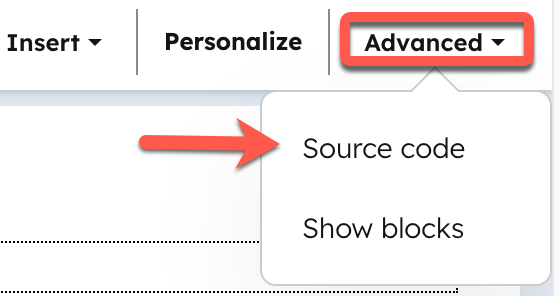
* In the editor, click into a rich text section, such as the *Cover letter*, *Executive summary*, or *Acceptance* section. Then, in the top bar, click **Advanced** > **Source code**.

<Frame>
  <img width="300" src="https://developers.hubspot.com/hubfs/Knowledge_Base_2023-24-25/KB-quotes/quote-template-editor-source-code.png" alt="Screenshot of the quote template editor in HubSpot with the source code option highlighted" />
</Frame>

* Add your custom code, then click **Save changes**.

## Quote properties

Below is a list of available default quote properties. To fetch all available quote properties from a given account, make a `GET` request to `crm/properties/2026-03/quotes`. Learn more about the [properties API](/api-reference/latest/crm/properties/guide).

<Info>
  The following properties are <u>only</u> supported in legacy quotes:

  * `hs_esign_enabled` (replaced by `hs_acceptance_method`)
  * `hs_show_signature_box` (replaced by `hs_acceptance_method`)
  * `hs_proposal_*` (e.g., `hs_proposal_domain`)
</Info>

The properties below can only be used with quotes, not legacy quotes.

<div className="compact-table-wrapper">
  | Property                                        | Type        | Description                                                                                                                                                                                                                                                                                                                                                                                                                                                                                                                         |
  | ----------------------------------------------- | ----------- | ----------------------------------------------------------------------------------------------------------------------------------------------------------------------------------------------------------------------------------------------------------------------------------------------------------------------------------------------------------------------------------------------------------------------------------------------------------------------------------------------------------------------------------- |
  | `hs_acceptance_method`                          | Enumeration | The acceptance method of the quote. Can be one of: <ul><li>`clickwrap`: click to accept</li><li>`esignature`: enables e-sign</li><li>`print_and_sign`: for manual signatures </li></ul>                                                                                                                                                                                                                                                                                                                                             |
  | `hs_billing_enabled`                            | Boolean     | Set to `true` to enable automatic invoice and subscription creation.                                                                                                                                                                                                                                                                                                                                                                                                                                                                |
  | `hs_clickwrap_accepted_by`                      | String      | The name or identifier of the individual who accepted the quote via clickwrap (i.e., without providing a handwritten or electronic signature).                                                                                                                                                                                                                                                                                                                                                                                      |
  | `hs_collection_process`                         | Enumeration | Set to `AUTO_PAYMENTS` to charge invoices using the customer's payment method automatically on each billing date.                                                                                                                                                                                                                                                                                                                                                                                                                   |
  | `hs_contract_effective_start_date`              | Date        | Contract effective start date.                                                                                                                                                                                                                                                                                                                                                                                                                                                                                                      |
  | `hs_contract_effective_start_date_type`         | Enumeration | How the effective start date of a contract is determined. Can be one of: <ul><li>`ON_AGREEMENT`: the contract becomes effective on the date both parties agree, with signing being optional to indicate acceptance.</li><li>`CUSTOM`: allows for specifying a fixed custom start date for the contract.</li><li>`DELAYED_BY_DAYS`: the effective start date is delayed by a set number of days post-agreement.</li><li>`DELAYED_BY_MONTHS`: the effective start date is delayed by a set number of months post-agreement.</li></ul> |
  | `hs_contract_effective_start_delayed_by_days`   | Number      | The number of days that the contract's effective start date is delayed by.                                                                                                                                                                                                                                                                                                                                                                                                                                                          |
  | `hs_contract_effective_start_delayed_by_months` | Number      | The number of months that the contract's effective start date is delayed by.                                                                                                                                                                                                                                                                                                                                                                                                                                                        |
  | `hs_cover_letter`                               | String      | The cover letter presented on the quote.                                                                                                                                                                                                                                                                                                                                                                                                                                                                                            |
  | `hs_net_payment_terms`                          | Number      | The period in days in which a buyer must make a full payment.                                                                                                                                                                                                                                                                                                                                                                                                                                                                       |

  ### Properties set by quote state

  Updating the quote’s state will update the following properties:

  | Property                    | Type        | Description                                                                                                                                                                                                                                                    |
  | --------------------------- | ----------- | -------------------------------------------------------------------------------------------------------------------------------------------------------------------------------------------------------------------------------------------------------------- |
  | `hs_quote_amount`           | Number      | The total amount due for the quote. This can be either total contract value or the amount due at checkout depending on the account's [default quote value setting](https://knowledge.hubspot.com/quotes/set-up-quotes#set-the-default-quote-value).            |
  | `hs_domain`                 | String      | Domain this quote should be served from. By default, this will be set to the domain that's configured as the primary quotes domain. Learn more about [setting up quotes](https://knowledge.hubspot.com/quotes/set-up-quotes#configure-general-quote-settings). |
  | `hs_slug`                   | String      | The URL path that the quote will be served from.                                                                                                                                                                                                               |
  | `hs_quote_total_preference` | Enumeration | The line item property that will be used to calculate `hs_quote_amount`.                                                                                                                                                                                       |
  | `hs_timezone`               | String      | The time zone for displaying dates on the quote.                                                                                                                                                                                                               |
  | `hs_locale`                 | String      | The locale for displaying this quote publicly.                                                                                                                                                                                                                 |
  | `hs_quote_number`           | String      | Reference number shown on quote document.                                                                                                                                                                                                                      |
  | `hs_language`               | String      | The language for displaying this quote publicly.                                                                                                                                                                                                               |
  | `hs_currency`               | String      | Currency code for the quote.                                                                                                                                                                                                                                   |

  Additionally, the properties below will be calculated when the quote is published.

  | Property                        | Type        | Description                                                                                                                                                                                                                                                                                                                                            |
  | ------------------------------- | ----------- | ------------------------------------------------------------------------------------------------------------------------------------------------------------------------------------------------------------------------------------------------------------------------------------------------------------------------------------------------------ |
  | `hs_pdf_download_link`          | String      | Populated with a URL of a PDF for the quote.                                                                                                                                                                                                                                                                                                           |
  | `hs_locked`                     | Boolean     | Set to `true`. To modify any properties after you've published a quote, you must first update the `hs_status` of the quote back to `DRAFT`, `PENDING_APPROVAL`, or `REJECTED`.                                                                                                                                                                         |
  | `hs_quote_link`                 | String      | The quote's publicly accessible URL. This is a read-only property and cannot be set through the API after publishing.                                                                                                                                                                                                                                  |
  | `hs_esign_num_signers_required` | Number      | If you've [enabled e-signatures](#enable-e-signatures), displays the number of signatures required.                                                                                                                                                                                                                                                    |
  | `hs_payment_status`             | Enumeration | The status of payment collection, if you've enabled payments. Upon publishing with payments enabled, this property will be set to `PENDING`. Once the buyer submits payment through the quote, the status will automatically update accordingly. Learn more about [enabling payments](/api-reference/latest/crm/objects/quotes/guide#enable-payments). |
</div>