> ## Documentation Index
> Fetch the complete documentation index at: https://developers.hubspot.com/docs/llms.txt
> Use this file to discover all available pages before exploring further.

---
id: 7b63fc36-e1c8-45eb-a18c-c22432514a21
---

# Send custom event occurrences

> Custom events allow you to track advanced activity via a JavaScript or HTTP API. The Events API can be used to get details about your events.

export const Tag = ({children, type = 'default', className = ''}) => {
  return <span className={`tag tag-${type} ${className}`.trim()}>
      {children}
    </span>;
};

export const SupportedProducts = ({marketing, sales, service, cms, data, commerce, marketingLevel, salesLevel, serviceLevel, cmsLevel, dataLevel, commerceLevel}) => {
  const translations = {
    description: "Requires one of the following products or higher.",
    productNames: {
      marketing: "Marketing Hub",
      sales: "Sales Hub",
      service: "Service Hub",
      cms: "Content Hub",
      data: "Data Hub",
      commerce: "Revenue Hub"
    },
    tiers: {
      free: "Free",
      starter: "Starter",
      professional: "Professional",
      enterprise: "Enterprise"
    }
  };
  const translateTier = tier => {
    if (!tier) return '';
    const lowerTier = tier.toLowerCase();
    return translations.tiers[lowerTier] || tier;
  };
  const products = [{
    name: marketing ? translations.productNames.marketing : '',
    level: translateTier(marketingLevel),
    icon: "https://mintlify-assets.b-cdn.net/Icons/marketing-bolt.svg",
    alt: "Marketing Hub"
  }, {
    name: sales ? translations.productNames.sales : '',
    level: translateTier(salesLevel),
    icon: "https://mintlify-assets.b-cdn.net/Icons/sales-star.svg",
    alt: "Sales Hub"
  }, {
    name: service ? translations.productNames.service : '',
    level: translateTier(serviceLevel),
    icon: "https://mintlify-assets.b-cdn.net/Icons/service-heart.svg",
    alt: "Service Hub"
  }, {
    name: cms ? translations.productNames.cms : '',
    level: translateTier(cmsLevel),
    icon: "https://mintlify-assets.b-cdn.net/Icons/content-play.svg",
    alt: "Content Hub"
  }, {
    name: data ? translations.productNames.data : '',
    level: translateTier(dataLevel),
    icon: "https://developers.hubspot.com/hubfs/Knowledge_Base_2023-24-25/subscription_key_icons/operations_icon.svg",
    alt: "Data Hub"
  }, {
    name: commerce ? translations.productNames.commerce : '',
    level: translateTier(commerceLevel),
    icon: "https://developers.hubspot.com/hubfs/Knowledge_Base/subscription_key_icons/commerce_icon.svg",
    alt: "Revenue Hub"
  }].filter(product => product.name && product.level);
  if (products.length === 0) return null;
  return <div>
      <div className="text-sm mb-2">{translations.description}</div>
      <div className={`grid ${products.length === 1 ? 'grid-cols-1' : 'grid-cols-2'} gap-1.5`}>
        {products.map((product, index) => <div key={index} style={{
    display: 'flex',
    alignItems: 'center'
  }}>
            <img src={product.icon} alt={product.alt} className="w-3.5 h-3.5 mr-1.5 mt-2.5 mb-2.5 flex-shrink-0 align-middle" />
            <span className="font-medium mr-1 text-sm">{product.name} -</span>
            <span className="text-sm">{product.level}</span>
          </div>)}
      </div>
    </div>;
};

export const ScopesList = ({scopes = [], description = "This API requires one of the following scopes:"}) => {
  if (!scopes || scopes.length === 0) {
    return null;
  }
  const sortedScopes = scopes.sort((a, b) => a.localeCompare(b));
  return <div>
      <div className="text-sm mb-2">{description}</div>
      <div>
        {sortedScopes.map((scope, index) => <div key={index}>
            <code>
              <span className="text-xs">{scope}</span>
            </code>
          </div>)}
      </div>
    </div>;
};

<AccordionGroup>
  <Accordion title="Supported products" defaultOpen="true" icon="cubes">
    <SupportedProducts marketing={true} sales={true} service={true} cms={true} data={true} marketingLevel="professional" salesLevel="professional" serviceLevel="professional" cmsLevel="professional" dataLevel="professional" />
  </Accordion>

  <Accordion title="Scope requirements">
    <ScopesList
      scopes={[
  'analytics.behavioral_events.send'
]}
    />
  </Accordion>
</AccordionGroup>

Custom events are account-defined events that track what occurred at specific moments in time, often related to user activity and behavior. An individual instance of a custom event is called an event occurrence. For example, you created a custom event that tracks logins to your app. Each individual login is an occurrence of that event. An event occurrence includes values for event properties that tell you more about the occurrence, such as the date and time it occurred, the browser it occurred in, or from which referring URL.

Below, learn how to use the API to send or retrieve custom event occurrence data.

## Define the custom event

To send event occurrence data to HubSpot, you first need to define the event. You can define events using the [custom event definition API](/api-reference/latest/events/define-events/guide) or if you have an *Enterprise* subscription, [create the event in HubSpot](https://knowledge.hubspot.com/analytics-tools/create-codeless-custom-behavioral-events).

Once you’ve set up your custom event, you can send data to it through the API or by [customizing your HubSpot tracking code](/api-reference/latest/account/settings/tracking-code/overview).

## Send event occurrence data

To send event data to HubSpot, make a `POST` request to `/events/2026-03/send` with your event data in the request body. Before sending event data, review the [limits](#limits) below, as exceeding these limits will result in an error.

| Parameter                                                                                               | Type   | Description                                                                                                                                                                                                                                                                                                                                                                   |
| ------------------------------------------------------------------------------------------------------- | ------ | ----------------------------------------------------------------------------------------------------------------------------------------------------------------------------------------------------------------------------------------------------------------------------------------------------------------------------------------------------------------------------- |
| `eventName` <Tag type="error">Required</Tag>                                                            | String | The fully qualified name of the event (`fullyQualifiedName`). You can find this by [querying your existing event definitions](/api-reference/latest/events/define-events/guide#get-existing-event-definitions) or [within the HubSpot app](https://knowledge.hubspot.com/reports/create-custom-events#find-internal-name). The value will be formatted as `pe{HubID}_{name}`. |
| `objectId` (or other [identifier](#link-event-occurrences-to-records)) <Tag type="error">Required</Tag> | String | An identifying value for the record with which to associate the event occurrence. Learn more about the [identifier options to associate records with event occurrences](#link-event-occurrences-to-records).                                                                                                                                                                  |
| `occurredAt`                                                                                            | String | By default, HubSpot sets the event occurrence timestamp to the time the request was sent. To specify the time of an event occurrence (e.g., backdating event data), include a [ISO 8601 string or UNIX-formatted timestamp in milliseconds](/api-reference/latest/crm/properties/guide#add-values-to-date-and-datetime-properties) as the `occurredAt` value.                 |
| `properties`                                                                                            | Object | The event properties to set or update. Learn more about [custom event properties](/api-reference/latest/events/define-events/guide#manage-properties-in-event-definitions).                                                                                                                                                                                                   |

For example, to send information about a login occurrence, with details about the location, source, and device, your request could look like:

```json theme={null}
{
  "eventName": "pe1234567_login_event",
  "objectId": "608051",
  "properties": {
    "hs_city": "Cambridge",
    "hs_country": "United States",
    "hs_page_id": "53005768010",
    "hs_page_content_type": "LANDING_PAGE",
    "hs_device_type": "PDA;Smartphone",
    "hs_touchpoint_source": "DIRECT_TRAFFIC"
  }
}
```

### Link event occurrences to records

A unique identifier is a property that differentiates one record in the CRM from another, even if they have otherwise identical information. To identify which record to link to an event occurrence, you must include a unique value in your request to send an event occurrence.

The options for unique identifiers are included in the table below, from highest to lowest priority. The priority order refers to the order in which values will be checked for a matching record if you've included multiple identifying values.

| Field                       | Priority | Description                                                                                                                                                                                                                                                                                                                                                                                                                                                                                                                                         |
| --------------------------- | -------- | --------------------------------------------------------------------------------------------------------------------------------------------------------------------------------------------------------------------------------------------------------------------------------------------------------------------------------------------------------------------------------------------------------------------------------------------------------------------------------------------------------------------------------------------------- |
| `customMatchingId` property | 1        | An event property that uniquely identifies an object record via a matching ID. To use this method, include the `eventPropertyName` property in the `properties` field, with the object record's value for the `targetObjectPropertyName`. This is set up when [defining a custom event](/api-reference/latest/events/define-events/guide#define-a-custom-event). You can [retrieve a custom event definition](/api-reference/latest/events/define-events/guide#get-existing-event-definitions) to confirm if there's a custom matching ID property. |
| `objectId`                  | 2        | The [record ID](/guides/crm/understanding-the-crm#unique-identifiers-and-record-ids) (recommended).                                                                                                                                                                                                                                                                                                                                                                                                                                                 |
| `email`                     | 3        | The contact email address (contacts only).                                                                                                                                                                                                                                                                                                                                                                                                                                                                                                          |
| `utk`                       | 4        | The [contact usertoken](/api-reference/latest/account/settings/tracking-code/overview#how-do-identities-work) (contacts only).                                                                                                                                                                                                                                                                                                                                                                                                                      |

Review the requests below for examples of using identifiers.

<Tabs>
  <Tab title="By objectId">
    ```json theme={null}
    {
      "eventName": "pe1234567_login_event",
      "objectId": "608051",
      "properties": {
        "hs_city": "Cambridge",
        "hs_country": "United States",
        "hs_page_id": "53005768010"
        }
    }
    ```
  </Tab>

  <Tab title="By customMatchingId">
    ```json theme={null}
    {
      "eventName": "pe1234567_login_event",
      "properties": {
        "hs_city": "Cambridge",
        "hs_country": "United States",
        "hs_page_id": "53005768010",
        "example_custom_matching_property": "12345"
        }
    }
    ```
  </Tab>

  <Tab title="By email">
    ```json theme={null}
    {
      "eventName": "pe1234567_login_event",
      "email": "test@hubspot.com",
      "properties": {
        "hs_city": "Cambridge",
        "hs_country": "United States",
        "hs_page_id": "53005768010"
        }
    }
    ```
  </Tab>
</Tabs>

## Retrieve event occurrence data

To [retrieve event data](/api-reference/latest/events/retrieve-events/get-events), make a `GET` request to `/events/event-occurrences/2026-03`.

* To return all event occurrences for a specific event, include the `eventType` parameter along with the internal event name (e.g., `pe123456_custom_event`). You can retrieve all event types using the [event analytics API](/api-reference/latest/events/retrieve-events/get-event-types).
* To return event occurrences for a specific record, include the `objectType` parameter along with either the `objectId` or `objectProperty.<property>` parameters. The `objectType` specifies the type of object (e.g., `contact`), while the other parameters specify the unique identifier value for the record (either record ID or `email` for contacts). For example, to retrieve all events that occurred for a specific contact, your request URL could be  `/events/event-occurrences/2026-03?objectType=contact&objectId=111111` or `/events/event-occurrences/2026-03?objectType=contact&objectProperty.email=bilbo@shire.com`.
* To filter the results by event occurrences with a specific event property value, include the `property.<propertyName>` parameter. For example, to retrieve page visit events for your home page, your request URL might be: `/events/event-occurrences/2026-03?eventType=e_visited_page&property.hs_page_title=home`

<Info>
  For property values with spaces, replace the spaces with either `%20` or `+`.
  For example: `property.hs_page_title=home+page`.
</Info>

## Set and update event properties

Event occurrence data is stored in event properties. Event properties may include [default event properties](/api-reference/latest/events/define-events/guide#hubspot’s-default-event-properties) and [custom-defined properties](/api-reference/latest/events/define-events/guide#define-new-properties).

When sending event data, include a `properties` object with key-value pairs for the properties you want to update along with the property values to store. The types of values you send depend on the type of event property. Refer to the [table of supported event property types](/api-reference/latest/events/define-events/guide#define-new-properties) when formatting property values.

```json theme={null}
"properties": {
    "property1": "string",
    "property2": "string",
    "property3": "string"
  }
```

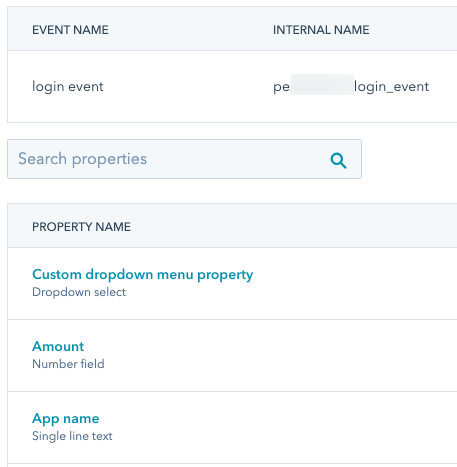
To view a custom event's properties and their types, you can:

* For default event properties, review the [table of default properties and their types](/api-reference/latest/events/define-events/guide#hubspot’s-default-event-properties).
* [Retrieve the custom object definition](/api-reference/latest/events/define-events/guide#get-existing-event-definitions) with the `includeProperties` parameter set to `true`.
* View a custom event's available properties in your HubSpot account:
  * Navigate to **Data Management** > **Custom Events**.
  * In the table, click the **name** of the event.
  * At the top, click the **Properties** tab.
  * In the properties table, view the property type under the name of the property.

<Frame>
  <img src="https://www.hubspot.com/hubfs/Knowledge_Base_2021/Developer/custom-event-properties-table.png" alt="custom-event-properties-table" />
</Frame>

## Limits

When [sending event data](#send-event-occurrence-data), exceeding any of the following limits will result in a failed request.

* The property label and internal name are limited to 50 characters.
* URL and referrer properties can receive up to 1,024 characters, while all other properties can receive up to 256 characters.
* Each event occurrence can contain data for up to 50 properties.
* Property internal names must start with a letter and contain only lowercase letters a-z, numbers 0-9, and underscores.
* Properties with the same internal name after lowercasing are considered duplicates, and only one of the properties will be used on occurrence. HubSpot will sort in ascending lexicographical order and keep the last property seen among the first 50 properties.

The following limits also apply to the custom event endpoints:

* There is a limit of 500 unique event definitions per account.
* There is a limit of 30 million event occurrences per month.
* The [send custom event occurrences](/api-reference/latest/events/send-event-data/batch-send-occurrences) endpoint supports up to 1250 requests per second.
* The [custom event occurrence batch](/api-reference/latest/events/send-event-data/batch-send-occurrences) endpoint supports batches of 500.

## Attribution reporting

JavaScript events such as [clicked element](https://knowledge.hubspot.com/analytics-tools/create-codeless-custom-behavioral-events) and [visited URL](https://knowledge.hubspot.com/analytics-tools/create-codeless-custom-behavioral-events) events are automatically populated with asset type and interaction data for attribution reporting. To include the same data for manually tracked events, you'll need to manually include the data in the request body using event properties. Learn more about [analyzing custom events](https://knowledge.hubspot.com/analytics-tools/analyze-custom-behavioral-events).

Below, learn about the available values for asset types and interaction sources, along with example requests.

### Asset type

To attribute a specific asset type to a custom behavioral event request, include the `hs_page_content_type` property in the request body. For example:

```json theme={null}
{
  "eventName": "pe1234567_manually_tracked_event",
  "properties": {
    "hs_page_id": "53005768010",
    "hs_page_content_type": "LANDING_PAGE"
  },
  "objectId": "6091051"
}
```

<Info>
  You can also use the `hs_asset_type` property. If both `hs_page_content_type` and `hs_asset_type` are included in one request, `hs_page_content_type` will override the `hs_asset_type` value.
</Info>

HubSpot's standard content types, such as landing pages and blog posts, can be represented with the following values:

| Value               | Description                                   |
| ------------------- | --------------------------------------------- |
| `STANDARD_PAGE`     | An interaction with a website page.           |
| `LANDING_PAGE`      | An interaction with a landing page.           |
| `BLOG_POST`         | An interaction with a blog post.              |
| `KNOWLEDGE_ARTICLE` | An interaction with a knowledge base article. |

For all other types of assets, use the following values:

| Value                          | Description                                                                                      |
| ------------------------------ | ------------------------------------------------------------------------------------------------ |
| `AD`                           | An interaction with an ad, such as a Facebook or Google ad.                                      |
| `CALL`                         | An interaction with a call.                                                                      |
| `CONTACT_IMPORT`               | An interaction via a contact import.                                                             |
| `CONVERSATION`                 | An interaction related to a HubSpot conversation.                                                |
| `CUSTOM_BEHAVIORAL_EVENT_NAME` | The internal name of a custom event, such as `pe123456_manually_tracked_event`.                  |
| `EMAIL`                        | An interaction with an email.                                                                    |
| `EXTERNAL_PAGE`                | An interaction with an external page.                                                            |
| `INTEGRATIONS`                 | An interaction via an integration.                                                               |
| `MARKETING_EVENT`              | An interaction with a [marketing event](/api-reference/latest/marketing/marketing-events/guide). |
| `MEDIA_BRIDGE`                 | An interaction via the [media bridge](/api-reference/latest/cms/media-bridge/guide).             |
| `MEETING`                      | An interaction with a meeting.                                                                   |
| `SALES_EMAIL`                  | An interaction with a 1:1 sales email.                                                           |
| `SEQUENCE`                     | An interaction with a sequence.                                                                  |
| `SOCIAL_POST`                  | An interaction with a social media post.                                                         |
| `OTHER`                        | An interaction with an asset not in one of the above categories.                                 |

### Asset title

To attribute a custom event to an asset, include the `hs_page_title` or `hs_asset_title` property in your request with the name of the asset formatted as a string. For example:

`hs_page_title:`

```json theme={null}
{
  "eventName": "pe1234567_manually_tracked_event",
  "properties": {
    "hs_page_title": "Sweepstakes Sign Up",
    "hs_page_content_type": "LANDING_PAGE"
  },
  "objectId": "6091051"
}
```

### Interaction sources

To attribute a custom behavioral event to a specific source, include the `hs_touchpoint_source` property in your request with one of the following values:

| Value             | Description                                                                                            |
| ----------------- | ------------------------------------------------------------------------------------------------------ |
| `CONVERSATION`    | The interaction source is a conversation.                                                              |
| `DIRECT_TRAFFIC`  | The interaction source is direct traffic.                                                              |
| `EMAIL_MARKETING` | The interaction source is a marketing email.                                                           |
| `HUBSPOT_CRM`     | The interaction source is the HubSpot CRM.                                                             |
| `INTEGRATION`     | The interaction source is an integration.                                                              |
| `MARKETING_EVENT` | The interaction source is a [marketing event](/api-reference/latest/marketing/marketing-events/guide). |
| `OFFLINE`         | The interaction source is offline.                                                                     |
| `ORGANIC_SEARCH`  | The interaction source is organic search.                                                              |
| `OTHER_CAMPAIGNS` | The interaction source is from an uncategorized campaign.                                              |
| `PAID_SEARCH`     | The interaction source is a paid search ad.                                                            |
| `PAID_SOCIAL`     | The interaction source is a paid social ad.                                                            |
| `REFERRALS`       | The interaction source is a referral.                                                                  |
| `SALES`           | The interaction source is sales.                                                                       |
| `SOCIAL_MEDIA`    | The interaction source is social media (not a paid social ad).                                         |