> ## Documentation Index
> Fetch the complete documentation index at: https://developers.hubspot.com/docs/llms.txt
> Use this file to discover all available pages before exploring further.

---
id: 1563b750-570b-4907-9606-29398141f95e
---

# Workflows API

> Learn how to use the workflows v4 API.

export const PostmanCard = ({title, collectionId}) => {
  return <div className="card-condensed-cta">
      <Card title={title ? title : "Postman collection"} href={`https://app.getpostman.com/run-collection/${collectionId}`} horizontal={true} cta="Run in Postman" icon={<svg xmlns="http://www.w3.org/2000/svg" width={25} height={25} preserveAspectRatio="xMidYMid" viewBox="0 0 256 256">
              <path fill="#FF6C37" d="M254.953 144.253c8.959-70.131-40.569-134.248-110.572-143.206C74.378-7.912 10.005 41.616 1.047 111.619c-8.959 70.003 40.569 134.248 110.572 143.334 70.131 8.959 134.248-40.569 143.334-110.7Z" />
              <path fill="#FFF" d="m174.2 82.184-54.007 54.007-15.229-15.23c53.11-53.11 58.358-48.503 69.236-38.777Z" />
              <path fill="#FF6C37" d="M120.193 137.47c-.384 0-.64-.128-.895-.384l-15.358-15.229a1.237 1.237 0 0 1 0-1.792c54.007-54.006 59.638-48.887 71.028-38.649.255.256.383.512.383.896s-.128.64-.383.896l-54.007 53.878c-.128.256-.512.384-.768.384Zm-13.437-16.509 13.437 13.438 52.087-52.087c-9.47-8.446-15.87-11.006-65.524 38.65Z" />
              <path fill="#FFF" d="m135.679 151.676-14.718-14.718 54.007-54.006c14.46 14.59-7.167 38.265-39.29 68.724Z" />
              <path fill="#FF6C37" d="M135.679 152.956c-.384 0-.64-.128-.896-.384l-14.718-14.718c-.256-.256-.256-.512-.256-.896s.128-.64.384-.895L174.2 82.056a1.237 1.237 0 0 1 1.791 0 15.58 15.58 0 0 1 4.991 11.902c-.256 14.206-16.38 32.25-44.28 58.614-.383.256-.767.384-1.023.384Zm-12.926-15.998c8.19 8.319 11.646 11.646 12.926 12.926 21.5-20.476 42.36-41.464 42.488-55.926.128-3.327-1.152-6.655-3.327-9.214l-52.087 52.214Z" />
              <path fill="#FFF" d="m105.22 121.345 10.878 10.878c.256.256.256.512 0 .768-.128.128-.128.128-.256.128l-22.524 4.863c-1.152.128-2.175-.64-2.431-1.791-.128-.64.128-1.28.512-1.664l13.053-13.054c.256-.256.64-.384.768-.128Z" />
              <path fill="#FF6C37" d="M92.934 139.262c-1.92 0-3.327-1.536-3.327-3.455 0-.896.384-1.792 1.024-2.432l13.053-13.054c.768-.64 1.792-.64 2.56 0l10.878 10.878c.768.64.768 1.792 0 2.56-.256.256-.512.384-.896.512l-22.524 4.863c-.256 0-.512.128-.768.128Zm11.902-16.51-12.542 12.543c-.256.256-.383.64-.128 1.024.128.383.512.511.896.383l21.116-4.607-9.342-9.342Z" />
              <path fill="#FFF" d="M202.739 52.238c-8.191-7.935-21.373-7.679-29.307.64-7.935 8.318-7.679 21.372.64 29.306A20.678 20.678 0 0 0 199.155 85l-14.59-14.59 18.174-18.172Z" />
              <path fill="#FF6C37" d="M188.405 89.223c-12.158 0-22.012-9.854-22.012-22.012 0-12.158 9.854-22.012 22.012-22.012 5.631 0 11.134 2.176 15.23 6.143.255.256.383.512.383.896s-.128.64-.384.895L186.357 70.41l13.566 13.566c.512.512.512 1.28 0 1.792l-.256.256c-3.327 2.047-7.295 3.199-11.262 3.199Zm0-41.337c-10.75 0-19.452 8.703-19.324 19.453 0 10.75 8.702 19.452 19.452 19.324 2.944 0 5.887-.64 8.575-2.047l-13.438-13.31c-.256-.256-.384-.512-.384-.896s.128-.64.384-.895l17.149-17.15c-3.456-2.943-7.807-4.479-12.414-4.479Z" />
              <path fill="#FFF" d="m203.122 52.622-.255-.256-18.301 18.044 14.461 14.462c1.408-.896 2.816-1.92 3.967-3.072a20.51 20.51 0 0 0 .128-29.178Z" />
              <path fill="#FF6C37" d="M199.155 86.28c-.384 0-.64-.128-.896-.384l-14.589-14.59c-.256-.256-.384-.512-.384-.896s.128-.64.384-.895l18.173-18.173a1.237 1.237 0 0 1 1.791 0l.384.256c8.575 8.574 8.575 22.396.128 31.098-1.28 1.28-2.687 2.432-4.223 3.328-.384.128-.64.256-.768.256Zm-12.798-15.87 12.926 12.926c1.024-.64 2.048-1.536 2.816-2.304 7.294-7.294 7.678-19.196.64-26.875L186.357 70.41Z" />
              <path fill="#FFF" d="M176.375 84.488a7.879 7.879 0 0 0-11.134 0l-48.247 48.247 8.063 8.063 51.062-44.792c3.328-2.816 3.584-7.807.768-11.134-.256-.128-.384-.256-.512-.384Z" />
              <path fill="#FF6C37" d="M124.929 142.077c-.384 0-.64-.128-.896-.383l-8.063-8.063a1.237 1.237 0 0 1 0-1.792l48.247-48.247a9.115 9.115 0 0 1 12.926 0 9.115 9.115 0 0 1 0 12.926l-.384.384-51.063 44.792c-.128.255-.384.383-.767.383Zm-6.143-9.342 6.27 6.271 50.167-44.024c2.816-2.304 3.072-6.527.768-9.342-2.303-2.816-6.526-3.072-9.342-.768-.128.128-.256.256-.512.384l-47.351 47.48Z" />
              <path fill="#FFF" d="M80.009 187.637c-.512.256-.768.768-.64 1.28l2.175 9.214c.512 1.28-.256 2.816-1.663 3.2-1.024.384-2.176 0-2.816-.768l-14.077-13.95 45.943-45.943 15.87.256 10.75 10.75c-2.56 2.175-18.045 17.149-55.542 35.961Z" />
              <path fill="#FF6C37" d="M78.985 202.61c-1.024 0-2.048-.383-2.688-1.151l-13.95-13.95c-.255-.256-.383-.512-.383-.896 0-.383.128-.64.384-.895l45.944-45.944c.256-.256.64-.384.895-.384l15.87.256c.383 0 .64.128.895.384l10.75 10.75c.256.256.384.64.384 1.024s-.128.64-.512.896l-.895.767c-13.566 11.902-31.995 23.804-54.902 35.194l2.175 9.086c.384 1.664-.384 3.456-1.92 4.352-.767.384-1.407.512-2.047.512Zm-14.078-15.997 13.182 13.054c.384.64 1.152.896 1.792.512.64-.384.896-1.152.512-1.792l-2.176-9.214c-.256-1.152.256-2.176 1.28-2.688 22.652-11.39 40.952-23.163 54.39-34.81l-9.47-9.47-14.718-.256-44.792 44.664Z" />
              <path fill="#FFF" d="m52.11 197.62 11.006-11.007 16.38 16.381-26.107-1.791c-1.151-.128-1.92-1.152-1.791-2.304 0-.512.128-1.024.512-1.28Z" />
              <path fill="#FF6C37" d="m79.497 204.146-26.236-1.791c-1.92-.128-3.199-1.792-3.071-3.712.128-.768.384-1.535 1.024-2.047L62.22 185.59a1.237 1.237 0 0 1 1.792 0l16.38 16.38c.385.385.512.897.257 1.408-.256.512-.64.768-1.152.768Zm-16.381-15.74-10.11 10.11c-.384.255-.384.895 0 1.151.127.128.255.256.511.256l22.652 1.536-13.053-13.054ZM104.452 146.557c-.768 0-1.28-.64-1.28-1.28 0-.384.128-.64.384-.896l12.414-12.414a1.237 1.237 0 0 1 1.792 0l8.062 8.063c.384.384.512.768.384 1.28-.128.384-.512.767-1.023.895l-20.477 4.352h-.256Zm12.414-11.902-8.446 8.446 13.821-2.943-5.375-5.503Z" />
              <path fill="#FFF" d="m124.8 140.926-14.077 3.071c-1.024.256-2.048-.384-2.303-1.408-.128-.64 0-1.28.511-1.791l7.807-7.807 8.063 7.935Z" />
              <path fill="#FF6C37" d="M110.467 145.277a3.168 3.168 0 0 1-3.2-3.2c0-.895.385-1.663.897-2.303l7.806-7.807a1.237 1.237 0 0 1 1.792 0l8.062 8.063c.384.384.512.768.384 1.28-.128.384-.512.767-1.023.895l-14.078 3.072h-.64Zm6.399-10.622-6.91 6.91c-.257.257-.257.512-.129.768s.384.384.768.384l11.774-2.56-5.503-5.502ZM203.25 64.907c-.256-.767-1.151-1.151-1.92-.895-.767.255-1.151 1.151-.895 1.92 0 .127.128.255.128.383.768 1.536.512 3.455-.512 4.863-.512.64-.384 1.536.128 2.048.64.512 1.536.384 2.048-.256 1.92-2.432 2.303-5.503 1.023-8.063Z" />
            </svg>} />
    </div>;
};

export const ScopesList = ({scopes = [], description = "This API requires one of the following scopes:"}) => {
  if (!scopes || scopes.length === 0) {
    return null;
  }
  const sortedScopes = scopes.sort((a, b) => a.localeCompare(b));
  return <div>
      <div className="text-sm mb-2">{description}</div>
      <div>
        {sortedScopes.map((scope, index) => <div key={index}>
            <code>
              <span className="text-xs">{scope}</span>
            </code>
          </div>)}
      </div>
    </div>;
};

<PostmanCard collectionId="26126890-fa03fc34-c80a-40be-9049-c38244c7f524" />

<Accordion title="Scope requirements">
  <ScopesList
    scopes={[
  'automation'
]}
  />
</Accordion>

Use the workflows v4 API to fetch data from existing [workflows](https://knowledge.hubspot.com/workflows/create-workflows), create new workflows, and delete workflows that you no longer need. The sections below provide a walkthrough of how to use the v4 endpoints.

When setting up your requests, learn more about [action and enrollment types](/api-reference/legacy/automation/workflows/action-enrollment-reference).

<Warning>
  **Please note:**

  This API is currently in beta and is subject to change based on testing and feedback. By using these endpoints you agree to adhere to HubSpot's [Developer Terms](https://legal.hubspot.com/hs-developer-terms) & [Developer Beta Terms](https://legal.hubspot.com/hubspot-beta-terms). You also acknowledge and understand the risk associated with testing an unstable API.
</Warning>

## Scope requirements

To use any of the v4 endpoints, your app will need to be authorized to use the `automation` scope. In addition, if you need to access sensitive data properties in a workflow, enroll records in a workflow that references sensitive data, or retrieve enrollment and performance data for workflows with sensitive data properties, you'll need to authorize sensitive data scopes as detailed in the sections below.

Learn more about [working with sensitive data](https://knowledge.hubspot.com/account-security/store-sensitive-data).

### Retrieving workflows that reference sensitive data

To retrieve enrollment and performance data for existing workflows that reference sensitive data properties, your app will need to request and be granted one of the scopes below, based on the enrolled record type in your workflow:

* `crm.objects.contacts.sensitive.read`: view enrollment and performance data for existing contact-based workflows.
* `crm.objects.companies.sensitive.read`: view enrollment and performance data for existing company-based workflows.
* `crm.objects.deals.sensitive.read`: view enrollment and performance data for existing deal-based workflows.
* `crm.objects.custom.sensitive.read`: view enrollment and performance data for workflows based on custom objects an account.

The scopes above are <u>not</u> sufficient to create or delete workflows using the v4 API, or enroll records in existing workflows that access sensitive data properties. Consult the sensitive data write scopes in the section below if you need to perform these operations via the v4 API.

### Creating and managing workflows that reference sensitive data

To create or delete workflows that reference sensitive data, or enroll records in an existing workflow, your app will need to request and be granted one of the scopes below, based on the enrolled record type of your workflow:

* `crm.objects.contacts.sensitive.write`: create and delete contact-based workflows via the v4 API, as well as enroll contacts in existing workflows that access sensitive data.
* `crm.objects.companies.sensitive.write`: create and delete company-based workflows via the v4 API, as well as enroll companies in existing workflows that access sensitive data.
* `crm.objects.deals.sensitive.write`: create and delete deal-based workflows via the v4 API, as well as enroll deals in existing workflows that access sensitive data.
* `crm.objects.custom.sensitive.write`: create and delete workflows based on custom objects via the v4 API, as well as enroll custom object records in existing workflows that access sensitive data.

## Create a workflow

To create a workflow, make a `POST` request to `/automation/v4/flows` and provide a workflow specification in the body of your request.

* Consult the [action and enrollment types reference](/api-reference/legacy/automation/workflows/action-enrollment-reference) for information on specifying the `actions` in your workflow and configuring the `enrollmentCriteria`.
* For contact-based workflows, set the `type` to `CONTACT_FLOW`. For all other workflow types (e.g., deal-based, goal-based, etc.), set the `type` to `PLATFORM_FLOW`.

For example, if you wanted to create a workflow that executed the following:

* When a contact submits a specific form on your website, create a ticket in your account.
* After a 1 day delay, send an [automated marketing email](https://knowledge.hubspot.com/marketing-email/create-automated-emails-to-use-in-workflows) to the contact.

The request body of your `POST` request will resemble the following:

```json theme={null}
{
  "isEnabled": true,
  "flowType": "WORKFLOW",
  "name": "New form submission from interested contact",
  "startActionId": "1",
  "nextAvailableActionId": "4",
  "actions": [
    {
      "type": "SINGLE_CONNECTION",
      "actionId": "1",
      "actionTypeVersion": 0,
      "actionTypeId": "0-14",
      "connection": {
        "edgeType": "STANDARD",
        "nextActionId": "3"
      },
      "fields": {
        "object_type_id": "0-5",
        "properties": [
          {
            "targetProperty": "subject",
            "value": {
              "type": "STATIC_VALUE",
              "staticValue": "Review new form submission"
            }
          },
          {
            "targetProperty": "hs_pipeline_stage",
            "value": {
              "type": "STATIC_VALUE",
              "staticValue": "1"
            }
          },
          {
            "targetProperty": "source_type",
            "value": {
              "type": "STATIC_VALUE",
              "staticValue": "FORM"
            }
          },
          {
            "targetProperty": "content",
            "value": {
              "type": "STATIC_VALUE",
              "staticValue": "[Triage required] new form submitted. Next available rep should review."
            }
          }
        ],
        "associations": [
          {
            "target": {
              "associationCategory": "HUBSPOT_DEFINED",
              "associationTypeId": 16
            },
            "value": {
              "type": "ENROLLED_OBJECT"
            }
          },
          {
            "target": {
              "associationCategory": "HUBSPOT_DEFINED",
              "associationTypeId": 339
            },
            "value": {
              "type": "COPY_ASSOCIATION",
              "sourceSpec": {
                "associationCategory": "HUBSPOT_DEFINED",
                "associationTypeId": 279
              }
            }
          }
        ],
        "use_explicit_associations": "true"
      }
    },
    {
      "type": "SINGLE_CONNECTION",
      "actionId": "2",
      "actionTypeVersion": 0,
      "actionTypeId": "0-4",
      "fields": {
        "content_id": "113782603056"
      }
    },
    {
      "type": "SINGLE_CONNECTION",
      "actionId": "3",
      "actionTypeVersion": 0,
      "actionTypeId": "0-1",
      "connection": {
        "edgeType": "STANDARD",
        "nextActionId": "2"
      },
      "fields": {
        "delta": "1440",
        "time_unit": "MINUTES"
      }
    }
  ],
  "enrollmentCriteria": {
    "shouldReEnroll": false,
    "type": "EVENT_BASED",
    "eventFilterBranches": [
      {
        "filterBranches": [],
        "filters": [
          {
            "property": "hs_form_id",
            "operation": {
              "operator": "IS_ANY_OF",
              "includeObjectsWithNoValueSet": false,
              "values": ["2f5cc7f8-d359-4e9c-a770-dd42ea07d217"],
              "operationType": "ENUMERATION"
            },
            "filterType": "PROPERTY"
          }
        ],
        "eventTypeId": "4-1639801",
        "operator": "HAS_COMPLETED",
        "filterBranchType": "UNIFIED_EVENTS",
        "filterBranchOperator": "AND"
      }
    ],
    "listMembershipFilterBranches": []
  },
  "timeWindows": [],
  "blockedDates": [],
  "customProperties": {},
  "crmObjectCreationStatus": "COMPLETE",
  "type": "CONTACT_FLOW",
  "objectTypeId": "0-1",
  "suppressionListIds": [],
  "canEnrollFromSalesforce": false
}
```

## Retrieve workflows

The sections below outline how to fetch details about specific workflows, or retrieve details for multiple workflows in a single call. When retrieving a workflow

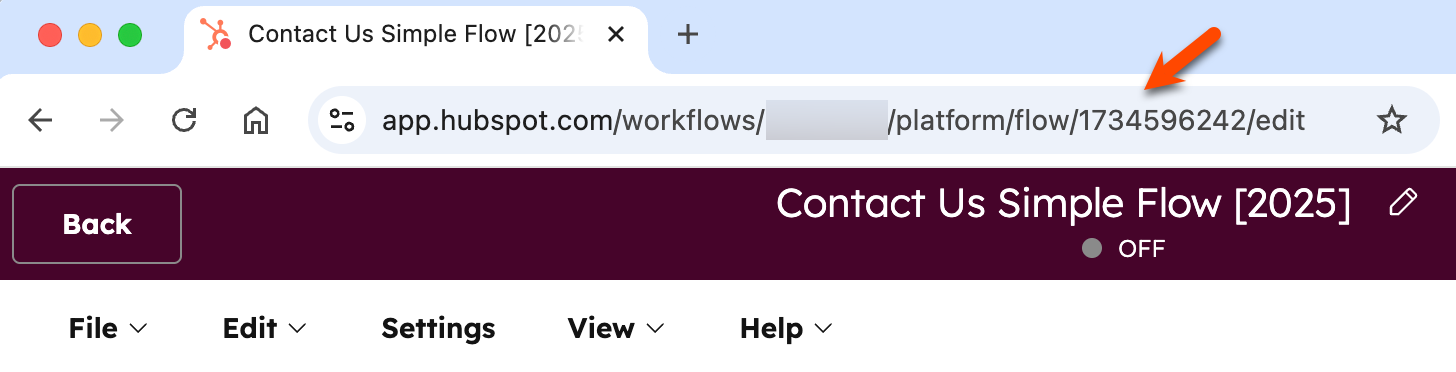
When retrieving workflows, you may need the workflow's `flowId` to make a request. To retrieve the workflow's `flowId`:

* In your HubSpot account, navigate to the [workflow editor](https://knowledge.hubspot.com/workflows/organize-your-workflows#manage-your-workflows) for the workflow that you'd like to retrieve, then check the URL for the second ID in the URL path.
* Alternatively, make a `GET` request to `/automation/v4/flows` to get all workflows and filter the resulting response by the name of your workflow.

<Frame>
  <img src="https://knowledge.hubspot.com/hubfs/Knowledge_Base_2023-24-25/KB-Workflows/workflows-flowid.png" alt="workflow-id-for-automation-v4-api-1" />
</Frame>

### Retrieve a specific workflow by ID

To retrieve data from an existing workflow, make a `GET` request to `/automation/v4/flows/{flowId}`, where `flowId` is the ID of an existing workflow in your account.

For example, if you made a `GET` request to `/automation/v4/flows/12345678` to get the workflow with an ID of `12345678`, you can expect the resulting response below.

The response includes the specification for a contact-based workflow with two actions, where contacts are enrolled if they filled out a form on your website. If there are actions with incomplete but required fields in your workflow, you may encounter errors when making this request.

```json theme={null}
{
  "id": "12345678",
  "isEnabled": true,
  "flowType": "WORKFLOW",
  "revisionId": "7",
  "name": "New form submission workflow",
  "createdAt": "2024-06-07T17:27:08.101Z",
  "updatedAt": "2024-06-07T17:31:11.263Z",
  "startActionId": "1",
  "nextAvailableActionId": "3",
  "actions": [
    {
      "type": "SINGLE_CONNECTION",
      "actionId": "1",
      "actionTypeVersion": 0,
      "actionTypeId": "0-13",
      "connection": {
        "edgeType": "STANDARD",
        "nextActionId": "2"
      },
      "fields": {
        "operation": "ADD",
        "list_id": "178"
      }
    },
    {
      "type": "SINGLE_CONNECTION",
      "actionId": "2",
      "actionTypeVersion": 0,
      "actionTypeId": "0-9",
      "fields": {
        "user_ids": ["2620022"],
        "delivery_method": "APP",
        "subject": "New form submission",
        "body": "Check out the new form submission we received!"
      }
    }
  ],
  "enrollmentCriteria": {
    "shouldReEnroll": false,
    "type": "EVENT_BASED",
    "eventFilterBranches": [
      {
        "filterBranches": [],
        "filters": [],
        "eventTypeId": "4-1639801",
        "operator": "HAS_COMPLETED",
        "filterBranchType": "UNIFIED_EVENTS",
        "filterBranchOperator": "AND"
      }
    ],
    "listMembershipFilterBranches": []
  },
  "timeWindows": [],
  "blockedDates": [],
  "customProperties": {},
  "crmObjectCreationStatus": "COMPLETE",
  "type": "CONTACT_FLOW",
  "objectTypeId": "0-1",
  "suppressionListIds": [],
  "canEnrollFromSalesforce": false
}
```

### Retrieve workflows in bulk using their IDs

To fetch multiple workflows using their IDs, you can make a `POST` request to the `/automation/v4/flows/batch/read` endpoint. When doing so, you'll need to provide the following within an `inputs` array provided in the request body:

* The ID of each workflow as the `flowId`.
* The `type` as `FLOW_ID`

For example, the request body below would fetch the workflow details for two workflows with IDs of `12345678` and `87654321`:

```json theme={null}
{
  "inputs": [
    {
      "flowId": "12345678",
      "type": "FLOW_ID"
    },
    {
      "flowId": "87654321",
      "type": "FLOW_ID"
    }
  ]
}
```

### Retrieve all workflows

To retrieve all workflows in an account, you can make a `GET` request to `/automation/v4/flows`. Do note that the response will only include key fields for the workflow, such as `id`, `isEnabled`, `objectTypeId`, and the latest `revisionId`.

If you want to retrieve a full list of properties for a specific workflow, make a `GET` request to `/automation/v4/flows/{flowId}` and provide the specific ID of the workflow as the `flowId`.

## Update a workflow

To update an existing workflow, make a PUT request to `/automation/v4/{flowId}` using the ID of your workflow you want to update as the `flowId`, and providing any properties you want to change in the request body.

* You must include the `revisionId` and `type` properties in your request body.
* The `revisionId` must correspond to the most current revision of your workflow. This can be retrieved by making a `GET` request to `/automation/v4/{flowId}`.
* Any existing data retrieved from the `GET` request, not included in the `PUT` request, will be omitted from the updated workflow. For example, if an existing action is not included in the new `PUT` request to update the workflow, the action will be removed from the workflow.
* If you're creating a `PUT` request with data retrieved from an earlier `GET` request, it is recommended to remove the `CreatedAt`, `UpdatedAt`, and `dataSources` fields to avoid validation errors.

For the example, if the following workflow is currently turned off, the request body below would turn on the workflow, using its most recent revisionId of `"18"`:

```json theme={null}
{
    "id": "1734596242",
    "isEnabled": true,
    "flowType": "WORKFLOW",
    "revisionId": "18",
    "name": "Contact Us Simple Flow [2025]",
    "startActionId": "4",
    "nextAvailableActionId": "6",
    "actions": [
        {
            "actionId": "4",
            "actionTypeVersion": 0,
            "actionTypeId": "0-1",
            "connection": {
                "edgeType": "STANDARD",
                "nextActionId": "5"
            },
            "fields": {
                "delta": "1440",
                "time_unit": "MINUTES"
            },
            "type": "SINGLE_CONNECTION"
        },
        {
            "actionId": "5",
            "actionTypeVersion": 0,
            "actionTypeId": "0-4",
            "fields": {
                "content_id": "35431921489"
            },
            "type": "SINGLE_CONNECTION"
        }
    ],
    "enrollmentCriteria": {
        "shouldReEnroll": true,
        "eventFilterBranches": [
            {
                "filterBranches": [],
                "filters": [
                    {
                        "property": "hs_form_id",
                        "operation": {
                            "operator": "IS_ANY_OF",
                            "includeObjectsWithNoValueSet": false,
                            "values": [
                                "1c2c34c5-c98b-4241-abea-ef227575335b"
                            ],
                            "operationType": "ENUMERATION"
                        },
                        "filterType": "PROPERTY"
                    }
                ],
                "eventTypeId": "4-1639801",
                "operator": "HAS_COMPLETED",
                "filterBranchType": "UNIFIED_EVENTS",
                "filterBranchOperator": "AND"
            }
        ],
        "listMembershipFilterBranches": [],
        "type": "EVENT_BASED"
    },
    "timeWindows": [],
    "blockedDates": [],
    "customProperties": {},
    "crmObjectCreationStatus": "COMPLETE",
    "suppressionListIds": [],
    "canEnrollFromSalesforce": false,
    "type": "CONTACT_FLOW",
    "objectTypeId": "0-1"
}
```

## Delete a workflow

To delete a workflow, make a `DELETE` request to `/automation/v4/{flowId}` using the ID of the workflow you want to delete as the `flowId`.

<Warning>
  **Please note:**

  Once deleted, you cannot restore the workflow via the automation API. You must [contact HubSpot Support](https://knowledge.hubspot.com/help-and-resources/get-help-with-hubspot) to get assistance with restoring your workflow.
</Warning>
