> ## Documentation Index
> Fetch the complete documentation index at: https://developers.hubspot.com/docs/llms.txt
> Use this file to discover all available pages before exploring further.

---
id: cbc79e8b-0e7e-41bd-a608-7b7f8af861d4
---

# Visitor Identification

> The visitor identification API is used to identify visitors to your site that were authenticated using external authentication systems.

export const PostmanCard = ({title, collectionId}) => {
  return <div className="card-condensed-cta">
      <Card title={title ? title : "Postman collection"} href={`https://app.getpostman.com/run-collection/${collectionId}`} horizontal={true} cta="Run in Postman" icon={<svg xmlns="http://www.w3.org/2000/svg" width={25} height={25} preserveAspectRatio="xMidYMid" viewBox="0 0 256 256">
              <path fill="#FF6C37" d="M254.953 144.253c8.959-70.131-40.569-134.248-110.572-143.206C74.378-7.912 10.005 41.616 1.047 111.619c-8.959 70.003 40.569 134.248 110.572 143.334 70.131 8.959 134.248-40.569 143.334-110.7Z" />
              <path fill="#FFF" d="m174.2 82.184-54.007 54.007-15.229-15.23c53.11-53.11 58.358-48.503 69.236-38.777Z" />
              <path fill="#FF6C37" d="M120.193 137.47c-.384 0-.64-.128-.895-.384l-15.358-15.229a1.237 1.237 0 0 1 0-1.792c54.007-54.006 59.638-48.887 71.028-38.649.255.256.383.512.383.896s-.128.64-.383.896l-54.007 53.878c-.128.256-.512.384-.768.384Zm-13.437-16.509 13.437 13.438 52.087-52.087c-9.47-8.446-15.87-11.006-65.524 38.65Z" />
              <path fill="#FFF" d="m135.679 151.676-14.718-14.718 54.007-54.006c14.46 14.59-7.167 38.265-39.29 68.724Z" />
              <path fill="#FF6C37" d="M135.679 152.956c-.384 0-.64-.128-.896-.384l-14.718-14.718c-.256-.256-.256-.512-.256-.896s.128-.64.384-.895L174.2 82.056a1.237 1.237 0 0 1 1.791 0 15.58 15.58 0 0 1 4.991 11.902c-.256 14.206-16.38 32.25-44.28 58.614-.383.256-.767.384-1.023.384Zm-12.926-15.998c8.19 8.319 11.646 11.646 12.926 12.926 21.5-20.476 42.36-41.464 42.488-55.926.128-3.327-1.152-6.655-3.327-9.214l-52.087 52.214Z" />
              <path fill="#FFF" d="m105.22 121.345 10.878 10.878c.256.256.256.512 0 .768-.128.128-.128.128-.256.128l-22.524 4.863c-1.152.128-2.175-.64-2.431-1.791-.128-.64.128-1.28.512-1.664l13.053-13.054c.256-.256.64-.384.768-.128Z" />
              <path fill="#FF6C37" d="M92.934 139.262c-1.92 0-3.327-1.536-3.327-3.455 0-.896.384-1.792 1.024-2.432l13.053-13.054c.768-.64 1.792-.64 2.56 0l10.878 10.878c.768.64.768 1.792 0 2.56-.256.256-.512.384-.896.512l-22.524 4.863c-.256 0-.512.128-.768.128Zm11.902-16.51-12.542 12.543c-.256.256-.383.64-.128 1.024.128.383.512.511.896.383l21.116-4.607-9.342-9.342Z" />
              <path fill="#FFF" d="M202.739 52.238c-8.191-7.935-21.373-7.679-29.307.64-7.935 8.318-7.679 21.372.64 29.306A20.678 20.678 0 0 0 199.155 85l-14.59-14.59 18.174-18.172Z" />
              <path fill="#FF6C37" d="M188.405 89.223c-12.158 0-22.012-9.854-22.012-22.012 0-12.158 9.854-22.012 22.012-22.012 5.631 0 11.134 2.176 15.23 6.143.255.256.383.512.383.896s-.128.64-.384.895L186.357 70.41l13.566 13.566c.512.512.512 1.28 0 1.792l-.256.256c-3.327 2.047-7.295 3.199-11.262 3.199Zm0-41.337c-10.75 0-19.452 8.703-19.324 19.453 0 10.75 8.702 19.452 19.452 19.324 2.944 0 5.887-.64 8.575-2.047l-13.438-13.31c-.256-.256-.384-.512-.384-.896s.128-.64.384-.895l17.149-17.15c-3.456-2.943-7.807-4.479-12.414-4.479Z" />
              <path fill="#FFF" d="m203.122 52.622-.255-.256-18.301 18.044 14.461 14.462c1.408-.896 2.816-1.92 3.967-3.072a20.51 20.51 0 0 0 .128-29.178Z" />
              <path fill="#FF6C37" d="M199.155 86.28c-.384 0-.64-.128-.896-.384l-14.589-14.59c-.256-.256-.384-.512-.384-.896s.128-.64.384-.895l18.173-18.173a1.237 1.237 0 0 1 1.791 0l.384.256c8.575 8.574 8.575 22.396.128 31.098-1.28 1.28-2.687 2.432-4.223 3.328-.384.128-.64.256-.768.256Zm-12.798-15.87 12.926 12.926c1.024-.64 2.048-1.536 2.816-2.304 7.294-7.294 7.678-19.196.64-26.875L186.357 70.41Z" />
              <path fill="#FFF" d="M176.375 84.488a7.879 7.879 0 0 0-11.134 0l-48.247 48.247 8.063 8.063 51.062-44.792c3.328-2.816 3.584-7.807.768-11.134-.256-.128-.384-.256-.512-.384Z" />
              <path fill="#FF6C37" d="M124.929 142.077c-.384 0-.64-.128-.896-.383l-8.063-8.063a1.237 1.237 0 0 1 0-1.792l48.247-48.247a9.115 9.115 0 0 1 12.926 0 9.115 9.115 0 0 1 0 12.926l-.384.384-51.063 44.792c-.128.255-.384.383-.767.383Zm-6.143-9.342 6.27 6.271 50.167-44.024c2.816-2.304 3.072-6.527.768-9.342-2.303-2.816-6.526-3.072-9.342-.768-.128.128-.256.256-.512.384l-47.351 47.48Z" />
              <path fill="#FFF" d="M80.009 187.637c-.512.256-.768.768-.64 1.28l2.175 9.214c.512 1.28-.256 2.816-1.663 3.2-1.024.384-2.176 0-2.816-.768l-14.077-13.95 45.943-45.943 15.87.256 10.75 10.75c-2.56 2.175-18.045 17.149-55.542 35.961Z" />
              <path fill="#FF6C37" d="M78.985 202.61c-1.024 0-2.048-.383-2.688-1.151l-13.95-13.95c-.255-.256-.383-.512-.383-.896 0-.383.128-.64.384-.895l45.944-45.944c.256-.256.64-.384.895-.384l15.87.256c.383 0 .64.128.895.384l10.75 10.75c.256.256.384.64.384 1.024s-.128.64-.512.896l-.895.767c-13.566 11.902-31.995 23.804-54.902 35.194l2.175 9.086c.384 1.664-.384 3.456-1.92 4.352-.767.384-1.407.512-2.047.512Zm-14.078-15.997 13.182 13.054c.384.64 1.152.896 1.792.512.64-.384.896-1.152.512-1.792l-2.176-9.214c-.256-1.152.256-2.176 1.28-2.688 22.652-11.39 40.952-23.163 54.39-34.81l-9.47-9.47-14.718-.256-44.792 44.664Z" />
              <path fill="#FFF" d="m52.11 197.62 11.006-11.007 16.38 16.381-26.107-1.791c-1.151-.128-1.92-1.152-1.791-2.304 0-.512.128-1.024.512-1.28Z" />
              <path fill="#FF6C37" d="m79.497 204.146-26.236-1.791c-1.92-.128-3.199-1.792-3.071-3.712.128-.768.384-1.535 1.024-2.047L62.22 185.59a1.237 1.237 0 0 1 1.792 0l16.38 16.38c.385.385.512.897.257 1.408-.256.512-.64.768-1.152.768Zm-16.381-15.74-10.11 10.11c-.384.255-.384.895 0 1.151.127.128.255.256.511.256l22.652 1.536-13.053-13.054ZM104.452 146.557c-.768 0-1.28-.64-1.28-1.28 0-.384.128-.64.384-.896l12.414-12.414a1.237 1.237 0 0 1 1.792 0l8.062 8.063c.384.384.512.768.384 1.28-.128.384-.512.767-1.023.895l-20.477 4.352h-.256Zm12.414-11.902-8.446 8.446 13.821-2.943-5.375-5.503Z" />
              <path fill="#FFF" d="m124.8 140.926-14.077 3.071c-1.024.256-2.048-.384-2.303-1.408-.128-.64 0-1.28.511-1.791l7.807-7.807 8.063 7.935Z" />
              <path fill="#FF6C37" d="M110.467 145.277a3.168 3.168 0 0 1-3.2-3.2c0-.895.385-1.663.897-2.303l7.806-7.807a1.237 1.237 0 0 1 1.792 0l8.062 8.063c.384.384.512.768.384 1.28-.128.384-.512.767-1.023.895l-14.078 3.072h-.64Zm6.399-10.622-6.91 6.91c-.257.257-.257.512-.129.768s.384.384.768.384l11.774-2.56-5.503-5.502ZM203.25 64.907c-.256-.767-1.151-1.151-1.92-.895-.767.255-1.151 1.151-.895 1.92 0 .127.128.255.128.383.768 1.536.512 3.455-.512 4.863-.512.64-.384 1.536.128 2.048.64.512 1.536.384 2.048-.256 1.92-2.432 2.303-5.503 1.023-8.063Z" />
            </svg>} />
    </div>;
};

export const ScopesList = ({scopes = [], description = "This API requires one of the following scopes:"}) => {
  if (!scopes || scopes.length === 0) {
    return null;
  }
  const sortedScopes = scopes.sort((a, b) => a.localeCompare(b));
  return <div>
      <div className="text-sm mb-2">{description}</div>
      <div>
        {sortedScopes.map((scope, index) => <div key={index}>
            <code>
              <span className="text-xs">{scope}</span>
            </code>
          </div>)}
      </div>
    </div>;
};

<PostmanCard collectionId="26126890-758cdd33-e98b-466f-94bd-605fcbaa588c" />

<ProductTier
  tiers={[
'marketing_hub-professional',
'marketing_hub-enterprise',
'sales_hub-professional',
'sales_hub-enterprise',
'cms-professional',
'cms-enterprise',
'service_hub-professional',
'service_hub-enterprise',
]}
/>

<Accordion title="Scope requirements">
  <ScopesList
    scopes={[
  'conversations.visitor_identification.tokens.create'
]}
  />
</Accordion>

Use the visitor identification API to identify visitors to your site that were authenticated using your own external authentication system.

An identification token returned from this API can be used to pass information about your already-authenticated visitor to the chat widget, so that it treats the visitor as a known contact. Agents in the inbox can then have confidence about who they are talking to, and visitors can access previous thread history across devices.

For example, if you host your own web app behind a login, you may set up the HubSpot chat widget to appear on pages within your web app where you know that visitors have already been authenticated and identified. Currently, any visitor chatting in on those pages would still show up as “Unknown visitor” in the Conversations inbox, despite being an identified, logged-in visitor in your web app. Using the Visitor Identification API, you can pass authenticated visitor information directly to the chat widget, which identifies them in the Conversations inbox.

<Warning>
  **Please note:**

  * The visitor identification API is for telling HubSpot who the visitor is. You should not rely on this to authenticate users in your platform.
  * Access to the visitor identification API requires a *Professional* or *Enterprise* level subscription. If the account does not have a qualifying subscription, you will receive a `403` error response from the API.
</Warning>

## Example integration flow

To integrate with this feature, you must have an existing web application with an authentication system. Before getting started, make sure you have a [private app](/apps/legacy-apps/private-apps/overview)set up and the account that you are trying to integrate has a qualifying *Professional* or *Enterprise* subscription.

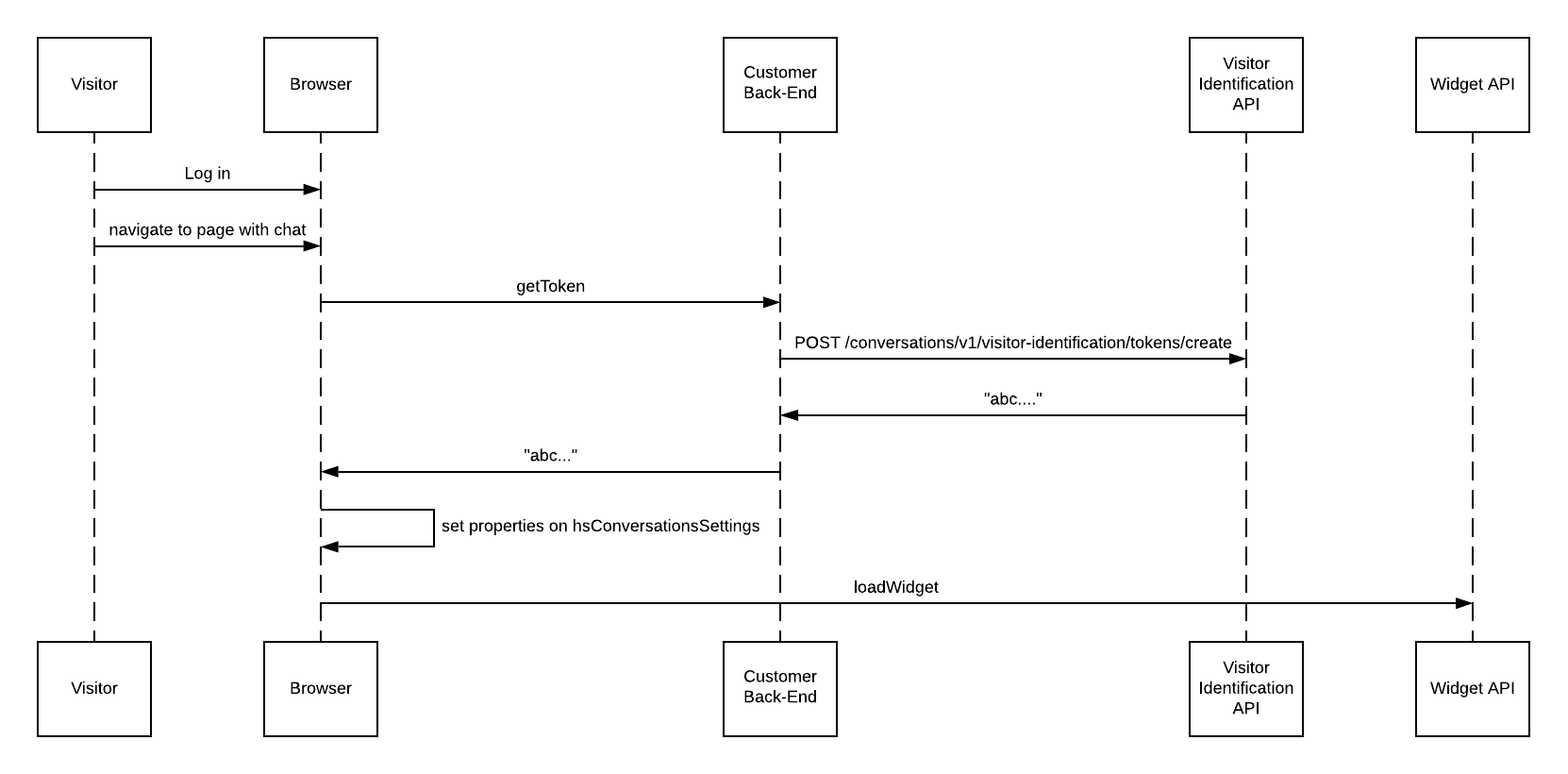
Here’s an example of a possible integration flow:

<Frame>
  <img src="https://developers.hubspot.com/hubfs/Possible%20User%20Identification%20Flow.png" alt="Possible User Identification Flow" />
</Frame>

Once your customer is logged in and verified in your system, take the following steps to identify them within live chat:

**1.** On your front end, set `loadImmediately` to `false` on the `hsConversationsSettings` object on the window. If you do not do this, the chat widget may load before the identification information is passed through. See the [Chat Widget SDK primer below](#chat-widget-sdk-primer) for more information.

* Set the `hsConversationsSettings` properties outside the `isConversationsAPIReady` function.
* In addition, the `hsConversationsSettings` needs to be set prior to the call, otherwise you may experience a race condition that interferes with widget load.

```js theme={null}
window.hsConversationsSettings = {
  loadImmediately: false,
};
```

**2.** Generate a token from the Visitor Identification API by passing in the email address of your authenticated visitor. This should be done on the backend of your web application. Check out the [reference documentation](/api-reference/legacy/conversations/visitor-identification/generate-visitor-token) for an example request.

```shell theme={null}
curl --request POST \
  --url 'https://api.hubapi.com/visitor-identification/v3/tokens/create' \
--data '{
  "email": "gob@bluth.com",
  "firstName": "Gob",
  "lastName": "Bluth"
}'
```
<Info>
  The provided first and last name will be set on the contact record in HubSpot after the chat begins if:

  * It's a new contact created by the Visitor Identification API.
  * It's an existing contact where the name is not already known.

  This can be useful when personalizing messages to identified visitors when your external system already has name information, but it does not yet exist in HubSpot. These are optional parameters and not required.
</Info>

**3.** Using the token Step 2, set the following properties on the `hsConversationsSettings` object on the window.

```js theme={null}
window.hsConversationsSettings = {
  identificationEmail: "visitor-email@example.com",
  identificationToken: "<TOKEN FROM STEP 1>",
};
```

**4.** Load the widget.

```js theme={null}
window.HubSpotConversations.widget.load();
```

The token and email must be set on the `hsConversationsSettings` object on the window every time the page loads for an authenticated visitor. This context will not be carried across page loads automatically if these parameters are no longer set. Tokens are temporary and will expire after 12 hours. Tokens can be cached to avoid re-fetching the token on every page load, as long as they are refreshed at least every 12 hours.

## Verify the integration

Once you've completed your integration of the Visitor Identification feature, you can verify that it’s working as expected. This can be done in a couple ways, depending on your implementation, so you may need to tailor the examples below to your specific requirements.

* If you've added the chat widget to one or more public pages as well as behind an authentication system:

  * Navigate to a page where the chat widget should not be identifying visitors and start a conversation.
  * In HubSpot, open the inbox and verify that the chat that just came in belongs to an *Unknown Visitor*. If this is not the case, try following these steps in a private browsing window:

    * Navigate to a page where the chat widget should be identifying visitors via the Visitor Identification API and start a conversation.
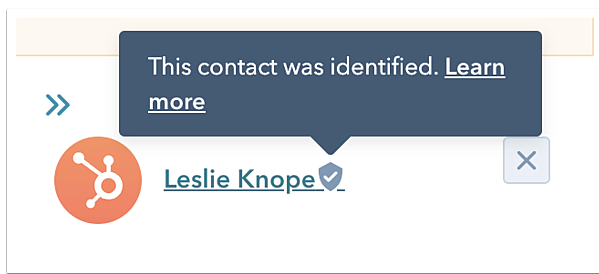
    * In HubSpot, open the inbox and verify that the chat is correctly attributed to the contact that you’re logged in as. You should see a badge next to the contact’s name, indicating that this contact was successfully identified through this API.

<Frame>
  <img src="https://f.hubspotusercontent00.net/hubfs/53/visitor_identity_badge.png" alt="visitor_identity_badge" />
</Frame>

* If you've only added the chat widget to pages behind an authentication system, and you have access to multiple test user accounts:
  * Log in to HubSpot as the first test user, then navigate to a page where the chat widget loads, and start a conversation.
  * Log out of HubSpot, then log back in as the second test user. Navigate to a page where the chat widget loads, and start a conversation.
  * In HubSpot, open the inbox and verify that the chats that came in were from the first and second test accounts, respectively, and that you see the badge next to the contact names for both records.

<Warning>
  **Please note:**

  For visitors identified with this API, HubSpot will not drop the `messagesUtk` cookie. HubSpot will also skip any email capture questions since email address is already known. Because the `messagesUtk` cookie and email capture do not apply to these chats, the associated settings in the chatflow will not show for visitors identified through the Visitor Identification API.
</Warning>

## Chat widget SDK primer

The API is housed in the `window.HubSpotConversations` object. All available methods can be accessed via this object. The HubSpot script loader on your page will create this object for you, but it may not be available immediately. To defer accessing the API until it's initialized, you may use the `window.hsConversationsOnReady` helper. For example:

```html theme={null}
<script type="text/javascript">
  function onConversationsAPIReady() {
    console.log(`HubSpot Conversations API: ${window.HubSpotConversations}`);
  }
  /*
    configure window.hsConversationsSettings if needed.
  */
  window.hsConversationsSettings = {};
  /*
   If external API methods are already available, use them.
  */
  if (window.HubSpotConversations) {
    onConversationsAPIReady();
  } else {
    /*
      Otherwise, callbacks can be added to the hsConversationsOnReady on the window object.
      These callbacks will be called once the external API has been initialized.
    */
    window.hsConversationsOnReady = [onConversationsAPIReady];
  }
</script>
```

### SDK reference

`window.hsConversationsOnReady` **array**

This is an optional field you can define on the window object that enables you to specify code to be executed as soon as the widget becomes available. Once the API has been initialized, it will check for the existence of this array and execute its functions in series.

```js theme={null}
if (window.HubSpotConversations) {
  console.log("The api is ready already");
} else {
  window.hsConversationsOnReady = [
    () => {
      console.log("Now the api is ready");
    },
  ];
}
```

`hsConversationsSettings` **object**

This object enables you to provide some configuration options to the widget before it initializes. In order to use the Visitor Identification feature, you must set the following fields:

| Parameter             | Type    | Description                                                                                                                                                                                                       | Default |
| --------------------- | ------- | ----------------------------------------------------------------------------------------------------------------------------------------------------------------------------------------------------------------- | ------- |
| `loadImmediately`     | boolean | Whether the widget should implicitly load or wait until the `widget.load` method is called                                                                                                                        | `true`  |
| `identificationToken` | string  | Used to integrate with the Visitor Identification API. This is the token provided by the token generation endpoint on the Visitor Identification API that is used as proof that this visitor has been identified. | `""`    |
| `identificationEmail` | string  | The email address of the visitor that you’ve identified as loading the widget.                                                                                                                                    | `""`    |

```js theme={null}
window.hsConversationsSettings = {
  loadImmediately: false,
  identificationEmail: "visitor-email@example.com",
  identificationToken: "<TOKEN FROM STEP 1>",
};
```

Learn more about the [conversations SDK](/api-reference/legacy/conversations/visitor-identification/guide).
