> ## Documentation Index
> Fetch the complete documentation index at: https://developers.hubspot.com/docs/llms.txt
> Use this file to discover all available pages before exploring further.
---
id: 89d4590f-9863-4bcf-8387-cdc773fe1087
---
# List (segment) filters overview
> Learn how to structure filters when using the Lists API
This guide provides reference material and examples for how to use filters with the lists API.
If you select a `SNAPSHOT` or `DYNAMIC` list processing type when creating a list, use filters to determine which records are members of the list.
* List filters have conditional logic that is defined by filter branches which have `AND` or `OR` operation types. This is defined by the `filterBranchType` parameter.
* Within these branches, there are groups of individual filters that contain logic to assess records to determine if they should be included in the list. These are defined by the `filterType` parameter.
* Filter branches can also have nested filter branches.
The legacy v1 lists API has been [sunset as of April 30th, 2026](https://developers.hubspot.com/changelog/upcoming-sunset-v1-lists-api). Calls made to the v1 endpoints will no longer function. If you previously used the v1 endpoints, follow the [migration guide](/api-reference/legacy/crm/lists/v1-list-api-migration-guide) to transition to the latest version of the API.
## Filters
There are a variety of different filter types that can be used to build out filters in a list's filter definition. These filters types can be used together in different combinations to construct the logic that is needed for a particular list definition structure.
HubSpot uses **PASS**/**FAIL** logic with filters to determine if a record should be in a list. If a record passes all filters, it will be a member of the list.
## Filter evaluation steps
To determine which records pass a list's filters, the following steps occur in order:
1. Select or fetch the relevant records based on the filter selected. For example, the property values for all records being evaluated for a [property filter.](#property-filter-options)
2. If applicable, use the `pruningRefineBy` parameter to refine the data to a specific time range (see Refine By Operation section).
3. Apply the filtering rules against the refined data to determine if the records **PASS** or **FAIL**. For example, if the filter "First Name is equal to "John"" is selected, **PASS** all records that have "John" for their First Name contact property.
4. If applicable, use the `coalescingRefineBy` parameter to further refine the data to a specific number of occurrences. For example, the filter "contact has filled out a form at least 2 times".
* If a `coalescingRefineBy` parameter is present, then **PASS** records that meet the number of occurrences selected.
* If no `coalescingRefineBy` parameter is present, then records **PASS** or **FAIL** based on the criteria set in step 3.
## Filter branches
A filter branch is a data structure used to build out the conditional logic of a list's definition. Filter branches are defined by a specific type, an operator, a list of filters, and a list of sub-branches.
The filter branch's operator `OR` or `AND` dictate how the filter branch will be evaluated relative to the rest of the branches. The list of filters and sub-filter branches determine which records will be members of a list.
* If the filter branch has an `AND` operator, then the record is accepted by the branch if it passes **all** the branch's filters and is accepted by **all** the sub-filter branches.
* If the filter branch has an `OR` operator, then the record is accepted by the branch if it passes **any** of the branch's filters or is accepted by **any** of the branch's sub-filter branches.
A record is a member of a list if it is accepted by the root filter branch in the list definition.
## Structure
All filter definitions must start with a root-level `OR` `filterBranchType` (see [filter branch types](#filter-branch-types) for more details). This root level `OR` filter branch must then have one or more `AND` sub-filter branches.
The root-level **`OR`** filter branch can be thought of as the parent filter branch while the `AND` sub-filter branches can be thought of as child filter groups. Together, these branches make up the base filter branch structure.
```json theme={null}
{
"filterBranch": {
"filterBranches": [
{
"filterBranches": [],
"filterBranchType": "AND",
"filters": [
// can have filters here
]
}
// can have more filterBranches here
],
"filterBranchType": "OR",
"filters": []
}
}
```
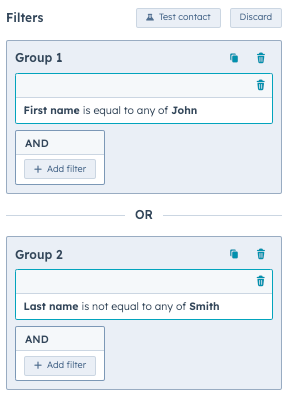
For example, to create a list of contacts who have the first name "John" OR do not have the last name "Smith", the `POST` body would be:
```json theme={null}
{
"filterBranch": {
"filterBranchType": "OR",
"filters": [],
"filterBranches": [
{
"filterBranchType": "AND",
"filters": [
{
"filterType": "PROPERTY",
"property": "firstname",
"operation": {
"operationType": "MULTISTRING",
"operator": "IS_EQUAL_TO",
"values": ["John"]
}
}
],
"filterBranches": []
},
{
"filterBranchType": "AND",
"filters": [
{
"filterType": "PROPERTY",
"property": "lastname",
"operation": {
"operationType": "MULTISTRING",
"operator": "IS_NOT_EQUAL_TO",
"values": ["Smith"]
}
}
],
"filterBranches": []
}
]
}
}
```
In the above example, there is one parent `OR` `filterBranchType` parameter with two nested `AND` `filterBranchType` parameters. The nested filter branches each have one `filterType` that sets the criteria for the list.
The two `filterType` parameters are nested within `AND` filter branches, rather than directly within an `OR` filter branch. This structure is enforced by HubSpot's API so that the list's filters can be properly rendered in the HubSpot user interface.
In the HubSpot user interface, the above code would look like the image below. Any contacts that meet either of the criteria will be a member of the list.
To create a list of contacts who have the first name "John" and the last name "Smith":
```json theme={null}
{
"filterBranch": {
"filterBranchType": "OR",
"filters": [],
"filterBranches": [
{
"filterBranchType": "AND",
"filters": [
{
"filterType": "PROPERTY",
"property": "firstname",
"operation": {
"operationType": "MULTISTRING",
"operator": "IS_EQUAL_TO",
"values": ["John"]
}
},
{
"filterType": "PROPERTY",
"property": "lastname",
"operation": {
"operationType": "MULTISTRING",
"operator": "IS_EQUAL_TO",
"values": ["Smith"]
}
}
],
"filterBranches": []
}
]
}
}
```
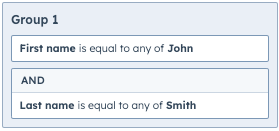
In the above example, there is one parent `OR` `filterBranchType` with one nested `AND` `filterBranchType`. The `AND` `filterBranchType` has two `filterType` parameters, one for each criteria.
In the HubSpot user interface, the above code would look like the image below. Any contacts that meet the criteria will be a member of the list.
## Filtering on events and associated objects
There are two special versions of `AND` `filterBranchType` parameters:
* `UNIFIED_EVENTS`: used to filter on events.
* `ASSOCIATION`: used to filter on records that are associated with the primary record being evaluated.
These branches should be used within an `AND` filter branch. For example:
```json theme={null}
{
"filterBranches": [
{
"filterBranches": [
{
"filterBranchType": "UNIFIED_EVENTS",
"filterBranchOperator": "AND",
"filters": [
// must have one or more filters here
]
// additional UNIFIED_EVENTS filter branch details omitted
},
{
"filterBranchType": "ASSOCIATION",
"filterBranchOperator": "AND",
"filters": [
// may have one or more filters here
],
"filterBranches": [
// may have another ASSOCIATION branch here if filtering based on line item properties from a contact list
]
// additional ASSOCIATION filter branch details omitted
}
],
"filterBranchOperator": "AND",
"filterBranchType": "AND",
"filters": [
// can have filters here
]
}
// can have more filterBranches here
],
"filterBranchOperator": "OR",
"filterBranchType": "OR",
"filters": []
}
```
## Filter branch types
Below, review the different `filterBranchType` parameters that can be used to construct your list's filter definition structure.
## OR filter branch
Begin your filter definition structure with an `OR` `filterBranchType`. It is used to apply **OR** conditional logic against records that are accepted by the nested `AND` filter branches.
`OR` filter branches:
* Must have one or more `AND` type sub-filter branches.
* Cannot have any filters.
If a record is accepted by any of its nested filter branches, an `OR` filter branch will accept the record as well.
```json theme={null}
{
"filterBranchType": "OR",
"filterBranches": [], // One or more nested AND filter branches
"filters": [] // Zero filters
}
```
## AND filter branch
The `AND` `filterBranchType` is used as a nested filter branch within the parent `OR` filter branch. All filter definitions must have at least one `AND` filter branch for it to be valid. It is used to apply **AND** conditional logic against the records that pass evaluation as defined by its filters and have also been accepted by nested filter branches.
**AND** filter branches:
* Can have zero or more filters.
* Can have zero or more nested `UNIFIED_EVENTS` and/or `ASSOCIATION` `filterBranchType` parameters.
An `AND` filter branch accepts a record if the record is accepted by all of its nested filter branches and the record passes all filters in the filter branch.
```json theme={null}
{
"filterBranchType": "AND",
"filterBranches": [], // Zero or more nested UNIFIED_EVENTS or ASSOCIATION filter branches
"filters": [] // Zero or more filters
}
```
## UNIFIED\_EVENTS filter branch
The `UNIFIED_EVENTS` `filterBranchType` can only be used as a nested filter branch within an `AND` `filterBranchType`. It is used to determine which records have or have not completed a given unified event.
`UNIFIED_EVENTS` type filter branches:
* Can have one or more `PROPERTY` type filters.
* Cannot have any additional filter branches.
A `UNIFIED_EVENTS` filter branch accepts a record if the record passes all filters on the filter branch and the criteria defined by the `UNIFIED_EVENTS` filter branch.
```json theme={null}
{
"filterBranchType": "UNIFIED_EVENTS",
"filterBranches": [], // Zero filter branches
"filters": [], // Zero or more filters
"eventTypeId": "0-1",
"operator": "HAS_COMPLETED"
}
```
| Parameter | Accepted Values |
| ---------- | ------------------------------------ |
| `operator` | `HAS_COMPLETED`, `HAS_NOT_COMPLETED` |
## ASSOCIATION filter branch
The `ASSOCIATION` `filterBranchType` can only be used as a nested filter branch within an `AND` `filterBranchType`. It is used to filter on records which are associated with the primary record being evaluated.
`ASSOCIATION` filter branches:
* Must have one or more filters.
* Cannot have any additional nested filter branches.
An `ASSOCIATION` filter branch accepts a record if it is accepted by all of its nested filter branches and if the record **PASSES** all filters of the filter branch.
You can only have additional `filterBranches` in the case of a `CONTACT` to `LINE_ITEM` association.
```json theme={null}
{
"filterBranchType": "ASSOCIATION",
"filterBranches": [], // Zero or one nested ASSOCIATION filter branches
"filters": [], // Zero or more filters
"objectTypeId": "0-1",
"operator": "IN_LIST",
"associationTypeId": 280,
"associationCategory": "HUBSPOT_DEFINED"
}
```
| Parameter | Accepted Values |
| --------------------- | ------------------------------------------------------- |
| `operator` | `IN_LIST` |
| `associationCategory` | `HUBSPOT_DEFINED`, `USER_DEFINED`, `INTEGRATOR_DEFINED` |
## Filter types
Review the table below for the different types of filters that can be used. The `filterType` parameter is used to define the filter within the `filterBranch`.
| Parameter | Description |
| ------------------------- | --------------------------------------------------------------------------------------------------------------------------------------------------------------------------------------------------------- |
| `ADS_TIME` | Evaluates whether a contact has seen any ads in the timeframe defined by the `pruningRefineBy` parameter. |
| `ADS_SEARCH` | Evaluates whether a contact has performed the ad interactions as defined by the filter. |
| `CTA` | Evaluates whether a contact has or has not interacted with a specific call-to-action as defined by the filter. |
| `EMAIL_EVENT` | Evaluate the opt-in status of a contact for specific email subscriptions as defined by the filter. |
| `EVENT` | Evaluates whether a contact has or does not have a specific event as defined by the filter. |
| `FORM_SUBMISSION` | Evaluates whether a contact has or has not filled out a specific form or any form as defined by the filter. |
| `FORM_SUBMISSION_ON_PAGE` | Evaluates whether a contact has or has not filled out a specific or any form on a specific page as defined by the filter. |
| `IN_LIST` | Evaluates whether a record is or is not a member of a specific list, import, or workflow as defined by the filter. |
| `PAGE_VIEW` | Evaluates whether a contact has or has not viewed a specific page as defined by the filter. |
| `PRIVACY` | Evaluates whether a contact does or does not have privacy consent for a specific privacy type as defined by the filter. |
| `PROPERTY` | Evaluates whether a record’s property value satisfies the property filter operation as defined by the filter. See the [property filter operations](#property-filter-operations) section for more details. |
| `SURVEY_MONKEY` | Evaluates whether a contact has or has not responded to a specific Survey Monkey survey as defined by the filter. |
| `SURVEY_MONKEY_VALUE` | Evaluates whether a contact has or has not responded to a specific Survey Monkey survey’s question with a specified value as defined by the filter. |
| `WEBINAR` | Evaluates whether a contact has or has not registered or attended any webinars or a specific webinar as defined by the filter. |
| `INTEGRATION_EVENT` | Integration event filters can be used to filter specific contacts based on whether or not they have interacted with integration events that have properties as specified by the filter lines. |
## Property filter operations
When filtering for records with the `PROPERTY`, `INTEGRATION_EVENT`, or `SURVEY_MONKEY_VALUE` filter type, you'll include an `operation` object to define the parameters of the filter. This object can contain the following fields:
* `operationType`: the type of operator that you're filtering by (e.g., `NUMBER`). Each type of property supports a set of operation types, and each operation type supports a set of operators, which you'll define with the `operator` field. (e.g., `IS` and `IS_NOT`).
* `operator`: the operator that will be applied to `operationType` (e.g., `IS` and `IS_NOT`). Each property type supports a set of operators. Learn more about property types and their supporter operators in the table below.
* `value` / `values`: the value or values to filter by. Some operators can accept one value, while others can accept multiple values in an array.
* `includeObjectsWithNoValueSet`: defines how the operation should treat records that do not have a value set for the defined property.
* If `true`, a record without a value for the evaluated property will be accepted.
* If `false` (default), a record without a value for the evaluated property will be rejected.
For example, the filter below would filter for contacts with a `firstname` property value of `John`.
```json theme={null}
"filters": [
{
"filterType": "PROPERTY",
"property": "firstname",
"operation": {
"operationType": "MULTISTRING",
"operator": "IS_EQUAL_TO",
"values": ["John"]
}
}
]
```
The table below gives an overview of the available operation types.
| OperationType | Supported operators | Description |
| -------------- | ------------------- | ------------------------------------------------------------------------------------------------------------------------------------------------------------------------------------------------------------------------------------------------------------------------------------------------------------------------------------------------------------------------------- |
| `ALL_PROPERTY` | String | Used to determine whether a property value is known or is unknown as defined by the property operation. |
| `BOOL` | String | Used to determine whether a current (or historical) boolean property value is or is not (or has or has not) equaled a specific value. |
| `ENUMERATION` | String | Used to determine whether an enumeration/multi-select property value is any of, is none of, is exactly, is not exactly, contains all of, does not contain all of, has ever been any of, has never been any of, has ever been exactly, has never been exactly, has ever contained all, or has never contained all of a given set of values as defined by the property operation. |
| `MULTISTRING` | String | Used to determine whether a string property value is equal to, is not equal to, contains, does not contain, starts with, or ends with any of a given set of values as defined by the property operation. |
| `NUMBER` | String | Used to determine whether a current (or historical) number property value is or is not (or has or has not) equaled a specific value as defined by the property operation. |
| `STRING` | String | Used to determine whether a current (or historical) string property value is or is not (or has or has not) equaled a specific value as defined by the property operation. |
| `TIME_POINT` | String | Used to determine if a property has been updated before or after a specific time. That time can be specified as a specific date or relative to the current day. This operation also allows the comparison of two properties or their last updated time. |
| `TIME_RANGED` | String | Used to determine if a property has been updated between or outside of two specific times. These times can be specified as a specific date or relative to the current day. |
## TIME\_POINT and TIME\_RANGED examples
Below, review some examples when using the `TIME_POINT` and `TIME_RANGED` parameter. These parameters can be used in both time-referenced and property-referenced requests. For more information, see the
## Is equal to date
The request below filters for *Last activity date is equal to 03/11/2024 (EDT)*.
```json theme={null}
{
"name": "Sample Date Equal",
"objectTypeId": "0-1",
"processingType": "DYNAMIC",
"filterBranch": {
"filterBranches": [
{
"filterBranches": [],
"filters": [
{
"property": "notes_last_updated",
"operation": {
"operator": "IS_BETWEEN",
"includeObjectsWithNoValueSet": false,
"lowerBoundEndpointBehavior": "INCLUSIVE",
"upperBoundEndpointBehavior": "INCLUSIVE",
"propertyParser": "VALUE",
"lowerBoundTimePoint": {
"timeType": "DATE",
"timezoneSource": "CUSTOM",
"zoneId": "America/New_York",
"year": 2024,
"month": 3,
"day": 11,
"hour": 0,
"minute": 0,
"second": 0,
"millisecond": 0
},
"upperBoundTimePoint": {
"timeType": "DATE",
"timezoneSource": "CUSTOM",
"zoneId": "US/Eastern",
"year": 2024,
"month": 3,
"day": 11,
"hour": 23,
"minute": 59,
"second": 59,
"millisecond": 999
},
"type": "TIME_RANGED",
"operationType": "TIME_RANGED"
},
"filterType": "PROPERTY"
}
],
"filterBranchType": "AND",
"filterBranchOperator": "AND"
}
],
"filters": [],
"filterBranchOperator": "OR",
"filterBranchType": "OR"
}
```
## In Last X Number of Days
The example below filters for *Last activity date is less than 3 days ago*.
```json theme={null}
{
"name": "Sample Date Last 3 days",
"objectTypeId": "0-1",
"processingType": "DYNAMIC",
"filterBranch": {
"filterBranches": [
{
"filterBranches": [],
"filters": [
{
"property": "notes_last_updated",
"operation": {
"operator": "IS_BETWEEN",
"includeObjectsWithNoValueSet": false,
"lowerBoundEndpointBehavior": "INCLUSIVE",
"upperBoundEndpointBehavior": "INCLUSIVE",
"propertyParser": "VALUE",
"lowerBoundTimePoint": {
"timeType": "INDEXED",
"timezoneSource": "CUSTOM",
"zoneId": "US/Eastern",
"indexReference": {
"referenceType": "TODAY"
},
"offset": {
"days": -3
}
},
"upperBoundTimePoint": {
"timeType": "INDEXED",
"timezoneSource": "CUSTOM",
"zoneId": "America/New_York",
"indexReference": {
"referenceType": "NOW"
}
},
"type": "TIME_RANGED",
"operationType": "TIME_RANGED"
},
"filterType": "PROPERTY"
}
],
"filterBranchType": "AND",
"filterBranchOperator": "AND"
}
],
"filters": [],
"filterBranchOperator": "OR",
"filterBranchType": "OR"
}
}
```
## In Next X Number of Days
The example below filters for *Last activity date is less than 5 days from now*.
```json theme={null}
{
"name": "Sample Date Next 5 Days",
"objectTypeId": "0-1",
"processingType": "DYNAMIC",
"filterBranch": {
"filterBranches": [
{
"filterBranches": [],
"filters": [
{
"property": "notes_last_updated",
"operation": {
"operator": "IS_BETWEEN",
"includeObjectsWithNoValueSet": false,
"lowerBoundEndpointBehavior": "INCLUSIVE",
"upperBoundEndpointBehavior": "INCLUSIVE",
"propertyParser": "VALUE",
"lowerBoundTimePoint": {
"timeType": "INDEXED",
"timezoneSource": "CUSTOM",
"zoneId": "US/Eastern",
"indexReference": {
"referenceType": "NOW"
}
},
"upperBoundTimePoint": {
"timeType": "INDEXED",
"timezoneSource": "CUSTOM",
"zoneId": "US/Eastern",
"indexReference": {
"referenceType": "TODAY"
},
"offset": {
"days": 5
}
},
"type": "TIME_RANGED",
"operationType": "TIME_RANGED"
},
"filterType": "PROPERTY"
}
],
"filterBranchType": "AND",
"filterBranchOperator": "AND"
}
],
"filters": [],
"filterBranchOperator": "OR",
"filterBranchType": "OR"
}
}
```
## Updated or Not Updated in the Last X Days
The example below filters for *Last activity date updated in last 7 days*.
To filter for *Last activity date not updated in last 7 days*, change the `operator` parameter to `IS_NOT_BETWEEN`.
```json theme={null}
{
"name": "Sample Date Updated Last 7 Days",
"objectTypeId": "0-1",
"processingType": "DYNAMIC",
"filterBranch": {
"filterBranches": [
{
"filterBranches": [],
"filters": [
{
"property": "notes_last_updated",
"operation": {
"operator": "IS_BETWEEN",
"includeObjectsWithNoValueSet": false,
"lowerBoundEndpointBehavior": "INCLUSIVE",
"upperBoundEndpointBehavior": "INCLUSIVE",
"propertyParser": "UPDATED_AT",
"lowerBoundTimePoint": {
"timeType": "INDEXED",
"timezoneSource": "CUSTOM",
"zoneId": "America/New_York",
"indexReference": {
"referenceType": "TODAY"
},
"offset": {
"days": -7
}
},
"upperBoundTimePoint": {
"timeType": "INDEXED",
"timezoneSource": "CUSTOM",
"zoneId": "America/New_York",
"indexReference": {
"referenceType": "NOW"
}
},
"type": "TIME_RANGED",
"operationType": "TIME_RANGED"
},
"filterType": "PROPERTY"
}
],
"filterBranchType": "AND",
"filterBranchOperator": "AND"
}
],
"filters": [],
"filterBranchOperator": "OR",
"filterBranchType": "OR"
}
}
```
## Is After Date
The example below filters for *Last activity date is after 03/04/2024 (EST)*.
```json theme={null}
{
"name": "Sample Date After",
"objectTypeId": "0-1",
"processingType": "DYNAMIC",
"filterBranch": {
"filterBranches": [
{
"filterBranches": [],
"filters": [
{
"property": "notes_last_updated",
"operation": {
"operator": "IS_AFTER",
"includeObjectsWithNoValueSet": false,
"timePoint": {
"timeType": "DATE",
"timezoneSource": "CUSTOM",
"zoneId": "America/New_York",
"year": 2024,
"month": 3,
"day": 4,
"hour": 23,
"minute": 59,
"second": 59,
"millisecond": 999
},
"endpointBehavior": "EXCLUSIVE",
"propertyParser": "VALUE",
"type": "TIME_POINT",
"operationType": "TIME_POINT"
},
"filterType": "PROPERTY"
}
],
"filterBranchType": "AND",
"filterBranchOperator": "AND"
}
],
"filters": [],
"filterBranchOperator": "OR",
"filterBranchType": "OR"
}
}
```
## Is Relative to Today
The example below can either represent *Last activity date is more than x days from now* or *Last activity date is more than x days ago*.
To filter for the latter, set the value for the `offset` parameter to `<=0`.
```json theme={null}
{
"name": "Sample Days From Now",
"objectTypeId": "0-1",
"processingType": "DYNAMIC",
"filterBranch": {
"filterBranches": [
{
"filterBranches": [],
"filters": [
{
"property": "notes_last_updated",
"operation": {
"operator": "IS_AFTER",
"includeObjectsWithNoValueSet": false,
"timePoint": {
"timeType": "INDEXED",
"timezoneSource": "CUSTOM",
"zoneId": "America/New_York",
"indexReference": {
"referenceType": "TODAY"
},
"offset": {
"days": 2
}
},
"endpointBehavior": "EXCLUSIVE",
"propertyParser": "VALUE",
"type": "TIME_POINT",
"operationType": "TIME_POINT"
},
"filterType": "PROPERTY"
}
],
"filterBranchType": "AND",
"filterBranchOperator": "AND"
}
],
"filters": [],
"filterBranchOperator": "OR",
"filterBranchType": "OR"
}
}
```
## Is Before or After another property (value or last updated)
The example below compares the values where *Last activity date is before Latest Open Lead Date*.
To filter for *Last activity date is after Latest Open Lead Date*: set the `operator` value to `IS_AFTER`.
To filter for when the Latest Open Lead Date was updated: set the `referenceType` value to `UPDATED_AT`.
```json theme={null}
{
"name": "Sample Property Before",
"objectTypeId": "0-1",
"processingType": "DYNAMIC",
"filterBranch": {
"filterBranches": [
{
"filterBranches": [],
"filters": [
{
"property": "notes_last_updated",
"operation": {
"operator": "IS_BEFORE",
"includeObjectsWithNoValueSet": false,
"timePoint": {
"timeType": "PROPERTY_REFERENCED",
"timezoneSource": "CUSTOM",
"zoneId": "US/Eastern",
"property": "hs_latest_open_lead_date",
"referenceType": "VALUE"
},
"endpointBehavior": "EXCLUSIVE",
"propertyParser": "VALUE",
"type": "TIME_POINT",
"operationType": "TIME_POINT"
},
"filterType": "PROPERTY"
}
],
"filterBranchType": "AND",
"filterBranchOperator": "AND"
}
],
"filters": [],
"filterBranchType": "OR",
"filterBranchOperator": "OR"
}
}
```
## Refine by operation
There are two types of refine by operations that can be used in certain filters:
* `pruningRefineBy`: refine the data set to a particular timeframe.
* `coalescingRefineBy`: determines whether the record **PASSES** the filter the number of times defined.
Filters only support up to one refine by operation at a time, even if some filters allow for both a coalescing and pruning refine by operation to be passed in. This is enforced by HubSpot's API.
## Pruning Refine By operations
Pruning refine by operations are used to narrow down the dataset that will be used for filter evaluation by refining the dataset to a particular timeframe. Pruning refine by operations are classified into two types: relative and absolute.
* **Relative**: narrow the dataset down based on a time offset of a number of days or weeks in the past or in the future.
* **Absolute**: narrow the dataset down based on the data being before or after a specific timestamp
For both relative and absolute refine by operations, there are ranged and comparative derivatives.
## Absolute Comparative timestamp
Used to narrow the relevant dataset down based on whether the timestamp of the data being evaluated is before or after a specific timestamp as defined by the refine by operation.
```json theme={null}
{
"type": "ABSOLUTE_COMPARATIVE",
"comparison": "BEFORE",
"timestamp": 1698915170126
}
```
| Parameter | Description |
| ------------ | --------------------------------------------------------------------------------------------------------- |
| `comparison` | Whether the data's timestamp is before or after the defined `timestamp`. Values include:`BEFORE`, `AFTER` |
## Absolute Ranged timestamp
Used to narrow the relevant dataset down based on whether the timestamp of the data being evaluated is between or is not between an upper and lower bound timestamp as defined by the refine by operation.
```json theme={null}
{
"type": "ABSOLUTE_RANGED",
"rangeType": "BETWEEN",
"lowerTimestamp": 1698915170126,
"upperTimestamp": 1682406908449
}
```
| Parameter | Description |
| ----------- | ------------------------------------------------------------------------------------------------------------------------------------------------ |
| `rangeType` | Whether the data's timestamp is between or not between the defined `lowerTimestamp`and `upperTimestamp`. Values include:`BETWEEN`, `NOT_BETWEEN` |
## Relative Comparative timestamp
Used to narrow the relevant dataset down based on whether the timestamp of the data being evaluated is before or after a certain number of days or weeks in the past or future relative to the current timestamp as defined by the refine by operation.
```json theme={null}
{
"type": "RELATIVE_COMPARATIVE",
"comparison": "BEFORE",
"timeOffset": [
"offsetDirection": "PAST",
"timeUnit": "DAYS",
"amount": 4
],
}
```
| Parameter | Description |
| ----------------- | ------------------------------------------------------------------------------------------------------------------ |
| `comparison` | Whether the data's timestamp is before or after the defined `timeOffset` values. Values include: `BEFORE`, `AFTER` |
| `offsetDirection` | Values include:`PAST`, `FUTURE` |
| `timeUnit` | Values include:`DAYS`, `WEEKS` |
| `amount` | A number value. |
## Relative Ranged timestamp
Used to narrow the relevant dataset down based on whether the timestamp of the data being evaluated is between or is not between an upper and lower bound time offset relative to the current timestamp. The time offsets are a certain number of days or weeks in the past or the future as defined by the refine by operation.
```json theme={null}
{
"type": "RELATIVE_RANGED",
"rangeType": "BETWEEN",
"timeOffset": [
"offsetDirection": "PAST",
"timeUnit": "DAYS",
"amount": 4
],
}
```
| Parameter | Description |
| ----------------- | -------------------------------------------------------------------------------------------------------------------------------- |
| `rangeType` | Whether the data's timestamp is between or not between the defined `timeOffset` values. Values include: `BETWEEN`, `NOT_BETWEEN` |
| `offsetDirection` | Values include:`PAST`, `FUTURE` |
| `timeUnit` | Values include:`DAYS`, `WEEKS` |
| `amount` | A number value. |
## Coalescing Refine By operations
Coalescing refine by operations are used once the filter criteria has been applied to the relevant dataset. The only coalescing refine by operation supported by the Lists API is a “number of occurrences” operation that determines whether an object in the dataset **PASSED** the filter evaluation at least a minimum number of times and less than a maximum number of times.
```json theme={null}
{
"type": "NUM_OCCURRENCES",
"minOccurrences": 1, // Optional
"maxOccurrences": 4 // Optional
}
```
| Parameter | Description |
| ----------------- | ----------------------------------------------------------------------------------------------------------------------------------------------------------------------------------------------------------------------------------------------------------------------------------------------------------- |
| `NUM_OCCURRENCES` | Used to determine whether an object in the relevant dataset PASSED the filter evaluation at least a minimum number of times (or zero times if a minimum is not provided) and at most a maximum number of times (or any number of times if a maximum is not provided) as defined by the refine by operation. |
### All property types operations
For any property, filters for whether the property value is known or unknown. Available operators are: `IS_KNOWN` and `IS_NOT_KNOWN`.
```json theme={null}
// alltypes filter
{
"filterType": "PROPERTY",
"property": "any_property",
"operation": {
"propertyType": "alltypes",
"operator": "IS_KNOWN"
}
}
```
### String operations
Operations for string type properties.
Available operators are: `IS_EQUAL_TO`, `IS_NOT_EQUAL_TO`, `CONTAINS`, `DOES_NOT_CONTAIN`, `STARTS_WITH`, `ENDS_WITH`, `HAS_EVER_BEEN_EQUAL_TO`, `HAS_NEVER_BEEN_EQUAL_TO`, `HAS_EVER_CONTAINED`, `HAS_NEVER_CONTAINED`.
```json theme={null}
// string property filter
{
"filterType": "PROPERTY",
"property": "string_property_name",
"operation": {
"propertyType": "string",
"operator": "CONTAINS",
"value": "def"
}
}
```
### Multi-string operations
Operations for multiple string values.
Available operators are: `IS_EQUAL_TO`, `IS_NOT_EQUAL_TO`, `CONTAINS`, `DOES_NOT_CONTAIN`, `STARTS_WITH`, `ENDS_WITH`.
```json theme={null}
// multi-string property filter
{
"filterType": "PROPERTY",
"property": "string_property_name",
"operation": {
"propertyType": "multistring",
"operator": "CONTAINS",
"values": ["def", "abc", "123"]
}
}
```
### Number operations
Operations for number type properties.
Available operators are: `IS_EQUAL_TO`, `IS_NOT_EQUAL_TO`, `CONTAINS`, `DOES_NOT_CONTAIN`, `STARTS_WITH`, `ENDS_WITH`, `HAS_EVER_BEEN_EQUAL_TO`, `HAS_NEVER_BEEN_EQUAL_TO`, `IS_BETWEEN`, `IS_NOT_BETWEEN`.
```json theme={null}
// number property filter
{
"filterType": "PROPERTY",
"property": "number_property_name",
"operation": {
"propertyType": "number",
"operator": "IS_GREATER_THAN",
"value": 100
}
}
```
To filter for ranges, include a `lowerBound` and `upperBound`.
```json theme={null}
// number property filter
{
"filterType": "PROPERTY",
"property": "datetime_property_name",
"operation": {
"propertyType": "number-ranged",
"operator": "IS_BETWEEN",
"lowerBound": 0,
"upperBound": 10
}
}
```
### Boolean operations
Operations for boolean type properties. Can only filter for a `value` of `true` or `false`.
Available operators are: `IS_EQUAL_TO`, `IS_NOT_EQUAL_TO`, `HAS_EVER_BEEN_EQUAL_TO, HAS_NEVER_BEEN_EQUAL_TO`.
```json theme={null}
// boolean property filter
{
"filterType": "PROPERTY",
"property": "boolean_property_name",
"operation": {
"propertyType": "bool",
"operator": "IS_EQUAL_TO",
"value": true
}
}
```
### Enumeration operations
Operations for enumeration type properties.
Available operators are: `IS_EQUAL_TO`, `IS_NOT_EQUAL_TO`, `HAS_EVER_BEEN_ANY_OF, HAS_NEVER_BEEN_ANY_OF`.
```json theme={null}
// enumeration property filter
{
"filterType": "PROPERTY",
"property": "enumeration_property_name",
"operation": {
"propertyType": "enumeration",
"operator": "IS_ANY_OF",
"values": ["abc", "def", "xyz"]
}
}
```
### Datetime operations
There are five different operation types for datetime properties, as set by the `propertyType` field:
* `datetime`: compares the property value to a specific datetime stamp. Available operators are: `IS_EQUAL_TO`, `IS_BEFORE_DATE` (millisecond of day's start), `IS_AFTER_DATE` (last millisecond of day's end).
```json theme={null}
// datetime property filter
{
"filterType": "PROPERTY",
"property": "datetime_property_name",
"operation": {
"propertyType": "datetime",
"operator": "IS_EQUAL_TO",
"timestamp": 1504703360618
}
}
```
* `datetime-comparative`: compares the property value to another other datetime property on the contact record. Available operators are: `IS_BEFORE`, `IS_AFTER`.
```json theme={null}
// datetime comparative property filter
{
"filterType": "PROPERTY",
"property": "datetime_property_name",
"operation": {
"propertyType": "datetime-comparative",
"operator": "IS_AFTER",
"comparisonPropertyName": "other_datetime_property"
}
}
```
* `datetime-ranged`: compares the property value to a specific timestamp range. Available operators are: `IS_BETWEEN`, `IS_NOT_BETWEEN`.
```json theme={null}
// datetime range property filter
{
"filterType": "PROPERTY",
"property": "datetime_property_name",
"operation": {
"propertyType": "datetime-ranged",
"operator": "IS_BETWEEN",
"lowerBoundTimestamp": 1,
"upperBoundTimestamp": 2
}
}
```
* `datetime-rolling`: compares the property value to a rolling number of days. Available operators are: `IS_LESS_THAN_X_DAYS_AGO`, `IS_MORE_THAN_X_DAYS_AGO, IS_LESS_THAN_X_DAYS_FROM_NOW`, `IS_MORE_THAN_X_DAYS_FROM_NOW`.
```json theme={null}
// datetime rolling property filter
{
"filterType": "PROPERTY",
"property": "datetime_property_name",
"operation": {
"propertyType": "datetime-rolling",
"operator": "IS_LESS_THAN_X_DAYS_AGO",
"numberOfDays": 5
}
}
```
* `rolling-property-updated`: compares the last time the property was updated to a rolling number of days. Available operators are: `UPDATED_IN_LAST_X_DAYS`, `NOT_UPDATED_IN_LAST_X_DAYS`.
```json theme={null}
// datetime rolling property filter
{
"filterType": "PROPERTY",
"property": "datetime_property_name",
"operation": {
"propertyType": "rolling-property-updated",
"operator": "UPDATED_IN_LAST_X_DAYS",
"numberOfDays": 3
}
}
```