> ## Documentation Index
> Fetch the complete documentation index at: https://developers.hubspot.com/docs/llms.txt
> Use this file to discover all available pages before exploring further.

---
id: 110d189b-3758-478b-aca5-8867c1e1a39e
---

# CRM API | Products

> In HubSpot, products represent the goods or services you sell. The products endpoints allow you to manage and sync this data.

export const PostmanCard = ({title, collectionId}) => {
  return <div className="card-condensed-cta">
      <Card title={title ? title : "Postman collection"} href={`https://app.getpostman.com/run-collection/${collectionId}`} horizontal={true} cta="Run in Postman" icon={<svg xmlns="http://www.w3.org/2000/svg" width={25} height={25} preserveAspectRatio="xMidYMid" viewBox="0 0 256 256">
              <path fill="#FF6C37" d="M254.953 144.253c8.959-70.131-40.569-134.248-110.572-143.206C74.378-7.912 10.005 41.616 1.047 111.619c-8.959 70.003 40.569 134.248 110.572 143.334 70.131 8.959 134.248-40.569 143.334-110.7Z" />
              <path fill="#FFF" d="m174.2 82.184-54.007 54.007-15.229-15.23c53.11-53.11 58.358-48.503 69.236-38.777Z" />
              <path fill="#FF6C37" d="M120.193 137.47c-.384 0-.64-.128-.895-.384l-15.358-15.229a1.237 1.237 0 0 1 0-1.792c54.007-54.006 59.638-48.887 71.028-38.649.255.256.383.512.383.896s-.128.64-.383.896l-54.007 53.878c-.128.256-.512.384-.768.384Zm-13.437-16.509 13.437 13.438 52.087-52.087c-9.47-8.446-15.87-11.006-65.524 38.65Z" />
              <path fill="#FFF" d="m135.679 151.676-14.718-14.718 54.007-54.006c14.46 14.59-7.167 38.265-39.29 68.724Z" />
              <path fill="#FF6C37" d="M135.679 152.956c-.384 0-.64-.128-.896-.384l-14.718-14.718c-.256-.256-.256-.512-.256-.896s.128-.64.384-.895L174.2 82.056a1.237 1.237 0 0 1 1.791 0 15.58 15.58 0 0 1 4.991 11.902c-.256 14.206-16.38 32.25-44.28 58.614-.383.256-.767.384-1.023.384Zm-12.926-15.998c8.19 8.319 11.646 11.646 12.926 12.926 21.5-20.476 42.36-41.464 42.488-55.926.128-3.327-1.152-6.655-3.327-9.214l-52.087 52.214Z" />
              <path fill="#FFF" d="m105.22 121.345 10.878 10.878c.256.256.256.512 0 .768-.128.128-.128.128-.256.128l-22.524 4.863c-1.152.128-2.175-.64-2.431-1.791-.128-.64.128-1.28.512-1.664l13.053-13.054c.256-.256.64-.384.768-.128Z" />
              <path fill="#FF6C37" d="M92.934 139.262c-1.92 0-3.327-1.536-3.327-3.455 0-.896.384-1.792 1.024-2.432l13.053-13.054c.768-.64 1.792-.64 2.56 0l10.878 10.878c.768.64.768 1.792 0 2.56-.256.256-.512.384-.896.512l-22.524 4.863c-.256 0-.512.128-.768.128Zm11.902-16.51-12.542 12.543c-.256.256-.383.64-.128 1.024.128.383.512.511.896.383l21.116-4.607-9.342-9.342Z" />
              <path fill="#FFF" d="M202.739 52.238c-8.191-7.935-21.373-7.679-29.307.64-7.935 8.318-7.679 21.372.64 29.306A20.678 20.678 0 0 0 199.155 85l-14.59-14.59 18.174-18.172Z" />
              <path fill="#FF6C37" d="M188.405 89.223c-12.158 0-22.012-9.854-22.012-22.012 0-12.158 9.854-22.012 22.012-22.012 5.631 0 11.134 2.176 15.23 6.143.255.256.383.512.383.896s-.128.64-.384.895L186.357 70.41l13.566 13.566c.512.512.512 1.28 0 1.792l-.256.256c-3.327 2.047-7.295 3.199-11.262 3.199Zm0-41.337c-10.75 0-19.452 8.703-19.324 19.453 0 10.75 8.702 19.452 19.452 19.324 2.944 0 5.887-.64 8.575-2.047l-13.438-13.31c-.256-.256-.384-.512-.384-.896s.128-.64.384-.895l17.149-17.15c-3.456-2.943-7.807-4.479-12.414-4.479Z" />
              <path fill="#FFF" d="m203.122 52.622-.255-.256-18.301 18.044 14.461 14.462c1.408-.896 2.816-1.92 3.967-3.072a20.51 20.51 0 0 0 .128-29.178Z" />
              <path fill="#FF6C37" d="M199.155 86.28c-.384 0-.64-.128-.896-.384l-14.589-14.59c-.256-.256-.384-.512-.384-.896s.128-.64.384-.895l18.173-18.173a1.237 1.237 0 0 1 1.791 0l.384.256c8.575 8.574 8.575 22.396.128 31.098-1.28 1.28-2.687 2.432-4.223 3.328-.384.128-.64.256-.768.256Zm-12.798-15.87 12.926 12.926c1.024-.64 2.048-1.536 2.816-2.304 7.294-7.294 7.678-19.196.64-26.875L186.357 70.41Z" />
              <path fill="#FFF" d="M176.375 84.488a7.879 7.879 0 0 0-11.134 0l-48.247 48.247 8.063 8.063 51.062-44.792c3.328-2.816 3.584-7.807.768-11.134-.256-.128-.384-.256-.512-.384Z" />
              <path fill="#FF6C37" d="M124.929 142.077c-.384 0-.64-.128-.896-.383l-8.063-8.063a1.237 1.237 0 0 1 0-1.792l48.247-48.247a9.115 9.115 0 0 1 12.926 0 9.115 9.115 0 0 1 0 12.926l-.384.384-51.063 44.792c-.128.255-.384.383-.767.383Zm-6.143-9.342 6.27 6.271 50.167-44.024c2.816-2.304 3.072-6.527.768-9.342-2.303-2.816-6.526-3.072-9.342-.768-.128.128-.256.256-.512.384l-47.351 47.48Z" />
              <path fill="#FFF" d="M80.009 187.637c-.512.256-.768.768-.64 1.28l2.175 9.214c.512 1.28-.256 2.816-1.663 3.2-1.024.384-2.176 0-2.816-.768l-14.077-13.95 45.943-45.943 15.87.256 10.75 10.75c-2.56 2.175-18.045 17.149-55.542 35.961Z" />
              <path fill="#FF6C37" d="M78.985 202.61c-1.024 0-2.048-.383-2.688-1.151l-13.95-13.95c-.255-.256-.383-.512-.383-.896 0-.383.128-.64.384-.895l45.944-45.944c.256-.256.64-.384.895-.384l15.87.256c.383 0 .64.128.895.384l10.75 10.75c.256.256.384.64.384 1.024s-.128.64-.512.896l-.895.767c-13.566 11.902-31.995 23.804-54.902 35.194l2.175 9.086c.384 1.664-.384 3.456-1.92 4.352-.767.384-1.407.512-2.047.512Zm-14.078-15.997 13.182 13.054c.384.64 1.152.896 1.792.512.64-.384.896-1.152.512-1.792l-2.176-9.214c-.256-1.152.256-2.176 1.28-2.688 22.652-11.39 40.952-23.163 54.39-34.81l-9.47-9.47-14.718-.256-44.792 44.664Z" />
              <path fill="#FFF" d="m52.11 197.62 11.006-11.007 16.38 16.381-26.107-1.791c-1.151-.128-1.92-1.152-1.791-2.304 0-.512.128-1.024.512-1.28Z" />
              <path fill="#FF6C37" d="m79.497 204.146-26.236-1.791c-1.92-.128-3.199-1.792-3.071-3.712.128-.768.384-1.535 1.024-2.047L62.22 185.59a1.237 1.237 0 0 1 1.792 0l16.38 16.38c.385.385.512.897.257 1.408-.256.512-.64.768-1.152.768Zm-16.381-15.74-10.11 10.11c-.384.255-.384.895 0 1.151.127.128.255.256.511.256l22.652 1.536-13.053-13.054ZM104.452 146.557c-.768 0-1.28-.64-1.28-1.28 0-.384.128-.64.384-.896l12.414-12.414a1.237 1.237 0 0 1 1.792 0l8.062 8.063c.384.384.512.768.384 1.28-.128.384-.512.767-1.023.895l-20.477 4.352h-.256Zm12.414-11.902-8.446 8.446 13.821-2.943-5.375-5.503Z" />
              <path fill="#FFF" d="m124.8 140.926-14.077 3.071c-1.024.256-2.048-.384-2.303-1.408-.128-.64 0-1.28.511-1.791l7.807-7.807 8.063 7.935Z" />
              <path fill="#FF6C37" d="M110.467 145.277a3.168 3.168 0 0 1-3.2-3.2c0-.895.385-1.663.897-2.303l7.806-7.807a1.237 1.237 0 0 1 1.792 0l8.062 8.063c.384.384.512.768.384 1.28-.128.384-.512.767-1.023.895l-14.078 3.072h-.64Zm6.399-10.622-6.91 6.91c-.257.257-.257.512-.129.768s.384.384.768.384l11.774-2.56-5.503-5.502ZM203.25 64.907c-.256-.767-1.151-1.151-1.92-.895-.767.255-1.151 1.151-.895 1.92 0 .127.128.255.128.383.768 1.536.512 3.455-.512 4.863-.512.64-.384 1.536.128 2.048.64.512 1.536.384 2.048-.256 1.92-2.432 2.303-5.503 1.023-8.063Z" />
            </svg>} />
    </div>;
};

export const ScopesList = ({scopes = [], description = "This API requires one of the following scopes:"}) => {
  if (!scopes || scopes.length === 0) {
    return null;
  }
  const sortedScopes = scopes.sort((a, b) => a.localeCompare(b));
  return <div>
      <div className="text-sm mb-2">{description}</div>
      <div>
        {sortedScopes.map((scope, index) => <div key={index}>
            <code>
              <span className="text-xs">{scope}</span>
            </code>
          </div>)}
      </div>
    </div>;
};

<PostmanCard collectionId="8215363-5d95b83b-a2a3-40ac-899d-cf50479f3f6f" />

<Accordion title="Scope requirements">
  <ScopesList
    scopes={[
  'crm.objects.products.read',
  'crm.objects.products.write'
]}
  />
</Accordion>

In HubSpot, products represent the goods or services you sell. Building a [product library](https://knowledge.hubspot.com/products/create-and-manage-products) allows you to quickly add products to deals, generate quotes, and report on product performance. The products endpoints allow you to manage this data and sync it between HubSpot and other systems.

Products, along with companies, contacts, deals, tickets, line items, and quotes, are objects in the HubSpot CRM. Learn more about object properties, associations, relationships, and more in our [Understanding the CRM Objects](/guides/crm/understanding-the-crm) guide.

**Example use case:** so that sales reps can easily add goods and services to deals, quotes, and more, use the products API to import your product catalog into HubSpot.

## Create a product

To create a product make a `POST` request to `crm/v3/objects/products`. In the request body, include a `properties` object containing any product properties that you'd like to set on create. You can later update a product's properties through a `PATCH` request to the same endpoint.

To see all available product properties, make a `GET` request to the [properties API](/api-reference/legacy/crm/properties/guide). To retrieve product properties, the request URL will be `/crm/v3/properties/products`.

```json theme={null}
{
  "properties": {
    "name": "Implementation Service",
    "price": "6000.00",
    "hs_sku": "123456",
    "description": "Onboarding service for data product",
    "hs_cost_of_goods_sold": "600.00",
    "hs_recurring_billing_period": "P12M"
  }
}
```

<Info>
  Note that the value for `hs_recurring_billing_period` is formatted as `P#M`, where # is the number of months.
</Info>

## Associate products

Products themselves can't be associated with other CRM objects. However, to associate a product's information with a deal or a quote, you can create a [line item](/api-reference/legacy/crm/objects/line-items/guide) based on that product. Line items are individual instances of products, and are a separate object from products so that you can tailor the goods and services on a deal or quote as needed without needing to update the product itself.

For example, if you're putting together a deal where one of your products is being sold, you'd first create a line item from the product, then associate it with the deal. You can either do this with two separate calls, or with one call that creates and associates the line item. Both options are shown below.

<Warning>
  **Please note:**

  Line items belong to one single parent object. If associating objects, line items should be individual to each object. For example, if you're creating a deal and a quote, you should create one set of line items for the deal, and another set for the quote. This will help streamline CRM data across objects and prevent unexpected data loss when needing to modify line items. For example, deleting a quote will also delete the quote's line items. If those line items are also associated with a deal, the deal's line items will also be deleted.
</Warning>

### Create and associate a line item (multiple calls)

First, you'll create a line item based on a product with the ID of `1234567`. For a full list of available line item properties, make a `GET` request to the [properties API](/api-reference/legacy/crm/properties/guide). The URL for line items would be `crm/v3/properties/line_items`. Because you're create the line item from an existing product, it will inherit property values from the product, such as price.

```json theme={null}
{
  "properties": {
    "quantity": 1,
    "hs_object_id": "1234567", //the object ID of the product
    "name": "New line item (product-based)"
  }
}
```

The response will return a line item ID which you can use to associate it with a deal using the [associations API](/api-reference/legacy/crm/associations/associate-records/guide). For this example, assume that the returned line item ID is `7791176460`.

To associate the line item with an existing deal (ID: `14795354663`), you'll make a `PUT` request to `/crm/v4/objects/line_items/7791176460/associations/default/deals/14795354663`. This request uses the default association type.

A `200` response will return information similar to the following:

```json theme={null}
{
  "status": "COMPLETE",
  "results": [
    {
      "from": {
        "id": "14795354663"
      },
      "to": {
        "id": "7791176460"
      },
      "associationSpec": {
        "associationCategory": "HUBSPOT_DEFINED",
        "associationTypeId": 19
      }
    },
    {
      "from": {
        "id": "7791176460"
      },
      "to": {
        "id": "14795354663"
      },
      "associationSpec": {
        "associationCategory": "HUBSPOT_DEFINED",
        "associationTypeId": 20
      }
    }
  ],
  "startedAt": "2023-12-21T20:06:52.083Z",
  "completedAt": "2023-12-21T20:06:52.192Z"
}
```

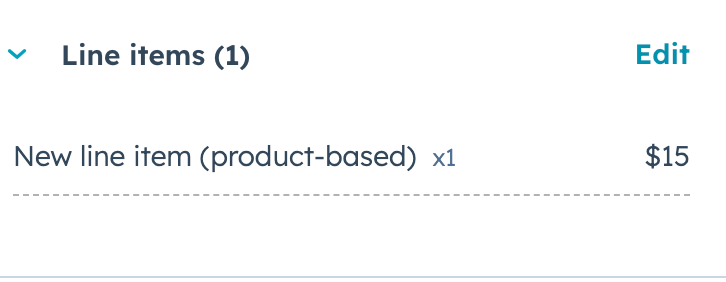
In HubSpot, the deal record will display the line item in the *Line items* card.

<Frame>
  <img src="https://www.hubspot.com/hubfs/Knowledge_Base_2023/deal-record-line-item-association.png" alt="deal-record-line-item-association" />
</Frame>

### Create and associate a line item (single call)

To create a line item from an existing product and associate it with a deal using a single call, you can include an `associations` array in the line item create request.

To create the line item, make a `POST` request to `crm/v3/objects/line_item`. Your request body will look similar to the following. Note that the `associationTypeId` for the line item-deal association is `20`. Learn more about [association types between different types of CRM records](/api-reference/legacy/crm/associations/associate-records/guide#association-type-id-values).

```json theme={null}
{
  "properties": {
    "quantity": 1,
    "hs_object_id": "1234567", //the object ID of the product
    "name": "New line item (product-based)"
  },
  "associations": [
    {
      "to": {
        "id": "14795354663"
      },
      "types": [
        {
          "associationCategory": "HUBSPOT_DEFINED",
          "associationTypeId": 20
        }
      ]
    }
  ]
}
```

A `200` response will return details about the new line item. In HubSpot, the deal record will display the line item in the *Line items* card.

<Frame>
  <img src="https://www.hubspot.com/hubfs/Knowledge_Base_2023/deal-record-line-item-association.png" alt="deal-record-line-item-association" />
</Frame>
