> ## Documentation Index
> Fetch the complete documentation index at: https://developers.hubspot.com/docs/llms.txt
> Use this file to discover all available pages before exploring further.

---
id: 1d884944-f0e3-4d8c-ad78-75124a408e8f
---

# Legacy quotes

> The legacy quotes API endpoints allow you to create and manage HubSpot quotes and sync quote data to other systems.

export const PostmanCard = ({title, collectionId}) => {
  return <div className="card-condensed-cta">
      <Card title={title ? title : "Postman collection"} href={`https://app.getpostman.com/run-collection/${collectionId}`} horizontal={true} cta="Run in Postman" icon={<svg xmlns="http://www.w3.org/2000/svg" width={25} height={25} preserveAspectRatio="xMidYMid" viewBox="0 0 256 256">
              <path fill="#FF6C37" d="M254.953 144.253c8.959-70.131-40.569-134.248-110.572-143.206C74.378-7.912 10.005 41.616 1.047 111.619c-8.959 70.003 40.569 134.248 110.572 143.334 70.131 8.959 134.248-40.569 143.334-110.7Z" />
              <path fill="#FFF" d="m174.2 82.184-54.007 54.007-15.229-15.23c53.11-53.11 58.358-48.503 69.236-38.777Z" />
              <path fill="#FF6C37" d="M120.193 137.47c-.384 0-.64-.128-.895-.384l-15.358-15.229a1.237 1.237 0 0 1 0-1.792c54.007-54.006 59.638-48.887 71.028-38.649.255.256.383.512.383.896s-.128.64-.383.896l-54.007 53.878c-.128.256-.512.384-.768.384Zm-13.437-16.509 13.437 13.438 52.087-52.087c-9.47-8.446-15.87-11.006-65.524 38.65Z" />
              <path fill="#FFF" d="m135.679 151.676-14.718-14.718 54.007-54.006c14.46 14.59-7.167 38.265-39.29 68.724Z" />
              <path fill="#FF6C37" d="M135.679 152.956c-.384 0-.64-.128-.896-.384l-14.718-14.718c-.256-.256-.256-.512-.256-.896s.128-.64.384-.895L174.2 82.056a1.237 1.237 0 0 1 1.791 0 15.58 15.58 0 0 1 4.991 11.902c-.256 14.206-16.38 32.25-44.28 58.614-.383.256-.767.384-1.023.384Zm-12.926-15.998c8.19 8.319 11.646 11.646 12.926 12.926 21.5-20.476 42.36-41.464 42.488-55.926.128-3.327-1.152-6.655-3.327-9.214l-52.087 52.214Z" />
              <path fill="#FFF" d="m105.22 121.345 10.878 10.878c.256.256.256.512 0 .768-.128.128-.128.128-.256.128l-22.524 4.863c-1.152.128-2.175-.64-2.431-1.791-.128-.64.128-1.28.512-1.664l13.053-13.054c.256-.256.64-.384.768-.128Z" />
              <path fill="#FF6C37" d="M92.934 139.262c-1.92 0-3.327-1.536-3.327-3.455 0-.896.384-1.792 1.024-2.432l13.053-13.054c.768-.64 1.792-.64 2.56 0l10.878 10.878c.768.64.768 1.792 0 2.56-.256.256-.512.384-.896.512l-22.524 4.863c-.256 0-.512.128-.768.128Zm11.902-16.51-12.542 12.543c-.256.256-.383.64-.128 1.024.128.383.512.511.896.383l21.116-4.607-9.342-9.342Z" />
              <path fill="#FFF" d="M202.739 52.238c-8.191-7.935-21.373-7.679-29.307.64-7.935 8.318-7.679 21.372.64 29.306A20.678 20.678 0 0 0 199.155 85l-14.59-14.59 18.174-18.172Z" />
              <path fill="#FF6C37" d="M188.405 89.223c-12.158 0-22.012-9.854-22.012-22.012 0-12.158 9.854-22.012 22.012-22.012 5.631 0 11.134 2.176 15.23 6.143.255.256.383.512.383.896s-.128.64-.384.895L186.357 70.41l13.566 13.566c.512.512.512 1.28 0 1.792l-.256.256c-3.327 2.047-7.295 3.199-11.262 3.199Zm0-41.337c-10.75 0-19.452 8.703-19.324 19.453 0 10.75 8.702 19.452 19.452 19.324 2.944 0 5.887-.64 8.575-2.047l-13.438-13.31c-.256-.256-.384-.512-.384-.896s.128-.64.384-.895l17.149-17.15c-3.456-2.943-7.807-4.479-12.414-4.479Z" />
              <path fill="#FFF" d="m203.122 52.622-.255-.256-18.301 18.044 14.461 14.462c1.408-.896 2.816-1.92 3.967-3.072a20.51 20.51 0 0 0 .128-29.178Z" />
              <path fill="#FF6C37" d="M199.155 86.28c-.384 0-.64-.128-.896-.384l-14.589-14.59c-.256-.256-.384-.512-.384-.896s.128-.64.384-.895l18.173-18.173a1.237 1.237 0 0 1 1.791 0l.384.256c8.575 8.574 8.575 22.396.128 31.098-1.28 1.28-2.687 2.432-4.223 3.328-.384.128-.64.256-.768.256Zm-12.798-15.87 12.926 12.926c1.024-.64 2.048-1.536 2.816-2.304 7.294-7.294 7.678-19.196.64-26.875L186.357 70.41Z" />
              <path fill="#FFF" d="M176.375 84.488a7.879 7.879 0 0 0-11.134 0l-48.247 48.247 8.063 8.063 51.062-44.792c3.328-2.816 3.584-7.807.768-11.134-.256-.128-.384-.256-.512-.384Z" />
              <path fill="#FF6C37" d="M124.929 142.077c-.384 0-.64-.128-.896-.383l-8.063-8.063a1.237 1.237 0 0 1 0-1.792l48.247-48.247a9.115 9.115 0 0 1 12.926 0 9.115 9.115 0 0 1 0 12.926l-.384.384-51.063 44.792c-.128.255-.384.383-.767.383Zm-6.143-9.342 6.27 6.271 50.167-44.024c2.816-2.304 3.072-6.527.768-9.342-2.303-2.816-6.526-3.072-9.342-.768-.128.128-.256.256-.512.384l-47.351 47.48Z" />
              <path fill="#FFF" d="M80.009 187.637c-.512.256-.768.768-.64 1.28l2.175 9.214c.512 1.28-.256 2.816-1.663 3.2-1.024.384-2.176 0-2.816-.768l-14.077-13.95 45.943-45.943 15.87.256 10.75 10.75c-2.56 2.175-18.045 17.149-55.542 35.961Z" />
              <path fill="#FF6C37" d="M78.985 202.61c-1.024 0-2.048-.383-2.688-1.151l-13.95-13.95c-.255-.256-.383-.512-.383-.896 0-.383.128-.64.384-.895l45.944-45.944c.256-.256.64-.384.895-.384l15.87.256c.383 0 .64.128.895.384l10.75 10.75c.256.256.384.64.384 1.024s-.128.64-.512.896l-.895.767c-13.566 11.902-31.995 23.804-54.902 35.194l2.175 9.086c.384 1.664-.384 3.456-1.92 4.352-.767.384-1.407.512-2.047.512Zm-14.078-15.997 13.182 13.054c.384.64 1.152.896 1.792.512.64-.384.896-1.152.512-1.792l-2.176-9.214c-.256-1.152.256-2.176 1.28-2.688 22.652-11.39 40.952-23.163 54.39-34.81l-9.47-9.47-14.718-.256-44.792 44.664Z" />
              <path fill="#FFF" d="m52.11 197.62 11.006-11.007 16.38 16.381-26.107-1.791c-1.151-.128-1.92-1.152-1.791-2.304 0-.512.128-1.024.512-1.28Z" />
              <path fill="#FF6C37" d="m79.497 204.146-26.236-1.791c-1.92-.128-3.199-1.792-3.071-3.712.128-.768.384-1.535 1.024-2.047L62.22 185.59a1.237 1.237 0 0 1 1.792 0l16.38 16.38c.385.385.512.897.257 1.408-.256.512-.64.768-1.152.768Zm-16.381-15.74-10.11 10.11c-.384.255-.384.895 0 1.151.127.128.255.256.511.256l22.652 1.536-13.053-13.054ZM104.452 146.557c-.768 0-1.28-.64-1.28-1.28 0-.384.128-.64.384-.896l12.414-12.414a1.237 1.237 0 0 1 1.792 0l8.062 8.063c.384.384.512.768.384 1.28-.128.384-.512.767-1.023.895l-20.477 4.352h-.256Zm12.414-11.902-8.446 8.446 13.821-2.943-5.375-5.503Z" />
              <path fill="#FFF" d="m124.8 140.926-14.077 3.071c-1.024.256-2.048-.384-2.303-1.408-.128-.64 0-1.28.511-1.791l7.807-7.807 8.063 7.935Z" />
              <path fill="#FF6C37" d="M110.467 145.277a3.168 3.168 0 0 1-3.2-3.2c0-.895.385-1.663.897-2.303l7.806-7.807a1.237 1.237 0 0 1 1.792 0l8.062 8.063c.384.384.512.768.384 1.28-.128.384-.512.767-1.023.895l-14.078 3.072h-.64Zm6.399-10.622-6.91 6.91c-.257.257-.257.512-.129.768s.384.384.768.384l11.774-2.56-5.503-5.502ZM203.25 64.907c-.256-.767-1.151-1.151-1.92-.895-.767.255-1.151 1.151-.895 1.92 0 .127.128.255.128.383.768 1.536.512 3.455-.512 4.863-.512.64-.384 1.536.128 2.048.64.512 1.536.384 2.048-.256 1.92-2.432 2.303-5.503 1.023-8.063Z" />
            </svg>} />
    </div>;
};

export const ScopesList = ({scopes = [], description = "This API requires one of the following scopes:"}) => {
  if (!scopes || scopes.length === 0) {
    return null;
  }
  const sortedScopes = scopes.sort((a, b) => a.localeCompare(b));
  return <div>
      <div className="text-sm mb-2">{description}</div>
      <div>
        {sortedScopes.map((scope, index) => <div key={index}>
            <code>
              <span className="text-xs">{scope}</span>
            </code>
          </div>)}
      </div>
    </div>;
};

<PostmanCard collectionId="8215363-40616f69-9a25-4e9d-90da-b737b996afa8" />

<Accordion title="Scope requirements">
  <ScopesList
    scopes={[
  'crm.objects.quotes.read',
  'crm.objects.quotes.write',
  'crm.objects.deals.read',
  'crm.objects.line_items.read',
  'crm.objects.line_items.write',
  'crm.objects.contacts.read',
]}
  />
</Accordion>

Use the quotes API to create, manage, and retrieve sales quotes for sharing pricing information with potential buyers. Once configured, a quote can be shared with a buyer either at a specified URL or through PDF. Users can also [manage quotes in HubSpot](https://knowledge.hubspot.com/quotes/set-up-legacy-quotes-legacy#manage-quotes) to add details, update associations, and more.

If you’ve set up either [HubSpot payments](https://knowledge.hubspot.com/payment-processing/set-up-payments) or [Stripe payment processing](https://knowledge.hubspot.com/payment-processing/connect-your-stripe-account-as-a-payment-processor-in-hubspot), you can configure a quote to be payable through this API. Learn more about [payable quotes](/api-reference/legacy/crm/objects/quotes/guide#enable-payments).

<Frame>
  <img src="https://www.hubspot.com/hubfs/Knowledge_Base_2023/example-quote-api.png" alt="example-quote-api" />
</Frame>

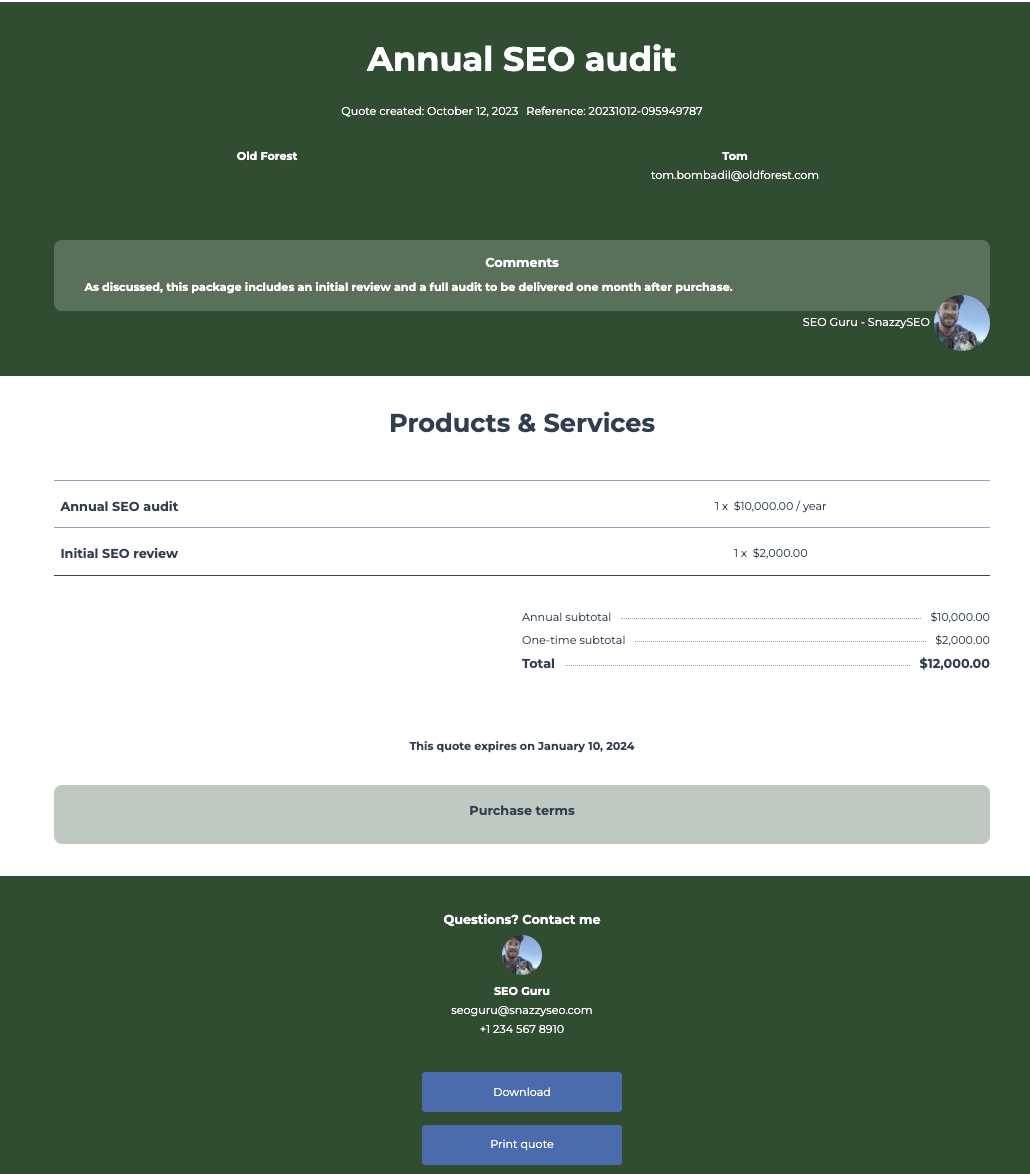
**Example use case:** You need to create a contract proposal for a customer who is interested in purchasing one of your annual SEO auditing service packages.

Below, learn how to create a quote through the API and configure its various properties, associations, states, and more.

## Overview

The quote creation process can be broken up into the following steps:

1. **Create a quote:** create a quote with a few details, such as name and expiration date. You can also configure the quote to [enable e-signatures](/api-reference/legacy/crm/objects/quotes/guide#enable-e-signatures) and [payments](/api-reference/legacy/crm/objects/quotes/guide#enable-payments)[](https://knowledge.hubspot.com/quotes/use-e-signatures-with-quotes).
2. **Set up associations:** associate the quote with other types of CRM objects, such as line items, a quote template, a deal, and more. During the next step, the quote will inherit property values from some of these associated records as well as the account's settings.
3. **Set the quote state:** set the quote's state to reflect its readiness to be shared with buyers. When you set the quote's state, such as making it an editable draft or fully published and publicly accessible quote, it will [inherit certain properties](#properties-set-by-quote-state) from its associated CRM records and account settings.
4. **Share the quote:** once a quote has been published, you can share it with your buyers.

## Create a quote

To create a quote, you'll first configure its basic details by making a `POST` request to `/crm/v3/objects/quotes`. Later, you'll make a separate call to associate the quote with other objects, such as the quote template, line items, or a deal.

<Info>
  Depending on your preferred workflow, you can instead [create a quote with associations through one POST request](#create-a-quote-with-associations-single-request).
</Info>

In the post body, include the following required properties to configure its basic details.

```json theme={null}
{
  "properties": {
    "hs_title": "CustomerName - annual SEO audit",
    "hs_expiration_date": "2023-12-10"
  }
}
```

| Parameter            | Type   | Description                      |
| -------------------- | ------ | -------------------------------- |
| `hs_title`           | String | The name of the quote.           |
| `hs_expiration_date` | String | The date that the quote expires. |

The above are just the minimum required properties to get a quote started, but [other properties](/api-reference/legacy/crm/objects/quotes/guide#adding-associations) are required to publish a quote. To see all available quote properties, make a `GET` request to `crm/v3/properties/quotes`. Learn more about the [properties API](/api-reference/legacy/crm/properties/guide).

The response will include an `id`, which you'll use to continue configuring the quote. You can update quote properties at any time by making a `PATCH` request to `/crm/v3/objects/quotes/{quoteId}`.

### Quote owner

Setting the `hubspot_owner_id` property manually isn't possible due to it being a calculated property, and any values will be overridden. When using quotes, the property works as follows:

* If a [deal is associated with the quote](#adding-associations), the `hubspot_owner_id` property will reflect the `hs_associated_deal_owner_id` property (`hs_associated_deal_owner_id` is a calculated property).
* If a deal isn't associated with the quote, the `hubspot_owner_id` property will reflect the `hs_quote_owner_id` property.

### Enable e-signatures

To enable e-signatures on the quote, include the `hs_esign_enabled` boolean property in your request body with a value of `true`. Note that you will not be able to add countersigners through the API, so those will need to be added in HubSpot before publishing the quote. You also cannot publish a quote with e-sign enabled if you've [exceeded your monthly e-signature limit](https://knowledge.hubspot.com/quotes/use-e-signatures-with-quotes#monitor-e-signature-usage).

```json theme={null}
{
  "properties": {
    "hs_title": "CustomerName - annual SEO audit",
    "hs_expiration_date": "2023-12-10",
    "hs_esign_enabled": "true"
  }
}
```

Later, you'll need to associate the quote with the quote signers. While the contacts signing the quote exist as contacts in HubSpot, they're stored as a separate association type from contacts. Learn more about [associating quotes with quote signers](#associating-quote-signers).

### Enable payments

To turn on payments on a quote, include the `hs_payment_enabled` boolean property in your request body with a value of `true`. Depending on your payment processor and accepted payment methods, you’ll also need to set `hs_payment_type` and `hs_allowed_payment_methods`.

<Warning>
  **Please note:**

  The HubSpot account must have either [HubSpot payments](https://knowledge.hubspot.com/payment-processing/set-up-payments) or [Stripe payment processing](https://knowledge.hubspot.com/payment-processing/connect-your-stripe-account-as-a-payment-processor-in-hubspot) set up before using this capability.
</Warning>

| Parameter                     | Type        | Description                                                                                                                              |
| ----------------------------- | ----------- | ---------------------------------------------------------------------------------------------------------------------------------------- |
| `hs_payment_enabled`          | Boolean     | When set to `true`, enables the quote to collect payment using either HubSpot payments or Stripe payment processing. Default is `false`. |
| `hs_payment_type`             | Enumeration | Determines which payment processor to use. Value can be either `HUBSPOT` or `BYO_STRIPE`.                                                |
| `hs_allowed_payment_methods`  | Enumeration | The payment methods to be used (e.g., credit card).                                                                                      |
| `hs_collect_billing_address`  | Boolean     | When set to `true`, allows the buyer to enter their billing address during checkout.                                                     |
| `hs_collect_shipping_address` | Boolean     | When set to `true`, allows the buyer to enter their shipping address during checkout.                                                    |

For example, to create a quote and enable HubSpot payments via credit/debit card or ACH, your request would look like:

```json theme={null}
{
  "properties": {
    "hs_title": "CustomerName - annual SEO audit",
    "hs_expiration_date": "2023-12-10",
    "hs_payment_enabled": "true",
    "hs_payment_type": "HUBSPOT",
    "hs_allowed_payment_methods": "CREDIT_OR_DEBIT_CARD;ACH"
  }
}
```

To track payment, HubSpot will automatically update the `hs_payment_status` and `hs_payment_date` properties:

* When you publish a quote with payments enabled, HubSpot will automatically set the `hs_payment_status` property to `PENDING`.
* If using ACH, when the payment is processed, HubSpot will automatically set the `hs_payment_status` property to `PROCESSING`.
* When the payment is confirmed, HubSpot will automatically set the `hs_payment_status` property to `PAID`.
* Once the quote is paid, HubSpot will automatically set `hs_payment_date` to the date and time that the payment was confirmed.
* Once payment is confirmed, the payment is automatically associated to the quote. If you would like to retrieve more information about the payment, refer to the [Payments API](/api-reference/legacy/crm/objects/commerce-payments/guide).

## Adding associations

To create a complete quote, you'll need to associate it with other CRM records, such as line items, using the [associations API](/api-reference/legacy/crm/associations/associate-records/guide). The table below shows which CRM record associations are required for a complete quote, and which are optional. Continue reading to learn more about retrieving IDs and using them to create the needed associations.

| Object type                                                                                                                                                                      | Required | Description                                                                                                                                                                                                                                                                                                                                 |
| -------------------------------------------------------------------------------------------------------------------------------------------------------------------------------- | -------- | ------------------------------------------------------------------------------------------------------------------------------------------------------------------------------------------------------------------------------------------------------------------------------------------------------------------------------------------- |
| [Line items](/api-reference/legacy/crm/objects/line-items/guide)                                                                                                                 | Yes      | The goods and/or services being sold through the quote. You can create line items from [products in your product library](/api-reference/legacy/crm/objects/products/guide) or create custom standalone line items.                                                                                                                         |
| [Quote template](https://knowledge.hubspot.com/quotes/set-up-legacy-quotes-legacy)                                                                                               | Yes      | The template that renders the quote, along with providing some default configuration settings for the quote, such as language. Each quote can be associated with one template.                                                                                                                                                              |
| [Deal](/api-reference/legacy/crm/objects/deals/guide)                                                                                                                            | Yes      | The deal record for tracking revenue and sales lifecycle. A quote inherits values from the associated deal, including the owner and currency. Each quote can be associated with one deal.                                                                                                                                                   |
| [Contact](/api-reference/legacy/crm/objects/contacts/guide)                                                                                                                      | No       | Specific buyers that you're addressing in the quote.                                                                                                                                                                                                                                                                                        |
| [Company](/api-reference/legacy/crm/objects/companies/guide)                                                                                                                     | No       | A specific company that you're addressing in the quote. Each quote can be associated with one company.                                                                                                                                                                                                                                      |
| [Discounts](/api-reference/legacy/crm/objects/discounts/guide), [fees](/api-reference/legacy/crm/objects/fees/guide), and [taxes](/api-reference/legacy/crm/objects/taxes/guide) | No       | Any discounts, fees, and taxes to be applied at checkout. When determining the total quote amount, HubSpot first applies discounts, followed by fees, then taxes. You can use the `hs_sort_order` field to reorder objects of the same type. Can be set to fixed values or percentages by setting `hs_type` to either `FIXED` or `PERCENT`. |

### Retrieving IDs for associations

To make each association, you'll first need to retrieve the ID of each object you want to associate. To retrieve each ID, you'll make a `GET` request to the relevant object endpoint, which follows the same pattern across each CRM object. When making each request, you can also include a `properties` query parameter to return specific properties when needed. Below are example `GET` requests for each type of object.

<CodeGroup>
  ```text hubl.txt theme={null}
  GET request for line items
  /crm/v3/objects/line_items?properties=name

  GET request for quote templates
  /crm/v3/objects/quote_template?properties=hs_name

  GET request for deals
  /crm/v3/objects/deals?properties=dealname

  GET request for contacts
  /crm/v3/objects/contacts?properties=email

  GET request for companies
  /crm/v3/objects/companies?properties=name

  GET request for discounts
  crm/v3/objects/discounts?properties=hs_type,hs_value

  GET request for fees
  crm/v3/objects/fees?properties=hs_type,hs_value

  GET request for taxes
  crm/v3/objects/taxes?properties=hs_type,hs_value
  ```

  ```bash example.sh theme={null}
  #GET request for line items
  curl --request GET \
  --url 'https://api.hubapi.com/crm/v3/properties/line_items?archived=false' \
  --header 'authorization: Bearer YOUR_ACCESS_TOKEN'

  #GET request for quote templates
  curl --request GET \
  --url 'https://api.hubapi.com/crm/v3/properties/quote_templates?archived=false' \
  --header 'authorization: Bearer YOUR_ACCESS_TOKEN'

  #GET request for deals
  curl --request GET \
  --url 'https://api.hubapi.com/crm/v3/properties/deals?archived=false' \
  --header 'authorization: Bearer YOUR_ACCESS_TOKEN'

  #GET request for contacts
  curl --request GET \
  --url 'https://api.hubapi.com/crm/v3/properties/contacts?archived=false' \
  --header 'authorization: Bearer YOUR_ACCESS_TOKEN'

  #GET request for companies
  curl --request GET \
  --url 'https://api.hubapi.com/crm/v3/properties/companies?archived=false' \
  --header 'authorization: Bearer YOUR_ACCESS_TOKEN'

  #GET request for discounts
  curl --request GET \
  --url 'https://api.hubapi.com/crm/v3/properties/discounts?archived=false' \
  --header 'authorization: Bearer YOUR_ACCESS_TOKEN'

  #GET request for fees
  curl --request GET \
  --url 'https://api.hubapi.com/crm/v3/properties/fees?archived=false' \
  --header 'authorization: Bearer YOUR_ACCESS_TOKEN'

  #GET request for taxes
  curl --request GET \
  --url 'https://api.hubapi.com/crm/v3/properties/taxes?archived=false' \
  --header 'authorization: Bearer YOUR_ACCESS_TOKEN'
  ```
</CodeGroup>

Each successful call will return a `200` response with details for each fetched object type. You'll use the value in the `id` field to set associations in the next step.

```json theme={null}
{
  "results": [
    {
      "id": "235425923863",
      "properties": {
        "hs_createdate": "2023-06-12T16:27:32.794Z",
        "hs_lastmodifieddate": "2023-06-12T16:27:32.794Z",
        "hs_name": "Default Basic",
        "hs_object_id": "235425923863"
      },
      "createdAt": "2023-06-12T16:27:32.794Z",
      "updatedAt": "2023-06-12T16:27:32.794Z",
      "archived": false
    },
    {
      "id": "235425923864",
      "properties": {
        "hs_createdate": "2023-06-12T16:27:32.794Z",
        "hs_lastmodifieddate": "2023-06-12T16:27:32.794Z",
        "hs_name": "Default Modern",
        "hs_object_id": "235425923864"
      },
      "createdAt": "2023-06-12T16:27:32.794Z",
      "updatedAt": "2023-06-12T16:27:32.794Z",
      "archived": false
    },
    {
      "id": "235425923865",
      "properties": {
        "hs_createdate": "2023-06-12T16:27:32.794Z",
        "hs_lastmodifieddate": "2023-06-12T16:27:32.794Z",
        "hs_name": "Default Original",
        "hs_object_id": "235425923865"
      },
      "createdAt": "2023-06-12T16:27:32.794Z",
      "updatedAt": "2023-06-12T16:27:32.794Z",
      "archived": false
    }
  ]
}
```

### Creating associations

With your IDs retrieved, you can now make calls to the [associations API](/api-reference/legacy/crm/associations/associate-records/guide) to create associations.

For each type of object you want to associate with a quote, you'll need to make a separate call by making a `PUT` request using the URL structure below:

`/crm/v4/objects/quotes/{fromObjectId}/associations/default/{toObjectType}/{toObjectId}`

| Parameter      | Description                                                                                           |
| -------------- | ----------------------------------------------------------------------------------------------------- |
| `fromObjectId` | The ID of the quote.                                                                                  |
| `toObjectType` | The type of object you're associating with. For example, `line_items`, `deals`, and `quote_template`. |
| `toObjectId`   | The ID of the object you're associating the quote with.                                               |

Below are example `PUT` requests for each type of object.

<CodeGroup>
  ```text hubl.txt theme={null}
  PUT request to associate a line item
  /crm/v4/objects/quotes/{quoteId}/associations/default/line_items/{lineItemId}

  PUT request to associate a quote template
  /crm/v4/objects/quotes/{quoteId}/associations/default/quote_template/{quoteTemplateId}

  PUT request to associate a deal
  /crm/v4/objects/quotes/{quoteId}/associations/default/deals/{dealId}

  PUT request to associate contacts
  /crm/v4/objects/quotes/{quoteId}/associations/default/contacts/{contactId}

  PUT request to associate companies
  /crm/v4/objects/quotes/{quoteId}/associations/default/companies/{companyId}

  PUT request to associate discounts
  /crm/v4/objects/quotes/{quoteId}/associations/default/discounts/{discountId}

  PUT request to associate fees
  /crm/v4/objects/quotes/{quoteId}/associations/default/fees/{feeId}

  PUT request to associate taxes
  /crm/v4/objects/quotes/{quoteId}/associations/default/taxes/{taxId}
  ```

  ```bash example.sh theme={null}
  #PUT request to associate line items
  curl --request PUT \
  --url https://api.hubapi.com/crm/v4/objects/quotes/{quoteId}/associations/default/line_items/{lineItemId} \
  --header 'authorization: Bearer YOUR_ACCESS_TOKEN'

  #PUT request to associate a quote template
  curl --request PUT \
  --url https://api.hubapi.com/crm/v4/objects/quotes/{quote_ID}/associations/default/quote_template/{quoteTemplateId} \
  --header 'authorization: Bearer YOUR_ACCESS_TOKEN'

  #PUT request to associate a deal
  curl --request PUT \
  --url https://api.hubapi.com/crm/v4/objects/quotes/{quoteId}/associations/default/deals/{dealId} \
  --header 'authorization: Bearer YOUR_ACCESS_TOKEN'

  #PUT request to associate contacts
  curl --request PUT \
  --url https://api.hubapi.com/crm/v4/objects/quotes/{quoteId}/associations/default/contacts/{contactId} \
  --header 'authorization: Bearer YOUR_ACCESS_TOKEN'

  #PUT request to associate a company
  curl --request PUT \
  --url https://api.hubapi.com/crm/v4/objects/quotes/{quoteId}/associations/default/companies/{companyId} \
  --header 'authorization: Bearer YOUR_ACCESS_TOKEN'

  #PUT request to associate discounts
  curl --request PUT \
  --url https://api.hubapi.com/crm/v4/objects/quotes/{quoteId}/associations/default/discounts/{discountId} \
  --header 'authorization: Bearer YOUR_ACCESS_TOKEN'

  #PUT request to associate fees
  curl --request PUT \
  --url https://api.hubapi.com/crm/v4/objects/quotes/{quoteId}/associations/default/fees/{feeId} \
  --header 'authorization: Bearer YOUR_ACCESS_TOKEN'

  #PUT request to associate taxes
  curl --request PUT \
  --url https://api.hubapi.com/crm/v4/objects/quotes/{quoteId}/associations/default/line_items/{taxId} \
  --header 'authorization: Bearer YOUR_ACCESS_TOKEN'
  ```
</CodeGroup>

As an example, if your quote has an ID of `123456`, the requests to associate the quote might include the following:

* **Line items (IDs: `55555`, `66666`):**
  * `/crm/v4/objects/quotes/123456/associations/default/line_items/55555`
  * `/crm/v4/objects/quotes/123456/associations/default/line_items/66666`
* **Quote template (ID:** `987654`**):** `/crm/v4/objects/quotes/123456/associations/default/quote_template/987654`
* **Deal (ID: `345345`):** `/crm/v4/objects/quotes/123456/associations/default/deals/345345`

Each successful association will return a `200` response with details about the association. The above calls will associate the objects in both directions, with each direction have its own ID. For example, if you associate the quote with a quote template, the response will describe the association from both ends. In the example response below, `286` is the quote-to-quote-template association type ID, and `285` is the quote-template-to-quote association type ID.

```json theme={null}
{
  "status": "COMPLETE",
  "results": [
    {
      "from": {
        "id": "115045534742"
      },
      "to": {
        "id": "102848290"
      },
      "associationSpec": {
        "associationCategory": "HUBSPOT_DEFINED",
        "associationTypeId": 285
      }
    },
    {
      "from": {
        "id": "102848290"
      },
      "to": {
        "id": "115045534742"
      },
      "associationSpec": {
        "associationCategory": "HUBSPOT_DEFINED",
        "associationTypeId": 286
      }
    }
  ],
  "startedAt": "2023-10-12T16:48:40.624Z",
  "completedAt": "2023-10-12T16:48:40.712Z"
}
```

<Warning>
  **Please note:**

  When associating a quote with a quote template:

  * Quote templates must be [created](https://knowledge.hubspot.com/quotes/set-up-legacy-quotes-legacy) before they can be associated with a quote.
  * A quote can only be associated with on quote template.
  * This API does not support legacy or proposal quotes. Only the `CUSTOMIZABLE_QUOTE_TEMPLATE` template type can be used.
</Warning>

### Associating quote signers

If you're [enabling the quote for e-signatures](#enable-e-signatures), you'll also need to create an association between the quote and the contacts who are signing by using a specific quote-to-contact [association label](/api-reference/legacy/crm/associations/associate-records/guide#associate-records-with-a-label).

Rather than using the default association endpoints shown above, you'll need to make a `PUT` request to the following URL:

`/crm/v4/objects/quote/{quoteId}/associations/contact/{contactId}`

In the request body, you'll need to specify the `associationCategory` and `associationTypeId`, as shown below:

```json theme={null}
[
  {
    "associationCategory": "HUBSPOT_DEFINED",
    "associationTypeId": 702
  }
]
```

## Create a quote with associations (single request)

The following request body will create a new quote with associations to a quote template, a deal, two line items, and a contact.

<Info>
  In order for the request body below to successfully create a quote in your account, you'll need to update the object IDs in the `associations` field to match existing data in your CRM. Review the [Retrieving IDs for associations section](#retrieving-ids-for-associations) for additional guidance.
</Info>

`POST` `/crm/v3/objects/quote`

```json theme={null}
{
  "properties": {
    "hs_title": "CustomerName - annual SEO audit",
    "hs_expiration_date": "2023-09-30"
  },
  "associations": [
    {
      "to": {
        "id": 115045534742
      },
      "types": [
        {
          "associationCategory": "HUBSPOT_DEFINED",
          "associationTypeId": 286
        }
      ]
    },
    {
      "to": {
        "id": 14795354663
      },
      "types": [
        {
          "associationCategory": "HUBSPOT_DEFINED",
          "associationTypeId": 64
        }
      ]
    },
    {
      "to": {
        "id": 75895447
      },
      "types": [
        {
          "associationCategory": "HUBSPOT_DEFINED",
          "associationTypeId": 67
        }
      ]
    },
    {
      "to": {
        "id": 256143985
      },
      "types": [
        {
          "associationCategory": "HUBSPOT_DEFINED",
          "associationTypeId": 67
        }
      ]
    }
  ]
}
```

| Parameter      | Type   | Description                                                                                                                                                                                                                                                                                                                                                                                                                                                                                                                                                                                                                                                                                                                                                                                                                                                                                                                                                                                                                                                           |
| -------------- | ------ | --------------------------------------------------------------------------------------------------------------------------------------------------------------------------------------------------------------------------------------------------------------------------------------------------------------------------------------------------------------------------------------------------------------------------------------------------------------------------------------------------------------------------------------------------------------------------------------------------------------------------------------------------------------------------------------------------------------------------------------------------------------------------------------------------------------------------------------------------------------------------------------------------------------------------------------------------------------------------------------------------------------------------------------------------------------------- |
| `properties`   | Object | Property values to define the quote details. Required properties are `hs_title` and `hs_expiration_date`: <ul><li>`hs_title`: the name of the quote.</li><li>`hs_expiration_date`: the date that the quote expires.</li><li>`hs_status`: the [quote state](#update-quote-state). If not provided at creation, users will not be able to edit the quote in HubSpot.</li></ul>                                                                                                                                                                                                                                                                                                                                                                                                                                                                                                                                                                                                                                                                                          |
| `associations` | Array  | The other CRM records and objects associated with the quote. For a quote to be publishable, it must have an associated deal and quote template. Line items associated with a quote should be distinct from the line items associated with the quote's deal (i.e., you should create copies of the line items).<br /><br />To set each association, include a separate object in this array with the following fields:<ul><li>`to`: the ID of the record or object to associate with the quote.</li><li>`associationCategory`: the [label category](/api-reference/legacy/crm/associations/associate-records/guide#associate-records-with-a-label) of the association type, either `"HUBSPOT_DEFINED"` (default label) or `"USER_DEFINED"` (custom label).</li><li>`associationTypeId`: the [ID of the type of association](/api-reference/legacy/crm/associations/associate-records/guide#association-type-id-values) being made. For example:<ul><li>`286`: quote to quote template</li><li>`64`: quote to deal</li><li>`67`: quote to line item</li></ul></li></ul> |

<Warning>
  **Please note:**

  These line items should be different to line items on other objects, even if they are associated (e.g., associating a quote to a deal). See the [line items API documentation](/api-reference/legacy/crm/objects/line-items/guide) for more information.
</Warning>

## Update quote state

A quote's state describes how far along it is in the creation process, from initial set up to being published and publicly accessible. Quote state can also reflect the [quote approval process](https://knowledge.hubspot.com/quotes/set-up-legacy-quotes), if quote approvals are enabled for the account. When setting a quote's state, HubSpot will [automatically fill in certain properties](#properties-set-by-quote-state).

You can update a quote's state by making a `PATCH` request to `/crm/v3/objects/quote/{quoteId}`.

A quote's state is based on the `hs_status` field. Certain quote states allow users to edit, publish, and use the quote in quote approval workflows. Below are the available quote states.

* **No state:** if no value is provided for the `hs_status` field, the quote will be in a *Minimal* state. The quote will appear on the index page of the quotes tool, but cannot be edited directly. Quotes in this state can still be used in automation, such as the sequences tool, and are also available to analyze within the reporting tool.
* `DRAFT`: enables the quote to be edited in HubSpot. This state can be useful for when the quote isn't fully configured or if you'd rather enable sales reps to complete the quote configuration process in HubSpot.
* `APPROVAL_NOT_NEEDED`: publishes the quote at a publicly accessible URL (`hs_quote_link`) without needing to be [approved](https://knowledge.hubspot.com/quotes/set-up-legacy-quotes).
* `PENDING_APPROVAL`: indicates that the quote is [waiting to be approved](https://knowledge.hubspot.com/quotes/set-up-legacy-quotes) before it can be published.
* `APPROVED`: the quote has been [approved](https://knowledge.hubspot.com/quotes/set-up-legacy-quotes) and is now published at a publicly accessible URL (`hs_quote_link`).
* `REJECTED`: indicates that the quote has been set up but has not been [approved](https://knowledge.hubspot.com/quotes/set-up-legacy-quotes) for publishing, and must be edited before it can be submitted for approval again.

<Warning>
  **Please note:**

  If you're [enabling e-signatures](#enabling-e-signatures) on the quote, you won't be able to publish the quote if you've exceeded your [monthly e-signature limit](https://knowledge.hubspot.com/quotes/use-e-signatures-with-quotes#monitor-e-signature-usage).
</Warning>

For example, the following request would publish the quote at a publicly accessible URL.

```json theme={null}
{
  "properties": {
    "hs_status": "APPROVAL_NOT_NEEDED"
  }
}
```

<Warning>
  **Please note:**

  By default, HubSpot will set the quote's `hs_template_type` property to `CUSTOMIZABLE_QUOTE_TEMPLATE` after you [update the quote's state](/api-reference/legacy/crm/objects/quotes/guide#update-quote-state). This template type is supported by the v3 API, whereas the following template types are legacy templates that are no longer supported:

  * `QUOTE`
  * `PROPOSAL`
</Warning>

### Properties set by quote state

Updating the quote's state will update the following properties:

* `hs_quote_amount`: calculated based on any associated line items, taxes, discounts, and fees.
* `hs_domain`: set from the associated quote template.
* `hs_slug`: randomly generated if one is not explicitly provided.
* `hs_quote_total_preference`: set based on your account settings. If you haven't configured this setting, it will default to the value of the total\_first\_payment field.
* `hs_timezone`: defaults to your HubSpot account's timezone.
* `hs_locale`: set from the associated quote template.
* `hs_quote_number`: set based on the current date and time, unless one is provided.
* `hs_language`: set from the associated quote template.
* `hs_currency`: set based on the associated deal. If you haven't associated a deal with the quote, it will default to your HubSpot account's default currency.

Additionally, the properties below will be calculated when the quote is set to a published state:

* `hs_pdf_download_link`: populated with a URL of a PDF for the quote.
* `hs_locked`: set to `true`. To modify any properties after you've published a quote, you must first update the `hs_status` of the quote back to `DRAFT`, `PENDING_APPROVAL`, or `REJECTED`.
* `hs_quote_link`: the quote's publicly accessible URL. This is a read-only property and cannot be set through the API after publishing.
* `hs_esign_num_signers_required`: if you've [enabled e-signatures](#enable-e-signatures), displays the number of signatures required.
* `hs_payment_status`: the status of payment collection, if you’ve enabled payments. Upon publishing with payments enabled, this property will be set to PENDING. Once the buyer submits payment through the quote, the status will automatically update accordingly. Learn more about [enabling payments](/api-reference/legacy/crm/objects/quotes/guide#enable-payments).

## Retrieve quotes

You can retrieve quotes individually or in batches.

* To retrieve an individual quote, make a `GET` request to `/crm/v3/objects/quotes/{quoteID}`.
* To request a list of all quotes, make a `GET` request to `/crm/v3/objects/quotes`.

For these endpoints, you can include the following query parameters in the request URL:

| Parameter               | Description                                                                                                                                                                                                                                                                      |
| ----------------------- | -------------------------------------------------------------------------------------------------------------------------------------------------------------------------------------------------------------------------------------------------------------------------------- |
| `properties`            | A comma separated list of the properties to be returned in the response. If a requested property isn't defined, it won't be included in the response. If a requested property is defined but a quote doesn't have a value, it will be returned as `null`.                        |
| `propertiesWithHistory` | A comma separated list of the current and historical properties to be returned in the response. If a requested property isn't defined, it won't be included in the response. If a requested property is defined but a quote doesn't have a value, it will be returned as `null`. |
| `associations`          | A comma separated list of objects to retrieve associated IDs for. Any specified associations that don't exist will not be returned in the response. Learn more about the [associations API.](/api-reference/legacy/crm/associations/associate-records/guide)                     |

To retrieve a batch of specific quotes by their IDs, make a `POST` request to `crm/v3/objects/quotes/batch/read` and include the IDs in the request body. You can also include a `properties` array to specify which properties to return. The batch endpoint cannot retrieve associations. Learn how to batch read associations with the [associations API](/api-reference/legacy/crm/associations/associate-records/guide).

```json theme={null}
{
  "inputs": [
    {
      "id": "342007287"
    },
    {
      "id": "81204505203"
    }
  ],
  "properties": ["hs_content", "hs_sentiment", "hs_submission_timestamp"]
}
```

## Scopes

The following scopes are required for an app to create a valid publishable quote:

* `crm.objects.quotes.write`, `crm.objects.quotes.read`, `crm.objects.line_items.write`, `crm.objects.line_items.read`, `crm.objects.owners.read`, `crm.objects.contacts.write`, `crm.objects.contacts.read`, `crm.objects.deals.write`, `crm.objects.deals.read`, `crm.objects.companies.write`, `crm.objects.companies.read`
* `crm.schemas.quote.read`, `crm.schemas.line_items.read`, `crm.schemas.contacts.read`, `crm.schemas.deals.read`, `crm.schemas.companies.read`
