> ## Documentation Index
> Fetch the complete documentation index at: https://developers.hubspot.com/docs/llms.txt
> Use this file to discover all available pages before exploring further.
---
id: 27163ad8-289d-4334-ae58-4a28977876c1
---
# Access and manage Sensitive Data
> Learn how to gain access to and manage Sensitive Data via API.
With [Sensitive Data properties](https://knowledge.hubspot.com/properties/store-sensitive-data), HubSpot users in *Enterprise* accounts can store Sensitive Data or Highly Sensitive Data and use the data in HubSpot tools. For example, you can create a *Passport Number* property and filter contacts in a list based on its values, or create an *SSN* property to store social security numbers. Refer to the [Sensitive Data terms](https://legal.hubspot.com/sensitive-data-terms) page to understand which types of Sensitive Data you can store and which HubSpot tools can access each type of Sensitive Data.
Existing HubSpot APIs and apps will continue to work as expected, but if you have an app that needs access to Sensitive Data or Highly Sensitive Data, you must update the app’s scopes and require app users to authorize and install the app. Once your app gains access, you can use [certain APIs](#manage-sensitive-data) to manage your Sensitive Data.
## Sensitive Data scopes
For an app to access Sensitive Data, it must have the sensitive scopes for each applicable object. For example, if your app needs to read and update Sensitive Data on companies and contacts, you’ll need to add the company and contact read and write sensitive scopes.
If you want to access Highly Sensitive Data, you'll need [additional scopes](#highly-sensitive-scopes-beta).
Sensitive and highly sensitive scopes are not required to retrieve schema information for a Sensitive Data or Highly Sensitive Data property, but are required to create or edit Sensitive Data or Highly Sensitive data properties and to access the property values.
### Sensitive scopes
The sensitive scopes are:
* `crm.objects.contacts.sensitive.read`
* `crm.objects.contacts.sensitive.write`
* `crm.objects.companies.sensitive.read`
* `crm.objects.companies.sensitive.write`
* `crm.objects.deals.sensitive.read`
* `crm.objects.deals.sensitive.write`
* `crm.objects.appointments.sensitive.read`
* `crm.objects.appointments.sensitive.write`
* `crm.objects.custom.sensitive.read`
* `crm.objects.custom.sensitive.write`
* `crm.objects.projects.sensitive.read`
* `crm.objects.projects.sensitive.write`
* `tickets.sensitive` (Both read and write access)
### Highly sensitive scopes
The highly sensitive scopes are:
* `crm.objects.contacts.highly_sensitive.read`
* `crm.objects.contacts.highly_sensitive.write`
* `crm.objects.companies.highly_sensitive.read`
* `crm.objects.companies.highly_sensitive.write`
* `crm.objects.deals.highly_sensitive.read`
* `crm.objects.deals.highly_sensitive.write`
* `crm.objects.custom.highly_sensitive.read`
* `crm.objects.custom.highly_sensitive.write`
* `crm.objects.projects.highly_sensitive.read`
* `crm.objects.projects.highly_sensitive.write`
* `tickets.highly_sensitive` (Both read and write access)
## Sensitive Data scopes and UI extensions
Apps that use Sensitive Data scopes can include [app cards](/apps/developer-platform/add-features/ui-extensions/extension-points/app-cards/overview) and other UI extensions, but with the following restrictions:
* Apps with Sensitive Data scopes **cannot** use [`hubspot.fetch()`](/apps/developer-platform/add-features/ui-extensions/fetching-data), preventing Sensitive Data from being sent to external services.
* Apps with Sensitive Data scopes **cannot** use serverless functions.
These restrictions are safeguards to help prevent exfiltration of Sensitive Data to external endpoints, but they are not a substitute for your own data handling practices. As a developer, you are responsible for ensuring that your app handles Sensitive Data in compliance with applicable laws, regulations, and HubSpot's [Sensitive Data terms](https://legal.hubspot.com/sensitive-data-terms). If your app requires both Sensitive Data access and `hubspot.fetch()`, you'll need to use separate apps for each capability.
## Turn on Sensitive Data access for your app
The process for gaining access to Sensitive Data scopes depends on the type of your app.
### Legacy private apps and privately distributed apps
For [legacy private apps](/apps/legacy-apps/private-apps/overview), you can add the [scopes](#sensitive-data-scopes) in your private app settings.
1. In your HubSpot account, click the **settings icon** in the top navigation bar.
2. In the left sidebar menu, navigate to **Integrations** > **Private Apps**.
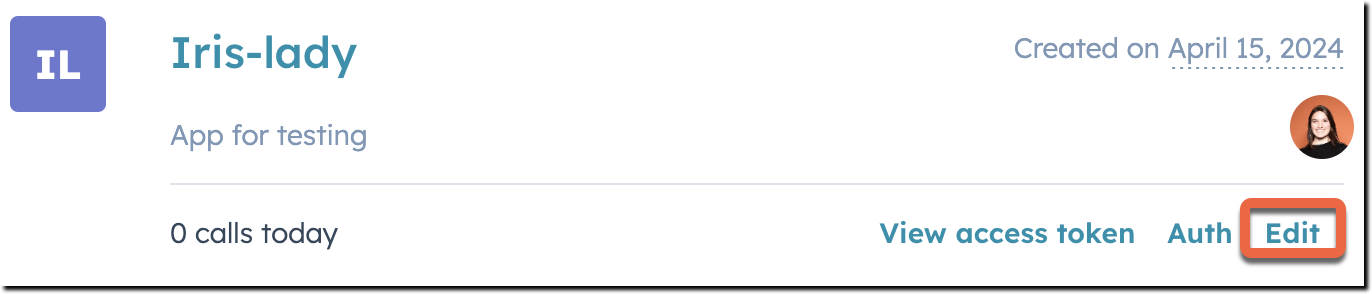
3. On the private app, click **Edit**.
4. Click the **Scopes** tab.
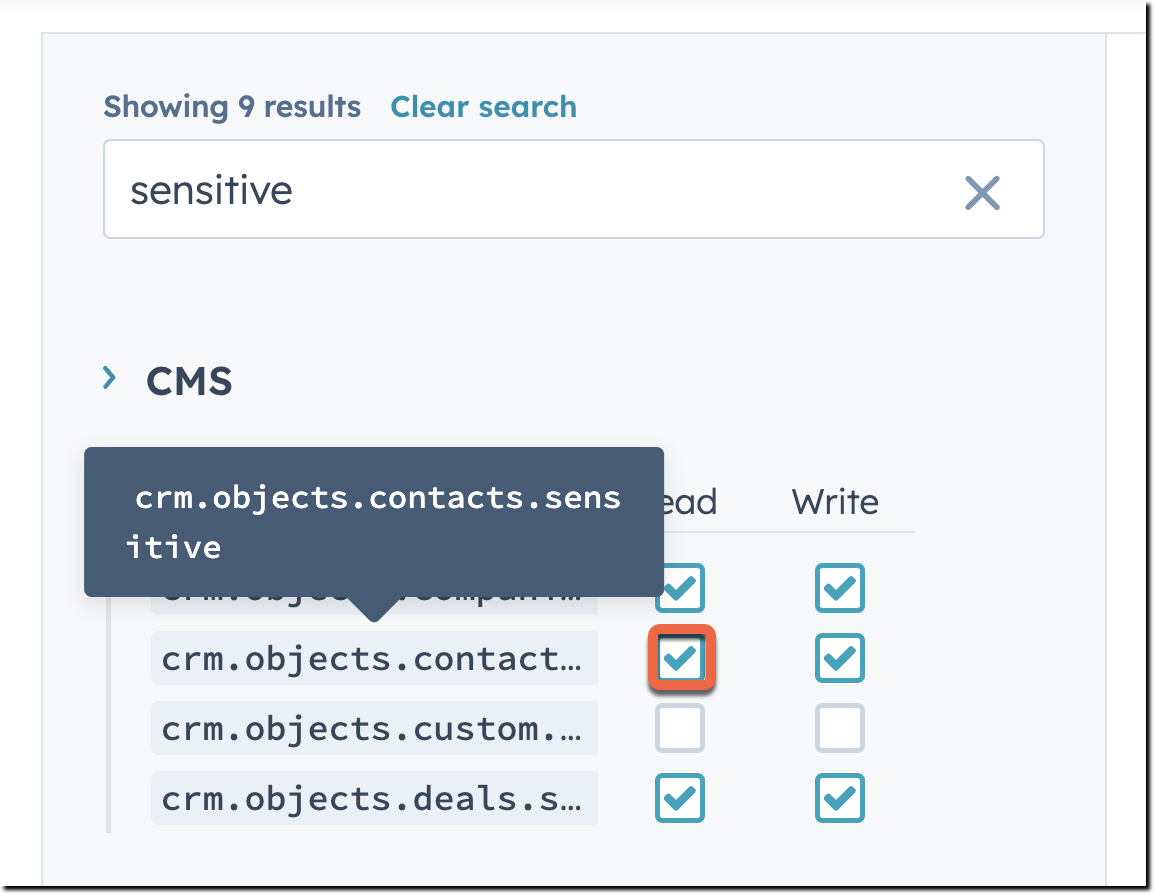
5. Select the **checkboxes** of the [sensitive scopes](#sensitive-data-scopes) you want to add.
6. In the top right, click **Commit changes**.
Your legacy private app's access token will immediately have access to read and/or write Sensitive Data properties on the selected objects.
If you're building an app on the new developer platform that's [privately distributed](/apps/developer-platform/build-apps/app-configuration#distribution), you can specify the [sensitive scopes](#sensitive-data-scopes) in your `app-hsmeta.json` configuration file.
### Legacy public apps and apps built on the new developer platform
For legacy public apps and apps on the latest two versions (2025.2 and 2026.03) of the [developer platform](/apps/developer-platform/overview) intended for distribution on the HubSpot Marketplace, you’ll need to request access to specific sensitive scopes from HubSpot’s Ecosystem Quality team. If approved, the team will allowlist the sensitive scopes to test your app and will help you publish your app with the required scopes following a period of testing and compliance checks. You’ll then need to notify app users of the change and [request re-authorization of your app](#request-authorization-from-app-users).
Navigate to [this page](https://developers.hubspot.com/sensitive-data#getStarted) to view the full process and fill out the form to request Sensitive Data access for these app types.
### Request authorization from app users
Once the sensitive [scopes](#sensitive-data-scopes) have been added to your app, you’ll need to send [authorization URLs](/apps/developer-platform/build-apps/authentication/oauth/working-with-oauth) to app users so they can authorize and install the app, granting access to Sensitive Data scopes. If they’re existing users of the app, they’ll need to reauthorize with the updated scopes for Sensitive Data access to apply.
Once you’ve notified your app users, a Super admin in their account will need to:
1. Click the **authorization URL** with Sensitive Data scopes.
2. Select the **account** into which to install the app. The HubSpot account must have an *Enterprise* subscription to access Sensitive Data functionality.
3. Review the updated list of scopes, then click **Connect App** to install.
Once authorized and installed, the app can access Sensitive Data via APIs for the account.
## Manage Sensitive Data
Once your app has access to Sensitive Data, you can use the following APIs to manage Sensitive Data:
* **Properties API**: create, edit, or archive Sensitive Data and Highly Sensitive Data properties, and retrieve property information.
* **Object APIs**: retrieve or update Sensitive Data and Highly Sensitive Data property values. Available for the following objects: [Contacts](/api-reference/legacy/crm/objects/contacts/guide), [Companies](/api-reference/legacy/crm/objects/companies/guide), [Deals](/api-reference/legacy/crm/objects/deals/guide), [Tickets](/api-reference/legacy/crm/objects/tickets/guide), [Custom objects](/api-reference/legacy/crm/objects/custom-objects/guide), [Appointments](/guides/crm/using-object-apis), [Projects](/guides/account/projects/guide).
* **Imports API**: import files to set or update Sensitive Data and Highly Sensitive Data property values. Your app must have the sensitive and highly sensitive scopes for the objects you're importing. Learn more about using the [imports API](/api-reference/legacy/crm/imports/guide).
* **Exports API**: export records and lists with Sensitive Data and Highly Sensitive Data property values. Your app must have the sensitive and highly sensitive scopes for the objects you're exporting. Learn more about using the [exports API](/api-reference/legacy/crm/exports/guide).
* **CRM Search V3 API**: search for records with values for Sensitive Data properties. This API is not available for use with Highly Sensitive Data.
* **Forms API**: send form submissions containing Sensitive Data or Highly Sensitive Data.
* **Webhooks API**: create `propertyChange` event type webhook subscriptions for contact, company, deal, and ticket Sensitive Data properties. This API is not available for use with Highly Sensitive Data.
### Retrieve Sensitive Data properties
You can use the [properties API](/api-reference/legacy/crm/properties/guide) to view Sensitive Data property definitions and schema information.
To retrieve all Sensitive Data properties for an object, include the `dataSensitivity` query parameter with the value `sensitive`. To retrieve all Highly Sensitive Data properties, use the value `highly_sensitive`. If you don't include this parameter when retrieving properties, only non-sensitive properties will be returned. For example, to retrieve all contact properties that store Sensitive Data, make a `GET` request to `/crm/v3/properties/contacts?dataSensitivity=sensitive`.
* To retrieve an individual property, make a `GET` request to `/crm/v3/properties/{objectType}/{propertyName}`.
* If a property contains Sensitive Data, in the response, the `dataSensitivity` property will have the value `sensitive`.
* If a property contains Highly Sensitive data, the `dataSensitivity` property will have the value `highly_sensitive`.
* If a returned Sensitive Data property stores protected health information, the returned `sensitiveDataCategories` field will have a value of `["HIPAA"]`.
* If it’s not a Sensitive Data property, the `dataSensitivity` property value will be `non_sensitive`.
For example, if you have a *Passport Number* Sensitive Data property, when you retrieve it, your response would look like:
```json theme={null}
// Example response for GET /crm/v3/properties/contacts/passport_number
{
"updatedAt": "2021-11-03T15:24:08.528Z",
"createdAt": "2021-04-16T18:17:14.911Z",
"name": "passport_number",
"label": "Passport Number",
"type": "string",
"fieldType": "text",
"description": "",
"groupName": "contactinformation",
"options": [],
"createdUserId": "9586504",
"updatedUserId": "9586504",
"displayOrder": -1,
"dataSensitivity": "sensitive",
"calculated": false,
"externalOptions": false,
"archived": false,
"hasUniqueValue": false,
"hidden": false,
"showCurrencySymbol": false,
"modificationMetadata": {
"archivable": true,
"readOnlyDefinition": false,
"readOnlyValue": false
},
"formField": true
}
```
### Create or update Sensitive Data properties
You can use the [properties API](/api-reference/legacy/crm/properties/guide) to create or update Sensitive Data properties. You must have the `sensitive.write` scope for the given object to create or edit its properties.
* To create a property and mark it as sensitive, make a `POST` request to `/crm/v3/properties/{object}` and include the `dataSensitivity` field with the value `sensitive`.
* To create a property and mark it as highly sensitive, make a `POST` request to `/crm/v3/properties/{object}` and include the `dataSensitivity` field with the value `highly_sensitive`.
Once you've created a property as sensitive, you cannot change the sensitivity setting.
For example, to create a Sensitive Data property for contacts with a `POST` request to `/crm/v3/properties/contacts`, your request would look like:
```json theme={null}
{
"groupName": "contactinformation",
"name": "sensitive_property",
"label": "Sensitive Property",
"type": "string",
"fieldType": "text",
"dataSensitivity": "sensitive"
}
```
* To edit a Sensitive Data property, make a `PATCH` request to `/crm/v3/properties/{objectType}/{propertyName}`. You cannot edit the `dataSensitivity` field.
* To archive a Sensitive Data property, make a `DELETE` request to `crm/v3/properties/{objectType}/{propertyName}`. Once archived, properties will be permanently deleted after 90 days.
Learn more about using the [properties API](/api-reference/legacy/crm/properties/guide).
### Retrieve Sensitive Data property values
You can retrieve a record’s value for a Sensitive Data property. To do this, make a `GET` request to `/crm/v3/objects/{object}/{recordId}` and include the Sensitive Data property in your query parameters.
For example, to retrieve a contact’s *Passport Number* value, your request URL would look like: `https://api.hubspot.com/crm/v3/objects/contacts/1234567?properties=passport_number`.
### Set or update Sensitive Data property values
You can use the [object APIs](/guides/crm/understanding-the-crm) to create or edit records to set values for Sensitive Data properties.
* To create a record and set a value for a Sensitive Data property, make a `POST` request to `/crm/v3/objects/{object}`. In your request body, include the required properties and the Sensitive Data property.
* To update a record’s value for a Sensitive Data property, make a `PATCH` request to `/crm/v3/objects/{object}/{objectId}`. In your request body, include the Sensitive Data property with the new value. To clear the value, set the value to an empty string in your request body.
For example, if you want to create a contact and set a value for the *Passport Number* property by making a `POST` request to `/crm/v3/objects/contacts`, the request body would look like:
```json theme={null}
{
"properties": {
"email": "example@hubspot.com",
"firstname": "Jane",
"lastname": "Doe",
"phone": "(555) 555-5555",
"company": "HubSpot",
"website": "hubspot.com",
"lifecyclestage": "marketingqualifiedlead",
"passport_number": "1234567"
}
}
```
If you wanted to update the property’s value later on, your request would look like:
```json theme={null}
// Example request body for PATCH crm/v3/objects/contacts/{contactID}
{
"properties": {
"passport_number": "89101112"
}
}
```
### CRM Search API
If your app has the Sensitive Data scopes, you can use the [V3 CRM search API](/api-reference/legacy/crm/search-the-crm) to search for records with values for Sensitive Data properties. To do so, make a `POST` request to `/crm/v3/objects/{object}/search` and include the Sensitive Data properties you want to search for.
For example, the following search would return contacts with their first name, last name, and passport number values:
```json theme={null}
// Example POST request to /crm/v3/objects/contacts/search
{
"properties": ["firstname", "lastname", "passport_number"]
}
```
### Forms API
To send form submissions containing Sensitive Data to HubSpot, make a `POST` request to `https://api.hsforms.com/submissions/v3/integration/secure/submit/{HubID}/:formGuid`. Learn more about using this [endpoint.](/api-reference/legacy/marketing/forms/v3-legacy/submit-data-authenticated).
This is currently the only forms submission API endpoint that can be used with Sensitive Data because it supports authentication. Any other requests to the forms API will result in an error or hide Sensitive Data values.
### Webhooks API
You can create `propertyChange` [event type webhook subscriptions](/api-reference/legacy/webhooks) for Sensitive Data properties on contacts, companies, deals, and tickets.
For non-sensitive property `propertyChange` events, the webhook payload has the new value in the `propertyValue` field. For Sensitive Data property `propertyChange` events, the webhook payload will have the `propertyValue` set as `"REDACTED"`. To view the value, you'll need to [retrieve the record's value](#retrieve-sensitive-data-property-values) for the Sensitive Data property.
For example, a webhook payload for a Sensitive Data property `propertyChange` event contact subscription would look like the following:
```json theme={null}
// Example webhook payload
[
{
"eventId": 3029365631,
"subscriptionId": 686627,
"portalId": 891472211,
"appId": 7906213,
"occurredAt": 1715203101896,
"subscriptionType": "contact.propertyChange",
"attemptNumber": 0,
"objectId": 847297356,
"propertyName": "passport_number",
"propertyValue": "REDACTED",
"changeSource": "CRM_UI",
"sourceId": "userId:882761034"
}
]
```
## Errors
The following errors and redactions are expected:
* If you don’t have the required [scope](#sensitive-data-scopes) to read or update Sensitive Data for a given object, you’ll receive a 403 Forbidden error when you make a request containing a Sensitive Data property to that object's API.
* Sensitive Data access is only supported for the V3 properties, object, CRM search, and forms APIs.
* If you use legacy versions of the properties and object APIs, your request will appear successful, but Sensitive Data values won't be updated and will be hidden in the response body.
* If you use legacy versions of the CRM search API, you'll receive a 403 Forbidden error citing support in version 3 or later.
* If you use the unauthorized form submission API, you'll receive a 403 Forbidden error. If you try to retrieve form submissions containing Sensitive Data, the submissions will be returned but the Sensitive Data properties and their values will be hidden.