> ## Documentation Index
> Fetch the complete documentation index at: https://developers.hubspot.com/docs/llms.txt
> Use this file to discover all available pages before exploring further.
---
id: a374b4eb-7434-4288-adfe-77e5cfa4ac80
---
# Marketing events API guide
> An overview of the Marketing Events object in HubSpot.
export const PostmanCard = ({title, collectionId}) => {
return
} />
;
};
export const ScopesList = ({scopes = [], description = "This API requires one of the following scopes:"}) => {
if (!scopes || scopes.length === 0) {
return null;
}
const sortedScopes = scopes.sort((a, b) => a.localeCompare(b));
return
{description}
{sortedScopes.map((scope, index) =>
{scope}
)}
;
};
A marketing event is a CRM object, similar to contacts and companies, that enables you to track marketing events, such as a webinar, along with the contacts who registered and attended the event. Below, learn more about working with the marketing event API to integrate marketing events into an app.
## In this article
* [Scope requirements](#scope-requirements)
* [Differences between internal ID and external ID endpoints](#differences-between-internal-id-and-external-id-endpoints)
* [Event management endpoints](#create-and-update-events)
* [Event attendance endpoints](#event-attendance-endpoints)
* [Participant state endpoints](#participant-state-endpoints)
* [List association endpoints](#list-association-endpoints)
* [Configure app settings](#configure-app-settings)
* [Step 1: Create an API in your app](#step-1-create-an-api-in-your-app)
* [Step 2: Provide HubSpot with the URL path to your API](#step-2-provide-hubspot-with-the-url-path-to-your-api)
## Scope requirements
To make an API request to one of the marketing event endpoints, the following [scopes](/apps/developer-platform/build-apps/authentication/scopes) are required:
* `crm.objects.marketing_events.read`: grants permission to retrieve marketing event and attendance data.
* `crm.objects.marketing_events.write`: grants permission to create, delete, or make changes to marketing event information.
When authenticating calls made by your app, you can either use a [static auth token](/apps/developer-platform/build-apps/authentication/overview#static-auth) or [OAuth](/api-reference/legacy/authentication/manage-oauth-tokens).
## Differences between internal ID and external ID endpoints
Many endpoints below provide two different ways to identify an event you want to fetch or update. Though the end result for similar endpoints might be the same, they differ mainly in the associated IDs you provide:
* **Endpoints using external IDs:** endpoints that require `externalEventId` and `externalAccountId` parameters will only work in the same app that originally created the event. For example, if you created two public apps, called *App A* and *App B*, and you created a marketing event via the authentication and IDs associated with *App A*, only *App A* can read, update, or add new participants to the event. If you attempt to access the same event with *App B* using the same externalEventId and externalAccountId, a 404 error will result.
* **Endpoints using an objectId:** endpoints that require an `objectId` can be used to access an event by any app with the associated scopes listed in the section above, regardless of the app that originally created the event. If *App A* created a marketing event, *App B* can still read, update, or add participants through `objectId`-based endpoints.
## Event management endpoints
The following sections provide context on common event properties, and detail how to use the various event management endpoints to create, read, update, and archive events.
### Event properties
The following properties are available to fetch and update when using the event management endpoints:
| Parameter | Type | Description |
| ------------------ | ------- | -------------------------------------------------------------------------------------------------- |
| `eventName` | String | The title of your event. |
| `eventType` | String | The type of the event (e.g., webinar, tradeshow, etc.). |
| `eventOrganizer` | String | The individual or organization that's hosting the event. |
| `eventDescription` | String | A description for your event. |
| `eventUrl` | String | A URL that users can navigate to where they can learn more details and/or register for your event. |
| `eventCancelled` | Boolean | Whether or not the event is cancelled. |
| `eventStartTime` | String | An ISO 8601 formatted timestamp of the event's start time. |
| `eventEndTime` | String | An ISO 8601 formatted timestamp of the event's end time. |
### Create an event
To create a marketing event you can make a `POST` request to `/marketing/v3/marketing-events/events` and provide the `eventName`, `externalEventId`, `externalAccountId`, and `eventOrganizer` in the body of your request. You can optionally provide any additional properties listed in the [table above](#event-properties) in your request.
For example, if the `externalAccountId` of your app is `"12345"`, and the `externalEventId` of your event in your app is `"67890"`, you could create a new event called `"Winter webinar"` with a request that would resemble the following:
```json theme={null}
{
"externalAccountId": "12345",
"externalEventId": "67890",
"eventName": "Winter webinar",
"eventOrganizer": "Snowman Fellowship",
"eventCancelled": false,
"eventUrl": "https://example.com/holiday-jam",
"eventDescription": "Let's get together to plan for the holidays",
"eventCompleted": false,
"startDateTime": "2024-08-07T12:36:59.286Z",
"endDateTime": "2024-08-07T12:36:59.286Z",
"customProperties": [
{
"name": "eventSeason",
"value": "winter"
}
]
}
```
### Update event properties using external IDs
You can update marketing events by making a `POST` request to `/marketing/v3/marketing-events/events/upsert` endpoint. You can include any `customProperties` along with any other details of your event (including its name, start time, and description).
If a marketing event already exists with the specified ID in your request, it will be updated. Otherwise, a new event will be created.
For example, the following request would create an event with an ID of `4` named "Virtual cooking class":
```json theme={null}
{
"inputs": [
{
"customProperties": [
{
"name": "property1",
"value": "1234"
}
],
"eventName": "Virtual cooking class",
"startDateTime": "2023-11-30T17:46:20.461Z",
"eventOrganizer": "Chef Joe",
"eventDescription": "Join us for a virtual cooking class! Yum.",
"eventCancelled": false,
"externalAccountId": "CookingCo",
"externalEventId": "4"
}
]
}
```
### Update event properties using its objectId
Once an event is created, you can update its properties by making a `PATCH` request to `/marketing/v3/marketing-events/{objectId}`.
* To get the `objectId` for a specific marketing event, follow the instructions in [this knowledge base article](https://knowledge.hubspot.com/integrations/use-marketing-events#view-and-analyze-marketing-events) to view the details for an event in your HubSpot account, then locate the ID under the *Record ID* field. The `objectId` will also be returned in the response when you successfully create an event.
* You can also make a `GET` request to the `/marketing/v3/marketing-events` endpoint described in the next section.
* If you have the `externalEventId` of an event, you can include it as a path when making a `GET` request to `/marketing/v3/marketing-events/{externalEventId}/identifiers`. The response will include all marketing events along with the relevant identifiers for each event (i.e., the event's `objectId`, its `appInfo`, the `marketingEventName`, and the `externalAccountId`).
### Get event details
To get a list of all marketing events along with their properties, make a `GET` request to `/marketing/v3/marketing-events`.
If you need to retrieve the details for a specific marketing event by its *Record ID* in HubSpot, you can provide the ID as the objectId in a `GET` request to `/marketing/v3/marketing-events/{objectId}`.
```json theme={null}
{
"eventName": "Test Marketing Event",
"eventType": "test-type",
"startDateTime": "2024-05-22T12:29:50.734Z",
"endDateTime": "2024-05-25T12:29:50.734Z",
"eventOrganizer": "testEventOrganizer",
"eventDescription": "testDescription",
"eventUrl": "testURL",
"eventCancelled": true,
"eventCompleted": false,
"customProperties": [
{
"name": "test_custom_prop",
"value": "1"
},
{
"name": "test_prop",
"value": "2"
}
],
"objectId": "58237132332",
"externalEventId": null,
"eventStatus": "CANCELLED",
"appInfo": {
"id": "111",
"name": "Zoom"
},
"registrants": 1,
"attendees": 1,
"cancellations": 2,
"noShows": 0,
"createdAt": "2024-08-07T12:58:40.635Z",
"updatedAt": "2024-10-15T13:35:03.353Z"
}
```
### Delete an event
To delete a marketing event, make a `DELETE` request to `/marketing/v3/marketing-events/{objectId}` with the event's associated `objectId`.
If successful, you'll receive a `204 No Content` response.
### Update multiple events in bulk
To update multiple marketing events in bulk, you can make a `POST` request to `/marketing-events/v3/marketing-events/batch/update` and provide the properties you want to update for each event within the inputs array of the request body.
For example, if you wanted to update several properties of two marketing events with object IDs of 58237132332 and 54073507364 in a single request, the body of your request would resemble the following:
```json theme={null}
{
"inputs": [
{
"objectId": "58237132332",
"eventCancelled": true,
"eventOrganizer": "testEventOrganizer",
"eventUrl": "testURL",
"eventDescription": "testDescription",
"eventName": "Test Marketing Event Update",
"eventType": "test-type"
},
{
"objectId": "54073507364",
"eventCancelled": true,
"eventOrganizer": "testEventOrganizer",
"eventUrl": "testURL",
"eventDescription": "testDescription",
"eventName": "Test Marketing Event Update 2",
"eventType": "test-type"
}
]
}
```
## Event attendance endpoints
The event attendance state endpoints allow you to record registration activities for a contact, such as whether they registered, attended, or cancelled their registration for your event. For example, you can use this endpoint to record that a HubSpot contact has registered for a marketing event.
### Update attendance using the event objectId
If you want to use the `objectId` of a marketing event, you can either use the contact ID of the contact you want to record participation state for, or you can use their email address.
* To use a contact's ID, make a POST request to `/marketing/v3/marketing-events/{objectId}/attendance/{subscribeState}/create` then provide the ID of the contact using the `vid` field within the `inputs` array of your request body. For example, the request body below provides an example of updating the attendance data for a contact with an ID of `47733471576` and specifying when the attendee joined and left the event via the `joinedAt` and `leftAt` properties:
```json theme={null}
{
"inputs": [
{
"vid": 47733471576,
"properties": {
"joinedAt": "2024-05-22T13:38:16.500Z",
"leftAt": "2024-05-22T15:40:16.500Z"
},
"interactionDateTime": 1716382579000
}
]
}
```
* To use a contact's email, make a POST request to `/marketing/v3/marketing-events/{objectId}/attendance/{subscribeState}/email-create` then provide the email of the contact using the `email` field within the `inputs` array of your request body.
* If you're creating a new contact, you can include the `contactProperties` field within the `inputs` array of your request body to set any associated properties on the newly created contact. Otherwise, if the contact already exists, `contactProperties` provided in the request will not be updated.
* For example, the request body below provides an example of updating the attendance data for a contact with an email address of `john@example.com` and specifying when the attendee joined and left the event via the `joinedAt` and `leftAt` fields within the `properties` object of your `inputs` array:
```json theme={null}
{
"inputs": [
{
"contactProperties": {
"additionalProp1": "string",
"additionalProp2": "string"
},
"properties": {
"joinedAt": "2024-05-22T13:38:16.500Z",
"leftAt": "2024-05-22T15:40:16.500Z"
},
"email": "john@example.com",
"interactionDateTime": 1716382579000
}
]
}
```
For either of the approaches above, provide the following values for the corresponding path parameters:
* `objectId`: the *Record ID* of the marketing event in your HubSpot account. Check out the [section above](#differences-between-internal-id-and-external-id-endpoints) for more details on using the objectId of an event versus using its external IDs.
* `subscriberState`: an enumeration that matches the new attendance status of the contact:
* `REGISTERED`: indicates that the HubSpot contact has registered for the event.
* `ATTENDED`: indicates that the HubSpot contact has attended the event. If you're updating a contact's status to ATTENDED, you can also include the `joinedAt` and `leftAt` timestamps as parameters in the request body, specified in the ISO8601 Instant format.
* `CANCELLED`: indicates that the HubSpot contact, who had previously registered for the event, has cancelled their registration.
### Update attendance using the external IDs of the event
**Please note:** if you were previously using the `/upsert` or `/email-upsert` endpoints to update an attendee's status, you can instead use the alternate endpoints listed below. However, compared to the event attendance endpoints above, using these endpoints will not provide support for the following:
* Creating a new contact if it doesn't already exist.
* Showing timeline events on the contact record page.
* Specifying the `joinedAt` or `leftAt` properties.
* Providing a detailed response upon success.
If you do use the endpoints that require the `externalEventId` from your app, you can either use the contact IDs or email address of existing contacts:
* If you want to use the contact IDs of existing contacts:
* Make a `POST` request to `/marketing/v3/marketing-events/attendance/{externalEventId}/{subscriberState}/create`, using the ID of the event from your external application as the `externalEventId`.
* In the request body, provide an `inputs` object that includes the following fields:
* `interactionDateTime`: the date and time at which the contact subscribed to the event.
* `vid`: the contact ID of an existing contact.
* If you want to use the email address of one of the event's attendees:
* Make a `POST` request to `/marketing/v3/marketing-events/attendance/{externalEventId}/{subscriberState}/email-create`.
* In the request body, provide an `inputs` object that includes the following fields:
* `interactionDateTime`: the date and time at which the contact subscribed to the event.
* `email`: the email address of the attendee as the value of the email field within an inputs
* If the email address you include don't match the address of an existing contact, a new contact will be created.
For both of the endpoints above, provide the following values for the corresponding path parameters:
* `externalEventId`: the ID of the [marketing event](https://knowledge.hubspot.com/integrations/use-marketing-events#view-edit-and-analyze-marketing-events). Check out the [section above](#differences-between-internal-id-and-external-id-endpoints) for more details on using the objectId of an event versus using its external IDs.
* `subscriberState`: an enumeration that matches the new attendance status of the contact:
* `REGISTERED`: indicates that the HubSpot contact has registered for the event.
* `ATTENDED`: indicates that the HubSpot contact has attended the event. If you're updating a contact's status to ATTENDED, you can also include the `joinedAt` and `leftAt` timestamps as parameters in the request body, specified in the ISO8601 Instant format.
* `CANCELLED`: indicates that the HubSpot contact, who had previously registered for the event, has cancelled their registration.
These APIs are idempotent so long as the ID of the contact and the `interactionDateTime` value in the event has not changed. This enables you to safely set attendance state multiple times without HubSpot creating duplicate events in the marketing events properties.
## Participant state endpoints
You can use the participation endpoints to retrieve event participant data for your marketing events. You can query data such as aggregate metrics for a specific event, as well as participant data for a specific contact or event.
The activity counts in the [marketing events page](https://knowledge.hubspot.com/integrations/use-marketing-events) in your HubSpot account may differ from the corresponding aggregate metrics from the participation counters API endpoint.
For example, if a participant registered for an event, then cancelled, then re-registered for the same event, each of those activities will be included in the totals you see in the marketing events UI in your account. If you're using the participant state endpoints below, only the current state of a participant is included in the associated counter for that metric (e.g., `attended`, `registered`, `cancelled`, or `noShows`).
### Read participation data for a specific contact
To get event participation data for a specific contact, make a `GET` request to `/marketing/v3/marketing-events/participations/contacts/{contactIdentifier}/breakdown`, using's the contact's ID or email address as the `contactIdentifier` path parameter.
The response will include a summary of the contact's event participation in the `properties` field:
```json theme={null}
{
"results": [
{
"associations": {
"marketingEvent": {
"externalAccountId": "4",
"marketingEventId": "123",
"externalEventId": "456",
"name": "Virtual baking workshop"
},
"contact": {
"firstname": "Jane",
"contactId": "156792341",
"email": "jdoe@example.com",
"lastname": "Doe"
}
},
"createdAt": "2024-05-21T18:35:04.838Z",
"id": "string",
"properties": {
"occurredAt": "2024-05-22T10:35:04.838Z",
"attendancePercentage": "string",
"attendanceState": "REGISTERED",
"attendanceDurationSeconds": 3600
}
}
]
}
```
### Read participation breakdown data
To get a breakdown of participation data for a specific event, use your `externalAccountId` and the `externalEventId` of your event to make a `GET` request to `/marketing/v3/marketing-events/participations/{externalAccountId}/{externalEventId}/breakdown`.
### Read participation counters
To get an aggregate participation summary for an event, use your `externalAccountId` and the `externalEventId` of your event to make a `GET` request to `/marketing/v3/marketing-events/participations/{externalAccountId}/{externalEventId}`.
The response will include the total attendance counts:
```json theme={null}
{
"attended": 152,
"registered": 200,
"cancelled": 3,
"noShows": 8
}
```
### Filtering participation breakdown data
When fetching breakdown data or event participation data for a specific contact, you can filter the resulting data using the contactIdentifier, state, limit, or after fields as query parameters in your request.
| Query parameter | Type | Description |
| ------------------- | ----------- | --------------------------------------------------------------------------------------------------------------------------------------------------------------------------------------------------------------------------------------------------------------------------------------------------------------------------------------------------------------- |
| `contactIdentifier` | string | The email address or ID of a specific contact |
| `state` | Enumeration | The participation state for the event. The possible participation states are:
`REGISTERED`: The contact has registered for the event
`CANCELLED`: The contact's registration has been cancelled.
`ATTENDED`: The contact attended the event.
`NO_SHOW`: The contact registered but did not end up attending the event.
|
| `limit` | Number | Limit the results returned. By default, the limit is set to 10. The valid range is 1-100. |
| `after` | Number | Used for paging between results in the response. Consult the provided offset in the previous page of response data to determine the next index of results to return. |
## List association endpoints
You can use the endpoints described in the sections below to manage associations between lists and your marketing events.
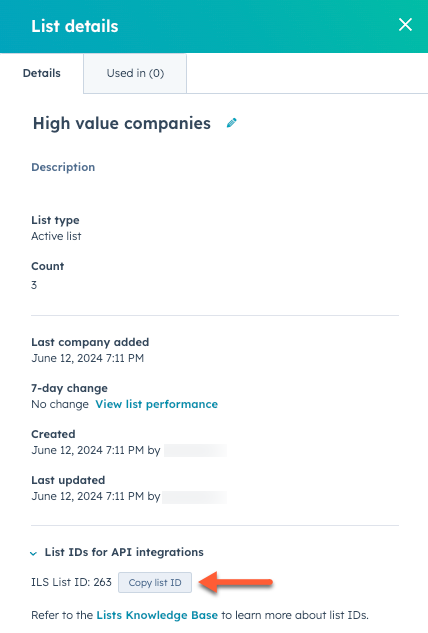
Many of these endpoints require a `listId` as a path parameter, which you can find on the list details page in your HubSpot account:
* In your HubSpot account, navigate to **CRM** > **Lists**.
* Click the **name** of a list.
* In the top right, click **Details**.
* In the right panel, the list ID will appear under *List IDs for API integrations*. You can click **Copy list ID** to copy the ID to the clipboard.
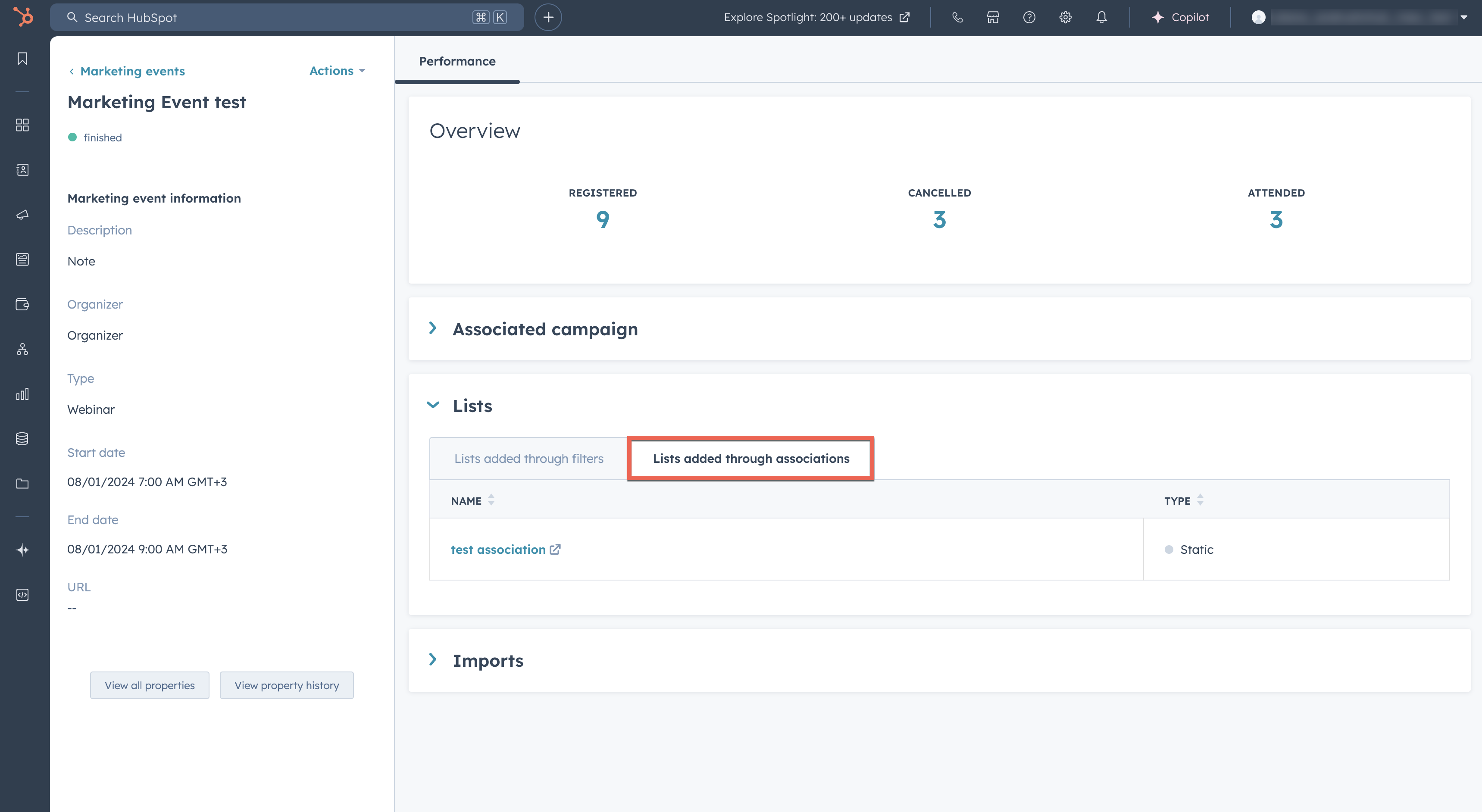
As you associate lists with your marketing events, they'll appear on the details page for a marketing event in your HubSpot account:
* In your HubSpot account, navigate to **CRM** > **Contacts**.
* In the upper left, click **Contacts** and in the dropdown menu, select **Marketing events**.
* Click the **name** of a marketing event.
* On the *Performance* tab, click **Lists** to expand the section, then click the **Lists added through associations** tab.
### Create list association with a marketing event ID
To create a new association between a marketing event and an existing list, make a `PUT` request to `/marketing/v3/marketing-events/associations/{marketingEventId}/lists/{listId}`.
If successful, you'll receive a `204 No content` response.
### Create list association with external event and account IDs
To create a new association between a marketing event and an existing list using the external account ID and the external event ID, make a `PUT` request to `/marketing/v3/marketing-events/associations/{externalAccountId}/{externalEventId}/lists/{listId}`.
If successful, you'll receive a `204 No content` response.
### Get lists associated with a marketing event using a marketing event ID
To get all lists associated with a marketing event, make a `GET` request to `/marketing/v3/marketing-events/associations/{marketingEventId}/lists`.
The response will resemble the following:
```json theme={null}
{
"total": 1,
"results": [
{
"listId": "string",
"listVersion": 0,
"createdAt": "2024-05-10T08:58:35.769Z",
"updatedAt": "2024-05-10T08:58:35.769Z",
"filtersUpdatedAt": "2024-05-10T08:58:35.769Z",
"processingStatus": "string",
"createdById": "string",
"updatedById": "string",
"processingType": "string",
"objectTypeId": "string",
"name": "string",
"size": 0
}
]
}
```
### Get lists associated with a event using external event and account IDs
You can also get lists associated with a marketing event using an external account ID and the external event ID, make a `GET` request to `/marketing/v3/marketing-events/associations/{externalAccountId}/{externalEventId}/lists`.
### Delete list association using a marketing event ID
To delete a list association for a marketing event using a marketing event ID, make a `DELETE` request to `/marketing/v3/marketing-events/associations/{marketingEventId}/lists/{listId}`.
If successful, you'll receive a `204 No content` response.
### Delete list association using external event and account IDs
To delete a list association for a marketing event using the external account ID and an external event ID, make a `DELETE` request to `/marketing/v3/marketing-events/associations/{externalAccountId}/{externalEventId}/lists/{listId}`.
If successful, you'll receive a `204 No content` response.
## Configure app settings
There's some setup required to allow marketing events to sync properly with HubSpot.
If you send HubSpot an attendance state change (e.g., a registration or cancellation), HubSpot will first check to see if a Marketing Event exists for the specified event ID. If it doesn't, HubSpot will call the configured endpoint for your app to retrieve the details of the marketing event, then create the event in HubSpot and then publish the attendance state change.
This is provided for convenience; however, it's still recommended that you create the Marketing Events yourself via the CRUD methods provided in the reference documentation (e.g., this `POST` endpoint [reference](/api-reference/legacy/marketing/marketing-events/create-event)), and don't rely on this functionality to create your marketing events in HubSpot.
### Step 1: Create an API in your app
In order to support this, HubSpot requires each app that uses Marketing Events to define an API to fetch information about a specific marketing event.
Requirements:
* Accepts:
* `externalAccountId`: a query parameter that specifies the accountId of the customer in the external app.
* `appId`: a query parameter that specifies the ID of the HubSpot application that is requesting the event details. This will be the ID of your app.
* `externalEventId`: a path parameter in the URL of the request that specifies the ID of the event in the external app that HubSpot requires details about.
* Returns:
* A JSON object that provides details for the marketing event, that includes the following fields detailed in the table below:
| Field Name | Required | Type | Field Description |
| ------------------ | -------- | ------------------- | -------------------------------------------------------------------------------------- |
| `eventName` | true | string | The name of the marketing event |
| `eventOrganizer` | true | string | The name of the organizer of the marketing event. |
| `eventType` | false | string | Describes what type of event this is. For example: `WEBINAR`, `CONFERENCE`, `WORKSHOP` |
| `startDateTime` | false | string(\$date-time) | The start date and time of the marketing event. |
| `endDateTime` | false | string(\$date-time) | The end date and time of the marketing event. |
| `eventDescription` | false | string | The description of the marketing event. |
| `eventUrl` | false | string | A URL in the external event application where the marketing event. |
| `eventCancelled` | false | bool | Indicates if the marketing event has been cancelled. Defaults to `false` |
HubSpot will also send a `X-HubSpot-Signature-v3` header that you can use to verify that the request came from HubSpot. Read more about [request signatures](/apps/developer-platform/build-apps/authentication/request-validation) for additional details on the signature and how to validate it.
### Step 2: Provide HubSpot with the URL path to your API
Now that you've created the API in your app that will return an object that provides the details of a specific marketing event, you will need to provide HubSpot with the URL path to your API by making a `POST` request to `/marketing/v3/marketing-events/{appId}/settings`. This will allow HubSpot to determine how to make requests to your app to get the details of a marketing event.
In the body of your `POST` request, specify your URL using the `eventDetailsURL` field. The `eventDetailsURL` must adhere to the following two requirements:
* Contain a `%s` character sequence, which HubSpot will use to substitute in the ID of the event (`externalEventId`) as a path parameter.
* It must be the full path to the API resource, including the `https://` prefix and the domain name (e.g., `my.event.app`).
For example, if you configure an `eventDetailsURL` of `https://my.event.app/events/%s`, and you need to make a request to fetch details of an event with id `1234-event-XYZ`, for the HubSpot app with id `app-101` and account with id `ABC-account-789`, HubSpot will make a `GET` request to:
`https://my.event.app/events/1234-event-XYZ?appId=app-101&externalAccountId=ABC-account-789`