> ## Documentation Index
> Fetch the complete documentation index at: https://developers.hubspot.com/docs/llms.txt
> Use this file to discover all available pages before exploring further.

---
id: 4454f7f9-e50f-43ba-b672-04c6fc3dd57d
---

# Marketing API | Single send API

> An overview of the marketing single-send API in HubSpot.

export const RequiredIndicator = () => {
  return <span className="required-indicator">
      required
    </span>;
};

export const PostmanCard = ({title, collectionId}) => {
  return <div className="card-condensed-cta">
      <Card title={title ? title : "Postman collection"} href={`https://app.getpostman.com/run-collection/${collectionId}`} horizontal={true} cta="Run in Postman" icon={<svg xmlns="http://www.w3.org/2000/svg" width={25} height={25} preserveAspectRatio="xMidYMid" viewBox="0 0 256 256">
              <path fill="#FF6C37" d="M254.953 144.253c8.959-70.131-40.569-134.248-110.572-143.206C74.378-7.912 10.005 41.616 1.047 111.619c-8.959 70.003 40.569 134.248 110.572 143.334 70.131 8.959 134.248-40.569 143.334-110.7Z" />
              <path fill="#FFF" d="m174.2 82.184-54.007 54.007-15.229-15.23c53.11-53.11 58.358-48.503 69.236-38.777Z" />
              <path fill="#FF6C37" d="M120.193 137.47c-.384 0-.64-.128-.895-.384l-15.358-15.229a1.237 1.237 0 0 1 0-1.792c54.007-54.006 59.638-48.887 71.028-38.649.255.256.383.512.383.896s-.128.64-.383.896l-54.007 53.878c-.128.256-.512.384-.768.384Zm-13.437-16.509 13.437 13.438 52.087-52.087c-9.47-8.446-15.87-11.006-65.524 38.65Z" />
              <path fill="#FFF" d="m135.679 151.676-14.718-14.718 54.007-54.006c14.46 14.59-7.167 38.265-39.29 68.724Z" />
              <path fill="#FF6C37" d="M135.679 152.956c-.384 0-.64-.128-.896-.384l-14.718-14.718c-.256-.256-.256-.512-.256-.896s.128-.64.384-.895L174.2 82.056a1.237 1.237 0 0 1 1.791 0 15.58 15.58 0 0 1 4.991 11.902c-.256 14.206-16.38 32.25-44.28 58.614-.383.256-.767.384-1.023.384Zm-12.926-15.998c8.19 8.319 11.646 11.646 12.926 12.926 21.5-20.476 42.36-41.464 42.488-55.926.128-3.327-1.152-6.655-3.327-9.214l-52.087 52.214Z" />
              <path fill="#FFF" d="m105.22 121.345 10.878 10.878c.256.256.256.512 0 .768-.128.128-.128.128-.256.128l-22.524 4.863c-1.152.128-2.175-.64-2.431-1.791-.128-.64.128-1.28.512-1.664l13.053-13.054c.256-.256.64-.384.768-.128Z" />
              <path fill="#FF6C37" d="M92.934 139.262c-1.92 0-3.327-1.536-3.327-3.455 0-.896.384-1.792 1.024-2.432l13.053-13.054c.768-.64 1.792-.64 2.56 0l10.878 10.878c.768.64.768 1.792 0 2.56-.256.256-.512.384-.896.512l-22.524 4.863c-.256 0-.512.128-.768.128Zm11.902-16.51-12.542 12.543c-.256.256-.383.64-.128 1.024.128.383.512.511.896.383l21.116-4.607-9.342-9.342Z" />
              <path fill="#FFF" d="M202.739 52.238c-8.191-7.935-21.373-7.679-29.307.64-7.935 8.318-7.679 21.372.64 29.306A20.678 20.678 0 0 0 199.155 85l-14.59-14.59 18.174-18.172Z" />
              <path fill="#FF6C37" d="M188.405 89.223c-12.158 0-22.012-9.854-22.012-22.012 0-12.158 9.854-22.012 22.012-22.012 5.631 0 11.134 2.176 15.23 6.143.255.256.383.512.383.896s-.128.64-.384.895L186.357 70.41l13.566 13.566c.512.512.512 1.28 0 1.792l-.256.256c-3.327 2.047-7.295 3.199-11.262 3.199Zm0-41.337c-10.75 0-19.452 8.703-19.324 19.453 0 10.75 8.702 19.452 19.452 19.324 2.944 0 5.887-.64 8.575-2.047l-13.438-13.31c-.256-.256-.384-.512-.384-.896s.128-.64.384-.895l17.149-17.15c-3.456-2.943-7.807-4.479-12.414-4.479Z" />
              <path fill="#FFF" d="m203.122 52.622-.255-.256-18.301 18.044 14.461 14.462c1.408-.896 2.816-1.92 3.967-3.072a20.51 20.51 0 0 0 .128-29.178Z" />
              <path fill="#FF6C37" d="M199.155 86.28c-.384 0-.64-.128-.896-.384l-14.589-14.59c-.256-.256-.384-.512-.384-.896s.128-.64.384-.895l18.173-18.173a1.237 1.237 0 0 1 1.791 0l.384.256c8.575 8.574 8.575 22.396.128 31.098-1.28 1.28-2.687 2.432-4.223 3.328-.384.128-.64.256-.768.256Zm-12.798-15.87 12.926 12.926c1.024-.64 2.048-1.536 2.816-2.304 7.294-7.294 7.678-19.196.64-26.875L186.357 70.41Z" />
              <path fill="#FFF" d="M176.375 84.488a7.879 7.879 0 0 0-11.134 0l-48.247 48.247 8.063 8.063 51.062-44.792c3.328-2.816 3.584-7.807.768-11.134-.256-.128-.384-.256-.512-.384Z" />
              <path fill="#FF6C37" d="M124.929 142.077c-.384 0-.64-.128-.896-.383l-8.063-8.063a1.237 1.237 0 0 1 0-1.792l48.247-48.247a9.115 9.115 0 0 1 12.926 0 9.115 9.115 0 0 1 0 12.926l-.384.384-51.063 44.792c-.128.255-.384.383-.767.383Zm-6.143-9.342 6.27 6.271 50.167-44.024c2.816-2.304 3.072-6.527.768-9.342-2.303-2.816-6.526-3.072-9.342-.768-.128.128-.256.256-.512.384l-47.351 47.48Z" />
              <path fill="#FFF" d="M80.009 187.637c-.512.256-.768.768-.64 1.28l2.175 9.214c.512 1.28-.256 2.816-1.663 3.2-1.024.384-2.176 0-2.816-.768l-14.077-13.95 45.943-45.943 15.87.256 10.75 10.75c-2.56 2.175-18.045 17.149-55.542 35.961Z" />
              <path fill="#FF6C37" d="M78.985 202.61c-1.024 0-2.048-.383-2.688-1.151l-13.95-13.95c-.255-.256-.383-.512-.383-.896 0-.383.128-.64.384-.895l45.944-45.944c.256-.256.64-.384.895-.384l15.87.256c.383 0 .64.128.895.384l10.75 10.75c.256.256.384.64.384 1.024s-.128.64-.512.896l-.895.767c-13.566 11.902-31.995 23.804-54.902 35.194l2.175 9.086c.384 1.664-.384 3.456-1.92 4.352-.767.384-1.407.512-2.047.512Zm-14.078-15.997 13.182 13.054c.384.64 1.152.896 1.792.512.64-.384.896-1.152.512-1.792l-2.176-9.214c-.256-1.152.256-2.176 1.28-2.688 22.652-11.39 40.952-23.163 54.39-34.81l-9.47-9.47-14.718-.256-44.792 44.664Z" />
              <path fill="#FFF" d="m52.11 197.62 11.006-11.007 16.38 16.381-26.107-1.791c-1.151-.128-1.92-1.152-1.791-2.304 0-.512.128-1.024.512-1.28Z" />
              <path fill="#FF6C37" d="m79.497 204.146-26.236-1.791c-1.92-.128-3.199-1.792-3.071-3.712.128-.768.384-1.535 1.024-2.047L62.22 185.59a1.237 1.237 0 0 1 1.792 0l16.38 16.38c.385.385.512.897.257 1.408-.256.512-.64.768-1.152.768Zm-16.381-15.74-10.11 10.11c-.384.255-.384.895 0 1.151.127.128.255.256.511.256l22.652 1.536-13.053-13.054ZM104.452 146.557c-.768 0-1.28-.64-1.28-1.28 0-.384.128-.64.384-.896l12.414-12.414a1.237 1.237 0 0 1 1.792 0l8.062 8.063c.384.384.512.768.384 1.28-.128.384-.512.767-1.023.895l-20.477 4.352h-.256Zm12.414-11.902-8.446 8.446 13.821-2.943-5.375-5.503Z" />
              <path fill="#FFF" d="m124.8 140.926-14.077 3.071c-1.024.256-2.048-.384-2.303-1.408-.128-.64 0-1.28.511-1.791l7.807-7.807 8.063 7.935Z" />
              <path fill="#FF6C37" d="M110.467 145.277a3.168 3.168 0 0 1-3.2-3.2c0-.895.385-1.663.897-2.303l7.806-7.807a1.237 1.237 0 0 1 1.792 0l8.062 8.063c.384.384.512.768.384 1.28-.128.384-.512.767-1.023.895l-14.078 3.072h-.64Zm6.399-10.622-6.91 6.91c-.257.257-.257.512-.129.768s.384.384.768.384l11.774-2.56-5.503-5.502ZM203.25 64.907c-.256-.767-1.151-1.151-1.92-.895-.767.255-1.151 1.151-.895 1.92 0 .127.128.255.128.383.768 1.536.512 3.455-.512 4.863-.512.64-.384 1.536.128 2.048.64.512 1.536.384 2.048-.256 1.92-2.432 2.303-5.503 1.023-8.063Z" />
            </svg>} />
    </div>;
};

export const ScopesList = ({scopes = [], description = "This API requires one of the following scopes:"}) => {
  if (!scopes || scopes.length === 0) {
    return null;
  }
  const sortedScopes = scopes.sort((a, b) => a.localeCompare(b));
  return <div>
      <div className="text-sm mb-2">{description}</div>
      <div>
        {sortedScopes.map((scope, index) => <div key={index}>
            <code>
              <span className="text-xs">{scope}</span>
            </code>
          </div>)}
      </div>
    </div>;
};

<PostmanCard collectionId="26126890-a562dddd-ea78-4e00-867e-03cecae5a983" />

<Accordion title="Scope requirements">
  <ScopesList
    scopes={[
  'marketing-email',
  'transactional-email'
]}
  />
</Accordion>

The single-send API allows you to send template emails created in the HubSpot [marketing email tool](https://knowledge.hubspot.com/marketing-email/create-and-send-marketing-emails) using a JSON-formatted `POST` request.

All contacts receiving marketing content must be [set as marketing](https://knowledge.hubspot.com/records/set-contacts-as-marketing). Any marketing emails sent through the single-send API will automatically be associated with contact records based on their email address, and update non-marketing contacts and set them to marketing contacts. If there's no contact with a matching email address, a new contact record with that email will be created, and the contact will be set as marketing.

## Requirements

To use the marketing single send API, the following requirements must be met:

* You must have a ***Marketing Hub** Enterprise* account.
* The [app](/apps/developer-platform/build-apps/create-an-app) you're using to make API requests has been granted the `marketing-email` scope.

## Create an email and send it via the single-send API

First, [set up your email in HubSpot](https://knowledge.hubspot.com/marketing-email/send-transactional-emails). After you create the email, you can set the recipient details, including any contact or custom properties set up in the email template, in the body of the API request. Before you can make the API request, you'll need the ID of the email:

* If you leave the email drafted without publishing it, you can get the email ID from the URL when you're in the email editor. The ID is the final numeric value before the final slash character (`/`) in the URL (e.g., `https://app.hubspot.com/email/{PORTAL_ID}/edit/{EMAIL_ID}/settings`).

<Frame>
  <img src="https://www.hubspot.com/hubfs/Knowledge_Base_2023/email-id-for-drafted-single-send-api-email.png" alt="email-id-for-drafted-single-send-api-email" />
</Frame>

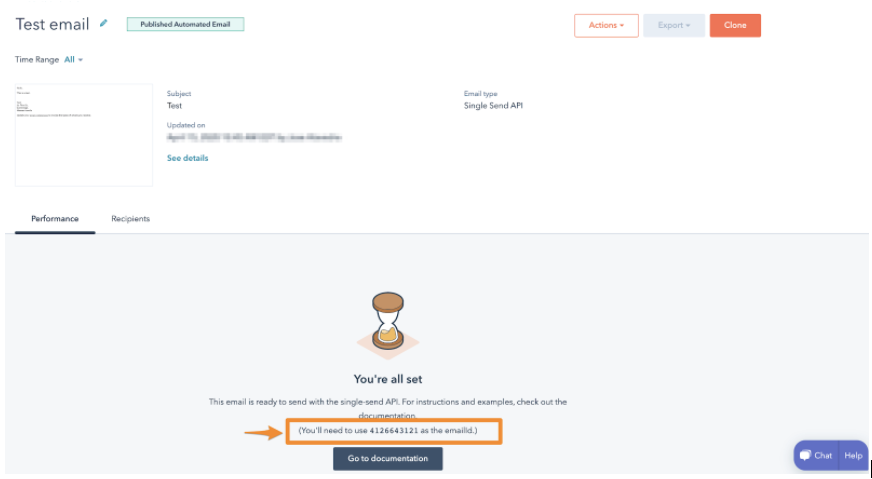
* If you publish your email, you can copy the email ID from the email details page.
<Frame>
  <img src="https://cdn2.hubspot.net/hubfs/53/Screen%20Shot%202020-04-15%20at%201.00.37%20PM.png" alt="Screen Shot 2020-04-15 at 1.00.37 PM" />
</Frame>

<Warning>
  **Please note:**

  HubSpot does not save the HTML/JSON sent through this API. You can review the email template from the recipient contact's timeline, but if you want to keep a record of the email's contents, it's recommended to add a BCC to the email.
</Warning>

To send an email with the Single-Send API, make a `POST` request to `/marketing/v4/email/single-send`.

### Request properties

The request body must be a JSON-formatted object with the following properties:

| Property                        | Type    | Description                                                                                                                                                                       |
| ------------------------------- | ------- | --------------------------------------------------------------------------------------------------------------------------------------------------------------------------------- |
| `emailId` <RequiredIndicator /> | Integer | The email's content ID, which can be found in HubSpot's email tool, as described [above](#create-an-email-and-send-it-via-the-single-send-api).                                   |
| `message`                       | Object  | The message field is an object containing anything that you want to override. At the minimum, you must include the `to` field. See more details in the [section below](#message). |
| `contactProperties`             | Object  | An object with any dynamic contact properties that will be included as part of the email personalization. See more details in the [section below](#contactProperties).            |
| `customProperties`              | Object  | An object of property values that relate to any other dynamic properties in the email, detailed in the [section below](#customProperties).                                        |

#### message

The message field is a JSON object containing email metadata. The available fields are provided in the table below:

| Field                      | Type   | Description                                                                                                                                                 |
| -------------------------- | ------ | ----------------------------------------------------------------------------------------------------------------------------------------------------------- |
| `to` <RequiredIndicator /> | String | The recipient of the email                                                                                                                                  |
| `from`                     | String | The "From" header for the email. You can define a from name with the following format: <br /> <br />`"from":"Sender Name <sender@hubspot.com>"`             |
| `sendId`                   | String | The ID of a particular send. Only one email with a given `sendId` will be sent per account, so you can include this field to prevent duplicate email sends. |
| `replyTo`                  | Array  | An array of "Reply-To" header values for the email.                                                                                                         |
| `cc`                       | Array  | An array of email addresses to send as CC.                                                                                                                  |
| `bcc`                      | Array  | An array of email addresses to send as BCC.                                                                                                                 |

#### contactProperties

The `contactProperties` field is a JSON object of contact property values. Each contact property value contains a `name` and `value`. Each property will be set on the contact record and will be visible in the template under:

<Frame>
  <img src="https://www.hubspot.com/hubfs/Knowledge_Base_2021/Developer/name-token-in-template-for-transactional-email.png" alt="name-token-in-template-for-transactional-email" />
</Frame>

Use these properties when you want to set a contact property while you’re sending the email. For example, when sending a receipt you may want to set a `last_paid_date` property, as the sending of the receipt will have information about the last payment.

```json theme={null}
{
  "emailId": 4126643121,
  "message": {
    "to": "jdoe@hubspot.com",
    "sendId": "6"
  },
  "contactProperties": {
    "last_paid_date": "2022-03-01",
    "firstname": "jane"
  }
}
```

#### customProperties

The `customProperties` field is a JSON object of key-value properties. These properties are generally related to the email itself, not the contact receiving the email. They will not appear in the [web page version of the email](https://knowledge.hubspot.com/marketing-email/create-a-web-version-of-your-marketing-email), or in the view of the email from the contact's timeline. These properties are also not stored in HubSpot and will only be included in the sent email.

Each key in the `customProperties` field can be referenced in the template using a [HubL expression](/cms/reference/hubl/overview) for fields contained within the `custom` variable (e.g., `{{ custom.NAME_OF_PROPERTY }}` ).

For example, if your email template references two properties, `purchaseUrl` and `productName`, you could provide the associated values for these properties with the following request body:

```json theme={null}
{
  "emailId": 4126643121,
  "message": {
    "to": "jdoe@hubspot.com",
    "sendId": "6"
  },
  "customProperties": {
    "purchaseUrl": "https://example.com/link-to-product",
    "productName": "vanilla"
  }
}
```

You can then reference these properties in your email template:

```hubl theme={null}
<!doctype html>
<html>
  <p>
    Congrats on purchasing some of the best ice cream around.
  </p>
  <a href={{custom.purchaseUrl}}>{{custom.productName}}</a>
</html>
```

The `customProperties` field only supports arrays when used with [programmable email content](/cms/start-building/features/data-driven-content/emails-with-programmable-content). In your email template, you can reference the items defined in your `customProperties` field by using a [HubL expression](/cms/reference/hubl/overview) (e.g., using a [for loop](/cms/reference/hubl/loops) to render each item in a list). For example, if the `customProperties` you included in your request body was structured like the following JSON snippet below:

```json theme={null}
{
  "emailId": 4126643122,
  "message": {
    "to": "jdoe@hubspot.com",
    "sendId": "7"
  },
  "customProperties": {
    "exampleArray": [
      { "firstKey": "someValue", "secondKey": "anotherValue" },
      { "firstKey": "value1", "secondKey": "value2" }
    ]
  }
}
```

You could then reference the values for each item in `exampleArray` with the following HubL code:

```hubl theme={null}
<!doctype html>
<html>
  <p>
    Thanks for your recent purchase! Here are the details of the items you'll be receiving:
  </p>
  <ul>
    {% for item in custom.exampleArray %}
      <li>First key: {{ item.firstKey }}, Second key: {{item.secondKey}}</li>
    {% endfor %}
  </ul>
</html>
```

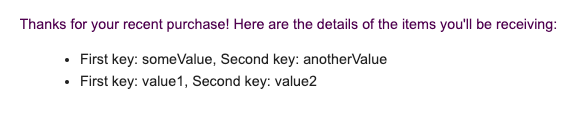
Once sent, the email would render the contents of the associated programmable email template as follows:

<Frame>
  <img src="https://www.hubspot.com/hubfs/Knowledge_Base_2021/Developer/example-transactional-email-with-customProperties-array.png" alt="example-transactional-email-with-customProperties-array" />
</Frame>

### Response

The response contains the following fields:

| Field         | Type   | Description                                                                                                                                                                                                                       |
| ------------- | ------ | --------------------------------------------------------------------------------------------------------------------------------------------------------------------------------------------------------------------------------- |
| `sendResult`  | String | An enumeration that represents the email's send status. The possible values are [listed below](#sendresult-values).                                                                                                               |
| `requestedAt` | String | An ISO 8601 formatted timestamp from when the send was requested.                                                                                                                                                                 |
| `startedAt`   | String | An ISO 8601 formatted timestamp from when the send began processing.                                                                                                                                                              |
| `message`     | String | A supplementary message describing the result.                                                                                                                                                                                    |
| `completedAt` | String | An ISO 8601 formatted timestamp when the send completed.                                                                                                                                                                          |
| `statusId`    | String | An identifier that can be used to [query the status of the send](#query-the-status-of-an-email-send).                                                                                                                             |
| `status`      | String | The status of the send request. Possible values are: `PENDING`, `PROCESSING`, `CANCELED`, and `COMPLETE`.                                                                                                                         |
| `eventId`     | Object | If sent in the original request, this object will be included in the response, which includes two fields: <ul><li>`id`: the ID of the sent event.</li><li>`created`: an ISO 8601 formatted timestamp of the sent event</li></ul>. |

### Query the status of an email send

To get the status of the email send, make a `GET` request to `https://api.hubapi.com/marketing/v3/email/send-statuses/{statusId}`.

The response contains the following fields:

| Field         | Type   | Description                                                                                                                                                                                                                       |
| ------------- | ------ | --------------------------------------------------------------------------------------------------------------------------------------------------------------------------------------------------------------------------------- |
| `sendResult`  | String | An enumeration that represents the email's send status. The possible values are [listed below](#sendresult-values).                                                                                                               |
| `requestedAt` | String | An ISO 8601 formatted timestamp from when the send was requested.                                                                                                                                                                 |
| `startedAt`   | String | An ISO 8601 formatted timestamp from when the send began processing.                                                                                                                                                              |
| `completedAt` | String | An ISO 8601 formatted timestamp timestamp when the send completed.                                                                                                                                                                |
| `statusId`    | String | An identifier that can be used to query the status of the send.                                                                                                                                                                   |
| `status`      | String | The status of the send request. Possible values are: `PENDING`, `PROCESSING`, `CANCELED`, and `COMPLETE`.                                                                                                                         |
| `eventId`     | Object | If sent in the original request, this object will be included in the response, which includes two fields: <ul><li>`id`: the ID of the sent event.</li><li>`created`: an ISO 8601 formatted timestamp of the sent event</li></ul>. |

### sendResult values

The `sendResult` is an enumeration that reflects the result of an email send attempt, either in the initial response or when querying for the status of an email send after your initial request.

Its possible values are:

| Value                         | Description                                                                                                                                                                                                                                                                                               |
| ----------------------------- | --------------------------------------------------------------------------------------------------------------------------------------------------------------------------------------------------------------------------------------------------------------------------------------------------------- |
| `SENT`                        | The email was sent successfully.                                                                                                                                                                                                                                                                          |
| `QUEUED`                      | The email was queued and will send as the queue gets processed.                                                                                                                                                                                                                                           |
| `PORTAL_SUSPENDED`            | Due to [Acceptable Use Policy](https://legal.hubspot.com/acceptable-use) violations, the HubSpot customer's email has been suspended.                                                                                                                                                                     |
| `INVALID_TO_ADDRESS`          | The recipient address is invalid. This error will also occur if you attempt to send an email with any of the following role-based prefixes in the email address: `abuse`, `no-reply`, `noreply`, `root`, `spam`, `security`, `undisclosed-recipients`, `unsubscribe`, `inoc`, `postmaster`, or `privacy`. |
| `BLOCKED_DOMAIN`              | The domain cannot receive emails from HubSpot at this time.                                                                                                                                                                                                                                               |
| `PREVIOUSLY_BOUNCED`          | The recipient has previously bounced, and the sending logic resulted in no send.                                                                                                                                                                                                                          |
| `PREVIOUS_SPAM`               | The recipient has previously marked similar email as spam.                                                                                                                                                                                                                                                |
| `INVALID_FROM_ADDRESS`        | The *From* address is invalid.                                                                                                                                                                                                                                                                            |
| `MISSING_CONTENT`             | The `emailId` is invalid, or the `emailId` corresponds to an email that wasn't set up for Single-Send.                                                                                                                                                                                                    |
| `MISSING_TEMPLATE_PROPERTIES` | There are properties set up in the template that have not been included in the `customProperties` sent in the request.                                                                                                                                                                                    |