> ## Documentation Index
> Fetch the complete documentation index at: https://developers.hubspot.com/docs/llms.txt
> Use this file to discover all available pages before exploring further.
---
id: bcedd968-34be-4a07-87a5-bd20e3ed4734
---
# App events reference
> Reference information for app events on the latest version of the developer platform.
export const RequiredIndicator = () => {
return
required
;
};
This feature is intended only for [technology partners](https://www.hubspot.com/partners/technology/join), and requires approval from HubSpot to use. To apply for app events access, or if you want to learn more about the functionality, please submit [this in-app form](https://app.hubspot.com/l/developer-overview/appObjectsEventsRequest).
Below, find reference information for using app events, including event type schemas, event timeline rendering templates, event occurrence fields, and more.
## Project structure
To define an app event type, create an `app-events` directory within `src/app/`. Then, add a configuration file to that directory for each event type you want to define, using the naming convention `*-hsmeta.json`.
To include event type definitions in a project requires the following:
* Your app must use OAuth authentication and be configured for HubSpot Marketplace distribution. In addition, the app must include `timeline` in its `requiredScopes`. Learn more about [app configuration](/apps/developer-platform/build-apps/app-configuration).
* Your project must successfully deploy before you can include an app event component.
## Event type configuration
Below are the configuration options available for event type schemas (`*-hsmeta.json`). Note that `objectType` cannot be changed after the event type is created.
Each app is limited to 750 event types.
```json theme={null}
{
"uid": "customer_login_event",
"type": "app-event",
"config": {
"name": "Customer login",
"description": "Tracks when a customer logs into their account including the method of login.",
"headerTemplate": "{{customerName}} logged in.",
"detailTemplate": "{{customerName}} logged in via the {{loginLocation}}.",
"objectType": "CONTACT",
"properties": [
{
"name": "customerName",
"label": "Customer Name",
"description": "The full name of the customer who logged in.",
"type": "string"
},
{
"name": "loginLocation",
"label": "Login location",
"description": "Where the customer logged in from.",
"type": "enumeration",
"options": [
{
"value": "mobileApp",
"label": "Mobile app"
},
{
"value": "website",
"label": "Website"
}
]
}
]
}
}
```
| Field | Type | Description |
| ----------------------------------- | ------- | ---------------------------------------------------------------------------------------------------------------------------------------------------------------------------------------------------------------------------------------------------------------------------------------------------------------------------------------------------------------------------------------------------------------------------------------------------------------- |
| `uid` | String | An internal unique identifier for the event type. |
| `type` | String | The type of component. Must be `app-event`. |
| `name` | String | The label displayed in HubSpot (up to 50 characters). |
| `description` | String | A description of the event type. Can be up to 1,000 characters in length. |
| `objectType` | String | The fully qualified name of the CRM object type that event occurrences can be associated with. Can be one of: `APP_OBJECT`, `APPOINTMENT`, `COMPANY`, `CONTACT`, `COURSE`, `DEAL`, `LEAD`, `LISTING`, `ORDER`, `PROJECT`, `SERVICE`, `TICKET`. To create an event type for custom objects, use the `supportsCustomObject` field instead.
This value cannot be changed after creation. |
| `supportsCustomObject` | Boolean | Set to `true` to configure the app event type for custom objects. When set to `true`: - The event type will be enabled for all custom objects in the account.
- You cannot specify another `objectType` in addition to custom objects (i.e., the `objectType` cannot be set to `CONTACT` and support custom objects).
- You cannot copy event property values to object property values via [property stamping](#property-stamping).
|
| `headerTemplate` | String | The [rendering template](#rendering-templates) for the header of the CRM timeline activity card. Can be up to 1,000 characters in length. |
| `detailTemplate` | String | The [rendering template](#rendering-templates) for the body of the CRM timeline activity card. Can be up to 10,000 characters in length. |
| `properties` | Array | Properties defined for the event type that you'll store event occurrence data in. Each event type can include up to 500 properties. Learn more about event properties below. |
### Event properties
The `properties` array of the schema contains the fields that you can [send event occurrence data](/apps/developer-platform/add-features/app-events/send-event-occurrences) to. When HubSpot receives event occurrence data, it validates any properties included with it against the ones defined in the schema. Incoming occurrence properties must match these event type properties, otherwise HubSpot will reject the occurrence.
```json theme={null}
"properties": [
{
"name": "customerName",
"label": "Customer Name",
"description": "The full name of the customer who logged in.",
"type": "string"
},
{
"name": "loginLocation",
"label": "Login location",
"description": "Where the customer logged in from.",
"type": "enumeration",
"options": [
{
"value": "mobileApp",
"label": "Mobile app"
},
{
"value": "website",
"label": "Website"
}
]
}
]
```
| Field | Type | Description |
| ----------------------------- | ------- | --------------------------------------------------------------------------------------------------------------------------------------------------------------------------------------------------------------------------------------------------------------------------------------------------------------------------------------------------------------------------------------------------------------------------------------------------------------------------------------------------------------------------------------------------------------------------------------------------------------------------------------------------------------- |
| `name` | String | The internal name of the property. Must be lowercase and between 1-500 characters. Property names must be unique per event type. The value cannot match the regular expression `"[A-Za-z0-9_\\-.]+"`, begin with `hs_`, or match any reserved keywords.
- `applicationId`
- `domain`
- `email`
- `eventTemplateId`
- `eventTypeId`
- `extraData`
- `id`
- `log`
- `lookup`
- `objectType`
- `objectId`
- `portalId`
- `properties`
- `timelineIFrame`
- `timestamp`
- `tokens`
- `utk`
|
| `label` | String | The label displayed in HubSpot. Must be lowercase and between 1-500 characters. |
| `description` | String | A description of the property. Can be up to 1,000 characters in length. |
| `type` | String | The type of data captured in the property. Can be one of `string`, `number`, `date`, `enumeration`, `bool`.
Note that any `date` event properties must be specified as a Unix timestamp in milliseconds (e.g., `1762198997303`) or [ISO 8601](https://en.wikipedia.org/wiki/ISO_8601) format (e.g., `"2026-02-19T14:06:16-05:00"`). |
| `options` | Array | For `enumeration` type properties, this field provides the available options. Must contain at least one option. Each option is an object that contains: - `name`: the label for the option displayed in HubSpot.
- `value`: the internal value provided by the event occurrence.
The `name` and `label` must be unique within the event type. |
| `objectProperty` | String | If included, the name of the CRM object property that should be updated when event data is sent to HubSpot. The value in this property will overwrite any existing values in that property. Learn more about stamping CRM record properties below. |
| `isMultiValued` | Boolean | For `enumeration` type properties, this field sets whether or not users should be allowed to select more than one enumeration option |
### Property stamping
In some cases, you may want to modify the CRM record's property values based on app event occurrence data. For example, you may want to update a contact's first and last name with new values set by the occurrence (e.g., form submission).
Property stamping is not available for event types configured for custom objects.
To update CRM record properties via event occurrences, you can link an event property to a CRM property within the event type schema. In the definition fields for a given event property, include the `objectProperty` field and specify the CRM property to link. Once a property is linked, HubSpot will always update the property value on the CRM record using the value from the most recent occurrence based on the `timestamp` field.
For example, the event type schema below links the event property `customerName` with a custom contact property named `custom_property_name`. When event occurrence data includes a value for `customerName`, `custom_property_name` will be updated for the associated CRM record.
```json theme={null}
"properties": [
{
"name": "customerName",
"label": "Customer Name",
"type": "string",
"objectProperty": "custom_property_name"
}
]
```
### Rendering templates
Event type schemas can include the `headerTemplate` and `detailTemplate` fields to configure how event occurrences renders on CRM record timelines.
* `headerTemplate`: a one-line description of the event at the top of the activity card (up to 1,000 characters).
* `detailTemplate`: the details of the event in the body of the activity card (up to 10,000 characters).
Rendering templates are written using [Markdown](https://www.markdownguide.org/basic-syntax/) (excluding inline HTML and HTML blocks) with [Handlebars](https://handlebarsjs.com/guide/) templates. These templates can render event occurrence data as follows:
* In both templates, you can access any `property` data passed by the event occurrence using the syntax `{{propertyName}}`.
* In the `detailTemplate`, you can additionally access `extraData` values passed by the event occurrence using the syntax `{{extraData.fieldName}}`. You can access any tier of attribute in `extraData` through dot notation, such as `{{extraData.person1.preferredName}}`.
The `extraData` object can only contain valid JSON. If the JSON is malformed, the occurrence will be rejected and you'll receive an error response.
For example, the templates below use the `customerName` and `loginLocation` property data, along with the `surveyData` field from `extraData` [sent via the event occurrence](#event-occurrences).
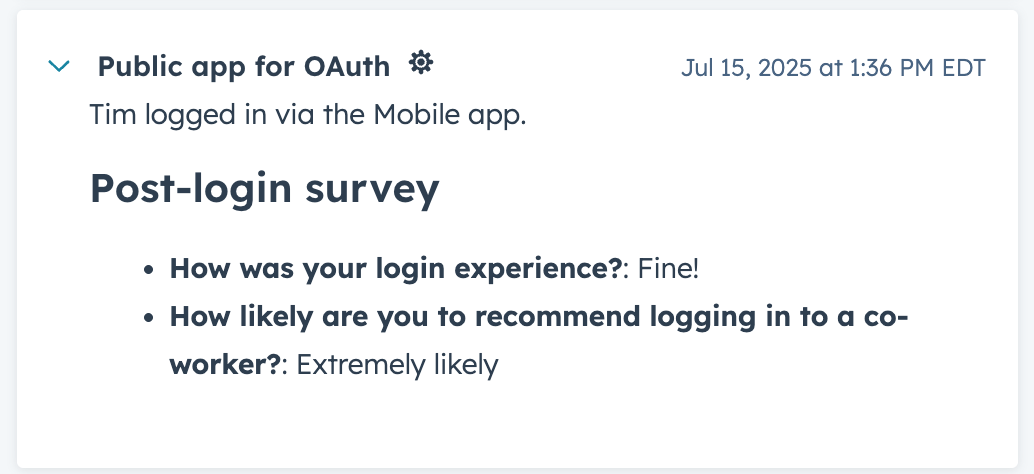 ```json wrap theme={null}
"headerTemplate": "{{customerName}} logged in via the {{loginLocation}}.",
"detailTemplate": "#### Post-login survey\n{{#each extraData.surveyData}}\n- **{{question}}**: {{answer}}\n{{/each}}",
```
Since templates are built with Markdown and Handlebars, you can take advantage of Handlebars helpers to make the content more dynamic. For example, the following `detailTemplate` includes the [`#if` helper](https://handlebarsjs.com/guide/builtin-helpers.html#if) to conditionally render content based on whether the event occurrence data includes the `surveyData` field in `extraData`.
* If `extraData` contains `surveyData`, show the post-login survey responses.
* If no `surveyData` was present in the event occurrence, render `No additional information.`.
```json wrap theme={null}
"headerTemplate": "{{customerName}} logged in via the {{loginLocation}}.",
"detailTemplate": "#### Post-login survey\n{{#each extraData.surveyData}}\n- **{{question}}**: {{answer}}\n{{/each}}",
```
Since templates are built with Markdown and Handlebars, you can take advantage of Handlebars helpers to make the content more dynamic. For example, the following `detailTemplate` includes the [`#if` helper](https://handlebarsjs.com/guide/builtin-helpers.html#if) to conditionally render content based on whether the event occurrence data includes the `surveyData` field in `extraData`.
* If `extraData` contains `surveyData`, show the post-login survey responses.
* If no `surveyData` was present in the event occurrence, render `No additional information.`.
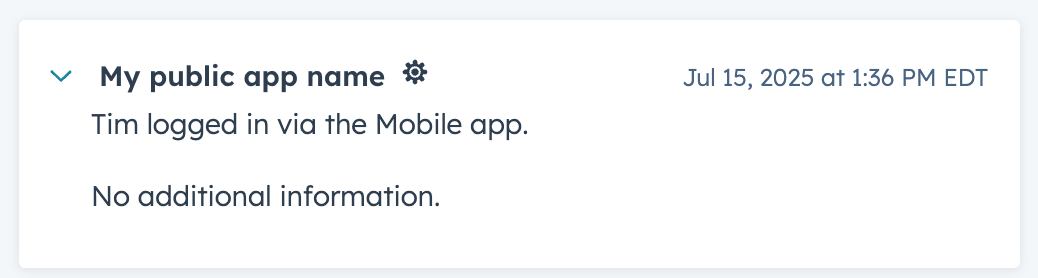 ```json theme={null}
"detailTemplate": "{{#if extraData.surveyData}}#### Post-login survey\n{{#each extraData.surveyData}}\n- **{{question}}**: {{answer}}\n{{/each}}{{else}}No additional information."
```
### Using iframes
When event occurrence data contains the `timelineIFrame` field, the timeline activity card will include a hyperlink that users can click to open the linked contents in an iframe.
```json theme={null}
"detailTemplate": "{{#if extraData.surveyData}}#### Post-login survey\n{{#each extraData.surveyData}}\n- **{{question}}**: {{answer}}\n{{/each}}{{else}}No additional information."
```
### Using iframes
When event occurrence data contains the `timelineIFrame` field, the timeline activity card will include a hyperlink that users can click to open the linked contents in an iframe.
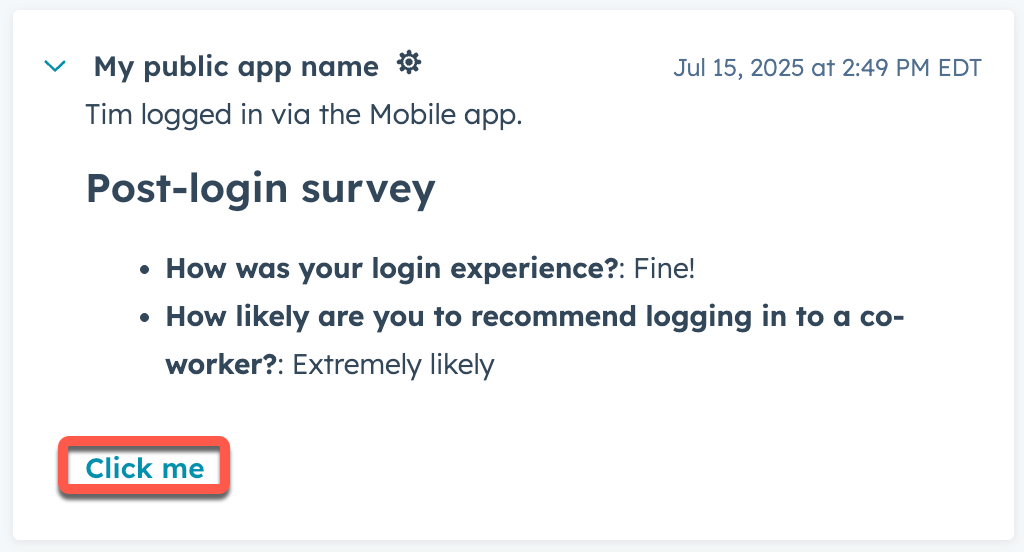 ```json theme={null}
"timelineIFrame": {
"linkLabel": "Click me",
"headerLabel": "This is an iframe",
"url": "https://developers.hubspot.com/docs/apps/developer-platform/overview",
"width": 300,
"height": 300
}
```
| Field | Type | Description |
| ------------- | ------- | ---------------------------------------------------------------- |
| `linkLabel` | String | The hyperlink text that will launch the iframe on click. |
| `headerLabel` | String | The label of the modal window that displays the iframe contents. |
| `url` | String | The URL of the iframe contents. |
| `width` | Integer | The width of the iframe modal. |
| `height` | Integer | The height of the iframe modal. |
## Event occurrences
To send event occurrences for a given event type, make a `POST` request to the endpoints below. The app events API includes endpoints for sending single event occurrences and batches of multiple event occurrences. For both endpoints, the event occurrence data will need to be validated against an existing event type schema, which you'll specify with `eventTypeName` in the request body.
To send a single event occurrence, make a `POST` request to `/integrators/timeline/v4/events`.
In the request body, include the event occurrence data, adhering to the event type's defined schema.
```json theme={null}
{
"eventTypeName": "ae000000_integrators-timeline-event-type-id-0000000",
"objectId": "123456",
"id": "login-1",
"properties": {
"customerName": "Mark S.",
"loginLocation": "mobileApp",
"preferredDevice": "iPhone;MacBook"
}
},
```
To send a batch of event occurrences, make a `POST` request to `/integrators/timeline/v4/events/batch`.
In the request body, include up to 500 comma-separated event occurrence objects within an `inputs` array. If any occurrences in the batch fail to validate, no occurrences from the batch will be accepted.
```json theme={null}
{
"inputs": [
{
"EventTypeName": "ae000000_integrators-timeline-event-type-id-0000000",
"id": "login_event_100",
"objectId": "769851",
"properties": {
"customerName": "Tim",
"loginLocation": "mobileApp"
},
"extraData": {
"surveyData": [
{
"question": "How was your login experience?",
"answer": "Fine!"
},
{
"question": "How likely are you to recommend logging in to a co-worker?",
"answer": "Extremely likely"
}
]
}
},
{
"EventTypeName": "ae000000_integrators-timeline-event-type-id-0000000",
"id": "login_event_101",
"objectId": "769851",
"properties": {
"customerName": "Tim",
"loginLocation": "website"
},
"extraData": {}
}
]
}
```
In the request body, include data based on the defined event type schema. The request body must include the `eventTypeName`, which can either be your app's `uid` [defined](/apps/developer-platform/build-apps/app-configuration#specifying-uids) in the top-level `*-hsmeta.json` file, or `fullyQualifiedName` returned from the `/integrators/timeline/v4/types/projects` [API](/apps/developer-platform/add-features/app-events/create-and-manage-event-types#retrieve-the-fullyqualifiedname-optional).
```json theme={null}
{
"eventTypeName": "ae000000_integrators-timeline-event-type-id-0000000",
"objectId": "8675309",
"properties": {
"customerName": "Mark S.",
"loginLocation": "mobileApp"
},
"id": "login-1529a3gda23",
"extraData": {
"surveyData": [
{
"question": "How was your login experience?",
"answer": "Fine!"
},
{
"question": "How likely are you to recommend logging in to a co-worker?",
"answer": "Extremely likely"
}
]
}
}
```
| Field | Type | Description |
| ------------------------------------- | ------ | ------------------------------------------------------------------------------------------------------------------------------------------------------------------------------------------------------------------------------------------------------------------------------------------------------------------------------------------------------------------------------------------------------------------------------------------------------------------------------------------------------------ |
| `eventTypeName` | String | The fully qualified name of the event type, which you'll use to identify the event via the API.
```json theme={null}
"timelineIFrame": {
"linkLabel": "Click me",
"headerLabel": "This is an iframe",
"url": "https://developers.hubspot.com/docs/apps/developer-platform/overview",
"width": 300,
"height": 300
}
```
| Field | Type | Description |
| ------------- | ------- | ---------------------------------------------------------------- |
| `linkLabel` | String | The hyperlink text that will launch the iframe on click. |
| `headerLabel` | String | The label of the modal window that displays the iframe contents. |
| `url` | String | The URL of the iframe contents. |
| `width` | Integer | The width of the iframe modal. |
| `height` | Integer | The height of the iframe modal. |
## Event occurrences
To send event occurrences for a given event type, make a `POST` request to the endpoints below. The app events API includes endpoints for sending single event occurrences and batches of multiple event occurrences. For both endpoints, the event occurrence data will need to be validated against an existing event type schema, which you'll specify with `eventTypeName` in the request body.
To send a single event occurrence, make a `POST` request to `/integrators/timeline/v4/events`.
In the request body, include the event occurrence data, adhering to the event type's defined schema.
```json theme={null}
{
"eventTypeName": "ae000000_integrators-timeline-event-type-id-0000000",
"objectId": "123456",
"id": "login-1",
"properties": {
"customerName": "Mark S.",
"loginLocation": "mobileApp",
"preferredDevice": "iPhone;MacBook"
}
},
```
To send a batch of event occurrences, make a `POST` request to `/integrators/timeline/v4/events/batch`.
In the request body, include up to 500 comma-separated event occurrence objects within an `inputs` array. If any occurrences in the batch fail to validate, no occurrences from the batch will be accepted.
```json theme={null}
{
"inputs": [
{
"EventTypeName": "ae000000_integrators-timeline-event-type-id-0000000",
"id": "login_event_100",
"objectId": "769851",
"properties": {
"customerName": "Tim",
"loginLocation": "mobileApp"
},
"extraData": {
"surveyData": [
{
"question": "How was your login experience?",
"answer": "Fine!"
},
{
"question": "How likely are you to recommend logging in to a co-worker?",
"answer": "Extremely likely"
}
]
}
},
{
"EventTypeName": "ae000000_integrators-timeline-event-type-id-0000000",
"id": "login_event_101",
"objectId": "769851",
"properties": {
"customerName": "Tim",
"loginLocation": "website"
},
"extraData": {}
}
]
}
```
In the request body, include data based on the defined event type schema. The request body must include the `eventTypeName`, which can either be your app's `uid` [defined](/apps/developer-platform/build-apps/app-configuration#specifying-uids) in the top-level `*-hsmeta.json` file, or `fullyQualifiedName` returned from the `/integrators/timeline/v4/types/projects` [API](/apps/developer-platform/add-features/app-events/create-and-manage-event-types#retrieve-the-fullyqualifiedname-optional).
```json theme={null}
{
"eventTypeName": "ae000000_integrators-timeline-event-type-id-0000000",
"objectId": "8675309",
"properties": {
"customerName": "Mark S.",
"loginLocation": "mobileApp"
},
"id": "login-1529a3gda23",
"extraData": {
"surveyData": [
{
"question": "How was your login experience?",
"answer": "Fine!"
},
{
"question": "How likely are you to recommend logging in to a co-worker?",
"answer": "Extremely likely"
}
]
}
}
```
| Field | Type | Description |
| ------------------------------------- | ------ | ------------------------------------------------------------------------------------------------------------------------------------------------------------------------------------------------------------------------------------------------------------------------------------------------------------------------------------------------------------------------------------------------------------------------------------------------------------------------------------------------------------ |
| `eventTypeName` | String | The fully qualified name of the event type, which you'll use to identify the event via the API.
This value can either be your app's `uid` [defined](/apps/developer-platform/build-apps/app-configuration#specifying-uids) in the top-level `*-hsmeta.json` file, or can be [obtained via the API](/apps/developer-platform/add-features/app-events/create-and-manage-event-types#retrieve-the-fullyqualifiedname) after creating the event type. This value cannot be changed after creation. |
| `objectId` | String | The ID of the CRM record to associate with the event occurrence. This field can be used for all types of CRM records, and is the recommended identifier. Learn more about [CRM record association](#crm-record-association). |
| `email` | String | For contact association, you can provide the email address of the contact to associate. Learn more about [CRM record association](#crm-record-association). |
| `utk` | String | For contact association, you can provide the usertoken of an existing contact to associate. Learn more about [CRM record association](#crm-record-association). |
| `domain` | String | For company association, you can provide the website domain of an existing company. Learn more about [CRM record association](#crm-record-association). |
| `timestamp` | String | Sets the time of the event occurrence ([ISO 8601](https://en.wikipedia.org/wiki/ISO_8601) format). If not provided, HubSpot will default to the timestamp of when the event occurrence data is sent. |
| `properties` | Object | Key-value pairs of property names and values for [properties](/apps/developer-platform/add-features/app-events/reference#event-properties) you've defined on the event type. Sending properties that don't exist in the event type schema or that are a different type than defined in the schema will result in the occurrence being rejected.
Note that to send multiple values for a multi-valued enumeration property, provide a string with options separated by a semicolon |
| `extraData` | Array | When included, provides additional information for timeline rendering. Must be valid JSON. Learn more about [extra data in rendering templates](#rendering-templates). |
| `timelineIFrame` | Object | When included, the timeline card will include a hyperlink that allows users to open the linked contents in an iframe. Learn more about [using iframes](#using-iframes). |
| `id` | String | A unique identifier for the event occurrence. Must be unique within the event type. If not provided, HubSpot will generate a random UUID. When multiple events have the same ID, the first will be accepted and all others will be rejected. |
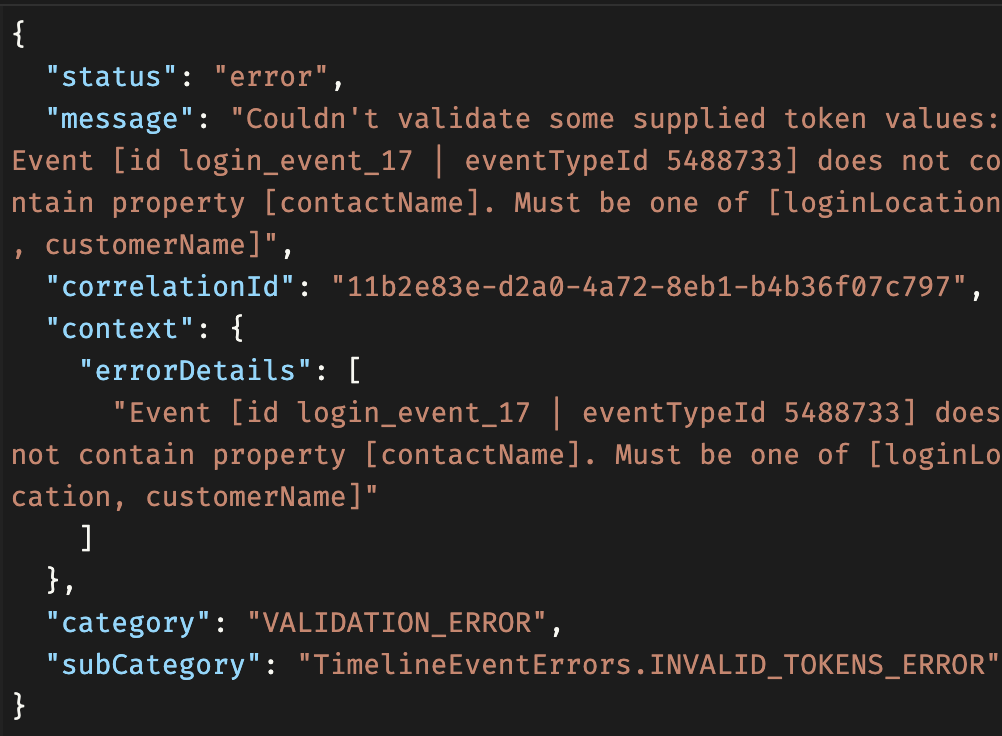
If any occurrences fail to validate, successfully validated occurrences will still be accepted and persisted. The error messaging in the response will provide information about what you'll need to fix.
 ### CRM record association
Each event occurrence must be associated with a CRM record, with the CRM object type defined by the event type schema. The app events API includes multiple fields for associating event occurrence data with CRM records. For all supported CRM objects, it's recommended to use the `objectId` field. However, there are some situations where you may want to use the other fields.
* `utk`/`email`: if you don't know the contact's ID, use the `utk` and/or `email` field for identification. Providing both of these identifiers also enables you to create and update contacts. For example:
* If `utk` matches an existing contact but the `email` doesn't match, HubSpot will update the contact with the new email address.
* If no `objectId` is provided, the event occurrence will associate with an existing contact that matches the `utk`/`email`, or HubSpot will create a new contact if no match is found.
* Note that the `utk` alone cannot create new contacts. You should always include `email` with `utk` to ensure proper association.
* `domain`: for company association, you must provide the `objectId`, but you can also include `domain` to update the `domain` property of that company.
### CRM record association
Each event occurrence must be associated with a CRM record, with the CRM object type defined by the event type schema. The app events API includes multiple fields for associating event occurrence data with CRM records. For all supported CRM objects, it's recommended to use the `objectId` field. However, there are some situations where you may want to use the other fields.
* `utk`/`email`: if you don't know the contact's ID, use the `utk` and/or `email` field for identification. Providing both of these identifiers also enables you to create and update contacts. For example:
* If `utk` matches an existing contact but the `email` doesn't match, HubSpot will update the contact with the new email address.
* If no `objectId` is provided, the event occurrence will associate with an existing contact that matches the `utk`/`email`, or HubSpot will create a new contact if no match is found.
* Note that the `utk` alone cannot create new contacts. You should always include `email` with `utk` to ensure proper association.
* `domain`: for company association, you must provide the `objectId`, but you can also include `domain` to update the `domain` property of that company.