> ## Documentation Index
> Fetch the complete documentation index at: https://developers.hubspot.com/docs/llms.txt
> Use this file to discover all available pages before exploring further.
---
id: 1ab735c5-a924-4dd7-ac0f-e558a59cb351
---
# Send event occurrences
> Learn how to send event occurrence data into HubSpot using your defined event type schemas.
This feature is intended only for [technology partners](https://www.hubspot.com/partners/technology/join), and requires approval from HubSpot to use. To apply for app events access, or if you want to learn more about the functionality, please submit [this in-app form](https://app.hubspot.com/l/developer-overview/appObjectsEventsRequest).
After [defining an event type schema](/apps/developer-platform/add-features/app-events/create-and-manage-event-types) and [retrieving its fullyQualifiedName](/apps/developer-platform/add-features/app-events/create-and-manage-event-types#retrieve-the-fullyqualifiedname), you can send event occurrence data via the app events API. When sending event data, you'll need to adhere to the schema you created earlier. Requests that don't match the schema will fail validation and will not be captured by the app.
**Please note:** event occurrences are immutable. Once created, they cannot be updated or removed.
## Sending event occurrences
To send a single event occurrence, make a `POST` request to `/integrators/timeline/v4/events`.
In the request body, include the following:
* The event data following the event type's defined schema, along with the `id` of the CRM record to associate with the event occurrence.
* The `fullyQualifiedName` value in a `eventTypeName` field. This value can either be your app's `uid` [defined](/apps/developer-platform/build-apps/app-configuration#specifying-uids) in the top-level `*-hsmeta.json` file, or `fullyQualifiedName` returned from the `/integrators/timeline/v4/types/projects` [API](/apps/developer-platform/add-features/app-events/create-and-manage-event-types#retrieve-the-fullyqualifiedname-optional).
```json theme={null}
{
"eventTypeName": "ae000000_integrators-timeline-event-type-id-0000000",
"objectId": "123456",
"id": "login-1",
"properties": {
"customerName": "Mark S.",
"loginLocation": "mobileApp"
}
}
```
To send a batch of event occurrences, make a `POST` request to `/integrators/timeline/v4/events/batch`.
In the request body, include up to 500 comma-separated event occurrence objects within an `inputs` array:
* Each event occurrence object should adhere to your event type's defined schema, and should also include the `id` of the CRM record to associate with the event occurrence.
* Each occurrence object should also include the `fullyQualifiedName` value in a `eventTypeName` field. This value can either be your app's `uid` [defined](/apps/developer-platform/build-apps/app-configuration#specifying-uids) in the top-level `*-hsmeta.json` file, or `fullyQualifiedName` returned from the `/integrators/timeline/v4/types/projects` [API](/apps/developer-platform/add-features/app-events/create-and-manage-event-types#retrieve-the-fullyqualifiedname-optional).
* If any occurrences in the batch fail to validate, no occurrences from the batch will be accepted.
```json theme={null}
{
"inputs": [
{
"eventTypeName": "ae000000_integrators-timeline-event-type-id-0000000",
"id": "login_event_100",
"objectId": "769851",
"properties": {
"customerName": "Tim",
"loginLocation": "mobileApp"
},
"extraData": {
"surveyData": [
{
"question": "How was your login experience?",
"answer": "Fine!"
},
{
"question": "How likely are you to recommend logging in to a co-worker?",
"answer": "Extremely likely"
}
]
}
},
{
"eventTypeName": "ae000000_integrators-timeline-event-type-id-0000000",
"id": "login_event_101",
"objectId": "769851",
"properties": {
"customerName": "Tim",
"loginLocation": "website"
},
"extraData": {}
}
]
}
```
Fields marked with \* are required.
| Field | Type | Description |
| ---------------------------------------------------- | ------ | ------------------------------------------------------------------------------------------------------------------------------------------------------------------------------------------------------------------------------------------------------------------------------------------------------------------------------------------------------------------------------------------------------------------------------------------------------------------------------------------------------------ |
| `eventTypeName`\* | String | The fully qualified name of the event type, which you'll use to identify the event via the API.
This value can either be your app's `uid` [defined](/apps/developer-platform/build-apps/app-configuration#specifying-uids) in the top-level `*-hsmeta.json` file, or can be [obtained via the API](/apps/developer-platform/add-features/app-events/create-and-manage-event-types#retrieve-the-fullyqualifiedname) after creating the event type. This value cannot be changed after creation. |
| `objectId`\* | String | The ID of the CRM record to associate with the event occurrence. This field can be used for all types of CRM records, and is the recommended identifier. Learn more about [CRM record association](#crm-record-association). |
| `objectTypeFullyQualifiedName` | Type | This field is required when the event type is configured for custom objects. Specifies the target custom object by its [fullyQualifiedName](/api-reference/latest/crm/objects/custom-objects/guide#retrieve-custom-object-records), using the format `p{accountId}_{objectName}` (e.g., `p1234567_Cats`). Including this field when targeting a non-custom object event type will result in a rejected data send. |
| `email` | String | For contact association, you can provide the email address of the contact to associate. Learn more about [CRM record association](#crm-record-association). |
| `utk` | String | For contact association, you can provide the usertoken of an existing contact to associate. Learn more about [CRM record association](#crm-record-association). |
| `domain` | String | Include this field in addition to `objectId` to set the company's `domain` property value. Learn more about [CRM record association](#crm-record-association). |
| `timestamp` | String | Sets the time of the event occurrence ([ISO 8601](https://en.wikipedia.org/wiki/ISO_8601) format). If not provided, HubSpot will default to the timestamp of when the event occurrence data is sent. |
| `properties` | Object | Key-value pairs of property names and values for properties you've configured for the event type. An occurrence will be rejected if it contains properties not defined in the event type schema, or if the property type in the occurrence doesn’t match the property type defined in the event type schema. Learn more about [event properties](/apps/developer-platform/add-features/app-events/reference#event-properties). |
| `extraData` | Object | Additional information which will be available to [timeline rendering templates](/apps/developer-platform/add-features/app-events/reference#rendering-templates). Must be in valid JSON format. |
| `timelineIFrame` | Object | When included, the timeline card will include a hyperlink that allows users to open the linked contents in an iframe. Learn more about [using iframes](/apps/developer-platform/add-features/app-events/reference#using-iframes). |
| `id` | String | A unique identifier for the event occurrence. Must be unique within the event type across all accounts. If not provided, HubSpot will generate a random UUID. When multiple events have the same ID, the first will be accepted and all others will be rejected. |
## CRM record association
Each event occurrence must be associated with a CRM record, with the CRM object type defined by the event type schema. The app events API includes multiple fields for associating event occurrence data with CRM records. For all supported CRM objects, it's recommended to use the `objectId` field. However, there are some situations where you may want to use the other fields.
* `utk`/`email`: if you don't know the contact's ID, use the `utk` and/or `email` field for identification. Providing both of these identifiers also enables you to create and update contacts. For example:
* If `utk` matches an existing contact but the `email` doesn't match, HubSpot will update the contact (by `utk`) with the new email address.
* If no `objectId` is provided, the event occurrence will associate with an existing contact that matches the `utk`/`email`, or HubSpot will create a new contact if no match is found.
* Note that the `utk` alone cannot create new contacts. You should always include `email` with `utk` to ensure proper association.
* `domain`: for company association, you must provide the `objectId`, but you can also include `domain` to update the `domain` property of that company.
When the `email` field is provided with other identifiers (`objectId`, `utk`), HubSpot will always update the email property on the contact record. For example, if the contact's email is `test@hubspot.com` and you send an occurrence with the `objectId` and `email` as `test-updated@hubspot.com`, the contact's email address property will be updated to `test-updated@hubspot.com`.
Below is the priority order for the CRM record association properties, with the lowest number being the highest priority:
| Field | Priority | Description |
| ---------- | -------- | ------------------------------------------ |
| `objectId` | 1 | The CRM record ID (recommended). |
| `utk` | 2 | The contact usertoken (contacts only). |
| `email` | 3 | The contact email address (contacts only). |
| `domain` | 4 | The company domain (companies only). |
## Sending additional data
Beyond sending data to [event properties](/apps/developer-platform/add-features/app-events/reference#event-properties) and [updating CRM properties via event occurrences](/apps/developer-platform/add-features/app-events/reference#property-stamping), you can include additional data for [timeline rendering](/apps/developer-platform/add-features/app-events/reference#rendering-templates) via the `extraData` object.
The `extraData` object can only contain valid JSON. If the JSON is malformed, the occurrence will be rejected and you'll receive an error response.
`extraData` field values can be accessed by the event type's `detailTemplate` using `{{extraData.fieldName}}` syntax. All attribute levels of `extraData` are available through dot notation, such as `{{extraData.person1.preferredName}}`.
For example, the templates below use the `customerName` and `loginLocation` property data, along with the `surveyData` field from `extraData` [sent via the event occurrence](#event-occurrences).
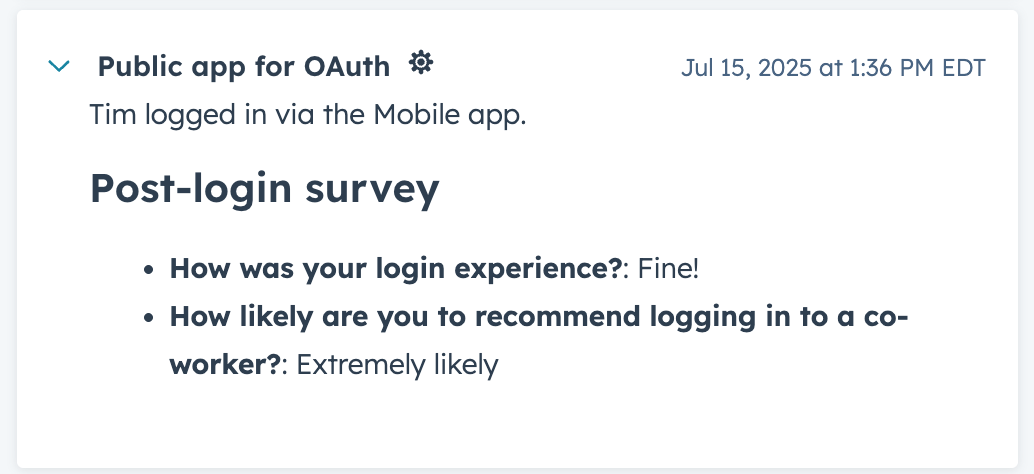
```json theme={null}
{
"eventTemplateId": "5488733",
"objectId": "769851",
"tokens": {
"customerName": "Tim",
"loginLocation": "mobileApp"
},
"extraData": {
"surveyData": [
{
"question": "How was your login experience?",
"answer": "Fine!"
},
{
"question": "How likely are you to recommend logging in to a co-worker?",
"answer": "Extremely likely"
}
]
}
}
```
```json theme={null}
"headerTemplate": "{{customerName}} logged in via the {{loginLocation}}.",
"detailTemplate": "#### Post-login survey\n{{#each extraData.surveyData}}\n- **{{question}}**: {{answer}}\n{{/each}}",
```