> ## Documentation Index
> Fetch the complete documentation index at: https://developers.hubspot.com/docs/llms.txt
> Use this file to discover all available pages before exploring further.
---
id: 1ecc5c78-4911-4bb0-ad11-070573b01fba
---
# App cards reference
> Reference information for building app cards on the latest version of the developer platform.
Below, find reference information for building app cards
## Project structure
To add an app card to an app, create a `cards` directory within `src/app`. The `cards` directory should contain:
* A JSON configuration file for each card that defines the card's schema (`*-hsmeta.json`).
* A React file for each card that renders the card's front-end (`.jsx` or `.tsx`).
* A `package.json` file to handle any needed dependencies. This file is shared between all app cards.
```shell theme={null}
project-folder/
└── src/
└── app/
├── app-hsmeta.json
└── cards/
└── my-app-card-hsmeta.json
└── my-app-card.jsx
└── package.json
```
## App card configuration
In the `*-hsmeta.json` configuration file for your app card, include the properties below.
```json theme={null}
{
"uid": "example-card",
"type": "card",
"config": {
"name": "Hello Example App",
"description": "A description of the card's purpose.",
"location": "crm.record.tab",
"entrypoint": "/app/cards/ExampleCard.jsx",
"objectTypes": ["contacts"]
}
}
```
Fields marked with \* are required.
| Field | Type | Description |
| -------------------------------------------------- | ------------------------------------------------------------------------------ | ------------------------------------------------------------------------------------------------------------------------------------------------------------------------------------------------------------------------------------------------------------------------ |
| `uid`\* | String | The card's unique identifier. This can be any string, but should meaningfully identify the card. HubSpot will identify the card by this ID so that you can change the card's title without removing historical or stateful data, such as the position on the CRM record. |
| `type` | String | The type of component, which should be `card` in this case. |
| `config` | Object | An object containing configuration details. |
| `name`\* | String | The card's title, as displayed in HubSpot's UI. |
| `description` | String | A description of the card. |
| `previewImage` | Object | An object containing the `file` and `altText` fields. The `file` field is the relative path to the preview image. Valid file extensions are png, jpeg, jpg, or gif. The maximum file size is 5.0 MB. The `altText` field is a short description of the image. |
| `entrypoint`\* | String | The file path of the card's front-end React code. |
| `location`\* | `crm.record.tab` \| `crm.record.sidebar` \| `crm.preview` \|`helpdesk.sidebar` | Where the card appears in HubSpot's UI. You can only specify one location value, but some `location` and `objectTypes` combinations result in multiple location support. See the [*Supported locations*](#supported-locations) section below for more details. |
| `objectTypes`\* | Array | The types of CRM records that the card will appear on. See the [*Supported objects*](#supported-objects) section below for more details. |
### Supported objects
In the `objectTypes` array of the card's `*-hsmeta.json` configuration file, specify the types of CRM records that the card will appear on. Below are the currently supported CRM objects, their `objectType` value, and the minimum [scope](/apps/legacy-apps/public-apps/overview#scope-types) to add to your app.
For HubSpot's standard objects, `objectType` values are not case sensitive, and both the singular and plural are supported. For example, `"CONTACT"` and `"contacts"` are both valid.
| CRM object | objectType value | Related scope |
| ---------------- | ------------------------------- | -------------------------------------------------------------------------------------------- |
| Contacts | `CONTACT` | `crm.objects.contacts.read` |
| Companies | `COMPANY` | `crm.objects.companies.read` |
| Deals | `DEALS` | `crm.objects.deals.read` |
| Tickets | `TICKETS` | `tickets` |
| Orders | `ORDERS` | `crm.objects.orders.read` |
| Carts | `CARTS` | `crm.objects.carts.read` |
| Invoices | `INVOICES` | `crm.objects.invoices.read` |
| Leads | `LEADS` | `crm.objects.leads.read` |
| Marketing events | `MARKETING_EVENTS` | `crm.objects.marketing_events.read` |
| Partner accounts | `PARTNER_ACCOUNTS` | `crm.objects.partner-accounts.read` |
| Partner clients | `PARTNER_CLIENTS` | `crm.objects.partner-clients.read` |
| Partner services | `PARTNER_SERVICES` | `crm.objects.partner-services.read` |
| Payments | `COMMERCE_PAYMENTS` | `crm.objects.commercepayments.read` |
| Products | `PRODUCTS` | `crm.objects.products.read` |
| Quotes | `QUOTES` | `crm.objects.quotes.read` |
| Subscriptions | `SUBSCRIPTIONS` | `crm.objects.subscriptions.read` |
| Custom objects | `p_objectName` (case sensitive) | `crm.objects.custom.read` |
| App objects | `app_object_uid` | See [app objects scopes](/apps/developer-platform/add-features/app-objects/reference#scopes) |
The custom object wildcard `p_*` can be used in lieu of `p_objectName` to target all custom objects in the HubSpot account.
In addition, the following CRM objects are supported if they've been [activated in the data model builder](https://knowledge.hubspot.com/data-management/use-the-data-model-builder):
| CRM object | objectType value | Related scopes |
| ------------ | ---------------- | ------------------------------- |
| Appointments | `APPOINTMENTS` | `crm.objects.appointments.read` |
| Courses | `COURSES` | `crm.objects.courses.read` |
| Listings | `LISTINGS` | `crm.objects.listings.read` |
| Services | `SERVICES` | `crm.objects.services.read` |
| Projects | `PROJECTS` | `crm.objects.projects.read` |
### Supported locations
In the `location` field of the card's `*-hsmeta.json` configuration file, specify where the card should display in HubSpot. Below are the currently supported locations.
* `crm.record.tab`: places the extension in the middle column of CRM record pages, either in one of HubSpot's default tabs or in a custom tab. When `objectType` is set to `COMPANIES`, the card will also be available in the [sales workspace target accounts preview panel](https://knowledge.hubspot.com/prospecting/manage-companies-in-the-sales-workspace).
If you've customized the middle column previously, you'll need to [customize the middle column view](https://knowledge.hubspot.com/object-settings/customize-records) to make any newly created extensions visible.
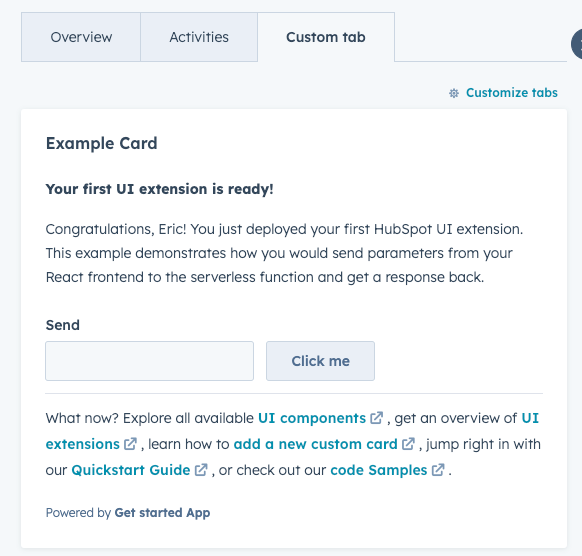
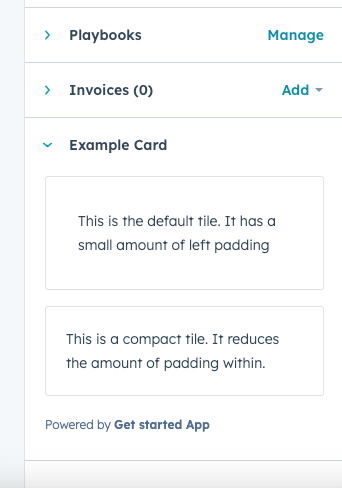
* `crm.record.sidebar`: displays the extension in the right sidebar of CRM record pages. Extensions in the sidebar cannot use [CRM data components](/apps/developer-platform/add-features/ui-extensions/ui-components/crm-data-components/overview). When `objectType` is set to `DEALS`, the card will also be available in the [sales workspace deals sidebar](https://knowledge.hubspot.com/prospecting/create-and-manage-deals-in-the-sales-workspace).
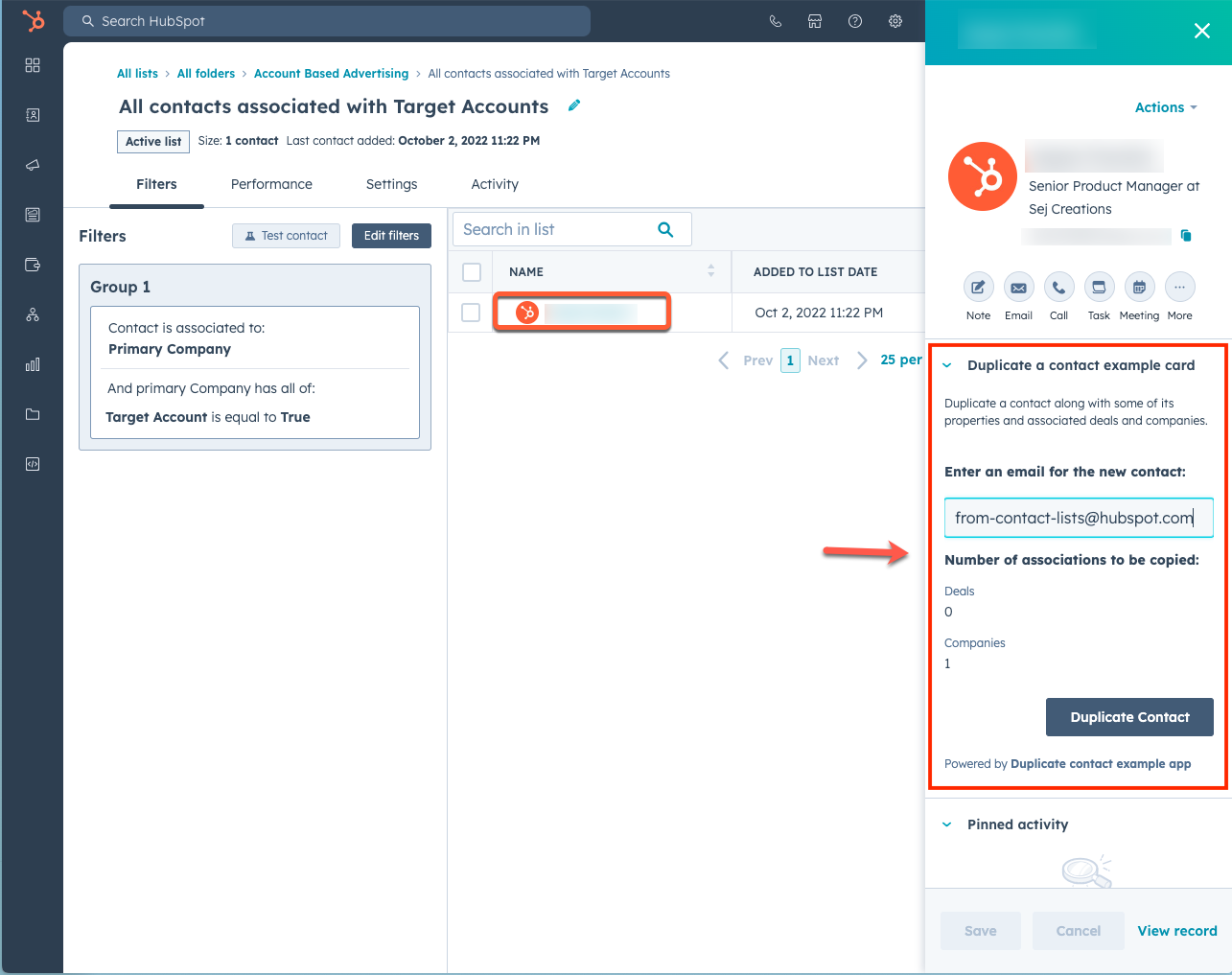
* `crm.preview`: displays the app card in the preview panel that you can access throughout the CRM. When using this location, the extension will be available when previewing the `objectTypes` specified in the [JSON config file](#example-card-json). This includes previewing records from within CRM record pages, index pages, board views, and the lists tool. Learn more about [customizing previews](https://knowledge.hubspot.com/object-settings/customize-record-previews).
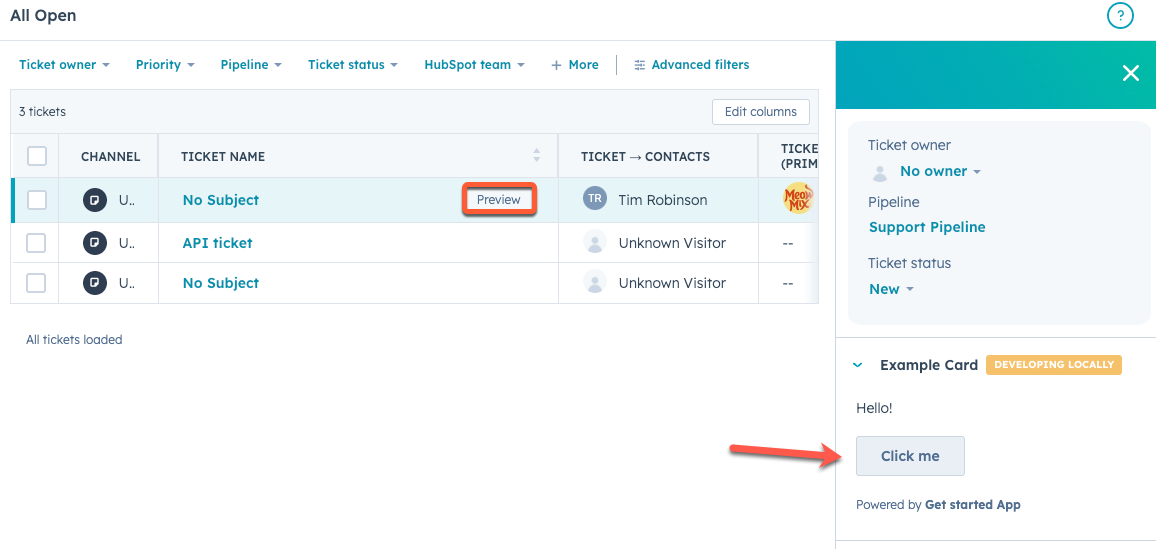
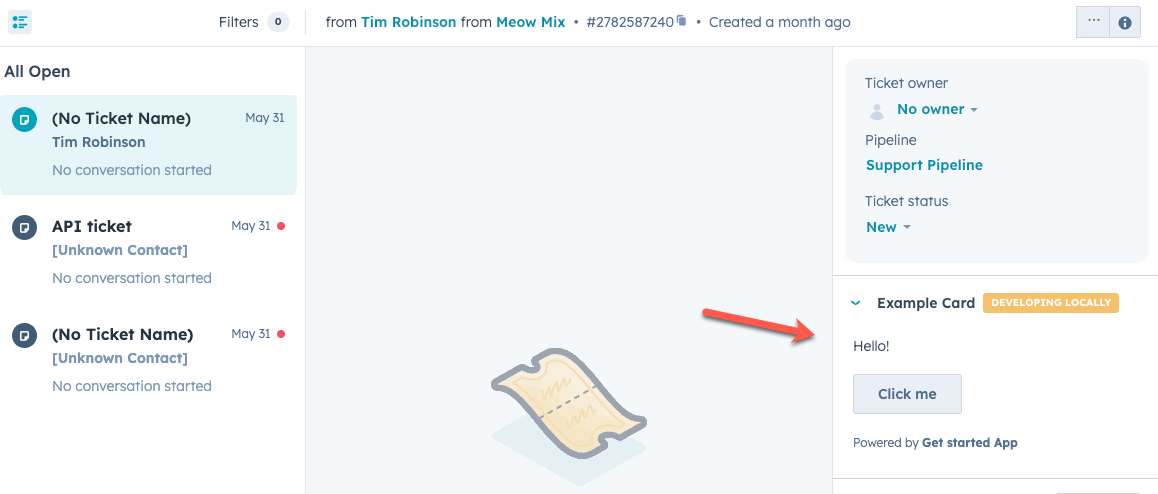
* `helpdesk.sidebar`: displays the card in the ticket sidebars within help desk. This includes both the ticket preview panel on the help desk home page and the right sidebar of the ticket view in help desk. To add a card to this location, you'll need to [configure your help desk settings](https://knowledge.hubspot.com/help-desk/customize-the-right-sidebar-of-help-desk) to include the card.
When creating an extension for this location, you'll also need to ensure that the [app's JSON configuration file](/apps/developer-platform/build-apps/app-configuration) includes `tickets` in the `scopes` array, and that the [card's JSON configuration file](#app-card-schema) includes `tickets` in the `objectTypes` field.
* Help desk home:
* Help desk ticket view:
## Building the React front-end
The UI of an app card is created by a React component file, either `.jsx` or `.tsx`. This file lives in the `cards/` directory alongside the [card configuration JSON file](#app-card-schema) (`*-hsmeta.json`). In the card configuration file, you'll specify the path of the React file in the `entrypoint` field.
Below is an example of a simple app card, which includes `Text` and `Button` [UI components](/apps/developer-platform/add-features/ui-extensions/ui-components/overview) to render the card content, along with a `Flex` component for managing layout.
```jsx theme={null}
import React from "react";
import { Text, Button, Flex, hubspot } from "@hubspot/ui-extensions";
// Define the extension to be run within the Hubspot CRM
hubspot.extend(() => );
// Define the Extension component
const Extension = () => {
return (
This is a simple getting started UI extension with static text.
);
};
```
The following reference documentation is provided for building out card appearance and functionality:
* [UI extension components reference documentation](/apps/developer-platform/add-features/ui-extensions/ui-components/overview)
* [UI extensions SDK](/apps/developer-platform/add-features/ui-extensions/ui-extensions-sdk)
## Managing dependencies
You can include dependencies for your app card in a `package.json` file within the `cards/` directory. By default, when adding an app card through the `hs project add` command, a `package.json` file will be created for you with the following dependencies:
* `@hubspot/ui-extensions`
* `react`
* `typescript`
To install dependencies for project components with a `package.json` file, you can run the `hs project install-deps` command in your project directory.
```json theme={null}
{
"name": "hubspot-example-extension",
"version": "0.1.0",
"license": "MIT",
"dependencies": {
"@hubspot/ui-extensions": "latest",
"react": "^18.2.0"
},
"devDependencies": {
"typescript": "^5.3.3"
}
}
```