> ## Documentation Index
> Fetch the complete documentation index at: https://developers.hubspot.com/docs/llms.txt
> Use this file to discover all available pages before exploring further.
---
id: 98cded79-5194-4733-859f-ab02a9f47686
---
# Fetching data for UI extensions
> Learn the different ways to fetch data in UI extensions, including CRM hooks, actions, serverless functions, and the hubspot.fetch() API.
UI extensions have multiple ways to fetch data. The right approach depends on what data you need and where the extension runs.
| Method | When to use | Where it works |
| ---------------------------------------------------------------------- | --------------------------------------------------------------------------------------------------------------------------------- | ------------------------- |
| [`useCrmProperties`](#crm-data-hooks) | Fetch properties from the current CRM record with automatic state management, formatting, and live updates. | CRM extension points only |
| [`useAssociations`](#crm-data-hooks) | Fetch records associated with the current CRM record with pagination and formatting. | CRM extension points only |
| [`actions.fetchCrmObjectProperties`](#fetchcrmobjectproperties-action) | Fetch CRM property data with manual control over when fetching occurs (imperative) | CRM extension points only |
| [`hubspot.serverless()`](#serverless-functions) | Retrieve or write data server-side using JavaScript within HubSpot's infrastructure, removing the need to manage your own server. | All extension points |
| [`hubspot.fetch()`](#hubspot-fetch) | Send requests from your extension to a backend that you manage, or to a public endpoint. | All extension points |
If you receive raw property values via `actions.fetchCrmObjectProperties`, a `hubspot.serverless()` call that reads CRM data, or a `hubspot.fetch()` request to the HubSpot CRM APIs, you can pass the results to the [`formatCrmProperties`](/apps/developer-platform/add-features/ui-extensions/ui-extensions-sdk/utilities) utility to apply HubSpot's display formatting. For example, resolve enumeration values to their display labels.
## CRM data hooks
The CRM data hooks fetch data using the context of the CRM record where an extension is displayed. They handle loading state, error handling, and property formatting automatically. They also offer utility functions for data refetching and pagination.
The CRM-specific hooks are only available in CRM extension points: `crm.record.tab`, `crm.record.sidebar`, `crm.preview`, and `helpdesk.sidebar`.
Learn more about using CRM data hooks on the [hooks reference page](/apps/developer-platform/add-features/ui-extensions/ui-extensions-sdk/hooks#CRM-specific-hooks).
```jsx theme={null}
import { useCrmProperties, useAssociations } from "@hubspot/ui-extensions/crm";
```
## fetchCrmObjectProperties action
Use `actions.fetchCrmObjectProperties` to fetch property values from the current CRM record imperatively. For example, when you need to control exactly when fetching occurs rather than fetching on render.
This action is only available in CRM extension points: `crm.record.tab`, `crm.record.sidebar`, `crm.preview`, and `helpdesk.sidebar`.
For most use cases, [`useCrmProperties`](/apps/developer-platform/add-features/ui-extensions/ui-extensions-sdk/hooks#usecrmproperties) is the better choice. It provides automatic state management, property formatting, and live updates when properties change.
Learn more about using `fetchCrmObjectProperties` on the [actions reference page](/apps/developer-platform/add-features/ui-extensions/ui-extensions-sdk/actions#fetch-crm-property-data).
## Serverless functions
Use `hubspot.serverless()` to call a serverless function from your UI extension. Serverless JavaScript functions execute within HubSpot's infrastructure, which eliminates the need to manage your own external server.
Learn more about [serverless functions](/apps/developer-platform/add-features/serverless-functions/overview).
**Please note:** an *Enterprise* subscription is required to install an app with serverless functions. You can use a [developer test account](/getting-started/account-types#developer-test-accounts) to test serverless functionality during development without an *Enterprise* subscription.
```jsx theme={null}
import { hubspot } from '@hubspot/ui-extensions';
const result = await hubspot.serverless('my_function', {
parameters: { key: 'value' },
propertiesToSend: ['firstname', 'email']
});
```
## hubspot.fetch()
Use `hubspot.fetch()` to make requests from a UI extension to your own backend or a third-party API. It works in all extension points (app cards, app homes, app settings, etc.).
To fetch data using this method, you'll need to:
* Provide a REST-based backend service to handle requests.
* Include the request URLs as `permittedUrls` in the [app's configuration](/apps/developer-platform/build-apps/app-configuration).
**Please note:** apps that use [Sensitive Data scopes](/api-reference/latest/crm/properties/sensitive-data) cannot use `hubspot.fetch()`, preventing Sensitive Data from being sent to external services.
### Specify permitted URLs to fetch from
To make calls to your backend or a third-party service, update the app's `*-hsmeta.json` [configuration file](/apps/developer-platform/build-apps/app-configuration) to include the URLs you'll be requesting. The URLs must be specified in the `fetch` array of `permittedUrls`.
```json theme={null}
"permittedUrls": {
"fetch": ["https://api.example.com/api/data/"],
"img": [],
"iframe": []
}
```
Note the following when configuring permitted URLs:
* Fetch URLs must be valid HTTPS URLs and cannot be `localhost`. If you want to send requests to a locally running backend, learn how to [proxy requests](#proxying-requests-to-a-locally-running-backend).
* Entries in `permittedUrls.fetch` are treated as prefixes. A request to `https://api.example.com/api/data/users` will be allowed if `https://api.example.com/api/data/` is listed.
* Wildcards are not supported.
* If a URL is not included in `permittedUrls.fetch`, the request will fail with a 403 Forbidden error.
| `permittedUrls` entry | Request URL | Allowed? |
| ----------------------------------- | ---------------------------------------- | -------- |
| `https://api.example.com/api/data/` | `https://api.example.com/api/data/users` | Yes |
| `https://api.example.com/api/data/` | `https://api.example.com/other/endpoint` | No |
| `https://api.example.com/` | `https://api.example.com/api/data/users` | Yes |
When running the local development server, any `hubspot.fetch()` request will still go to your hosted backend via a HubSpot-managed data fetch service. If you need to update the allowlist while running the dev server, you'll need to run `hs project upload` for the change to take effect.
### Method
The method contract for `hubspot.fetch()` is as follows:
```js theme={null}
import { hubspot } from '@hubspot/ui-extensions';
interface Options {
method?: 'GET' | 'PUT' | 'POST' | 'DELETE' | 'PATCH';
timeout?: number;
body?: {
[key: string | number]: unknown;
}
}
hubspot.fetch(resource: string | URL): Promise
hubspot.fetch(resource: string, options?: Options): Promise
```
| Parameter | Type | Description |
| --------- | ------ | ------------------------------------------------------------------------------------------------------------------------------------------------------------------------------------------------------------------ |
| `method` | String | The HTTP method to use. |
| `timeout` | Number | Time in milliseconds to allow for the request to complete before timing out. Maximum value is 120000 (2 minutes). When not specified, the default timeout is 15 seconds. See [Limits](#limits) for retry behavior. |
| `body` | Object | The request body. |
**Please note:** for security reasons, you should not store secrets in your React code to communicate with third-party backends. Instead, use your own backend to fetch data from other third-party APIs after [validating the HubSpot signature](/apps/legacy-apps/authentication/validating-requests) on the request.
### Headers and metadata
To ensure that the requests hitting your backend are coming from HubSpot, several headers are included in the request. You can use these headers, along with the incoming request fields, to verify the signature of the request. Learn more about [validating HubSpot requests](/apps/legacy-apps/authentication/validating-requests).
HubSpot will always populate headers related to request signing and also allow you to pass a custom `Authorization` header from `hubspot.fetch()`. See the [example hubspot.fetch() request with Authorization header](#authorization-header) for more information. All other client-supplied request headers are stripped. Response headers from your backend are not returned.
HubSpot also automatically adds the following query parameters to each request to supply metadata:
* `userId`
* `portalId`
* `userEmail`
* `appId`
As the request URL is hashed as part of the signature header, this will help you securely retrieve the identity of the user making requests to your backend.
Note the following:
* While you can use `hubspot.fetch()` to pass an `Authorization` request header, `hubspot.fetch()` does not pass other client-supplied request headers or return response headers set by your backend server.
* If you're not seeing appended metadata passed with `hubspot.fetch()` requests, check whether you have a `local.json` file that's currently rerouting requests via a proxy. If so, disable this local data fetch feature by renaming the file to `local.json.bak` and restarting the development server.
### Limits
Requests made with `hubspot.fetch()` are subject to the following limits:
* **Concurrency:** each app is allowed up to 20 concurrent requests per account. Additional requests are rejected with `429` and can be retried after a delay.
* **Timeout:** each request has a default timeout of 15 seconds. It can be increased up to 120 seconds (2 minutes) using the `timeout` option. HubSpot will automatically retry a request once if there are issues establishing a connection, or if the request fails with a `5XX` status code within the timeout window. Request duration time includes the time required to establish an HTTP connection.
* **Payload size:** both request and response payloads are limited to 1 MB.
If you're familiar with using the [browser Fetch API](https://developer.mozilla.org/en-US/docs/Web/API/Fetch_API), note that `hubspot.fetch()` is not a one-to-one replacement. Key differences between the two APIs are listed below.
| Feature | Native `fetch()` | `hubspot.fetch()` |
| ---------------- | --------------------- | ----------------------------------- |
| Custom headers | All headers supported | `Authorization` header only |
| Response headers | Returned | Not returned |
| Credentials mode | Supported | Not supported |
| Cache control | Supported | Not supported |
| Timeout | Browser default | 15 seconds default, 120 seconds max |
| Payload size | Large | 1MB max |
| URL requirements | Any URL | Must be in `permittedUrls` |
### Proxying requests to a locally running backend
If you have a locally running backend, you can set up a proxy to remap `hubspot.fetch()` requests made during local development. This proxy is configured through a `local.json` file in your project, and will prevent requests from being routed through HubSpot's data fetch service.
To proxy requests to a locally running backend:
1. Create a `local.json` file in the same directory as your `public-app.json` file. In this file, define a proxy that remaps requests made using `hubspot.fetch()`. This mapping will only happen for the locally running extension. You can include multiple proxy key-value pairs in the `proxy` object.
```json theme={null}
{
"proxy": {
"https://example.com": "http://localhost:8080"
}
}
```
* Each proxy URL must be a valid URL and use HTTPS.
* Path-based routing is not supported. For example, the following proxy won't work: `"https://example.com/a": "http://localhost:8080"`
2. Upload your project by running `hs project upload`.
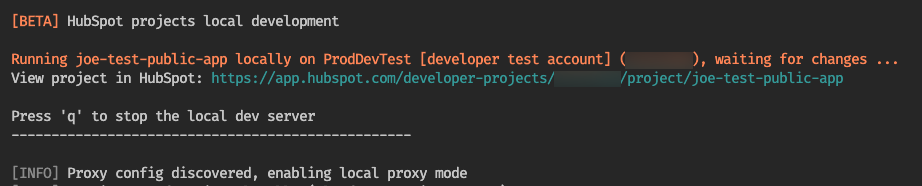
3. With your project uploaded, run `hs project dev` to start the development server. The CLI should confirm that it has detected your proxy.
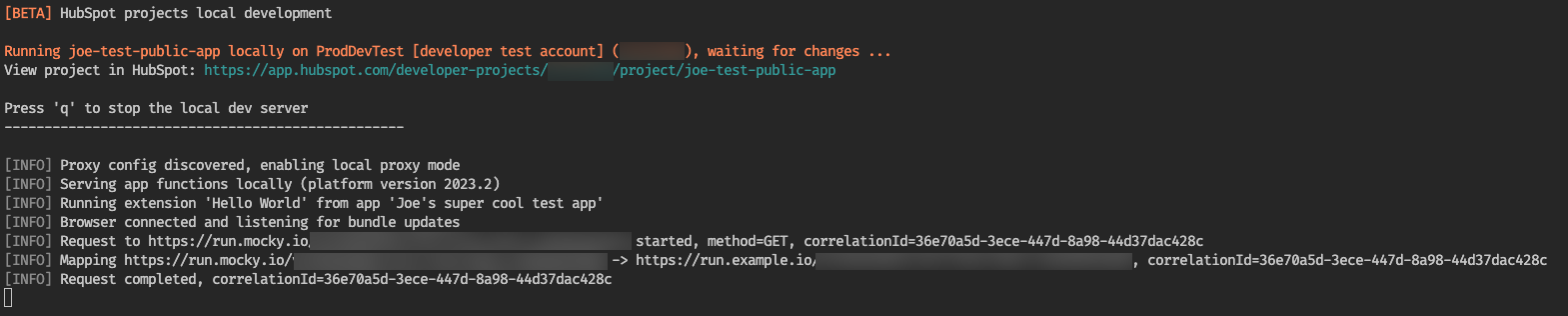
4. When you request the mapped URL using `hubspot.fetch()`, the CLI will confirm the remapping.
#### Request signatures during proxied local development
By default, when proxying requests during local development, requests will not be signed or include metadata in query parameters. However, if you want to introduce request signing into the local development process, you can inject the `CLIENT_SECRET` environment variable into the local development process.
##### Injecting CLIENT\_SECRET
After setting up your `local.json` file to proxy specific domains, you can inject the `CLIENT_SECRET` variable when starting the local development server by prepending the `hs project dev` command with the variable:
```shell theme={null}
CLIENT_SECRET="abc123" hs project dev
```
Note that this doesn't have to be a real `CLIENT_SECRET` value, as long as you inject the same variable in your locally running backend that you're using for `hs project dev`. For example, your backend might include the following Node or Python code:
```js JavaScript theme={null}
CLIENT_SECRET="abc123" node my-app.js
// and also
CLIENT_SECRET="abc123" npm run dev
```
```py Python theme={null}
CLIENT_SECRET="abc123" python my-app.py
```
And to access the `CLIENT_SECRET` variable:
```js JavaScript theme={null}
console.log(process.env.CLIENT_SECRET);
```
```py Python theme={null}
import os
print(os.environ['CLIENT_SECRET'])
```
Once you've finalized your request signing logic and have permanently added it to your backend code, you'll need to inject the `CLIENT_SECRET` variable from your app into the `hs project dev` command permanently. For ease of use, consider baking the variable into your start scripts for local development.
To validate HubSpot request signatures in your custom backend, check out the [request validation guide](/apps/legacy-apps/authentication/validating-requests). You can also use HubSpot's [`@hubspot/api-client`](https://www.npmjs.com/package/@hubspot/api-client) npm module to verify requests and sign them yourself. For example:
```js theme={null}
import { Signature } = from '@hubspot/api-client'
const url = `${req.protocol}://${req.header('host')}${req.url}`
const method = req.method;
const clientSecret = process.env.CLIENT_SECRET
const signatureV3 = req.header('X-HubSpot-Signature-v3');
const timestamp = req.header('X-HubSpot-Request-Timestamp');
// Reject the request if the timestamp is older than 5 minutes.
if (parseInt(timestamp, 10) < (Date.now() - 5 * 60 * 1000)) {
throw Error('Bad request. Timestamp too old.')
}
const requestBody = req.body === undefined || req.body === null
? ''
: req.body;
const validV3 = Signature.isValid({
signatureVersion: 'v3',
signature: signatureV3,
method,
clientSecret,
requestBody,
url,
timestamp,
});
if (!validV3) {
throw Error('Bad request. Invalid signature.')
}
```
### hubspot.fetch examples
Below are examples of `hubspot.fetch` requests to illustrate basic and authorization header usage.
#### Basic usage
```js theme={null}
import React, { useEffect } from "react";
import { hubspot, Text } from "@hubspot/ui-extensions";
hubspot.extend(({ context }) => );
const Hello = ({ context }) => {
useEffect(() => {
const fetchData = async () => {
const response = await hubspot.fetch("https://api.example.com/data", {
timeout: 2_000,
method: "GET",
});
if (!response.ok) {
throw new Error(`Request failed with status ${response.status}`);
}
const data = await response.json();
console.log(data);
};
fetchData().catch(err => console.error("Something went wrong", err));
}, []);
return Hello world;
};
```
#### Authorization header
You may return a short-lived authorization token from your backend service after validating the HubSpot signature. You can then use this token to access other resources.
To get the access token from your backend server in the UI extension:
```js wrap theme={null}
hubspot.fetch(`${BACKEND_ENDPOINT}/get-access-token`, {
timeout: 3000,
method: 'GET',
})
.then((response: Response) => {
response.json().then((data) => setAccessToken(data.accessToken));
})
```
To return a short-lived access token from your backend server:
```js wrap theme={null}
app.get("/get-access-token", (req, res) => {
validateHubspotSignatureOrThrow(req);
res.json({
accessToken: generateShortLivedAccessToken(req.query.userEmail),
expiryTime: addMinutes(currentTime, 10),
});
});
```
To attach access tokens to other UI extension requests:
```js theme={null}
hubspot.fetch('https://www.oauth-enabled-api.com/', {
timeout: 3000,
method: 'GET',
headers: {
'Authorization': `Bearer ${accessToken}`
}
}).then((response: Response) => {
...
})
```
### Monitoring and logs
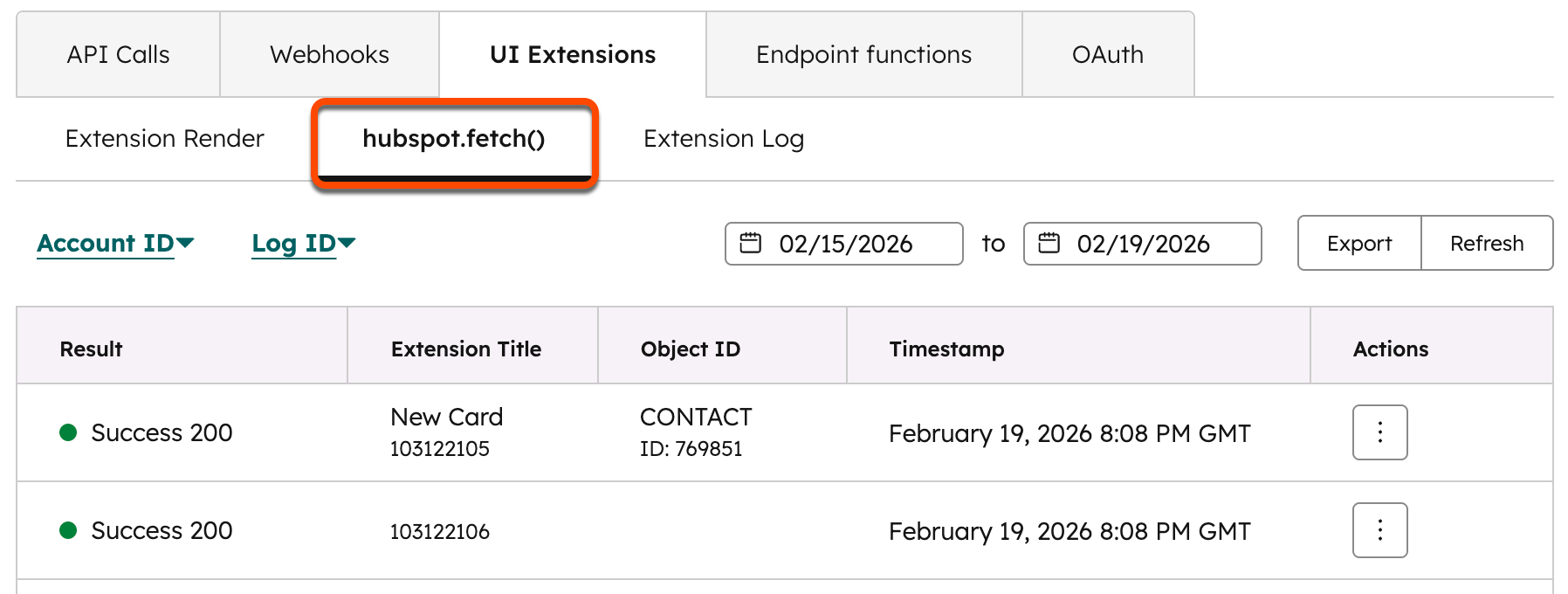
To monitor `hubspot.fetch()` activity, you can view request logs in HubSpot:
1. In your HubSpot account, navigate to **Development**.
2. In the left sidebar, navigate to **Monitoring** > **Logs**.
3. On the monitoring page, click the **UI Extensions** tab.
On the *UI Extensions* tab, use the **tabs** to view the various logs available. Learn more about [monitoring and logging for UI extensions](/apps/developer-platform/add-features/ui-extensions/logging-and-monitoring).