> ## Documentation Index
> Fetch the complete documentation index at: https://developers.hubspot.com/docs/llms.txt
> Use this file to discover all available pages before exploring further.
---
id: 44635f42-11e8-49ba-9c15-cb1954062269
---
# Box
> Learn about the Box component for configuring UI extension layout.
The `Box` component renders an empty `div` container for fine tuning the spacing of components. Commonly used with the [Flex](/apps/developer-platform/add-features/ui-extensions/ui-components/standard-components/flex) component.
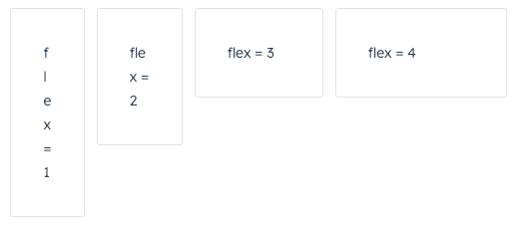 ```jsx theme={null}
import { Flex, Box, Tile } from "@hubspot/ui-extensions";
const Extension = () => {
return (
flex = 1
flex = 2
flex = 3
flex = 4
);
};
```
## Props
| Prop | Type | Description |
| ----------- | --------------------------------------------------------------------------- | -------------------------------------------------------------------------------------------------------------------------------------------------------------------------------------------------------------------------------------------------------------------------------------------------------------------------------------------------------------------------------------------------------------------------------------------------------------------------------------------------------------------------------------------------------------------------------------------------------------------------------------------------------------------------------------------------------------------------------------------------------------------------------------------------------------------------------------------------------------------------------------------------------------------- |
| `alignSelf` | `'start'` \| `'center'` \| `'end'` \| `'baseline'` \| `'stretch'` \| 'auto' | Distributes a child component along the cross-axis using the available free space. Use this prop for nested `Box` components to align them differently from other child components in the `Flex` group. |
| `flex` | `'initial'` \| `'auto'` (default) \| `'none'` \| Number | Distributes components based on the available empty space around them. Options are as follows:
```jsx theme={null}
import { Flex, Box, Tile } from "@hubspot/ui-extensions";
const Extension = () => {
return (
flex = 1
flex = 2
flex = 3
flex = 4
);
};
```
## Props
| Prop | Type | Description |
| ----------- | --------------------------------------------------------------------------- | -------------------------------------------------------------------------------------------------------------------------------------------------------------------------------------------------------------------------------------------------------------------------------------------------------------------------------------------------------------------------------------------------------------------------------------------------------------------------------------------------------------------------------------------------------------------------------------------------------------------------------------------------------------------------------------------------------------------------------------------------------------------------------------------------------------------------------------------------------------------------------------------------------------------- |
| `alignSelf` | `'start'` \| `'center'` \| `'end'` \| `'baseline'` \| `'stretch'` \| 'auto' | Distributes a child component along the cross-axis using the available free space. Use this prop for nested `Box` components to align them differently from other child components in the `Flex` group. |
| `flex` | `'initial'` \| `'auto'` (default) \| `'none'` \| Number | Distributes components based on the available empty space around them. Options are as follows:- `initial` (default): the item is sized according to its height and width. It shrinks to its minimum size to fit the container, but does not grow to absorb any extra free space in the flex container.
- `auto`: the item is sized according to its height and width, but grows to absorb any extra free space in the flex container, and shrinks to its minimum size to fit the container.
- `none`: the item is sized according to its height and width. It is fully inflexible: it neither shrinks nor grows in relation to the flex container.
- Number: tells a component to fill all available space, shared evenly amongst other components with the same parent. The larger the flex given, the higher the ratio of space a component will take compared to its siblings.
|
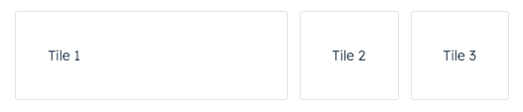
You only need to use `Box` as a wrapper for components that you want to adjust. For example, if you wrap one component in a `Box` with a `flex` value, only that one component will have its width adjusted based on the available empty space.
 ```jsx theme={null}
Tile 1
Tile 2
Tile 3
;
```
## Usage examples
### Using numbers in flex
Use the `flex` prop in a `Box` component to assign any extra spacing to components using either a default value (e.g. `auto`) or a specific number. When using a number, the components will be distributed based on the ratio of their assigned numbers. This also means that, when assigning a `flex` value for only one `Box`, you can use any number, because any number by itself will result in all available space being assigned to that `Box`.
For example, the four tiles below take up an increasing amount of space based on their `flex` values.
```jsx theme={null}
Tile 1
Tile 2
Tile 3
;
```
## Usage examples
### Using numbers in flex
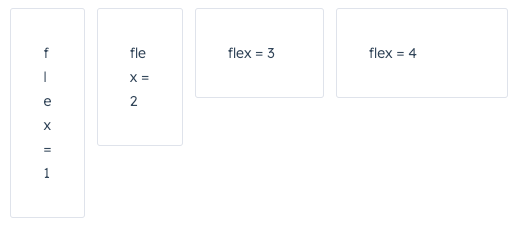
Use the `flex` prop in a `Box` component to assign any extra spacing to components using either a default value (e.g. `auto`) or a specific number. When using a number, the components will be distributed based on the ratio of their assigned numbers. This also means that, when assigning a `flex` value for only one `Box`, you can use any number, because any number by itself will result in all available space being assigned to that `Box`.
For example, the four tiles below take up an increasing amount of space based on their `flex` values.
 ```jsx theme={null}
flex = 1
flex = 2
flex = 3
flex = 4
;
```
### Using alignSelf
Use the `alignSelf` prop to override alignment rules for individual `Box` components.
```jsx theme={null}
flex = 1
flex = 2
flex = 3
flex = 4
;
```
### Using alignSelf
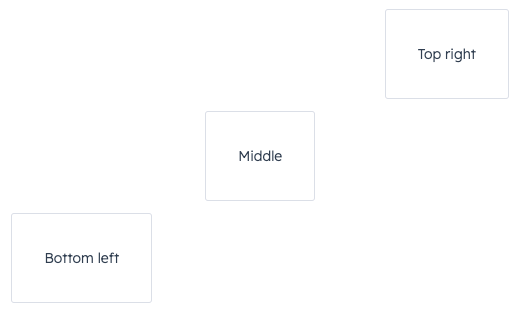
Use the `alignSelf` prop to override alignment rules for individual `Box` components.
 ```jsx theme={null}
Top right
Middle
Bottom left
;
```
## Related components
* [Flex](/apps/developer-platform/add-features/ui-extensions/ui-components/standard-components/flex)
* [Divider](/apps/developer-platform/add-features/ui-extensions/ui-components/standard-components/divider)
* [Tile](/apps/developer-platform/add-features/ui-extensions/ui-components/standard-components/tile)
```jsx theme={null}
Top right
Middle
Bottom left
;
```
## Related components
* [Flex](/apps/developer-platform/add-features/ui-extensions/ui-components/standard-components/flex)
* [Divider](/apps/developer-platform/add-features/ui-extensions/ui-components/standard-components/divider)
* [Tile](/apps/developer-platform/add-features/ui-extensions/ui-components/standard-components/tile)