> ## Documentation Index
> Fetch the complete documentation index at: https://developers.hubspot.com/docs/llms.txt
> Use this file to discover all available pages before exploring further.
---
id: e0c8f532-ee9b-4477-a532-7311a28018e7
---
# EmptyState | UI components
> Learn about the EmptyState component for use in UI extensions.
The `EmptyState` component sets the content that appears when the extension is in an empty state. Use this component when there's no content or data to help guide users.
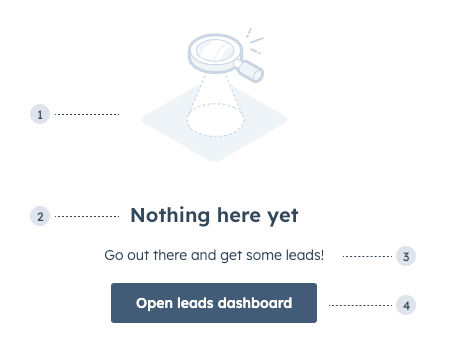 1. **Image:** the default image that comes with the component.
2. **Title:** the title that describes why the component is in an empty state.
3. **Additional text:** an additional [Text component](/apps/developer-platform/add-features/ui-extensions/ui-components/standard-components/text) to provide further guidance. This does not come with the component by default.
4. **Additional button:** an additional [Button component](/apps/developer-platform/add-features/ui-extensions/ui-components/standard-components/button) to help users take action. This does not come with the component by default.
```jsx theme={null}
import { EmptyState, Text } from '@hubspot/ui-extensions';
const Extension = ({ data }) => {
if (!data || !data.length) {
return (
Go out there and get some leads!
)
}
return (
{data.map(...)}
);
}
```
## Props
| **Prop** | **Type** | **Description** |
| -------------- | ---------------------------------------- | ----------------------------------------------------------------------------------------------------------------------------------------------------------------------------------------------------------- |
| `flush` | Boolean | When set to `true`, removes the default vertical margins for the component. By default, set to `false`. |
| `imageName` | String | The name of the image. See [available images](#available-images). By default, set to `'emptyStateCharts'`. |
| `imageWidth` | Number | The max-width for the image container. By default, set to `250`. |
| `layout` | `'horizontal'` (default) \| `'vertical'` | The layout direction of the content. |
| `reverseOrder` | Boolean | When set to `true`, swaps out the visual order of the text (primary) and image (secondary) content. This ensures that the primary content is presented first to screen readers. By default, set to `false`. |
| `title` | String | The text for the title header. |
## Available images
1. **Image:** the default image that comes with the component.
2. **Title:** the title that describes why the component is in an empty state.
3. **Additional text:** an additional [Text component](/apps/developer-platform/add-features/ui-extensions/ui-components/standard-components/text) to provide further guidance. This does not come with the component by default.
4. **Additional button:** an additional [Button component](/apps/developer-platform/add-features/ui-extensions/ui-components/standard-components/button) to help users take action. This does not come with the component by default.
```jsx theme={null}
import { EmptyState, Text } from '@hubspot/ui-extensions';
const Extension = ({ data }) => {
if (!data || !data.length) {
return (
Go out there and get some leads!
)
}
return (
{data.map(...)}
);
}
```
## Props
| **Prop** | **Type** | **Description** |
| -------------- | ---------------------------------------- | ----------------------------------------------------------------------------------------------------------------------------------------------------------------------------------------------------------- |
| `flush` | Boolean | When set to `true`, removes the default vertical margins for the component. By default, set to `false`. |
| `imageName` | String | The name of the image. See [available images](#available-images). By default, set to `'emptyStateCharts'`. |
| `imageWidth` | Number | The max-width for the image container. By default, set to `250`. |
| `layout` | `'horizontal'` (default) \| `'vertical'` | The layout direction of the content. |
| `reverseOrder` | Boolean | When set to `true`, swaps out the visual order of the text (primary) and image (secondary) content. This ensures that the primary content is presented first to screen readers. By default, set to `false`. |
| `title` | String | The text for the title header. |
## Available images
`addOnReporting`
`announcement`
`api`
`automatedTesting`
`beta`
`building`
`callingSetUp`
`companies`
`components`
`cone`
`contacts`
`contentStrategy`
`customObjects`
`customerExperience`
`customerSupport`
`deals`
`developerSecurityUpdate`
`electronicSignature`
`electronicSignatureEmptyState`
`emailConfirmation`
`emptyStateCharts`
`idea`
`integrations`
`leads`
`lock`
`meetings`
`missedGoal`
`multipleObjects`
`object`
`productsShoppingCart`
`registration`
`sandboxAddOn`
`social`
`store`
`storeDisabled`
`successfullyConnectedEmail`
`target`
`task`
`tickets`
`voteAndSearch`
## Usage examples
* Display when it's the first use of a feature.
* Show when the user is required to take action in order to populate the card with information.
## Guidelines
* **DO:** make empty states informative so that users understand what will appear when the extension is not empty.
* **DO:** make empty states actionable. If relevant, explain the benefits of this area and how to add content or data.
* **DON'T:** make empty states too long.
## Related components
* [Alert](/apps/developer-platform/add-features/ui-extensions/ui-components/standard-components/alert)
* [ErrorState](/apps/developer-platform/add-features/ui-extensions/ui-components/standard-components/error-state)
* [LoadingSpinner](/apps/developer-platform/add-features/ui-extensions/ui-components/standard-components/loading-spinner)