> ## Documentation Index
> Fetch the complete documentation index at: https://developers.hubspot.com/docs/llms.txt
> Use this file to discover all available pages before exploring further.
---
id: c7146fa1-0b47-46c6-8ea6-373c6c1ae03e
---
# Input
> Learn about the Input component for use in UI extensions.
export const ComponentProp = ({name, required, type, description, defaultValue, seeItems}) => {
const renderSeeItems = () => {
if (!seeItems || seeItems.length === 0) {
return null;
}
if (seeItems.length === 1) {
return
See: {seeItems[0]}
;
}
return
See:
{seeItems.map((item, index) => - {item}
)}
{name}
{required && <> Required}
|
{type}
{defaultValue &&
Default: {defaultValue}
}
|
{description}
{renderSeeItems()}
|
;
};
export const ComponentProps = ({children}) => {
return
| Prop |
Type |
Description |
{children}
;
};
export const Tag = ({children, type = 'default', className = ''}) => {
return
{children}
;
};
The `Input` component renders a text input field where a user can enter a custom text value. Like other inputs, this component should only be used within a [Form](/apps/developer-platform/add-features/ui-extensions/ui-components/standard-components/form) that has a submit button.
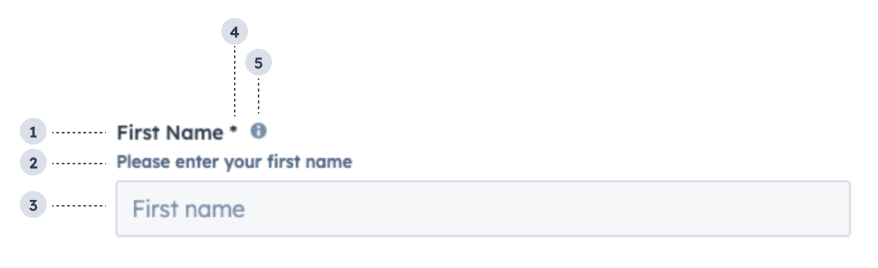 1. **Label:** the input's label.
2. **Description:** the text that describes the field's purpose.
3. **Placeholder:** the placeholder value that displays when no value has been entered.
4. **Required field indicator:** communicates to the user that the field is required for form submission.
5. **Tooltip:** on hover, displays additional information about the field.
```jsx theme={null}
import { useState } from "react";
import { Form, Input } from "@hubspot/ui-extensions";
const Extension = () => {
const [name, setName] = useState("");
const [validationMessage, setValidationMessage] = useState("");
const [isValid, setIsValid] = useState(true);
return (
);
};
```
## Props
1. **Label:** the input's label.
2. **Description:** the text that describes the field's purpose.
3. **Placeholder:** the placeholder value that displays when no value has been entered.
4. **Required field indicator:** communicates to the user that the field is required for form submission.
5. **Tooltip:** on hover, displays additional information about the field.
```jsx theme={null}
import { useState } from "react";
import { Form, Input } from "@hubspot/ui-extensions";
const Extension = () => {
const [name, setName] = useState("");
const [validationMessage, setValidationMessage] = useState("");
const [isValid, setIsValid] = useState(true);
return (
);
};
```
## Props
string} description={<>The text that displays above the input. Required if inputType is not set to hidden.} />
string} description={<>The input's unique identifier, similar to the HTML input element name attribute.} />
string} description={<>The value of the input on the first render.} />
string} description={<>Displayed text that describes the field's purpose.} />
boolean} description={<>When set to true, validationMessage is displayed as an error message if provided. The input will also render in an error state so that users are aware. If left false, validationMessage is displayed as a success message.} defaultValue={<>false} />
(value: string) => void} description={<>A function that is called and passes the value when the field loses focus.} />
(value: string) => void} description={<>A callback function that is invoked when the value is committed. Currently, these are onBlur of the input and when the user submits the form.} />
(value: string) => void} description={<>A function that is called and passed the value when the field gets focused.} />
(value: string) => void} description={<>A function that is called and passes the value when the field is edited by the user. Should be used for validation. It's recommended that you don't use this value to update state (use onChange instead).} />
string} description={<>The text that appears in the input before a value is set.} />
boolean} description={<>When set to true, users will not be able to enter a value into the field.} defaultValue={<>false} />
boolean} description={<>When set to true, displays a required field indicator.} defaultValue={<>false} />
string} description={<>Used by findByTestId() to locate this component in tests.} seeItems={[<>Testing utilities reference]} />
string} description={<>The text that displays in a tooltip next to the input label.} />
"password" | "text"} description={<>The type of input. An input with the 'password' type will hide the characters that the user types.} defaultValue={<>"text"} />
string} description={<>The text to show if the input has an error.} />
string} description={<>The value of the input.} />
## Usage example
Use for form fields where a user can enter any text value, such as email address or name.
## Guidelines
* **DO:** make label and description text concise and clear.
* **DO:** include placeholder text to help users understand what's expected in the field.
* **DO:** indicate if a field is required.
* **DO:** include clear validation error messages so that users know how to fix errors.
* **DON'T:** use this component for long responses, such as open-ended comments or feedback. Instead, use the [TextArea component](/apps/developer-platform/add-features/ui-extensions/ui-components/standard-components/text-area).
* **DON'T:** use placeholder text for critical information, as it will disappear once users begin to type. Critical information should be placed in the label and descriptive text, with additional context in the tooltip if needed.
## Related components
* [Select](/apps/developer-platform/add-features/ui-extensions/ui-components/standard-components/select)
* [TextArea](/apps/developer-platform/add-features/ui-extensions/ui-components/standard-components/text-area)
* [Form](/apps/developer-platform/add-features/ui-extensions/ui-components/standard-components/form)