> ## Documentation Index
> Fetch the complete documentation index at: https://developers.hubspot.com/docs/llms.txt
> Use this file to discover all available pages before exploring further.
---
id: 5085eae7-435e-4f76-bf5a-5a0542120a29
---
# LoadingButton | UI components
> Learn about the LoadingButton component for use in UI extensions.
The `LoadingButton` component renders a button with loading state options. It includes the same props as the [Button component](/apps/developer-platform/add-features/ui-extensions/ui-components/standard-components/button) with a few additional props for managing loading state.
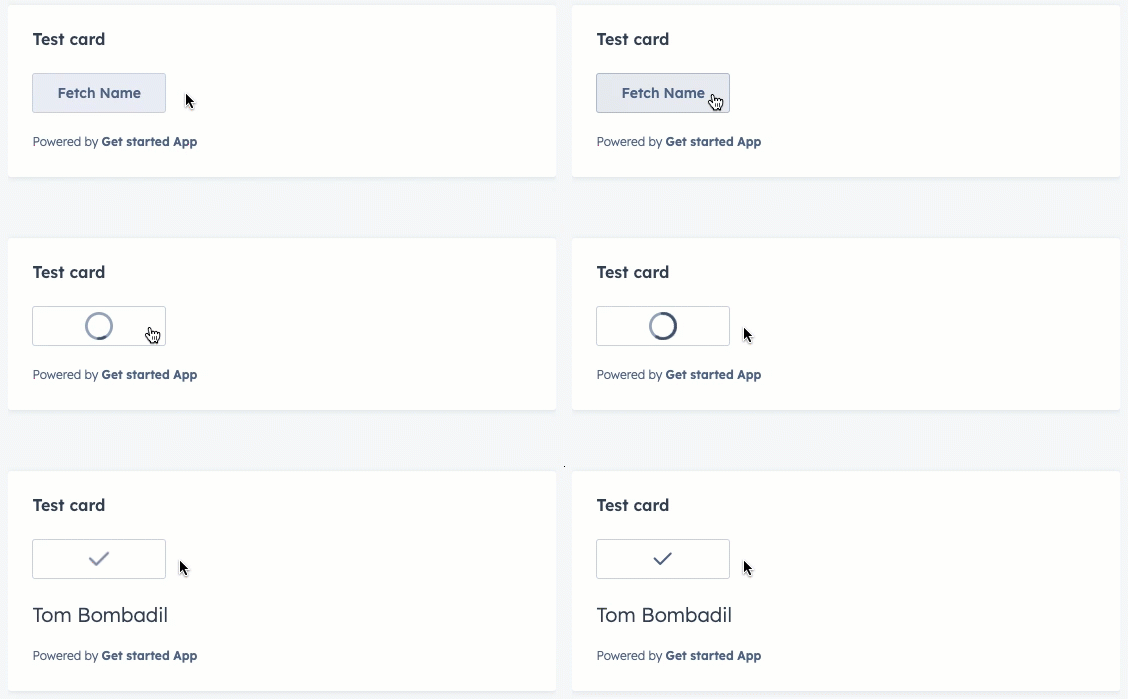 ```jsx theme={null}
import React from "react";
import { useState } from "react";
import { Flex, Heading, LoadingButton, hubspot } from "@hubspot/ui-extensions";
hubspot.extend(({ actions }) => );
function fakeFetchContactName() {
return new Promise(resolve => {
setTimeout(() => {
resolve({ firstname: "Tom", lastname: "Bombadil" });
}, 1000);
});
}
function Extension() {
const [isFetching, setIsFetching] = useState(false);
const [contactName, setContactName] = useState("");
async function handleClick() {
setIsFetching(true);
const { firstname, lastname } = await fakeFetchContactName();
setContactName(`${firstname} ${lastname}`);
setIsFetching(false);
}
return (
Fetch Name
{!isFetching && contactName !== "" && {contactName}}
);
}
```
## Props
| Prop | Type | Description |
| ---------------- | ----------------------------------------------------------------------------- | ---------------------------------------------------------------------------------------------------------------------------------------------------------------------------------------------------------------------------------------------------------------------------------------------------------------------------------------------------------------------------------------------------------------------------------------------------------------------------------------------------------------------------------------------------------------------------------------------------------- |
| `disabled` | Boolean | When set to `true`, the button will render in a greyed-out state and cannot be clicked. |
| `href` | String \| Object | Include this prop to open a URL on click. Can be set to a URL string or an object with the following fields:
```jsx theme={null}
import React from "react";
import { useState } from "react";
import { Flex, Heading, LoadingButton, hubspot } from "@hubspot/ui-extensions";
hubspot.extend(({ actions }) => );
function fakeFetchContactName() {
return new Promise(resolve => {
setTimeout(() => {
resolve({ firstname: "Tom", lastname: "Bombadil" });
}, 1000);
});
}
function Extension() {
const [isFetching, setIsFetching] = useState(false);
const [contactName, setContactName] = useState("");
async function handleClick() {
setIsFetching(true);
const { firstname, lastname } = await fakeFetchContactName();
setContactName(`${firstname} ${lastname}`);
setIsFetching(false);
}
return (
Fetch Name
{!isFetching && contactName !== "" && {contactName}}
);
}
```
## Props
| Prop | Type | Description |
| ---------------- | ----------------------------------------------------------------------------- | ---------------------------------------------------------------------------------------------------------------------------------------------------------------------------------------------------------------------------------------------------------------------------------------------------------------------------------------------------------------------------------------------------------------------------------------------------------------------------------------------------------------------------------------------------------------------------------------------------------- |
| `disabled` | Boolean | When set to `true`, the button will render in a greyed-out state and cannot be clicked. |
| `href` | String \| Object | Include this prop to open a URL on click. Can be set to a URL string or an object with the following fields:- `url` (string): the URL that will open on click.
- `external` (boolean, optional): set to `true` to open the URL in a new tab and display an external link icon. By default:
- Links to HubSpot app pages will open in the same tab and will not include an icon.
- Links to non-HubSpot app pages will open in a new tab and include the icon.
When a button includes both `href` and an `onClick` action, both will be executed on button click. |
| `loading` | Boolean | Set to `true` to display the loading indicator and disable the button. Default is `false`. |
| `onClick` | `() => void` | A function that will be invoked when the button is clicked. It receives no arguments and its return value is ignored. |
| `overlay` | Object | Include a [Modal](/apps/developer-platform/add-features/ui-extensions/ui-components/standard-components/modal) or [Panel](/apps/developer-platform/add-features/ui-extensions/ui-components/standard-components/panel) component in this object to open it as an overlay on click. Learn more about [using overlays](/apps/developer-platform/add-features/ui-extensions/ui-extensions-sdk#open-overlays). |
| `resultIconName` | String | Set to an [icon name](/apps/developer-platform/add-features/ui-extensions/ui-components/standard-components/icon) to display an icon after loading. By default, will display a check mark. |
| `size` | `'xs'`, `'extra-small'` \| `'sm'`, `'small'` \| `'med'`, `'medium'` (default) | The size of the button. |
| `type` | `'button'` (default) \| `'reset'` \| `'submit'` | Sets the `role` HTML attribute of the button. |
| `variant` | `'primary'` \| `'secondary'` (default) \| `'destructive'` | Sets the color of the button. See [variants section](#variants) for more information. |
## Opening overlays
Like the [Button](/apps/developer-platform/add-features/ui-extensions/ui-components/standard-components/button), [Link](/apps/developer-platform/add-features/ui-extensions/ui-components/standard-components/link), [Tag](/apps/developer-platform/add-features/ui-extensions/ui-components/standard-components/tag), and [Image](/apps/developer-platform/add-features/ui-extensions/ui-components/standard-components/image) components, the `LoadingButton` component can open an overlay. In addition, you can use the `overlayOptions` prop to trigger the overlay either on click or when the loading has finished.
```jsx theme={null}
import React from "react";
import { useState } from "react";
import { Flex, Heading, LoadingButton, Panel, PanelBody, PanelSection, hubspot } from "@hubspot/ui-extensions";
hubspot.extend(({ actions }) => );
function fakeFetchContactName() {
return new Promise(resolve => {
setTimeout(() => {
resolve({ firstname: "Tom", lastname: "Bombadil" });
}, 1000);
});
}
function Extension() {
const [isFetching, setIsFetching] = useState(false);
const [contactName, setContactName] = useState("");
async function handleClick() {
setIsFetching(true);
const { firstname, lastname } = await fakeFetchContactName();
setContactName(`${firstname} ${lastname}`);
setIsFetching(false);
}
return (
{contactName !== "" && {contactName}}
}
>
Fetch name (overlay)
);
}
```
## Variants
Using the `variant` prop, you can set the color of the button.
* **Primary:** a dark blue button for the most frequently used or most important action on an extension. Each extension should only have one primary button.
 * **Secondary (default):** a grey button to provide alternative or non-primary actions. Each extension should include no more than two secondary buttons.
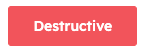
 * **Destructive:** a red button for actions that delete, disconnect, or perform any action that the user can't undo. Button text should clearly communicate what is being deleted or disconnected. After a destructive button is clicked, the user should have to verify or confirm the action.
 **Please note:**
HubSpot does not provide variant options for the orange buttons you’ll find across the app (both solid and outlined). Those color variants are reserved for the HubSpot product, which helps to maintain the hierarchy of available actions on a given page.
## Usage examples
* Use a `'primary'` button at the end of a form to submit data to another system.
* Use a `'secondary'` button next to a primary form submit button to reset form fields.
* Use a `'destructive'` button to enable users to delete a contact's data from an external system.
* Set a button to `disabled={true}` when a contact doesn't qualify for a form submission due to missing criteria or other ineligibility.
## Guidelines
* **DO:** set button text that clearly communicates what action will occur when a user clicks it. Text should be unambiguous and concise (\~2-4 words).
* **DO:** use sentence-casing for button text (only the first word capitalized)
* **DO:** minimize the number of buttons that appear on a page record across all extensions.
* **DO:** always open links to pages outside of the HubSpot app in a new tab (`external: true`).
* **DON'T:** include multiple primary buttons in a single extension.
* **DON'T:** use a destructive button unless the consequences are significant or irreversible.
## Related components
* [ButtonRow](/apps/developer-platform/add-features/ui-extensions/ui-components/standard-components/button-row)
* [Button](/apps/developer-platform/add-features/ui-extensions/ui-components/standard-components/button)
* [CrmActionButton](/apps/developer-platform/add-features/ui-extensions/ui-components/crm-action-components/crm-action-button)
* [Panel](/apps/developer-platform/add-features/ui-extensions/ui-components/standard-components/panel)
**Please note:**
HubSpot does not provide variant options for the orange buttons you’ll find across the app (both solid and outlined). Those color variants are reserved for the HubSpot product, which helps to maintain the hierarchy of available actions on a given page.
## Usage examples
* Use a `'primary'` button at the end of a form to submit data to another system.
* Use a `'secondary'` button next to a primary form submit button to reset form fields.
* Use a `'destructive'` button to enable users to delete a contact's data from an external system.
* Set a button to `disabled={true}` when a contact doesn't qualify for a form submission due to missing criteria or other ineligibility.
## Guidelines
* **DO:** set button text that clearly communicates what action will occur when a user clicks it. Text should be unambiguous and concise (\~2-4 words).
* **DO:** use sentence-casing for button text (only the first word capitalized)
* **DO:** minimize the number of buttons that appear on a page record across all extensions.
* **DO:** always open links to pages outside of the HubSpot app in a new tab (`external: true`).
* **DON'T:** include multiple primary buttons in a single extension.
* **DON'T:** use a destructive button unless the consequences are significant or irreversible.
## Related components
* [ButtonRow](/apps/developer-platform/add-features/ui-extensions/ui-components/standard-components/button-row)
* [Button](/apps/developer-platform/add-features/ui-extensions/ui-components/standard-components/button)
* [CrmActionButton](/apps/developer-platform/add-features/ui-extensions/ui-components/crm-action-components/crm-action-button)
* [Panel](/apps/developer-platform/add-features/ui-extensions/ui-components/standard-components/panel)