> ## Documentation Index
> Fetch the complete documentation index at: https://developers.hubspot.com/docs/llms.txt
> Use this file to discover all available pages before exploring further.
---
id: 7d100a65-5e65-40b0-980b-bf8e3e4cd97e
---
# LoadingSpinner
> Learn about the LoadingSpinner component for use in UI extensions.
The `LoadingSpinner` component renders a visual indicator for when an extension is loading or processing data.
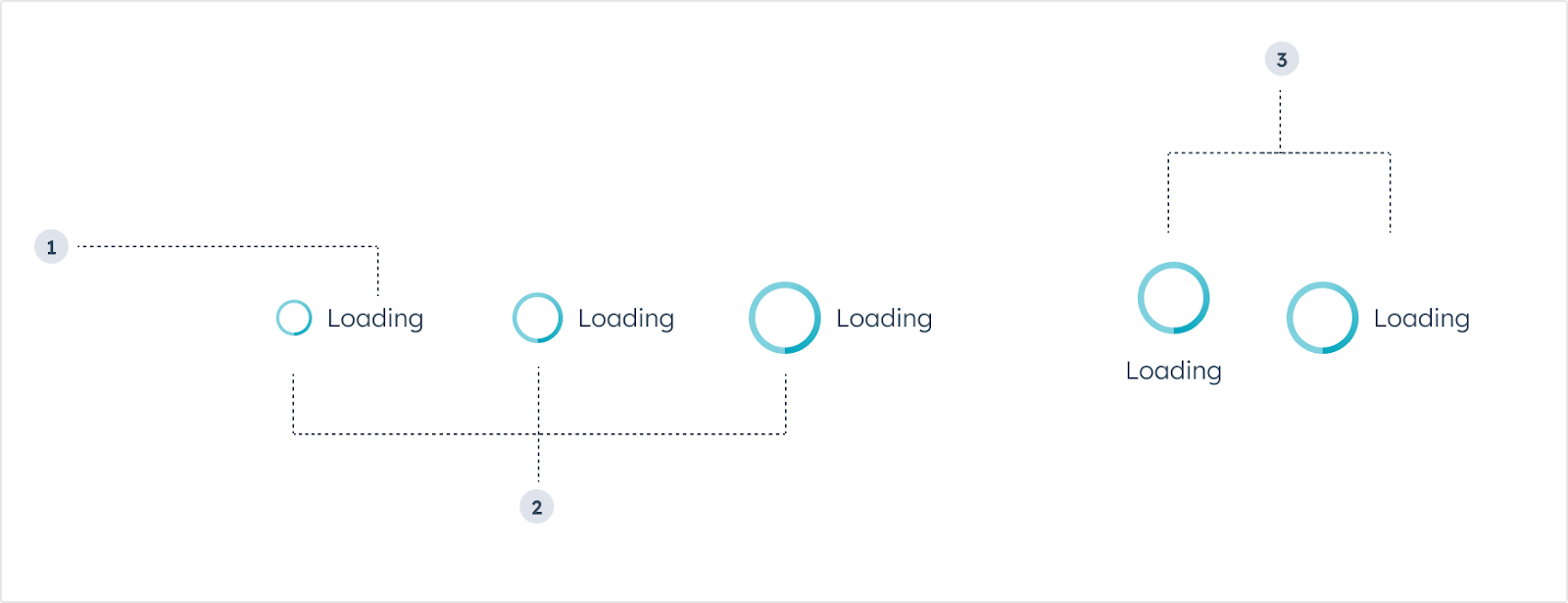 1. **Label:** the text that describes the loading state.
2. **Size:** the size of the component. From left to right: extra small (`'xs'`), small (`'sm'`, default), medium (`'md'`).
3. **Layout:** the positioning of the spinner. From left to right: `inline`, `centered`.
```jsx theme={null}
import { LoadingSpinner } from "@hubspot/ui-extensions";
const Extension = () => {
return ;
};
```
## Props
| Prop | Type | Description |
| ----------- | ---------------------------------------------------------------------------- | ------------------------------------------------------------------------------------ |
| `label` | String | The text that displays next to the spinner. |
| `layout` | `'inline'` (default) \| `'centered'` | The position of the spinner. |
| `showLabel` | Boolean | When set to `true`, the `label` will appear next to the spinner. Default is `false`. |
| `size` | `'xs'`, `'extra-small'` \| `'sm'`, `'small'` (default) \| `'md'`, `'medium'` | The size of the spinner. |
## Usage examples
* A loading state after the user submits form data to an external system (e.g., "Submitting contact details").
* A loading state as the card retrieves customer purchase history from an external system (e.g., "Loading purchase history").
## Guidelines
* **DO:** keep label text as concise as possible.
* **DO:** use label text to describe what's happening during the loading process.
* **DO:** use complete sentences in label text.
* **DON'T:** include multiple loading spinners at once in a single card to avoid confusion.
## Related components
* [Alert](/apps/developer-platform/add-features/ui-extensions/ui-components/standard-components/alert)
* [EmptyState](/apps/developer-platform/add-features/ui-extensions/ui-components/standard-components/empty-state)
* [ErrorState](/apps/developer-platform/add-features/ui-extensions/ui-components/standard-components/error-state)
1. **Label:** the text that describes the loading state.
2. **Size:** the size of the component. From left to right: extra small (`'xs'`), small (`'sm'`, default), medium (`'md'`).
3. **Layout:** the positioning of the spinner. From left to right: `inline`, `centered`.
```jsx theme={null}
import { LoadingSpinner } from "@hubspot/ui-extensions";
const Extension = () => {
return ;
};
```
## Props
| Prop | Type | Description |
| ----------- | ---------------------------------------------------------------------------- | ------------------------------------------------------------------------------------ |
| `label` | String | The text that displays next to the spinner. |
| `layout` | `'inline'` (default) \| `'centered'` | The position of the spinner. |
| `showLabel` | Boolean | When set to `true`, the `label` will appear next to the spinner. Default is `false`. |
| `size` | `'xs'`, `'extra-small'` \| `'sm'`, `'small'` (default) \| `'md'`, `'medium'` | The size of the spinner. |
## Usage examples
* A loading state after the user submits form data to an external system (e.g., "Submitting contact details").
* A loading state as the card retrieves customer purchase history from an external system (e.g., "Loading purchase history").
## Guidelines
* **DO:** keep label text as concise as possible.
* **DO:** use label text to describe what's happening during the loading process.
* **DO:** use complete sentences in label text.
* **DON'T:** include multiple loading spinners at once in a single card to avoid confusion.
## Related components
* [Alert](/apps/developer-platform/add-features/ui-extensions/ui-components/standard-components/alert)
* [EmptyState](/apps/developer-platform/add-features/ui-extensions/ui-components/standard-components/empty-state)
* [ErrorState](/apps/developer-platform/add-features/ui-extensions/ui-components/standard-components/error-state)