> ## Documentation Index
> Fetch the complete documentation index at: https://developers.hubspot.com/docs/llms.txt
> Use this file to discover all available pages before exploring further.
---
id: 94154945-b4db-4d8a-bd46-123168e40b68
---
# Panel
> Learn about the Panel component for use in UI extensions.
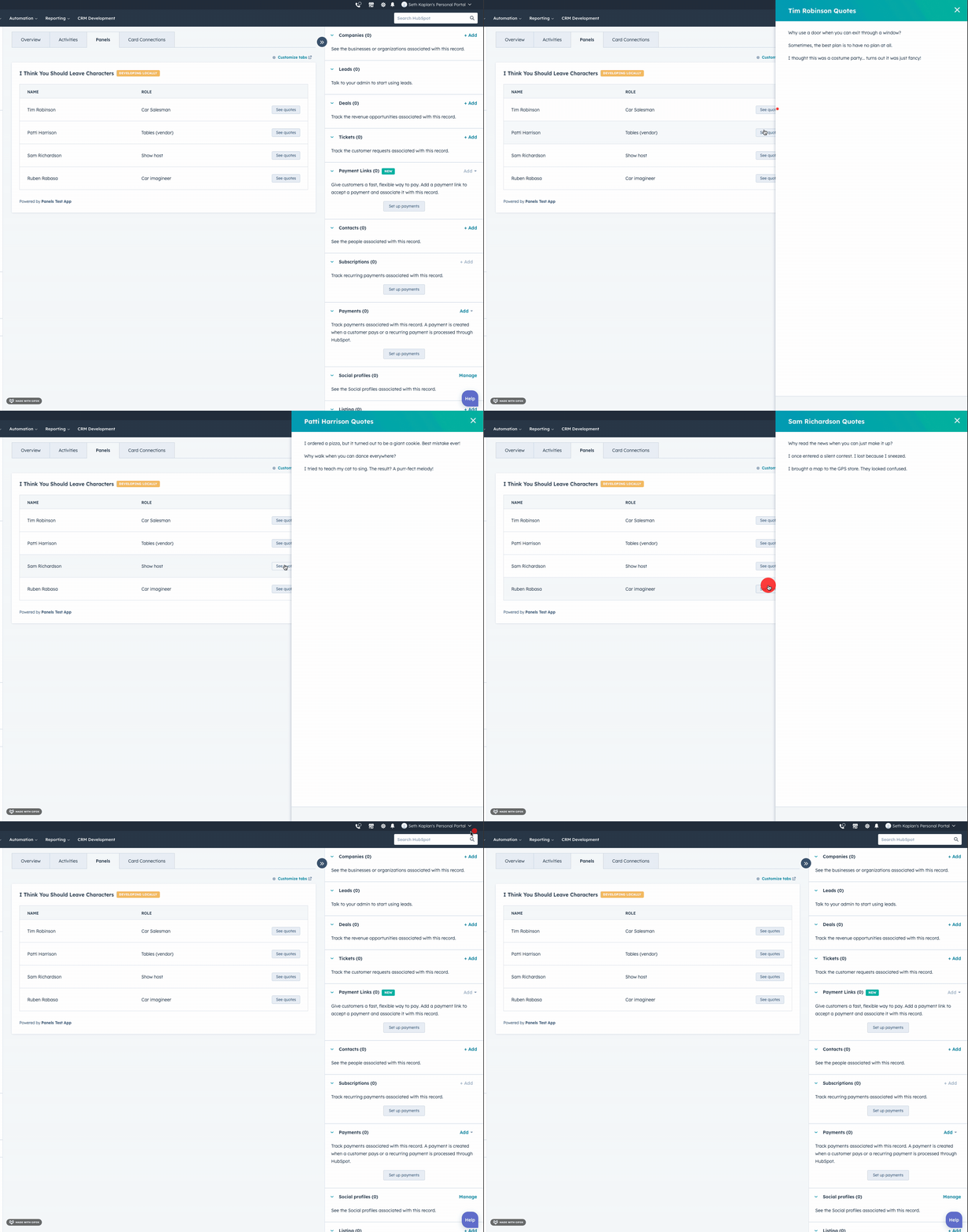
The `Panel` component renders a panel overlay on the right side of the page and contains other components. Like the [Modal](/apps/developer-platform/add-features/ui-extensions/ui-components/standard-components/modal) component, you'll include the `Panel` component in an `overlay` prop within a [Button](/apps/developer-platform/add-features/ui-extensions/ui-components/standard-components/button), [LoadingButton](/apps/developer-platform/add-features/ui-extensions/ui-components/standard-components/loading-button), [Link](/apps/developer-platform/add-features/ui-extensions/ui-components/standard-components/link), [Tag](/apps/developer-platform/add-features/ui-extensions/ui-components/standard-components/tag), or [Image](/apps/developer-platform/add-features/ui-extensions/ui-components/standard-components/image) component.
The `Panel` component uses three subcomponents to control its design and content, which follows the general structure below:
* ``: the outermost container. It must be a top-level component. You cannot put a `Panel` inside another component, such as `Flex`.
* ``: the container that wraps the panel's content and makes it scrollable. Include only one `PanelBody` per `Panel`.
* ``: a container that adds padding and bottom margin to provide spacing between content. You can use [Flex](/apps/developer-platform/add-features/ui-extensions/ui-components/standard-components/flex) and [Box](/apps/developer-platform/add-features/ui-extensions/ui-components/standard-components/box) to further customize content layout.
* ``: a sticky footer component at the bottom of the panel. Include only one `PanelFooter` per `Panel`.
```jsx theme={null}
import { Button, Panel, PanelSection, PanelBody, PanelFooter, Text, hubspot } from "@hubspot/ui-extensions";
hubspot.extend(() => );
const OverlayExampleCard = () => {
return (
<>
}
>
Open panel
);
};
```
## Props
Below are the props available for `Panel` and `PanelSection`.
**`` props**
| Prop | Type | Description |
| ------------ | ---------------------------------------------------------------------- | ----------------------------------------------------------------------------------------------------------------------------------------------------------------------------------------------------------------- |
| `aria-label` | String | The panel's accessibility label. |
| `id` | String | A unique ID for the panel. |
| `onClose` | `onClose() => void` | A function that will be invoked when the panel has finished closing. |
| `onOpen` | `onOpen() => void` | A function that will be invoked when the panel has finished opening. |
| `title` | String | The text that displays at the top of the panel. |
| `variant` | `'modal'` \| `'default'` (default) | The panel variant. The `modal` variant includes better screen reader focus on the panel and is recommended for visual and motor accessibility and tab navigation. See [variants](#variants) for more information. |
| `width` | `'sm'`, `'small'` (default) \| `'md'`, `'medium'` \| `'lg'`, `'large'` | The width of the panel. |
**`` props**
| Prop | Type | Description |
| ------- | ------- | ------------------------------------------------------------------------------- |
| `flush` | Boolean | When set to `true`, the section will have no bottom margin. Default is `false`. |
## Opening and closing panels
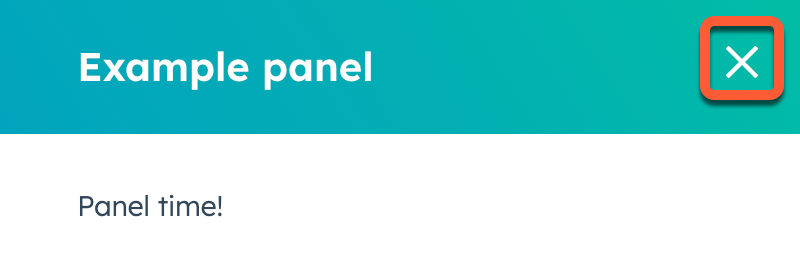
By default, HubSpot handles opening the panel when the user clicks the parent [Button](/apps/developer-platform/add-features/ui-extensions/ui-components/standard-components/button), [LoadingButton](/apps/developer-platform/add-features/ui-extensions/ui-components/standard-components/loading-button), [Link](/apps/developer-platform/add-features/ui-extensions/ui-components/standard-components/link), [Tag](/apps/developer-platform/add-features/ui-extensions/ui-components/standard-components/tag), or [Image](/apps/developer-platform/add-features/ui-extensions/ui-components/standard-components/image) component. A close button will also be included in the top right of the panel.
In addition, you can add a close mechanism to a panel using a `Button`, `LoadingButton`, `Link`, `Tag` or `Image` with an `onClick` event that triggers the `closeOverlay` action. To use this action, you'll need to include the [actions argument](/apps/developer-platform/add-features/ui-extensions/ui-extensions-sdk#registering-the-extension) in `hubspot.extend()` as seen in the example code below. /apps/developer-platform/add-features/ui-extensions/ui-extensions-sdk#registering-the-extension
Learn more about [opening and closing overlays](/apps/developer-platform/add-features/ui-extensions/ui-extensions-sdk#open-overlays).
```jsx theme={null}
import { Button, Panel, PanelSection, PanelBody, PanelFooter, Text, hubspot } from "@hubspot/ui-extensions";
hubspot.extend(({ actions }) => );
const OverlayExampleCard = ({ actions }) => {
return (
<>
}
>
Open panel
);
};
```
**Please note:**
* You can only have one panel open at a time. Opening a panel while another is already open will cause the first one to close.
* A `Modal` can be opened from a `Panel`, but a `Panel` cannot be opened from a `Modal`.
## Variants
By default, the panel will only obscure the content on the right side of the page where it opens. Using the `variants` prop, you can add an additional overlay behind the panel to blur the rest of the page. This variant puts more focus on the panel and improves accessibility for users with screen readers. Because the `modal` variant obscures the rest of the page's content, use it only when users don't need other context from the page.
## Usage examples
Use a panel when a user needs to submitting an order form for a customer.
## Guidelines
Use this component when users need to fill out a longer or multi-step form.
## Related components
* [Box](/apps/developer-platform/add-features/ui-extensions/ui-components/standard-components/box)
* [Button](/apps/developer-platform/add-features/ui-extensions/ui-components/standard-components/button)
* [LoadingButton](/apps/developer-platform/add-features/ui-extensions/ui-components/standard-components/loading-button)
* [Divider](/apps/developer-platform/add-features/ui-extensions/ui-components/standard-components/divider)
* [Link](/apps/developer-platform/add-features/ui-extensions/ui-components/standard-components/link)
* [Image](/apps/developer-platform/add-features/ui-extensions/ui-components/standard-components/image)
* [Modal](/apps/developer-platform/add-features/ui-extensions/ui-components/standard-components/modal)
* [Tag](/apps/developer-platform/add-features/ui-extensions/ui-components/standard-components/tag)
* [Tile](/apps/developer-platform/add-features/ui-extensions/ui-components/standard-components/tile)
 The `Panel` component uses three subcomponents to control its design and content, which follows the general structure below:
* `
The `Panel` component uses three subcomponents to control its design and content, which follows the general structure below:
* ` In addition, you can add a close mechanism to a panel using a `Button`, `LoadingButton`, `Link`, `Tag` or `Image` with an `onClick` event that triggers the `closeOverlay` action. To use this action, you'll need to include the [actions argument](/apps/developer-platform/add-features/ui-extensions/ui-extensions-sdk#registering-the-extension) in `hubspot.extend()` as seen in the example code below. /apps/developer-platform/add-features/ui-extensions/ui-extensions-sdk#registering-the-extension
Learn more about [opening and closing overlays](/apps/developer-platform/add-features/ui-extensions/ui-extensions-sdk#open-overlays).
```jsx theme={null}
import { Button, Panel, PanelSection, PanelBody, PanelFooter, Text, hubspot } from "@hubspot/ui-extensions";
hubspot.extend(({ actions }) =>
In addition, you can add a close mechanism to a panel using a `Button`, `LoadingButton`, `Link`, `Tag` or `Image` with an `onClick` event that triggers the `closeOverlay` action. To use this action, you'll need to include the [actions argument](/apps/developer-platform/add-features/ui-extensions/ui-extensions-sdk#registering-the-extension) in `hubspot.extend()` as seen in the example code below. /apps/developer-platform/add-features/ui-extensions/ui-extensions-sdk#registering-the-extension
Learn more about [opening and closing overlays](/apps/developer-platform/add-features/ui-extensions/ui-extensions-sdk#open-overlays).
```jsx theme={null}
import { Button, Panel, PanelSection, PanelBody, PanelFooter, Text, hubspot } from "@hubspot/ui-extensions";
hubspot.extend(({ actions }) => 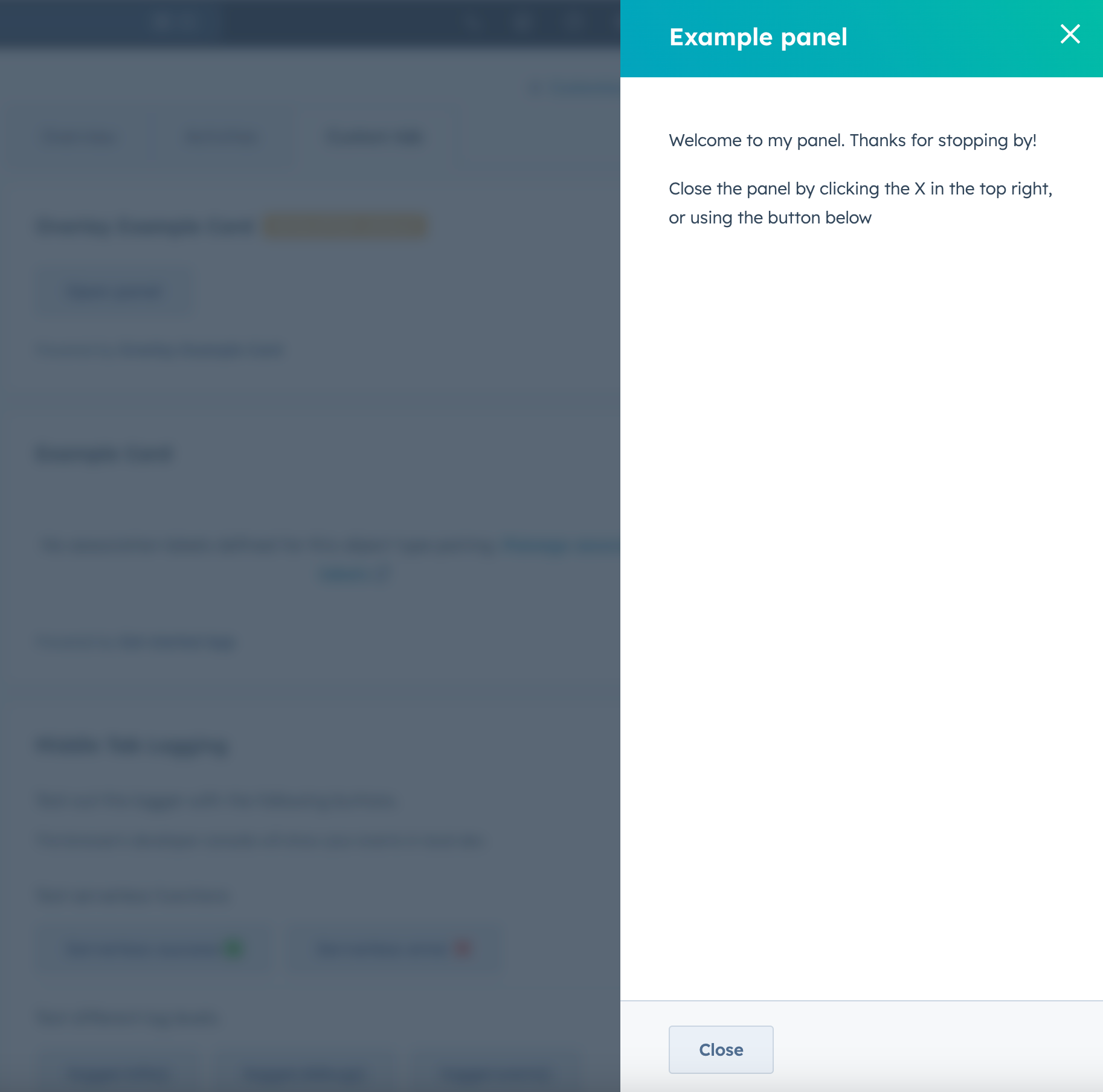 ## Usage examples
Use a panel when a user needs to submitting an order form for a customer.
## Guidelines
Use this component when users need to fill out a longer or multi-step form.
## Related components
* [Box](/apps/developer-platform/add-features/ui-extensions/ui-components/standard-components/box)
* [Button](/apps/developer-platform/add-features/ui-extensions/ui-components/standard-components/button)
* [LoadingButton](/apps/developer-platform/add-features/ui-extensions/ui-components/standard-components/loading-button)
* [Divider](/apps/developer-platform/add-features/ui-extensions/ui-components/standard-components/divider)
* [Link](/apps/developer-platform/add-features/ui-extensions/ui-components/standard-components/link)
* [Image](/apps/developer-platform/add-features/ui-extensions/ui-components/standard-components/image)
* [Modal](/apps/developer-platform/add-features/ui-extensions/ui-components/standard-components/modal)
* [Tag](/apps/developer-platform/add-features/ui-extensions/ui-components/standard-components/tag)
* [Tile](/apps/developer-platform/add-features/ui-extensions/ui-components/standard-components/tile)
## Usage examples
Use a panel when a user needs to submitting an order form for a customer.
## Guidelines
Use this component when users need to fill out a longer or multi-step form.
## Related components
* [Box](/apps/developer-platform/add-features/ui-extensions/ui-components/standard-components/box)
* [Button](/apps/developer-platform/add-features/ui-extensions/ui-components/standard-components/button)
* [LoadingButton](/apps/developer-platform/add-features/ui-extensions/ui-components/standard-components/loading-button)
* [Divider](/apps/developer-platform/add-features/ui-extensions/ui-components/standard-components/divider)
* [Link](/apps/developer-platform/add-features/ui-extensions/ui-components/standard-components/link)
* [Image](/apps/developer-platform/add-features/ui-extensions/ui-components/standard-components/image)
* [Modal](/apps/developer-platform/add-features/ui-extensions/ui-components/standard-components/modal)
* [Tag](/apps/developer-platform/add-features/ui-extensions/ui-components/standard-components/tag)
* [Tile](/apps/developer-platform/add-features/ui-extensions/ui-components/standard-components/tile)