> ## Documentation Index
> Fetch the complete documentation index at: https://developers.hubspot.com/docs/llms.txt
> Use this file to discover all available pages before exploring further.
---
id: d88446df-c665-474d-bf4a-07f859c1e991
---
# Statistics
> Learn about the Statistics component for use in UI extensions.
The `Statistics` component renders a visual spotlight of one or more data points. Includes the `StatisticsItem` and `StatisticsTrend` subcomponents.
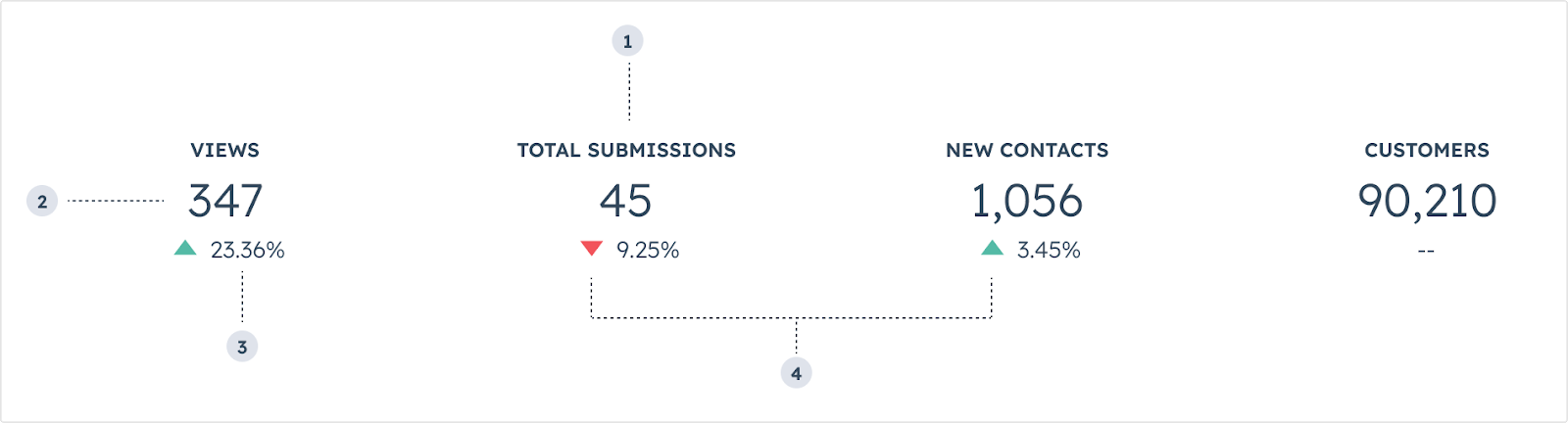 1. `StatisticItem` **label:** the `statisticItem`'s label text.
2. `StatisticItem` **number:** the `statisticItem`'s primary number.
3. `StatisticTrend` **value:** the percentage trend value.
4. `StatisticTrend` **direction:** the direction if the trend arrow (up or down).
```jsx theme={null}
import { Statistics, StatisticsItem, StatisticsTrend } from "@hubspot/ui-extensions";
const Extension = () => {
return (
);
};
```
## Props
**`` props**
| Prop | Type | Description |
| -------- | ---------------- | -------------------------------------------------------- |
| `id` | String | The statistic item's unique identifier. |
| `label` | String | The item's label. |
| `number` | String \| number | The string to be displayed as the item's primary number. |
**`` props**
| Prop | Type | Description |
| ----------- | -------------------------------------- | -------------------------------------------- |
| `color` | `'red'` \| `'green'` | The color of the trend arrow. |
| `direction` | `'increase'` (default) \| `'decrease'` | The direction of the trend arrow. |
| `value` | String | The text to be displayed as the trend value. |
## Variants
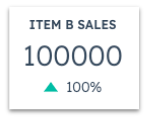
In `StatisticsTrend` components, use the `direction` prop to describe whether the data is trend upwards or downwards.
* `increase`: for additions or positive progression for a given time period.
1. `StatisticItem` **label:** the `statisticItem`'s label text.
2. `StatisticItem` **number:** the `statisticItem`'s primary number.
3. `StatisticTrend` **value:** the percentage trend value.
4. `StatisticTrend` **direction:** the direction if the trend arrow (up or down).
```jsx theme={null}
import { Statistics, StatisticsItem, StatisticsTrend } from "@hubspot/ui-extensions";
const Extension = () => {
return (
);
};
```
## Props
**`` props**
| Prop | Type | Description |
| -------- | ---------------- | -------------------------------------------------------- |
| `id` | String | The statistic item's unique identifier. |
| `label` | String | The item's label. |
| `number` | String \| number | The string to be displayed as the item's primary number. |
**`` props**
| Prop | Type | Description |
| ----------- | -------------------------------------- | -------------------------------------------- |
| `color` | `'red'` \| `'green'` | The color of the trend arrow. |
| `direction` | `'increase'` (default) \| `'decrease'` | The direction of the trend arrow. |
| `value` | String | The text to be displayed as the trend value. |
## Variants
In `StatisticsTrend` components, use the `direction` prop to describe whether the data is trend upwards or downwards.
* `increase`: for additions or positive progression for a given time period.
 * `decrease`: for subtractions or negative progression for a given time period.
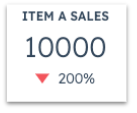 Note that the positive or negative movement of a given statistic is intended solely to represent the increase or decrease in numerical value. Be mindful of how these movements can communicate sentiment. For example, a decrease in support volume can be a net positive, which can be confusing when represented by a red, downward arrow.
## Usage examples
* Calling out the progress of quarterly sales for a company.
* Monitoring the amount of traffic and social media engagement that a contact has for the month.
## Guidelines
* **DO:** keep statistics labels short and concise.
* **DO:** place statistics components towards the top of a card when possible to enable users to more easily scan information without scrolling.
* **DON'T:** include more than three statistics components per card if possible.
* **DON'T:** use more than four statistics components side by side.
* **DON'T:** include sensitive data that you don't want all users to see.
## Related components
* [Table](/apps/developer-platform/add-features/ui-extensions/ui-components/standard-components/table)
* [DescriptionList](/apps/developer-platform/add-features/ui-extensions/ui-components/standard-components/description-list)
* [CrmPropertyList](/apps/developer-platform/add-features/ui-extensions/ui-components/crm-data-components/crm-property-list)
Note that the positive or negative movement of a given statistic is intended solely to represent the increase or decrease in numerical value. Be mindful of how these movements can communicate sentiment. For example, a decrease in support volume can be a net positive, which can be confusing when represented by a red, downward arrow.
## Usage examples
* Calling out the progress of quarterly sales for a company.
* Monitoring the amount of traffic and social media engagement that a contact has for the month.
## Guidelines
* **DO:** keep statistics labels short and concise.
* **DO:** place statistics components towards the top of a card when possible to enable users to more easily scan information without scrolling.
* **DON'T:** include more than three statistics components per card if possible.
* **DON'T:** use more than four statistics components side by side.
* **DON'T:** include sensitive data that you don't want all users to see.
## Related components
* [Table](/apps/developer-platform/add-features/ui-extensions/ui-components/standard-components/table)
* [DescriptionList](/apps/developer-platform/add-features/ui-extensions/ui-components/standard-components/description-list)
* [CrmPropertyList](/apps/developer-platform/add-features/ui-extensions/ui-components/crm-data-components/crm-property-list)