> ## Documentation Index
> Fetch the complete documentation index at: https://developers.hubspot.com/docs/llms.txt
> Use this file to discover all available pages before exploring further.
---
id: b6f50ac6-130e-4495-a607-822e0be7d780
---
# Manage developer seats
> Learn how to manage developer platform access using developer seats
To streamline access and permissions to developers within accounts with seat-based pricing, you can assign developer seats to users in your account. This seat type provides dedicated access to the developer platform without needing to use one of your [paid Core seats](https://knowledge.hubspot.com/account-management/manage-seats#seat-types) or other seat types.
Note that if a user has already been assigned a seat, you can't assign a developer seat in tandem with the existing seat. If you want to keep the user's existing seat, you can always grant them the *Developer tools access* [permission](https://knowledge.hubspot.com/user-management/hubspot-user-permissions-guide#settings-access).
Learn more about seats on HubSpot's [Knowledge Base](https://knowledge.hubspot.com/account-management/manage-seats#seat-types).
**Please note:**
* If your account doesn't use seat-based pricing, you'll have to grant a user the *Developer tools access* [permission](https://knowledge.hubspot.com/user-management/hubspot-user-permissions-guide#settings-access) in your account settings, in order for them to access the developer platform.
* By default, all [super admins](https://knowledge.hubspot.com/user-management/hubspot-user-permissions-guide#super-admin) and [partner admins](https://knowledge.hubspot.com/user-management/hubspot-user-permissions-guide#partner-admin) have access to the developer platform.
## Benefits of Developer seats
Developer seats provide an unlimited number of users access to the developer platform in accounts with seat-based pricing. This is particularly useful for accounts such as free [standard HubSpot accounts](/getting-started/account-types#standard-hubspot-accounts), which are limited to two [Core seats](https://knowledge.hubspot.com/account-management/manage-seats#seat-types).
Developer seats offer the following key benefits:
* **Comprehensive access to the developer platform:** users who are assigned a Developer seat gain full access to the developer platform, including projects, apps, monitoring, and settings to manage HubSpot Marketplace listings.
* **No impact to CRM users:** Developer seats don't count towards your CRM user limitations, which allows you to add developers to your HubSpot account without affecting your total CRM user count or incur additional subscription costs.
## Using developer seats
To grant a user access to the developer platform, they must be assigned a Developer seat in your HubSpot account.
### Invite a new user with a Developer seat
If you're a [Super admin](https://knowledge.hubspot.com/user-management/hubspot-user-permissions-guide#super-admin) in a HubSpot account that's opted into the new developer platform, you can invite new users with a developer seat:
* In your HubSpot account, click the **settings icon** in the main navigation bar.
* In the left sidebar menu, navigate to **Users & Teams**.
* Click **Add user**.
* Under *Assign a seat*, click the **Seat assignment** dropdown menu and select **Developer Seat**.
* Click **Next**, then click **Create user** to send the new user an invite email.
 ### Change an existing user's seat
To update an existing user to grant them a developer seat:
* In your HubSpot account, click the **settings icon** in the main navigation bar.
* In the left sidebar menu, navigate to **Users & Teams**.
* Click the **Seats** tab.
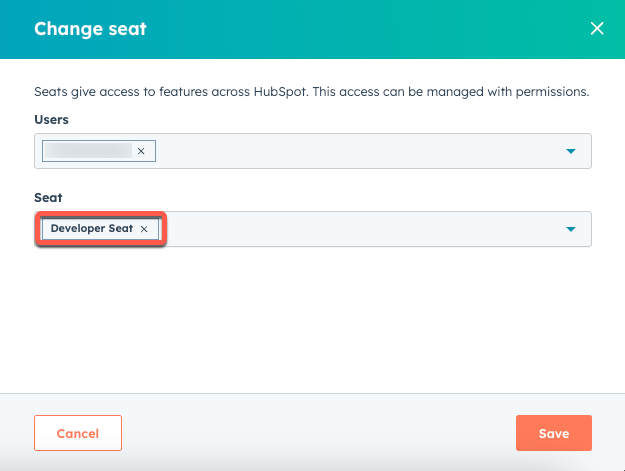
* Hover over a user, then click **Change seat**.
* In the right panel, click the **Seat** dropdown menu, then select **Developer Seat**.
* Click **Save**.
### Change an existing user's seat
To update an existing user to grant them a developer seat:
* In your HubSpot account, click the **settings icon** in the main navigation bar.
* In the left sidebar menu, navigate to **Users & Teams**.
* Click the **Seats** tab.
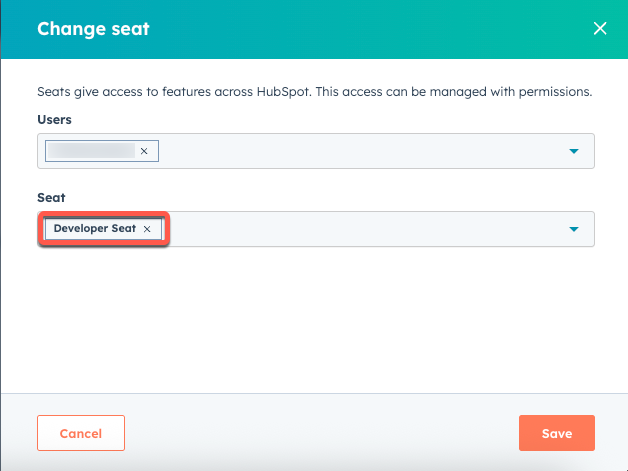
* Hover over a user, then click **Change seat**.
* In the right panel, click the **Seat** dropdown menu, then select **Developer Seat**.
* Click **Save**.
 ### Access the developer platform
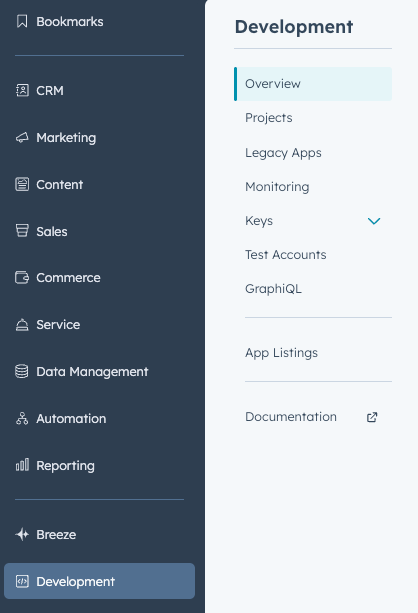
Users with developer seats can navigate to the developer platform by clicking **Development** in the navigation menu in their HubSpot account. This section provides access to:
* **Overview:** review recent activity and onboarding content.
* **Projects:** access and manage your uploaded projects.
* **Legacy apps:** review any previously created [private](/apps/legacy-apps/private-apps/overview) or [public](/apps/legacy-apps/public-apps/overview) apps created before you opted into the new developer platform.
* **Monitoring:** track the performance and health of your apps.
* **Keys:** manage your Developer API keys and Personal Access keys.
* **Test accounts:** set up and manage test environments for your apps and projects.
* **App listings:** manage your app listing in the [HubSpot Marketplace](https://ecosystem.hubspot.com/marketplace/apps).
* **Documentation:** access technical documentation about the platform and its associated tools.
### Access the developer platform
Users with developer seats can navigate to the developer platform by clicking **Development** in the navigation menu in their HubSpot account. This section provides access to:
* **Overview:** review recent activity and onboarding content.
* **Projects:** access and manage your uploaded projects.
* **Legacy apps:** review any previously created [private](/apps/legacy-apps/private-apps/overview) or [public](/apps/legacy-apps/public-apps/overview) apps created before you opted into the new developer platform.
* **Monitoring:** track the performance and health of your apps.
* **Keys:** manage your Developer API keys and Personal Access keys.
* **Test accounts:** set up and manage test environments for your apps and projects.
* **App listings:** manage your app listing in the [HubSpot Marketplace](https://ecosystem.hubspot.com/marketplace/apps).
* **Documentation:** access technical documentation about the platform and its associated tools.