> ## Documentation Index
> Fetch the complete documentation index at: https://developers.hubspot.com/docs/llms.txt
> Use this file to discover all available pages before exploring further.
---
id: 15512f99-e2a3-4128-a2ed-44e4cc57f5d9
---
# HubSpot Marketplace | Provide testing credentials for your app
> Follow these steps to provide testing credentials for your app when listing or certifying it on HubSpot Marketplace.
Valid testing credentials must be provided to [list](/apps/developer-platform/list-apps/listing-your-app/listing-your-app) or [certify](/apps/developer-platform/list-apps/apply-for-certification/applying-for-app-certification) your app on HubSpot Marketplace. This is necessary for the HubSpot Product team to verify listing and certification requirements, and also recommend areas for improvement.
## Before you begin
Review the following questions to find the appropriate instructions for providing testing credentials to the HubSpot Product team:
1. Does your app with HubSpot require an account for a platform/application/service other than HubSpot?
* If **yes**, (i.e. at least one other account is required), proceed to question 2.
* If **no**, follow the steps listed [here](#does-not-require-account).
2. Are you able to give HubSpot Product team members access to all platforms/applications/services required to use your app?
* If **yes**, (i.e. you are able to give HubSpot Product team members access to needed platforms/applications/services), follow the steps listed [here](#able-to-invite-teams).
* If **no**, (i.e. you are not able to give HubSpot Product team members access to at least one platform/application/service), follow the steps listed [here](#unable-to-give-access).
## Provide your testing credentials
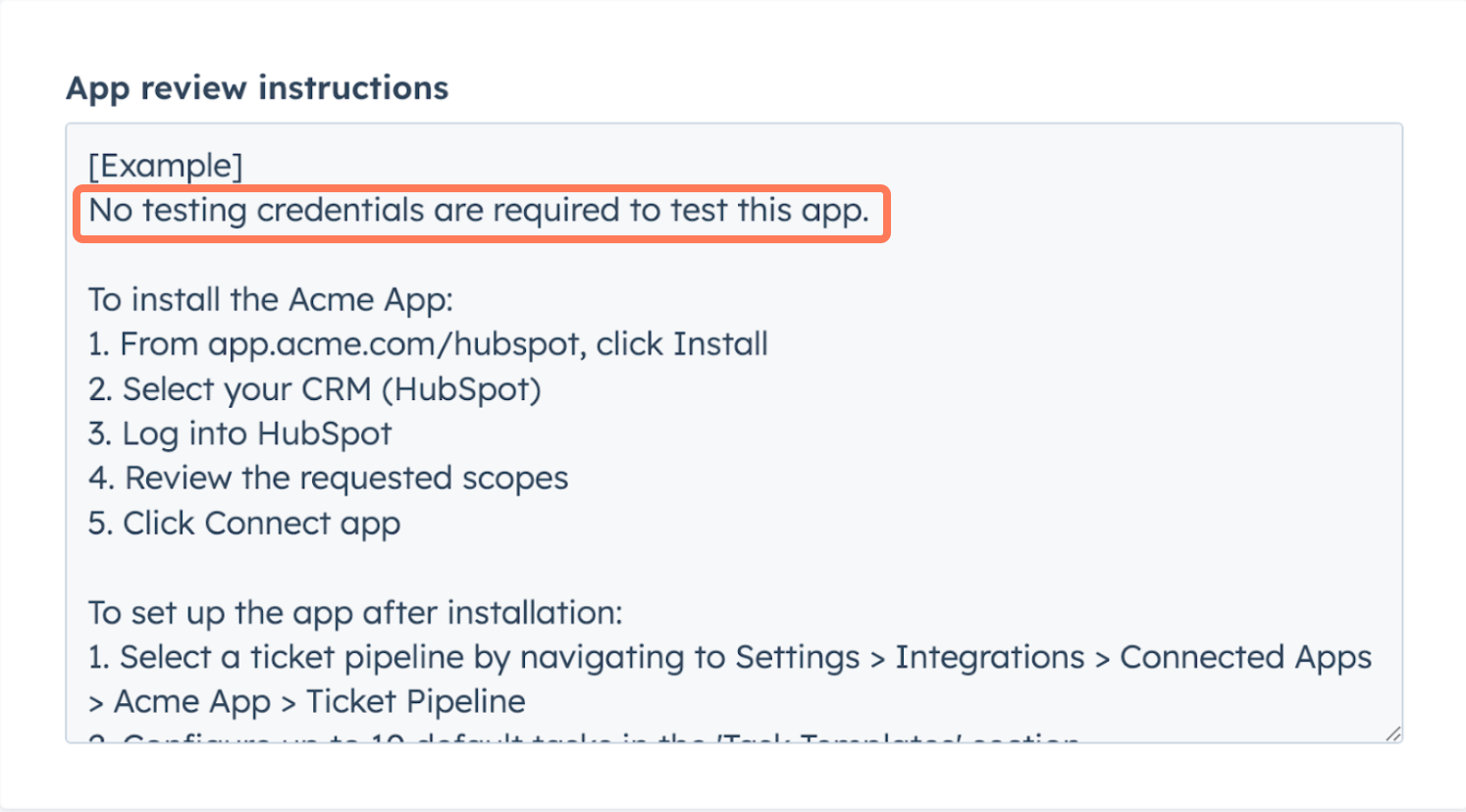
**If your app does not require a separate platform/application/service account:**
1. In the first line, enter “No testing credentials are required to test this app.”
2. Describe the steps to install the app, configure app settings, and perform common actions with the app. If these instructions are publicly documented, you may hyperlink to the relevant documentation.
 **If your app requires a separate platform/application/service account and you are able to provide the HubSpot Product team with access:**
1. In the first line, list all platforms/applications/services required to fully use your app/integration.
2. For each required platform/application/service that you are able to give access to:
* Invite [marketplace-tester@hubspot.com](mailto:marketplace-tester@hubspot.com) to all new or existing accounts. Ensure that these accounts have all features and permissions required to fully use your app with HubSpot.
* Include “Invite sent to [marketplace-tester@hubspot.com](mailto:marketplace-tester@hubspot.com)” next to the platform you’ve added that user to. **Do not** ask the HubSpot Product team to create new accounts or sign up for free trials.
3. Describe the steps to install the app, configure app settings, and perform common actions with the app. If these instructions are publicly documented, you may hyperlink to the relevant documentation.
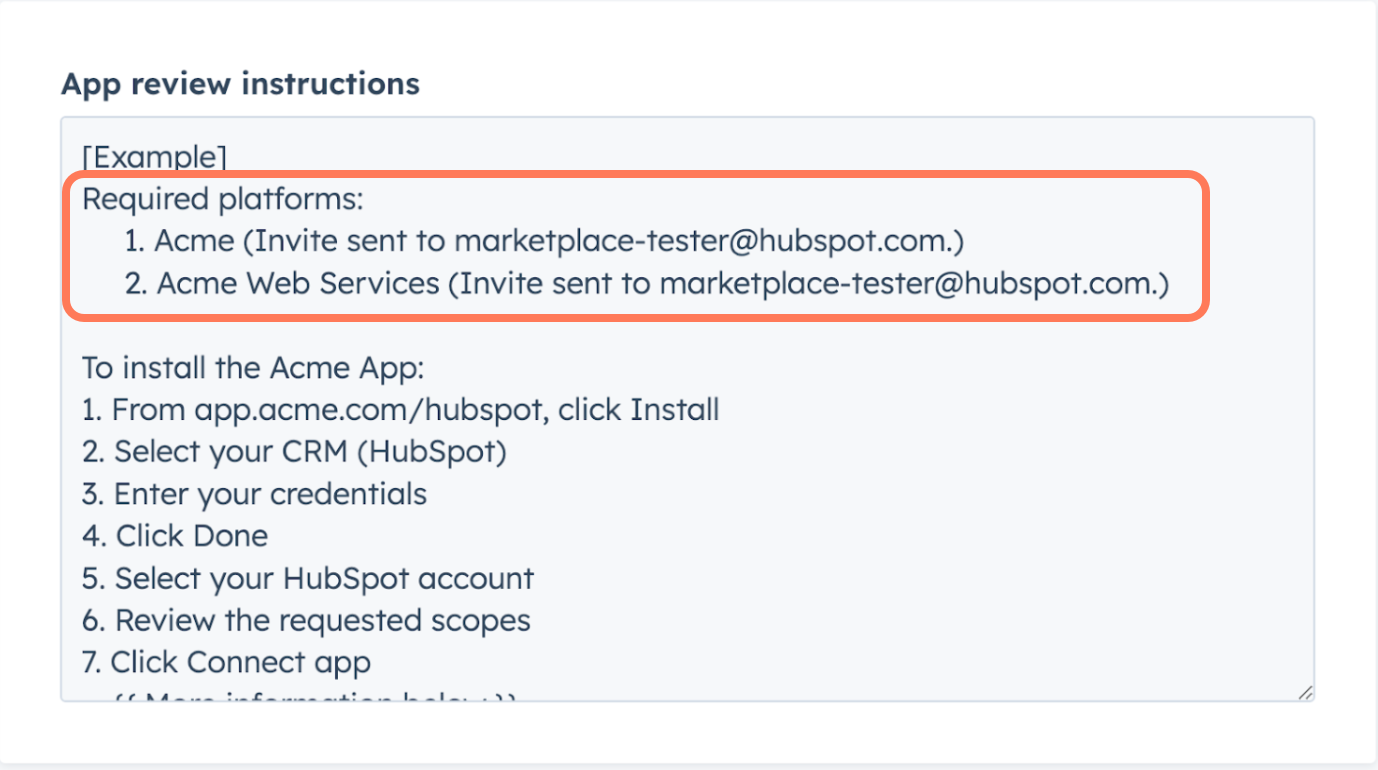
**If your app requires a separate platform/application/service account and you are able to provide the HubSpot Product team with access:**
1. In the first line, list all platforms/applications/services required to fully use your app/integration.
2. For each required platform/application/service that you are able to give access to:
* Invite [marketplace-tester@hubspot.com](mailto:marketplace-tester@hubspot.com) to all new or existing accounts. Ensure that these accounts have all features and permissions required to fully use your app with HubSpot.
* Include “Invite sent to [marketplace-tester@hubspot.com](mailto:marketplace-tester@hubspot.com)” next to the platform you’ve added that user to. **Do not** ask the HubSpot Product team to create new accounts or sign up for free trials.
3. Describe the steps to install the app, configure app settings, and perform common actions with the app. If these instructions are publicly documented, you may hyperlink to the relevant documentation.
 **If your app requires a separate platform/application/service account and you are not able to provide the HubSpot Product team with access:**
1. In the first line, list all platforms/applications/services required to fully use your app/integration.
2. For each required platform/application/service that you are able to give access to:
* Invite [marketplace-tester@hubspot.com](mailto:marketplace-tester@hubspot.com) to all new or existing accounts. Ensure that these accounts have all features and permissions required to fully use your app with HubSpot.
* Include “Invite sent to [marketplace-tester@hubspot.com](mailto:marketplace-tester@hubspot.com)” next to the platform you’ve added that user to. **Do not** ask the HubSpot Product team to create new accounts or sign up for free trials.
3. For each platform/application/service that you are not able to give access to:
* Include an explanation on why you're unable to give the HubSpot Product team access.
4. Describe the steps to install the app, configure app settings, and perform common actions with the app. If these instructions are publicly documented, you may hyperlink to the relevant documentation.
5. Record a demo video that shows the app/integration performing actions with all required platforms, applications, or services. The demo video must meet the requirements listed [here](/apps/developer-platform/list-apps/apply-for-certification/applying-for-app-certification#app-demo) (even if you are not applying for app certification).
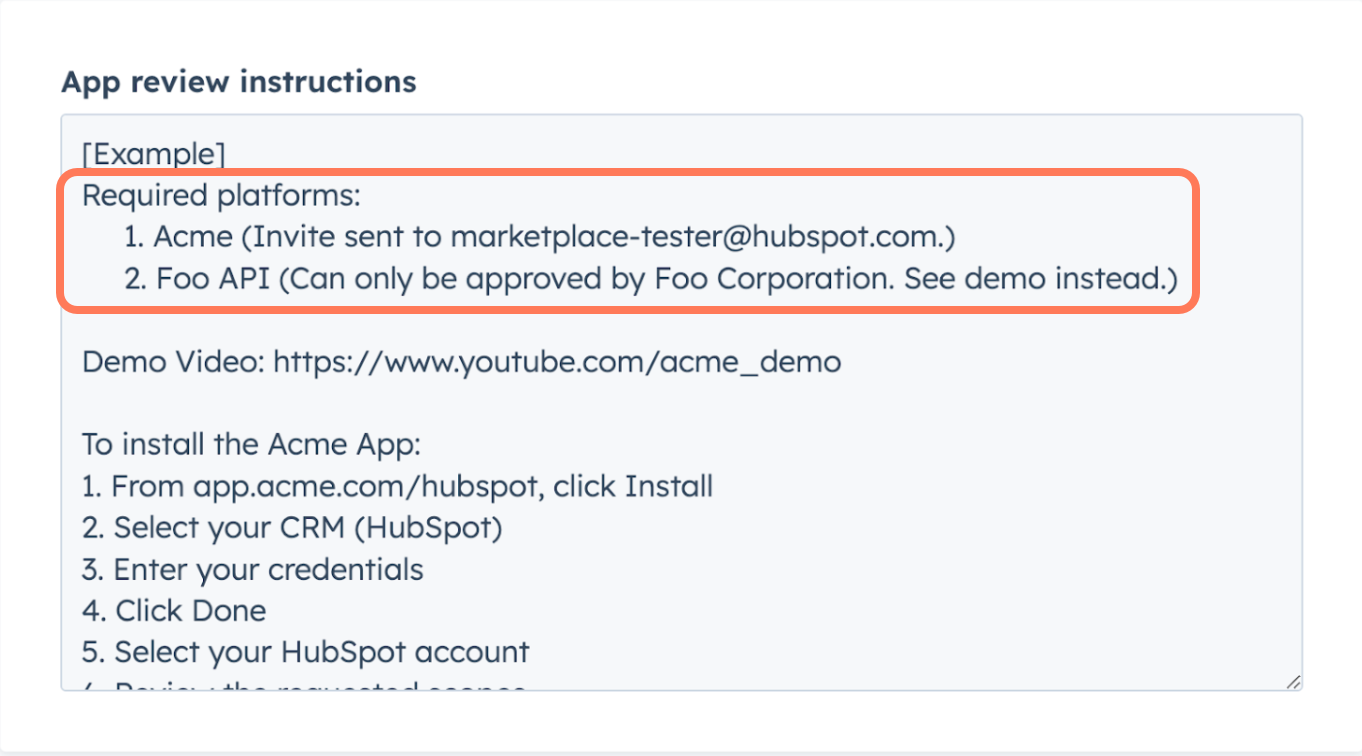
**If your app requires a separate platform/application/service account and you are not able to provide the HubSpot Product team with access:**
1. In the first line, list all platforms/applications/services required to fully use your app/integration.
2. For each required platform/application/service that you are able to give access to:
* Invite [marketplace-tester@hubspot.com](mailto:marketplace-tester@hubspot.com) to all new or existing accounts. Ensure that these accounts have all features and permissions required to fully use your app with HubSpot.
* Include “Invite sent to [marketplace-tester@hubspot.com](mailto:marketplace-tester@hubspot.com)” next to the platform you’ve added that user to. **Do not** ask the HubSpot Product team to create new accounts or sign up for free trials.
3. For each platform/application/service that you are not able to give access to:
* Include an explanation on why you're unable to give the HubSpot Product team access.
4. Describe the steps to install the app, configure app settings, and perform common actions with the app. If these instructions are publicly documented, you may hyperlink to the relevant documentation.
5. Record a demo video that shows the app/integration performing actions with all required platforms, applications, or services. The demo video must meet the requirements listed [here](/apps/developer-platform/list-apps/apply-for-certification/applying-for-app-certification#app-demo) (even if you are not applying for app certification).
 ## Frequently Asked Questions
You may connect your app to a non-product HubSpot account. However, the HubSpot Product team reserves the right to disconnect your account and connect theirs for testing.
Credentials will be stored in a HubSpot-build admin tool and an enterprise-grade privileged access management (PAM) solution which is approved and managed by HubSpot's Security team.
Please do not deactivate the testing credentials. If this is not possible, please notify the HubSpot Product team when the listing or certification review is complete.
Yes, you will be required to provide testing credentials for your app if you apply for certification. You may reuse the same account/user or invite [marketplace-tester@hubspot.com](mailto:marketplace-tester@hubspot.com) if all features and permissions to fully use your HubSpot app remain available.
## Frequently Asked Questions
You may connect your app to a non-product HubSpot account. However, the HubSpot Product team reserves the right to disconnect your account and connect theirs for testing.
Credentials will be stored in a HubSpot-build admin tool and an enterprise-grade privileged access management (PAM) solution which is approved and managed by HubSpot's Security team.
Please do not deactivate the testing credentials. If this is not possible, please notify the HubSpot Product team when the listing or certification review is complete.
Yes, you will be required to provide testing credentials for your app if you apply for certification. You may reuse the same account/user or invite [marketplace-tester@hubspot.com](mailto:marketplace-tester@hubspot.com) if all features and permissions to fully use your HubSpot app remain available.