> ## Documentation Index
> Fetch the complete documentation index at: https://developers.hubspot.com/docs/llms.txt
> Use this file to discover all available pages before exploring further.
---
id: e01d7607-180d-4747-b5a5-d1d0b8af6650
---
# HubSpot APIs | Authentication methods on HubSpot
> Learn more about using OAuth or private access tokens to make authenticated API requests to HubSpot.
This authentication guide pertains to [legacy public apps](/apps/legacy-apps/public-apps/overview). For an overview of authentication for apps built on the new developer platform, check out [this article](/apps/developer-platform/build-apps/authentication/overview) instead.
There are two ways to authenticate calls to HubSpot's APIs: [OAuth](/apps/legacy-apps/authentication/working-with-oauth), and [private app](/apps/legacy-apps/private-apps/overview) access tokens. Below, learn more about each method and how to include it in your code for authorization.
**Please note:**
Integrations designed for multi-customer use or listing on the HubSpot Marketplace must be built as an app using HubSpot’s OAuth protocol
## OAuth
To make a request using [OAuth](/api-reference/legacy/authentication/oauth-tokens/v1/guide) when building a [public app](/apps/legacy-apps/public-apps/overview), include the OAuth access token in the authorization header:
```shell theme={null}
/~curl --header "Authorization: Bearer C4d***sVq"
https://api.hubapi.com/crm/v3/objects/contacts?limit=10&archived=false
```
## Private app access tokens
Similar to OAuth, to make a request using a [private app](/apps/legacy-apps/private-apps/overview) access token, include the token in the authorization header:
```shell theme={null}
/~curl --header "Authorization: Bearer ***-***-*********-****-****-****-************"
https://api.hubapi.com/crm/v3/objects/contacts?limit=10&archived=false
```
## Automatic token deactivation
To protect developers from potential security incidents, HubSpot leverages the monitoring and secret scanning capabilities provided by GitHub to detect any HubSpot authentication tokens that are publicly exposed in GitHub repositories. Any detected tokens will automatically be deactivated, and you will be notified via email and in-app notification so you can generate a new token and update your integrations to replace the revoked token.
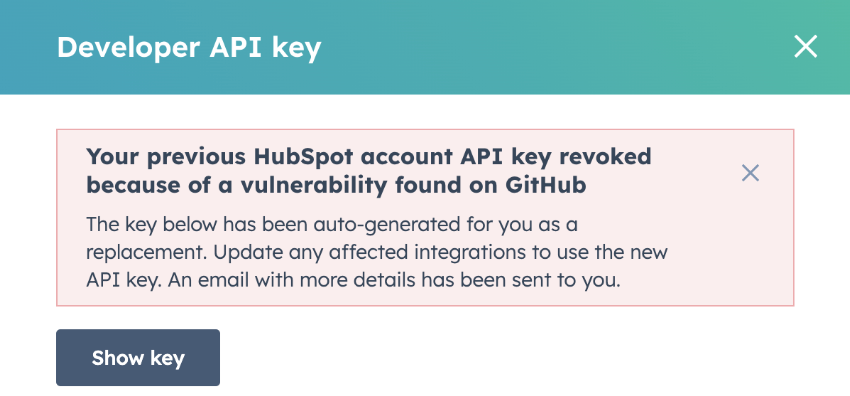 The affected key and token types are listed below:
* Developer API keys created within your [app developer account](/getting-started/account-types#app-developer-accounts).
* Personal Access Keys used to authenticate commands in the [HubSpot CLI](/developer-tooling/local-development/hubspot-cli/reference).
* Private access tokens used to authenticate requests in a [private app](/apps/legacy-apps/private-apps/overview).
* SMTP tokens used for sending [transactional emails](https://knowledge.hubspot.com/marketing-email/send-transactional-emails).
***
#### Related docs
The affected key and token types are listed below:
* Developer API keys created within your [app developer account](/getting-started/account-types#app-developer-accounts).
* Personal Access Keys used to authenticate commands in the [HubSpot CLI](/developer-tooling/local-development/hubspot-cli/reference).
* Private access tokens used to authenticate requests in a [private app](/apps/legacy-apps/private-apps/overview).
* SMTP tokens used for sending [transactional emails](https://knowledge.hubspot.com/marketing-email/send-transactional-emails).
***
#### Related docs