> ## Documentation Index
> Fetch the complete documentation index at: https://developers.hubspot.com/docs/llms.txt
> Use this file to discover all available pages before exploring further.
---
id: 6b35a983-341b-45a9-9d2f-a3d6de7d9218
---
# Working with webhooks in project-built private apps
> Learn how to add webhooks to your private apps built using a developer project.
Build webhooks into your private app to subscribe to events occurring in the account that your app is installed in.
Legacy apps are still supported by HubSpot, but don't have access to the latest app features. Learn more about the [new developer platform](/docs/apps/developer-platform/overview).
Private apps built on 2025.1 of the developer platform do support serverless functions for UI extensions, but do not support features such as creating an [app settings](/docs/apps/developer-platform/add-features/ui-extensions/extension-points/create-a-settings-page) page.
If you have an existing project-built private app, you can migrate its functionality to the latest version of the developer platform by following the [migration guide](/docs/apps/developer-platform/build-apps/migrate-an-app/overview).
## Defining webhook subscriptions
Webhook subscriptions are defined in the `webhooks.json` file within a `webhooks` folder in the same directory as your app (e.g., `src/app`). By default, your top-level `app.json` configuration file will reference that file.
The `webhooks.json` file contains fields for defining the webhook's settings and event subscriptions.
```json theme={null}
{
"settings": {
"targetUrl": "https://example.com/webhook",
"maxConcurrentRequests": 10
},
"subscriptions": {
"crmObjects": [
{
"subscriptionType": "object.propertyChange",
"objectName": "contact",
"propertyName": "firstname",
"active": true
},
{
"subscriptionType": "object.creation",
"objectName": "contact",
"active": true
}
],
"legacyCrmObjects": [
{
"subscriptionType": "contact.propertyChange",
"propertyName": "lastname",
"active": true
},
{
"subscriptionType": "contact.deletion",
"active": true
}
],
"hubEvents": [
{
"subscriptionType": "contact.privacyDeletion",
"active": true
}
]
}
}
```
| Parameter | Type | Description |
| ----------------------- | ------- | -------------------------------------------------------------------------------------------------------------------------------------------------------------------------------------------------------------------------------------------------------------------------------------------------------------------------------------------------------------------- |
| `settings` | Object | An object that specifies your webhook settings, including `targetUrl` and `maxConcurrentRequests`. |
| `targetUrl` | String | The URL that webhooks will be sent to. Learn more about the [response payload](#response-payloads) sent with the `POST` request. |
| `maxConcurrentRequests` | String | The maximum number of concurrent requests that will be sent. |
| `subscriptions` | Object | An object that specifies the webhook subscriptions. |
| `crmObjects` | Array | An array containing event subscription definitions. This is the standard array to include, and should be used for all events in the new format (`object.*`). Classic webhook subscription types should instead be included in `legacyCrmObjects` and `hubEvents` arrays, depending on the event. See [subscription types](#subscription-types) for more information. |
| `subscriptionType` | String | The type of event being subscribed to. Learn more about [subscription types](#subscription-types). |
| `objectName` | String | The CRM object being subscribed to. |
| `propertyName` | String | The property on the CRM object being subscribed to. |
| `active` | Boolean | Whether webhooks will be sent for this subscription. |
| `legacyCrmObjects` | Array | An array containing classic subscription types, such as `contact.creation` and `deal.deletion`. See the [webhooks API guide](/docs/api-reference/latest/webhooks#webhook-subscriptions) for more information. |
| `hubEvents` | Array | An array containing the classic subscription types `contact.privacyDeletion` and `conversation.*`. See the [webhooks API guide](/docs/api-reference/latest/webhooks#webhook-subscriptions) for more information. |
## Subscription types
Private apps built with projects use generic webhook subscription syntax, using the format `object.*` rather than specifying the object name in the subscription type (e.g., `contact.*`).
| Subscription type | Format |
| ------------------ | -------------------------- |
| Creation | `object.creation` |
| Deletion | `object.deletion` |
| Merge | `object.merge` |
| Restore | `object.restore` |
| Property change | `object.propertyChange` |
| Association change | `object.associationChange` |
To specify the type of CRM object you're subscribing to, include the `objectName` field in the subscription definition object using any of the supported objects in the table below. You'll need to include the object's corresponding scopes in your `app.json` file.
The table below provides the `objectName` fields that are currently available for project-built private apps:
appointment
|
fee
|
quote\_template
|
call
|
feedback\_submission
|
task
|
cart
|
goal\_target
|
tax
|
commerce\_payment
|
line\_item
|
ticket
|
communication
|
listing
|
partner\_client
|
company
|
meeting\_event
|
lead
|
contact
|
note
|
service
|
course
|
order
|
subscription
|
deal
|
postal\_mail
|
invoice
|
discount
|
product
|
user
|
email
|
quote
|
partner\_account
|
engagement
|
|
|
## Example webhooks.json
Webhook configuration details are specified within the `/webhooks/webhooks.json` file.
Based on the subscription type format you prefer, you can either specify generic subscriptions within the `subscriptions.crmObjects` array, or refer to the object names themselves within the `subscriptions.legacyCrmObjects` and `subscriptions.hubEvents` arrays instead.
| Parameter | Type | Description |
| ------------------ | ----- | ------------------------------------------------------------------------------------------------------------------------------------------------------------------------------------------------- |
| `crmObjects` | Array | An array containing generic subscription types, where each type should include a `subscriptionType` following the format of `object.EVENT_TYPE` and the object name as the `objectName` property. |
| `legacyCrmObjects` | Array | An array containing [classic subscription types](/docs/api-reference/latest/webhooks#webhook-subscriptions) (e.g., `contact.propertyChange`). |
| `hubEvents` | Array | An array that can contain the `contact.privacyDeletion` and `conversation.*` [classic subscription types](/docs/api-reference/latest/webhooks#webhook-subscriptions). |
Examples for each of these format types are provided in the two sections below.
### Generic subscription format
The newer generic subscription format follows a pattern of `object.EVENT_TYPE` for the `subscriptionType`, where the `EVENT_TYPE` is the event you want to subscribe to, while the object name itself is provided via the `objectName` field.
For example, the following `webhooks.json` snippet subscribes to changes to the `firstname` property on all contacts.
```json theme={null}
{
"settings": {
"targetUrl": "https://example.com/webhook",
"maxConcurrentRequests": 10
},
"subscriptions": {
"crmObjects": [
{
"subscriptionType": "object.propertyChange",
"objectName": "contact",
"propertyName": "firstname",
"active": true
}
...
]
}
}
```
### Classic subscription format
If you need to subscribe to [classic subscription types](/docs/api-reference/latest/webhooks#webhook-subscriptions), you can store them in the `legacyCrmObjects` and `hubEvents` arrays instead, depending on the type of subscription.
```json theme={null}
{
"settings": {
"targetUrl": "https://example.com/webhook",
"maxConcurrentRequests": 10
},
"subscriptions": {
"legacyCrmObjects": [
{
"subscriptionType": "contact.propertyChange",
"propertyName": "lastname",
"active": true
},
{
"subscriptionType": "contact.deletion",
"active": true
}
],
"hubEvents": [
{
"subscriptionType": "contact.privacyDeletion",
"active": true
}
]
}
}
```
## Response payloads
When an event that the app is subscribed to occurs, the `targetUrl` you specify in `webhooks.json` will receive a `POST` request containing JSON formatted data from HubSpot. All events will include the same base set of fields, with other fields being added depending on the event type. Learn more about [parsing webhook payloads for specific event types](/docs/apps/legacy-apps/public-apps/create-generic-webhook-subscriptions#parse-generic-webhook-payloads).
Below is an example payload for `propertyChange` event. This type of event contains all generic fields, plus the `propertyName` and `propertyValue` fields to show which property changed and the new value.
```json theme={null}
[
{
"appId": 3715530,
"eventId": 100,
"subscriptionId": 2764026,
"portalId": 123456,
"occurredAt": 1723651850844,
"subscriptionType": "object.propertyChange",
"attemptNumber": 0,
"objectId": 987654,
"changeSource": "CRM",
"objectTypeId": "0-1",
"propertyName": "firstname",
"propertyValue": "sample-value",
"isSensitive": false
}
]
```
| Field | Description |
| ------------------ | ------------------------------------------------------------------------------------------------------------------------------------------------------------------------------------------------------------------------------------------- |
| `appId` | The ID of your private app. This can be helpful if you have multiple private apps pointing to the same webhook URL. |
| `eventId` | The ID of the event that triggered this notification. This value is not guaranteed to be unique. |
| `subscriptionId` | The ID of the subscription that triggered the event. |
| `portalId` | The [ID of the HubSpot account](https://knowledge.hubspot.com/account/manage-multiple-hubspot-accounts#check-your-current-account) where the event occurred. |
| `occurredAt` | When the event occurred as a unix timestamp (in milliseconds). |
| `subscriptionType` | The webhook subscription type. Can be one of the following:- `object.creation`
- `object.deletion`
- `object.merge`
- `object.restore`
- `object.propertyChange`
- `object.associationChange`
|
| `attemptNumber` | Starting at `0`, which number attempt this is to notify your service of this event.
|
| `objectId` | The ID of the object that was created, changed, or deleted. For example, for a contact-related event, `objectId` would be the contact's ID. |
| `changeSource` | The source of the change. This can be any of the change sources that appear in contact property histories. |
| `objectTypeId` | The type of object that triggered the event. See the [full list of object type IDs](/docs/guides/crm/understanding-the-crm#object-type-ids) for more information. |
| `propertyName` | The name of the property that was updated (for `object.propertyChange` events only). |
| `propertyValue` | The new property value that resulted from the change (for `object.propertyChange` events only). |
| `isSensitive` | Will be `true` if the property is a [sensitive data property](/docs/api-reference/latest/crm/properties/sensitive-data). |
| `sourceId` | The ID of the source that triggered the event (e.g., a user ID if it was a user that updated the property data). |
The `object.associationChange` subscription will trigger for all associations, including custom association labels. Association change events will also trigger on both incoming and outgoing association changes. This means that an `object.associationChange` event defined for an `objectName` of `contact` will not only trigger on a `CONTACT_TO_DEAL` association change, but also on a `DEAL_TO_CONTACT` association change.
```json theme={null}
[
{
"eventId": 668521389,
"subscriptionId": 621550,
"portalId": 123456,
"appId": 3715530,
"occurredAt": 1715708228603,
"subscriptionType": "object.associationChange",
"attemptNumber": 0,
"changeSource": "USER",
"associationType": "CONTACT_TO_DEAL",
"associationCategory": "HUBSPOT_DEFINED",
"associationTypeId": 4,
"fromObjectId": 3788,
"fromObjectTypeId": "0-3",
"toObjectId": 4658499728,
"toObjectTypeId": "0-1",
"associationRemoved": true,
"isPrimaryAssociation": false,
"sourceId": "userId:864745280"
},
{
"eventId": 2975980077,
"subscriptionId": 621550,
"portalId": 885814039,
"appId": 5553555,
"occurredAt": 1715708228603,
"subscriptionType": "object.associationChange",
"attemptNumber": 0,
"changeSource": "USER",
"associationType": "DEAL_TO_CONTACT",
"associationCategory": "HUBSPOT_DEFINED",
"associationTypeId": 3,
"fromObjectId": 4658499728,
"fromObjectTypeId": "0-3",
"toObjectId": 3788,
"toObjectTypeId": "0-1",
"associationRemoved": true,
"isPrimaryAssociation": false,
"sourceId": "userId:864745280"
}
]
```
Learn more about [fields included in `associationChange` event payloads](/docs/apps/legacy-apps/private-apps/create-and-edit-webhook-subscriptions-in-private-apps).
## Update your private app configuration to point to your webhooks JSON file
After you add your `webhooks.json` file and configure your webhooks, you'll need to update your `app.json` file to point to the webhooks JSON file.
The following `app.json` file provides an example of updating the `"webhooks"` field to point to your `webhooks.json` file, [using the file structure from the creation guide](/docs/apps/legacy-apps/private-apps/build-with-projects/create-private-apps-with-projects).
```json theme={null}
{
"name": "Get started App",
"description": "This is an example private app that shows a custom card on the Contact record tab built with React-based frontend. This card demonstrates a simple handshake with HubSpot's serverless backend.",
"uid": "get_started_app",
"scopes": ["crm.objects.contacts.read", "crm.objects.contacts.write"],
"public": false,
"extensions": {
"crm": {
"cards": [
{
"file": "extensions/example-card.json"
}
]
}
},
"webhooks": {
"file": "./webhooks/webhooks.json"
}
}
```
## View webhook subscriptions in HubSpot
On the private app settings page in HubSpot, you can view a list of each event subscription for each subscription in the app's `webhooks.json` file.
To view your private app's webhook subscriptions in HubSpot:
* In your HubSpot account, navigate to **Development**.
* In the left sidebar menu, click **Legacy apps**.
* Click the **name** of your private app.
* Click the **Webhooks** tab.
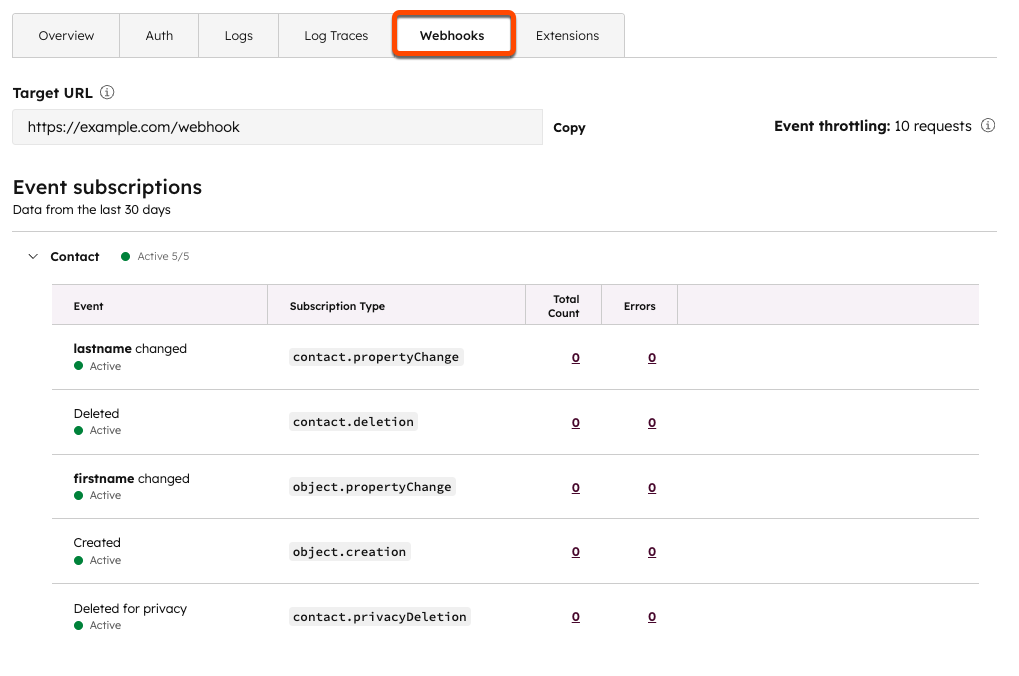 * Under *Event subscriptions*, you can view each of the app's webhook subscriptions.
* To view more information about a subscription for a specific object type, including number of times triggered and number of errors, click the **name** of the subscription to expand the section and view all associated event triggers:
* Click the numbers in the **Total count** and **Errors** columns to navigate to the webhooks monitoring tab.
* Hover over a subscription type then click **Details** to open the details panel on the right. This panel includes a sample event response payload and a testing feature.
* Under *Event subscriptions*, you can view each of the app's webhook subscriptions.
* To view more information about a subscription for a specific object type, including number of times triggered and number of errors, click the **name** of the subscription to expand the section and view all associated event triggers:
* Click the numbers in the **Total count** and **Errors** columns to navigate to the webhooks monitoring tab.
* Hover over a subscription type then click **Details** to open the details panel on the right. This panel includes a sample event response payload and a testing feature.
