> ## Documentation Index
> Fetch the complete documentation index at: https://developers.hubspot.com/docs/llms.txt
> Use this file to discover all available pages before exploring further.
---
id: 9ad79e4a-f175-45de-a3ae-99a410024c49
---
# Define serverless functions for project-built private apps
> Learn how to define serverless functions in a project-built private app (2025.1).
When needing to fetch data for a project-based private app, whether for a [UI extension](/apps/developer-platform/add-features/ui-extensions/ui-components/overview) or [CMS React project](/cms/start-building/introduction/react-plus-hubl/modules), you'll use a serverless function. When executed, HubSpot runs the serverless function server-side using JavaScript. Because HubSpot runs the function, you don't need to manage your own server.
Legacy apps are still supported by HubSpot, but don't have access to the latest app features. Learn more about the [new developer platform](/apps/developer-platform/overview).
Private apps built on 2025.1 of the developer platform do support serverless functions for UI extensions, but do not support features such as creating an [app settings](/apps/developer-platform/add-features/ui-extensions/extension-points/create-a-settings-page) page.
If you have an existing project-built private app, you can migrate its functionality to the latest version of the developer platform by following the [migration guide](/apps/developer-platform/build-apps/migrate-an-app/overview).
Your access to using serverless functions depends on your HubSpot subscription:
* **UI extensions:** using serverless functions for UI extensions requires an *Enterprise* subscription. You can also test out UI extensions for private apps for free in a [developer test account](/getting-started/account-types#developer-test-accounts).
* **CMS:** using serverless functions for CMS React projects requires a ***Content Hub*** *Enterprise* subscription.
Within the project file structure, serverless functions live in the `src/app` directory within a `.functions` folder. At the most basic level, this folder should include:
* One or more JavaScript files that export a `main` function.
* A `serverless.json` file that registers and configures your functions. Learn more about [serverless function configuration](#configuration).
Learn more about creating your app and the top-level [project structure](/apps/legacy-apps/private-apps/build-with-projects/create-private-apps-with-projects#project-structure).
## Create a serverless function
Serverless functions for private apps in projects can be executed in two ways:
* **App function:** a serverless function that gets executed directly from within the project using the `hubspot.serverless` API.
* **Endpoint function** (***Content Hub*** *Enterprise* only)**:** an app function that is invoked by calling a public URL. The URL is determined by the account's connected domains and the path specified in the `serverless.json` file. This is more common for [implementing serverless functions for the CMS](/cms/start-building/features/serverless-functions/overview).
**Please note:** serverless functions cannot import other functions. You'll need to include all the code the serverless function needs to execute within the serverless function file.
### Configuration
In the serverless functions directory, configure the serverless function with a `serverless.json` file. In this file, you'll configure your serverless function name and the path of the JavaScript file to execute, along with any secrets that might need to be included for authentication.
If you have a ***Content Hub*** *Enterprise* subscription, you can configure a serverless function to be invoked by a public URL by including an `endpoint` object in the config. Learn more about [endpoint functions](#endpoint-functions).
```js theme={null}
{
"appFunctions": {
"functionName": {
"file": "function1.js",
"secrets": ["SOME_SECRET"],
"endpoint": {
"path": "path/to/endpoint",
"method": ["GET"]
}
}
}
}
```
| Parameter | Type | Description |
| ---------- | ------ | ----------------------------------------------------------------------------------------------------------------------------------------------------------------------------------------------------------- |
| `file` | String | The `.js` file in the project to execute. |
| `secrets` | Array | To authenticate requests, you can include secrets as string values in this array. Learn more about [managing secrets](#managing-secrets). |
| `endpoint` | Object | If invoking the function by a public URL (***Content Hub*** *Enterprise* only), this object defines the endpoint details:
`path`: the endpoint path.
`method`: the request method.
|
### Building the function
Each serverless function exports a `main` function that gets called when HubSpot executes it. The function receives the `context` argument, which is an object that contains data based on how the function is being used. This includes context about where the card is loaded as well as the authenticated user and account. Learn more about [what's included in the context object](/apps/developer-platform/add-features/ui-extensions/ui-extensions-sdk#access-context-data).
Below is an example of a function that returns a `200` status code and a `Hello World` message.
```js theme={null}
exports.main = async context => {
return {
statusCode: 200,
body: { message: "Hello World" },
};
};
```
For a more advanced example, the following serverless function uses a third-party HTTP client library ([Axios](https://axios-http.com/docs/intro)) to fetch a quote from an external API ([ZenQuotes](https://docs.zenquotes.io/zenquotes-documentation/)). The output can be found in the browser console and [function logs in HubSpot](#debug-a-serverless-function).
```js theme={null}
const axios = require("axios");
exports.main = async (context = {}) => {
const { hs_object_id } = context.propertiesToSend;
console.log(`Fetching inspirational quote for contact ${hs_object_id}`);
try {
const response = await axios.get("https://zenquotes.io/api/random");
const quote = response.data[0];
if (!quote) {
throw new Error("No quote received from API");
}
console.log(`Retrieved quote: "${quote.q}" - ${quote.a}`);
return {
statusCode: 200,
body: {
quote: {
text: quote.q,
author: quote.a,
},
},
};
} catch (error) {
console.error("ZenQuotes API request failed:", error.message);
}
};
```
```jsx theme={null}
import { hubspot, Button } from "@hubspot/ui-extensions";
hubspot.extend(() => );
const Example = () => {
const fetchQuote = async () => {
try {
const result = await hubspot.serverless("example-function", {
propertiesToSend: ["hs_object_id"],
parameters: {},
});
console.log("Quote result:", result);
} catch (error) {
console.error("Quote fetch failed:", error);
}
};
return ;
};
```
```shell theme={null}
2025-07-08T22:37:55.598Z INFO - Fetching inspirational quote for contact 769851
2025-07-08T22:37:55.717Z INFO - Retrieved quote: "The best way to predict your future is to create it." - Abraham Lincoln
```
Whichever HTTP library you use for making requests, be sure to include it as a dependency in the `package.json` file within `app.functions`.
You can find more examples of serverless functions in the following GitHub repositories:
* [CRM data components sample](https://github.com/HubSpot/ui-extensions-examples/blob/15fc84f4993d6234f5ffbe785c85f65fd02414e1/crm-data-components/src/app/app.functions/updateDeal.js)
* [Duplicate a contact sample](https://github.com/HubSpot/ui-extensions-examples/blob/15fc84f4993d6234f5ffbe785c85f65fd02414e1/duplicate-contact/src/app/app.functions/fetchAssociations.js)
#### Calling the function
In your extension's front-end React code, you'll call the function using the `hubspot.serverless()` API.
`hubspot.serverless()` expects a string of the name of the function to call (as defined in the `serverless.json` file), and an object containing the `propertiesToSend` and `parameters` fields.
```jsx theme={null}
import { hubspot, Button } from "@hubspot/ui-extensions";
hubspot.extend(() => );
const Extension = () => {
const handleSubmit = () => {
hubspot
.serverless("my-function-name", {
propertiesToSend: ["hs_object_id"],
parameters: { extra: "data" },
})
.then(response => {
// handle response, which is the value returned from the function on success
})
.catch(error => {
// handle error, which is an Error object if the function failed to execute
});
};
return ;
};
```
```json theme={null}
{
"appFunctions": {
"my-function-name": {
"file": "function.js",
"secrets": []
}
}
}
```
| Parameter | Type | Description |
| ------------------ | ------ | --------------------------------------------------------------------------------------------------------------------------------------------------------------------------------------------------------------------------------------- |
| `propertiesToSend` | Array | An array of properties to send the serverless function from the front-end. Property values are pulled from the currently displaying CRM record. This enables retrieving property values on the server-side when the function is called. |
| `parameters` | Object | Additional key-value pairs to supply to the function. |
On success, `hubspot.serverless()` will return `Promise`. On failure, it will reject the promise.
**Please note:** serverless functions have a response limit of 15 seconds. Functions that take longer to execute will fail.
### Endpoint functions
If you have a ***Content Hub*** *Enterprise* subscription, you can configure a serverless function to be invoked by a public URL. When calling the URL of a HubSpot-hosted serverless function, you can use any [domain connected to your account](https://knowledge.hubspot.com/domains-and-urls/connect-a-domain-to-hubspot) with the following URL structure: `https:///hs/serverless/`.
For example, if both *website.com* and *subdomain.brand.com* are connected to the account, you could call the function using `https://website.com/hs/serverless/path/to/endpoint` or `https://subdomain.brand.com/hs/serverless/path/to/endpoint`.
In the URL to call the function, the endpoint path is global rather than scoped to the app or project. If you have identical endpoint paths across multiple apps or projects, the most recently deployed endpoint function will take precedence.
```json theme={null}
{
"appFunctions": {
"functionName": {
"file": "somefunction.js",
"secrets": ["SOME_SECRET"],
"endpoint": {
"path": "path/to/endpoint",
"method": ["GET"]
}
}
}
}
```
## Authenticate requests
Every private app comes with an access token that you can use to authenticate calls to HubSpot's APIs. Alternatively, you can authenticate calls using secrets, which you'll [manage through the CLI](#managing-secrets).
### Private app access tokens
To authenticate HubSpot API requests with private app access tokens, you'll access the token with `process.env['PRIVATE_APP_ACCESS_TOKEN']`. For example, to make a request using HubSpot's Node.js library:
* Ensure the @hubspot/api-client [library](https://github.com/HubSpot/hubspot-api-nodejs) is [included as a dependency](#including-dependencies) in your project.
* In the serverless function JavaScript file, include `@hubspot/api-client`.
* Instantiate the client within `exports.main` and include `PRIVATE_APP_ACCESS_TOKEN` for authentication:
```js theme={null}
// Include HubSpot node API client
const hubspot = require("@hubspot/api-client");
exports.main = async (context = {}) => {
// Get hs_object_id of the record in context
const { hs_object_id } = context.propertiesToSend;
console.log(`Looking up contact by ID [${hs_object_id}]`);
// Instantiate HubSpot Node API client
const hubspotClient = new hubspot.Client({
accessToken: process.env["PRIVATE_APP_ACCESS_TOKEN"],
});
// Your function
};
```
* Configure the rest of the function using Node.js. For example, the following code would create a serverless function that retrieves the current contact by ID using the [contacts API](/api-reference/latest/crm/objects/contacts/guide):
```js theme={null}
// Include HubSpot node API client
const hubspot = require("@hubspot/api-client");
exports.main = async (context = {}) => {
// Get hs_object_id of the record in context
const { hs_object_id } = context.propertiesToSend;
console.log(`Looking up contact by ID [${hs_object_id}]`);
// instantiate HubSpot Node API client
const hubspotClient = new hubspot.Client({
accessToken: process.env["PRIVATE_APP_ACCESS_TOKEN"],
});
const properties = ["firstname", "lastname"];
try {
const apiResponse = await hubspotClient.crm.contacts.basicApi.getById(hs_object_id, properties);
console.log(JSON.stringify(apiResponse));
} catch (e) {
e.message === "HTTP request failed" ? console.error(JSON.stringify(e.response, null, 2)) : console.error(e);
}
};
```
To access a private app access token during local development:
* If you're running HubSpot CLI version 7.0.0 or above, private app access tokens are automatically available for authentication as long as your personal access key has the `developer.app_functions.write` and `developer.app_functions.read` scopes.
* If you're running HubSpot CLI version 6.x or below, you'll need to add the token to a `.env` file within the `.functions` directory, as shown below. You can find the [private app access token in the app's settings in HubSpot](/apps/legacy-apps/private-apps/build-with-projects/create-private-apps-with-projects#view-the-app-in-hubspot).
```shell theme={null}
PRIVATE_APP_ACCESS_TOKEN=pat-na1-******
```
**Please note:** calls authenticated with private app access tokens count against your [API call limits](/developer-tooling/platform/usage-guidelines).
### Secrets
To authenticate a serverless function requests using a secret:
* Create a secret by running `hs secrets add `. HubSpot will securely store this secret on its backend and inject them into the runtime environment when a function is invoked in production.
* In the `serverless.json` file, include a `secrets` field within the corresponding function object, then specify the name of the secret. Do not include `PRIVATE_APP_ACCESS_TOKEN` in this array, as this is automatically created for you and already available in the serverless function.
```json theme={null}
{
"appFunctions": {
"functionName": {
"file": "function1.js",
"secrets": ["GITHUB_ACCESS_TOKEN"]
}
}
}
```
* To make secrets available for local development, create a `.env` file in the `.functions` directory. HubSpot will never retrieve your secrets outside of its protected infrastructure, so you'll need to specify the secret values that you want to use when the function is executed locally.
```shell theme={null}
SECRET=my-secret-value
ANOTHER_SECRET=another-secret-value
```
* After saving secrets to the `.env` file, you can access them in your function using `process.env['secretName']`.
```js theme={null}
export const main = async (context) => {
const secret = process.env['ANOTHER_SECRET'];
const token = process.env['PRIVATE_APP_ACCESS_TOKEN'];
...
}
```
#### Managing secrets
HubSpot provides a set of CLI commands for create and managing secrets:
* [Create a secret](/developer-tooling/local-development/hubspot-cli/reference#add-a-secret) by running `hs secrets add `. HubSpot will securely store this secret on its backend and inject them into the runtime environment when a function is invoked in production.
* [Update a secret](/developer-tooling/local-development/hubspot-cli/reference#update-a-secret) by running the `hs secrets update` command. If you're using a Node runtime of 14 or higher, updated secret values will automatically be updated in your deployed function within one minute, meaning you won't have to build and deploy to get the updated secret.
* [View existing secrets](/developer-tooling/local-development/hubspot-cli/reference#list-secrets) stored in your account by running `hs secrets list`.
* [Delete a secret](/developer-tooling/local-development/hubspot-cli/reference#list-secrets) by running `hs secrets delete `. The command line will prompt you to confirm the deletion, which you can bypass by including the `--force` flag.
**Please note:**
* To limit exposure of a secret, it's strongly recommended to never include it in console statements to prevent it from being recorded in logs.
* If you're using GitHub as source control for your project, be sure to never commit the `.env` file when uploading to GitHub. You can include an entry for `.env` in your `.gitignore` file to ensure that it is omitted from your commits.
## Best practices
Keep the following recommendations in mind while you develop and test your serverless function:
#### Variable assignment inside functions
To ensure that variables are correctly assigned and initialized with every function invocation, you should opt to assign variables within the function itself. This practice prevents potential issues related to stale or persistent variable states, which can lead to unexpected behaviors. See the example below for additional context:
```js theme={null}
// Preferred
exports.myHandler = async (event, context) => {
const myDynamicVariable = process.env["SOME_KEY"];
// The rest of your handler logic
};
// Discouraged
const myDynamicVariable = process.env["SOME_KEY"];
exports.myHandler = async (event, context) => {
// The rest of your handler logic
};
```
#### Stay up to date with the latest platform version
The `hsprojects.json` configuration file includes a `platformVersion` field which specifies which [platform version](/developer-tooling/platform/versioning) to run the project on. It's strongly encouraged to use the latest platform version to ensure that your project and its assets are up to date with the latest improvements, optimizations, and feature enhancements. In addition, some previously available features may not be available in older versions due to deprecation.
The platform version also dictates which version of Node the project runs on. The latest version, `2023.2`, uses Node18, and doesn't support older versions of Node.
## Including dependencies
By default, HubSpot provides a small number of [NPM](https://www.npmjs.com/) dependencies in addition to the [Node.js](https://nodejs.org/en/download/) standard library. To add your own dependencies, you can list the package in `dependencies` within the `package.json` file. When the app is built, dependencies will be bundled with your function code. All dependencies must be published to NPM and be public.
For example, if you wanted to add the [lodash](https://www.npmjs.com/package/lodash) library in a serverless function, you would first update `package.json` to include the dependency:
```json theme={null}
{
"name": "app.functions",
"version": "1.0.0",
"description": "",
"dependencies": {
"lodash": "^4.17.21"
}
}
```
Then, at the top of your serverless function JavaScript file, you would require the lodash dependency:
```js theme={null}
const _ = require("lodash");
exports.main = async context => {
const objectA = {};
const objectB = {};
const equal = _.isEqual(objectA, objectB);
return {
statusCode: 200,
body: {
isEqual: equal,
},
};
};
```
## Debug a serverless function
Log messages are produced every time HubSpot executes a serverless function. Below, learn how to access logs in HubSpot and locally using the CLI.
### In-app debugging
In HubSpot, you can view a serverless function's log history for both app functions and endpoint functions, including successful requests and errors.
To access a serverless function's logs in HubSpot:
* In your HubSpot account, navigate to **CRM Development**.
* In the left sidebar menu, navigate to **Private apps**.
* Select the **private app** that contains the serverless function.
* Click the **Logs** tab.
* To view logs for a serverless app function, click the **Serverless functions** tab. To view logs for a serverless endpoint function, click the **Endpoint functions** tab.
* In each tab, you can view logs for specific requests by clicking the **request**. You can also use the search bar to search by request ID.
* In the right panel, you can then click **View log trace** for a more in-depth breakdown of the request.
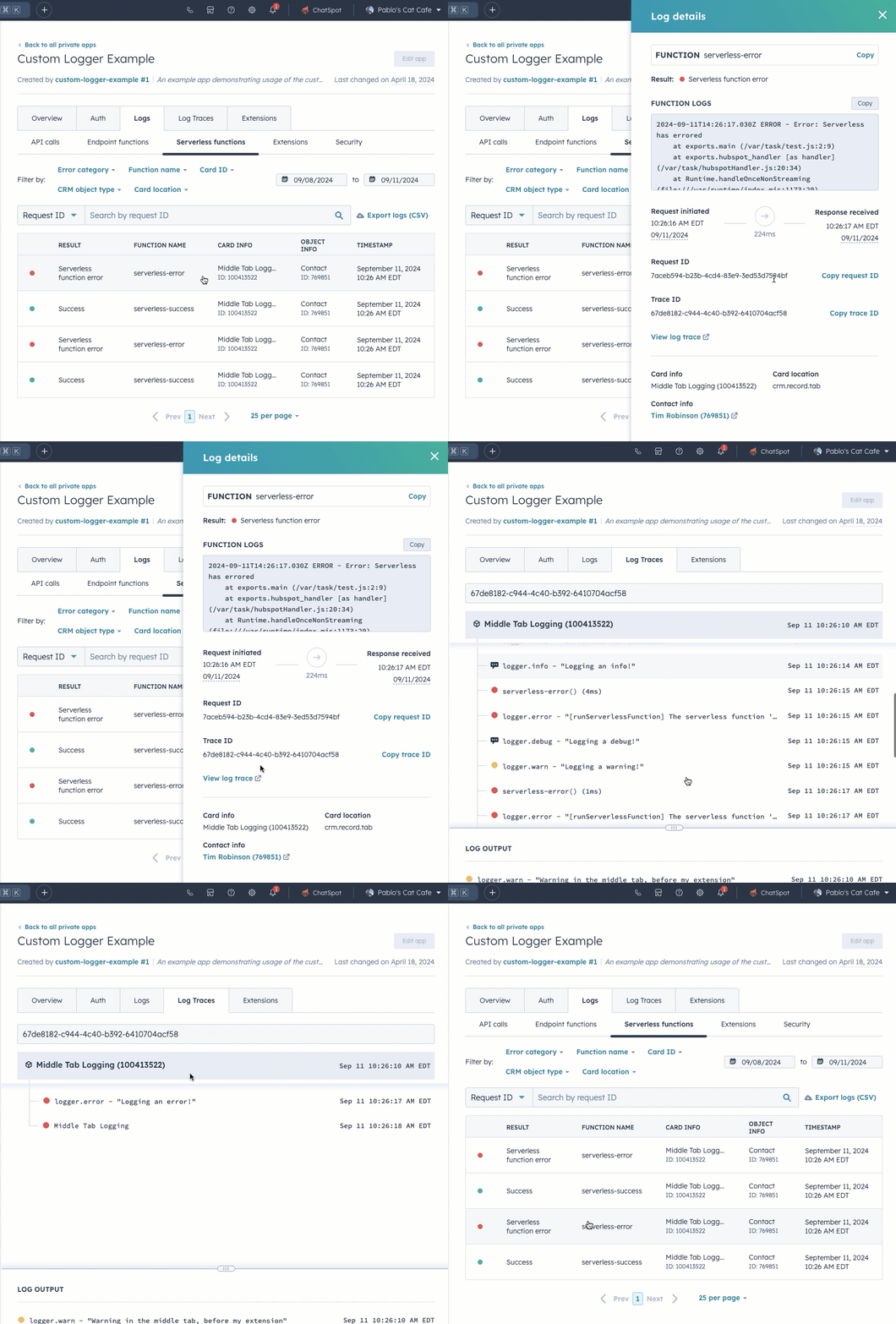
You can also include `console.log()` in your serverless function code for debugging purposes, then view its output in the function log details sidebar.
### Local debugging
Log messages are produced every time HubSpot executes a serverless function. To view a serverless function's logs in the CLI, run the `hs project logs` command. Learn more about using the [hs project logs command](/developer-tooling/local-development/hubspot-cli/project-commands#view-logs).
There are two types of log messages produced:
* Log messages that record the execution of a function, along with its status and timing. For example: `2021-04-28T19:19:21.666Z - SUCCESS - Execution Time: 279ms`
* Log messages that are produced through console statements in the function code. For example, your serverless function JavaScript might include:
```js theme={null}
exports.main = async context => {
console.log("Log some debug info");
console.error("An error occurred");
return {
statusCode: 200,
body: { message: "Hello World" },
};
};
```
A log output for the above code would then produce the following:
`2021-04-28T19:15:13.200Z INFO Log some debug info`
`2021-04-28T19:15:14.200Z ERROR An error occurred`