> ## Documentation Index
> Fetch the complete documentation index at: https://developers.hubspot.com/docs/llms.txt
> Use this file to discover all available pages before exploring further.

---
id: 4972a129-669c-40d9-90ee-185b9d79352d
---

# Operators & Expression Tests

> In order to expand the logic and functionality of your templates, HubL supports several key operators and expression tests. The operators allow you to execute math functions, make comparisons, complicate template logic, and alter what markup renders. In addition, this article contains a comprehensive list of expression tests that can be used in HubL .

In order to expand the logic and functionality of your templates, HubL supports several key operators and expression tests. The [operators](/cms/reference/hubl/operators-and-expression-tests#operators) allow you to execute math functions, make comparisons, complicate template logic, and alter what markup renders. In addition, this article contains a comprehensive list of [expression tests](/cms/reference/hubl/operators-and-expression-tests#expression-tests) that can be used in HubL.

## Operators

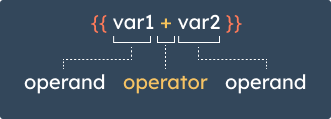
Operators are symbols that tell the HubL compiler to execute various operations that result in the final output. Operators are placed between operands in order to relate the two values, whether for executing math functions, making comparisons, or implementing boolean expressions.

<img style={{maxWidth: '330px', width: '330px', margin: '0 auto' }} src="https://www.hubspot.com/hubfs/Knowledge_Base_2023-24-25/operators-and-operands.png" alt="operators-and-operands-diagram" />

Below are the operators you can use in HubL, organized by type.

### Math

Standard math operators can be used to calculate values in the context of a template.

```jinja theme={null}
{% set my_num = 11 %}
{% set my_number = 2 %}

{{ my_num + my_number }}
<!-- 11 + 2 = 13 -->

{{ my_num - my_number }}
<!-- 11 - 2 = 9 -->

{{ my_num / my_number }}
<!-- 11 / 2 = 5.5 -->

{{ my_num % my_number }}
<!-- 11 % 2 = 1 -->

{{ my_num // my_number }}
<!-- 11 // 2 = 5 -->

{{ my_num * my_number }}
<!-- 11 * 2 = 22 -->

{{ my_num ** my_number }}
<!-- 11 ** 2 = 121 -->
```

| Symbol | Description                                                                                                                                            |
| ------ | ------------------------------------------------------------------------------------------------------------------------------------------------------ |
| `+`    | Adds two objects together, generally number values. To concatenate strings or lists, you should use the [`~` operator](#other-hubl-operators) instead. |
| `-`    | Subtracts one number from another.                                                                                                                     |
| `/`    | Divides numbers.                                                                                                                                       |
| `%`    | Returns the remainder from dividing numbers.                                                                                                           |
| `//`   | Divide two numbers and return the truncated integer result. For example, `{{ 20 // 7 }}` is `2`.                                                       |
| `*`    | Multiplies numbers.                                                                                                                                    |
| `**`   | Raise the left operand to the power of the right operand.                                                                                              |

### Comparison

Comparison operators can be used to evaluate values for template logic. You can see some examples of comparison operators being used in [if statements](/cms/reference/hubl/if-statements).

```jinja theme={null}
{% set my_num = 11 %}
{% set my_number = 2 %}

{{ my_num == my_number }}
<!-- Evaluates to false -->

{{ my_num != my_number }}
<!-- Evaluates to true -->

{{ my_num > my_number }}
<!-- Evaluates to true -->

{{ my_num >= my_number }}
<!-- Evaluates to true -->

{{ my_num < my_number }}
<!-- Evaluates to false -->

{{ my_num <= my_number }}
<!-- Evaluates to false -->
```

| Symbol | shorthand | Description                                                                                               |
| ------ | --------- | --------------------------------------------------------------------------------------------------------- |
| `==`   | eq        | Equal to. Evaluates to true if the two objects have equal values.                                         |
| `!=`   | ne        | Not equal to. Evaluates to true if the two objects are not equal.                                         |
| `>`    | gt        | Greater than. Evaluates to true if the left operand value is greater than the right operand.              |
| `>=`   | gte       | Greater than or equal to. Evaluates to true if the left operand is greater or equal to the right operand. |
| `<`    | lt        | Less than. Evaluates to true if the left operand is lower than the right operand.                         |
| `<=`   | lte       | Less than or equal to. Evaluates to true if the left operand is lower or equal to the right operand.      |

<Tip>
  The shorthand version of the comparison operators are usable in HubL filters that involve testing an expression such as [`|selectattr()`](/cms/reference/hubl/filters#selectattr).
</Tip>

### Logical

Logical operators allow you to implement boolean expressions, as well as combine multiple expressions into single statements.

<Tabs sync={false}>
  <Tab title="And">
    ```jinja theme={null}
    Two non-empty strings:
    {{ "a" and "b" }}
    <!-- Evaluates to true -->

    Empty string and non-empty string:
    {{ "" and "b" }}
    <!-- Evaluates to false -->

    Two non-zero numbers:
    {{ 1 and 2 }}
    <!-- Evaluates to true -->

    Zero and non-zero number:
    {{ 0 and 1 }}
    <!-- Evaluates to false -->

    Two non-empty lists:
    {{ [1] and [2] }}
    <!-- Evaluates to true -->

    Empty list and non-empty list:
    {{ [] and [2] }}
    <!-- Evaluates to false -->

    Two non-empty dicts:
    {{ {a: 1} and {b: 2} }}
    <!-- Evaluates to true -->

    Empty dict and non-empty dict:
    {{ {} and {b: 2} }}
    <!-- Evaluates to false -->
    ```
  </Tab>

  <Tab title="Or">
    ```jinja theme={null}
    Two non-empty strings:
    {{ "a" or "b" }}
    <!-- Evaluates to "a" -->

    Empty string and non-empty string:
    {{ "" or "b" }}
    <!-- Evaluates to "b" -->

    Two non-zero numbers:
    {{ 1 or 2 }}
    <!-- Evaluates to 1 -->

    Zero and non-zero number:
    {{ 0 or 1 }}
    <!-- Evaluates to 0 -->

    Two non-empty lists:
    {{ [1] or [2] }}
    <!-- Evaluates to [1] -->

    Empty list and non-empty list:
    {{ [] or [2] }}
    <!-- Evaluates to [2] -->

    Two non-empty dicts:
    {{ {a: 1} or {b: 2} }}
    <!-- Evaluates to {a=1} -->

    Empty dict and non-empty dict:
    {{ {} or {b: 2} }}
    <!-- Evaluates to {b=2} -->
    ```
  </Tab>

  <Tab title="is / is not">
    ```jinja theme={null}
    Conditional using `is` operator:
    {% set string = "strings are a cat's best friend" %}
    {% if string is string_containing "cat" %}
    Meow
    {% else %}
    Woof
    {% endif %}
    <!-- Evaluates to Meow -->

    Conditional using `not` operator:
    {% set string = "strings are a cat's best friend" %}
    {% if string is not string_containing "cat" %}
    Meow
    {% else %}
    Woof
    {% endif %}
    <!-- Evaluates to Woof -->
    ```
  </Tab>

  <Tab title="(expr)">
    ```jinja theme={null}
    {% set my_num = 10 %}
    {% set my_variable = 5 %}

    {{ (my_num + 2) * my_variable }}
    <!-- Evaluates to 60 -->
    ```
  </Tab>

  <Tab title="?">
    ```jinja theme={null}
    {% set date = local_dt %}
    {{ date ? date : 'No date'}}
    <!-- Evaluates to the date variable value -->

    {{ todays_date ? todays_date : 'No date'}}
    <!-- Evaluates to 'No date' since no value is set for todays_date -->
    ```
  </Tab>
</Tabs>

| Symbol   | Description                                                                                                                                                                                                                                             |
| -------- | ------------------------------------------------------------------------------------------------------------------------------------------------------------------------------------------------------------------------------------------------------- |
| `and`    | Returns `true` if both the left and right operand are truthy. Otherwise, returns `false`. <br /><br />This operator does not behave like the `and` operator in Python or the `&&` operator in JavaScript. Learn more about using `and` operators below. |
| `or`     | Returns the first operand if it is truthy. Otherwise, returns the second operand. <br /><br />This operator is equivalent to `or` in Python and <code>\|\|</code> in JavaScript. Learn more about using `or` operators below.                           |
| `is`     | Joins two operands for an affirmative statement.                                                                                                                                                                                                        |
| `not`    | Negates a statement, in conjunction with `is`.                                                                                                                                                                                                          |
| `(expr)` | Group an expression for the order of operations. For example, `(10 - 2) * variable`.                                                                                                                                                                    |
| `?`      | The [ternary operator](/cms/reference/hubl/if-statements) can be used to quickly write conditional logic. Accepts 3 arguments: expression, true condition, false condition. Evaluates an expression and returns the corresponding condition.            |

**Using and/or operators**

In HubL, the `or` operator behaves like the `or` operator in Python and the `||` operator in JavaScript. It will return the first operand if the expression evaluates as true, otherwise it will return the second operand. A common use case for the `or` operator is setting a fallback value when a variable value isn't defined.

```jinja theme={null}
Two non-empty strings:
{{ "a" or "b" }}
<!-- Evaluates to "a" -->

Empty string and non-empty string:
{{ "" or "b" }}
<!-- Evaluates to "b" -->

Defining a fallback value:
{{ some_variable or "default value" }}
<!-- If some_variable is defined, print its value,
otherwise print "default value" -->
```

However, the `and` operator behaves differently than the `and` operator in Python and the `&&` operator in JavaScript. In HubL, `and` will always return a boolean value: when the expression evaluates as true, `true` is returned, otherwise it will return `false`. The Python and JavaScript operators, on the other hand, will return an operand value based on whether the statement evaluates as true or false.

```jinja theme={null}
Two non-empty strings:
{{ "a" and "b" }}
<!-- Evaluates to true -->

Empty string and non-empty string:
{{ "" and "b" }}
<!-- Evaluates to false -->
```

In HubL, empty lists (`[]`) and empty dicts (`{}`) are considered falsy. This is equivalent to the behavior in Python, but different from JavaScript, where `[]` and `{}` are truthy.

```jinja theme={null}
Empty list and non-empty list:
{{ [] or [2] }}
<!-- Evaluates to [2] -->

Empty dict and non-empty dict:
{{ {} and {b: 2} }}
<!-- Evaluates to false -->
```

### Other HubL operators

Below are other important HubL operators that can be used to perform various tasks.

| Symbol          | Description                                                                                         |
| --------------- | --------------------------------------------------------------------------------------------------- |
| `in`            | Checks to see if a value is in a sequence.                                                          |
| `is`            | Performs an [expression test](/cms/reference/hubl/operators-and-expression-tests#expression-tests). |
| <code>\|</code> | Applies a filter.                                                                                   |
| `~`             | Concatenates values.                                                                                |

## Expression tests

Expression tests are various boolean conditions that can be evaluated by using logical operators.

### boolean

Tests whether the object is boolean (in a strict sense, not in its ability to evaluate to a truthy expression).

<Tabs sync={false}>
  <Tab title="HubL">
    ```jinja theme={null}
    {% set isActive = false %}

    {% if isActive is boolean %}
    isActive is a boolean
    {% endif %}
    ```
  </Tab>

  <Tab title="Output">
    ```html theme={null}
    isActive is a boolean
    ```
  </Tab>
</Tabs>

### containing

Tests whether a list variable has a value in it.

<Tabs sync={false}>
  <Tab title="HubL">
    ```jinja theme={null}
    {% set numbers = [1, 2, 3] %}

    {% if numbers is containing 2 %}
    Set contains 2!
    {% endif %}
    ```
  </Tab>

  <Tab title="Output">
    ```html theme={null}
    Set contains 2!
    ```
  </Tab>
</Tabs>

### containingall

Tests if a list variable contains all of the values of another list.

<Tabs sync={false}>
  <Tab title="HubL">
    ```jinja theme={null}
    {% set numbers = [1, 2, 3] %}

    {% if numbers is containingall [2, 3] %}
    Set contains 2 and 3!
    {% endif %}

    {% if numbers is containingall [2, 4] %}
    Set contains 2 and 4!
    {% endif %}
    ```
  </Tab>

  <Tab title="Output">
    ```html theme={null}
    Set contains 2 and 3!
    ```
  </Tab>
</Tabs>

### defined

Tests whether a variable is defined within the context of the template. While you can use this expression test, writing an if statement without any operators will default to checking whether or not the variable is defined.

In the example below, a color module's color parameter is tested. If the color parameter had no value, the template would render a default black background color. If it is defined, it renders the background color set by the user.

<Tabs sync={false}>
  <Tab title="HubL">
    ```jinja theme={null}
    {% color "my_color" color="#930101", export_to_template_context=True %}
    <style>
    {% if widget_data.my_color.color is defined %}
    body{
    background: {{ widget_data.my_color.color }};
    }
    {% else %}
    body{
    background: #000;
    }
    {% endif %}
    </style>
    ```
  </Tab>

  <Tab title="Output">
    ```html theme={null}
    <style>
    body {
    background: #930101;
    }
    </style>
    ```
  </Tab>
</Tabs>

### divisibleby

Tests whether an object is divisible by another number.

For example, below a for loop is created that iterates through a list of types of animals. Each type of animal gets printed in a div, and every 5th div has different inline styling applied (width:100%). This concept could be applied to a blog where different markup is rendered for a certain pattern of posts. To learn more about for loops and loop.index, [check out this article](/cms/reference/hubl/loops).

<Tabs sync={false}>
  <Tab title="HubL">
    ```jinja theme={null}
    {% set animals = ["lions", "tigers", "bears", "dogs", "sharks"] %}
    {% for animal in animals %}
    {% if loop.index is divisibleby 5 %}
    <div style="width:100%">{{animal}}</div>
    {% else %}
    <div style="width:25%">{{animal}}</div>
    {% endif %}
    {% endfor %}
    ```
  </Tab>

  <Tab title="Output">
    ```html theme={null}
    <div style="width:25%">lions</div>
    <div style="width:25%">tigers</div>
    <div style="width:25%">bears</div>
    <div style="width:25%">dogs</div>
    <div style="width:100%">sharks</div>
    ```
  </Tab>
</Tabs>

### equalto

Tests whether a variable's value is equal to a constant or another variable. You can also use the operator `==` to do the same test.

In the example below, the width of the blog posts is adjusted based on the total number of posts in the loop. The example output assumes there were 4 posts in the blog.

<Tabs sync={false}>
  <Tab title="HubL">
    ```jinja theme={null}
    {% for content in contents %}
    {% if loop.length is equalto 2 %}
    <div style="width:50%;">Post content</div>
    {% elif loop.length is equalto 3 %}
    <div style="width:33.333332%;">Post content</div>
    {% elif loop.length is equalto 4 %}
    <div style="width:25%;">Post content</div>
    {% else %}
    <div style="width:100%;>Post content</div>
    {% endif %}
    {% endfor %}
    ```
  </Tab>

  <Tab title="Output">
    ```html theme={null}
    <div style="width:25%;">Post content</div>
    <div style="width:25%;">Post content</div>
    <div style="width:25%;">Post content</div>
    <div style="width:25%;">Post content</div>
    ```
  </Tab>
</Tabs>

### even

Tests whether a numeric variable is an even number.

The example below shows a simplified blog listing loop, where if the current iteration of the loop is even, a class of `even-post` is assigned to the post item div. Otherwise, a class of `odd-post` is assigned.

<Tabs sync={false}>
  <Tab title="HubL">
    ```jinja theme={null}
    {% for content in contents %}
    {% if loop.index is even %}
    <div class="post-item even-post">Post content</div>
    {% else %}
    <div class="post-item odd-post">Post content</div>
    {% endif %}
    {% endfor %}
    ```
  </Tab>

  <Tab title="Output">
    ```html theme={null}
    <div class="post-item odd-post">Post content</div>
    <div class="post-item even-post">Post content</div>
    <div class="post-item odd-post">Post content</div>
    <div class="post-item even-post">Post content</div>
    ```
  </Tab>
</Tabs>

### float

Tests whether a numeric variable is a floating-point number.

<Tabs sync={false}>
  <Tab title="HubL">
    ```jinja theme={null}
    {% set quantity = 1.20 %}
    {% if quantity is float %}
    quantity is a floating point number
    {% endif %}
    ```
  </Tab>

  <Tab title="Output">
    ```html theme={null}
    quantity is a floating-point number
    ```
  </Tab>
</Tabs>

### integer

Tests whether a variable is an integer.

<Tabs sync={false}>
  <Tab title="HubL">
    ```jinja theme={null}
    {% set quantity = 120 %}
    {% if quantity is integer %}
    Quantity is an integer
    {% endif %}
    ```
  </Tab>

  <Tab title="Output">
    ```html theme={null}
    Quantity is an integer
    ```
  </Tab>
</Tabs>

### iterable

Tests whether a variable can be looped through.

This example checks a variable called `jobs` to see if it can be iterated through. Since the variable contains a list of jobs, the [if statement](/cms/reference/hubl/if-statements) would evaluate to `true`, and the loop would run. If the variable had contained a single value, the if statement would print that value with different markup instead. [Learn more about for loops](/cms/reference/hubl/loops).

<Tabs sync={false}>
  <Tab title="HubL">
    ```jinja theme={null}
    {% set jobs = ["Accountant", "Developer", "Manager", "Marketing", "Support"] %}

    {% if jobs is iterable %}
    <h3>Available positions</h3>
    <ul>
    {% for job in jobs %}
    <li>{{ job }}</li>
    {% endfor %}
    </ul>
    {% else %}
    <h3>Available position</h3>
    <div class="single-position">{{ jobs }}</div>
    {% endif %}
    ```
  </Tab>

  <Tab title="Output">
    ```html theme={null}
    <h3>Available positions</h3>
    <ul>
    <li>Accountant</li>
    <li>Developer</li>
    <li>Manager</li>
    <li>Marketing</li>
    <li>Support</li>
    </ul>
    ```
  </Tab>
</Tabs>

### lower

Tests whether a string is lowercase.

The example below uses an [unless statement](/cms/reference/hubl/if-statements#unless-statements) and a lower filter to ensure that a string of text entered into a text module is always lowercase.

<Tabs sync={false}>
  <Tab title="HubL">
    ```jinja theme={null}
    {% module "my_text" path="@hubspot/text" label="Enter text", value="Some TEXT that should be Lowercase", export_to_template_context=True %}

    {% unless widget_data.my_text.value is lower %}
    {{ widget_data.my_text.value|lower }}
    {% endunless %}
    ```
  </Tab>

  <Tab title="Output">
    ```html theme={null}
    some text that should be lowercase
    ```
  </Tab>
</Tabs>

### mapping

Tests whether an object is a dict (dictionary).

The example below is checking to see if the contact object is a dictionary.

<Tabs sync={false}>
  <Tab title="HubL">
    ```jinja theme={null}
    {% if contact is mapping %}
    This object is a dictionary.
    {% else %}
    This object is not a dictionary.
    {% endif %}
    ```
  </Tab>

  <Tab title="Output">
    ```html theme={null}
    This object is a dictionary.
    ```
  </Tab>
</Tabs>

### none

Tests whether a variable has a `null` value.

<Tabs sync={false}>
  <Tab title="HubL">
    ```jinja theme={null}
    {% module "user_email" path="@hubspot/text" label="Enter user email", value="example@hubspot.com", export_to_template_context=True %}
    {% unless widget_data.user_email.value is none %}
    {{ widget_data.user_email.value }}
    {% endunless %}
    ```
  </Tab>

  <Tab title="Output">
    ```html theme={null}
    example@hubspot.com
    ```
  </Tab>
</Tabs>

### number

Tests whether the value of a variable is a number.

The example below checks a variable to see whether or not it is a variable, and if so it converts it into millions.

<Tabs sync={false}>
  <Tab title="HubL">
    ```jinja theme={null}
    {% set my_var = 40 %}
    {% if my_var is number %}
    {{ my_var * 1000000 }}
    {% else %}
    my_var is not a number.
    {% endif %}
    ```
  </Tab>

  <Tab title="Output">
    ```html theme={null}
    40000000
    ```
  </Tab>
</Tabs>

### odd

Tests whether a numeric variable is an odd number.

Below is the same example as the inverse even expression test previously described.

<Tabs sync={false}>
  <Tab title="HubL">
    ```jinja theme={null}
    {% for content in contents %}
    {% if loop.index is odd %}
    <div class="post-item odd-post">Post content</div>
    {% else %}
    <div class="post-item even-post">Post content</div>
    {% endif %}
    {% endfor %}
    ```
  </Tab>

  <Tab title="Output">
    ```html theme={null}
    <div class="post-item odd-post">Post content</div>
    <div class="post-item even-post">Post content</div>
    <div class="post-item odd-post">Post content</div>
    <div class="post-item even-post">Post content</div>
    ```
  </Tab>
</Tabs>

### sameas

Tests whether or not two variables have the same value.

The example below sets two variables and then checks to see whether or not they are the same.

<Tabs sync={false}>
  <Tab title="HubL">
    ```jinja theme={null}
    {% set var_one = True %}
    {% set var_two = True %}
    {% if var_one is sameas var_two  %}
    The variables values are the same.
    {% else %}
    The variables values are different.
    {% endif %}
    ```
  </Tab>

  <Tab title="Output">
    ```html theme={null}
    The variables values are the same.
    ```
  </Tab>
</Tabs>

### sequence

Similar to the **iterable** test, this expression test checks whether a variable is a sequence.

The example below tests whether a variable is a sequence, then iterates through that sequence of musical genres.

<Tabs sync={false}>
  <Tab title="HubL">
    ```jinja theme={null}
    {% set genres = ["Pop", "Rock", "Disco", "Funk", "Folk", "Metal", "Jazz", "Country", "Hip-Hop", "Classical", "Soul", "Electronica" ] %}
    {% if genres is sequence %}
    <h3>Favorite genres</h3>
    <ul>
    {% for genre in genres %}
    <li>{{ genre }}</li>
    {% endfor %}
    </ul>
    {% else %}
    <h3>Favorite genre:</h3>
    <div class="single-genre">{{ genres }}</div>
    {% endif %}
    ```
  </Tab>

  <Tab title="Output">
    ```html theme={null}
    <ul>
    <li>Pop</li>
    <li>Rock</li>
    <li>Disco</li>
    <li>Funk</li>
    <li>Folk</li>
    <li>Metal</li>
    <li>Jazz</li>
    <li>Country</li>
    <li>Hip-Hop</li>
    <li>Classical</li>
    <li>Soul</li>
    <li>Electronica</li>
    </ul>
    ```
  </Tab>
</Tabs>

### string

Tests whether the value stored in a variable is text.

The example below checks whether a variable is a string, and if so it applies a title filter to change the capitalization.

<Tabs sync={false}>
  <Tab title="HubL">
    ```jinja theme={null}
    {% set my_var = "title of section" %}
    {% if my_var is string %}
    {{ my_var|title }}
    {% else %}
    my_var is not a string
    {% endif %}
    ```
  </Tab>

  <Tab title="Output">
    ```html theme={null}
    Title Of Section
    ```
  </Tab>
</Tabs>

### string\_containing

Tests whether a provided substring is contained within another string. This expression test is used in conjunction with the `is` operator.

<Tabs sync={false}>
  <Tab title="HubL">
    ```jinja theme={null}
    {% if content.domain is string_containing ".es" %}
    Markup that will only render on content hosted on .es domains
    {% elif content.domain is string_containing ".jp" %}
    Markup that will only render on content hosted on .jp domains
    {% else %}
    Markup that will render on all other domains
    {% endif %}
    ```
  </Tab>

  <Tab title="Output">
    ```html theme={null}
    Markup that will render on all other domains
    ```
  </Tab>
</Tabs>

### string\_startingwith

Tests whether a string starts with a particular string. It is used in conjunction with the `is` operator.

<Tabs sync={false}>
  <Tab title="HubL">
    ```jinja theme={null}
    {% if content.slug is string_startingwith "es/" %}
    Markup that will only render on content hosted in a /es/ subdirectory
    {% elif content.slug is string_startingwith "jp/" %}
    Markup that will only render on content hosted in a /jp/ subdirectory
    {% else %}
    Markup that will render on all subdirectories
    {% endif %}
    ```
  </Tab>

  <Tab title="Output">
    ```html theme={null}
    Markup that will render on all subdirectories
    ```
  </Tab>
</Tabs>

### truthy

Tests whether an expression evaluates to `True`.

The example below uses a boolean checkbox module to display an alert message.

<Tabs sync={false}>
  <Tab title="HubL">
    ```jinja theme={null}
    {% boolean "check_box" label="Show alert", value=True, export_to_template_context=True %}

    {% if widget_data.check_box.value is truthy %}
    <div class="alert">Danger!</div>
    {% endif %}
    ```
  </Tab>

  <Tab title="Output">
    ```html theme={null}
    <div class="alert">Danger!</div>
    ```
  </Tab>
</Tabs>

### undefined

Tests whether a variable is undefined in the context of the template. This test is different from the `none` expression test in that undefined will be `true` when the variable is present but has no value; whereas, none will be `true` when the variable has a null value.

The example below checks a template for the existence of the variable `"my_var"`.

<Tabs sync={false}>
  <Tab title="HubL">
    ```jinja theme={null}
    {% if my_var is undefined %}
    A variable named "my_var" does not exist on this template.
    {% else %}
    {{ my_var }}
    {% endif %}
    ```
  </Tab>

  <Tab title="Output">
    ```html theme={null}
    A variable named "my_var" does not exist on this template.
    ```
  </Tab>
</Tabs>

### upper

Tests whether a string is all uppercase. Below is an inverse example of the `lower` expression test [above](#lower).

<Tabs sync={false}>
  <Tab title="HubL">
    ```jinja theme={null}
    {% module "my_text" path="@hubspot/text" label="Enter text", value="Some TEXT that should be Uppercase", export_to_template_context=True %}

    {% unless widget_data.my_text.value is upper %}
    {{ widget_data.my_text.value|upper }}
    {% endunless %}
    ```
  </Tab>

  <Tab title="Output">
    ```html theme={null}
    SOME TEXT THAT SHOULD BE UPPERCASE
    ```
  </Tab>
</Tabs>

### within

Tests whether a variable is present within a list.

<Tabs sync={false}>
  <Tab title="HubL">
    ```jinja theme={null}
    {% set numbers = [1, 2, 3] %}

    {% if 2 is within numbers %}
    2 is in the list!
    {% endif %}

    {% if 4 is within numbers %}
    4 is in the list!
    {% endif %}
    ```
  </Tab>

  <Tab title="Output">
    ```html theme={null}
    2 is in the list!
    ```
  </Tab>
</Tabs>
