> ## Documentation Index
> Fetch the complete documentation index at: https://developers.hubspot.com/docs/llms.txt
> Use this file to discover all available pages before exploring further.
---
id: 8e677eaf-da3e-4a30-9f61-5b0731469ced
---
# Configuring a module
> Learn how to a configure a custom module.
When creating a module, there are a number of options available that impact where a module is visible, how it's identified, and how it can be edited.
When [developing locally](/developer-tooling/local-development/hubspot-cli/install-the-cli), modules are stored as folders with a `.module` suffix. These folders contain the files that make up the module's settings and the code used to render it. A module's configuration is kept in the [meta.json](#meta-json) file, while fields are configured separately in a [fields.json](/cms/start-building/building-blocks/modules/overview#fields-json) file.
Most configuration can also be modified using the module editor in the [Design Manager](/cms/start-building/introduction/developer-environment/design-manager).
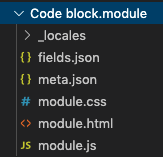 At a high level, you configure module options locally within the `meta.json` file, which can include the following properties:
| Parameter | Type | Description | Default |
| ------------------------------ | ------- | ----------------------------------------------------------------------------------------------------------------------------------------------------------------------------------------------------------------------------------------------------------------------------------------------------------------------------------------------------------------------------------------------------------------------------------------------------------------------------------------------------------------------------------------------------------------------------------------------------------------------------------------------------------------------------------------------------------------------------------------------------------------------------------------------------------------------------------------------------------------------------------------------------------------------------------------------------------------------------------------------------------------------------------------------------------------------------- | ----------------------- |
| `icon` | String | URL to an image to use as the icon for a module. | |
| `label` | String | Label used when modules are shown in the content editors | |
| `module_id` | Number | Unique id for the module that is independent from the path. | |
| `is_available_for_new_content` | Boolean | The value for the toggle in the top right corner of the module editor in HubSpot. Determines if the module can be used in content. | `true` |
| `global` | Boolean | Indicates whether the module is global or not | `false` |
| `content_types` | Array | An `array` of [content types](/cms/start-building/building-blocks/drag-and-drop/tutorial) that the module can be used within. One or more of:
At a high level, you configure module options locally within the `meta.json` file, which can include the following properties:
| Parameter | Type | Description | Default |
| ------------------------------ | ------- | ----------------------------------------------------------------------------------------------------------------------------------------------------------------------------------------------------------------------------------------------------------------------------------------------------------------------------------------------------------------------------------------------------------------------------------------------------------------------------------------------------------------------------------------------------------------------------------------------------------------------------------------------------------------------------------------------------------------------------------------------------------------------------------------------------------------------------------------------------------------------------------------------------------------------------------------------------------------------------------------------------------------------------------------------------------------------------- | ----------------------- |
| `icon` | String | URL to an image to use as the icon for a module. | |
| `label` | String | Label used when modules are shown in the content editors | |
| `module_id` | Number | Unique id for the module that is independent from the path. | |
| `is_available_for_new_content` | Boolean | The value for the toggle in the top right corner of the module editor in HubSpot. Determines if the module can be used in content. | `true` |
| `global` | Boolean | Indicates whether the module is global or not | `false` |
| `content_types` | Array | An `array` of [content types](/cms/start-building/building-blocks/drag-and-drop/tutorial) that the module can be used within. One or more of:- `ANY`: any of the types listed below.
- `LANDING_PAGE`: landing pages.
- `SITE_PAGE`: website pages and templates.
- `BLOG_POST`: blog posts and templates.
- `BLOG_LISTING`: blog listing templates.
- `EMAIL`: emails and email templates.
- `KNOWLEDGE_BASE`: knowledge base pages and templates.
- `QUOTE_TEMPLATE`: quote templates.
- `CUSTOMER_PORTAL`: customer portal templates.
- `WEB_INTERACTIVE`: web interactives.
- `SUBSCRIPTION`: subscription templates.
- `MEMBERSHIP`: membership templates.
If a module is not to be used in any area within HubSpot, you would set the value to an empty array `[]` instead of `["NONE"]`.Note that this field was previously named `host_template_types`. Modules using the previous field name will continue to function, but it's recommended to use `content_types` moving forward. | |
| `css_assets` | Array | An `array` of CSS files that the module depends on. Supports relative paths.e.g. `"css_assets": [{ "path": "../path/to/file.css" }]` | `[]` |
| `css_render_options` | Object | Set whether the module CSS renders asynchronously with `async`: `true`, `false` | `{"async": false}` |
| `js_assets` | Array | An `array` of JavaScript files that the module depends on. Supports relative paths.e.g. `"js_assets": [{ "path": "../path/to/file.js" }]` | `[]` |
| `js_render_options` | Object | Modifies the module JavaScript tag added to the rendered page. Options include:- `position`: `head` , `footer`
- `async`: `true`, `false`
- `defer`: `true`, `false`
- `type`: `string`
| `{"position":"footer"}` |
| `inline_help_text` | String | Help text that will be shown at the top of the module in a blue info box (limit 400 characters).Provides information necessary to use the module. If you have field-specific help text information to convey, refer to the [help text field documentation](/cms/reference/fields/module-theme-fields#properties-used-by-all-fields). | `null` |
| `master_language` | String | With [translations enabled](https://knowledge.hubspot.com/design-manager/create-translations-of-your-modules#:~:text=To%20create%20translations%20of%20a,the%20right%2C%20click%20Add%20translations.), the language code of the language the module's fields were originally written in.e.g. `en` | |
| `placeholder` | Object | Sets [placeholder content](/cms/reference/hubl/tags/standard-tags#editor-placeholders) for the module. Includes the following properties:- `show_module_icon`: whether the module icon displays. `true`, `false`.
- `title`: the title that appears on the module in the editor. String.
- `description`: the description that appears on the module in the editor. String.
| |
| `categories` | Array | An array containing up to three [module categories](#add-categories).For example: `"categories":["FORMS_AND_BUTTONS"]` | |
| `content_tags` | Array | An array of [module tag objects](#adding-categories-and-tags) containing the tag name and `source` of `"USER"`.For example: `"content_tags": [{` `"name" : "BUTTONS",` `"source" : "USER"``}]` | |
Below, learn more about individual module configuration options.
## Adding an Icon
Modules can include an icon that appears in the [Design Manager](/cms/start-building/introduction/developer-environment/design-manager) and the page and email editors to provide visual context for content creators. It's recommended to have different icons for the different types of modules in your theme. Icons are [required for marketplace providers](/cms/marketplace/template-guidelines).
There are two ways to add an icon, through the [design manager](#add-an-icon-using-the-design-manager) or the [CMS CLI](#add-an-icon-using-the-cli).
Module icons must be an `.svg` file and no larger in size than 10kb. For best results your icon should be simple and use only one color. Icons that use more than one color will be automatically converted for you. The default module icon that displays is a wrench and paint brush icon.
To add an icon using the design manager:
1. In your HubSpot account, navigate to **Marketing** > **Files and Templates** > **Design Tools**.
2. Use the left sidebar to locate the **module** you want to edit, then click the **module name**.
3. In the right sidebar of the module editor, click the **icon** next to the module title.
4. Upload/select your icon. After publishing your changes, the icon will appear within the page editors and design manager.
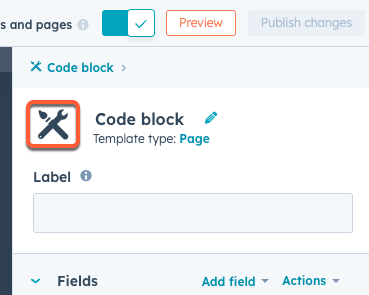 To add an icon when developing locally, open the module's `meta.json` file and add or edit the `icon` parameter's value to be an SVG from the file manager.
```json theme={null}
// meta.json
{
"global": false,
"content_types": ["PAGE"],
"icon": "http://example.com/hubfs/code.svg",
"label": "Code block",
"smart_type": "NOT_SMART",
"is_available_for_new_content": true,
"inline_help_text": "This module is for code snippets."
}
```
## Changing the label
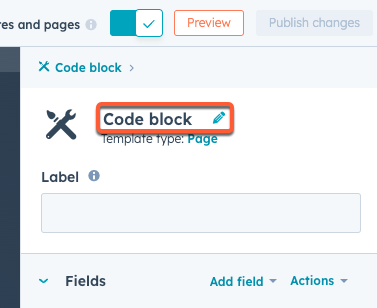
The label used when modules are displayed in the editor can be adjusted separately from the name for the module. This is useful when developing locally as you can have a name that makes sense to you while having a different one content creators see.
Locally you change the `label` parameter to set the label. In the design manager there's a field in the module editor below the module name.
To add an icon when developing locally, open the module's `meta.json` file and add or edit the `icon` parameter's value to be an SVG from the file manager.
```json theme={null}
// meta.json
{
"global": false,
"content_types": ["PAGE"],
"icon": "http://example.com/hubfs/code.svg",
"label": "Code block",
"smart_type": "NOT_SMART",
"is_available_for_new_content": true,
"inline_help_text": "This module is for code snippets."
}
```
## Changing the label
The label used when modules are displayed in the editor can be adjusted separately from the name for the module. This is useful when developing locally as you can have a name that makes sense to you while having a different one content creators see.
Locally you change the `label` parameter to set the label. In the design manager there's a field in the module editor below the module name.
 ## Making a module global
For normal modules, the content of each instance of a module in a page, email or template is independent. For some use cases, it is useful to be able to have all instances of a module share the same content. When developing locally, you can make a module global by setting `global` to `true`.
You can also [convert modules in a drag-and-drop template to global](https://knowledge.hubspot.com/design-manager/use-global-content-across-multiple-templates#create-new-global-content-in-the-design-manager:~:text=To%20convert%20an%20existing%20local%20module%20or%20group) using the design manager.
## Controlling where a module is available for use
When developing locally, you can control which types of content a module can be used in through the `hostTemplateTypes` property. Learn more about the [available template types](/cms/start-building/building-blocks/templates/overview#template-types). Modules also can be hidden so that they can't be added directly to pages through setting `is_available_for_new_content` to `false`. For example, this can be helpful for modules built for navigation menus and search.
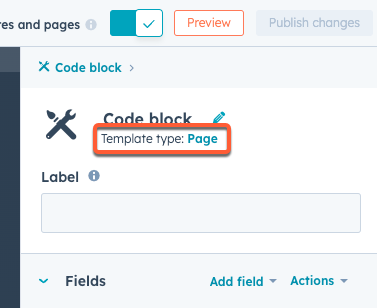
You can update this in the design manager by clicking the **Template type** option in the right sidebar.
## Making a module global
For normal modules, the content of each instance of a module in a page, email or template is independent. For some use cases, it is useful to be able to have all instances of a module share the same content. When developing locally, you can make a module global by setting `global` to `true`.
You can also [convert modules in a drag-and-drop template to global](https://knowledge.hubspot.com/design-manager/use-global-content-across-multiple-templates#create-new-global-content-in-the-design-manager:~:text=To%20convert%20an%20existing%20local%20module%20or%20group) using the design manager.
## Controlling where a module is available for use
When developing locally, you can control which types of content a module can be used in through the `hostTemplateTypes` property. Learn more about the [available template types](/cms/start-building/building-blocks/templates/overview#template-types). Modules also can be hidden so that they can't be added directly to pages through setting `is_available_for_new_content` to `false`. For example, this can be helpful for modules built for navigation menus and search.
You can update this in the design manager by clicking the **Template type** option in the right sidebar.
 ## Adding CSS and JavaScript dependencies
In addition to using `module.css` and `module.js` to add CSS and JavaScript that will be added to all pages that include a module instance, dependencies that are shared between modules can be attached using `css_assets` and `js_assets`. Paths can be absolute or relative to the `meta.json` file.
```json theme={null}
{
"css_assets": [
{
"path": "../path/to/file.css"
}
],
"js_assets": [
{
"path": "../path/to/file.js"
}
]
}
```
**Warning:** When using relative paths to reference dependencies, running `hs fetch --overwrite` to update the module for local development will overwrite the relative paths with absolute paths.
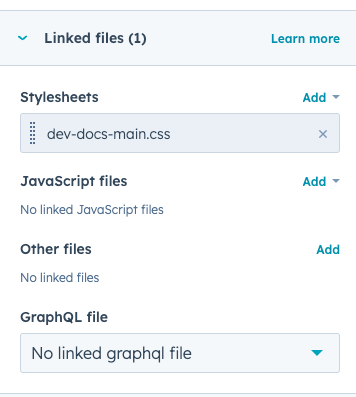
Using the design manager, you can link CSS and JavaScript files to a module using the *Linked files* section in the right sidebar of the module editor.
## Adding CSS and JavaScript dependencies
In addition to using `module.css` and `module.js` to add CSS and JavaScript that will be added to all pages that include a module instance, dependencies that are shared between modules can be attached using `css_assets` and `js_assets`. Paths can be absolute or relative to the `meta.json` file.
```json theme={null}
{
"css_assets": [
{
"path": "../path/to/file.css"
}
],
"js_assets": [
{
"path": "../path/to/file.js"
}
]
}
```
**Warning:** When using relative paths to reference dependencies, running `hs fetch --overwrite` to update the module for local development will overwrite the relative paths with absolute paths.
Using the design manager, you can link CSS and JavaScript files to a module using the *Linked files* section in the right sidebar of the module editor.
 ## Adding categories and tags
You can assign categories and tags to modules to organize them within HubSpot tools:
* [Categories](#categories): assign categories to a modules to organize them into groups within the content editor UI. This enables content creators to find modules more easily while building content in HubSpot. Note the following about categories:
* A module can have up to three categories, which are pre-defined and cannot be customized.
* Currently, categories are not surfaced in the content editor UI. However, you can assign categories for when categorization is available in editors.
* Uncategorized modules will be available under an *All* category.
* [Tags](#tags): assign tags to organize modules within the design manager. This enables you to find modules more easily while building templates.
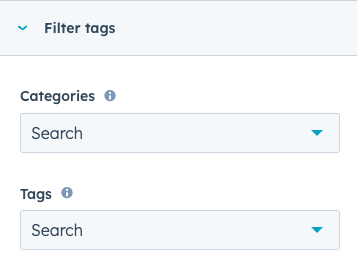
In the design manager, you can assign categories and tags using the *Filter tags* section of the right sidebar in the module editor. Learn more about the available categories and tags below.
## Adding categories and tags
You can assign categories and tags to modules to organize them within HubSpot tools:
* [Categories](#categories): assign categories to a modules to organize them into groups within the content editor UI. This enables content creators to find modules more easily while building content in HubSpot. Note the following about categories:
* A module can have up to three categories, which are pre-defined and cannot be customized.
* Currently, categories are not surfaced in the content editor UI. However, you can assign categories for when categorization is available in editors.
* Uncategorized modules will be available under an *All* category.
* [Tags](#tags): assign tags to organize modules within the design manager. This enables you to find modules more easily while building templates.
In the design manager, you can assign categories and tags using the *Filter tags* section of the right sidebar in the module editor. Learn more about the available categories and tags below.
 Locally, you can add categories and tags to a module's `meta.json` file as follows:
```json theme={null}
{
"label": "Custom module",
"categories": ["image_and_video", "commerce"],
"content_tags": [
{
"name": "BUTTONS",
"source": "USER"
},
{
"name": "CTA",
"source": "USER"
}
],
"is_available_for_new_content": true
}
```
### Categories
A module's `categories` array can contain up to three of the following categories (case-insensitive):
| Category | Description |
| ------------------- | ------------------------------------------------------------------------------------- |
| `blog` | Blog-specific modules, such as a recent post listing. |
| `body_content` | Modules that are formatted to graphically showcase content, such as an image gallery. |
| `commerce` | Commerce-specific modules, such as pricing cards. |
| `design` | Modules that affect content structure and layout, such as accordions. |
| `functionality` | Modules that include dynamic responses or behavior on the page, such as menus. |
| `forms_and_buttons` | Modules that allow site visitors to input and submit data. |
| `media` | Modules that contain elements such as images, icons, video, and banners. |
| `social` | Social media-specific modules, such as social sharing. |
| `text` | Modules that contain only text. |
### Tags
A module's `content_tags` array can contain any of the following module tag objects (case sensitive):
**Content types:**
* `ACCORDION`
* `ANIMATION`
* `BLOG_POST`
* `BUTTONS`
* `CODE`
* `CTA`
* `FEED`
* `FORM`
* `ICON`
* `IMAGE`
* `LISTS`
* `LOGO`
* `MENU`
* `RICH_TEXT`
* `SLIDER`
* `TEXT`
* `VIDEO`
**Functions:**
* `BANNER`
* `BLOG`
* `BRANDING`
* `CALCULATOR`
* `CONVERSION`
* `EMAIL`
* `GALLERY`
* `HEADERS`
* `INTERACTION`
* `LAYOUT`
* `MAP`
* `MULTIMEDIA`
* `NAVIGATION`
* `PROGRESS_BAR`
* `SEARCH`
* `SETTINGS`
* `SOCIAL`
* `TRANSLATION`
Locally, you can add categories and tags to a module's `meta.json` file as follows:
```json theme={null}
{
"label": "Custom module",
"categories": ["image_and_video", "commerce"],
"content_tags": [
{
"name": "BUTTONS",
"source": "USER"
},
{
"name": "CTA",
"source": "USER"
}
],
"is_available_for_new_content": true
}
```
### Categories
A module's `categories` array can contain up to three of the following categories (case-insensitive):
| Category | Description |
| ------------------- | ------------------------------------------------------------------------------------- |
| `blog` | Blog-specific modules, such as a recent post listing. |
| `body_content` | Modules that are formatted to graphically showcase content, such as an image gallery. |
| `commerce` | Commerce-specific modules, such as pricing cards. |
| `design` | Modules that affect content structure and layout, such as accordions. |
| `functionality` | Modules that include dynamic responses or behavior on the page, such as menus. |
| `forms_and_buttons` | Modules that allow site visitors to input and submit data. |
| `media` | Modules that contain elements such as images, icons, video, and banners. |
| `social` | Social media-specific modules, such as social sharing. |
| `text` | Modules that contain only text. |
### Tags
A module's `content_tags` array can contain any of the following module tag objects (case sensitive):
**Content types:**
* `ACCORDION`
* `ANIMATION`
* `BLOG_POST`
* `BUTTONS`
* `CODE`
* `CTA`
* `FEED`
* `FORM`
* `ICON`
* `IMAGE`
* `LISTS`
* `LOGO`
* `MENU`
* `RICH_TEXT`
* `SLIDER`
* `TEXT`
* `VIDEO`
**Functions:**
* `BANNER`
* `BLOG`
* `BRANDING`
* `CALCULATOR`
* `CONVERSION`
* `EMAIL`
* `GALLERY`
* `HEADERS`
* `INTERACTION`
* `LAYOUT`
* `MAP`
* `MULTIMEDIA`
* `NAVIGATION`
* `PROGRESS_BAR`
* `SEARCH`
* `SETTINGS`
* `SOCIAL`
* `TRANSLATION`