> ## Documentation Index
> Fetch the complete documentation index at: https://developers.hubspot.com/docs/llms.txt
> Use this file to discover all available pages before exploring further.

---
id: 41702ab8-030b-452a-9e20-d53d64260f27
---

# Blog templates

> Blog listing and blog post templates can be used to customize the appearance of a site's blog. 

export const SupportedProducts = ({marketing, sales, service, cms, data, commerce, marketingLevel, salesLevel, serviceLevel, cmsLevel, dataLevel, commerceLevel}) => {
  const translations = {
    description: "Requires one of the following products or higher.",
    productNames: {
      marketing: "Marketing Hub",
      sales: "Sales Hub",
      service: "Service Hub",
      cms: "Content Hub",
      data: "Data Hub",
      commerce: "Commerce Hub"
    },
    tiers: {
      free: "Free",
      starter: "Starter",
      professional: "Professional",
      enterprise: "Enterprise"
    }
  };
  const translateTier = tier => {
    if (!tier) return '';
    const lowerTier = tier.toLowerCase();
    return translations.tiers[lowerTier] || tier;
  };
  const products = [{
    name: marketing ? translations.productNames.marketing : '',
    level: translateTier(marketingLevel),
    icon: "https://mintlify-assets.b-cdn.net/Icons/marketing-bolt.svg",
    alt: "Marketing Hub"
  }, {
    name: sales ? translations.productNames.sales : '',
    level: translateTier(salesLevel),
    icon: "https://mintlify-assets.b-cdn.net/Icons/sales-star.svg",
    alt: "Sales Hub"
  }, {
    name: service ? translations.productNames.service : '',
    level: translateTier(serviceLevel),
    icon: "https://mintlify-assets.b-cdn.net/Icons/service-heart.svg",
    alt: "Service Hub"
  }, {
    name: cms ? translations.productNames.cms : '',
    level: translateTier(cmsLevel),
    icon: "https://mintlify-assets.b-cdn.net/Icons/content-play.svg",
    alt: "Content Hub"
  }, {
    name: data ? translations.productNames.data : '',
    level: translateTier(dataLevel),
    icon: "https://developers.hubspot.com/hubfs/Knowledge_Base_2023-24-25/subscription_key_icons/operations_icon.svg",
    alt: "Data Hub"
  }, {
    name: commerce ? translations.productNames.commerce : '',
    level: translateTier(commerceLevel),
    icon: "https://developers.hubspot.com/hubfs/Knowledge_Base/subscription_key_icons/commerce_icon.svg",
    alt: "Commerce Hub"
  }].filter(product => product.name && product.level);
  if (products.length === 0) return null;
  return <div>
      <div className="text-sm mb-2">{translations.description}</div>
      <div className={`grid ${products.length === 1 ? 'grid-cols-1' : 'grid-cols-2'} gap-1.5`}>
        {products.map((product, index) => <div key={index} style={{
    display: 'flex',
    alignItems: 'center'
  }}>
            <img src={product.icon} alt={product.alt} className="w-3.5 h-3.5 mr-1.5 mt-2.5 mb-2.5 flex-shrink-0 align-middle" />
            <span className="font-medium mr-1 text-sm">{product.name} -</span>
            <span className="text-sm">{product.level}</span>
          </div>)}
      </div>
    </div>;
};

<Accordion title="Supported products" defaultOpen="true" icon="cubes">
  <SupportedProducts marketing={true} marketingLevel="professional" cms={true} cmsLevel="starter" />
</Accordion>

HubSpot blogs consist of blog listing pages and the individual blog posts. In addition to listing the individual blog posts, the blog listing template is also used for rendering the author and tag listing pages. You can either create a single template to render all listing and blog post pages, or you can create two separate templates.

Below, learn about blog template markup, template components, and customization options.

## Create a shared template for the listing and post pages

To create one template that renders the listing and post pages, add the `templateType: blog` [annotation](/cms/start-building/building-blocks/templates/html-hubl-templates#template-annotations) to the top of your template file. When using one template to render both, you'll use an [if statement](/cms/reference/hubl/if-statements) that evaluates whether the user is looking at a listing page or an individual post. If you are using the [drag and drop design manager layouts](/cms/start-building/building-blocks/drag-and-drop/drag-and-drop-templates), this `if` statement is built into the UI of blog content module buttons.

By using the `if is_listing_view` statement, you can write your post and listing code separately.

```jinja theme={null}
{% if is_listing_view %}
    Markup for blog listing template
{% else %}
    Markup for blog post template
{% endif %}
```

## Create separate listing and post templates

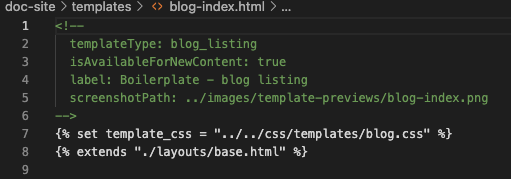
Alternatively, you can choose to have separate templates for [blog post](/cms/start-building/building-blocks/templates/overview#blog-post) and [listing pages](/cms/start-building/building-blocks/templates/overview#blog-listing) which can help make your code cleaner and easier to read as a developer, while making the templates easier to select for content creators. Rather than using the `templateType: blog` annotation at the top of the one template, include the following [annotations](/cms/start-building/building-blocks/templates/overview#template-types) at the top of your two templates:

* **Blog post template:** `templateType: blog_post`
* **Blog listing template:** `templateType: blog_listing`

<Frame>
  <img src="https://www.hubspot.com/hubfs/Knowledge_Base_2021/Developer/template-annotation-blog-listing.png" alt="template-annotation-blog-listing" />
</Frame>

When building separate post and listing templates, the `is_listing_view` check is not required. Instead, you'll manually [select separate templates](https://knowledge.hubspot.com/blog/manage-your-blog-template-and-settings#select-your-blog-templates) within the account's blog settings.

### Listing page templates

The `templateType: blog_listing` annotation makes the template available for [selection under blog settings](https://knowledge.hubspot.com/blog/manage-your-blog-template-and-settings) specifically for the listing view. With this template type, content creators can also edit the listing page within the page editor. By also including [drag and drop areas](/cms/start-building/building-blocks/drag-and-drop/overview) in the template, modules can be added and removed in the page editor like they can for other CMS pages. Check out the [CMS boilerplate blog templates](https://github.com/HubSpot/cms-theme-boilerplate/tree/main/src/templates) to see examples of including drag and drop areas.

The listing of posts is generated by a [for loop](/cms/reference/hubl/loops) that iterates through your blog posts. `contents` is a predefined sequence of content that contains all the posts contained in that blog.

```jinja theme={null}
{% for content in contents %}
    <div class="post-item">
        Post item markup that renders with each iteration.
    </div>
{% endfor %}
```

<Info>
  It's recommended to make all text strings on your blog listing template controlled by fields. This makes it easier to create [multilingual](/cms/start-building/features/multi-language-content) blogs and gives content creators more control.
</Info>

## Create a blog listing module

To display a series of blog post previews, it's recommended to use HubSpot's [default post\_listing module](/cms/reference/modules/default-modules), or build a [for loop](/cms/reference/hubl/loops) that iterates through blog posts.

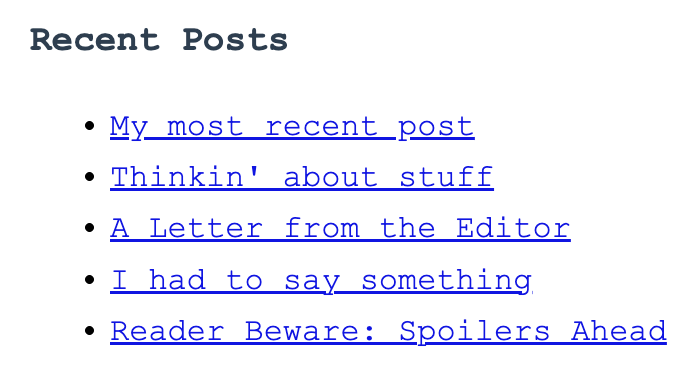
Below is an example implementation of the default `post_listing` module for a blog post template. Based on the included parameters, it would display the most recent posts from the default blog (up to 5) underneath a title of "Recent Posts".

<Frame>
  <img style={{ width:'300px' }} src="https://developers.hubspot.com/hubfs/Knowledge_Base_2023-24-25/developer/example-blog-post-listing-module-implementation.png" alt="Screenshot of an example post_listing module implementation" />
</Frame>

```jinja theme={null}
{% post_listing
  max_links=5
  listing_type="recent",
  select_blog="default",
  list_title="Recent Posts",
%}
```

While HubSpot provides [blog settings](https://knowledge.hubspot.com/blog/manage-your-blog-template-and-settings#select-your-blog-templates) for showing summaries and using featured images, you can also build these features into your module. This enables content creators to set these features within the page editor, rather than blog settings.

## List tags on a blog post

To display a blog post's tags on the post, you can use a [for loop](/cms/reference/hubl/loops) in the blog post template to render the tags when present. As an example, the code below does the following when added to a blog post template:

* If the currently displaying post has blog tags, create a `<div>` to render additional content.
* For each blog tag assigned to the current post, create a link to that tag's listing page, where readers can view other posts with that tag. The link will use the tag's name for display.
* After each tag, add a comma when there are additional tags to display.

Because the code includes the [if statement](/cms/reference/hubl/if-statements) at the top, it will only render on posts that have one or more tags.

```jinja theme={null}
{% if content.tag_list %}
    <div class="blog-post__tags">
      {% for tag in content.tag_list %}
        <a class="blog-post__tag-link" href="{{ blog_tag_url(group.id, tag.slug) }}">{{ tag.name }}</a>{% if not loop.last %},{% endif %}
      {% endfor %}
    </div>
{% endif %}
```

Learn more about HubL blog variables, such as `tag_list`, in the [HubL variables reference documentation](/cms/reference/hubl/variables#blog-variables).

## List authors on a blog post

To display a blog post's authors, use `content.blog_author_list` in the blog post template. This variable returns a list of all authors assigned to a post, including when only one author is set.

The example below renders each author's avatar and display name when the post has one or more authors assigned:

* If `content.blog_author_list` is populated, loop over it to render each author's avatar and display name.
* Use `loop.last` and `loop.revindex` to produce a comma-separated list with "and" before the final author (e.g., "Alice, Bob, and Carol").

```jinja theme={null}
{% if content.blog_author_list %}
  <div class="blog-post-authors">
    <div class="blog-post-authors__avatars">
      {% for author in content.blog_author_list %}
        {% if author.avatar %}
          <img src="{{ author.avatar }}" alt="{{ author.display_name|escape_attr }}" width="48" height="48">
        {% endif %}
      {% endfor %}
    </div>
    <div class="blog-post-authors__names">
      By:
      {% for author in content.blog_author_list %}
        {{ author.display_name|sanitize_html }}{% if not loop.last %}{% if loop.revindex == 2 %} and {% else %}, {% endif %}{% endif %}
      {% endfor %}
    </div>
  </div>
{% endif %}
```

Learn more about `blog_author_list` and related variables in the [HubL variables reference documentation](/cms/reference/hubl/variables#blog-variables).

## Blog author, tag, and simple listing pages

In addition to the blog post and blog listing pages, HubSpot blogs also have pages for blog authors, blog post tags, and simple listing pages. These additional pages use the same template as the blog listing page to render their content.

<Info>
  Because the listing page template is also shared by the blog author, tag, and simple listing page, updates published to the template will also apply to those pages.
</Info>

To configure the layout of these pages individually, you can use `if` statements to conditionally render content for each type of page.

### If blog\_author

Within the standard HubSpot blog listing markup, there is an `if blog_author` statement. This statement evaluates as true when viewing an author's page, which lists the posts published by the author. The boilerplate template includes the author's name, bio, and social media accounts.

```jinja theme={null}
{% if blog_author %}
  <div class="blog-header">
    <div class="blog-header__inner">
      {% if blog_author.avatar %}
      <div class="blog-header__author-avatar" style="background-image: url('{{ blog_author.avatar }}');"></div>
      {% endif %}
      <h1 class="blog-header__title">{{ blog_author.display_name }}</h1>
      <h4 class="blog-header__subtitle">{{ blog_author.bio }}</h4>
      {% if blog_author.has_social_profiles %}
        <div class="blog-header__author-social-links">
          {% if blog_author.website %}
            <a href="{{ blog_author.website }}" target="_blank">
              {% icon name="link" style="SOLID" width="10" %}
            </a>
          {% endif %}
          {% if blog_author.facebook %}
            <a href="{{ blog_author.facebook }}" target="_blank">
              {% icon name="facebook-f" style="SOLID" width="10" %}
            </a>
          {% endif %}
          {% if blog_author.linkedin %}
            <a href="{{ blog_author.linkedin }}" target="_blank">
              {% icon name="linkedin-in" style="SOLID" width="10" %}
            </a>
          {% endif %}
          {% if blog_author.twitter %}
            <a href="{{ blog_author.twitter }}" target="_blank">
              {% icon name="twitter" style="SOLID" width="10" %}
            </a>
          {% endif %}
        </div>
      {% endif %}
    </div>
  </div>
{% else %}
```

### If tag

You can use an `if tag` statement to only render code on a blog tag listing page, which visitors can see when clicking a blog tag on your site. The example below is a snippet that uses the page title variable to automatically print the tag name at the top of a tag listing page.

```jinja theme={null}
{% if tag %}
  <h3>Posts about {{ page_meta.html_title|split(" | ")|last }}</h3>
{% endif %}
```

### If not simple\_list\_page

There are two types of blog listing pages that can be rendered to display blog post listings: the regular listing page, and a simple listing page:

* The regular listing iterates through the number of posts specified by the post listing blog setting and paginates accordingly.
* A simple listing is a listing of all your posts and does not support pagination. The simple listing is not affected by the [post limit blog setting](/cms/start-building/introduction/developer-environment/website-settings#number-of-posts-per-listing-page) and generally just contains links to the most recent 200 blog posts. The address of your simple listing page is the URL for your blog with `/all` added to the end of the path.

You can use an `if not simple_list_page` statement to determine what to render in a simple versus regular listing. A simplified version of this statement is shown below.

<Info>
  Note that the `if` statement uses reverse logic, which means that the `else` defines the simple listing view. Optionally, you could use an [unless statement](/cms/reference/hubl/if-statements#unless-statements) instead.
</Info>

```jinja theme={null}
{% if not simple_list_page %}
    Iterated post markup for regular listing
{% else %}
    <h2 class="post-listing-simple"><a href="{{content.absolute_url}}">{{ content.name }}</a></h2>
{% endif %}
```

## Listing pagination

Blog listing pages have auto-generated pagination. Your listing template can include logic to allow visitors to easily pages through your blog posts. HubSpot provides a default pagination module that you can use to accomplish this. You can find this module in the [`@hubspot` directory of the design manager](/cms/start-building/introduction/developer-environment/design-manager#default-modules-and-themes). This module includes the following HubL and HTML:

```jinja expandable theme={null}
{# Module variables #}

{% if module.numbers.index("show_numbers") >= 0 %}
  {% set show_numbers = true %}
{% endif %}

{% if module.previous_and_next.index("show_labels") >= 0 %}
  {% set show_next_and_previous_labels = true %}
{% endif %}

{% if module.previous_and_next.index("show_arrows") >= 0 %}
  {% set show_next_and_previous_arrows = true %}
{% endif %}

{% if module.first_and_last.index("show_labels") >= 0 %}
  {% set show_first_and_last_labels = true %}
{% endif %}

{% if module.first_and_last.index("show_arrows") >= 0 %}
  {% set show_first_and_last_arrows = true %}
{% endif %}

{% set first_page_link = blog_page_link(1)|cut("/page/1") %}

{# Mock data for editor #}

{% if is_in_editor %}
  {% set total_page_count = 6 %}
  {% set current_page_num = 2 %}
  {% set next_page_num = true %}
  {% set last_page_num = true %}
{% else %}
  {% set total_page_count = contents.total_page_count %}
{% endif %}

{# Module styles #}

{% require_css %}
  <style>
    {% scope_css %}

      {# Pagination #}

      .hs-pagination {
        {{ module.styles.pagination.spacing.spacing.css }}
      }

      .hs-pagination__link:not(:last-child) {
        margin-right: {{ module.styles.pagination.spacing.space_between_links ~ "px" }};
      }

      {# Numbers #}

      {% if show_numbers %}

        .hs-pagination__link--number {
          {% if module.styles.numbers.background.color.color %}
            background-color: rgba({{ module.styles.numbers.background.color.color|convert_rgb }}, {{ module.styles.numbers.background.color.opacity / 100 }});
          {% endif %}
          {{ module.styles.numbers.border.border.css }}
          {% if module.styles.numbers.corner.radius >= 0 %}
            border-radius: {{ module.styles.numbers.corner.radius ~ "px" }};
          {% endif %}
          {{ module.styles.numbers.text.font.css }}
          {{ module.styles.numbers.spacing.spacing.css }}
        }

        .hs-pagination__link--active {
          {% if module.styles.numbers.active.background.color.color %}
            background-color: rgba({{ module.styles.numbers.active.background.color.color|convert_rgb }}, {{ module.styles.numbers.active.background.color.opacity / 100 }});
          {% endif %}
          {% if module.styles.numbers.active.border.color.color %}
            border-color: {{ module.styles.numbers.active.border.color.color }};
          {% endif %}
          {% if module.styles.numbers.active.text.color.color %}
            color: {{ module.styles.numbers.active.text.color.color }};
          {% endif %}
        }

        .hs-pagination__link--number:hover,
        .hs-pagination__link--number:focus {
          {% if module.styles.numbers.hover.background.color.color %}
            background-color: rgba({{ module.styles.numbers.hover.background.color.color|convert_rgb }}, {{ module.styles.numbers.hover.background.color.opacity / 100 }});
          {% endif %}
          {% if module.styles.numbers.hover.border.color.color %}
            border-color: {{ module.styles.numbers.hover.border.color.color }};
          {% endif %}
          {% if module.styles.numbers.hover.text.color.color %}
            color: {{ module.styles.numbers.hover.text.color.color }};
          {% endif %}
        }

      {% endif %}

      {# Next/previous #}

      {% if show_next_and_previous_arrows or show_next_and_previous_labels %}
        .hs-pagination__link--prev,
        .hs-pagination__link--next {
          {% if module.styles.previous_and_next.background.color.color %}
            background-color: rgba({{ module.styles.previous_and_next.background.color.color|convert_rgb }}, {{ module.styles.previous_and_next.background.color.opacity / 100 }});
          {% endif %}
          {{ module.styles.previous_and_next.border.border.css }}
          {% if module.styles.previous_and_next.corner.radius >= 0 %}
            border-radius: {{ module.styles.previous_and_next.corner.radius ~ "px" }};
          {% endif %}
          {{ module.styles.previous_and_next.spacing.spacing.css }}
        }

        .hs-pagination__link--prev:hover,
        .hs-pagination__link--prev:focus,
        .hs-pagination__link--next:hover,
        .hs-pagination__link--next:focus {
          {% if module.styles.previous_and_next.hover.background.color.color %}
            background-color: rgba({{ module.styles.previous_and_next.hover.background.color.color|convert_rgb }}, {{ module.styles.previous_and_next.hover.background.color.opacity / 100 }});
          {% endif %}
          {% if module.styles.previous_and_next.hover.border.color.color %}
            border-color: {{ module.styles.previous_and_next.hover.border.color.color }};
          {% endif %}
        }

        {% if show_next_and_previous_labels %}
          .hs-pagination__link--prev > .hs-pagination__link-text,
          .hs-pagination__link--next > .hs-pagination__link-text {
            {{ module.styles.previous_and_next.text.font.css }}
          }

          {% if module.styles.previous_and_next.hover.text.color.color %}
            .hs-pagination__link--prev:hover > .hs-pagination__link-text,
            .hs-pagination__link--prev:focus > .hs-pagination__link-text,
            .hs-pagination__link--next:hover > .hs-pagination__link-text,
            .hs-pagination__link--next:focus > .hs-pagination__link-text {
              color: {{ module.styles.previous_and_next.hover.text.color.color }};
            }
          {% endif %}
        {% endif %}

        {% if show_next_and_previous_arrows and show_next_and_previous_labels %}
          {% if module.styles.previous_and_next.spacing.space_between_text_and_icon >= 0 %}
            .hs-pagination__link--text-and-icon.hs-pagination__link--prev > .hs-pagination__link-icon {
              margin-right: {{ module.styles.previous_and_next.spacing.space_between_text_and_icon ~ "px" }};
            }
          {% endif %}

          {% if module.styles.previous_and_next.spacing.space_between_text_and_icon >= 0 %}
            .hs-pagination__link--text-and-icon.hs-pagination__link--next > .hs-pagination__link-icon {
              margin-left: {{ module.styles.previous_and_next.spacing.space_between_text_and_icon ~ "px" }};
            }
          {% endif %}
        {% endif %}

        {% if show_next_and_previous_arrows %}
          .hs-pagination__link--prev > .hs-pagination__link-icon svg,
          .hs-pagination__link--next > .hs-pagination__link-icon svg {
            {% if module.styles.previous_and_next.icon.size %}
              height: {{ module.styles.previous_and_next.icon.size ~ "px" }};
              width: {{ module.styles.previous_and_next.icon.size ~ "px" }};
            {% endif %}
            {% if module.styles.previous_and_next.text.font.color %}
              fill: {{ module.styles.previous_and_next.text.font.color }};
            {% endif %}
          }

          {% if module.styles.previous_and_next.hover.text.color.color %}
            .hs-pagination__link--prev:hover > .hs-pagination__link-icon svg,
            .hs-pagination__link--prev:focus > .hs-pagination__link-icon svg,
            .hs-pagination__link--next:hover > .hs-pagination__link-icon svg,
            .hs-pagination__link--next:focus > .hs-pagination__link-icon svg {
              fill: {{ module.styles.previous_and_next.hover.text.color.color }};
            }
          {% endif %}
        {% endif %}
      {% endif %}

      {# First/last #}

      {% if show_first_and_last_arrows or show_first_and_last_labels %}
        .hs-pagination__link--first,
        .hs-pagination__link--last {
          {% if module.styles.first_and_last.background.color.color %}
            background-color: rgba({{ module.styles.first_and_last.background.color.color|convert_rgb }}, {{ module.styles.first_and_last.background.color.opacity / 100 }});
          {% endif %}
          {{ module.styles.first_and_last.border.border.css }}
          {% if module.styles.first_and_last.corner.radius >= 0 %}
            border-radius: {{ module.styles.first_and_last.corner.radius ~ "px" }};
          {% endif %}
          {{ module.styles.first_and_last.spacing.spacing.css }}
        }

        .hs-pagination__link--first:hover,
        .hs-pagination__link--first:focus,
        .hs-pagination__link--last:hover,
        .hs-pagination__link--last:focus {
          {% if module.styles.first_and_last.hover.background.color.color %}
            background-color: rgba({{ module.styles.first_and_last.hover.background.color.color|convert_rgb }}, {{ module.styles.first_and_last.hover.background.color.opacity / 100 }});
          {% endif %}
          {% if module.styles.first_and_last.hover.border.color.color %}
            border-color: {{ module.styles.first_and_last.hover.border.color.color }};
          {% endif %}
        }

        {% if show_first_and_last_labels %}
          .hs-pagination__link--first > .hs-pagination__link-text,
          .hs-pagination__link--last > .hs-pagination__link-text {
            {{ module.styles.first_and_last.text.font.css }}
          }

          {% if module.styles.first_and_last.hover.text.color.color %}
            .hs-pagination__link--first:hover > .hs-pagination__link-text,
            .hs-pagination__link--first:focus > .hs-pagination__link-text,
            .hs-pagination__link--last:hover > .hs-pagination__link-text,
            .hs-pagination__link--last:focus > .hs-pagination__link-text {
              color: {{ module.styles.first_and_last.hover.text.color.color }};
            }
          {% endif %}
        {% endif %}

        {% if show_first_and_last_arrows and show_first_and_last_labels %}
          {% if module.styles.first_and_last.spacing.space_between_text_and_icon >= 0 %}
            .hs-pagination__link--text-and-icon.hs-pagination__link--first > .hs-pagination__link-icon {
              margin-right: {{ module.styles.first_and_last.spacing.space_between_text_and_icon ~ "px" }};
            }
          {% endif %}

          {% if module.styles.first_and_last.spacing.space_between_text_and_icon >= 0 %}
            .hs-pagination__link--text-and-icon.hs-pagination__link--last > .hs-pagination__link-icon {
              margin-left: {{ module.styles.first_and_last.spacing.space_between_text_and_icon ~ "px" }};
            }
          {% endif %}
        {% endif %}

        {% if show_first_and_last_arrows %}
          .hs-pagination__link--first > .hs-pagination__link-icon svg,
          .hs-pagination__link--last > .hs-pagination__link-icon svg {
            {% if module.styles.first_and_last.icon.size %}
              height: {{ module.styles.first_and_last.icon.size ~ "px" }};
              width: {{ module.styles.first_and_last.icon.size ~ "px" }};
            {% endif %}
            {% if module.styles.first_and_last.text.font.color %}
              fill: {{ module.styles.first_and_last.text.font.color }};
            {% endif %}
          }

          {% if module.styles.first_and_last.hover.text.color.color %}
            .hs-pagination__link--first:hover > .hs-pagination__link-icon svg,
            .hs-pagination__link--first:focus > .hs-pagination__link-icon svg,
            .hs-pagination__link--last:hover > .hs-pagination__link-icon svg,
            .hs-pagination__link--last:focus > .hs-pagination__link-icon svg {
              fill: {{ module.styles.first_and_last.hover.text.color.color }};
            }
          {% endif %}
        {% endif %}
      {% endif %}

    {% end_scope_css %}
  </style>
{% end_require_css %}

{# Pagination #}

{% if total_page_count > 1 %}
  <nav aria-label="{{ module.default_text.pagination_navigation|escape_attr }}" role="navigation" class="hs-pagination">
    {# First page link #}

    {% if last_page_num and (show_first_and_last_arrows or show_first_and_last_labels) %}
      <a
        class="hs-pagination__link hs-pagination__link--first {{ "hs-pagination__link--text-and-icon" if show_first_and_last_arrows and show_first_and_last_labels }}"
        href="{{ first_page_link|escape_url }}"
      >
        {% if show_first_and_last_arrows %}
          {% icon "hs_first_icon"
            extra_classes="hs-pagination__link-icon",
            name="angle-double-left",
            purpose="decorative",
            style="SOLID",
            unicode="f100" %}
        {% endif %}
        {% if show_first_and_last_labels %}
          <span class="hs-pagination__link-text hs-pagination__show-for-sr--mobile">
            {{ module.first_label|sanitize_html }}
          </span>
        {% endif %}
      </a>
    {% endif %}

    {# Previous page link #}

    {% if last_page_num and (show_next_and_previous_arrows or show_next_and_previous_labels) %}
      {% set last_blog_page_link = blog_page_link(last_page_num) %}
      {% set prev_page_link = current_page_num == 2 ? first_page_link : last_blog_page_link %}
      <a
        class="hs-pagination__link hs-pagination__link--prev {{ "hs-pagination__link--text-and-icon" if show_next_and_previous_arrows and show_next_and_previous_labels }}"
        href="{{ prev_page_link|escape_url }}"
      >
        {% if show_next_and_previous_arrows %}
          {% icon "hs_previous_icon"
            extra_classes="hs-pagination__link-icon",
            name="angle-left",
            purpose="decorative",
            style="SOLID",
            unicode="f104" %}
        {% endif %}
        {% if show_next_and_previous_labels %}
          <span class="hs-pagination__link-text hs-pagination__show-for-sr--mobile">
            {{ module.previous_label|sanitize_html }}
          </span>
        {% endif %}
      </a>
    {% endif %}

    {# Numbered pagination #}

    {% if show_numbers %}

      {% set current_page_count = total_page_count - current_page_num %}

      {% set page_list = [ -2, -1, 0, 1, 2] %}

      {% if current_page_count == 1 %}
        {% set offset = -1 %}
      {% elif current_page_count == 0 %}
        {% set offset = -2 %}
      {% elif current_page_num == 2 %}
        {% set offset = 1 %}
      {% elif current_page_num == 1 %}
        {% set offset = 2 %}
      {% else %}
        {% set offset = 0 %}
      {% endif %}

      {% for page in page_list %}
      {% set this_page = current_page_num + page + offset %}
      {% if this_page > 0 and this_page <= total_page_count %}
      {% set not_first_blog_page_link = blog_page_link(this_page) %}
      {% set this_page_link = (this_page == 1) ? first_page_link : not_first_blog_page_link %}
        <a
          class="hs-pagination__link hs-pagination__link--number {{ "hs-pagination__link--active" if this_page == current_page_num }}"
          aria-label="{{ module.default_text.go_to_page }}"
          {{ "aria-current=\"true\"" if this_page == current_page_num }}
          href="{{ this_page_link|escape_url }}"
          >
            {{ this_page|escape_html }}
          </a>
      {% endif %}
      {% endfor %}

    {% endif %}

    {# Next page link #}

    {% if next_page_num and (show_next_and_previous_arrows or show_next_and_previous_labels) %}
      <a
        class="hs-pagination__link hs-pagination__link--next {{ "hs-pagination__link--text-and-icon" if show_next_and_previous_arrows and show_next_and_previous_labels }}"
        href="{{ blog_page_link(current_page_num + 1)|escape_url }}"
      >
        {% if show_next_and_previous_labels %}
          <span class="hs-pagination__link-text hs-pagination__show-for-sr--mobile">
            {{ module.next_label|sanitize_html }}
          </span>
        {% endif %}
        {% if show_next_and_previous_arrows %}
          {% icon "hs_next_icon"
            extra_classes="hs-pagination__link-icon",
            name="angle-right",
            purpose="decorative",
            style="SOLID",
            unicode="f105" %}
        {% endif %}
      </a>
    {% endif %}

    {# Last page link #}

    {% if next_page_num and (show_first_and_last_arrows or show_first_and_last_labels) %}
      <a
        class="hs-pagination__link hs-pagination__link--last {{ "hs-pagination__link--text-and-icon" if show_first_and_last_arrows and show_first_and_last_labels }}"
        href="{{ blog_page_link(total_page_count)|escape_url }}"
      >
        {% if show_first_and_last_labels %}
          <span class="hs-pagination__link-text hs-pagination__show-for-sr--mobile">
            {{ module.last_label|sanitize_html }}
          </span>
        {% endif %}
        {% if show_first_and_last_arrows %}
          {% icon "hs_last_icon"
            extra_classes="hs-pagination__link-icon",
            name="angle-double-right",
            purpose="decorative",
            style="SOLID",
            unicode="f101" %}
        {% endif %}
      </a>
    {% endif %}
  </nav>
{% endif %}

```

## Boilerplate markup

Below, view the boilerplate markup for the blog post and blog listing page templates. You can also view this markup in the CMS boilerplate on GitHub, as listed in each section.

### Post template markup

All blog posts in a blog are generated by a single blog template. Below is the blog post template from the default Elevate theme. Note that the template uses the `content.blog_author_list` variable to enable multiple authors to be configured for each post.

[View this template's source code in GitHub](https://github.com/HubSpot/cms-elevate-theme-public/blob/main/src/unified-theme/templates/blog-detail.hubl.html)

```jinja expandable theme={null}
<!--
  templateType: blog_post
  isAvailableForNewContent: true
  label: Blog post
  screenshotPath: '../images/template-previews/blog-post.png'
-->
{% set template_css = "../../assets/dist/css/blog.hubl.css" %}
{% extends "./layouts/base.hubl.html" %}

{% block body %}

<div class="hs-elevate-content-wrapper">

  {% if content.featured_image %}
    <div class="hs-elevate-blog-image-container">
      <img src="{{ content.featured_image|escape_attr }}" alt="{{ content.featured_image_alt_text|escape_attr }}" width="{{ content.featured_image_width|escape_attr }}" height="{{ content.featured_image_height|escape_attr }}">
    </div>
  {% endif %}

  <section class="hs-elevate-blog-content-container hs-elevate-content-wrapper hs-elevate-content-wrapper--sm">
    {% if content.topic_list|length > 0 %}
      <div class="hs-elevate-blog-tags-container">
        {% for topic in content.topic_list %}
          {% if loop.index <= 3 %}
            <span class='hs-elevate-tag'>{{ topic.name|sanitize_html }}</span>
          {% endif %}
        {% endfor %}
      </div>
    {% endif %}

    <h1 class="hs-elevate-blog-title">{{ content.name|sanitize_html }}</h1>

    {% set authors_to_display = content.blog_author_list if content.blog_author_list and content.blog_author_list|length > 0 else [content.blog_author] if content.blog_author else [] %}
    {% if authors_to_display and authors_to_display|length > 0 %}
      <div class="hs-elevate-blog-meta">
        <div class="hs-elevate-blog-meta__avatars">
          {% for author in authors_to_display %}
            <div class="hs-elevate-blog-meta__image-container">
              <img src="{{ author.avatar or get_asset_url('../images/avatar-placeholder.jpg') }}" alt="{{ author.display_name|escape_attr }}" width="48" height="48">
            </div>
          {% endfor %}
        </div>

        <div class="hs-elevate-blog-meta__content">
          <div class="hs-elevate-blog-meta__authors">
            {% for author in authors_to_display %}
              {% if author.display_name %}
                {{ author.display_name|sanitize_html }}{% if not loop.last %}{% if loop.revindex == 2 %}, and {% else %}, {% endif %}{% endif %}
              {% endif %}
            {% endfor %}
          </div>
        </div>
      </div>

      {% if content.publish_date %}
        <div class="hs-elevate-blog-meta__date-container">
          <time datetime="{{ content.publish_date }}" class="hs-elevate-blog-meta__date">{{ content.publish_date|format_date('long') }}</time>
        </div>
      {% endif %}
    {% endif %}

    <div class="hs-elevate-blog-audio-narration">
      {% module "narration"
        path="@hubspot/blog_audio",
        overrideable=False
      %}
    </div>

    <div class="hs-elevate-blog-content ">
      {{ content.post_body }}
    </div>

    <div class="hs-elevate-blog-share">
      {% module "blog-share-heading-2" path="../components/modules/Heading"
        headingAndTextHeadingLevel="h2",
        headingAndTextHeading={{ template_translations.blog_post_share_post_heading.message }},
        groupStyle={
          "alignment": {
            "text_align": "CENTER"
          },
          "headingStyleVariant": "h5",
          "sectionStyleVariant": "section_variant_1"
        }
      %}

      {% module "social_share" path="../components/modules/SocialShare"
        groupStyle={
          buttonStyleVariant: "secondary",
          spaceBetweenIcons: "small"
        }
      %}
    </div>

  </section>

  {% set rec_posts = blog_recent_posts(group.id, 3) %}
  {% set posts_to_use = [] %}
  {% for post in rec_posts %}
    {% do posts_to_use.append(post) if post.id != content.id and posts_to_use|length < 2 %}
  {% endfor %}

  {% macro build_recent_post(post) %}
    <article class="hs-elevate-card--recent-post hs-elevate-card--variant-2">
      <a class="hs-elevate-card--recent-post__link" href="{{ post.absolute_url|escape_url }}">
        {% if group.use_featured_image_in_summary %}
          <div class="hs-elevate-card--recent-post__image-container">
            <img src="{{ post.featured_image|escape_url }}" alt="{{ post.featured_image_alt_text|escape_attr }}" width="{{ post.featured_image_width|escape_attr }}" height="{{ post.featured_image_height|escape_attr }}">
          </div>
        {% endif %}

        <div class="hs-elevate-card--recent-post__content-container">
        {% if post.topic_list|length > 0 %}
          <div class="hs-elevate-card--recent-post__tag-container">
            {% for topic in post.topic_list %}
              {% if loop.index <= 3 %}
                <span class='hs-elevate-tag'>{{ topic.name|sanitize_html }}</span>
              {% endif %}
            {% endfor %}
          </div>
          {% endif %}

          <h3 class="hs-elevate-card--recent-post__title">{{ post.title|sanitize_html }}</h3>

        </div>
      </a>
    </article>
  {% endmacro %}
</div>

{% if group.allow_comments %}
  <section class="hs-elevate-content-wrapper hs-elevate-blog-comments-container">
    <div class="hs-elevate-content-wrapper hs-elevate-content-wrapper--sm">
      {% module "blog_comments" path="@hubspot/blog_comments" %}
    </div>
  </section>
{% endif %}


{% if posts_to_use|length > 0 %}
 <section class="hs-elevate-blog-recent-posts">
  <div class="hs-elevate-content-wrapper">
    <h2 class="hs-elevate-blog-recent-posts__heading">{{ template_translations.blog_post_recent_posts_heading.message }}</h2>
    <div class=" hs-elevate-blog-recent-posts__card-container">
      {% for post in posts_to_use %}
        {{ build_recent_post(post) }}
      {% endfor %}
    </div>
  </div>
  </section>
{% endif %}
{% endblock %}
```

### Listing template markup

Below is the blog listing template from the default Elevate theme. Note that it uses the `BlogListing` module that's included in the theme to render blog post previews in cards.

**View source code in GitHub:**

* [Blog listing template](https://github.com/HubSpot/cms-elevate-theme-public/blob/main/src/unified-theme/templates/blog-listing.hubl.html)
* [BlogListing module](https://github.com/HubSpot/cms-elevate-theme-public/tree/main/src/unified-theme/components/modules/BlogListing)

```jinja theme={null}
<!--
  templateType: blog_listing
  isAvailableForNewContent: true
  label: Blog listing
  screenshotPath: '../images/template-previews/blog-listing.png'
-->
{% extends "./layouts/base.hubl.html" %}

{% block body %}

{% dnd_area 'main'%}
  {% dnd_section
    padding={
      "default" : {
        "bottom" : spacing_32
      }
    }
  %}
    {% dnd_column
    %}
      {% dnd_row %}
        {% dnd_module
          path="../components/modules/Heading",
          groupStyle={
            "alignment" : {
              "text_align" : "CENTER"
            }
          },
          headingAndTextHeading={{ group.public_title }}
        %}
        {% end_dnd_module %}
      {% end_dnd_row %}
      {% dnd_row %}
        {% dnd_module
          path="../components/modules/RichText",
        %}
          {% module_attribute "richTextContentHTML" %}
            <p style="text-align: center;">{{ template_translations.blog_listing_page_description.message }}</p>
          {% end_module_attribute %}
        {% end_dnd_module %}
      {% end_dnd_row %}
    {% end_dnd_column %}
  {% end_dnd_section %}

  {% dnd_section
    padding={
      "default" : {
        "top" : spacing_32
      }
    }
  %}
    {% dnd_column
    %}
      {% dnd_row %}
        {% dnd_module
          path="../components/modules/BlogListing",
        %}
        {% end_dnd_module %}
      {% end_dnd_row %}
    {% end_dnd_column %}
  {% end_dnd_section %}

{% end_dnd_area %}

{% endblock %}
```

<Tip>
  For more post listing options, check out the following HubL tags:

  * [Blog related posts](/cms/reference/hubl/tags/standard-tags#blog-related-posts)
  * [Blog post filter](/cms/reference/hubl/tags/standard-tags#blog-post-filter)
  * [Blog post listing](/cms/reference/hubl/tags/standard-tags#blog-post-listing)
</Tip>

## Related resources

* [Blog variables](/cms/reference/hubl/variables#blog-variables)
* [HubSpot CMS boilerplate](/cms/start-building/building-blocks/themes/hubspot-cms-boilerplate)
* [How to create a blog](https://knowledge.hubspot.com/blog/create-a-new-blog)
* [Import your blog into HubSpot](https://knowledge.hubspot.com/blog/import-your-content-into-hubspot)