> ## Documentation Index
> Fetch the complete documentation index at: https://developers.hubspot.com/docs/llms.txt
> Use this file to discover all available pages before exploring further.
---
id: e96d2270-662f-4550-873f-8271c18d2712
---
# HTML + HubL Templates
> HubSpot CMS templates are written in HTML and HubL. These templates are capable of containing regions that are friendly for content creators to edit themselves.
HTML + HubL templates can be used for [every type of template](/docs/cms/start-building/building-blocks/templates/overview#template-types) on the HubSpot CMS. These templates are `.html` files that support the [HubL templating language](/docs/cms/reference/hubl/overview). Because these coded templates support HubL the best previewing experience is using the [template preview in the Design Manager](https://knowledge.hubspot.com/cos-general/review-your-hubspot-template-setup) or viewing pages on a sandbox account. HTML + HubL templates can contain [partials](#partials), which can be used to separate commonly used chunks of code, such as a header or footer.
HTML + HubL templates give greater control to developers than [visual design manager drag and drop templates](/docs/cms/start-building/building-blocks/drag-and-drop/drag-and-drop-templates). Developers in-turn can provide better experiences for content creators through [drag and drop functionality](/docs/cms/reference/hubl/tags/dnd-areas), which is only possible with HTML + HubL templates.
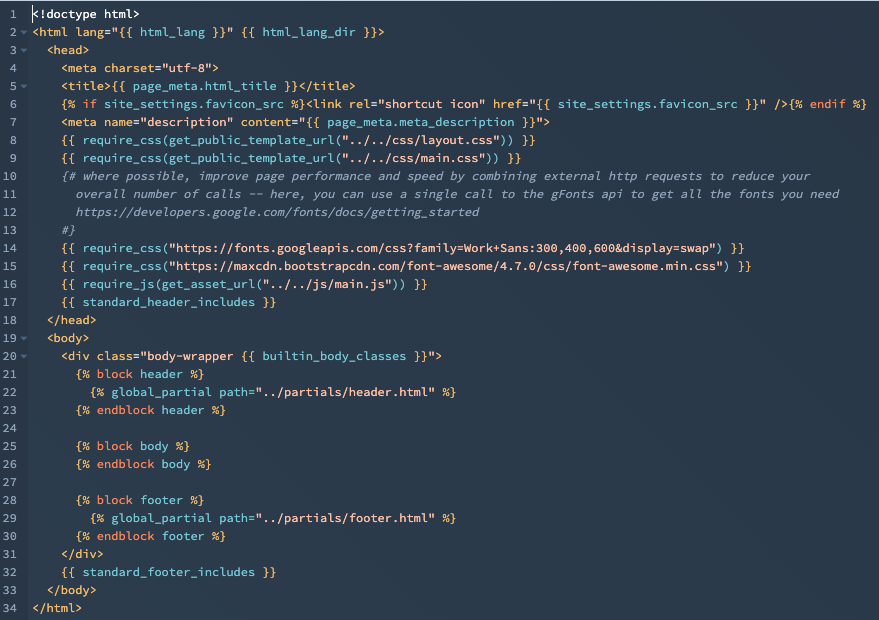
The above template is the [base.html template](https://github.com/HubSpot/cms-theme-boilerplate/blob/main/src/templates/layouts/base.html) included in the [HubSpot CMS boilerplate](/docs/cms/start-building/building-blocks/themes/hubspot-cms-boilerplate), which is a great way to get started developing with HubSpot.
## Familiarity and tooling
Since HTML + HubL templates are coded files, you can use your preferred tools to edit them locally. It's recommended to use HubSpot's own [local development tools](/docs/developer-tooling/local-development/hubspot-cli/reference) so that you can [upload](/docs/developer-tooling/local-development/hubspot-cli/reference#upload), [fetch](/docs/developer-tooling/local-development/hubspot-cli/reference#fetch), [watch](/docs/developer-tooling/local-development/hubspot-cli/reference#watch), [create](/docs/developer-tooling/local-development/hubspot-cli/reference#create-new-files) and otherwise securely manage files in the developer file system as well as the file manager.
Building HTML + HubL templates with HubSpot is similar to using other templating language you may have used before. The core difference is that HubSpot takes an opinionated stance on the best ways to do some things to offer the best experience for content creators, and also takes much of the maintenance and performance optimization work off of the developer.
For example, if you want to load CSS file on a page for certain modules, instead of using ``, you should include the stylesheet through `css_assets` in the [module's meta.json file](/docs/cms/reference/modules/configuration#adding-css-and-javascript-dependencies). This enables HubSpot to conditionally load the CSS only when the module is present on a page, minimizing the amount of unnecessary CSS loaded.
Learn more about [optimizing your HubSpot development workflow](/docs/cms/start-building/introduction/developer-environment/creating-an-efficient-development-workflow).
## Template annotations
Template annotations, included at the top of a template, configure important template settings, such as the template type and whether it can be used to create new content. Template annotations can be changed at any time during the development process. Below, learn more about available template annotations.
```html theme={null}
...
```
| Annotation | Type | Description |
| -------------------------- | ------ | ---------------------------------------------------------------------------------------------------------------------------------------------------------------------------------------------------------------------------------------------------------------------------------------------------------------------------------------------------------------------------------------------------------------------------------------------------------------------------------------------------------------------------------------------------------------------------------------------------------------------------------------------------------------------------------------------------------------------------------------------------------------------------------------------------------------------------------------------------------------------------------------------------------------------------------------------------------------------------------------------------------------------------------------------------------------------------------------------------------------------------------------------------------------------------------------------------------------------------------------------------------------------------------------------------------------------------------------------------------------------------------------------------------------------------------------------------------------------------------------------------------------------------------------------------------------------------------------------------------------------------------------------------------------------------------------------------------------------------------------------------------------------------------------------------------------------------------------------------------------------------------------------------------------------- |
| `templateType` | String | Specifies which template type a file is. Values include:
|
| `isAvailableForNewContent` | String | Specifies if a template is available for selection in the content creation process. Values include: `true`, `false`.Templates set to `false` do not need to include the [required variables](/docs/cms/reference/hubl/variables#required-page-template-variables). Templates of the `page` type that are set to false can also be used as [standard partials](#partials). |
| `enableDomainStylesheets` | String | Specifies if the template should load [domain stylesheets](https://knowledge.hubspot.com/design-manager/create-edit-and-attach-css-files-to-style-your-site#attach-or-remove-stylesheets-on-a-domain-level). Values include: `true`, `false`. |
| `Label` | String | User-friendly description of the template, displayed in the template selection screen. For example, `About Page`, `Homepage`, `Pricing`. |
| `screenshotPath` | String | The screenshot to display when a content creator is selecting a template. This screenshot should make it easy to differentiate between your templates. |
## Header and footer includes
HubSpot's templates require two tags to be present unless the file is a template partial. The two tags are:
* `{{ standard_header_includes }}` - Used to intelligently add combined and minified required CSS.
* `{{ standard_footer_includes }}` - Used to intelligently add javascript to the bottom of a page dynamically, for things like the HubSpot tracking script, and modules.
These tags must be present in a template or it's [partial](#partials) children to be published and used.
## Partials
Template partials are HTML + HubL files that can be included in other coded files. Partials enable you to take a more modular approach by sharing markup between multiple templates. For example, a header can be made into a partial so that you can easily include it as a component without needed to code it again.
### Standard partials
A standard partial is a reusable template or component containing content that can be edited on individual pages. This enables content creators to change the content as needed, as opposed to global partials which always share content. For example, the following code would pull the sidebar module into another template file.
Standard partials must include the following [annotations](/docs/cms/start-building/building-blocks/templates/html-hubl-templates#template-annotations) at the top of the template file:
* `templateType: page`
* `isAvailableForNewContent: false`
```hubl theme={null}
{% include "../partial/sidebar.html" %}
```
### Global partials
A global partial is a type of [global content](/docs/cms/start-building/building-blocks/global-content#global-partials) that can be used across multiple templates with content that is shared across all instances of the partial. Global partials are often used for headers and footers, which you can see an example of in the HubSpot CMS Boilerplate [header](https://github.com/HubSpot/cms-theme-boilerplate/blob/main/src/templates/partials/header.html) and [footer](https://github.com/HubSpot/cms-theme-boilerplate/blob/master/src/templates/partials/footer.html). These partials are then called in [base.html](https://github.com/HubSpot/cms-theme-boilerplate/blob/master/src/templates/layouts/base.html) using the `global_partial` tag.
Global partials must include the [annotation](/docs/cms/start-building/building-blocks/templates/html-hubl-templates#template-annotations) `templateType: global_partial` at the top of the file.
```hubl theme={null}
{% global_partial path="../partials/header.html" %}
```
### Blocks and extends
When creating complex templates, you can create compartmentalized blocks that extend a parent template.
For example, you can create a parent template that includes the required [`standard_header_includes`](/docs/cms/reference/hubl/variables#required-page-template-variables) and [`standard_footer_includes`](/docs/cms/reference/hubl/variables#required-page-template-variables) variables. Within that template, you define a unique block using the following syntax where `body` is a unique name:
```hubl theme={null}
{% block body %}
{% endblock body %}
```
Then, in the child template, you can extend the parent template, then insert more content into the `body` block.
```hubl theme={null}
{% extends "./layouts/base.html" %}
{% block body %}
Page Content
Bullet 1
Bullet 2
Bullet 3
{% endblock %}
```
This method is used in the [base.html](https://github.com/HubSpot/cms-theme-boilerplate/blob/main/src/templates/layouts/base.html) template of the HubSpot CMS boilerplate, which then is extended by the other templates in the [templates folder](https://github.com/HubSpot/cms-theme-boilerplate/tree/main/src/templates).
### Global groups
[Global groups](https://knowledge.hubspot.com/cms-general/use-global-content-across-multiple-templates) created using the drag and drop template builder in the Design Manager, can also be included. The syntax is displayed below:
```hubl theme={null}
{% include "/path/to/global_header.template.json" %}
```