> ## Documentation Index
> Fetch the complete documentation index at: https://developers.hubspot.com/docs/llms.txt
> Use this file to discover all available pages before exploring further.
---
id: 8860a424-7748-494d-892c-19f13861be38
---
# CRM objects in CMS pages
> CRM objects can be queried and rendered on HubSpot hosted content, allowing data to be shared between your business operations, website, and emails.
You can query CRM objects to use data from the object's records on HubSpot hosted content, allowing data to be shared between your business operations, website, and emails. Using the [`crm_object`](/cms/reference/hubl/functions#crm-object), [`crm_objects`](/cms/reference/hubl/functions#crm-objects) and [`crm_associations`](/cms/reference/hubl/functions#crm-associations) HubL functions, you can display and control logic based on your CRM object data.
Using CRM data on your website means that your sales, marketing, and website data all live in the same place and will always reflect the same information. In addition, because you can associate CRM records with one another, you can also pull in associated data onto your website pages.
Similarly, you can [create sets of dynamic pages that automatically generate using CRM object or HubDB data](/cms/start-building/features/data-driven-content/crm-objects).
You can learn more about building data-based CMS pages in HubSpot Academy's [CMS Data-Driven Content course](https://app.hubspot.com/academy/tracks/1148948/intro).
### Example use case
One example of using CRM object data in pages is a real estate listing page. With a custom object called *property*, individual object records can be created for each house that needs to be listed. Real estate agents can then add information to object properties to store details, such as location, number of bedrooms, and asking prices.
Website pages can then pull in that record data for each property to create a listing page and details pages for each property.
[Check out the GitHub repo](https://github.com/HubSpot/cms-custom-objects-example) to view the full example.
For an overview of this example, check out the [recording of HubSpot Developer Day 2020](https://developers.hubspot.com/community/developer-day-2020).
## Supported CRM object types
Below are the types of CRM objects that you can pull data from for your CMS pages. Whether you can use the data across all pages or only on private pages depends on the object type.
In the tables below, learn about which object types are available for CMS content along with their object type names and fully qualified names.
### CRM object data available for all pages
Data from the following CRM objects can be used on any CMS page.
| Object type | object\_type\_name | Fully qualified name |
| -------------------------------------------------------------------------- | ---------------------------------------------------------------------------------------------------------------------------------------------------------------------------------------------------------------------------------------------------------------------------------------------------------------------------------------------------------------------------------------------------------------------------------------------------------------------------------------------------------------------------------------------------------------------------------------------------------------------------------------------------------------------------------------------------------------- | -------------------- |
| [Products](/api-reference/latest/crm/objects/products/guide) | `product` | `PRODUCT` |
| [Marketing events](/api-reference/latest/marketing/marketing-events/guide) | `marketing_event` | `MARKETING_EVENT` |
| [Custom objects](/api-reference/latest/crm/objects/custom-objects/guide) | ***Content Hub** Enterprise* only. You can either use the object's [fully qualified name](/cms/start-building/features/data-driven-content/crm-objects#getting-a-custom-object-type-s-details), or the name that was entered at the time of creation. For example, if you create an object named `Cars`, you cannot reference it with `cars` or `Car`.You must use the [fully qualified name](/cms/start-building/features/data-driven-content/crm-objects#getting-a-custom-object-type-s-details) if the custom object shares a name with a standard object. It's also strongly recommended to use the FQN if the object name is fully uppercased to avoid potential conflicts with HubSpot's standard objects. | |
### CRM object data available for private pages
Data from the following CRM objects can be used only on pages that require either a [password](https://knowledge.hubspot.com/website-pages/password-protect-a-page) or a [membership login.](https://knowledge.hubspot.com/website-pages/require-member-registration-to-access-private-content)
| Object type | object\_type\_name | Fully qualified name |
| ---------------------------------------------------------------- | ------------------ | -------------------- |
| [Contacts](/api-reference/latest/crm/objects/contacts/guide) | `contact` | `CONTACT` |
| [Companies](/api-reference/latest/crm/objects/companies/guide) | `company` | `COMPANY` |
| [Deals](/api-reference/latest/crm/objects/deals/guide) | `deal` | `DEAL` |
| [Tickets](/api-reference/latest/crm/objects/tickets/guide) | `ticket` | `TICKET` |
| [Quotes](/api-reference/latest/crm/objects/quotes/guide) | `quote` | `QUOTE` |
| [Line items](/api-reference/latest/crm/objects/line-items/guide) | `line_item` | `LINE_ITEM` |
## Display data from a single CRM record with the crm\_object function
Use the [`crm_object`](/cms/reference/hubl/functions#crm-object) function to get a single record from the HubSpot CRM by query or by CRM record ID.
Object records are returned as a dict of properties and values.
```jinja theme={null}
{# Render custom object by query #}
{% set event = crm_object("event", "name=Defensive Health") %}
{{ event.name }}
{# Render custom objects specifying the id of the object #}
{% set event = crm_object("event", 289236) %}
{{ event.name }}
```
```html theme={null}
Defensive Health
Defensive Health
```
If a query returns a collection of records, the function will return the first record in the collection.
## Display data from multiple CRM records with the crm\_objects function
Use the [`crm_objects()`](/cms/reference/hubl/functions#crm-objects) function to get CRM records by object type from the HubSpot CRM by query or by record ID. Records are returned as a dict of properties and values.
The record returned contains a `results` property that can be looped through to display the information in the record's items.
```jinja theme={null}
{# Render custom objects by query #}
{% set events = crm_objects("event", "limit=3&type=virtual") %}
{{events.total}} New Events:
{% for event in events.results %}
- Name: {{ event.name }}
{% endfor %}
{# Render custom objects by ids #}
{% set events = crm_objects("event", [289236,289237,289238]) %}
{{events.total}} New Events:
{% for event in events.results %}
- Name: {{ event.name }}
{% endfor %}
```
```html theme={null}
3 New Events:
- Name: Defensive Health
- Name: Body Balance
- Name: Happy Heart
3 New Events:
- Name: Defensive Health
- Name: Body Balance
- Name: Happy Heart
```
## Display associated records
Use the [`crm_associations`](/cms/reference/hubl/functions#crm-associations) HubL function to get a list of associated records from the HubSpot CRM based on the given record ID, association category, and association definition ID. [](#getting-a-custom-object-s-details)
Records are returned as a dict of properties and values.
```jinja theme={null}
{% set associated_objects = crm_associations(289236, "USER_DEFINED", 3) %}
Contacts Associated With Event
{% for contact in associated_objects.results %}
- Name: {{ contact.firstname }} {{ contact.lastname }}
{% endfor %}
```
```html theme={null}
Contacts Associated With Event
- Name: Brian Halligan
- Name: Dharmesh Shah
- Name: Yamini Rangan
```
## Getting a custom object type's details
To get a custom object type's `name`, `id`, `fullyQualifiedName`, association IDs, and other details, you can make a `GET` request to the [CRM Objects schema API](/developer-tooling/local-development/hubspot-cli/reference#custom-objects).
**Please note:**
`fullyQualifiedName` for account-specific object types includes the HubSpot account ID, so it's recommended to avoid using it when developing your code for multiple HubSpot accounts.
## CRM Object Module field
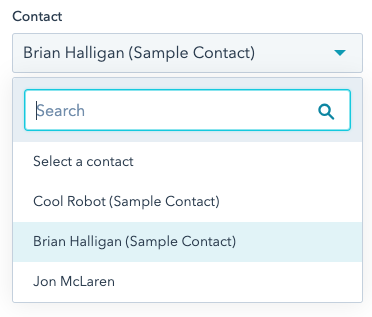
To provide a way for content creators to select CRM records to display or execute logic, you can build modules that include the [CRM object field](/cms/reference/fields/module-theme-fields#crm-object).
For example, you may want to display information from a specific product, contact, company, deal, quote, ticket, or custom object.
 ## CRM Object tutorials and resources
* [Essentials of getting started with Custom Objects](https://developers.hubspot.com/blog/essentials-for-getting-started-with-custom-objects)
* [Think like an architect: Build scalable Custom Objects](https://developers.hubspot.com/blog/how-to-think-like-an-architect-by-building-scalable-custom-objects)
* [Build Dynamic Pages with CRM Objects](/cms/start-building/features/data-driven-content/crm-data-in-cms-pages)
## CRM Object tutorials and resources
* [Essentials of getting started with Custom Objects](https://developers.hubspot.com/blog/essentials-for-getting-started-with-custom-objects)
* [Think like an architect: Build scalable Custom Objects](https://developers.hubspot.com/blog/how-to-think-like-an-architect-by-building-scalable-custom-objects)
* [Build Dynamic Pages with CRM Objects](/cms/start-building/features/data-driven-content/crm-data-in-cms-pages)