> ## Documentation Index
> Fetch the complete documentation index at: https://developers.hubspot.com/docs/llms.txt
> Use this file to discover all available pages before exploring further.

---
id: 30e63f61-d9a1-4aff-81d4-6ded4f55ccde
---

# Serverless functions for the CMS

> Serverless functions are written in JavaScript and use the NodeJS runtime. Use them to add new and advanced capabilities to HubSpot CMS websites.

export const SupportedProducts = ({marketing, sales, service, cms, data, commerce, marketingLevel, salesLevel, serviceLevel, cmsLevel, dataLevel, commerceLevel}) => {
  const translations = {
    description: "Requires one of the following products or higher.",
    productNames: {
      marketing: "Marketing Hub",
      sales: "Sales Hub",
      service: "Service Hub",
      cms: "Content Hub",
      data: "Data Hub",
      commerce: "Commerce Hub"
    },
    tiers: {
      free: "Free",
      starter: "Starter",
      professional: "Professional",
      enterprise: "Enterprise"
    }
  };
  const translateTier = tier => {
    if (!tier) return '';
    const lowerTier = tier.toLowerCase();
    return translations.tiers[lowerTier] || tier;
  };
  const products = [{
    name: marketing ? translations.productNames.marketing : '',
    level: translateTier(marketingLevel),
    icon: "https://mintlify-assets.b-cdn.net/Icons/marketing-bolt.svg",
    alt: "Marketing Hub"
  }, {
    name: sales ? translations.productNames.sales : '',
    level: translateTier(salesLevel),
    icon: "https://mintlify-assets.b-cdn.net/Icons/sales-star.svg",
    alt: "Sales Hub"
  }, {
    name: service ? translations.productNames.service : '',
    level: translateTier(serviceLevel),
    icon: "https://mintlify-assets.b-cdn.net/Icons/service-heart.svg",
    alt: "Service Hub"
  }, {
    name: cms ? translations.productNames.cms : '',
    level: translateTier(cmsLevel),
    icon: "https://mintlify-assets.b-cdn.net/Icons/content-play.svg",
    alt: "Content Hub"
  }, {
    name: data ? translations.productNames.data : '',
    level: translateTier(dataLevel),
    icon: "https://developers.hubspot.com/hubfs/Knowledge_Base_2023-24-25/subscription_key_icons/operations_icon.svg",
    alt: "Data Hub"
  }, {
    name: commerce ? translations.productNames.commerce : '',
    level: translateTier(commerceLevel),
    icon: "https://developers.hubspot.com/hubfs/Knowledge_Base/subscription_key_icons/commerce_icon.svg",
    alt: "Commerce Hub"
  }].filter(product => product.name && product.level);
  if (products.length === 0) return null;
  return <div>
      <div className="text-sm mb-2">{translations.description}</div>
      <div className={`grid ${products.length === 1 ? 'grid-cols-1' : 'grid-cols-2'} gap-1.5`}>
        {products.map((product, index) => <div key={index} style={{
    display: 'flex',
    alignItems: 'center'
  }}>
            <img src={product.icon} alt={product.alt} className="w-3.5 h-3.5 mr-1.5 mt-2.5 mb-2.5 flex-shrink-0 align-middle" />
            <span className="font-medium mr-1 text-sm">{product.name} -</span>
            <span className="text-sm">{product.level}</span>
          </div>)}
      </div>
    </div>;
};

<Accordion title="Supported products" defaultOpen="true" icon="cubes">
  <SupportedProducts cms={true} cmsLevel="enterprise" />
</Accordion>

Serverless functions provide a way to execute JavaScript through HubSpot on the server-side, preventing it from being exposed to the client. This can be especially important for making API requests that contain sensitive information, such as an API key or other credentials. When running a serverless function, HubSpot executes the function on its back-end, which also means you don't need to provide your own back-end servers to make requests for your CMS website. HubSpot’s serverless functions use the [NodeJS](https://nodejs.org/en/about/) runtime.

For example, you can use serverless functions to:

* Collect and store data in HubDB or the HubSpot CRM
* Run complex data calculators
* Dynamically fetch and display data from external systems
* Send form data to external systems

Below, learn more about how you can build and use serverless functions on HubSpot's CMS.

<Info>
  You may also want to check out the [getting started with serverless functions
  guide](/cms/start-building/features/serverless-functions/getting-started-with-serverless-functions),
  as well as the [serverless functions reference
  documentation](/cms/reference/serverless-functions/serverless-functions).
</Info>

## Limits

Serverless functions are intended to be fast and have a narrow focus. To maintain performance, HubSpot serverless functions are limited to:

* 50 secrets per account.
* 128MB of memory.
* no more than 100 endpoints per HubSpot account.
* the contentType `application/json` when calling a function.
* 6MB per invocation payload, which you might encounter when trying to upload a file with a serverless function, for example.
* 4KB for the amount of data that can be logged. When hitting this limit, it's recommended to log after individual actions, rather than the final output.

### Execution limits

* Each function has a maximum of 10 seconds of execution time.
* Each account is limited to 600 total execution seconds per minute.

This means either of these scenarios can happen within one minute:

* Up to 60 function executions that take 10 seconds each to complete.
* Up to 6,000 function executions that take 100 milliseconds to complete.

Functions that exceed those limits will throw an error. Execution count and time limits will return a `429` response. The execution time of each function is included in the [serverless function logs](#viewing-serverless-function-logs).

### Split dependencies

Serverless functions don't support splitting JavaScript between multiple files, as they cannot import other functions. Instead, your serverless function JavaScript must be contained in one file. Alternatively, you can use [webpack](https://webpack.js.org/) to bundle your code. Learn more about using webpack as a solution on [HubSpot's Community](https://community.hubspot.com/t5/APIs-Integrations/Import-packages-in-serverless-functions/m-p/346620).

## Building functions

Serverless functions consist of a `.functions` directory containing a JavaScript file, a `serverless.json` configuration file, and a `package.json` file. The `.functions` directory can be named anything, as long as it contains the `.functions` suffix. Files stored in this folder are not publicly accessible.

* `serverless.json`: the serverless function's configuration file, which includes definitions for the function name, JavaScript file path, included secrets, and endpoint details.
* `.js` file: the code that gets executed when the function is invoked. This file can have any name, as long as it ends in `.js`. You'll specify the file name in the `serverless.json` file.
* `package.json` (project-based only): for serverless functions built with [projects](/apps/legacy-apps/private-apps/build-with-projects/create-private-apps-with-projects), this file configures dependencies needed to execute the function.

There are two methods for building serverless functions and making them available for your CMS website: developer projects and the design manager.

### Developer projects

You can use the developer platform to build and deploy a private app with serverless functions defined within it.

This is the recommended path, as project-based serverless functions enable you to include third-party dependencies, as well as use the included private app for HubSpot scopes rather than manually managing app tokens through secrets.

<Warning>
  **Please note:** serverless functions are <u>not</u> supported in [version](/developer-tooling/platform/versioning) `2025.2` of the developer platform. Instead, you'll need to use version `2025.1` to build and deploy serverless functions.
</Warning>

Within a developer project, the `.functions` directory should be placed within the app directory, as shown below.

```text theme={null}
project-folder/
└── hsproject.json
└── src/
    └── app/
       ├── app.json
       └── app.functions/
           ├── function.js
           ├── package.json
           └── serverless.json
```

Get started [building serverless functions with projects](/cms/start-building/features/serverless-functions/getting-started-with-serverless-functions).

### Design manager

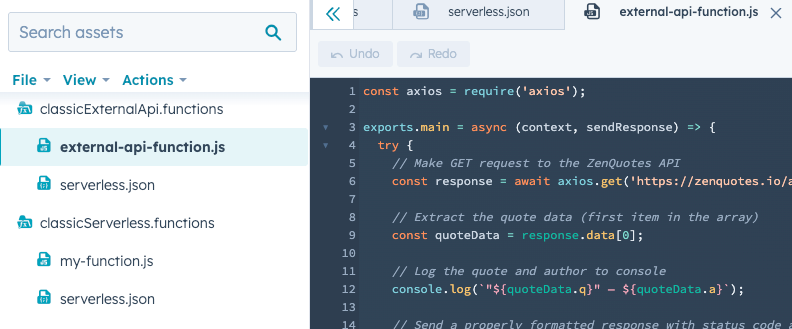
If you've built serverless functions for the CMS before HubSpot's developer projects platform was released, this is the method that you'll have used before. Similar to project-based serverless functions, these serverless functions are built locally, but they're then uploaded to the design manager instead of a project.

While this method is still supported, including third-party dependencies is <u>not</u> supported, so it's recommended to build serverless functions using projects instead.

For serverless functions created in the design manager, the `.functions` directory is uploaded directly to the design manager using the CLI, not through a developer project. The `.functions` directory should contain a `serverless.json` file and a JavaScript file containing the code to execute.

<Frame>
  <img src="https://www.hubspot.com/hubfs/Knowledge_Base_2023-24-25/classic-serverless-functions.png" alt="Design manager structure of a classic CMS serverless function" />
</Frame>

<Tip>
  For design manager functions, you can prevent accidental edits from within the design manager by locking the folder. To lock a folder, navigate to the design manager, then right-click the **folder** and select **Lock folder**.
</Tip>

## Authentication

There are two ways to authenticate requests made by serverless functions: private app access tokens and secrets.

* **Private app access tokens:** because project-based serverless functions are bundled inside a private app, you can reference the app's access token directly in your JavaScript code. Requests will have access to the scopes assigned to the private app. For serverless functions built in the design manager, you'll need to create a secret to store a private app access token value. Calls authenticated with a private app access token count against your API call limits.
* **Secrets:** create secrets using the CLI to store credentials securely in HubSpot. You can make a secret available to a serverless function by including the secret name in the `serverless.json` file. Learn more about [managing secrets using the HubSpot CLI](/developer-tooling/local-development/hubspot-cli/reference).

<Warning>
  **Please note:**

  <ul>
    <li>
      You should never return secret values through console logging or as a
      response, as it will expose the secret to the front-end.
    </li>

    <li>
      Due to caching, it can take about one minute to see updated secret values.
      If you've just updated a secret but are still seeing the old value, check
      again after about a minute.
    </li>
  </ul>
</Warning>

## Debugging

### Project-based serverless functions

Log messages are produced every time HubSpot executes a serverless function. Below, learn how to access logs in HubSpot and locally using the CLI.

#### In-app debugging

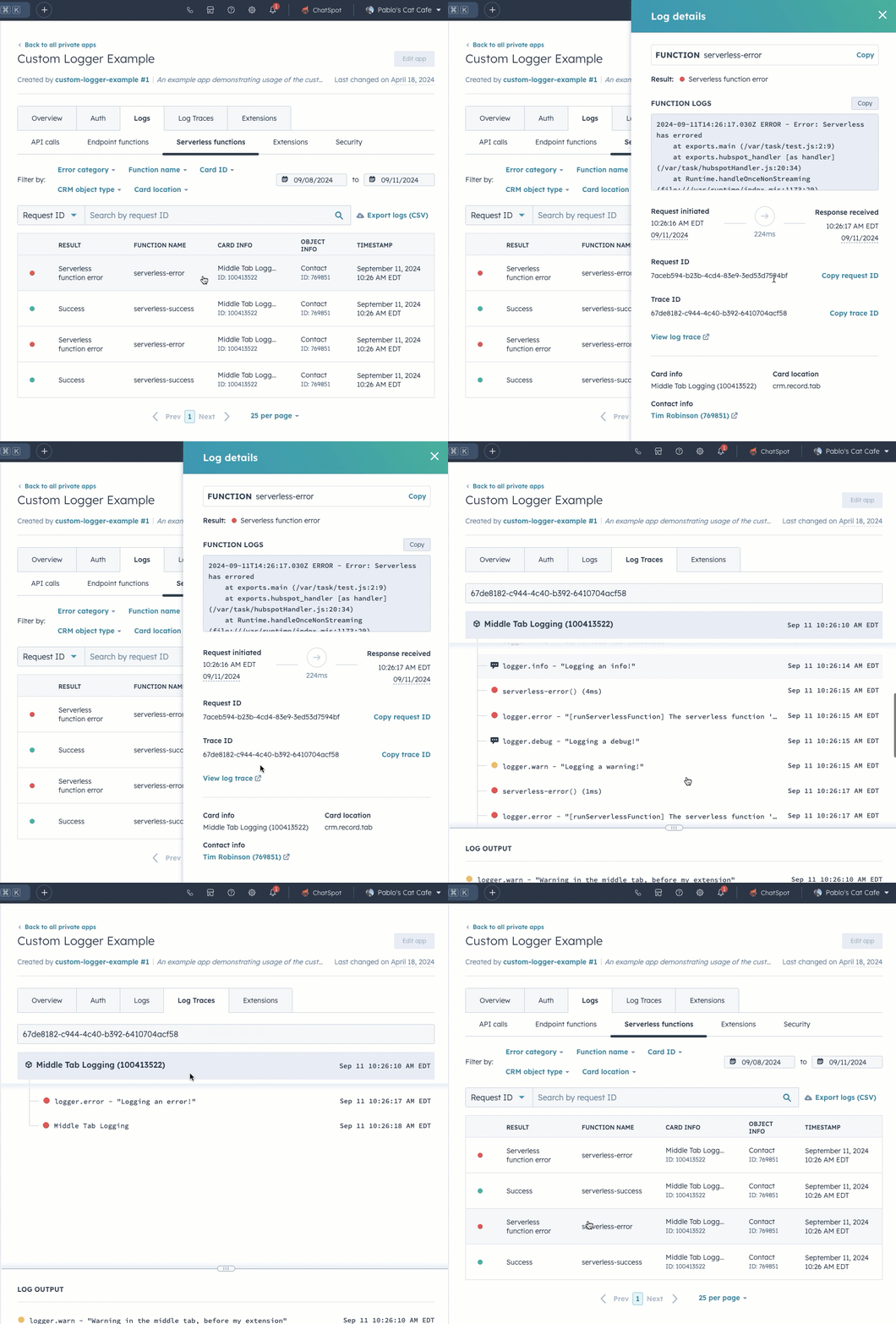
In HubSpot, you can view a serverless function's log history, including successful requests and errors.

To access a serverless function's logs in HubSpot:

* In your HubSpot account, navigate to **CRM Development**.
* In the left sidebar menu, navigate to **Private apps**.
* Select the **private app** that contains the serverless function.
* Click the **Logs** tab.
* To view logs for a serverless app function, click the **Serverless functions** tab. To view logs for a serverless endpoint function, click the **Endpoint functions** tab.
* In each tab, you can view logs for specific requests by clicking the **request**. You can also use the search bar to search by request ID.
* In the right panel, you can then click **View log trace** for a more in-depth breakdown of the request.

<Frame>
  <img src="https://www.hubspot.com/hubfs/Knowledge_Base_2023_2024/view-serverless-app-function-logs.gif" alt="view-serverless-app-function-logs" />
</Frame>

You can also include `console.log()` in your serverless function code for debugging purposes, then view its output in the function log details sidebar. Note that the message will not log directly to your browser console.

#### Local debugging

Log messages are produced every time HubSpot executes a serverless function. To view a serverless function's logs in the CLI, run the `hs project logs` command. Learn more about using the [hs project logs command](/developer-tooling/local-development/hubspot-cli/project-commands#view-logs).

There are two types of log messages produced:

* Log messages that record the execution of a function, along with its status and timing. For example: `2021-04-28T19:19:21.666Z - SUCCESS - Execution Time: 279ms`
* Log messages that are produced through console statements in the function code. For example, your serverless function JavaScript might include:

```js theme={null}
exports.main = async context => {
  console.log("Log some debug info");
  console.error("An error occurred");
  return {
    statusCode: 200,
    body: { message: "Hello World" },
  };
};
```

A log output for the above code would then produce the following:

`2021-04-28T19:15:13.200Z    INFO   Log some debug info`

`2021-04-28T19:15:14.200Z    ERROR    An error occurred`

### Design manager serverless functions

To help with troubleshooting your serverless functions, the [CLI](/developer-tooling/local-development/hubspot-cli/reference) has an [`hs logs` command](/developer-tooling/local-development/hubspot-cli/reference#logs) which gives you the ability to view your function’s logs. In addition to individual function invocation responses, time of execution, and execution time, any `console.log` statement will also appear in function logs. Do not `console.log` secrets like API keys.