> ## Documentation Index
> Fetch the complete documentation index at: https://developers.hubspot.com/docs/llms.txt
> Use this file to discover all available pages before exploring further.
---
id: 4c306573-a5df-478e-a8ce-1cafe68242dd
---
# Fetching data
> Learn how to fetch data into your React modules through a variety of methods, including GraphQL and HubL.
When you need to fetch data in your React modules, you can use a variety of methods on both the server- and client-side, depending on your use case. This includes:
* GraphQL (*Professional* and *Enterprise* only)
* HubL
* `getServerSideProps` function (*Professional* and *Enterprise* only)
Below, learn more about each available method.
**Please note:** the methods described in this guide are only for reading data. At this time, there are no methods for updating HubSpot data through React modules.
## Server-side fetching
The sections below detail the methods available for fetching data on the server-side.
### GraphQL
If you have a *Professional* or *Enterprise* subscription, you can bind GraphQL queries to your modules to fetch data from HubDB, CRM objects (including custom objects), blogs, and knowledge base.
You can explore your account's schema and run test queries by using the [GraphiQL tool](http://app.hubspot.com/l/graphiql) in your account.
Using GraphQL comes with some key advantages, such as:
* Co-locating the query and component for compartmentalization.
* Needing only a single query for fetching association data.
* Triggering prerendering of pages using the query when you make updates to the query or relevant data.
Learn more about [binding GraphQL queries to modules](/cms/start-building/introduction/react-plus-hubl/modules#graphql).
### hublParameters
You can pass data from the template to the module by using HubL at the template level, then using `props.hublParameters` at the React component level.
In the template, add parameters for each data property in the HubL module tag, then use HubL tokens to fetch the data.
```hubl theme={null}
{% module "contact_profile"
path="@projects/contact-profile-project/contact-profile-app/components/modules/ContactProfile",
firstName="{{contact.firstname}}",
lastName="{{contact.lastname}}",
email="{{contact.email}}"
%}
```
Then, use `props.hublParameters` to pass the data to the React module.
```jsx theme={null}
// contact-profile-project/contact-profile-app/components/modules/ContactProfile/index.jsx
export const Component = props => {
return (
{props.hublParameters.firstName}
{props.hublParameters.lastName}
{props.hublParameters.email}
);
};
```
Since the data is passed at the template level, it will not work for cases where modules are added to the page via the drag and drop content editor (as that module doesn't exist at the template level). For those cases, use the `hublDataTemplate` API instead.
### hublDataTemplate
To automatically attach and pass HubL context variables to your React modules:
* In the module, export a string via `hublDataTemplate`. In the string, include a HubL statement to set the `hublData` variable.
```js theme={null}
export const hublDataTemplate = `{% set hublData = "Hello from HubL!" %}`;
```
* The data will come through in your React module as a top level prop of `hublData`. Use `props.hublData` to access the returned data.
```jsx theme={null}
export function Component(props) {
return {props.hublData}
;
}
```
You can add any valid HubL to this template, including [filters](/cms/reference/hubl/filters), [functions](/cms/reference/hubl/functions), and [module field references](/cms/reference/fields/module-theme-fields). This can be especially useful for building more complex maps of data.
```jsx theme={null}
import ModuleFields from "./ModuleFields.js";
import ModuleMeta from "./ModuleMeta.js";
export function Component(props) {
return (
);
}
export const meta = ModuleMeta;
export const fields = ModuleFields;
export const hublDataTemplate = `
{% set blogId = module.blog_field %}
{% set hublData = {
"totalBlogPostCount": blog_total_post_count(blogId),
"blogAllPostsUrl": blog_all_posts_url(blogId)
}
%}
`;
```
Learn more about [passing HubL data in modules](/cms/start-building/introduction/react-plus-hubl/modules#passing-hubl-data).
### getServerSideProps
If you have a *Professional* or *Enterprise* account, you can export a `getServerSideProps` function from React modules. This function must return an object with a `serverSideProps` property and a `cacheConfig` property, which configures [caching of the module](#getserversideprops-caching).
In the React component, the information returned in `serverSideProps` can be accessed via `props.serverSideProps`. For fetching specific data based on dependencies such as URLs, query parameters, or the contact object, HubSpot provides the following utility functions:
* [withModuleProps](#withmoduleprops)
* [withUrlPath](#withurlpath)
* [withUrlAndQuery](#withurlandquery)
* [withContact](#withcontact)
These helper functions wrap your data fetching functions and automatically inject relevant dependencies (with TypeScript types), ensuring that your module has the necessary context to fetch and process the data.
For example, when you use `withUrlPath`, the wrapped function will receive a URL without query parameters, making it easy to fetch data based on the path alone. Similarly, `withContact` ensures that your function has access to the URL, query, and contact information, allowing for more complex data-fetching scenarios.
#### withModuleProps
Wraps a function to provide module properties without additional dependencies. Access to `fieldValues`, `hublData`, and `dataQueryResult` etc. is available.
```jsx theme={null}
import { withModuleProps } from 'path/to/helpers';
const fetchData = (props: ModulePropsWithoutSSP) => {
// Your data fetching logic
};
export const getServerSideProps = withModuleProps(fetchData);
```
#### withUrlPath
Provides module properties like `withModuleProps`, but also includes the page URL (without query parameters). Caching at the module level is partly based on the props and dependencies used in data fetching. By omitting the query parameters, you can optimize this caching, as it won't create new cache records for every query parameter variation.
To include query parameters, use `withUrlAndQuery` instead.
```jsx theme={null}
import { withUrlPath } from 'path/to/helpers';
const fetchData = (props: ModulePropsWithoutSSP, { url }: { url: URLWithoutQuery }) => {
// Your data fetching logic
};
export const getServerSideProps = withUrlPath(fetchData);
```
#### withUrlAndQuery
Builds on `withUrlPath` and provides module properties like `withModuleProps`, but also includes the page URL with query parameters. A new cache record will be created for each permutation of the URL with query parameters for this module.
```jsx theme={null}
import { withUrlAndQuery } from 'path/to/helpers';
const fetchData = (props: ModulePropsWithoutSSP, { url }: { url: URL }) => {
// Your data fetching logic
};
export const getServerSideProps = withUrlAndQuery(fetchData);
```
#### withContact
Like `withUrlAndQuery`, this function provides the module properties, along with a URL with query parameters, but also includes a contact object.
```jsx theme={null}
import { withContact } from 'path/to/helpers';
const fetchData = (props: ModulePropsWithoutSSP, { url, contact }: { url: URL; contact: Contact }) => {
// Your data fetching logic
};
export const getServerSideProps = withContact(fetchData);
```
#### getServerSideProps caching
The caching that happens between HubSpot's edge CDN and the data center where React modules are rendered is outside of the standard [prerendering](/cms/best-practices/testing-staging-performance/prerendering) caching behavior. This means that parts of the page outside of the React module can be statically prerendered, and the module itself can be dynamic or cache by caching rules that you define. By default, HubSpot provides a 10-second cache (`Cache-control: max-age=10`) for data fetching modules.
Cache keys are based on the following:
* Project build number
* Module props (e.g., `fieldValues`, `hublData`, `dataQueryResult`)
* Injected dependency values (e.g., using `withUrlPath` will result in a new cache key being created each time the module is rendered on a page at a new URL path).
This means that, if you haven't made any changes to the data flowing into a module, you can bust the cache by triggering a new project build.
The `getServerSideProps` function includes a `caching` property which you can use to control caching. This property only contains the `cacheControl` property, which represents the [Cache-Control header](https://developer.mozilla.org/en-US/docs/Web/HTTP/Reference/Headers/Cache-Control), and it can include any of the [standard directives](https://developer.mozilla.org/en-US/docs/Web/HTTP/Reference/Headers/Cache-Control#cache_directives).
In the example below, the module will be cached for 60 seconds, and any request after that will trigger a re-cache.
```jsx theme={null}
import { withModuleProps } from 'path/to/helpers';
const fetchData = async (props: ModulePropsWithoutSSP) => {
// Your data fetching logic
const results = await fetch(...).then(response => response.json())
return {
serverSideProps: {
results
},
caching: {
cacheControl: {
maxAge: 60
}
}
}
};
export const getServerSideProps = withModuleProps(fetchData);
```
In local development, the module is rendered on your machine, so no caching is at play.
## Client-side fetching with serverless functions
Use [serverless functions](/cms/start-building/features/serverless-functions/getting-started-with-serverless-functions) to fetch data on the client-side securely without needing to spin up and maintain a back-end server. There are multiple ways to [authenticate serverless function requests](/cms/reference/serverless-functions/serverless-functions-in-projects#authentication) if needed, either by using private app access tokens or [secrets](/cms/start-building/introduction/react-plus-hubl/secrets).
Serverless functions for the CMS are executed when their public endpoint is called. The URL is determined by the [`serverless.json` configuration](/cms/reference/serverless-functions/serverless-functions-in-projects#serverless.json), but always follows a common structure: `https:///hs/serverless/`.
The above path is used for calling serverless functions built with projects, which is the recommended method. You can invoke [serverless functions built with the design manager](/cms/reference/serverless-functions/serverless-functions) in CMS React modules with: `https:///_hcms/api/`.
You can choose to package the serverless function in the same project as your CMS assets, but you can also invoke serverless functions that exists outside of the project. Below is an example of what your project file structure might look like if it contained CMS React assets alongside a private app with a serverless function.
```shell theme={null}
project-folder/
└── src/
└── cms-assets/
├── assets/
├── components/
├── styles/
├── cms-assets.json
└── package.json
└── app/
├── app-hsmeta.json
└── app.functions/
├── function.js
├── package.json
└── serverless.json
```
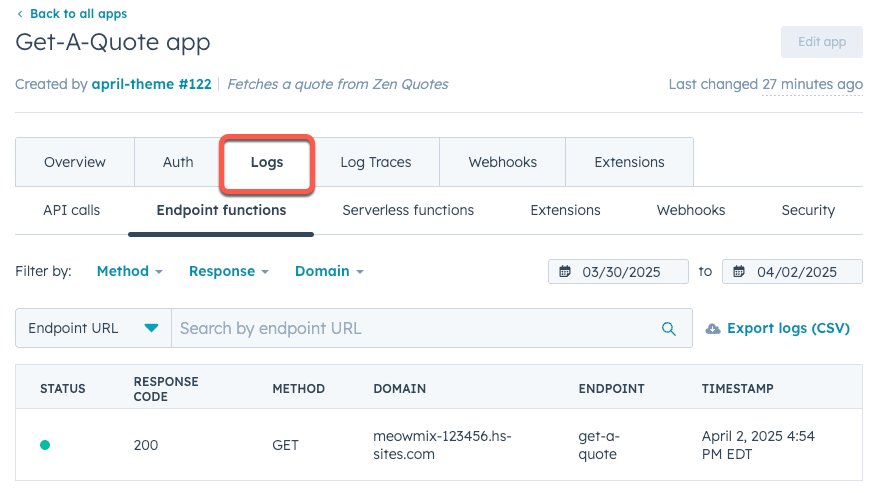
For debugging, HubSpot provides serverless function logs in the [app settings page of HubSpot](/guides/crm/understanding-the-crm#view-the-app-in-hubspot).
 Check out the following documentation for more information about building and using serverless functions:
* [HubSpot's example serverless function project](https://github.com/HubSpot/cms-react/tree/main/examples/serverless)
* [Serverless functions overview](/cms/start-building/features/serverless-functions/overview)
* [Serverless functions reference](/cms/reference/serverless-functions/serverless-functions-in-projects)
* [Get started with serverless functions](/cms/start-building/features/serverless-functions/getting-started-with-serverless-functions)
* [Secrets management](/cms/start-building/introduction/react-plus-hubl/secrets)
Check out the following documentation for more information about building and using serverless functions:
* [HubSpot's example serverless function project](https://github.com/HubSpot/cms-react/tree/main/examples/serverless)
* [Serverless functions overview](/cms/start-building/features/serverless-functions/overview)
* [Serverless functions reference](/cms/reference/serverless-functions/serverless-functions-in-projects)
* [Get started with serverless functions](/cms/start-building/features/serverless-functions/getting-started-with-serverless-functions)
* [Secrets management](/cms/start-building/introduction/react-plus-hubl/secrets)