> ## Documentation Index
> Fetch the complete documentation index at: https://developers.hubspot.com/docs/llms.txt
> Use this file to discover all available pages before exploring further.
---
id: 26a32edb-6ca6-464d-9cb8-c5269cee1cf5
---
# Build and deploy with projects
> Learn about building and deploying CMS content on the latest version of HubSpot's developer platform.
On HubSpot's developer platform, you can use projects to create CMS content, such as themes and modules, using the HubSpot CLI. By building on the latest version of the platform, you can build with both React and HubL to take advantage of component composability, code reuse, broader community resources, and real access to JavaScript on the server at render time.
Below, learn about how to structure your project along with steps to build and deploy to your HubSpot account.
## Prerequisites
* Because CMS React projects are developed locally, you'll need to have the [HubSpot CLI](/developer-tooling/local-development/hubspot-cli/install-the-cli) installed, along with Node v20.
* If you haven't worked with CMS React projects before, it's recommended to start with the [quickstart guide](/cms/start-building/introduction/react-plus-hubl/react-plus-hubl-quickstart).
## Project structure
Your project structure will vary slightly based on whether your project includes a CMS theme or just React modules. Use the tabs below to view the basic project structure for theme or standalone React module development.
Below is the basic directory structure for a project with a CMS theme component on the [latest version](/developer-tooling/platform/versioning) of the developer projects platform (`2025.2`).
If you're familiar with building [classic HubL themes](/cms/start-building/building-blocks/overview#theme-file-structure) locally, it may be helpful to think of this structure as having two parts:
* The project-specific files and directories that enable you to build your theme on version `2025.2` of the developer platform. This includes everything from the project root folder to `src/theme/` and the `*-hsmeta.json` file.
* The theme directory itself, which contains all of your theme assets and `theme.json` configuration file. In the example structure below, this is the `my-theme` directory.
```shell theme={null}
projectName/
├── hsproject.json
└── src/
└── theme/
├── theme-hsmeta.json
└── my-theme/
├── assets/
├── components/
├── styles/
├── templates/
├── fields.json
├── package.json
└── theme.json
```
| Name | Type | Description |
| ------------------- | --------- | --------------------------------------------------------------------------------------------------------------------------------------------------------------------------------------------------------------------------------------------------------------------------------------- |
| `projectName` | Directory | Top-level directory that contains all other project files. This directory can have any name, but must contain `hsproject.json`. |
| `hsproject.json` | File | The project's configuration file, which must be at the root of the project. |
| `src` | Directory | The container for your project's components. This directory can have any name as long as it's specified in the `hsproject.json` configuration file at the root of the project. If your project also includes an app, the `src` folder would contain both a `theme` and `app` directory. |
| `theme` | Directory | The directory that contains your theme directory and `*-hsmeta.json` configuration file. |
| `theme-hsmeta.json` | File | The configuration file for the project's theme component. |
| `my-theme` | Directory | The directory containing the theme itself, including the `theme.json` configuration file and all theme assets (e.g., modules and templates). |
| `assets` | Directory | The directory that contains supporting static assets, such as image files. Static assets with common extensions will resolve to public URLs automatically when used in modules. Learn more in [Vite's static asset documentation](https://vitejs.dev/guide/assets.html). |
| `components` | Directory | The directory that contains the project's [islands](/cms/reference/react/islands) and [modules](/cms/start-building/introduction/react-plus-hubl/modules) directories. |
| `styles` | Directory | The directory containing the project's stylesheets. |
| `theme.json` | File | The theme configuration file, which includes fields such as the display label, screenshot path, version number, and more. Learn more about the [theme.json file](/cms/start-building/building-blocks/overview#theme-json). |
| `package.json` | File | The file used for loading scripts and third-party dependencies. |
Below is the basic structure for a project that contains React modules, but no theme. While similar to the theme project structure, note the following differences:
* The `src/` directory contains a `cms-assets/` directory, rather than `theme/`.
* The directory containing your CMS assets must include a `cms-assets.json` folder, rather than `theme.json`.
```shell theme={null}
projectName/
├── hsproject.json
└── src/
└── cms-assets/
├── cms-assets-hsmeta.json
└── my-react-assets/
├── assets/
├── components/
├── styles/
└── cms-assets.json
```
| Name | Type | Description |
| ------------------------ | --------- | -------------------------------------------------------------------------------------------------------------------------------------------------------------------------------------------------------------------------------------------------------------------------------------------- |
| `projectName` | Directory | Top-level directory that contains all other project files. This directory can have any name, but must contain `hsproject.json`. |
| `hsproject.json` | File | The project's configuration file, which must be at the root of the project. |
| `src` | Directory | The container for your project's components. This directory can have any name as long as it's specified in the `hsproject.json` configuration file at the root of the project. If your project also includes an app, the `src` folder would contain both a `cms-assets` and `app` directory. |
| `cms-assets` | Directory | The directory that contains the `*-hsmeta.json` configuration file and a directory for your React assets. |
| `cms-assets-hsmeta.json` | File | The configuration file for the project's CMS assets component. |
| `my-react-assets` | Directory | The directory containing the `cms-assets.json` file and React modules. |
| `assets` | Directory | The directory that contains supporting static assets, such as image files. Static assets with common extensions will resolve to public URLs automatically when used in modules. Learn more in [Vite's static asset documentation](https://vitejs.dev/guide/assets.html). |
| `components` | Directory | The directory that contains the project's [islands](/cms/reference/react/islands) and [modules](/cms/start-building/introduction/react-plus-hubl/modules) directories. |
| `styles` | Directory | The directory containing the project's stylesheets. |
| `cms-assets.json` | File | The CMS assets configuration file, which includes fields such as the display label. |
| `package.json` | File | The file used for loading scripts and third-party dependencies. |
## Project schema
The `*-hsmeta.json` and `.json` schema requirements differ slightly based on whether your project includes a CMS theme or just React modules. Use the tabs below to view the basic project structure for theme or standalone React module development.
The top-level configuration file for your project's theme component is specified in the `theme-hsmeta.json` file in the `src/theme/` directory.
```shell theme={null}
my-project-folder/
└── src
└── theme/
└── theme-hsmeta.json/
```
This file configures the unique identifier for the theme component, along with details such as the path of the main theme folder.
```json theme={null}
{
"uid": "my-theme",
"type": "theme",
"config": {
"themePath": "my-theme",
"secretNames": []
}
}
```
| Field | Type | Description |
| ------------------------------------------------ | ------ | ------------------------------------------------------------------------------------------------------------------------------------------------------------------------------------------------------------------------------------------------------ |
| `uid`\* | String | An internal unique identifier for the theme. Must be globally unique within the project. Can be any string up to 64 characters. Characters can be uppercase or lowercase, and can include numbers, underscores (`_`), dashes (`-`), and periods (`.`). |
| `type`\* | String | The type of component. Must match the name of the parent folder (`theme`). |
| `themePath`\* | String | The path of the directory containing the [theme.json file](/cms/start-building/building-blocks/overview#theme-json) and theme assets. |
The top-level configuration file for your project's CMS assets component is specified in the `cms-assets-hsmeta.json` file within the `src/cms-assets/` directory.
```shell theme={null}
my-project-folder/
└── src
└── cms-assets/
└── cms-assets-hsmeta.json
└── my-assets/
```
This file configures the unique identifier for the project's CMS assets component, along with details such as the path of the main assets folder.
```json theme={null}
{
"uid": "my-react-module-project",
"type": "cms-assets",
"config": {
"themePath": "my-assets",
"secretNames": []
}
}
```
| Field | Type | Description |
| ------------------------------------------------ | ------ | ------------------------------------------------------------------------------------------------------------------------------------------------------------------------------------------------------------------------------------------------------ |
| `uid`\* | String | An internal unique identifier for the theme. Must be globally unique within the project. Can be any string up to 64 characters. Characters can be uppercase or lowercase, and can include numbers, underscores (`_`), dashes (`-`), and periods (`.`). |
| `type`\* | String | The type of component. Must be `cms-assets`. |
| `themePath`\* | String | The path of the directory containing the `cms-assets.json` file and CMS assets. |
The `cms-assets.json` file should be structured as shown below.
```json theme={null}
{
"label": "react-modules-only",
"outputPath": ""
}
```
## Building and deploying
Using [project-specific CLI commands](/developer-tooling/local-development/hubspot-cli/project-commands), you can build and deploy your project to HubSpot. An `hsproject.json` file must be in the root directory of your project folder for the CLI to recognize your project.
To build and deploy your project, run `hs project upload`.
```shell theme={null}
hs project upload
```
By default, projects are configured to auto-deploy successful builds. You can [turn off auto-deploy in the project's settings](#auto-deploy) in HubSpot after initial upload. Projects with auto-deploy turned off can be deployed with the `hs project deploy` command.
### View build and deploy history
In HubSpot, you can view your project's build and deploy history as well as redeploy previous builds as needed.
To view project builds and deploys:
* Navigate to the project page in HubSpot:
* To open the project page from your terminal, run `hs project open` from within the local project directory.
* Alternatively, in your HubSpot account, navigate to **Development**. Then, click the **name** of your project.
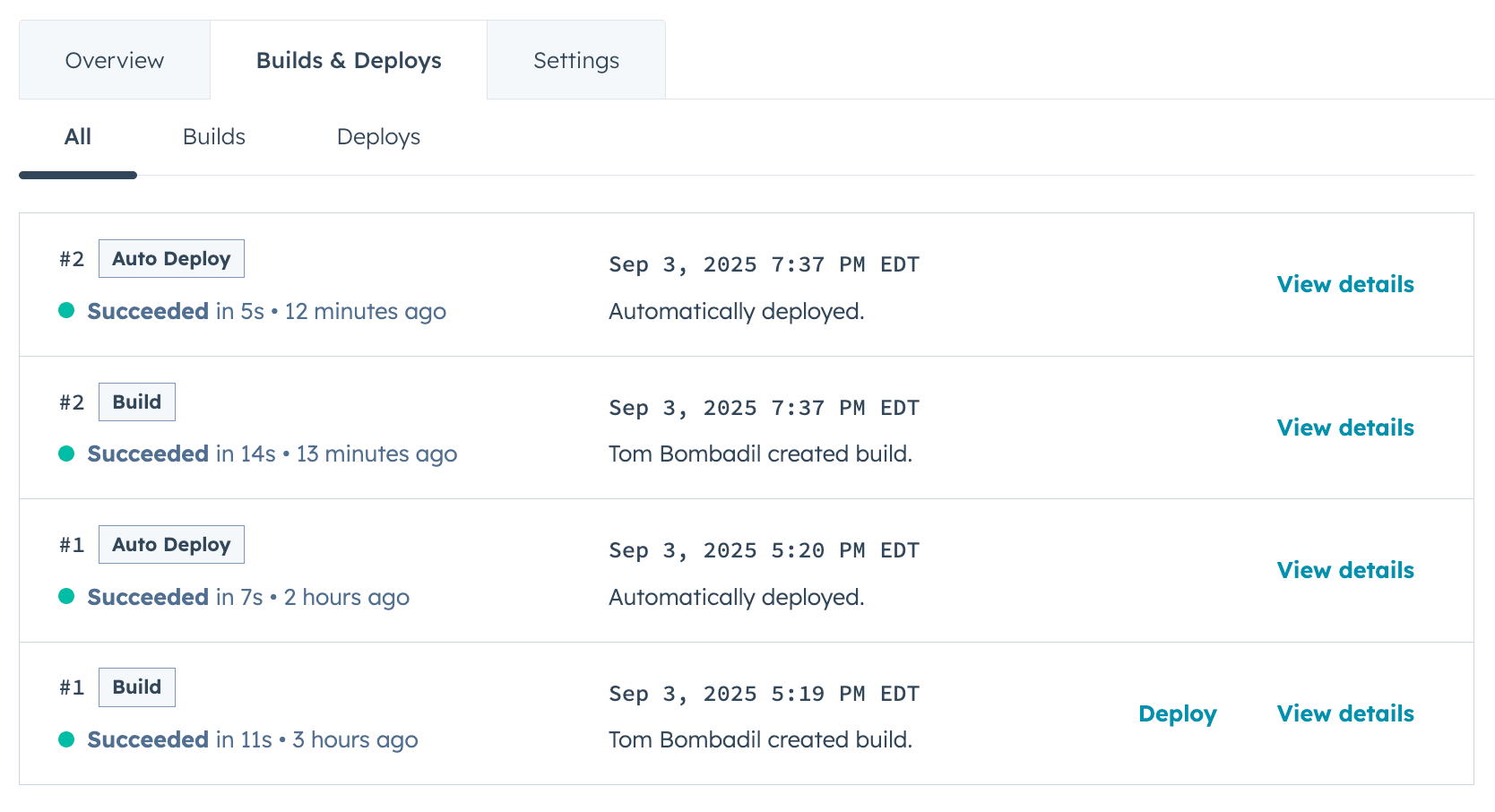
* On the *Overview* tab, you can view the most recent builds and deploys.
* Click the **Builds & Deploys** tab to view a full build and deploy history. To view more details about a particular build or deploy, click **View details** next to the build or deploy.
 To turn off auto-deploy:
* Navigate to the project page in HubSpot:
* To open the project page from your terminal, run `hs project open` from within the local project directory.
* Alternatively, in your HubSpot account, navigate to **Development**. Then, click the **name** of your project.
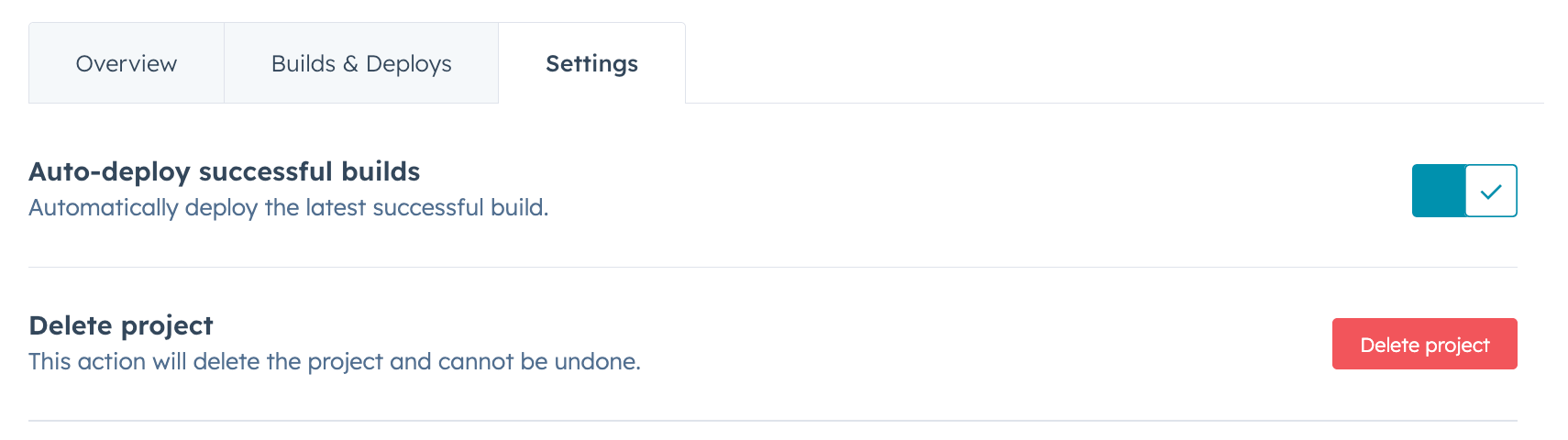
* Click the **Settings** tab, then toggle the **Auto-deploy successful builds** switch off.
To turn off auto-deploy:
* Navigate to the project page in HubSpot:
* To open the project page from your terminal, run `hs project open` from within the local project directory.
* Alternatively, in your HubSpot account, navigate to **Development**. Then, click the **name** of your project.
* Click the **Settings** tab, then toggle the **Auto-deploy successful builds** switch off.
 ## Delete a project
To delete a project:
* Navigate to the project page in HubSpot:
* To open the project page from your terminal, run `hs project open` from within the local project directory.
* Alternatively, in your HubSpot account, navigate to **Development**. Then, click the **name** of your project.
* On the project home page, click the **Settings** tab.
* At the bottom of the tab, click **Delete**.
## Delete a project
To delete a project:
* Navigate to the project page in HubSpot:
* To open the project page from your terminal, run `hs project open` from within the local project directory.
* Alternatively, in your HubSpot account, navigate to **Development**. Then, click the **name** of your project.
* On the project home page, click the **Settings** tab.
* At the bottom of the tab, click **Delete**.
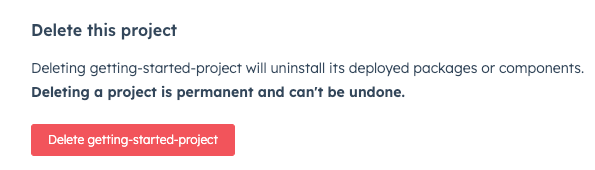 * In the dialog box, enter the **project name**, then click **Delete project**.