> ## Documentation Index
> Fetch the complete documentation index at: https://developers.hubspot.com/docs/llms.txt
> Use this file to discover all available pages before exploring further.
---
id: 51b3a4d9-3e41-4dce-931b-6d0a1e24641a
---
# Authenticate the CLI with personal access keys
> Learn about connecting the HubSpot CLI to your account using a personal access key.
Personal access keys provide secure account authentication for the HubSpot CLI and local development tools.
Each user can only have one personal access key at a time per account, and the key can be deactivated and rotated as needed. When creating a key, you can select the specific scopes assigned to the key, which will determine the types of requests you can make through the CLI.
Although any user in your account can create a personal access key, the scopes associated with their access key will be limited to their [HubSpot user permissions](https://knowledge.hubspot.com/user-management/hubspot-user-permissions-guide).
For example, if a user without the *Developer tools access* permission creates a personal access key, they won't be able to use it to upload developer projects to your account.
## Generating and using your key
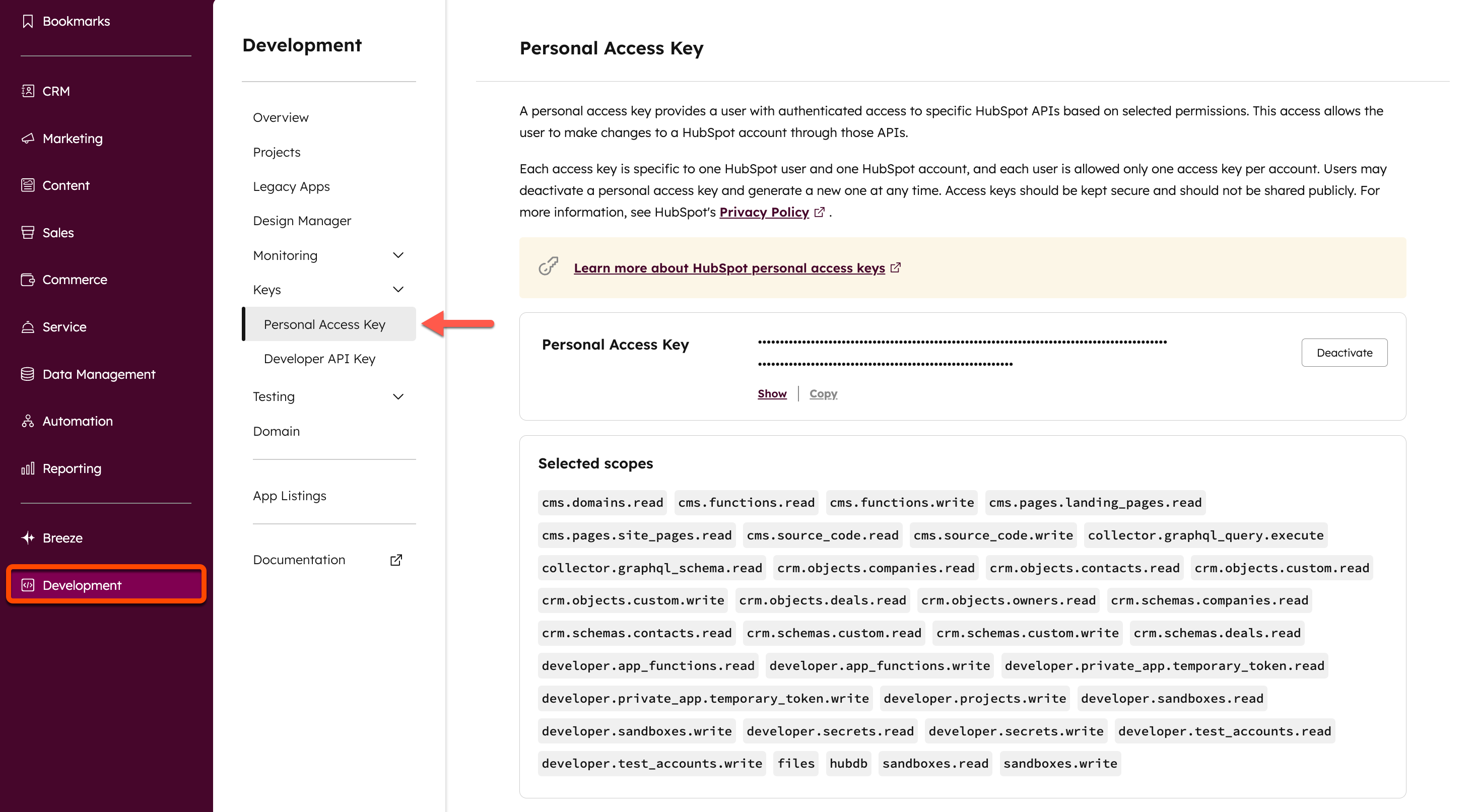
When [installing the CLI](/developer-tooling/local-development/hubspot-cli/install-the-cli) or adding an account using the `hs account auth` command, you'll be prompted to provide the CLI with your personal access key to allow the CLI to make requests to your account. You can view your personal access key using any of the following methods:
* Follow the terminal prompts when installing the HubSpot CLI or running `hs account auth`.
* [Use this direct link](http://app.hubspot.com/l/personal-access-key).
* Navigate to your key manually in your HubSpot account by clicking **Development** in the main navigation bar, then navigating to **Keys** > **Personal Access Key**.
 **Please note:** personal access keys should be kept secure and should not be shared publicly.
## Managing personal access keys
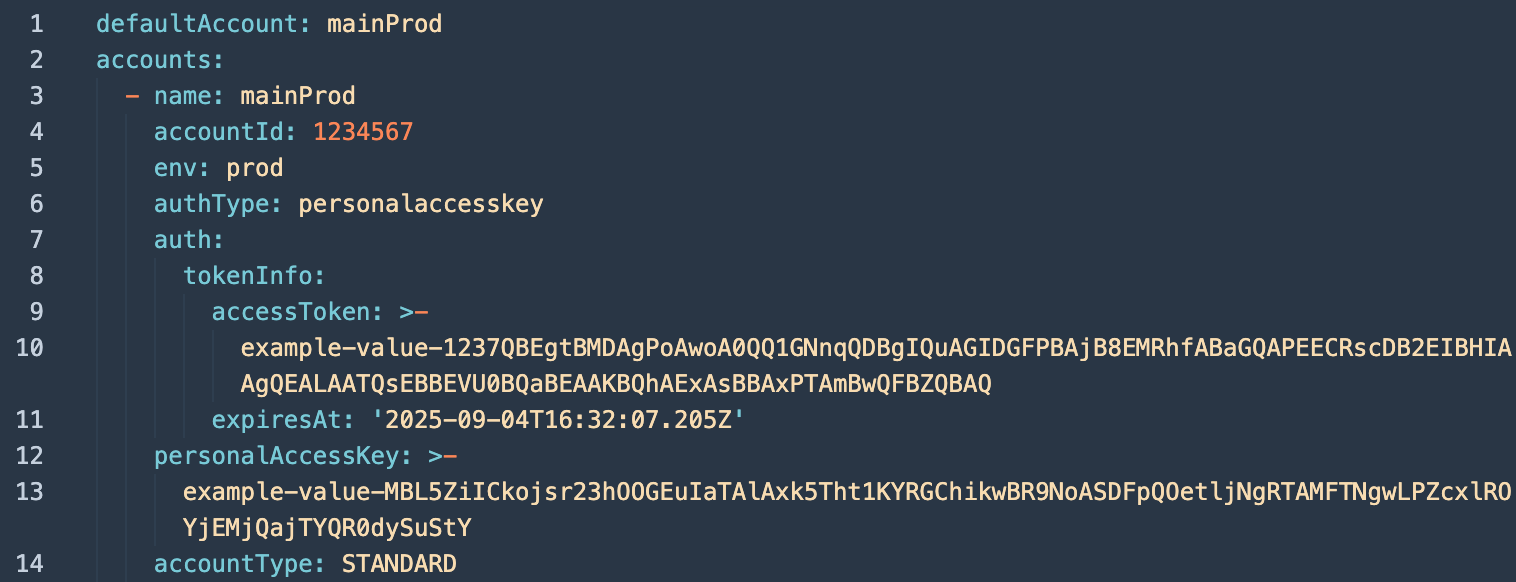
After you authenticate via the CLI using the `hs account auth` command, your access key will be added to your global config file (`~/.hscli/config.yml`) for future use. You can update the value any time by running `hs account auth` and copy/pasting the value from your account. Below is an example `~/.hscli/config.yml` global config file.
**Please note:** personal access keys should be kept secure and should not be shared publicly.
## Managing personal access keys
After you authenticate via the CLI using the `hs account auth` command, your access key will be added to your global config file (`~/.hscli/config.yml`) for future use. You can update the value any time by running `hs account auth` and copy/pasting the value from your account. Below is an example `~/.hscli/config.yml` global config file.
 If you previously specified a per-directory override via an `.hsaccount` file, you can use the newer model of linking a directory to a specific authenticated account using the [hs account link](/developer-tooling/local-development/hubspot-cli/commands/account-commands#link-an-account) command.
Prior to version `7.4.0` of the HubSpot CLI, configuration was stored within `hubspot.config.yml` files. With the latest version of the CLI, only one global config file (`~/.hscli/config.yml`) is used to manage account configuration via the `hs account auth` command, with [overriding capability](/developer-tooling/local-development/hubspot-cli/reference#override-the-default-account-in-your-global-config) available as needed.
Learn how to [migrate or merge your config files](/developer-tooling/local-development/hubspot-cli/commands/debugging-commands#migrate-configuration).
Authenticating an account with the CLI will connect a *HubSpot Local Development Tools* app to the account. This first-party HubSpot app facilitates authentication for the local development tools.
If you previously specified a per-directory override via an `.hsaccount` file, you can use the newer model of linking a directory to a specific authenticated account using the [hs account link](/developer-tooling/local-development/hubspot-cli/commands/account-commands#link-an-account) command.
Prior to version `7.4.0` of the HubSpot CLI, configuration was stored within `hubspot.config.yml` files. With the latest version of the CLI, only one global config file (`~/.hscli/config.yml`) is used to manage account configuration via the `hs account auth` command, with [overriding capability](/developer-tooling/local-development/hubspot-cli/reference#override-the-default-account-in-your-global-config) available as needed.
Learn how to [migrate or merge your config files](/developer-tooling/local-development/hubspot-cli/commands/debugging-commands#migrate-configuration).
Authenticating an account with the CLI will connect a *HubSpot Local Development Tools* app to the account. This first-party HubSpot app facilitates authentication for the local development tools.
 Personal access keys can be deactivated through any of the following methods:
* Manual deactivation from the [personal access key page](http://app.hubspot.com/l/personal-access-key).
* Uninstalling the *HubSpot Local Development Tools* app in your account. This will uninstall the app for your user only.
* Removing a user from the account.
Personal access keys can be deactivated through any of the following methods:
* Manual deactivation from the [personal access key page](http://app.hubspot.com/l/personal-access-key).
* Uninstalling the *HubSpot Local Development Tools* app in your account. This will uninstall the app for your user only.
* Removing a user from the account.