> ## Documentation Index
> Fetch the complete documentation index at: https://developers.hubspot.com/docs/llms.txt
> Use this file to discover all available pages before exploring further.
---
id: 19e83331-288a-4ef5-884f-ca3d446bc9a1
---
# Developer platform and API versioning
> Learn about the changes released for each version of HubSpot's developer platform and REST APIs
export const BlogPostCTA = ({title, href}) => {
return
;
};
export const Tag = ({children, type = 'default', className = ''}) => {
return
{children}
;
};
HubSpot developer projects and REST APIs are versioned based on when they were released. This enables you to access updated functionality while ensuring any new features don't break any features you've released on a previous version.
## Platform and API version schedule
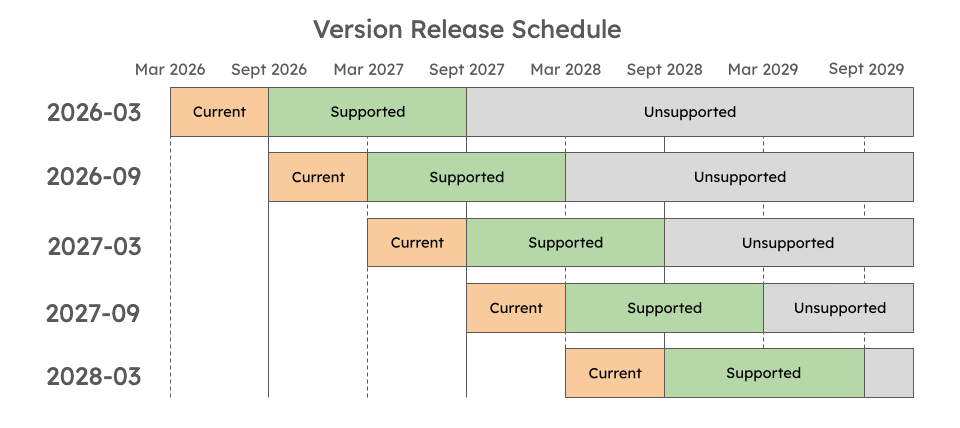
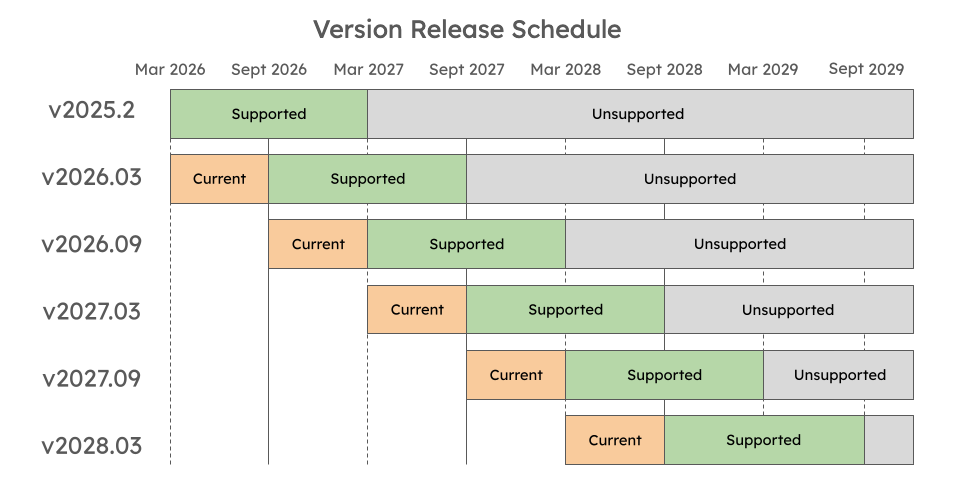
A new version of HubSpot's REST APIs and app developer platform is made generally available (GA) every 6 months in March and September, accompanied by a support transition for previous versions:
* **Current**: the newest version will be considered *Current* for 6 months following its original release. During this period, the version will be actively managed to address bugs, maintain reliability, and safeguard developer security.
* **Supported:** after a version has been GA for 6 months, it will transition to *Supported*. Any critical bug fixes will be addressed to ensure stability and security.
* **Unsupported:** 18 months after a version originally went into GA, the version will be considered unsupported:
* Any *Unsupported* versions will not receive any bug fixes and no further updates will be made.
* If you try to upload a project using an *Unsupported* version, the resulting build will fail.
* Although APIs or apps using these versions may still work, developers should not expect ongoing stability and are highly advised to upgrade to the most *Current* version.
The release schedules for APIs and the developer platform are illustrated in the tabs below:
 The following sections provide more details on the availability and features of each API and developer platform version.
## API versioning
Starting from March 30th 2026, HubSpot's REST APIs follow a date-based version standard, based on the release schedule detailed above. Instead of the previous semantic versioning scheme, such as v1, v2, v3, or v4, versions are tied to release dates:
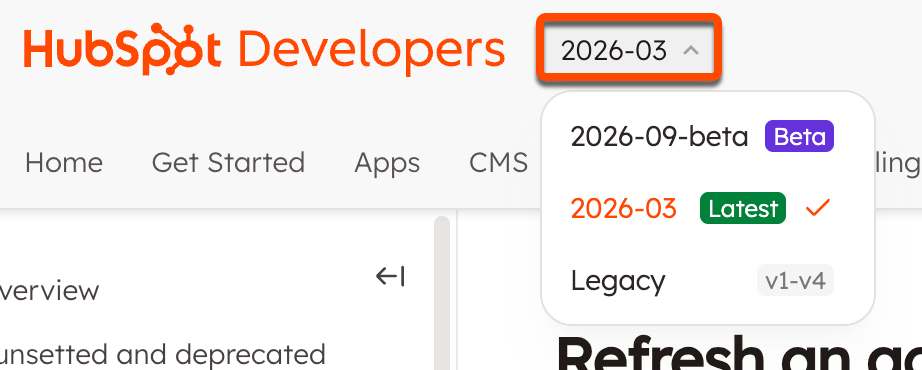
* REST APIs in beta include the next release date, suffixed by `-beta` (e.g., `/2026-09-beta/`).
* The latest API version includes a URL prefix that's formatted as `/YYYY-MM` (e.g., `/2026-03/`).
* All legacy APIs using semantic versions (e.g., v4, v3, v2, and v1) are still supported and available at their previous URLs.
All APIs can be accessed in the **APIs** [tab](/api-reference/latest/overview) in the top left, where you can use the version picker to navigate between API versions.
The following sections provide more details on the availability and features of each API and developer platform version.
## API versioning
Starting from March 30th 2026, HubSpot's REST APIs follow a date-based version standard, based on the release schedule detailed above. Instead of the previous semantic versioning scheme, such as v1, v2, v3, or v4, versions are tied to release dates:
* REST APIs in beta include the next release date, suffixed by `-beta` (e.g., `/2026-09-beta/`).
* The latest API version includes a URL prefix that's formatted as `/YYYY-MM` (e.g., `/2026-03/`).
* All legacy APIs using semantic versions (e.g., v4, v3, v2, and v1) are still supported and available at their previous URLs.
All APIs can be accessed in the **APIs** [tab](/api-reference/latest/overview) in the top left, where you can use the version picker to navigate between API versions.
 ## Developer platform versioning
Apps built on the HubSpot developer platform also use date-based versioning, where each platform version is named using the year and month it was released, formatted as: `YYYY.MM` (e.g., `2025.2`, `2026.03`, etc).
### Manage platform versions
To check which version of the developer platform your projects are running on, locate the `platformVersion` field in your project's top-level `hsproject.json` file.
```json highlight={4} theme={null}
{
"name": "my_project",
"srcDir": "src",
"platformVersion": "2026.03"
}
```
Learn how to migrate an older version of an app to the latest version of the developer platform:
* [Migration overview](/apps/developer-platform/build-apps/migrate-an-app/overview)
* [Migrate an app to 2026.03](/apps/developer-platform/build-apps/migrate-an-app/migrate-to-the-latest-platform-version)
If you're just getting started, check out the [app creation guide](/apps/developer-platform/build-apps/create-an-app).
### Platform version history
| Parameter | Description |
| ------------------------------------------------------------- | -------------------------------------------------------------------------------------------------------------------------------------------------------------------------------------------------------------------------------------------------------------------------------------------------------------------------------------------------------------------------------------------------------- |
| `2026.03`
## Developer platform versioning
Apps built on the HubSpot developer platform also use date-based versioning, where each platform version is named using the year and month it was released, formatted as: `YYYY.MM` (e.g., `2025.2`, `2026.03`, etc).
### Manage platform versions
To check which version of the developer platform your projects are running on, locate the `platformVersion` field in your project's top-level `hsproject.json` file.
```json highlight={4} theme={null}
{
"name": "my_project",
"srcDir": "src",
"platformVersion": "2026.03"
}
```
Learn how to migrate an older version of an app to the latest version of the developer platform:
* [Migration overview](/apps/developer-platform/build-apps/migrate-an-app/overview)
* [Migrate an app to 2026.03](/apps/developer-platform/build-apps/migrate-an-app/migrate-to-the-latest-platform-version)
If you're just getting started, check out the [app creation guide](/apps/developer-platform/build-apps/create-an-app).
### Platform version history
| Parameter | Description |
| ------------------------------------------------------------- | -------------------------------------------------------------------------------------------------------------------------------------------------------------------------------------------------------------------------------------------------------------------------------------------------------------------------------------------------------------------------------------------------------- |
| `2026.03`
Current | Available as of March 30th, 2026.
This version provides [serverless function support](/apps/developer-platform/add-features/serverless-functions/overview) for apps built on the developer platform. Learn more about how to [migrate to 2026.03](/apps/developer-platform/build-apps/migrate-an-app/migrate-to-the-latest-platform-version). |
| `2025.2`
Supported | Released on Sept 2, 2025.
This platform version increased the minimum required version of Node.js to v22.
Changes include a new file-based build-and-deploy framework. This framework contains an app's configuration, assets, and other source code. Learn more in the [developer platform overview](/apps/developer-platform/overview). |
| `2025.1`
Upcoming deprecation | Available as of April 1, 2025. This platform version increases the minimum required version of Node.js to `v20`.
Note that this version of the developer platform will be deprecated on August 1, 2026. Learn more about the upcoming deprecation on the [HubSpot Developer Changelog](https://developers.hubspot.com/changelog/upcoming-deprecation-hubspot-projects-v2025-1-aug-1-2026). |
| `2023.2`
Sunset | This version was sunset on October 1, 2025, and attempts to upload projects at this version will fail. To continue building and deploying, upgrade to a newer version of the [developer platform](/apps/developer-platform/build-apps/migrate-an-app/overview). |
| `2023.1`
Sunset | Initial release of the developer platform. This version is no longer available as of March 31, 2024. Attempts to upload projects at this version will fail. |
#### Changes in 2026.03
The latest version of the developer platform re-introduces full serverless function support for project-built apps, which was not previously supported for `2025.2` apps.
Learn more about how to add [serverless functions](/apps/developer-platform/add-features/serverless-functions/overview) to an app on version `2026.03`, or [migrate an older app](/apps/developer-platform/build-apps/migrate-an-app/migrate-to-the-latest-platform-version) to `2026.03`.
If you opt to migrate a legacy private app or public app to version `2026.03`, you won't be able to downgrade back to a previous version after the migration process is complete.
Learn more about [migrating your app](/apps/developer-platform/build-apps/migrate-an-app/overview) to `2026.03`.
#### Changes in 2025.2
Version `2025.2` of the developer platform introduced a number of new [features](/apps/developer-platform/overview#features), a streamlined build-and-deploy process, and other productivity tools to help you build powerful integrations with HubSpot.
Learn more about how to [build an app](/apps/developer-platform/build-apps/create-an-app), edit your [app configuration](/apps/developer-platform/build-apps/app-configuration), manage your [app in HubSpot](/apps/developer-platform/build-apps/manage-apps-in-hubspot), and how to install the [latest version](/developer-tooling/local-development/hubspot-cli/install-the-cli) of the HubSpot CLI.
More details are available in the [developer platform overview](/apps/developer-platform/overview).
#### Changes in 2025.1
Version `2025.1` increases the minimum version of Node.js to v20 for serverless functions, app functions, and endpoint functions.
#### Changes in 2023.2 (sunset)
This version was sunset on October 1, 2025. If you have a project that's still on `2023.2`, you can continue building it by [migrating](/apps/developer-platform/build-apps/migrate-an-app/overview) to the latest version of the developer platform.
For posterity, below are the changes included for version `2023.2`.
The following changes have been made for serverless function configuration (`serverless.json`):
* Previously, serverless functions in projects supported two types of functions: app and API endpoint. App functions have been updated to support public URLs for making API requests, so you no longer need to build these as separate types.
* With this update, the `runtime` and `version` fields have also been removed.
* This version uses Node18, and lower versions cannot be specified.
**Previous serverless function configuration**
```js theme={null}
{
"runtime": "nodejs18.x",
"version": "1.0",
"appFunctions": {
"functionName": {
"file": "function1.js"
}
},
"endpoints": {
"path/to/endpoint": {
"file": "githubUserFunction.js",
"method": ["GET", "POST"]
}
}
}
```
**Updated serverless function configuration**
```js theme={null}
{
"appFunctions": {
"functionName": {
"file": "function1.js",
"endpoint": {
"path": "path/to/endpoint",
"method": ["GET"],
}
}
}
}
```
`2023.2` projects now support asynchronous functions. Callbacks are no longer supported in this version.
To update your serverless functions to use async:
* Add `async` to the function definition.
* Remove the callback (sometimes referred to as `sendResponse`), and use return statements to return response.
* Use `await` and `try`/`catch` instead of promise chaining.
* Return the desired response or throw an error.
Before:
```js theme={null}
const hubspot = require("@hubspot/api-client");
exports.main = myFunction = (context = {}, sendResponse) => {
const { hs_object_id } = context.propertiesToSend;
const userId = context.parameters.userId;
const hubspotClient = new hubspot.Client({
accessToken: process.env["PRIVATE_APP_ACCESS_TOKEN"],
});
const properties = {
name: "newName",
};
const SimplePublicObjectInput = { properties };
const objectType = "myObject";
const objectId = hs_object_id;
const idProperty = undefined;
hubspotClient.crm.objects.basicApi
.update(objectType, objectId, SimplePublicObjectInput, idProperty)
.then(res => {
sendResponse(res);
})
.catch(err => {
console.error(err);
sendResponse(err);
});
};
```
After:
```js theme={null}
const hubspot = require("@hubspot/api-client");
exports.main = async (context = {}) => {
const { hs_object_id } = context.propertiesToSend;
const userId = context.parameters.userId;
const hubspotClient = new hubspot.Client({
accessToken: process.env["PRIVATE_APP_ACCESS_TOKEN"],
});
const properties = {
name: "newName",
};
const SimplePublicObjectInput = { properties };
const objectType = "myObject";
const objectId = hs_object_id;
const idProperty = undefined;
try {
const res = await hubspotClient.crm.objects.basicApi.update(
objectType,
objectId,
SimplePublicObjectInput,
idProperty
);
return res;
} catch (err) {
console.error(err);
return err;
}
};
```
Whereas previously you would refer to private app access tokens with `context.secrets.PRIVATE_APP_ACCESS_TOKEN`, you'll now use `process.env` rather than `context.secrets`. For example:
```js theme={null}
// Include HubSpot node API client
const hubspot = require("@hubspot/api-client");
exports.main = async (context = {}) => {
// instantiate HubSpot node API client
const hubspotClient = new hubspot.Client({
accessToken: process.env["PRIVATE_APP_ACCESS_TOKEN"],
});
//your function
return response;
};
```
Version `2023.2` increases log size from 4KB to 256KB and guarantees logs to be in order of execution. You can also take advantage of improved in-app logging, such as log tracing.