> ## Documentation Index
> Fetch the complete documentation index at: https://developers.hubspot.com/docs/llms.txt
> Use this file to discover all available pages before exploring further.
---
id: 133f7283-f1b6-41ed-8fe8-f3ccff1c20c9
---
# Use Postman collections to make API requests to HubSpot
> Learn how to configure Postman to interact with HubSpot APIs.
[Postman](https://www.postman.com/) is a third-party API client that provides pre-built collections for all major HubSpot APIs that are immediately ready to use once you configure your authentication for your HubSpot account. This guide will walk you through how to access Postman collections for HubSpot APIs, authenticate your API calls, and send requests to efficiently develop and test your apps.
Before you proceed, you'll need a free [Postman account](https://identity.getpostman.com/signup) to access the HubSpot API collections.
## Access Postman collections for HubSpot APIs
The [HubSpot public API workspace](https://www.postman.com/hubspot/hubspot-public-api-workspace) in Postman includes API collections for most of the latest versions of the HubSpot REST APIs. You can use these collections to explore endpoints, test requests, and kickstart your development.
To browse the HubSpot API Postman collections, navigate directly to the [HubSpot Public API workspace](https://www.postman.com/hubspot/hubspot-public-api-workspace) within Postman. In the workspace, all available API collections will be grouped by product (e.g., the CRM API collections, the CMS API collections, etc).
To preview or use a HubSpot API collection in your own workspace:
* Log in to your [Postman account](https://identity.getpostman.com/) or sign up for a [new account](https://identity.getpostman.com/signup).
* In the same browser session, navigate to the HubSpot API guide for a given endpoint, such as the [contacts API guide](/api-reference/latest/crm/objects/contacts/guide), then click the **Postman collection** link at the top of the page.
 * You'll be redirected to Postman, where you'll be prompted to fork the collection. You can click the **View collection** link to preview the collection in your workspace first. Otherwise, click **Fork collection** to create a copy of the collection in your own workspace so you can freely make modifications:
* Enter a **fork label** so it can be uniquely identified in your own workspace.
* Select a **workspace** to fork the collection into.
* Under *Notifications*, it's recommended to leave the *Watch original collection* checkbox selected, which will ensure you're alerted when the original collection is updated. You can then pull any changes to the latest collection into your workspace.
* Click **Fork collection**.
* You'll be redirected to Postman, where you'll be prompted to fork the collection. You can click the **View collection** link to preview the collection in your workspace first. Otherwise, click **Fork collection** to create a copy of the collection in your own workspace so you can freely make modifications:
* Enter a **fork label** so it can be uniquely identified in your own workspace.
* Select a **workspace** to fork the collection into.
* Under *Notifications*, it's recommended to leave the *Watch original collection* checkbox selected, which will ensure you're alerted when the original collection is updated. You can then pull any changes to the latest collection into your workspace.
* Click **Fork collection**.
 ## Make an API request using a Postman collection
After you've forked a collection into your workspace, you can securely provide your authentication details within Postman and test out API requests using the collection:
* Locate your authentication token for your app based on whether you're using a *Static* access token or *OAuth* authentication, then copy that token to the clipboard. Learn more about the different [authentication methods](/apps/developer-platform/build-apps/authentication/overview) you can use when developing with HubSpot.
* Navigate to your Postman account, locate the forked collection, then click the **API** endpoint you want to make a request to.
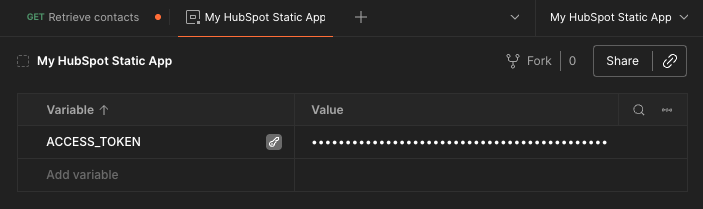
* In the top right, click **No environment**, then click **Create environment** to create an [environment](https://learning.postman.com/docs/sending-requests/variables/variables-intro/):
* Hover over *New environment* to provide a custom name (e.g., *My HubSpot static app*).
* Under the *Variable* column in the table, enter **ACCESS\_TOKEN** as a new variable name, then hover over it and click the **key icon** to mark the variable as sensitive.
* Under the *Value* column, paste in your access token you copied from your HubSpot app.
## Make an API request using a Postman collection
After you've forked a collection into your workspace, you can securely provide your authentication details within Postman and test out API requests using the collection:
* Locate your authentication token for your app based on whether you're using a *Static* access token or *OAuth* authentication, then copy that token to the clipboard. Learn more about the different [authentication methods](/apps/developer-platform/build-apps/authentication/overview) you can use when developing with HubSpot.
* Navigate to your Postman account, locate the forked collection, then click the **API** endpoint you want to make a request to.
* In the top right, click **No environment**, then click **Create environment** to create an [environment](https://learning.postman.com/docs/sending-requests/variables/variables-intro/):
* Hover over *New environment* to provide a custom name (e.g., *My HubSpot static app*).
* Under the *Variable* column in the table, enter **ACCESS\_TOKEN** as a new variable name, then hover over it and click the **key icon** to mark the variable as sensitive.
* Under the *Value* column, paste in your access token you copied from your HubSpot app.
 * With your environment ready, click the **API endpoint** tab or side-navigation entry to navigate back to configuring the API request.
* Click the **Authorization** tab to set up authentication for the request:
* Click the **Auth Type** dropdown menu, then select **Bearer token**.
* On the right, next to *Token*, enter `{{ACCESS_TOKEN}}` to reference the variable you configured in your environment. You can also paste in your access token here directly if you'd prefer not to use an environment.
* With your environment ready, click the **API endpoint** tab or side-navigation entry to navigate back to configuring the API request.
* Click the **Authorization** tab to set up authentication for the request:
* Click the **Auth Type** dropdown menu, then select **Bearer token**.
* On the right, next to *Token*, enter `{{ACCESS_TOKEN}}` to reference the variable you configured in your environment. You can also paste in your access token here directly if you'd prefer not to use an environment.
 * Click the **Params** tab to customize the query parameters for your request. You can also provide request body parameters by clicking the **Body** tab.
* Once you've configured your request, click **Send** in the top right to execute the request.
* Click the **Params** tab to customize the query parameters for your request. You can also provide request body parameters by clicking the **Body** tab.
* Once you've configured your request, click **Send** in the top right to execute the request.
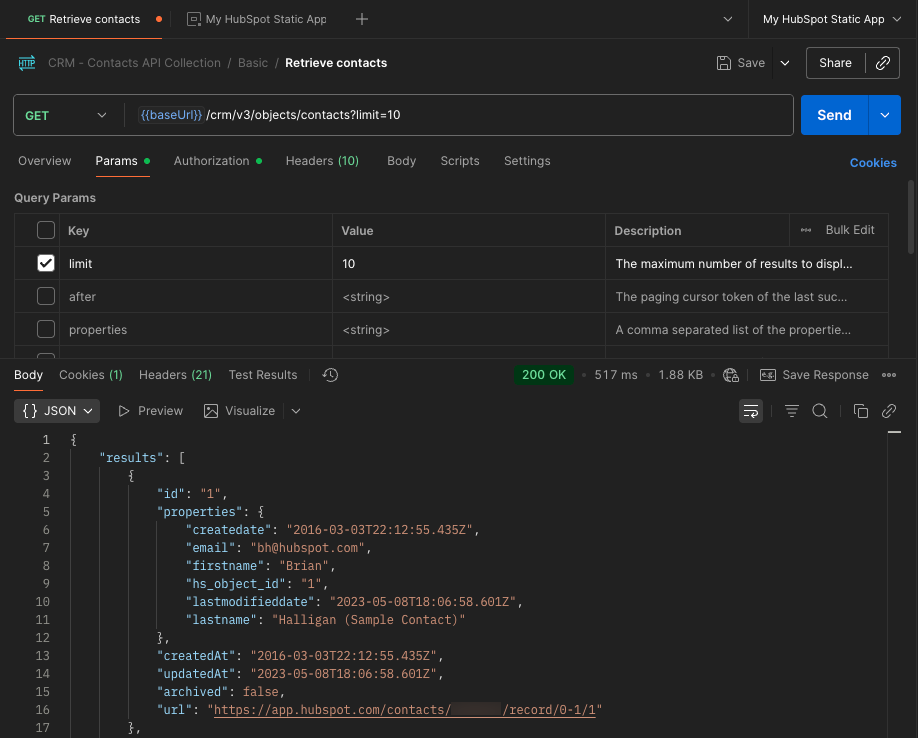 A successful request will result in a `200` response. Learn more about the tools Postman provides to manage response data or how to debug requests in their [official documentation](https://learning.postman.com/docs/sending-requests/response-data/response-data).
## Recommended resources
To learn more about using Postman to leverage HubSpot's APIs, check out the resources below:
* [Accelerate your HubSpot API Adoption with Postman](https://developers.hubspot.com/postman)
* [HubSpot Public API Workspace](https://www.postman.com/hubspot/hubspot-public-api-workspace/overview)
* [HubSpot Developer Use Case Workspace](https://www.postman.com/hubspot/hubspot-developer-use-cases/overview)
* [HubSpot APIs overview](/api-reference/latest/overview)
A successful request will result in a `200` response. Learn more about the tools Postman provides to manage response data or how to debug requests in their [official documentation](https://learning.postman.com/docs/sending-requests/response-data/response-data).
## Recommended resources
To learn more about using Postman to leverage HubSpot's APIs, check out the resources below:
* [Accelerate your HubSpot API Adoption with Postman](https://developers.hubspot.com/postman)
* [HubSpot Public API Workspace](https://www.postman.com/hubspot/hubspot-public-api-workspace/overview)
* [HubSpot Developer Use Case Workspace](https://www.postman.com/hubspot/hubspot-developer-use-cases/overview)
* [HubSpot APIs overview](/api-reference/latest/overview)