As of June 23, 2026, legacy public apps can no longer be created. Existing legacy public apps will continue to be supported, but don't have access to the latest app features. Learn more about this sunset on the HubSpot Developer Changelog.
To get started building apps on HubSpot's developer platform, learn how to migrate an existing legacy public app or create a new app.
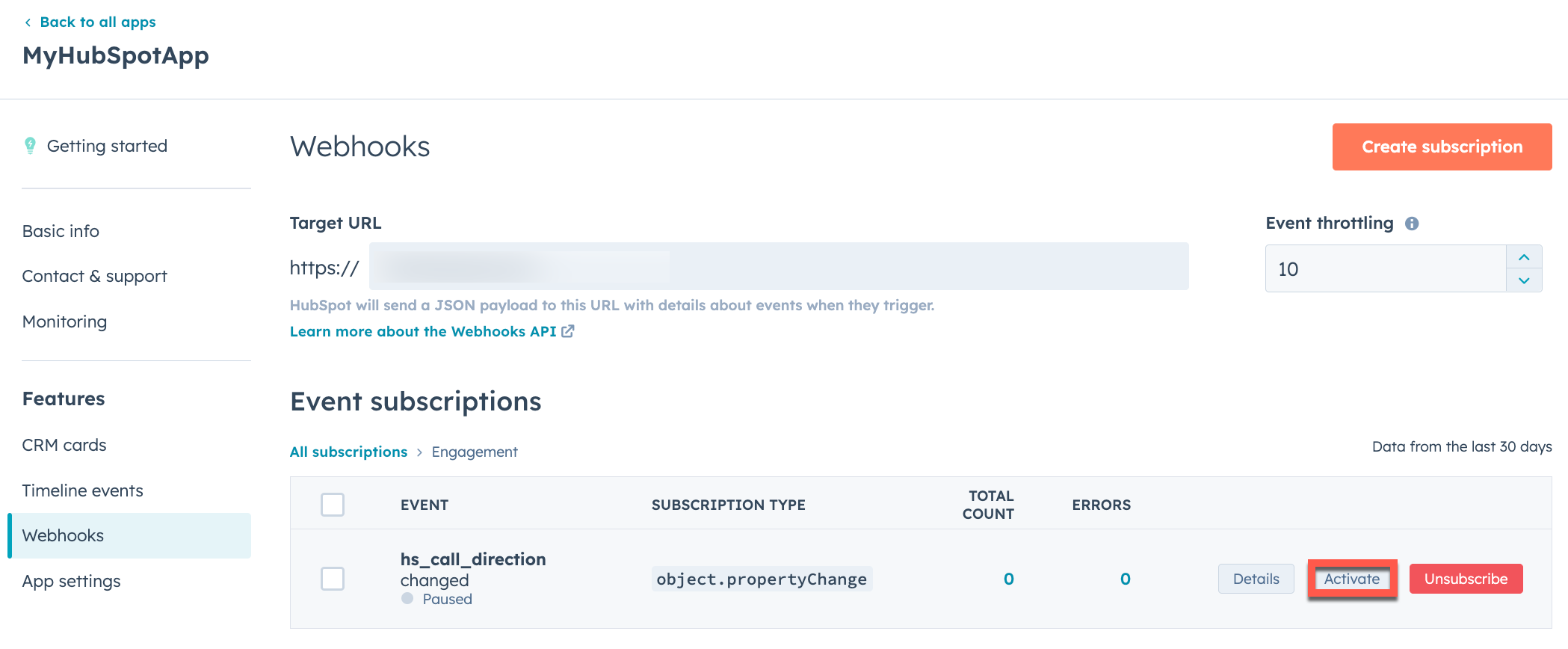
 * If you don't want your webhook subscriptions to be active immediately, or if you want to delete a subscription you mistakenly created, you can hover over the webhook and manage its status, unsubscribe to delete it, or review the subscription details. If you've configured multiple webhook subscriptions, you can edit their statuses in bulk by selecting the **checkboxes** next to each one then clicking **Activate** or **Pause**.
* When you're ready to save your changes, click **Commit changes** in the top right.
After you've configured your webhook subscriptions, HubSpot will begin sending `POST` requests to your *Target URL* once any of the events associated with your active subscriptions are triggered.
* If you don't want your webhook subscriptions to be active immediately, or if you want to delete a subscription you mistakenly created, you can hover over the webhook and manage its status, unsubscribe to delete it, or review the subscription details. If you've configured multiple webhook subscriptions, you can edit their statuses in bulk by selecting the **checkboxes** next to each one then clicking **Activate** or **Pause**.
* When you're ready to save your changes, click **Commit changes** in the top right.
After you've configured your webhook subscriptions, HubSpot will begin sending `POST` requests to your *Target URL* once any of the events associated with your active subscriptions are triggered.
 * Click the **name** of an existing public app.
* In the left sidebar menu, navigate to **Webhooks**.
* Under *Target URL*, enter the **URL** that HubSpot will make a `POST` request to when events trigger.
* Click **Create subscription**.
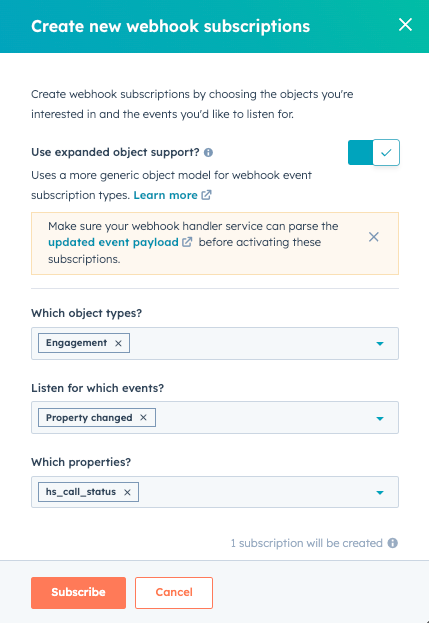
* In the right panel, configure your subscription:
* Select the **object types** that you want to subscribe to, then select the **events** associated with those objects (e.g., created, merged, deleted) that will trigger HubSpot to send a request to the endpoint you configured.
* * If you select *Property changed* for the event type, you can then select any of the associated object properties that you want to subscribe to changes for.
* Click **Subscribe**.
* After you've created your subscription, hover over the associated object type and click **View subscriptions**. When you're ready to activate the subscription, hover over the event subscription and click **Activate**.
* Click the **name** of an existing public app.
* In the left sidebar menu, navigate to **Webhooks**.
* Under *Target URL*, enter the **URL** that HubSpot will make a `POST` request to when events trigger.
* Click **Create subscription**.
* In the right panel, configure your subscription:
* Select the **object types** that you want to subscribe to, then select the **events** associated with those objects (e.g., created, merged, deleted) that will trigger HubSpot to send a request to the endpoint you configured.
* * If you select *Property changed* for the event type, you can then select any of the associated object properties that you want to subscribe to changes for.
* Click **Subscribe**.
* After you've created your subscription, hover over the associated object type and click **View subscriptions**. When you're ready to activate the subscription, hover over the event subscription and click **Activate**.
 After you've configured your webhook subscriptions, HubSpot will begin sending `POST` requests to your *Target URL* once any of the events associated with your active subscriptions are triggered in an account that's installed your app.
## Parse generic webhook payloads
The endpoint at the target URL that you specify in your app's webhooks settings will receive `POST` requests containing JSON formatted data from HubSpot.
To ensure that the requests you're getting at your webhook endpoint are actually coming from HubSpot, HubSpot populates a `X-HubSpot-Signature` header with a SHA-256 hash built using the client secret of your app combined with details of the request. Learn more about [validating request signatures](/apps/legacy-apps/authentication/validating-requests).
For generic webhook payloads, the subscriptionType will follow the format of `object.*` (e.g., `object.propertyChange` instead of the previous format that was specific to each object type like `contact.propertyChange`). For creation, deletion, merge, restore, and property change events, the associated object type will be provided in the `objectTypeId` field of the payload, as defined in the table [here](/guides/crm/understanding-the-crm#object-type-id).
The tables below define the fields provided in different event payloads.
### General
The following fields will appear in all webhook event payloads:
| Field | Description |
| ------------------ | ------------------------------------------------------------------------------------------------------------------------------------------------------------------------------------------------------------------------------------------------------------------- |
| `objectId` | The ID of the object that was created, changed, or deleted. For example, for contact event changes this is the contact ID; for companies, the company ID; for deals, the deal ID; and for conversations the [thread ID](/api-reference/legacy/conversations/guide). |
| `eventId` | The ID of the event that triggered this notification. This value is not guaranteed to be unique. |
| `subscriptionId` | The ID of the subscription that triggered a notification about the event. |
| `portalId` | The specific [HubSpot account ID](https://knowledge.hubspot.com/account-management/manage-multiple-hubspot-accounts#check-your-current-account) where the event occurred. |
| `appId` | The ID of your public app or private app. This is used in case you have multiple applications pointing to the same webhook URL. |
| `label` | When this event occurred as a unix timestamp (in milliseconds). |
| `attemptNumber` | Starting at 0, which number attempt this is to notify your service of this event. If your service times-out or throws an error as describe in the *Retries* section below, HubSpot will attempt to send the notification again. |
| `changeSource` | The source of the change. This can be any of the change sources that appear in contact property histories. |
| `subscriptionType` | The webhook subscription type. This can be one of the following types: `object.creation`, `object.deletion`, `object.merge`, `object.restore`, `object.propertyChange`, or `object.associationChange`. |
| `objectTypeId` | The type of the object that triggered the event. See the [table in this article](/guides/crm/understanding-the-crm#object-type-ids) for a full reference of each `objectTypeId`. |
| `sourceId` | The user or source of the triggered webhook event (e.g., a user in the HubSpot account updating a value). |
### Property change events
The following fields are specifically included in the payload of `object.propertyChange` events:
| Field | Description |
| --------------- | --------------------------------------------------------------------------------------- |
| `propertyName` | The name of the object property that changed (e.g., the `city` property for a contact). |
| `propertyValue` | The new value of the property. |
### Merge events
The following fields are specifically included in the payload of `object.merge` events:
| Field | Description |
| ------------------------- | ------------------------------------------------------------------------------------------------------------------------------------------------------------------------------ |
| `primaryObjectId` | The ID of the merge winner, which is the record that remains after the merge. In the HubSpot merge UI, this is the record on the right. |
| `mergedObjectIds` | An array of IDs that represent the records that are merged into the merge winner. In the HubSpot merge UI, this is the record on the left. |
| `newObjectId` | The ID of the record that is created as a result of the merge. This is separate from `primaryObjectId` because in some cases a new record is created as a result of the merge. |
| `numberOfPropertiesMoved` | An integer representing how many properties were transferred during the merge. |
### Association events
The fields below are specifically included in the payload of `object.associationChange` events.
| Field | Description |
| --------------------- | ----------------------------------------------------------------------------------------------------------------------------------------------------------------------------------------------------------------------------------------------------------------------------------------- |
| `fromObjectTypeId` | The ID of the object you're associating. To find the ID values, refer to this [list of object type IDs,](/guides/crm/understanding-the-crm#object-type-id) or for contacts, companies, deals, tickets, and notes, you can use the object name (e.g., `contact`, `company`). |
| `toObjectTypeId` | The ID of the object you're associating the record to. To find the ID values, refer to this [list of object type IDs,](/guides/crm/understanding-the-crm#object-type-id) or for contacts, companies, deals, tickets, and notes, you can use the object name (e.g., `contact`, `company`). |
| `associationTypeId` | The type of association you want to create. A full list of association types is provided [here](/api-reference/latest/crm/associations/associate-records/guide#association-type-id-values). |
| `associationCategory` | Whether the association type was created by HubSpot (`HUBSPOT_DEFINED`) or by a user (`USER_DEFINED`). |
Association change events will trigger on both incoming and outgoing associations. This means that an `object.associationChange` for an `objectName` of `contact` will trigger on a `DEAL_TO_CONTACT` association change with `toObjectTypeId: 0-1` and the corresponding `associationTypeId` in the payload.
After you've configured your webhook subscriptions, HubSpot will begin sending `POST` requests to your *Target URL* once any of the events associated with your active subscriptions are triggered in an account that's installed your app.
## Parse generic webhook payloads
The endpoint at the target URL that you specify in your app's webhooks settings will receive `POST` requests containing JSON formatted data from HubSpot.
To ensure that the requests you're getting at your webhook endpoint are actually coming from HubSpot, HubSpot populates a `X-HubSpot-Signature` header with a SHA-256 hash built using the client secret of your app combined with details of the request. Learn more about [validating request signatures](/apps/legacy-apps/authentication/validating-requests).
For generic webhook payloads, the subscriptionType will follow the format of `object.*` (e.g., `object.propertyChange` instead of the previous format that was specific to each object type like `contact.propertyChange`). For creation, deletion, merge, restore, and property change events, the associated object type will be provided in the `objectTypeId` field of the payload, as defined in the table [here](/guides/crm/understanding-the-crm#object-type-id).
The tables below define the fields provided in different event payloads.
### General
The following fields will appear in all webhook event payloads:
| Field | Description |
| ------------------ | ------------------------------------------------------------------------------------------------------------------------------------------------------------------------------------------------------------------------------------------------------------------- |
| `objectId` | The ID of the object that was created, changed, or deleted. For example, for contact event changes this is the contact ID; for companies, the company ID; for deals, the deal ID; and for conversations the [thread ID](/api-reference/legacy/conversations/guide). |
| `eventId` | The ID of the event that triggered this notification. This value is not guaranteed to be unique. |
| `subscriptionId` | The ID of the subscription that triggered a notification about the event. |
| `portalId` | The specific [HubSpot account ID](https://knowledge.hubspot.com/account-management/manage-multiple-hubspot-accounts#check-your-current-account) where the event occurred. |
| `appId` | The ID of your public app or private app. This is used in case you have multiple applications pointing to the same webhook URL. |
| `label` | When this event occurred as a unix timestamp (in milliseconds). |
| `attemptNumber` | Starting at 0, which number attempt this is to notify your service of this event. If your service times-out or throws an error as describe in the *Retries* section below, HubSpot will attempt to send the notification again. |
| `changeSource` | The source of the change. This can be any of the change sources that appear in contact property histories. |
| `subscriptionType` | The webhook subscription type. This can be one of the following types: `object.creation`, `object.deletion`, `object.merge`, `object.restore`, `object.propertyChange`, or `object.associationChange`. |
| `objectTypeId` | The type of the object that triggered the event. See the [table in this article](/guides/crm/understanding-the-crm#object-type-ids) for a full reference of each `objectTypeId`. |
| `sourceId` | The user or source of the triggered webhook event (e.g., a user in the HubSpot account updating a value). |
### Property change events
The following fields are specifically included in the payload of `object.propertyChange` events:
| Field | Description |
| --------------- | --------------------------------------------------------------------------------------- |
| `propertyName` | The name of the object property that changed (e.g., the `city` property for a contact). |
| `propertyValue` | The new value of the property. |
### Merge events
The following fields are specifically included in the payload of `object.merge` events:
| Field | Description |
| ------------------------- | ------------------------------------------------------------------------------------------------------------------------------------------------------------------------------ |
| `primaryObjectId` | The ID of the merge winner, which is the record that remains after the merge. In the HubSpot merge UI, this is the record on the right. |
| `mergedObjectIds` | An array of IDs that represent the records that are merged into the merge winner. In the HubSpot merge UI, this is the record on the left. |
| `newObjectId` | The ID of the record that is created as a result of the merge. This is separate from `primaryObjectId` because in some cases a new record is created as a result of the merge. |
| `numberOfPropertiesMoved` | An integer representing how many properties were transferred during the merge. |
### Association events
The fields below are specifically included in the payload of `object.associationChange` events.
| Field | Description |
| --------------------- | ----------------------------------------------------------------------------------------------------------------------------------------------------------------------------------------------------------------------------------------------------------------------------------------- |
| `fromObjectTypeId` | The ID of the object you're associating. To find the ID values, refer to this [list of object type IDs,](/guides/crm/understanding-the-crm#object-type-id) or for contacts, companies, deals, tickets, and notes, you can use the object name (e.g., `contact`, `company`). |
| `toObjectTypeId` | The ID of the object you're associating the record to. To find the ID values, refer to this [list of object type IDs,](/guides/crm/understanding-the-crm#object-type-id) or for contacts, companies, deals, tickets, and notes, you can use the object name (e.g., `contact`, `company`). |
| `associationTypeId` | The type of association you want to create. A full list of association types is provided [here](/api-reference/latest/crm/associations/associate-records/guide#association-type-id-values). |
| `associationCategory` | Whether the association type was created by HubSpot (`HUBSPOT_DEFINED`) or by a user (`USER_DEFINED`). |
Association change events will trigger on both incoming and outgoing associations. This means that an `object.associationChange` for an `objectName` of `contact` will trigger on a `DEAL_TO_CONTACT` association change with `toObjectTypeId: 0-1` and the corresponding `associationTypeId` in the payload.