
Required Scopes
Required Scopes
Methods for sending transactional email
There are three ways to implement transactional email:SMTP API
Transactional email sent using the SMTP API is automatically triggered by specific criteria, like making a purchase on an e-commerce website. This API integrates with any internal or third-party systems to both trigger the email and incorporate data stored outside of HubSpot (e.g. shipping info or purchase price). The email is sent from your system, but is wrapped with HubSpot tracking codes that allow full engagement tracking and measurement. To send an email using the SMTP API, you need to use an SMTP API token to get login credentials for the HubSpot SMTP server. Once you log in to the server, you can send the email over SMTP. If you haven’t created any SMTP API tokens, you’ll first need to generate a new token. If you’ve already created SMTP API tokens, learn about the different methods for getting your tokens through the API. After getting your token, learn about how to log in to HubSpot’s SMTP server. Any domains you use as the From Address of your emails must be connected as an email sending domain in HubSpot. You will encounter an error if you send transactional emails through the SMTP API using a domain that isn’t authorized to send on behalf of your HubSpot account.Create a new SMTP API token
To create a new SMTP API token, make aPOST request to /marketing/transactional/2026-09/smtp-tokens/.
The request body must be a JSON-formatted object with the following properties:
createContact: indicates whether a contact should be created for email recipients.campaignName: a name for the campaign associated with the SMTP API token.
id: username to log into the HubSpot SMTP server.createdBy: email address of the user that sent the token creation request.password: the password for logging in to the HubSpot SMTP server.emailCampaignId: identifier assigned to the campaign provided in the token creation request.createdAt: timestamp generated when a token is created.createContact: indicates whether a contact should be created for email recipients.campaignName: the name of the campaign associated with the token.
id and password values.
A token’s password can only be retrieved at the time of creation. If you lose the password, or want to set a new password, you’ll need to reset the token’s password.
Token deactivation and expiration
To protect developers from potential security incidents, HubSpot will monitor any SMTP authentication tokens that are publicly exposed in GitHub repositories and deactivate them. Any detected SMTP tokens will automatically be deactivated, and you will be notified via email and in-app notification so you can generate a new token and update your integrations to replace the revoked token. SMTP API tokens generated through the public API expire after 12 months. Once expired, they’re automatically deleted. Tokens created directly within your HubSpot account do not expire automatically.
Retrieving SMTP tokens
Below are the available methods of getting token data using the API.List SMTP API tokens by campaign
To get either a list of tokens by campaign name, or get a single token by campaign ID, make aGET request to /marketing/transactional/2026-09/smtp-tokens.
You’ll also need to include either a campaignName or emailCampaignId parameter with the request. You can find all request details in the transactional email endpoint reference documentation.
Response details
The response contains results and paging as its top-level fields:
results: a collection ofSmtpApiTokenViewcontaining:id: username to log into the HubSpot SMTP server.createdBy: email address of the user that sent the token creation request.emailCampaignId: identifier assigned to the campaign provided in the token creation request.createdAt: timestamp generated when a token is created.createContact: indicates whether a contact should be created for email recipients.campaignName: the name of the campaign associated with the token.
paging: contains anext.afterfield that can be used to request more results.
Query a single SMTP API token
To query a single SMTP API token by ID, make aGET request to /marketing/transactional/2026-09/smtp-tokens/{tokenId}.
Response details:
The response includes SmtpApiTokenView, which contains:
id: username to log into the HubSpot SMTP server.createdBy: email address of the user that sent the token creation request.emailCampaignId: identifier assigned to the campaign provided in the token creation request.createdAt: timestamp generated when a token is created.createContact: indicates whether a contact should be created for email recipients.campaignName: the name of the campaign associated with the token.
Manage existing tokens
After creating tokens, you can reset a password or delete the token using the API.Reset password
To reset a token password, make a POST request to/marketing/transactional/2026-09/smtp-tokens/{tokenId}/password-reset.
The response includes SmtpApiTokenView, which contains:
id: username to log into the HubSpot SMTP server.createdBy: email address of the user that sent the token creation request.emailCampaignId: identifier assigned to the campaign provided in the token creation request.createdAt: timestamp generated when a token is created.createContact: indicates whether a contact should be created for email recipients.campaignName: the name of the campaign associated with the token.
Delete a token
To delete a single SMTP API token, make a DELETE request to/marketing/transactional/2026-09/smtp-tokens/{tokenId}.
The response does not include any content.
Log in to HubSpot’s SMTP server
Below are the details for logging in to HubSpot’s SMTP server, using the username (id) and password provided by your token.
- SMTP Hostname:
- If you’re not based in the EU, use
smtp.hubapi.comfor the hostname. - If you’re based in the EU, use
smtp-eu1.hubapi.comfor the hostname.
- If you’re not based in the EU, use
- SMTP Port:
- For STARTTLS, you can use port 25 or 587.
- For direct TLS, use port 465.
- SMTP User Name: provided in the ID field
- SMTP Password: provided in the password field
Single-send API
The Single-Send API sends template emails created in the HubSpot email tool using a JSON-formattedPOST request. Any emails sent through this API will be automatically associated with contact records based on email address. If there’s no contact with a matching email address, a new contact with that email will be created. If you want to send emails without creating contacts, use the SMTP API.
Create and publish your email template
First, set up your email in HubSpot. After you create the email, you can set the recipient details, including any contact or custom properties set up in the email template, in the body of the API request. Before you can make the API request, you’ll need the ID of the email:- If you leave the email drafted without publishing it, you can get the email ID from the URL when you’re in the email editor. The ID is the final numeric value before the final slash character (
/) in the URL (e.g.,https://app.hubspot.com/email/{PORTAL_ID}/edit/{EMAIL_ID}/settings).

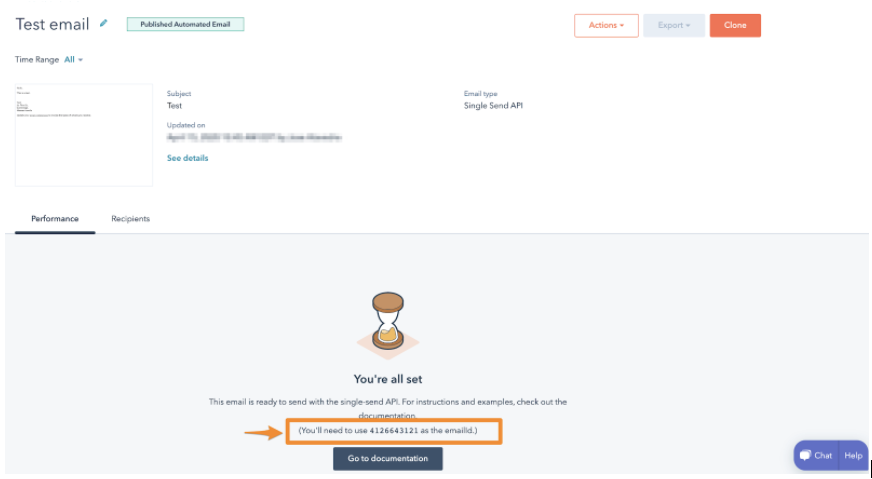
- If you publish your email, you can copy the email ID from the email details page.
Send your email using the single-send API
To send an email with the Single-Send API, make aPOST request to /marketing/transactional/2026-09/single-email/send.
The response contains the following fields:
-
requestedAt: the timestamp of when the send was requested. -
status: the status of the send request. IncludesPENDING,PROCESSING,CANCELED, andCOMPLETE.
Request properties
The request body must be a JSON-formatted object with the following properties:emailIdmessagecontactPropertiescustomProperties
emailId
TheemailId field contains the transactional email’s content ID, which can be found in HubSpot’s email tool.
message
The message field is a JSON object containing anything that you want to override. At the minimum, you must include theto field.
Message object fields:
to: the recipient of the emailfrom: the “From” header for the email. You can define a from name with the following format:"from":"Sender Name <sender@hubspot.com>"sendId: the ID of a particular send. Only one email with a givensendIdwill be sent per account, so you can include this field to prevent duplicate email sends.replyTo: a JSON list of “Reply-To” header values for the email.cc: a JSON list of email addresses to send as Cc.bcc: a JSON list of email addresses to send as Bcc.
contactProperties
ThecontactProperties field is a JSON map of contact property values. Each contact property value contains a name and value. Each property will be set on the contact record and will be visible in the template under:
 Use these properties when you want to set a contact property while you’re sending the email. For example, when sending a receipt you may want to set a
 last_paid_date property, as the sending of the receipt will have information about the last payment.
customProperties
ThecustomProperties field is a JSON map of key-value properties. These properties are generally related to the email itself, not the contact receiving the email. They will not appear in the web page version of the email, or in the view of the email from the contact’s timeline. These properties are also not stored in HubSpot and will only be included in the sent email.
Each key in the customProperties field can be referenced in the template using a HubL expression for fields contained within the custom variable (e.g., {{ custom.NAME_OF_PROPERTY }} ).
For example, if your email template references two properties, purchaseUrl and productName, you could provide the associated values for these properties with the following request body:
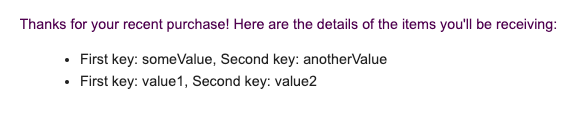
customProperties field only supports arrays when used with programmable email content. In your email template, you can reference the items defined in your customProperties field by using a HubL expression (e.g., using a for loop to render each item in a list). For example, if the customProperties you included in your request body was structured like the following JSON snippet below:
exampleArray with the following HubL code:
sendResult
ThesendResult is an enumeration that reflects the result of an email send attempt. Its possible values are:
SENT: the email was sent successfully.QUEUED: the email was queued and will send as the queue gets processed.PORTAL_SUSPENDED: due to Acceptable Use Policy violations, the HubSpot customer’s email has been suspended.INVALID_TO_ADDRESS: the recipient address is invalid. This error will also occur if you attempt to send an email with any of the following role-based prefixes in the email address:abuse,no-reply,noreply,root,spam,security,undisclosed-recipients,unsubscribe,inoc,postmaster, orprivacy.BLOCKED_DOMAIN: the domain cannot receive emails from HubSpot at this time.PREVIOUSLY_BOUNCED: the recipient has previously bounced, and the sending logic resulted in no send.PREVIOUS_SPAM: the recipient has previously marked similar email as spam.INVALID_FROM_ADDRESS: the From address is invalid.MISSING_CONTENT: theemailIdis invalid, or theemailIdcorresponds to an email that wasn’t set up for Single-Send.MISSING_TEMPLATE_PROPERTIES: there are properties set up in the template that have not been included in thecustomPropertiessent in the request.