Learn about the changes released for each version of HubSpot’s developer platform and REST APIs
HubSpot developer projects and REST APIs are versioned based on when they were released. This enables you to access updated functionality while ensuring any new features don’t break any features you’ve released on a previous version.
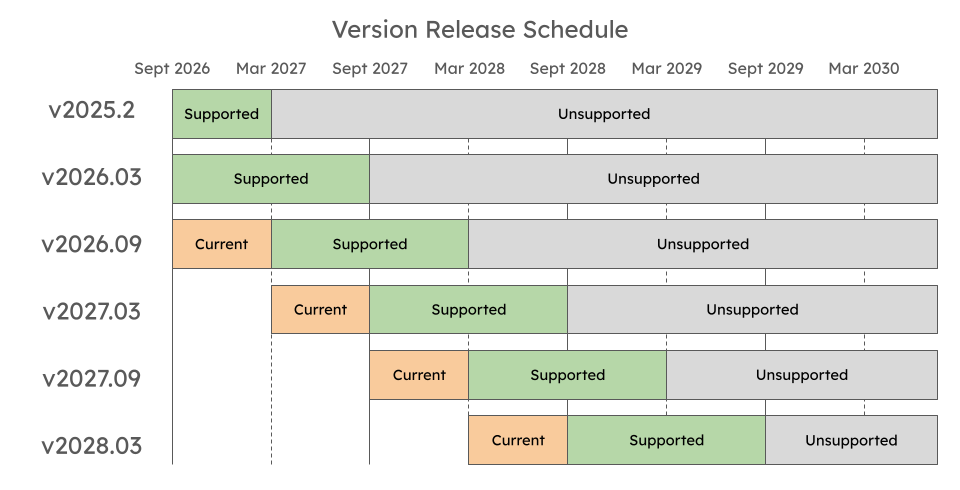
A new version of HubSpot’s REST APIs and app developer platform is made generally available (GA) every 6 months in March and September, accompanied by a support transition for previous versions:
Current: the newest version will be considered Current for 6 months following its original release. During this period, the version will be actively managed to address bugs, maintain reliability, and safeguard developer security.
Supported: after a version has been GA for 6 months, it will transition to Supported. Any critical bug fixes will be addressed to ensure stability and security.
Unsupported: 18 months after a version originally went into GA, the version will be considered unsupported:
Any Unsupported versions will not receive any bug fixes and no further updates will be made.
If you try to upload a project using an Unsupported version, the resulting build will fail.
Although APIs or apps using these versions may still work, developers should not expect ongoing stability and are highly advised to upgrade to the most Current version.
The release schedules for APIs and the developer platform are illustrated in the tabs below:
API versions
Developer platform versions
The following sections provide more details on the availability and features of each API and developer platform version.
Starting from March 30th 2026, HubSpot’s REST APIs follow a date-based version standard, based on the release schedule detailed above. Instead of the previous semantic versioning scheme, such as v1, v2, v3, or v4, versions are tied to release dates:
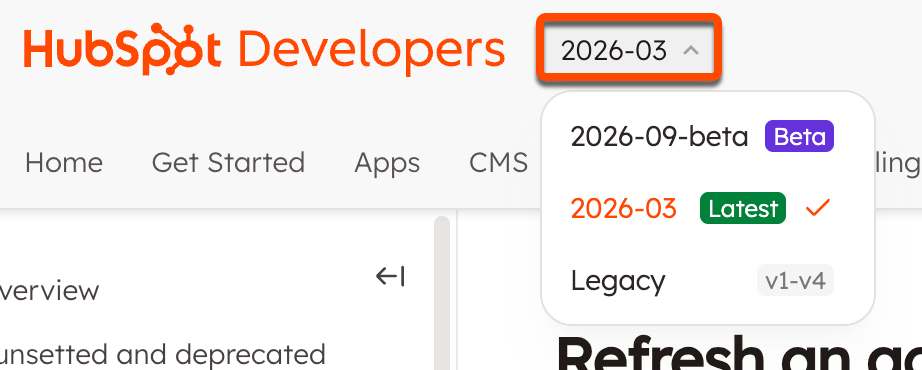
REST APIs in beta include the next release date, suffixed by -beta (e.g., /2026-09-beta/).
The latest API version includes a URL prefix that’s formatted as /YYYY-MM (e.g., /2026-03/).
All legacy APIs using semantic versions (e.g., v4, v3, v2, and v1) are still supported and available at their previous URLs.
All APIs can be accessed in the APIstab in the top left, where you can use the version picker to navigate between API versions.
Apps built on the HubSpot developer platform also use date-based versioning, where each platform version is named using the year and month it was released, formatted as: YYYY.MM (e.g., 2025.2, 2026.03, 2026.09, etc).
To check which version of the developer platform your projects are running on, locate the platformVersion field in your project’s top-level hsproject.json file.
This platform version increased the minimum required version of Node.js to v22.
Changes include a new file-based build-and-deploy framework. This framework contains an app’s configuration, assets, and other source code. Learn more in the developer platform overview.
2025.1
This version was sunset on August 1, 2026.
Learn more on the HubSpot Developer Changelog. Any project-built private apps on 2025.1 should be migrated to the latest version of the developer platform.
2023.2
This version was sunset on October 1, 2025, and attempts to upload projects at this version will fail. To continue building and deploying, upgrade to a newer version of the developer platform.
2023.1
Initial release of the developer platform. This version is no longer available as of March 31, 2024. Attempts to upload projects at this version will fail.
The latest version of the developer platform provides support for user-level access in apps. This feature allows you to build apps that act on behalf of specific users, enforcing their in-app HubSpot permissions instead of operating with broad, account-wide access to your account. Learn more about how to configure user-level access in your app and the supported features and APIs in this guide.
Version 2026.03 of the developer platform re-introduced full serverless function support for project-built apps, which was not previously supported for 2025.2 apps.Learn more about how to add serverless functions to an app on version 2026.03, or migrate an older app to 2026.03.
If you opt to migrate a legacy private app or public app to version 2026.03, you won’t be able to downgrade back to a previous version after the migration process is complete.Learn more about migrating your app to 2026.03.
Version 2025.2 of the developer platform introduced a number of new features, a streamlined build-and-deploy process, and other productivity tools to help you build powerful integrations with HubSpot.Learn more about how to build an app, edit your app configuration, manage your app in HubSpot, and how to install the latest version of the HubSpot CLI.More details are available in the developer platform overview.
This version was sunset on October 1, 2025. If you have a project that’s still on 2023.2, you can continue building it by migrating to the latest version of the developer platform.For posterity, below are the changes included for version 2023.2.
Show serverless function updates
The following changes have been made for serverless function configuration (serverless.json):
Previously, serverless functions in projects supported two types of functions: app and API endpoint. App functions have been updated to support public URLs for making API requests, so you no longer need to build these as separate types.
With this update, the runtime and version fields have also been removed.
This version uses Node18, and lower versions cannot be specified.
2023.2 projects now support asynchronous functions. Callbacks are no longer supported in this version.To update your serverless functions to use async:
Add async to the function definition.
Remove the callback (sometimes referred to as sendResponse), and use return statements to return response.
Use await and try/catch instead of promise chaining.
Whereas previously you would refer to private app access tokens with context.secrets.PRIVATE_APP_ACCESS_TOKEN, you’ll now use process.env rather than context.secrets. For example:
// Include HubSpot node API clientconst hubspot = require("@hubspot/api-client");exports.main = async (context = {}) => { // instantiate HubSpot node API client const hubspotClient = new hubspot.Client({ accessToken: process.env["PRIVATE_APP_ACCESS_TOKEN"], }); //your function return response;};
Show logging changes
Version 2023.2 increases log size from 4KB to 256KB and guarantees logs to be in order of execution. You can also take advantage of improved in-app logging, such as log tracing.
Last modified on September 9, 2026
Was this page helpful?
Assistant
Responses are generated using AI and may contain mistakes.