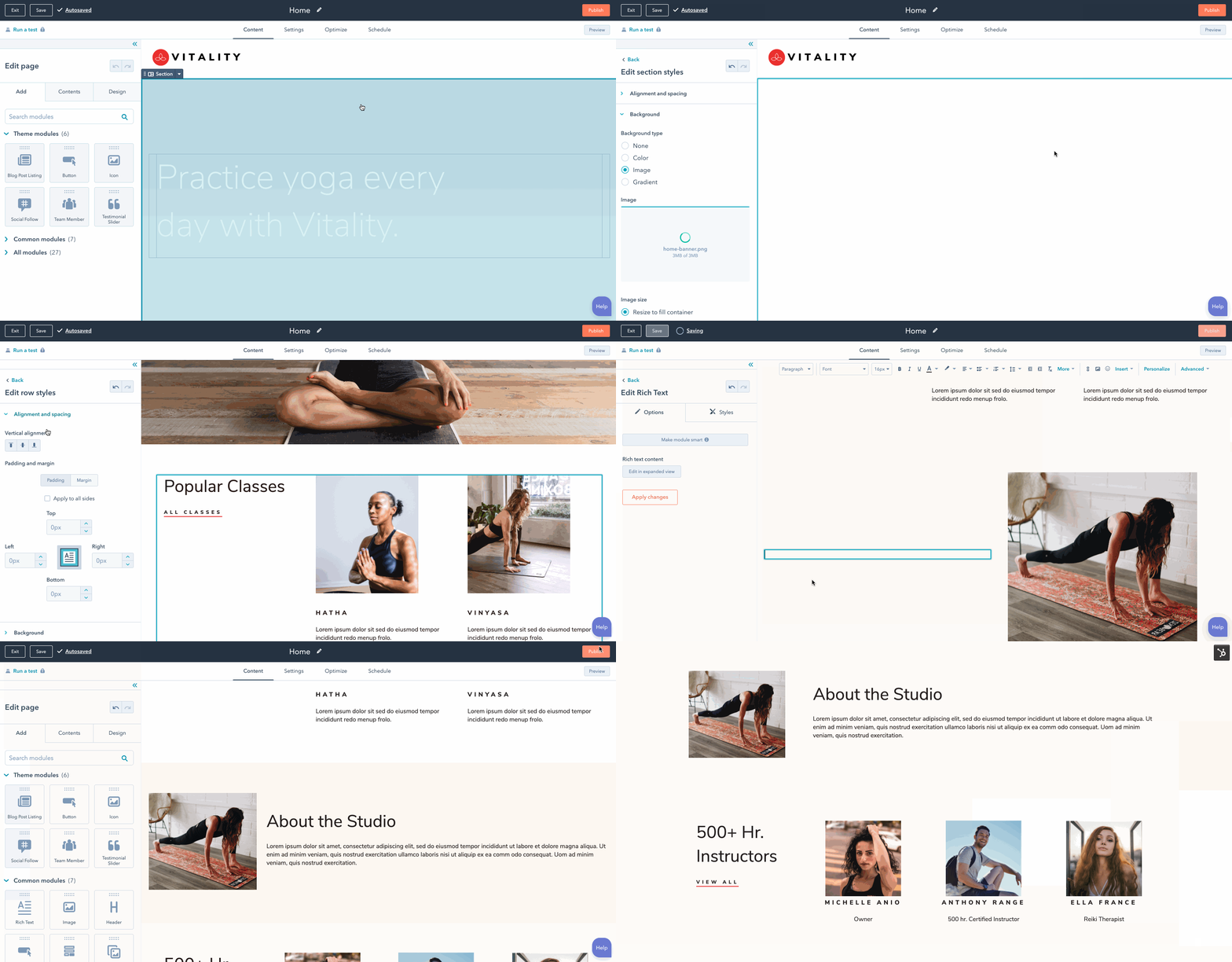
This section is designed to help you understand key aspects of HubSpot’s CMS and build great websites on it. To get the most out of this, a professional-level understanding of web development basics, including HTML, JavaScript, and CSS, is expected.
Getting started
If you’re just getting started with developing on HubSpot’s CMS, it’s recommended to begin with the following:
- Create a free developer account, then create a test account within it. This will give you a testing environment to build out your CMS assets without impacting a standard HubSpot account. Because you can also build private apps in developer test accounts, along with building public apps in developer accounts, you’ll have one home for both CMS and app development. Alternatively, you can create a CMS developer sandbox account.
- Follow the CMS quickstart guide to walk through some basics, such as using the CMS theme boilerplate, running commands using the HubSpot CLI, and the relationship between local development and content creation in HubSpot.
Building for content creators
HubSpot’s CMS is designed to help businesses grow their web presence with an emphasis on enabling marketers to create and manage web content. The website’s content, lead collection, and analytics are integrated with the HubSpot CRM, making it easy to create personalized experiences for visitors and integrate those experiences with the rest of the business.
A well-crafted website should be developed in close collaboration with your content creators to understand their needs. To that end, it’s recommended that you preview how the page building experience looks and feels for content creators while you build. This ensures they can work independently with the site as much as possible.
HubSpot takes care of hosting and maintaining your pages, so you don’t have to worry about plugin management, updates, hosting, scaling, or security. The tradeoff is that the system puts a few more restrictions on what you can do compared to self-hosted CMS’s. For example, you can’t alter or extend system fundamentals manually or via plugins, manipulate low-level rendering, or access and alter database content directly.
Developer-built content (e.g., themes, templates, modules, JavaScript, and CSS) is created in a developer file system, while page content (pages, blog posts) is laid out and built in a powerful block-based what you see is what you get (WYSIWYG) editor, and media files (content creator-built images, PDFs, etc.) are stored in a web app-based file manager.
When a page is rendered, HubSpot routes the request to one of many servers based on domain, renders the page on our servers, and caches it to a content delivery network (CDN) if possible.
Types of content
There are many types of content that you create using HubSpot’s CMS. The user interface for content creators is slightly different depending on content type, which has implications that you as a developer need to be aware of.
Website pages and landing pages
Website and landing pages are built independent of one another, but all pages are based on templates. For content creators, the process of building a landing page or a website page is nearly identical. The distinction between them is that website pages are made to present information that’s part of your website and designed to be found organically, while a landing page is generally associated with a specific marketing offer or campaign (e.g., linked from a marketing email sent to a specific list of contacts).
In the UI for marketers, the analytics and organization of these page types are also organized separately since landing pages often have specific conversion goals.
Blogs
HubSpot blogs have two views—one for the listing page and one for the individual post page, then each blog post is populated into each of them. You can set a blog to share the same template for blog posts and listing pages, or have separate templates for the listing page and for blog posts. Blog posts must share the same template. Learn more about blog template markup and how to create and manage blogs in HubSpot.
Emails
Emails can be built in a few ways in HubSpot:
- Classic email: build email templates and modules in a similar way to website and landing pages. You can also build coded email templates to have full control of the markup.
- Drag and drop emails: build customizable drag and drop email templates that enable content creators to build email layout and content using HubSpot’s drag and drop interface.
Please note: building custom email modules and templates requires a Marketing Hub Professional or Enterprise subscription.
Working with data
In addition to creating page content through the in-app editors or hard-coding in templates, you can also use structured data sources to populate dynamic page content with HubL. You can use the following data sources to populate pages:
- HubDB: store data in cells of HubDB tables.
- CRM records: store data in CRM records, such as contacts, companies, or custom objects.
Building dynamic pages using structured content means that you can create, edit, and remove website pages and page content by updating the data sources directly. Similar to a HubSpot blog, a set of dynamic pages will include a single listing page to display the instances of your data source, then a separate page for each individual instance. Using HubL, you can fully configure the data that the pages display.
For example, you can create a HubDB table that stores a row of information for each member of a sales team. Using that HubDB table, HubSpot can then generate a listing page to display key details from each table row (such as a name and image for each sales rep), along with a separate page per sales rep to display more information (such as their bio and phone number). Should a sales rep later be promoted to a different team, you can delete their row from the HubDB table, and HubSpot will automatically delete their detail page and remove them from the listing page.
Serverless functions
In addition to using CRM records and HubDB data to populate pages, you can use serverless functions to write server-side code that interacts with HubSpot and third-party services through APIs. Serverless Functions are a Content Hub Enterprise feature.
Developer file system
The core assets—templates, themes, and modules, as well as the JavaScript, CSS files, and images that support them—are created in a developer file system. You can view this file system either in the left panel of the design manager or in folders synchronized locally using the local development tools. Within the file system, assets can refer to each other with absolute or relative paths.
Please note:React-based assets, such as some HubSpot default modules and custom CMS React assets, will not appear in the design manager file system. These assets are intended to only be worked on in your local environment using the HubSpot CLI to fetch and upload.
/modules/ folder or JavaScript lives in a /js/ folder. However, it’s recommended to organize your assets in a similar way to the boilerplate example code for the CMS.
Please note:By default, HubSpot automatically minifies JavaScript and CSS included in the design manager to remove unnecessary spaces, line breaks, and comments. This also applies to JavaScript and CSS uploaded to the design manager through the CLI. This means that you should not add already minified code directly to the design manager.Learn more about JavaScript and CSS minification. Themes, templates, modules, and fields
Themes, templates, modules, and fields are the most common types of assets you’ll be working with. Using each type of asset effectively gives content creators the freedom to work on websites independently while staying inside defined style and layout guardrails.
Themes are the highest-level container that you can use to package other assets to create a cohesive site. One level down, templates are the files that content creators use for building individual pages, blog posts, emails, and more. Then, modules are elements on the page, such as a pricing card or image gallery. HubSpot provides a set of default web modules you can use out of the box for pages, and a set of default email modules for building emails.
Please note: building custom email modules and templates requires a Marketing Hub Professional or Enterprise subscription.
The HubL Language
The main language that you’ll use to build website assets on HubSpot’s CMS is the HubSpot Markup Language or HubL (pronounced “Hubble”). HubL is HubSpot’s extension of Jinjava, a templating engine based on Jinja. HubL uses a fair amount of markup that is unique to HubSpot and does not support all features of Jinja. It’s executed completely on the server-side when a page is rendered.
HubL has the features you’d expect of a simple templating language like variables, for loops, and if statements, but also supports more complex rendering macros, data fetching, and mapping with tags, functions, and filters.
If you reach the limits of what’s possible with HubL, HubSpot provides APIs for creating more customized solutions. Content Hub Enterprise accounts can use serverless functions, enabling more sophisticated server side programming.
You can refer to the HubL language reference for more details on specific language features.
Logged in pages
Using the Membership feature of Content Hub Enterprise, you can require your CRM contacts to be logged in to view specific content of your site. Content behind membership pages can be highly personalized to the logged-in contact, and can even render Contacts, Companies, Deals and Products data from the CRM.
Multi-language support
With HubSpot’s CMS, users can create multi-language variations of their content. This will allow end-users to see content in the language with which they’re most comfortable. In addition, HubSpot provides tools to help developers ensure that the right language is available to the end-user.