Starting from March 30th 2026, HubSpot’s REST APIs follow a date-based version standard. Instead of the previous semantic versioning scheme, such as v1, v2, v3, or v4, versions are tied to release dates instead:
- The latest API version includes a URL prefix that’s formatted as
/YYYY-MM (e.g., /2026-09/).
- In September 2027, all legacy APIs using semantic versions (e.g., v4, v3, v2, and v1) will no longer be supported.
If you have an existing app that’s currently using legacy API endpoints, you should audit the legacy endpoints and migrate to the 2026-09 equivalent endpoints. Many v3 and v4 endpoints have feature parity in version 2026-09, but check your existing code and the API documentation carefully as you prepare to migrate.
Please note: some older v1 and v2 endpoints may not have exact date-based equivalents at this time. This article will be regularly updated as HubSpot addresses historical gaps in functionality to streamline the migration process for developers. In the meantime, navigate to the latest 2026-09 APIs to see what’s available. Migrate legacy API usage
The sections below provide high-level guidance and best practices you should follow as you audit an existing app that’s using legacy API endpoints. You may want to create a duplicate project while you audit and test legacy endpoint usage and the corresponding 2026-09 APIs.
Audit legacy API references in your code
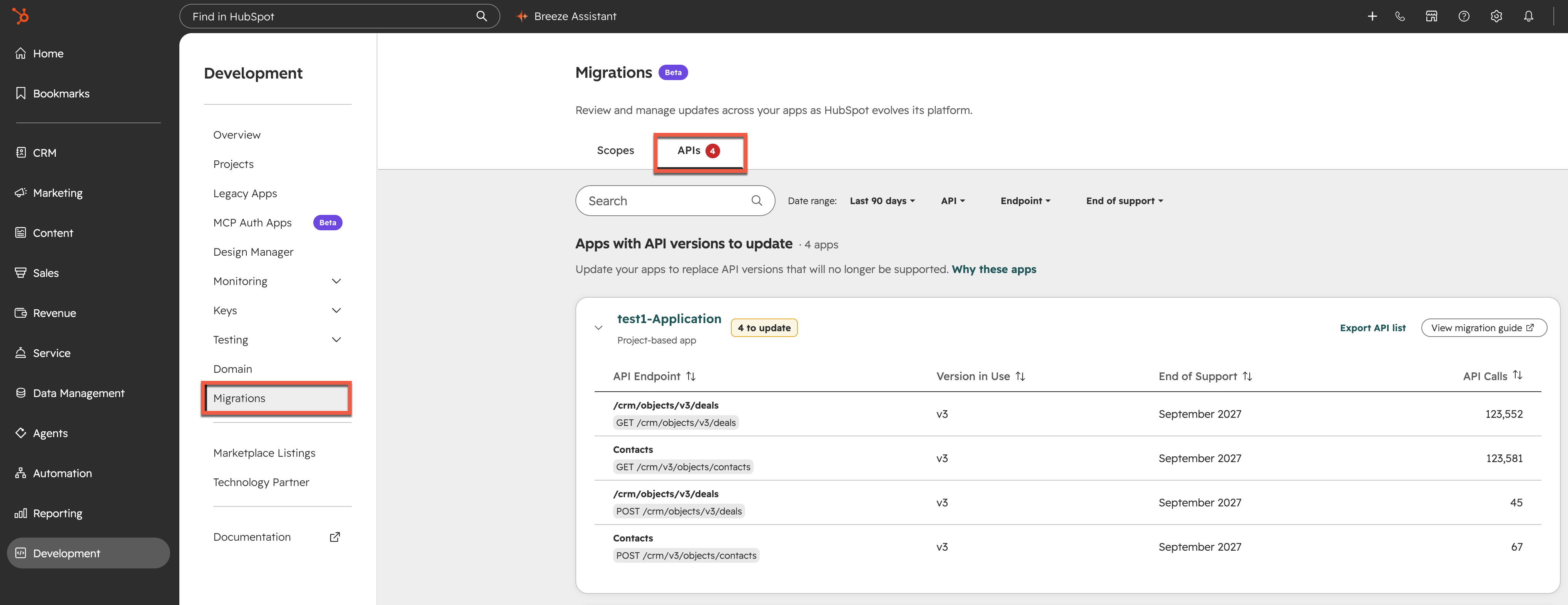
HubSpot provides an in-app tool in your account that provides a summary of recent usage of legacy APIs:
- In your HubSpot account, navigate to Development.
- In the left sidebar menu, click Migrations.
- Click the APIs tab.
Review each legacy API that’s been flagged by HubSpot’s automated tooling. Search your codebase for the corresponding references, then proceed to find the corresponding 2026-09 endpoint(s) you can migrate to.
Locate equivalent date-based API endpoints
Across the API reference sections in HubSpot’s developer documentation, use the versioning dropdown menu in the top bar to switch versions. If there’s an equivalent endpoint to the one you’re currently viewing, you’ll automatically be sent there. Otherwise, you’ll land on that version’s home page.
Migrate your code
Many legacy APIs, especially v3 endpoints, have identical contracts and responses in 2026-09. In these cases, after comparing the legacy and 2026-09 versions for an endpoint to confirm the same request body and response, you can simply update the URL path in your codebase.
For example, if you were previously making a GET request to /crm/v3/objects/contacts, you’d be able to simply switch that path to /crm/objects/2026-09/contacts. Note that for the date-based version of an endpoint, the new version slug may have shifted when compared to the legacy endpoint URL structure, so ensure that you copy and confirm the entire new URL correctly.
Some APIs will have updated request bodies, query parameters, or response shapes. For these APIs, check each of the fields you’re passing to the endpoint carefully, and map them to the associated fields in the date-based version.
If you can’t locate an equivalent endpoint for a legacy API you’re using, it may not yet be available. You can regularly return to this page for updates on new date-based versioned APIs as they become available.
Test your app
For each migrated reference in your code, thoroughly test each path in your code to make sure there are no changes in your app’s behavior. You can use a test account as you exercise each of the migrated API endpoints to ensure you’re not making any changes to critical production data in your main account.
Although API responses and errors should be very similar across versions, it’s highly recommended that you check for edge cases and prevent regressions. If you created a duplicate project and app in your initial exploration of the new APIs, you should feel confident about all code changes before making the corresponding changes to your production app.