
If you’ve integrated with HubSpot’s APIs, you know the OAuth handshake is relatively straightforward (if you don’t, no worries, we’ll review it below). But here’s the thing: getting that initial token is the easiest part. The real challenges start when you’re managing tokens in production. This is because you’re dealing with token validation across multiple services, updating scopes as your app grows, migrating old integrations in a multi-tenant setup, and keeping permissions consistent as things change. This is the stuff that keeps us up at night.
Here’s why it matters: bad token management can create real problems. On the security side, you risk exposing credentials or giving your integration more access than it needs. For reliability, expired tokens mean broken integrations and angry users filing support tickets. And performance? If you’re fetching a fresh token for every API call instead of caching, you’re slowing everything down unnecessarily. The gap between a working integration and a production-ready one usually comes down to how well you handle tokens.
This guide will go beyond the basics. We’ll walk through the full token lifecycle in production: how to securely store tokens, when and how to cache them, how to automatically refresh tokens before they expire, how to verify that requests originated from HubSpot, and how to handle the inevitable errors gracefully. By the end, I hope you’ll have practical patterns you can use to build token management systems that actually scale.
Friendly Update: (January 2026) HubSpot has released new OAuth v3 API endpoints with enhanced security features. This guide has been updated to reference the v3 endpoints. The v1 OAuth API endpoints are now deprecated but remain operational. We recommend that all new integrations use v3. Learn more about those changes.
Table of Contents
- Understanding the OAuth Handshake
- Secure Token Storage and Initial Setup
- Token Caching and Automatic Refresh
- Security and Request Verification
- Reliability and Testing
- Logging, Monitoring, and Alerting
- Unit and Integration Testing
- Production Readiness Checklist and Next Steps
Understanding the OAuth Handshake
Before we deep dive into production concerns, let’s make sure we’re all on the same page about how HubSpot’s OAuth flow works. If you’ve already built this part, feel free to skim, but it’s worth reviewing because understanding what each token does will help you manage them better.
HubSpot’s OAuth Flow
The OAuth dance with HubSpot follows the standard authorization code flow. Here’s how it plays out: when someone installs your app, you redirect them to HubSpot’s authorization URL with your app’s client ID, redirect URI, and the scopes you need. The user reviews the permissions you’re requesting, and either approves or denies them. If they approve, HubSpot redirects back to your app with an authorization code tucked into the response. You then exchange that code for the tokens you’ll actually use - an access token and a refresh token. The whole initial handshake happens once per installation (via user or portal), and then you’re off to the races!

Authorization vs. Access Tokens vs. Refresh Tokens
This is where people sometimes get tripped up, so let’s break down what each token actually does:
- The authorization code is a temporary and single-use code. It shows up in your redirect URL after the user approves your app, and you’ve got a short window to exchange it for the real tokens. Once you’ve used it, it’s done - you can’t reuse it.
- The access token is what you use for every API request. It goes in the Authorization header as a Bearer token and proves to HubSpot that your app has permission to act on behalf of the user’s account. Here is the catch, though: it expires quickly.
- The refresh token is your long-term credential. When your access token expires (which it will, every 30 minutes), you use the refresh token to get a fresh access token without bothering the user to reauthorize. Think of it like a backstage pass that lets you keep getting new tickets.
Token Lifespans and Expiration
The expires_in parameter in the token response indicates an access token's expiration, and it’s consistent. That means if you’re not actively managing token refresh, your integration will break every half hour. Not great.
So, what’s the good news? Refresh tokens don’t expire (for now)! They stay valid indefinitely unless the user uninstalls your app or you revoke them manually. This is different from other APIs, where refresh tokens also have expiration dates, which actually simplifies things. You get one refresh token per installation, and as long as that installation is active, you can keep using it to get new access tokens.
Note: Token deletion is available via the v1 OAuth API. The v3 OAuth API focuses on token generation and introspection. Use the v1 delete endpoint to programmatically revoke tokens.
The pattern you’ll use over and over is: check if your access token is still valid > if it’s expired or about to expire > use your refresh token to get a new one > store the new access token, > make your API request. We’ll dig into exactly how to automate that in the following section of this guide.

Secure Storage and Initial Setup
Now that we’ve reviewed the OAuth dance, the next question is: where do these tokens actually go? This is where many integrations make critical mistakes. Storing tokens properly isn’t just a nice-to-have - it’s fundamental to keeping your users’ data secure.
Implementing the Authorization Flow
Let’s walk through the setup. When a user clicks “Install” on your app, you direct them to HubSpot’s authorization URL, with the client ID, redirect URI, and the scopes you need. HubSpot shows them the permissions you’re requesting, and if they approve, they're redirected to your redirect URI with an authorization code in the query string.
Here’s where it gets real - you need to exchange that code for tokens immediately. Remember that the authorization code expires quickly (as we mentioned above). Then you’ll make a POST request to https://api.hubspot.com/oauth/v3/token with your client ID, client secret, redirect URI, and that authorization code in the request body. The response gives you an access token, a refresh token, and an expires_in value (1800 seconds, or 30 minutes). The critical moment is what happens next. Those tokens need to be stored securely before you do anything else with them.
Note: With the v3 API, all sensitive parameters must be sent in the request body using application/x-www-form-urlencoded format, never as URL query parameters. This prevents credentials from appearing in server logs or browser histories.
Encryption Strategies for Different Environments
Here’s the golden rule for anybody/everybody: never store tokens in plain text. Just don’t. Not in your database, not in log files, not anywhere. If someone gains access to your database or your logs, those plain-text tokens are keys to your users’ HubSpot accounts. For most production apps, you have three main options:
- Encrypted database storage is the most common approach. Store your tokens in your database, BUT encrypt them at rest using a strong encryption algorithm like AES-256. Your encryption keys should live separately from the data - typically in an environment variable or by using a secrets manager. When you need to use a token, decrypt it in memory, use it for the API call, and never log the decrypted value.
- Secrets managers like AWS Secrets Manager, Google Cloud Secret Manager, or HashiCorp Vault take this step further. They handle encryption, rotation, and access control for you. Instead of storing tokens directly in your database, you store a reference ID and fetch the actual token from the secrets manager when needed. This adds a bit of latency, but it’s worth it for sensitive integrations or apps that need to meet compliance requirements.
Note: We have a blog post that dives deep into leveraging secrets managers, here for your reference! - Environment variables work for simple, single-tenant apps (like when you’re building a private integration for just your company), but they don’t scale well. You can’t store different tokens for different users in environment variables, and rotating them requires redeploying your app.
Separation of Concerns | Tokens per Integration/User
In a multi-tenant app, each HubSpot account that installs your app gets its own set of tokens. You need to keep these completely separate. Store tokens with a clear association to which user or account they belong to - typically using the HubSpot portal_id or hub_id as the key.
In a user-based app, each user authorizes your app individually. That means you manage one set of tokens per (HubSpot account, user) pair, and your infrastructure needs to be able to route requests as the correct users, respecting their individual permissions and access level. Store the tokens for user-based apps with both the portalId and the installing userId, so you never confuse one user’s tokens with another’s within the same account. When you need to inspect a token, you can always refer to the OAuth v3 token introspection endpoint for additional information.
Regardless of which app model you use, never share tokens between HubSpot accounts, even if they belong to the same company, and never share tokens between users in a user-based app. Each installation has its own OAuth authorization, with its own scopes and user consent. Mixing the two creates security issues and makes it impossible to handle when one account uninstalls your app, but another keeps it.
Error Handling During Setup
The OAuth flow has multiple points where things can go wrong. The authorization code might be invalid or expired. The token exchange might fail because of network issues or incorrect credentials. Handle these gracefully!
If the token exchange fails, don’t retry automatically - send the user back through the authorization flow. Log enough information to debug issues (like HTTP status codes and error messages), but again - never log the actual tokens or your client secret.
Also, make sure to validate the state parameter if you’re using it. This prevents cross-site request forgery (CSRF) attacks where an attacker tricks a user into authorizing your app for the attacker’s account instead of their own. Generate a unique nonce and store it in a server-side store where you can retrieve it later (like Redis, your database, or a signed cookie; all work). Include it as the state parameter in your authorization URL, and when the user lands back at your redirect URI, check that it matches. If you go the cookie route, set SameSite=None; Secure since the callback may come from a cross-origin context (especially with pop-up-based install flows). Whatever you do, don't just stick it in a local variable or an unsigned cookie - those won't survive a server restart and are easy to tamper with.
Token Caching and Auto Refresh
You’ve got your token stored securely. Now the next question is: how do you use them efficiently without breaking things? This is where caching and automatic refresh come into play.
When and Why to Cache Tokens
Every time you make an API call to HubSpot, you need an access token. If you’re fetching a fresh token from your database or secrets manager for every single request, you’re adding unnecessary latency and database load (which is expensive). This is especially painful if you’re making hundreds, thousands, or hundreds of thousands of API calls per day.
Caching solves this! Once you have a valid access token, keep it in memory so you can reuse it for multiple API calls. The access token is good for 30 minutes, so you might make dozens of API requests with the same token before needing to refresh it.
Here’s the thing, though - you need to cache smartly. Cache the access token when it expires, but never cache your refresh token or client secret in a general-purpose cache. Those long-lived credentials should always be stored securely.
Detecting Expiration and Implementing Refresh Logic
An access token has an expires_in value of 1800 seconds (30 minutes). When you receive a token, immediately calculate its expiration by adding the duration to the current timestamp. Store that expiration time alongside the access token. See code example below:
Before making any API call, check if your cached access token is still valid. Don’t wait until you get a 401 error from HubSpot - be proactive and don’t create a poor user experience. Check the expiration time and refresh the token a few minutes before it actually expires. This gives you a buffer and avoids failed requests. See code example below:
When you refresh, make a POST request to https://api.hubspot.com/oauth/v3/token the response gives you a new access token (and potentially a new refresh token - always use the latest one). Update both your cache and your persistent storage with the new tokens.
Note: Additional examples are available in the Developer Documentation.
In-Memory vs Distributed Caching
For single-server setups, in-memory caching works great! Use something like a JavaScript object, local cache, or a least-recently-used (LRU) cache to store access tokens keyed by user or portal ID. When your server restarts, the cache is empty, but that’s fine - you’ll just fetch fresh tokens as needed on the next request.

If you’re running multiple servers (which most production apps do), in-memory caching creates problems. Each server has its own separate cache, leading to inconsistencies. For example, server A might have a fresh access token in its cache, while server B has an expired one (or no token at all). Or worse, both servers might try to refresh the same token at the same time, causing a race condition that results in unnecessary API calls and potential rate limit issues.
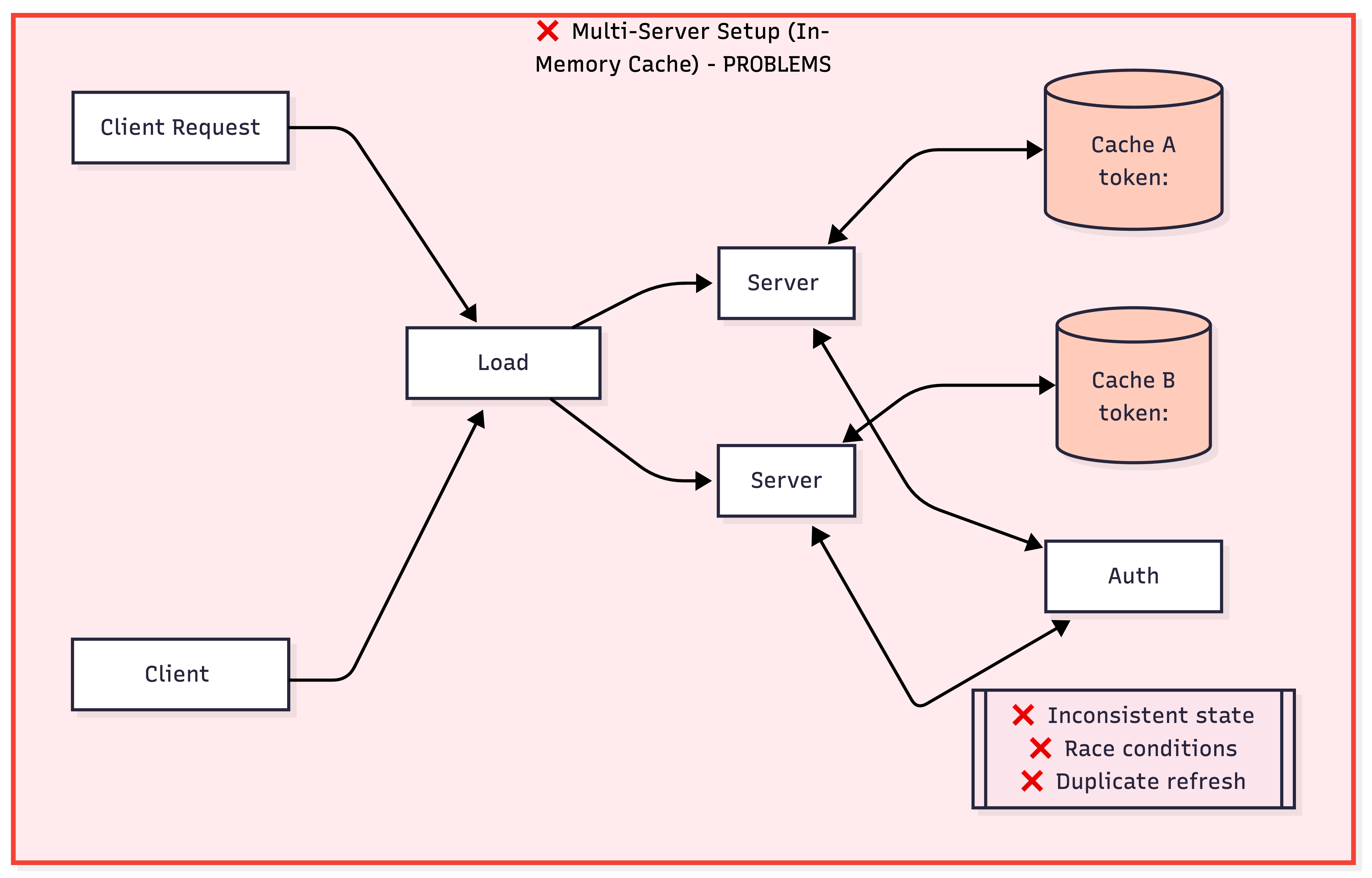
This is where distributed caching comes into play. Try using Redis, Memcached, or a similar system that all your servers can access. This way, when server A refreshes a token, it updates the shared cache, and server B immediately sees the new token. This keeps your servers in sync and reduces unnecessary refresh calls. With distributed caching, set a time-to-live (TTL) on your cache entries that is slightly shorter than, or equal to, the token's expiration. This ensures you’re not serving expired tokens from cache.

Handling Race Conditions in Multi-Server Environments
We lightly touched on what a race condition is. However, it is a common problem we should drill into a little more. When two servers check a token at the same time, both see it’s expired and try to refresh it simultaneously. This leads to wasted API calls or, in some cases, to invalidated tokens if HubSpot’s API behaves unexpectedly under concurrent requests.
The solution is to use locking. Before refreshing a token, acquire a lock in your distributed cache. Redis makes this easy by using the SET command with the NX (not exists) and EX (expiration) options in a single atomic operation, or by using the Redlock algorithm.
Note: Redlock is more complex and only necessary if you’re running multiple independent Redis masters (primary instances in a Redis replication setup that handle all write operations for adding, updating, and deleting data), and need to handle scenarios where individual Redis instances might fail or become partitioned from the network.
The lock says, “I’m refreshing this token right now. Everyone else, wait.” If another server tries to refresh the same token, it sees the lock, waits a moment, and then checks whether the first server has already refreshed it. See example code below:
Set a reasonable timeout on locks (10-30 seconds) to handle cases where a server crashes while holding a lock. After the timeout, other servers can acquire the lock and proceed with the refresh.
The goal is to make token refresh as seamless as possible. Your API calls should never fail because of an expired token, and you should never waste resources refreshing tokens more often than necessary.
Security and Verification
You’ve got tokens stored securely and refreshing automatically. Now, let's talk about the other side of the equation - making sure the requests hitting your servers are actually from the HubSpot and keeping your integration secure.
Webhook Signature Validation (v3, v2, v1)
When HubSpot sends webhooks to your apps, whether it’s notifying you about a new contact or a deal update, or a form submission, you need to verify that those requests are legitimate. Anyone can send a POST request to your webhook URL, so signature validation is your defense against spoofed requests.
HubSpot includes signature headers in every webhook request. The signature is an HMAC SHA-265 hash (for v3) or SHA-256 hash (for v2 and v1), built using your app’s client secret and details from the request. You reconstruct the same hash on your end and compare it to what HubSpot sent. If they match, the request is authentic.
v3 signature validation is the current standard. Look for the X-HubSpot-Signature-v3 and X-HubSpot-Request-Timestamp headers. Here’s the process:
- First, check the timestamp and reject any request older than 5 minutes. This prevents those pesky replay attacks.
- Decode specific URL-encoded characters in the request URI (:, /, ?, @, !, $, ', (, ), *, ,, ;).
- Create an HMAC SHA-256 hash using your client secret.
- Base 64 encode the result.
- Compare it to the signature header using the constant-time comparison.
- Order matters; in some web frameworks like Express, it’s necessary to add security verification as middleware using
Express.raw().
v2 and v1 signatures are older formats that you might encounter with legacy workflows or webhook actions. For v2, check the X-HubSpot-Signature-Version header; if it’s v2, hash clientSecret + method + uri + requestBody (no timestamp). For v1, it’s just clientSecret + requestBody. Both use SHA-256 (not HMAC) and return a hex string rather than a base64 string.
Always validate signatures before processing webhook data. Never trust incoming requests just because they hit your webhook endpoint.
Request Origin Verification and Preventing Replay Attacks
Beyond the signature validation, there are additional security layers to consider. First, always check that requests are coming over HTTPS. HubSpot uses HTTPS for all production webhooks. If you’re receiving HTTP requests, that’s a red flag.
The timestamp validation in v3 signatures is your defense against replay attacks, where an attacker captures a legitimate webhook request and resends it later. By rejecting requests older than 5 minutes, you are ensuring that even if someone intercepts a valid signed request, they can’t replay it after that window closes. Don’t just check that the timestamp exists; actually validate that it’s recent.
Also, use constant-time comparison when checking signatures (like crypto.timingSafeEqual() in Node.js). This prevents timing attacks where an attacker measures how long it takes to reject different signatures to slowly guess the correct value. Regular string comparison (===) can leak information about which characters are correct based on how quickly the comparison fails.
Optionally, you can verify the user agent if needed. However, this shouldn’t be your primary security mechanism since user agents are easily spoofed. The signature validation is your real proof of authenticity, and everything else is just an additional layer.
Reliability and Testing
Now, you’ve built a secure integration with proper token management. Let’s make sure it stays running reliably in production and that you can catch problems before your users do!
Common Failure Scenarios and Retry Strategies
Even with perfect code, things fail in production. Here are the scenarios you’ll encounter and how to handle them:
Token refresh failures occur when HubSpot’s OAuth endpoint is temporarily unavailable or when your refresh token is revoked (typically because the user uninstalled your app). When a refresh fails, check the error code. A 401 or 403 usually means the refresh token is invalid. Don’t retry, just prompt the user to reauthorize. A 500 or 503 from HubSpot means our service is having issues, so retry with exponential backoff.
Understanding OAuth v3 error responses now follows RFC 6749 standards, making them compatible with third-party OAuth libraries. Responses include both standard fields and HubSpot-specific fields for backward compatibility. See examples of the v3 OAuth error response:
Rate limiting is HubSpot’s way of protecting our API from being overwhelmed. You’ll get a 429 status code with a Retry-After header telling you how long to wait. Respect that header. Don’t hammer the API with retries or you’ll make things worse for everyone. Instead, implement exponential backoff: wait 1 second, then 2, then 4, and so on. Add some jitter (random variation) to prevent all your servers from retrying at the same time. See example below:
Network timeouts and connection failures are inevitable. Set reasonable timeouts on your HTTP requests (10-30 seconds for API calls). If a request times out, retry it, but ensure your operations are idempotent. If you’re creating a contact and the request times out, you don’t want to accidentally create two contacts on retry.
Webhook delivery failures happen when your server is down or overloaded. HubSpot will retry failed webhooks, but eventually, we do give up. That said, acknowledge the webhook quickly by returning a 200 status code immediately, then process it asynchronously. If processing fails, you’ll need your own retry mechanism or a dead-letter queue.
Database and cache failures require fallback strategies. For example, if Redis is down, fall back to fetching tokens from your database. If your database is unreachable, queue the operation and retry later. Never let a cache failure take down your entire integration!
Logging, Monitoring, and Alerting
Good observability is what separates a hobby project from a production system. You need to know what’s happening, when things break, and why. HubSpot provides built-in monitoring tools that you can leverage:
- App monitoring logs in your HubSpot development account show API calls, webhook deliveries, CRM extension interactions, and serverless function logs. This is your first stop when debugging issues. You can see exactly what requests HubSpot received, what we returned, and any errors that occurred.
- Log tracing lets you connect front-end and back-end logs with a single trace ID. When debugging a complex flow spanning your UI extension, backend service, and HubSpot’s APIs, trace IDs help you trace the entire request chain. Include trace IDs in your log messages and pass them through your system.
These monitoring tools are built to help you get started and provide you with a path forward. However, any production application should be connected to and monitored by a dedicated monitoring system, like Datadog or CloudWatch.
What to Log In Your Own Systems
Beyond HubSpot’s tools, maintain your own structured logs. Log every significant event, token refreshes, API call, webhook receipt, and errors. However, remember: never log the actual tokens, client secrets, or sensitive user data. Use structured logging (JSON format) so you can easily search and analyze logs later. See example below:
Metrics to Track
Ensure your code is written and designed to track these key metrics:
- Token refresh success/failure rate
- API request latency (p50, p95, p99)
- Error rates by type (4xx vs 5xx)
- Webhook processing time
- Cache hit/miss rates
- Number of rate limits hit (you’ll thank me later)
To track these metrics, use tools like Prometheus, Datadog, or CloudWatch to collect and visualize them.
Set Up Alerts
For critical failures, make sure you set up alerts for the following:
- Token refresh failure rate > 5%
- API error rate > 1%
- No successful API calls in the last 10 minutes (could mean tokens are all expired - eep!)
- Rate limit hits exceeding the threshold
Don’t alert on everything. Focus on actionable metrics that indicate real problems. Alert fatigue is very real, and you’ll start ignoring notifications if there are too many false positives.
Unit and Integration Testing
Testing token management required both unit tests (fast, isolated) and integration tests (real behavior with HubSpot).
Unit tests should cover expiration detection, signature validation for all webhook versions (v3, v2, v1), retry logic with exponential backoff, and token refresh flows with mocked responses. Keep these tests fast and focused on your logic - not HubSpot’s API. See example below:
Integration testing: HubSpot provides a great testing infrastructure. You receive up to 10 free developer test accounts with a 90-day Enterprise trial. Use these instead of production accounts. Create configurable test accounts via the HubSpot CLI to simulate different subscription tiers and HubSpot combinations. You can also import realistic data using the HubSpot CLI and Imports API - never test with an empty CRM. Automate everything with GitHub Actions to create test accounts, deploy your app, run tests, and tear down when you’re done!
Summary
Welp, you made it through the complexities of production-ready token management! Before you ship your integration, here’s how to make sure you’ve covered all the bases.
Make sure to download and refer to this handy list: Production Readiness Checklist. Additionally, here are some helpful resources:
HubSpot Documentation
- OAuth Quickstart Guide - Step-by-step OAuth implementation
- Request Validation - Webhook signature validation details
- Scopes Reference - Complete list of available scopes
- App Monitoring - Using HubSpot's built-in monitoring tools
Tools & Libraries
- HubSpot CLI - Local development and test account management
- HubSpot Node.js SDK - Official Node.js client library
- HubSpot Python SDK - Official Python client library
- CRM Object Sync - Reference integrations implementation for a CRM object
- HubSpot Center of Developer Excellence - Centralized resources for best practices, building on and scaling the HubSpot platform
Community & Support
- HubSpot Developer Community - Ask questions and share solutions
- Developer Changelog - Stay updated on API changes
- Recent Changelog: New OAuth v3 API Endpoints and Standardized Error Responses
- Developer Slack - Connect with other HubSpot developers
If you’re serious about building reliable integrations at scale, also consider exploring HubSpot’s v4 Webhook Journal API for tracking webhook deliveries, the Account Activity API for security auditing, and development sandboxes for safe testing.
The investment in proper token management pays dividends in reduced support burden, happier users, and fewer 3 AM alerts in your future. 🙂